Welcome Guest ( Log In | Register )

Outline · [ Standard ] · Linear+

TIME [OFFICIAL] TIME Fibre Broadband™ v4, Experience the ONE TRUE 2Gbps

views
     
Clavie
post May 19 2022, 08:12 PM

Getting Started
**
Junior Member
74 posts

Joined: Jan 2020


Hi!
Quick question for the owners of the Huawei HG8145X6:
Besides 2.4G and 5G WiFi networks, is there also a GUEST network we can use?

also, is there a pdf or online manual for me to check the interface, menus, etc...?
thanks.
Clavie
post May 23 2022, 10:36 AM

Getting Started
**
Junior Member
74 posts

Joined: Jan 2020


QUOTE(jjj2 @ May 20 2022, 11:41 PM)

*
thanks for the reply.
Bummer! So it's gonna be more difficult for me to set up a separate/private network with this TIME ONT, will have to attach a 2nd router to it I guess.
Clavie
post Jun 7 2022, 02:18 PM

Getting Started
**
Junior Member
74 posts

Joined: Jan 2020


QUOTE(powerwoot @ Jun 6 2022, 09:33 PM)
I know Time is only providing connection to the any high rises or any complexes as their last mile especially in city centre. But at the roadside of my kampung, Time just built the sort of exchange cabin with high fence surrounding it. Inside the compound has large cables, from the ground connected to the main cabin and power generator. What is this building used for?
*
I guess something like a fibre optic & phone node cabinet to distribute broadband internet to the neighborhood.
You may want to look at "what-is-full-fibre". Sorry I can't attach links

user posted image
Clavie
post Aug 27 2022, 05:37 PM

Getting Started
**
Junior Member
74 posts

Joined: Jan 2020


Hi,

My 500Mbps fibre link provides speedtest up/down results of 500+ to TIME's Shah Alam and Singtel SG servers and with other servers like in California I get 370Mbps.
When I ping IPs in California, ping is very good ~12-14ms.
All this is very good!

But when I browse the web, it is a bit sluggish at times, with all types of devices (laptop, phones, LAN connected desktop) and this is not good! Sometimes it's almost like being in China honestly, with ISP/net control! ohmy.gif

What is your feedback about web surfing and pages loading with TIME Fibre?

FYI I've made a few tracert and I realized that (I don't know whether it's important) the 3rd hop is always timeout until it moves on to the next hop (this happens in TT Dotcom Sdn Bhd Shah Alam according to the resolution of these IP addresses), for both sites in Malaysia and overseas.
e.g.
Tracing route to cs87.can.transactcdn.com [198.7.31.89] [Verizon CDN in California]
1 2 ms 2 ms 2 ms 192.168.100.1
2 6 ms 5 ms 4 ms 202.186.240.1 [TT Dotcom Sdn Bhd Kuala Lumpur]
3 * * * Request timed out.
4 12 ms 12 ms 13 ms 223.28.43.54 [TT Dotcom Sdn Bhd Shah Alam]
5 12 ms 12 ms 13 ms ae-112.border1.sgm.edgecastcdn.net [152.195.196.220]
6 12 ms 11 ms 11 ms ae-91.core1.sgz.lc3.n1cdn.net [152.195.196.137]
7 13 ms 12 ms 11 ms 198-7-31-89.edgecastcdn.net [198.7.31.89]

Tracing route to time.com.my [211.24.220.166] [TiME.com.my]
1 3 ms 2 ms 1 ms 192.168.100.1
2 6 ms 11 ms 5 ms 202.186.240.1
3 * * * Request timed out.
4 10 ms 5 ms 4 ms 223.28.43.222
5 12 ms 17 ms 5 ms vpn.time.com.my [211.24.220.4]
6 7 ms 6 ms 6 ms www.globaltransit.com.sg [211.24.220.166]


Notes: I'm located in KL. I have the Standard config of the TIME Huawei router, no additional network devices/software to slow it down. I've tried using google and cloudflare DNS in the router and it's the same surfing speed.


Clavie
post Aug 28 2022, 12:57 PM

Getting Started
**
Junior Member
74 posts

Joined: Jan 2020


QUOTE(blacktubi @ Aug 27 2022, 08:37 PM)
Are you testing this on WiFi or wired LAN?

It's normal as some hops are configured not to respond to ICMP request hence resulting in a timed out traceroute. TM unifi don't even let you to do TCP traceroute.

For you scenario I would blame it on the free router. Speedtest does not measure the responsiveness of the router. Fast.com can measure the loaded latency but it doesn't tell the full story as well.

Most free routers from the ISP have terrible congestion management which resulted in bufferbloat. This is where you find things to be laggy despite having a fast speed.

I am using a pretty decent third party router on TIME Fibre and it's the best consumer ISP in Malaysia in terms of connectivity, stability and responsiveness.
*
Thanks for your reply and explanations. Yes, mostly happening on WiFi, less on LAN. I'll try using a good Linksys router I have and see whether this improves.

So from your end with another router your pages loading while surfing the web is good, right?
Clavie
post Oct 13 2022, 11:34 PM

Getting Started
**
Junior Member
74 posts

Joined: Jan 2020


QUOTE(SzeMeng76 @ Oct 13 2022, 11:28 PM)
aman puri also keep DC for few 10 min then resume back few 10 min then down again.  bangwall.gif
*
Same here, still down
Clavie
post Oct 13 2022, 11:39 PM

Getting Started
**
Junior Member
74 posts

Joined: Jan 2020


QUOTE(Clavie @ Oct 13 2022, 11:34 PM)
Same here, still down
*
Back for a short while with high ping and less than 1Mbps speed.
Hopefully it's fully resolved soon.
Clavie
post Oct 13 2022, 11:40 PM

Getting Started
**
Junior Member
74 posts

Joined: Jan 2020


QUOTE(edytion @ Oct 13 2022, 11:27 PM)
their website also down.. i can’t even check my service status
Update: connection is back
*
Check your speed, you'll be scared 😨
Clavie
post Oct 14 2022, 03:55 PM

Getting Started
**
Junior Member
74 posts

Joined: Jan 2020


QUOTE(wick3d @ Oct 11 2022, 10:12 PM)
Hi sifus, I just got time installed at my condo. Was given the Huawei OptiXstar HG8145X6 unit. Just wondering, does the unit have the capability to create a guest wifi network?
*
Unfortunately there's no such option in this config.
We can achieve this though if you'd decide to use an Open source firmware instead of the Time/Huawei's one.

The other alternative for you is to use a second router to create a separated Guest network (plenty of YouTube tutorials available)
Clavie
post Oct 15 2022, 09:23 PM

Getting Started
**
Junior Member
74 posts

Joined: Jan 2020


QUOTE(jjj2 @ Oct 15 2022, 07:04 PM)
Hi, your old Tplink router is EC230 or Archer C1200 ? Relatively Huawei HG8145X6 is better, some argue single ONT is faster, but real world onsite tests proven otherwise.
Anyway, it saves you 1 power outlet.
Thanks.
*
I do prefer a standalone modem and the liberty of choosing my own router. For instance Time imposes that model to you where there's no guest network and they have even changed the config/UI compared to standard Huawei. And based on my usage it slows down web browsing (ref one of my previous post).
Anyway it's still good to get as it's free 🐱
Clavie
post Jan 13 2023, 10:16 AM

Getting Started
**
Junior Member
74 posts

Joined: Jan 2020


*edit: it is due to Time's outage and not the router*

*******No longer relevant****

Did my Huawei modem/router just die?

user posted image

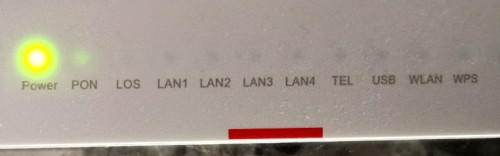
I have a 500mbps connection since a few month with that recent Huawei modem/router and suddenly no more WiFi. I tried accessing http://192.168.100.1/ but no access. I looked at the router and there were still some blinking lights like when it works well. I decided to press the button to switch it off and back on, then I only have the power light that turns green for 25 seconds then the green light goes away like it's off. It tried switching off the main power, waited some time, and same behavior when I turn it on.

Anything else I could do?
Or do I need to contact TIME? If so, what number to call?

Thanks, I rely on fibre to work :-(
Good day to you!

This post has been edited by Clavie: Jan 13 2023, 10:38 AM
Clavie
post Nov 1 2023, 09:47 PM

Getting Started
**
Junior Member
74 posts

Joined: Jan 2020


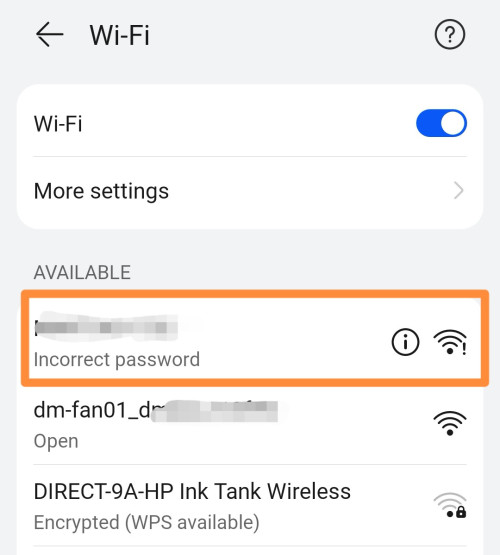
Hi! Has anyone experienced connection issue via WiFi from a device to Time's Huawei HG8145X6 router with a sudden "Incorrect Password"?

I reboot it once a week, up to now no issues. And it's not DHCP issue as I tried with setting a device with static IP and there was still the problem reoccurring the next day.
I need to wait several minutes for the connection to resume properly.

user posted image

This post has been edited by Clavie: Nov 1 2023, 09:49 PM
Clavie
post Apr 28 2024, 10:08 AM

Getting Started
**
Junior Member
74 posts

Joined: Jan 2020


Hello 🤠
For those who haven't changed the Huawei fibre router settings, could you please give me the default local DNS (primary and secondary) input by TIME? Tq
Clavie
post Apr 29 2024, 08:38 AM

Getting Started
**
Junior Member
74 posts

Joined: Jan 2020


QUOTE(westlife @ Apr 28 2024, 10:37 AM)
Why u want to use the default one?
*
Not to use, only for some tests.
Clavie
post May 7 2024, 09:22 AM

Getting Started
**
Junior Member
74 posts

Joined: Jan 2020


Hi! Is it possible to completely disable IPv6 in the Huawei router?
I've unchecked the "Enable DHCPv6 Server" in Advanced/LAN/DHCPv6 Server but in my devices connected to the router via WiFi I see the IPv6 counterpart of Google primary and secondary DNS although I've set Google DNS addresses in DHCP server IPv4 format.
Clavie
post May 20 2024, 12:40 AM

Getting Started
**
Junior Member
74 posts

Joined: Jan 2020


QUOTE(blacktubi @ May 19 2024, 12:58 PM)
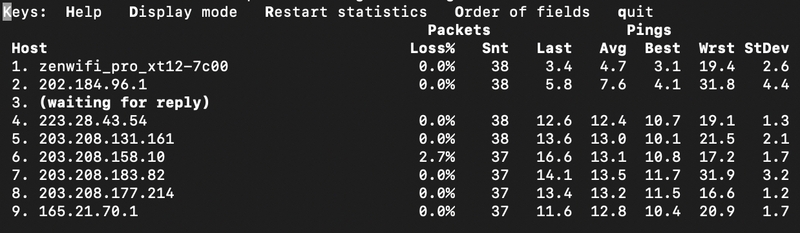
Did some investigation and found that some IP range have better performance to Singtel

202.184.100.xxx
user posted image
MTR Result
» Click to show Spoiler - click again to hide... «

BGP from Singtel looking glass
» Click to show Spoiler - click again to hide... «

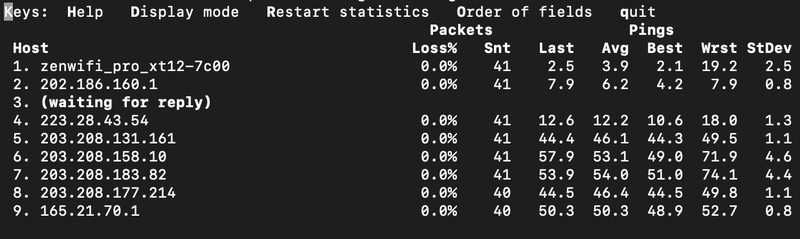
202.184.169.xxx
user posted image
MTR Result
» Click to show Spoiler - click again to hide... «

BGP from Singtel looking glass
» Click to show Spoiler - click again to hide... «


Comparing the bgp result from Singtel to the 2 IP range. Kinda explain the performance differences as it is routed through either NTT or TATA instead of a direct route.

Attribute 202.184.96.0/19 Path 1 202.184.96.0/19 Path 2 202.186.0.0/15 Path 1 202.186.0.0/15 Path 2
AS Path 9930 9930 2914 9930 (NTT) 6453 9930 (TATA)
Next-Hop 203.208.131.162 203.208.131.162 203.208.178.229 63.243.188.4
Best Path Yes No No Yes

Just for reference purpose.
*
My 202.185.208.xx after midnight to Singtel server on Speed test gave Idle ping 11ms, 0.0% packets loss, UL535Mbps 320ms and DL390M 126ms. Yes I still have big lag and issues accessing EU content.

This post has been edited by Clavie: May 20 2024, 12:42 AM
Clavie
post May 22 2024, 09:33 PM

Getting Started
**
Junior Member
74 posts

Joined: Jan 2020


This submarine cable problem is still causing a massive routing issue. Tonight so many EU sites are unusable. How can't TIME use a different route to provide a relief?
Clavie
post May 23 2024, 08:26 AM

Getting Started
**
Junior Member
74 posts

Joined: Jan 2020


QUOTE(Jeremy_John @ May 22 2024, 11:46 PM)
Try refresh your PPPOE wan IP, certain IP range gateway have better routing

Another option is VPN Policy-Based Routing, just get a MY/SG VPS and use any type of Wireguard
*
I did (need to soft reset the Huawei router) and unfortunately I always get IP addresses from 202.185.... and once a 192.228... that all have the same bad routing at night. 😭
However with the same IP in the morning everything is good and fast, which just highlights that the narrow band allocated is super congested at night.

This post has been edited by Clavie: May 23 2024, 02:26 PM
Clavie
post Jul 6 2024, 09:02 AM

Getting Started
**
Junior Member
74 posts

Joined: Jan 2020


QUOTE(CleverDick @ Jul 6 2024, 01:30 AM)
Anyone experiencing difficulty browsing ezgif? Can confirm it's not ezgif's problem because I can open the website using a free proxy.
*
Can access it, no problem. Using Google DNS.
Clavie
post Jul 6 2024, 09:04 AM

Getting Started
**
Junior Member
74 posts

Joined: Jan 2020


This morning my 600Mbps fibre is providing only DL 60-80Mbps in south KL area! Speedtest app to TIME server: Ping is 7ms and the DL ping is at 470ms!! Am I the only one?

2 Pages  1 2 >Top
 

Change to:
| Lo-Fi Version
0.0509sec    1.46    7 queries    GZIP Disabled
Time is now: 24th December 2025 - 03:58 PM