Welcome Guest ( Log In | Register )

668 Pages « < 72 73 74 75 76 > » Bottom

Outline · [ Standard ] · Linear+

TIME [OFFICIAL] TIME Fibre Broadband™ v4, Experience the ONE TRUE 2Gbps

views
     
Yamy
post Oct 28 2018, 06:55 PM

Casual
***
Junior Member
462 posts

Joined: Nov 2011
QUOTE(FusionXY @ Oct 28 2018, 06:44 PM)
Hi. Make sure that your installer install the cable properly.
The cable is arranged properly.

Check the speed test on your PCs. Sometimes installer laptop can achieve the speed while your own devices cannot.
Check the speed test whether it matches with the plan that you subscribed.
Check the router is on the latest version.
Check the speed over Wi-Fi.

Thanks.
*
Ok, thanks for the info. thumbsup.gif
FusionXY
post Oct 28 2018, 07:04 PM

LAZZIE ON VACATION
*******
Senior Member
3,834 posts

Joined: Aug 2016

QUOTE(Yamy @ Oct 28 2018, 06:55 PM)
Ok, thanks for the info.  :thumbsup:
*
You're welcome bro.


jasonchan323
post Oct 28 2018, 07:08 PM

Getting Started
**
Junior Member
72 posts

Joined: Mar 2012


QUOTE(LeoLilieno @ Oct 28 2018, 06:43 PM)
How you restart the thing? You mean switch it off? I am having this issue for few days oredi. Switch on and off dont know how many times.
*
Yala, switch off and on back. 1 day need to on off dont know how many times. bangwall.gif
LeoLilieno
post Oct 28 2018, 07:29 PM

On my way
****
Senior Member
542 posts

Joined: Oct 2008


QUOTE(FusionXY @ Oct 28 2018, 06:55 PM)
Is anything enable after you switch off the PCs?

Thanks.
*
Dont think so. As I am IT Noob, i wont simply go and change setting.
xinjiechew
post Oct 28 2018, 08:24 PM

Getting Started
**
Junior Member
138 posts

Joined: Sep 2014


QUOTE(LeoLilieno @ Oct 28 2018, 07:29 PM)
Dont think so. As I am IT Noob, i wont simply go and change setting.
*
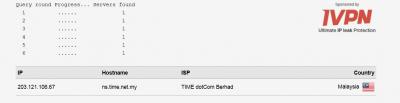
you can actually go to https://www.dnsleaktest.com/ and click 'extended test' to check whether your pc is using google dns or not. After the test is completed it should show something like below.
Attached Image

This post has been edited by xinjiechew: Oct 28 2018, 08:27 PM
jasonchan323
post Oct 28 2018, 10:26 PM

Getting Started
**
Junior Member
72 posts

Joined: Mar 2012


QUOTE(xinjiechew @ Oct 28 2018, 08:24 PM)
you can actually go to https://www.dnsleaktest.com/ and click 'extended test' to check whether your pc is using google dns or not. After the test is completed it should show something like below.
Attached Image
*
oh thanks, that's informative. Tried search using mobile phone is all Google ISP but its TIME dotCom Berhad if search by PC. How to change it to google?
I think once i restart my router its Google ISP but after a while it switch back to Time dotCom Berhad automatically. icon_question.gif


This post has been edited by jasonchan323: Oct 28 2018, 10:26 PM


Attached thumbnail(s)
Attached Image
doomx
post Oct 28 2018, 11:40 PM

Look at mah stars
*******
Senior Member
2,802 posts

Joined: Dec 2006


anybody facing disconnect in damansara perdana area? after i downgrade, i keep facing with this disconnect issue, everything green but the pc just say no internet,

need on and off router then it works
jjj2
post Oct 29 2018, 08:37 AM

Look at all my stars!!
*******
Senior Member
3,607 posts

Joined: Feb 2006
QUOTE(LeoLilieno @ Oct 28 2018, 06:50 PM)
Cannot access certain website lor and speed also slower. I have setup Google DNS in DIR882 oredi. Other device no problem. Handphone also no problem. Only my PC with LAN cable tak boleh.
*
Hi,

Check a few things --
1) In your Router, uder Advanced>DNS>set in your primary & secondary GoogleDNS servers. (Do you mean TIME guide you to set it up here ?)
2)make sure your PC is set to Auto obtain DNS Servers.

Thanks.
jjj2
post Oct 29 2018, 08:40 AM

Look at all my stars!!
*******
Senior Member
3,607 posts

Joined: Feb 2006
QUOTE(doomx @ Oct 28 2018, 11:40 PM)
anybody facing disconnect in damansara perdana area? after i downgrade, i keep facing with this disconnect issue, everything green but the pc just say no internet,

need on and off router then it works
*
Is your ONU showing LOX blinking in RED when the connection is down ?
If NO, then try to observe the Internet Connection indicator on the Router/login to the Router to check it's connection status.

Btw, which router are you using ?

Thanks.
Calvin871989
post Oct 29 2018, 08:42 AM

Im Batman
******
Senior Member
1,256 posts

Joined: May 2008
From: Gotham City


QUOTE(Calvin871989 @ Oct 22 2018, 11:30 AM)
For those saying on/off can't access XXX sites or piratebay or online classified sites and etc please do the following below,

Use Google DNS or Cloudflare DNS , set it on your router or at ethernet or both.
Disable IPV6 at network connections on pc if your on ethernet or wifi
Disable IPV6 on your router settings
Restart your modem and router
Restart your pc

I'm on Windows 10 between.

Try this and let me know your results and you can thank me later smile.gif
*
QUOTE(tango1800 @ Oct 23 2018, 09:54 PM)
Hi Bro,

Ive tried disabling IPV6 on my PC and it worked, for now.
Anyway, wondering if there is any trade off if I disable IPV6?

Thanks bro
*
QUOTE(LeoLilieno @ Oct 28 2018, 06:18 PM)
I also have problem when I switch to 882 router. My main PC now cannot detect Google DNS setting while my other devide on wireless can. So weird.
*
QUOTE(jasonchan323 @ Oct 28 2018, 06:38 PM)
Same here, but after restart then ok
*
tango1800 , still facing any issues cant access to certain websites after disable IPV6 ?

LeoLilieno , jasonchan323 , follow the following steps as above if you cant access certain websites.

This post has been edited by Calvin871989: Oct 29 2018, 08:47 AM
Lord_Ashe
post Oct 29 2018, 09:15 AM

Old Treasure Hunter Sidekick
******
Senior Member
1,495 posts

Joined: Sep 2005
From: Damansara Perdana - KL


Good morning everyone, just a brief update if you're interested in Mesh systems in PJ area:

TPlink Deco M9 - nowhere to be seen
TPlink Deco M5 - got in Harvey Norman, but bloody expensive
Netgear Orbi - quite a few shops carry, but expensive
Linksys Velop - got in Harvey Norman, but not sure if it's as good
Asus Lyra (previous model) - still available even in AllIT, but expensive
Dlink Covr - seems only available in Harvey Norman
michaelkkl
post Oct 29 2018, 09:19 AM

Casual
***
Junior Member
362 posts

Joined: Jan 2011
QUOTE(Calvin871989 @ Oct 29 2018, 08:42 AM)
tango1800 , still facing any issues cant access to certain websites after disable IPV6 ?

LeoLilieno , jasonchan323 , follow the following steps as above if you cant access certain websites.
*
Attached Image
For IPv6 DNS setting you need to set at the IPv6 setting page.
Selecting Obtaining a DNS manually and key in Google DNS IPv6
The Google Public DNS IPv6 addresses are as follows:
2001:4860:4860::8888
2001:4860:4860::8844

This post has been edited by michaelkkl: Oct 29 2018, 09:20 AM
ntc3freak
post Oct 29 2018, 09:48 AM

Look at all my stars!!
*******
Senior Member
2,347 posts

Joined: Sep 2005


QUOTE(Lord_Ashe @ Oct 29 2018, 09:15 AM)
Good morning everyone, just a brief update if you're interested in Mesh systems in PJ area:

TPlink Deco M9 - nowhere to be seen
TPlink Deco M5 - got in Harvey Norman, but bloody expensive
Netgear Orbi - quite a few shops carry, but expensive
Linksys Velop - got in Harvey Norman, but not sure if it's as good
Asus Lyra (previous model) - still available even in AllIT, but expensive
Dlink Covr - seems only available in Harvey Norman
*
Will be interesting to see how the newly-released Ubiquiti Amplifi Instant compares against these lot. Priced at USD179 for a pack of 2, it could turn out to be good value. Waiting for proper reviews now...
Lord_Ashe
post Oct 29 2018, 09:57 AM

Old Treasure Hunter Sidekick
******
Senior Member
1,495 posts

Joined: Sep 2005
From: Damansara Perdana - KL


QUOTE(ntc3freak @ Oct 29 2018, 09:48 AM)
Will be interesting to see how the newly-released Ubiquiti Amplifi Instant compares against these lot. Priced at USD179 for a pack of 2, it could turn out to be good value. Waiting for proper reviews now...
*
Haha yeah, the Amplifi had good reviews (earlier model) but it didn't really make landfall here.
Calvin871989
post Oct 29 2018, 10:09 AM

Im Batman
******
Senior Member
1,256 posts

Joined: May 2008
From: Gotham City


QUOTE(michaelkkl @ Oct 29 2018, 09:19 AM)
Attached Image
For IPv6 DNS setting you need to set at the IPv6 setting page.
Selecting Obtaining a DNS manually and key in Google DNS IPv6
The Google Public DNS IPv6 addresses are as follows:
2001:4860:4860::8888
2001:4860:4860::8844
*
That is if they want to use IPV6 then yes , if no , then just disable IPV6 and make use of the current IPV4 DNS address
davidgk
post Oct 29 2018, 10:18 AM

New Member
*
Junior Member
22 posts

Joined: Jul 2007


I just got TIME 1Gbps activated over the weekend. But when I do speedtest the results only around 70mbps dl/60mbps ul.

Using TP Link AC5400 router. Any reason its that slow? seems like something very wrong
darkdevilrey
post Oct 29 2018, 10:35 AM

Silly Fools
******
Senior Member
1,156 posts

Joined: Dec 2007


Hows the stability of TIME ?

How many time it disconnect if modem on for 24hours period ?

Now aiming between 100mbps and 500mbps hmm.gif

Does it makes a lot of different ? because our normal old fag pc is 10/100 Ethernet port right ?

so no point for 500mbps?

will not go for 1Gbps for now as all gadget not compatible yet.

any hidden charges ??
Calvin871989
post Oct 29 2018, 11:04 AM

Im Batman
******
Senior Member
1,256 posts

Joined: May 2008
From: Gotham City


user posted image

TIME 500Mbps speed test

no complains being a TIME user for the past 5 years notworthy.gif
muncheno
post Oct 29 2018, 11:12 AM

Enthusiast
*****
Senior Member
736 posts

Joined: Jun 2006
From: Ipoh
QUOTE(davidgk @ Oct 29 2018, 10:18 AM)
I just got TIME 1Gbps activated over the weekend. But when I do speedtest the results only around 70mbps dl/60mbps ul.

Using TP Link AC5400 router. Any reason its that slow? seems like something very wrong
*
Definitely something wrong with your setting or method u test it.

Looking at ur result, I could guess that you are connected with 2.4ghz WiFi and tested using your old mobile phone.

Just my 2 cents above as no details given.

I recommended you write more details about your problem for others to help.

Basic approach steps are:

1) check with LAN cable to make sure router/modem getting the speed per plan.

2) understand WiFi and their actual throughput speed, for instance 2.4ghz typically 30-40mbps on single channel dual could be upto 100mbps and 5ghz typically 250mbps on single channel. Very much depending on router AND mobile device use. Lastly make sure clear from overlapping with neighbour WiFi channel.

jjj2
post Oct 29 2018, 11:12 AM

Look at all my stars!!
*******
Senior Member
3,607 posts

Joined: Feb 2006
QUOTE(darkdevilrey @ Oct 29 2018, 10:35 AM)
Hows the stability of TIME ?
In comparison in terms of performance, price, stability, with its rivals, despite some hiccups, its still considered the best option in the market right now.

How many time it disconnect if modem on for 24hours period ?
This is a very hard to answer questions as it involves many factors in between, if your consumption is high, our advise is to replace the router.

Now aiming between 100mbps and 500mbps  hmm.gif

Does it makes a lot of different ? because our normal old fag pc is 10/100 Ethernet port right ?

so no point for 500mbps?
Your usage and equipment specs such as Gigabit ports
are definitely required in order to enjoy higher speed.
Rest for sure your investment will not be wasted.


will not go for 1Gbps for now as all gadget not compatible yet.

any hidden charges ??
[COLOR=purple]No Hidden charges. Installation is Free if you follow the standard Installation. One-time stamp duty RM10 charge, and FREE 20m of fibre cable from Point-of-Entry to the dropping point of the ONU.
Subsequently, its only RM10/m.
*
Please kindly refer to the above answers.

Thanks.


668 Pages « < 72 73 74 75 76 > » Top
 

Change to:
| Lo-Fi Version
0.0151sec    0.82    6 queries    GZIP Disabled
Time is now: 12th December 2025 - 12:18 PM