Welcome Guest ( Log In | Register )

670 Pages « < 580 581 582 583 584 > » Bottom

Outline · [ Standard ] · Linear+

TIME [OFFICIAL] TIME Fibre Broadband™ v4, Experience the ONE TRUE 2Gbps

views
     
brandonkl
post May 14 2024, 04:16 PM

-
*****
Junior Member
997 posts

Joined: May 2013
From: Kuala Lumpur


QUOTE(blacktubi @ May 11 2024, 08:44 PM)
I am on the same boat as well, considering Maxis 1Gbps@RM159 promotion.
*
This Maxis 1GB for RM159 with postpaid bundle, is it for the entire 24 mths contract duration?

What's the upload speed for Maxis 1GB plan?

This post has been edited by brandonkl: May 14 2024, 04:17 PM
Icehart
post May 14 2024, 04:18 PM

72.55.191.6
********
All Stars
14,899 posts

Joined: Apr 2005
From: Kuala Lumpur & Selangor


QUOTE(coolguy_0925 @ May 14 2024, 02:38 PM)
Most likely as this is their common practice

Good luck
*
QUOTE(jjj2 @ May 14 2024, 02:40 PM)
Nice work Bro ...
*
Yup hope so. I'm dropping by TM Point tomorrow or Thursday.
Will update.
aniq8676
post May 14 2024, 04:27 PM

Regular
******
Senior Member
1,524 posts

Joined: Dec 2020
From: Perak


QUOTE(brandonkl @ May 14 2024, 04:16 PM)
This Maxis 1GB for RM159 with postpaid bundle, is it for the entire 24 mths contract duration?

What's the upload speed for Maxis 1GB plan?
*
500Mbps
darren_yuri
post May 14 2024, 05:13 PM

Casual
***
Junior Member
394 posts

Joined: Aug 2010
From: 御堂筋

Many sites are also affected.... Twitter i have to force quit multiple times to load.
blacktubi
post May 14 2024, 05:19 PM

-
Group Icon
Elite
8,417 posts

Joined: Jul 2008

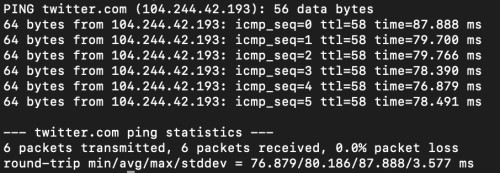
Twitter connectivity is fixed, consistently below 100ms now. Page loaded within seconds as well.

user posted image


QUOTE(brandonkl @ May 14 2024, 04:16 PM)
This Maxis 1GB for RM159 with postpaid bundle, is it for the entire 24 mths contract duration?

What's the upload speed for Maxis 1GB plan?
*
Check the TNC here.

https://www.maxis.com.my/en/faq/promotions/...-promo-apr2024/

This post has been edited by blacktubi: May 14 2024, 06:34 PM
ChenKaiWen
post May 14 2024, 11:37 PM

Casual
***
Junior Member
382 posts

Joined: May 2019


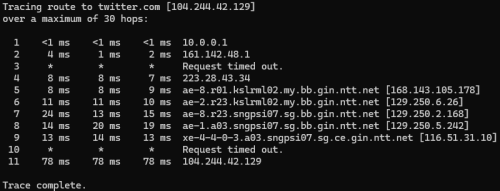
user posted image
Can confirm
Jeremy_John
post May 14 2024, 11:50 PM

Getting Started
**
Junior Member
147 posts

Joined: Jan 2010
From: Selangor


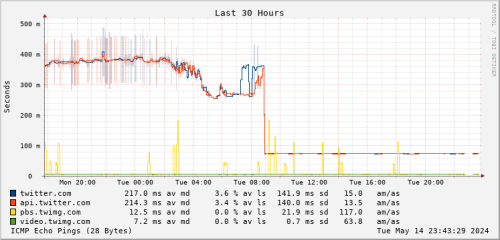
Same, Better since 9 am today
user posted image

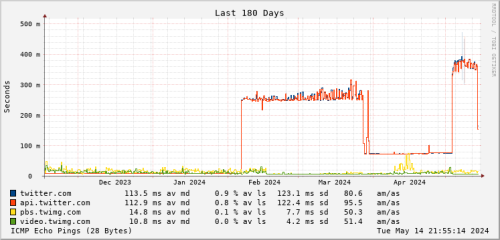
But still not as before, no more Singapore server?
user posted image
BaRT
post May 15 2024, 01:41 PM

-Retired MOD-
Group Icon
Elite
2,163 posts

Joined: Jan 2003
From: the muddy banks of the wishkah!!


Hi all,
Currently just subscribed to TIME fibre. (200mbps@99)

They give me the stock modem+router (huawei HG8145X6-10)

Previously, Im using a stock modem from unifi + own router TP link AX73.

Question:-
I wish to use back my AX73 router, is there any way to do so?
I'm aware that I can only set up my AX73 router as an 'access point mode' only by connecting the LAN cable to TIME router.

Is there any way I can set it up as wireless router?

Reason : when I setup with access point mode, the TP LINK homeshield function will disable. I need this to control the wifi access for my kids.
blacktubi
post May 15 2024, 02:45 PM

-
Group Icon
Elite
8,417 posts

Joined: Jul 2008

QUOTE(BaRT @ May 15 2024, 01:41 PM)
Hi all,
Currently just subscribed to TIME fibre. (200mbps@99)

They give me the stock modem+router (huawei HG8145X6-10)

Previously, Im using a stock modem from unifi + own router TP link AX73.

Question:-
I wish to use back my AX73 router, is there any way to do so?
I'm aware that I can only set up my AX73 router as an 'access point mode' only by connecting the LAN cable to TIME router.

Is there any way I can set it up as wireless router?

Reason : when I setup with access point mode, the TP LINK homeshield function will disable. I need this to control the wifi access for my kids.
*
How to use your own router with TIME all-in-one fiber modem and router.

Step 1: Call TIME or live chat them. Request them to switch the all in one modem router to bridge mode. (Make sure the modem is connected as they will do it remotely)
Step 2: Obtain the PPPOE username and password from self care portal or the TIME App.
Step 3: Setup your router with PPPOE mode to the provided modem router. No VLAN or any IPTV configuration required.

Feel free to copy and paste if anyone ask about this in future.

BaRT
post May 15 2024, 04:50 PM

-Retired MOD-
Group Icon
Elite
2,163 posts

Joined: Jan 2003
From: the muddy banks of the wishkah!!


QUOTE(blacktubi @ May 15 2024, 02:45 PM)
How to use your own router with TIME all-in-one fiber modem and router.

Step 1: Call TIME or live chat them. Request them to switch the all in one modem router to bridge mode. (Make sure the modem is connected as they will do it remotely)
Step 2: Obtain the PPPOE username and password from self care portal or the TIME App.
Step 3: Setup your router with PPPOE mode to the provided modem router. No VLAN or any IPTV configuration required.

Feel free to copy and paste if anyone ask about this in future.
*
done. tqvm!
ChenKaiWen
post May 15 2024, 05:20 PM

Casual
***
Junior Member
382 posts

Joined: May 2019


I am unable to speedtest with Singtel and Rakuten Mobile, Tokyo (Latency test error). With SG Viewqwest server, im getting 0.5-0.7% packet loss. Using Maxis 4G, 0% packet loss and no problem with singtel/rakuten mobile. Im getting random 5-10ms ping spike in Apex Legends.
blacktubi
post May 15 2024, 05:29 PM

-
Group Icon
Elite
8,417 posts

Joined: Jul 2008

QUOTE(ChenKaiWen @ May 15 2024, 05:20 PM)
I am unable to speedtest with Singtel and Rakuten Mobile, Tokyo (Latency test error). With SG Viewqwest server, im getting 0.5-0.7% packet loss. Using Maxis 4G, 0% packet loss and no problem with singtel/rakuten mobile. Im getting random 5-10ms ping spike in Apex Legends.
*
I can speedtest with Singtel server but the latency and speed are not good.

user posted image
ChenKaiWen
post May 15 2024, 05:35 PM

Casual
***
Junior Member
382 posts

Joined: May 2019


QUOTE(blacktubi @ May 15 2024, 05:29 PM)
I can speedtest with Singtel server but the latency and speed are not good.

user posted image
*
I am able to speedtest with rakuten mobile on speedtest-cli but not on the website. Singtel has latency test error on both. My IP starts with 161.142.x.x if that matters like TM
blacktubi
post May 15 2024, 06:08 PM

-
Group Icon
Elite
8,417 posts

Joined: Jul 2008

QUOTE(ChenKaiWen @ May 15 2024, 05:35 PM)
I am able to speedtest with rakuten mobile on speedtest-cli but not on the website. Singtel has latency test error on both. My IP starts with 161.142.x.x if that matters like TM
*
I'm on 1G plan, never got the 161 range, always been 202
ChenKaiWen
post May 15 2024, 06:12 PM

Casual
***
Junior Member
382 posts

Joined: May 2019


QUOTE(blacktubi @ May 15 2024, 06:08 PM)
I'm on 1G plan, never got the 161 range, always been 202
*
My friend is on 1gbps. His one is 161 as well. I remember it was 202 back then
stasio
post May 15 2024, 06:24 PM

10k Club
********
All Stars
18,505 posts

Joined: Oct 2007
From: P.Jaya
When TIME will be back to "normal " ? confused.gif

If not mistaken , is almost a month like this..... blush.gif


QUOTE(blacktubi @ May 15 2024, 06:08 PM)
I'm on 1G plan, never got the 161 range, always been 202
*
Same as me, but I have +RM10 for phone.

This post has been edited by stasio: May 15 2024, 06:26 PM
ChenKaiWen
post May 15 2024, 06:41 PM

Casual
***
Junior Member
382 posts

Joined: May 2019


QUOTE(stasio @ May 15 2024, 06:24 PM)
When TIME will be back to "normal " ?  :confused:

If not mistaken , is almost a month like this..... blush.gif
Same as me, but I have +RM10 for phone.
*
I guess ever since TIME rapid expansion, their quality has been dropping. I switched to TIME on the first week they started operating for my area. Now need to wait until next year if I want to switch ISP again. Hopefully maxis own infrastructure will be available soon.
jjj2
post May 15 2024, 06:53 PM

Look at all my stars!!
*******
Senior Member
3,608 posts

Joined: Feb 2006
QUOTE(BaRT @ May 15 2024, 01:41 PM)
Hi all,
Currently just subscribed to TIME fibre. (200mbps@99)

They give me the stock modem+router (huawei HG8145X6-10)

Previously, Im using a stock modem from unifi + own router TP link AX73.

Question:-
I wish to use back my AX73 router, is there any way to do so?
I'm aware that I can only set up my AX73 router as an 'access point mode' only by connecting the LAN cable to TIME router.

Is there any way I can set it up as wireless router?

Reason : when I setup with access point mode, the TP LINK homeshield function will disable. I need this to control the wifi access for my kids.
*
HI, yes for sure you can.
1) Call Time CS to request them to turn the Huawei HG8145X6-10 to bridge mode.
2) Configure your TPlink AX73 & connect it to LAN1 port of HG8145X6-10.


westlife
post May 15 2024, 07:18 PM

10k Club
********
All Stars
14,299 posts

Joined: Jan 2011
QUOTE(ChenKaiWen @ May 15 2024, 06:41 PM)
I guess ever since TIME rapid expansion, their quality has been dropping. I switched to TIME on the first week they started operating for my area. Now need to wait until next year if I want to switch ISP again. Hopefully maxis own infrastructure will be available soon.
*
U have no contract? Can switch so fast?
ChenKaiWen
post May 15 2024, 08:25 PM

Casual
***
Junior Member
382 posts

Joined: May 2019


QUOTE(westlife @ May 15 2024, 07:18 PM)
U have no contract? Can switch so fast?
*
Cannot. I switched to TIME last year august. Need to wait until august 2025 for contract to end. If TIME doesnt fix their routing by that, I might consider going back to Maxis if they're better. I dont remember having any problem with Maxis back then.

670 Pages « < 580 581 582 583 584 > » Top
 

Change to:
| Lo-Fi Version
0.0206sec    0.36    6 queries    GZIP Disabled
Time is now: 15th December 2025 - 01:58 PM