


Laptop over LAN with D-Link DIR-850L

TIME [OFFICIAL] TIME Fibre Broadband™ v4, Experience the ONE TRUE 2Gbps
|
|
 Oct 8 2018, 12:01 AM Oct 8 2018, 12:01 AM
Return to original view | Post
#1
|
 
Junior Member
394 posts Joined: Aug 2010 From: 御堂筋  
|
Samsung Galaxy Note FE
Laptop over LAN with D-Link DIR-850L |
|
|
|
|
|
Oct 8 2018, 12:03 AM
Return to original view | Post
#2
|
|
Junior Member
394 posts Joined: Aug 2010 From: 御堂筋
|
My DIR-850L have some problems.
The router kept showing orange globe. When I login into the router, the internet disconnected till I reboot it. And IPV6 no longer usable. |
|
|
Oct 25 2020, 04:08 PM
Return to original view | IPv6 | Post
#3
|
|
Junior Member
394 posts Joined: Aug 2010 From: 御堂筋
|
My router has been replaced to TP-EC230 by TIME after my previous TP AC1200 (due to unknown reason randomly reboot).
This TP-EC230 router signal is by far the worst signal coverage in my home. Previous routers like AC1200 and DIR-850L provided by TIME was okay. At least 2.4GHz and 5GHz can be used in master bedroom, but the new TP-EC230 constantly dropping signals. This post has been edited by darren_yuri: Oct 25 2020, 04:10 PM |
|
|
Nov 4 2020, 08:07 PM
Return to original view | IPv6 | Post
#4
|
|
Junior Member
394 posts Joined: Aug 2010 From: 御堂筋
|
I have repositioned the TP-Link EC230 router, slightly better, but still unstable.
I am thinking to use previous TIME DIR-850L router as repeater to cover the blind spot. Not sure the procedure.. I looked up on the internet immediately get confused. |
|
|
Feb 20 2021, 05:56 PM
Return to original view | IPv6 | Post
#5
|
|
Junior Member
394 posts Joined: Aug 2010 From: 御堂筋
|
TIME Installer came and add on the Huawei WA8021V5 in my house.
Everything is okay, until when I found out, when I connect my iPhone and iPad to the 5GHz WAP, my device will lose internet connectivity after certain period (connected to WiFi but no internet connection), but when I switched to 2.4GHz WAP all devices working fine even using for entire day. My TIME setup is EC230-G1 and one unit of Huawei WA8012V5 to improve the signal in my apartment. Second thing is that, I used a Window's program called WifiInfoView to scan for nearby network, I found out that the Huawei WA8012V5 configured with wrong SSID by the installer(on the Huawei WAP) , but the SSID cannot detected by other devices. Hopefully some sifu can help me clarify. |
|
|
Nov 7 2021, 03:32 PM
Return to original view | IPv6 | Post
#6
|
|
Junior Member
394 posts Joined: Aug 2010 From: 御堂筋
|
Hi, I having a issue on my home network here.
This problem has been persist for over half year now. I got upgraded with Huawei Omnimesh wa8021v5 mesh WIFI half year ago, it is suppose to cover the WIFI blind spots in my home (apartment). The installer installed both mesh WIFI in different part of the house. Router is TP-Link AC1350 EC230-G1 also provided by TIME. The problem I am facing right now is, my phone unable to roam between mesh WIFI, meaning that when I go to certain part of the house although my phone indicated that my WIFI signal is connected and strong but I couldn't access to the internet until I toggle off and on the WIFI. This problem happen on my phone and sometimes my android tablet, I have reset both my devices yet still the same problem. May I know what's the reason? And I also noticed that one of the SSID from the mesh WIFI said "5Ghz" but the network is "2.4Ghz" according to the WIFI analyzer app. |
|
|
|
|
|
Nov 25 2021, 05:29 PM
Return to original view | IPv6 | Post
#7
|
|
Junior Member
394 posts Joined: Aug 2010 From: 御堂筋
|
QUOTE(jjj2 @ Nov 12 2021, 09:30 AM) This is a known problem. Try placing the Mesh Nodes within line of sight, avoid L-corners if possible. My house really unable to avoid the L-corners for the location of the mesh nodes.  I have no idea how to re-locate those mesh nodes anymore. Plus I cannot drill any holes on the wall to mount the mesh nodes. |
|
|
Nov 26 2021, 01:12 AM
Return to original view | IPv6 | Post
#8
|
|
Junior Member
394 posts Joined: Aug 2010 From: 御堂筋
|
QUOTE(jjj2 @ Nov 25 2021, 07:05 PM) Hi, please kindly share your unit layout diagram, perhaps you would want to go for better performance mesh nodes.... Here is my unit layout diagram. 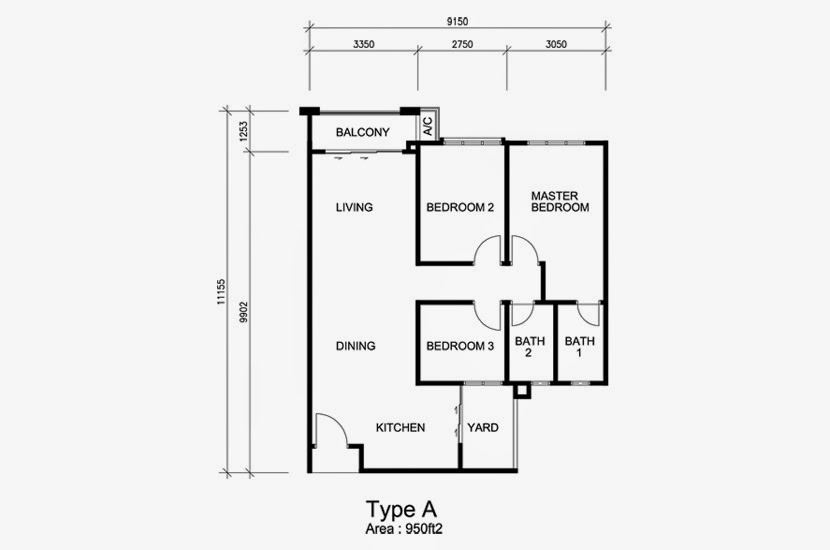 My primary router setup near the fibre socket at living room, located on the wall shared with Bedroom 2. Then the TIME installer he setup the mesh nodes inside Bedroom 3 and Master Bedroom. Because the mesh nodes are provided by TIME so I do not want to make any changes or modifications to the setup.. Can I know how to rectify the issues? |
|
|
Nov 29 2021, 03:43 PM
Return to original view | IPv6 | Post
#9
|
|
Junior Member
394 posts Joined: Aug 2010 From: 御堂筋
|
QUOTE(jjj2 @ Nov 26 2021, 03:54 PM) What is the model of your primary router ? And how does Mesh Node in Bedroom 3 link to primary router ? Primary router is TP Link EC230-G1.The mesh node in Bedroom 3 linked wirelessly? |
|
|
Jan 2 2022, 07:45 PM
Return to original view | IPv6 | Post
#10
|
|
Junior Member
394 posts Joined: Aug 2010 From: 御堂筋
|
QUOTE(jjj2 @ Nov 29 2021, 06:14 PM) Hi, your current configuration is not really proper as the mesh nodes is wirelessly bridged with the EC230, you should be connecting using a network cable to achieve optimum performance at least for the 1st node, and then mesh the 2nd node with the 1st node wirelessly. I am sorry,so do I need to reset the nodes again by going thru the setups? and then reinstall the EC230 back next to the modem? Thanks!If there is no way to run any network cable, then you remove the EC230, and configure the 1st Mesh Node to dial PPPOE, and the 2nd node pairing with it. Thanks. |
|
|
Jan 15 2022, 08:39 PM
Return to original view | Post
#11
|
|
Junior Member
394 posts Joined: Aug 2010 From: 御堂筋
|
I don’t know why but recently kept experiencing issues like suddenly no internet, despite the Wi-Fi network still remain connected.
Reboot the router, modem and the mesh nodes solve the problem temporary but the same problem persist for many days. |
|
|
Jan 15 2022, 10:54 PM
Return to original view | Post
#12
|
|
Junior Member
394 posts Joined: Aug 2010 From: 御堂筋
|
QUOTE(jack2 @ Jan 15 2022, 10:06 PM) Model? TP-Link EC230 G1Huawei mesh nodes Both under TIME |
|
|
Mar 11 2022, 12:12 PM
Return to original view | IPv6 | Post
#13
|
|
Junior Member
394 posts Joined: Aug 2010 From: 御堂筋
|
The TIME installer just installed the HG8145X6 router.
But I noticed the DNS settings is not available, and according to DNS sites the new router is leaking my location, can I know how to change the DNS settings on the router? Very urgent. |
|
|
|
|
|
Mar 11 2022, 11:44 PM
Return to original view | IPv6 | Post
#14
|
|
Junior Member
394 posts Joined: Aug 2010 From: 御堂筋
|
How do I turn off the HG8145X6 router WPS function, I couldn't see any options inside the control center..
The light of WPS on the ONT is brightly lit |
|
|
Mar 12 2022, 03:42 PM
Return to original view | IPv6 | Post
#15
|
|
Junior Member
394 posts Joined: Aug 2010 From: 御堂筋
|
QUOTE(jjj2 @ Mar 12 2022, 01:51 AM) Hi, use the login credentials at the back of the ONT. I already logged in. Couldn't see any settings related to DNS. |
|
|
Mar 14 2022, 11:56 AM
Return to original view | IPv6 | Post
#16
|
|
Junior Member
394 posts Joined: Aug 2010 From: 御堂筋
|
QUOTE(1zx @ Mar 14 2022, 10:22 AM) Hi jjj2, The current HG8240H ONU will be still served as the gateway.First of all, I'm not the person you replied the above to but your answer caught my attention. TIME currently offers the loyalty program (contract renewal) with Huawei HG8145X6. Would you happen to know, if I renew my contract, does TIME require to take back the current HG8240H ONU? I'm running a 3rd party router (MikroTik) but I don't mind getting the rebates and extra spare devices (Huawei HG8145X6/WA8021V5). Thanks in advance! TIME will setup the HG8145X6 and one unit of WA8021V5. I have also just renewed my contract with HG8145X6. |
|
|
Mar 14 2022, 12:49 PM
Return to original view | IPv6 | Post
#17
|
|
Junior Member
394 posts Joined: Aug 2010 From: 御堂筋
|
QUOTE(1zx @ Mar 14 2022, 12:24 PM) darren_yuri, Yeah I don't see a lot of people sharing their experience on the forum.. Thanks for the info! Good to hear from someone with first hand experience. Guess I can just tell the installers that they don't need to configure the units when they bring the devices.  Good initiative to upgrade the router for my home, meanwhile also to keep users under their contract for longer period. Speed wise is satisfactory. But the thing is that the HG8145X6 provided by TIME is pretty much locked (obviously), so I have contacted the TIME to schedule another appointment to come over my house to modify the DNS settings on the HG8145X6. |
|
|
Mar 14 2022, 05:58 PM
Return to original view | IPv6 | Post
#18
|
|
Junior Member
394 posts Joined: Aug 2010 From: 御堂筋
|
QUOTE(1zx @ Mar 14 2022, 01:47 PM) Do you see on your HG8145X6 if it allows access to backup configuration? On the page, only showing Export Configuration File, Import Configuration File, and Restoring Factory Settings  I know they have to ability to lock access (not shown on the menu) to that page. Does anyone know the actual link (???.asp) to the backup and restore configuration page? Please share if you do.  Hopefully it's accessible even though it's not displayed. ahahaha I just want to try to modify the DNS only. maybe I can use the method previously shared by someone on previous page, but just worried it might brick the router. |
|
|
May 7 2022, 04:06 PM
Return to original view | IPv6 | Post
#19
|
|
Junior Member
394 posts Joined: Aug 2010 From: 御堂筋
|
How can I set schedule reboot on my HG8145X6?
|
|
|
Jul 15 2022, 05:18 PM
Return to original view | IPv6 | Post
#20
|
|
Junior Member
394 posts Joined: Aug 2010 From: 御堂筋
|
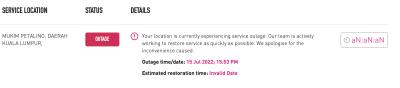
Why internet svc outage again oh my god
|
| Change to: |  0.5124sec 0.5124sec
 0.34 0.34
 7 queries 7 queries
 GZIP Disabled GZIP Disabled
Time is now: 3rd December 2025 - 02:30 AM |
 Quote
Quote