Welcome Guest ( Log In | Register )

664 Pages « < 57 58 59 60 61 > » Bottom

Outline · [ Standard ] · Linear+

TIME [OFFICIAL] TIME Fibre Broadband™ v4, Experience the ONE TRUE 2Gbps

views
     
jjj2
post Oct 19 2018, 10:18 AM

Look at all my stars!!
*******
Senior Member
3,605 posts

Joined: Feb 2006
QUOTE(koguma @ Oct 19 2018, 10:00 AM)
I would like to mention, that TIME has been unable to provide me with 1Gbps service.  They've upgraded me to 1Gbps, and are billing me for 1Gbps, but are still providing me with the old speed of 500Mbps.

I've had a ticket open with them for over 9 days.  The issue was confirmed by an on-premises independent Time Installer, and there's still no solution.

While I'm happy with TIME, please make sure you test your speed to make sure you're actually getting what you're paying for.
*
What is the speed the Installer getting while connecting directly to the ONU?


terdit
post Oct 19 2018, 10:31 AM

Getting Started
**
Junior Member
213 posts

Joined: Jan 2008


QUOTE(FusionXY @ Oct 18 2018, 09:02 PM)
The router is the cylinder type or with the three antenna?

The cable should be CAT 5E if I'm not mistaken. You may check your cable. On the cable itself got mention which CAT type.

Didn't hear any problems with disconnection and frequent restart every time.

Thanks.
*
router is without antenna type, model is DIR-850L.
will check on the cable tonight

same things happen again this morning, i try to restart the modem first, but still same have WIFI but without internet.


then i restart the router (DIR-850L), every work fine after that.
(Both light are green before restart)

So the problem is the router? hmm.gif

This post has been edited by terdit: Oct 19 2018, 10:32 AM
blacktubi
post Oct 19 2018, 11:02 AM

-
Group Icon
Elite
8,402 posts

Joined: Jul 2008

user posted image

Tested with Speedtest desktop client for the best accuracy. Just realize that browser based speedtest is rather inaccurate.

Router used: GT-AC5300 biggrin.gif
nicholasmark
post Oct 19 2018, 11:05 AM

Getting Started
**
Junior Member
214 posts

Joined: Dec 2007
From: Creams


QUOTE(terdit @ Oct 19 2018, 10:31 AM)
router is without antenna type, model is DIR-850L.
will check on the cable tonight

same things happen again this morning, i try to restart the modem first, but still same have WIFI but without internet.
then i restart the router (DIR-850L), every work fine after that.
(Both light are green before restart)

So the problem is the router?  hmm.gif
*
I'm also facing the same issue like yours using DIR-850L even before the upgrade, like once a month.

What is your WiFi speed like if you don't mind me asking?


chnghs
post Oct 19 2018, 11:16 AM

New Member
*
Newbie
15 posts

Joined: Sep 2011
Reading thro the postings, I am tempted to get a better router, than the stock one provided by Time.
The question is , if I were to get a better one, I am worried about the setting up.
Easy? hard?
Plug and play? And how to set it up. confused.gif
I like to get one that can penetrate a couple of walls in my apartment.
Any suggestions?
ntc3freak
post Oct 19 2018, 11:25 AM

Look at all my stars!!
*******
Senior Member
2,347 posts

Joined: Sep 2005


QUOTE(chnghs @ Oct 19 2018, 11:16 AM)
Reading thro the postings, I am tempted to get a better router, than the stock one provided by Time.
The question is , if I were to get a better one, I am worried about the setting up.
Easy? hard?
Plug and play? And how to set it up.  confused.gif
I like to get one that can penetrate a couple of walls in my apartment.
Any suggestions?
*
Most routers these days have very intuitive user interface that guides rookies and those less experienced. My recommendation for a big house with multiple wall penetrations is getting those newer WiFi Mesh systems, where you have one main router, and one (or two) satellite routers placed in the apartment where coverage is lacking. These WiFi Mesh systems usually come with easy-to-use apps that you use to set them up. A better, but more inconvenient solution would be a router and one (or more) access points to reach those weak coverage areas.

The main thing you need to know when setting up a new router is your PPPoE username and password, that's all. The rest is easy.

This post has been edited by ntc3freak: Oct 19 2018, 11:26 AM
TableBottom
post Oct 19 2018, 11:26 AM

New Member
*
Junior Member
49 posts

Joined: Jun 2014
QUOTE(blacktubi @ Oct 19 2018, 11:02 AM)
user posted image

Tested with Speedtest desktop client for the best accuracy. Just realize that browser based speedtest is rather inaccurate.

Router used: GT-AC5300  biggrin.gif
*
Yoooo
» Click to show Spoiler - click again to hide... «

terdit
post Oct 19 2018, 11:29 AM

Getting Started
**
Junior Member
213 posts

Joined: Jan 2008


QUOTE(nicholasmark @ Oct 19 2018, 11:05 AM)
I'm also facing the same issue like yours using DIR-850L even before the upgrade, like once a month.

What is your WiFi speed like if you don't mind me asking?
*
via desktop LAN cable TIME website , around 100 Mbps
via iOS speedtest app, also around 100 Mbps (5 Ghz WIFI)
via Android speedtest app, around 250 Mbps (5 Ghz WIFI)

My friend say DIR-850L cant really support high speed.
planning to change my router hmm.gif
cherroy
post Oct 19 2018, 11:30 AM

20k VIP Club
Group Icon
Staff
25,802 posts

Joined: Jan 2003
From: Penang


QUOTE(chnghs @ Oct 19 2018, 11:16 AM)
Reading thro the postings, I am tempted to get a better router, than the stock one provided by Time.
The question is , if I were to get a better one, I am worried about the setting up.
Easy? hard?
Plug and play? And how to set it up.  confused.gif
I like to get one that can penetrate a couple of walls in my apartment.
Any suggestions?
*
Setup is pretty easy across.
Just log into the router, set it as router mode (normally by default)
Just key in the username and password only,
Some also got wizard that guide you step by step.

Want to penetrate a couple of wall, then need to sacrifice 5Ghz wifi, aka connect at 2.4Ghz but a much slower speed than 5Ghz.

Get those router with HP (generally it indicated amplify wifi strength) at the back of router model, or come with high gain antenna.

terdit
post Oct 19 2018, 11:32 AM

Getting Started
**
Junior Member
213 posts

Joined: Jan 2008


QUOTE(cherroy @ Oct 19 2018, 11:30 AM)
Setup is pretty easy across.
Just log into the router, set it as router mode (normally by default)
Just key in the username and password only,
Some also got wizard that guide you step by step.

Want to penetrate a couple of wall, then need to sacrifice 5Ghz wifi, aka connect at 2.4Ghz but a much slower speed than 5Ghz.

Get those router with HP (generally it indicated amplify wifi strength) at the back of router model, or come with high gain antenna.
*
where to get my username and password for TIME? tongue.gif
stij
post Oct 19 2018, 12:03 PM

Getting Started
**
Junior Member
118 posts

Joined: Feb 2018
QUOTE(terdit @ Oct 19 2018, 11:32 AM)
where to get my username and password for TIME?  tongue.gif
*
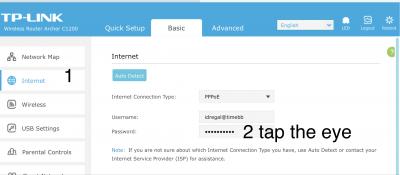
If you know the login password for the router then u can login inside (usually from 192.168.0.1) and go to Internet Connection section to see you user name and password for the PPPoE

As attached

This post has been edited by stij: Oct 19 2018, 12:22 PM


Attached thumbnail(s)
Attached Image Attached Image
kopiride
post Oct 19 2018, 12:03 PM

Enthusiast
*****
Junior Member
782 posts

Joined: Jan 2003
QUOTE(blacktubi @ Oct 19 2018, 11:02 AM)
user posted image

Tested with Speedtest desktop client for the best accuracy. Just realize that browser based speedtest is rather inaccurate.

Router used: GT-AC5300  biggrin.gif
*
Yeah so far i research this is the best router.
Found cheapest here.

https://shopee.com.my/Asus-ROG-Rapture-GT-A...5996.1577024609
jimbet1337
post Oct 19 2018, 12:17 PM

meh
*******
Senior Member
2,670 posts

Joined: Sep 2006
my ping is now constantly 12ms. Previously was 3ms.

nothing to worry about, right? should be negligible.
jjj2
post Oct 19 2018, 12:21 PM

Look at all my stars!!
*******
Senior Member
3,605 posts

Joined: Feb 2006
QUOTE(terdit @ Oct 19 2018, 10:31 AM)
router is without antenna type, model is DIR-850L.
will check on the cable tonight

same things happen again this morning, i try to restart the modem first, but still same have WIFI but without internet.
then i restart the router (DIR-850L), every work fine after that.
(Both light are green before restart)

So the problem is the router?  hmm.gif
*
Issues like intermittent connection hang & speed drops are known for this Router, if too frequent, then you will need to get a new router.

Thanks.
jjj2
post Oct 19 2018, 12:22 PM

Look at all my stars!!
*******
Senior Member
3,605 posts

Joined: Feb 2006
QUOTE(jimbet1337 @ Oct 19 2018, 12:17 PM)
my ping is now constantly 12ms. Previously was 3ms.

nothing to worry about, right? should be negligible.
*
Yes it's normal, no worries smile.gif
terdit
post Oct 19 2018, 12:23 PM

Getting Started
**
Junior Member
213 posts

Joined: Jan 2008


QUOTE(stij @ Oct 19 2018, 12:03 PM)
If you know the login password for the router then u can login inside (usually from 192.168.0.1) and go to Internet Connection section to see you user name and password for the PPPoE

As attached
*
Thanks for the info, very useful thumbup.gif
terdit
post Oct 19 2018, 12:24 PM

Getting Started
**
Junior Member
213 posts

Joined: Jan 2008


QUOTE(jjj2 @ Oct 19 2018, 12:21 PM)
Issues like intermittent connection hang & speed drops are known for this Router, if too frequent, then you will need to get a new router.

Thanks.
*
Yeah seems getting new router is the best way for my case sad.gif
jjj2
post Oct 19 2018, 12:24 PM

Look at all my stars!!
*******
Senior Member
3,605 posts

Joined: Feb 2006
QUOTE(chnghs @ Oct 19 2018, 11:16 AM)
Reading thro the postings, I am tempted to get a better router, than the stock one provided by Time.
The question is , if I were to get a better one, I am worried about the setting up.
Easy? hard?
Plug and play? And how to set it up.  confused.gif
I like to get one that can penetrate a couple of walls in my apartment.
Any suggestions?
*
Just text/pm/whatsapp/email me, will guide you steps to set it up.

Thanks.
jjj2
post Oct 19 2018, 12:25 PM

Look at all my stars!!
*******
Senior Member
3,605 posts

Joined: Feb 2006
QUOTE(terdit @ Oct 19 2018, 12:24 PM)
Yeah seems getting new router is the best way for my case  sad.gif
*
Yes , a wise choice to get a new one.
chuahcs79
post Oct 19 2018, 12:34 PM

Look at all my stars!!
Group Icon
Elite
6,931 posts

Joined: Apr 2011
From: Bolehland for sure ^_^


After click downgrade on 17th Oct in self care, today finally successfully downgrade to 100Mbps, connection is much more responsive compare to 500Mbps ( sometimes wifi is on but zero data packet running up/down) .

664 Pages « < 57 58 59 60 61 > » Top
 

Change to:
| Lo-Fi Version
0.0168sec    0.34    6 queries    GZIP Disabled
Time is now: 4th December 2025 - 07:02 AM