Welcome Guest ( Log In | Register )

Outline · [ Standard ] · Linear+

TIME [OFFICIAL] TIME Fibre Broadband™ v4, Experience the ONE TRUE 2Gbps

views
     
terdit
post Oct 18 2018, 04:43 PM

Getting Started
**
Junior Member
213 posts

Joined: Jan 2008


My TIME start to not stable after the upgrade kick in (mine upgraded to 500Mbps).
Experienced few time wake up from sleep, WIFI still there but without internet connection, need to restart both modem and router.
Also few times suddenly disconnected.
Speed also not as expected.
Max via 5 GHz WIFI get 200+ Mbps on Android, iOS only 100+ Mbps. LAN cable test also wont reach 200 Mbps.
Youtube seems load slower than previous before upgrade.
Torrent also seems just around 100 Mbps (via LAN).

Anyone here have the same issue?
Anything i can do to increase the speed?

This post has been edited by terdit: Oct 18 2018, 04:47 PM
terdit
post Oct 18 2018, 08:47 PM

Getting Started
**
Junior Member
213 posts

Joined: Jan 2008


QUOTE(FusionXY @ Oct 18 2018, 08:34 PM)
Hi, may I know which router that you are referring to?
Are you CAT 5E above?

Try to perform direct connection.

Thanks.
*
I restart both the router and modem (white and black color).
Not sure about my cable is CAT 5E and above or not. but that is cable that come together during installation.

I actually more concern on the frequent no internet issue sad.gif
terdit
post Oct 19 2018, 10:31 AM

Getting Started
**
Junior Member
213 posts

Joined: Jan 2008


QUOTE(FusionXY @ Oct 18 2018, 09:02 PM)
The router is the cylinder type or with the three antenna?

The cable should be CAT 5E if I'm not mistaken. You may check your cable. On the cable itself got mention which CAT type.

Didn't hear any problems with disconnection and frequent restart every time.

Thanks.
*
router is without antenna type, model is DIR-850L.
will check on the cable tonight

same things happen again this morning, i try to restart the modem first, but still same have WIFI but without internet.


then i restart the router (DIR-850L), every work fine after that.
(Both light are green before restart)

So the problem is the router? hmm.gif

This post has been edited by terdit: Oct 19 2018, 10:32 AM
terdit
post Oct 19 2018, 11:29 AM

Getting Started
**
Junior Member
213 posts

Joined: Jan 2008


QUOTE(nicholasmark @ Oct 19 2018, 11:05 AM)
I'm also facing the same issue like yours using DIR-850L even before the upgrade, like once a month.

What is your WiFi speed like if you don't mind me asking?
*
via desktop LAN cable TIME website , around 100 Mbps
via iOS speedtest app, also around 100 Mbps (5 Ghz WIFI)
via Android speedtest app, around 250 Mbps (5 Ghz WIFI)

My friend say DIR-850L cant really support high speed.
planning to change my router hmm.gif
terdit
post Oct 19 2018, 11:32 AM

Getting Started
**
Junior Member
213 posts

Joined: Jan 2008


QUOTE(cherroy @ Oct 19 2018, 11:30 AM)
Setup is pretty easy across.
Just log into the router, set it as router mode (normally by default)
Just key in the username and password only,
Some also got wizard that guide you step by step.

Want to penetrate a couple of wall, then need to sacrifice 5Ghz wifi, aka connect at 2.4Ghz but a much slower speed than 5Ghz.

Get those router with HP (generally it indicated amplify wifi strength) at the back of router model, or come with high gain antenna.
*
where to get my username and password for TIME? tongue.gif
terdit
post Oct 19 2018, 12:23 PM

Getting Started
**
Junior Member
213 posts

Joined: Jan 2008


QUOTE(stij @ Oct 19 2018, 12:03 PM)
If you know the login password for the router then u can login inside (usually from 192.168.0.1) and go to Internet Connection section to see you user name and password for the PPPoE

As attached
*
Thanks for the info, very useful thumbup.gif
terdit
post Oct 19 2018, 12:24 PM

Getting Started
**
Junior Member
213 posts

Joined: Jan 2008


QUOTE(jjj2 @ Oct 19 2018, 12:21 PM)
Issues like intermittent connection hang & speed drops are known for this Router, if too frequent, then you will need to get a new router.

Thanks.
*
Yeah seems getting new router is the best way for my case sad.gif
terdit
post Oct 19 2018, 01:20 PM

Getting Started
**
Junior Member
213 posts

Joined: Jan 2008


QUOTE(jjj2 @ Oct 19 2018, 12:25 PM)
Yes , a wise choice to get a new one.
*
Any recommended router? tongue.gif
terdit
post Oct 19 2018, 01:45 PM

Getting Started
**
Junior Member
213 posts

Joined: Jan 2008


QUOTE(jjj2 @ Oct 19 2018, 01:29 PM)
Any budget limitation & how big is the area you wanna cover ?
*
was looking at TP-Link Archer C1200, the current that TIME providing.
Since that model cost around RM250, so maybe budget below 300 is that sufficient?
Not really need a big coverage, i dont have big house tongue.gif
i got no complaint on the current DIR-850L coverage
terdit
post Oct 19 2018, 01:54 PM

Getting Started
**
Junior Member
213 posts

Joined: Jan 2008


QUOTE(jjj2 @ Oct 19 2018, 01:51 PM)
In that case you can consider this, the unit costs RM235 + installation with 3 years warranty.

Note :
-- Once a while Disconnection is reported for this router.
-- Orange globe light bug not fully resolved.
*
You mean TP-Link Archer C1200?
terdit
post Oct 19 2018, 02:34 PM

Getting Started
**
Junior Member
213 posts

Joined: Jan 2008


QUOTE(jjj2 @ Oct 19 2018, 02:10 PM)
Yes.
*
-- Orange globe light bug not fully resolved.
Means the Globe light is orange but internet is up as usual?

Saw from TIME shop, is RM235 or 24 months contract renewal.
I think my contract expired around Aug 2019, so 24 months start from Aug 2019? or 24 months start from now?
terdit
post Oct 19 2018, 02:44 PM

Getting Started
**
Junior Member
213 posts

Joined: Jan 2008


QUOTE(jjj2 @ Oct 19 2018, 02:37 PM)

*
Ya i know if purchase is without contract, just asking regarding the contract renewal instead of purchase
terdit
post Oct 19 2018, 05:42 PM

Getting Started
**
Junior Member
213 posts

Joined: Jan 2008


QUOTE(Scissorshand @ Oct 19 2018, 05:11 PM)
Garage Sales has plenty of other better model
*
not really research on router before
any recommendation from you? smile.gif
terdit
post Oct 23 2018, 01:58 PM

Getting Started
**
Junior Member
213 posts

Joined: Jan 2008


Any recommended WIFI router to replace my DIR-850L?
My current package is 500Mbps
Budget RM300 tongue.gif

This post has been edited by terdit: Oct 23 2018, 01:59 PM
terdit
post Oct 23 2018, 05:45 PM

Getting Started
**
Junior Member
213 posts

Joined: Jan 2008


QUOTE(SilentVampire @ Oct 23 2018, 04:02 PM)
Budget too low, if you are referring to getting max speed on wireless.

*
not really need to hit the max speed, but at least some router that consistence and reliable.
but of coz the speed as high as possible tongue.gif
terdit
post Nov 22 2024, 10:49 AM

Getting Started
**
Junior Member
213 posts

Joined: Jan 2008


Hi All Sifus

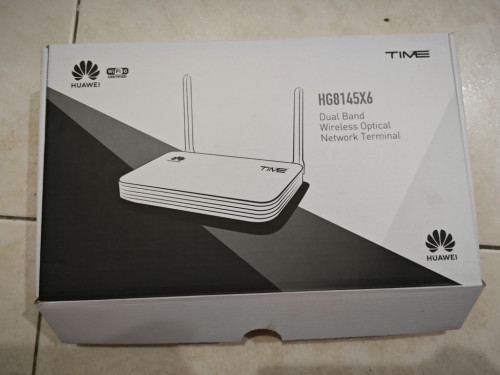
I got 2 unit of Huawei HG8145X6 for my contract renewal (Year 2023).
user posted image

would like to ask, can i use this Huawei HG8145X6 as Wifi Router?
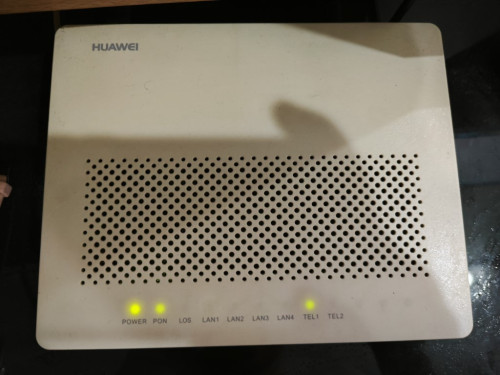
means it still connect to my old modem (as below):
user posted image

I believe it's doable, coz 2 of my friend house is being configure that way.
but when i try, i not able to find the place to put in the PPPoE credentials.

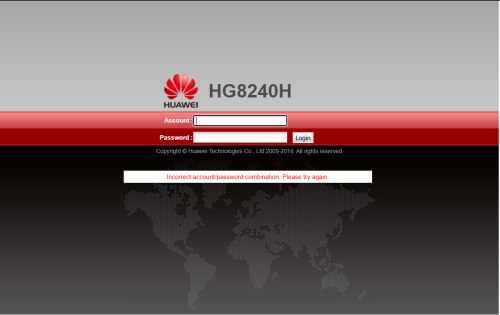
also when i try to configure, i notice 192.168.100.1 (if i remember the IP correctly), will reach different page.
when use wifi, will reach this page:
user posted image
the username/password at the bottom of the device not able to login this page.

when use LAN cable, is another page but too bad forgot to screenshot.
the username/password at the bottom of the device able to login this page. i manage to configure the wifi name and password here, but not able to find place to put in PPPoE credential
terdit
post Nov 22 2024, 11:11 AM

Getting Started
**
Junior Member
213 posts

Joined: Jan 2008


QUOTE(jjj2 @ Nov 22 2024, 10:59 AM)
*
Thanks a lot. will give it a try tonight notworthy.gif

to confirm, the WPS button is the 1 at the side of the device, correct?

This post has been edited by terdit: Nov 22 2024, 11:12 AM
terdit
post Nov 25 2024, 02:54 PM

Getting Started
**
Junior Member
213 posts

Joined: Jan 2008


QUOTE(PRSXFENG @ Nov 22 2024, 07:36 PM)
maybe there is some subnet clash

HG8240H is your modem

if both are on 192.168.100.1, there may be conflicts?
*
didnt get into the page again while i try to re-configure.
internet are working fine now so can just ignore that page issue lol
anyway thanks for your explanation thumbsup.gif

QUOTE(jjj2 @ Nov 22 2024, 11:35 AM)
Yes
*
able to put in the PPPoE credential and use that as my wifi router.
thanks for the advice. thumbup.gif
btw, i change to AP mode in the system instead of pressing the button tongue.gif
terdit
post Jan 14 2025, 10:07 AM

Getting Started
**
Junior Member
213 posts

Joined: Jan 2008


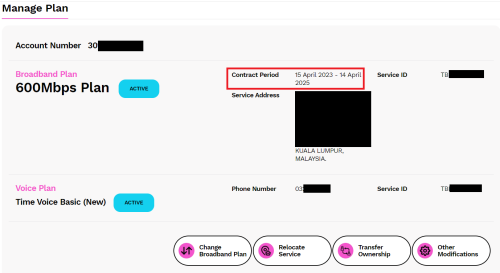
user posted image

Hi All Sifus,

i renewed my contract with TIME almost 2 years ago, next contract expiry is on mid of April 2025 (ngam ngam 3 months from today).
Would like to ask, when will i able to see the offer for contract renewal? still didnt see such things after login to self care.

previous renewal i got 2 unit of Huawei HG8145X6, which currently use 1 of it as my router after my TP-Link AX73 start to become not stable on the internet.
the TP-Link AX73 was bought on mid 2021 with 3 years warranty, so after warranty expired it start to have problem on Q3 2024 sweat.gif
they memang count till ngam ngam on the lifespan?

current Huawei HG8145X6, i found that the performance is not that good, sometimes internet (WiFi) is a bit slow when in the room. never have this problem when using TP-Link AX73 previously.
Should i head for the WIFI7 router from TIME? (if they offer me the router for contract renewal)
or should i just get another router from other brand? saw this TP-Link BE230 WiFi 7 BE3600 while exploring.
add on: i have quite a number of gadget and IOT connecting to the WiFi

need advice on the above.
thanks again.
terdit
post Jan 14 2025, 10:44 AM

Getting Started
**
Junior Member
213 posts

Joined: Jan 2008


QUOTE(jjj2 @ Jan 14 2025, 10:25 AM)

*
Any recommended router from you?

2 Pages  1 2 >Top
 

Change to:
| Lo-Fi Version
0.0348sec    0.44    7 queries    GZIP Disabled
Time is now: 5th December 2025 - 08:26 PM