

Well, the time for me to downgrade has come, 500Mbps to 100Mbps
TIME [OFFICIAL] TIME Fibre Broadband™ v4, Experience the ONE TRUE 2Gbps
TIME [OFFICIAL] TIME Fibre Broadband™ v4, Experience the ONE TRUE 2Gbps
|
|
 Nov 15 2023, 10:37 AM Nov 15 2023, 10:37 AM
Show posts by this member only | IPv6 | Post
#10441
|
 
Senior Member
2,611 posts Joined: Nov 2020  
|
Well, the time for me to downgrade has come, 500Mbps to 100Mbps jjj2 liked this post
|
|
|
|
|
|
Nov 16 2023, 01:32 AM
Show posts by this member only | IPv6 | Post
#10442
|

Senior Member
3,836 posts Joined: Aug 2016
|
QUOTE(tangenx @ Nov 8 2023, 05:38 AM) Its the 2 in 1 Huawei HG8145X6 Have you contact TIME to convert to bridge mode? Sorry for the late response as currently busy. |
|
|
Nov 16 2023, 10:43 AM
|
|
Junior Member
85 posts Joined: Dec 2021 
|
@jjj2 Any news on updated plan for Time internet? I may switch to Unifi if they have no plans to reduce the pricing. jjj2 liked this post
|
|
|
Nov 16 2023, 11:13 AM
|

Junior Member
394 posts Joined: Aug 2010 From: 御堂筋 
|
Not sure when is TIME going to revise their pricing...
|
|
|
Nov 16 2023, 08:05 PM
|
|
Junior Member
205 posts Joined: Sep 2014
|
QUOTE(FusionXY @ Nov 16 2023, 01:32 AM) Have you contact TIME to convert to bridge mode? You can do it by yourself. After login into the router, change the Uplink to AP.Sorry for the late response as currently busy. |
|
|
Nov 16 2023, 08:08 PM
|
|
Junior Member
205 posts Joined: Sep 2014
|
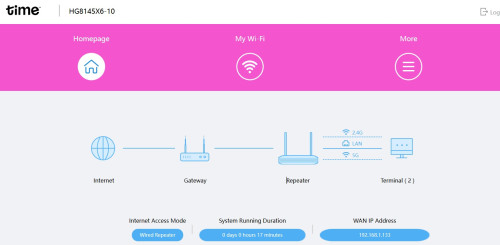
I'm trying to setup mesh on the HG8145X6 with my TPLink router. The X6 shows up on my TP-Link's EasyMesh page. However, the weird thing is the Wifi name in X6 is not the same as the TP-Link one. Any idea whether I set up the Mesh correctly?
 This post has been edited by RagingCandy: Nov 16 2023, 08:11 PM |
|
|
|
|
|
Nov 16 2023, 08:35 PM
|
|
Junior Member
382 posts Joined: May 2019
|
QUOTE(RagingCandy @ Nov 16 2023, 08:05 PM) You can do it by yourself. After login into the router, change the Uplink to AP. That is not bridge mode. Doing that will reset the settings on the unit. Then a SI will have to come and redo everything. Calling TIME support is a must for bridge mode unless you know the password for the real admin account RagingCandy and FusionXY liked this post
|
|
|
Nov 16 2023, 08:48 PM
Show posts by this member only | IPv6 | Post
#10448
|
|
Senior Member
2,611 posts Joined: Nov 2020
|
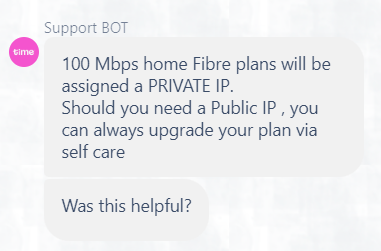 So I just remembered 100Mbps comes with Private IP and talked with the chat bot to request a Public IP It says I need to upgrade plan? |
|
|
Nov 16 2023, 08:51 PM
|
|
Junior Member
205 posts Joined: Sep 2014
|
QUOTE(ChenKaiWen @ Nov 16 2023, 08:35 PM) That is not bridge mode. Doing that will reset the settings on the unit. Then a SI will have to come and redo everything. Uh... I might misunderstood ur ask. I set the unit to AP so I can use to bridge mode to set another SSID / Mesh.Calling TIME support is a must for bridge mode unless you know the password for the real admin account |
|
|
Nov 16 2023, 08:57 PM
Show posts by this member only | IPv6 | Post
#10450
|
|
Junior Member
13 posts Joined: Nov 2007
|
Hi guys, i just upgraded my plan to 500mbps under loyalty program and got 2 units of HG8145X6-10.
However, when 1 unit served as the main connection and the other one connect as WPS, i got only 150mbps for my device even it is connecting to 5ghz frequency. But if i off the 2nd unit, then i can get up to 200mbps. My question is, is this normal? Anyway, the distance between my device and the main unit is about 10-15m away. And previously when i am on 100mbps package, i can get up to 80mbps. |
|
|
Nov 16 2023, 09:19 PM
|
|
Junior Member
382 posts Joined: May 2019
|
QUOTE(RagingCandy @ Nov 16 2023, 08:51 PM) Uh... I might misunderstood ur ask. I set the unit to AP so I can use to bridge mode to set another SSID / Mesh. That's not bridge mode. Bridge mode is disabling the router function of the unit and it acts as a modem, then you can use your own router. AP mode can let you use the unit as a router, access point and a repeater, disabling the modem function of the unit. |
|
|
Nov 16 2023, 10:55 PM
|

Senior Member
3,608 posts Joined: Feb 2006
|
QUOTE(Jennypenny @ Nov 16 2023, 10:43 AM) @jjj2 Yet to have Sis Any news on updated plan for Time internet? I may switch to Unifi if they have no plans to reduce the pricing.  Jennypenny liked this post
|
|
|
Nov 16 2023, 10:57 PM
|
|
Senior Member
3,608 posts Joined: Feb 2006
|
QUOTE(RagingCandy @ Nov 16 2023, 08:08 PM) I'm trying to setup mesh on the HG8145X6 with my TPLink router. The X6 shows up on my TP-Link's EasyMesh page. However, the weird thing is the Wifi name in X6 is not the same as the TP-Link one. Any idea whether I set up the Mesh correctly? It's on repeater mode, not mesh. Ditch this X6, get a proper mesh system, Tp-Link Deco is one of the great option. |
|
|
|
|
|
Nov 16 2023, 11:01 PM
|
|
Senior Member
3,608 posts Joined: Feb 2006
|
QUOTE(emin @ Nov 16 2023, 08:57 PM) Hi guys, i just upgraded my plan to 500mbps under loyalty program and got 2 units of HG8145X6-10. This problem happens when the 2nd unit of 'mesh' node is placed too close to the 1st unit... try move the 2nd unit approx. 10m away & if possible within LOS.... However, when 1 unit served as the main connection and the other one connect as WPS, i got only 150mbps for my device even it is connecting to 5ghz frequency. But if i off the 2nd unit, then i can get up to 200mbps. My question is, is this normal? Anyway, the distance between my device and the main unit is about 10-15m away. And previously when i am on 100mbps package, i can get up to 80mbps. Again, if you are hoping for more promising performance, get your own Mesh System. |
|
|
Nov 16 2023, 11:28 PM
|
|
Junior Member
205 posts Joined: Sep 2014
|
QUOTE(jjj2 @ Nov 16 2023, 10:57 PM) It's on repeater mode, not mesh. Ditch this X6, get a proper mesh system, Tp-Link Deco is one of the great option. What a good advice... So hard to setup due to confusing User Interface. jjj2 liked this post
|
|
|
Nov 16 2023, 11:40 PM
Show posts by this member only | IPv6 | Post
#10456
|
|
Senior Member
3,836 posts Joined: Aug 2016
|
QUOTE(jjj2 @ Nov 16 2023, 10:55 PM) Yet to have Sis Waiting...... |
|
|
Nov 17 2023, 01:17 AM
Show posts by this member only | IPv6 | Post
#10457
|
|
Senior Member
5,569 posts Joined: Aug 2011
|
QUOTE(darren_yuri @ Nov 16 2023, 11:13 AM) Not sure when is TIME going to revise their pricing... Fahmi just sembang kencang cakap kosong |
|
|
Nov 17 2023, 10:07 AM
Show posts by this member only | IPv6 | Post
#10458
|
|
Senior Member
2,687 posts Joined: Sep 2012
|
QUOTE(jjj2 @ Nov 16 2023, 10:55 PM) Yet to have Sis No price drop no enjoice 🥺🥺🥺 |
|
|
Nov 17 2023, 02:39 PM
|
|
Junior Member
132 posts Joined: Nov 2006
|
QUOTE(Jennypenny @ Nov 16 2023, 10:43 AM) @jjj2 I guess TimeBB still monitors the switch-out rate, most likely inaction unless many are switching out. Any news on updated plan for Time internet? I may switch to Unifi if they have no plans to reduce the pricing. Been waited 2 months (300mb without rm20 rebate), downgraded to 100mb yesterday after noticing its no longer warrant 24m contract as in late Sept. |
|
|
Nov 17 2023, 04:58 PM
Show posts by this member only | IPv6 | Post
#10460
|

Senior Member
1,250 posts Joined: Jun 2009 From: the land before time
|
Can I know for the 2gbps router, can we use the other LAN ports to connect our own wifi router? it seem that the 2gbps router only has one 2.5g lan port so I want to reserve that for my pc, but I also want to broadcast wifi via my own wifi router.
|
| Change to: |  0.0279sec 0.0279sec
 0.63 0.63
 6 queries 6 queries
 GZIP Disabled GZIP Disabled
Time is now: 17th December 2025 - 03:07 AM |
 Quote
Quote