Welcome Guest ( Log In | Register )

670 Pages « < 523 524 525 526 527 > » Bottom

Outline · [ Standard ] · Linear+

TIME [OFFICIAL] TIME Fibre Broadband™ v4, Experience the ONE TRUE 2Gbps

views
     
slackinux
post Nov 24 2023, 11:41 AM

Casual
***
Junior Member
407 posts

Joined: Dec 2008
QUOTE(bsb85my @ Nov 21 2023, 06:52 PM)
Do you mean that I'll need to login as a "superadmin" in order to enter my PPoE details?

Because when I enter using "admin", I can't find anywhere to enter PPoE details.
*
PM done.
Please check your inbox message.
slackinux
post Nov 24 2023, 02:04 PM

Casual
***
Junior Member
407 posts

Joined: Dec 2008
QUOTE(jjj2 @ Nov 21 2023, 11:45 PM)
It's under the 2 profiles, the 1st one is the voice profile, ignore that one, the 2nd one is the Internet profile which you need to click on it to edit it.
It's better to get yourself a better performance Mesh System rather than mingling around with this crappy mesh  stock routers.
*
I disagree with you that the Huawei HG8145X6 is a crappy mesh router.
I have been using it heavily (working from home ) from 8am to 12:30 mid night every day since I subscribed to TIME in September.
It performs not bad and same performance with my Mercusys MR80 WiFi 6 router when I was on TM Unifi 500mbps.
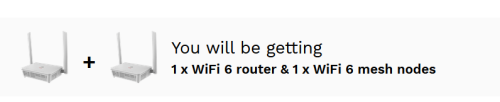
I fully utilise these two mesh enabled routers by placing each one on level 1 and level 2 in my double storey landed house.
At first, I thought of purchasing new TP link router as some of you guys did.
Until now, I have no problem with these stock mesh enabled router given by TIME.
I am happy with these stock mesh enabled router given by TIME.
My android Tv box also works perfectly with these stock router.
I don't see anymore reason to replace these stock router with expensive TP link mesh or router.

Who ever wanna throw away these stock routers, please give them to me for free.

jjj2
post Nov 24 2023, 04:54 PM

Look at all my stars!!
*******
Senior Member
3,608 posts

Joined: Feb 2006
QUOTE(slackinux @ Nov 24 2023, 02:04 PM)
I disagree with you that the Huawei HG8145X6 is a crappy mesh router.
I have been using it heavily (working from home ) from 8am to 12:30 mid night every day since I subscribed to TIME in September.
It performs not bad and same performance with my Mercusys MR80 WiFi 6 router when I was on TM Unifi 500mbps.
I fully utilise these two mesh enabled routers by placing each one on level 1 and level 2 in my double storey landed house.
At first, I thought of purchasing new TP link router as some of you guys did.
Until now, I have no problem with these stock mesh enabled router given by TIME.
I am happy with these stock mesh enabled router given by TIME.
My android Tv box also works perfectly with these stock router.
I don't see anymore reason to replace these stock router with expensive TP link mesh or router.

Who ever wanna throw away these stock routers, please give them to me for free.
*
Good to hear that ...good luck smile.gif
1234_4321
post Nov 24 2023, 06:14 PM

Casual
***
Junior Member
328 posts

Joined: Dec 2007


May I ask if I can install the Time internet (100Mbps) one without phone ?
Just wanted the internet service...
PRSXFENG
post Nov 24 2023, 06:32 PM

Look at all my stars!!
*******
Senior Member
2,611 posts

Joined: Nov 2020


QUOTE(1234_4321 @ Nov 24 2023, 06:14 PM)
May I ask if I can install the Time internet (100Mbps) one without phone ?
Just wanted the internet service...
*
There is no phone service or a landline phone included with the plan

With that said, you are assigned a phone number,the all in one modem/router does have a phone port and if you plug in a phone, you can make and receive calls with a pay per minute rate
raist86
post Nov 24 2023, 11:11 PM

Regular
******
Senior Member
1,577 posts

Joined: May 2005
From: USJ


after browsing through tens of pages of the forum, i still need to ask sifus here for advice on migrating to 3rd party router.
I'm on time package using the Huawei HG1845X6 fiber modem+router combo. I've been experiencing dropped signal or router hanging up frequently (have about 15 devices connecting, but only 3-4 devices using majority of the data pipeline).

Plan to change to a 3rd party faster router, what would be a good recommendation? Router is in main hall, i have to connect to study room which has the pc, laptop and nas (ideally would need a repeater with LAN port there).

Question would be how do i migrate from TIME device to a 3rd party one. Do i still keep the Huawei and use it as a fiber ONT and connect the new router to the huawei? appreciate the expert guide here.
PRSXFENG
post Nov 25 2023, 09:40 AM

Look at all my stars!!
*******
Senior Member
2,611 posts

Joined: Nov 2020


QUOTE(raist86 @ Nov 24 2023, 11:11 PM)
after browsing through tens of pages of the forum, i still need to ask sifus here for advice on migrating to 3rd party router.
I'm on time package using the Huawei HG1845X6 fiber modem+router combo. I've been experiencing dropped signal or router hanging up frequently (have about 15 devices connecting, but only 3-4 devices using majority of the data pipeline).

Plan to change to a 3rd party faster router, what would be a good recommendation? Router is in main hall, i have to connect to study room which has the pc, laptop and nas (ideally would need a repeater with LAN port there).

Question would be how do i migrate from TIME device to a 3rd party one. Do i still keep the Huawei and use it as a fiber ONT and connect the new router to the huawei? appreciate the expert guide here.
*
Maybe a TP-Link or Asus router, those are decent choicess

and yeah, just contact time and tell them you want to use your own router, they will set the huawei to just an ONT and you connect up your own device to it and setup with pppoe
blacktubi
post Nov 25 2023, 11:30 AM

-
Group Icon
Elite
8,420 posts

Joined: Jul 2008

Anyone switched from TIME to Maxis?

I am still using TIME 1Gbps but am seriously considering Maxis due to RM319 for 2Gbps.

Maxis' subsidy for the TV add-on is an amazing deal too.
jjj2
post Nov 25 2023, 11:55 AM

Look at all my stars!!
*******
Senior Member
3,608 posts

Joined: Feb 2006
QUOTE(1234_4321 @ Nov 24 2023, 06:14 PM)
May I ask if I can install the Time internet (100Mbps) one without phone ?
Just wanted the internet service...
*
The phone line is bundled with the Internet service with no monthly rental, if you don't use it, just leave it.
jjj2
post Nov 25 2023, 11:59 AM

Look at all my stars!!
*******
Senior Member
3,608 posts

Joined: Feb 2006
QUOTE(raist86 @ Nov 24 2023, 11:11 PM)
after browsing through tens of pages of the forum, i still need to ask sifus here for advice on migrating to 3rd party router.
I'm on time package using the Huawei HG1845X6 fiber modem+router combo. I've been experiencing dropped signal or router hanging up frequently (have about 15 devices connecting, but only 3-4 devices using majority of the data pipeline).

Plan to change to a 3rd party faster router, what would be a good recommendation? Router is in main hall, i have to connect to study room which has the pc, laptop and nas (ideally would need a repeater with LAN port there).

Question would be how do i migrate from TIME device to a 3rd party one. Do i still keep the Huawei and use it as a fiber ONT and connect the new router to the huawei? appreciate the expert guide here.
*
Hi, what you need to do is to convert the ONT back to the ONU mode (bridge mode), and have your own Router or Mesh system performing the PPPOE dialing via the ONU.
Do note that NOT advisable to hook up your router in AP mode & maintain the ONT by its default mode (ONU + Router).

Thanks.
diehard1979
post Nov 25 2023, 03:29 PM

Regular
******
Senior Member
1,194 posts

Joined: Jun 2005


user posted image

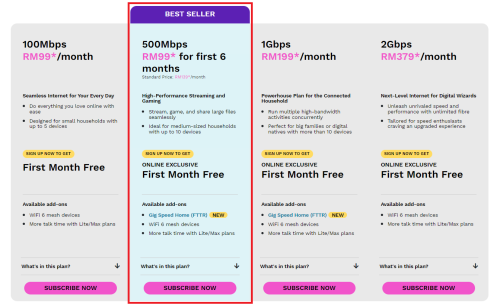
Time should do something already.
Other provider now keep doing a lot of offer and cut price.
Now Astro Fibre even offer 500Mbps for RM90 per month and it is fixed price for 24 months.
Seng89
post Nov 25 2023, 04:00 PM

Look at all my stars!!
*******
Senior Member
2,687 posts

Joined: Sep 2012
QUOTE(diehard1979 @ Nov 25 2023, 03:29 PM)
user posted image

Time should do something already.
Other provider now keep doing a lot of offer and cut price.
Now Astro Fibre even offer 500Mbps for RM90 per month and it is fixed price for 24 months.
*
Wew. I'm still under contract. Tak boleh lari. Haha sad
westlife
post Nov 25 2023, 07:55 PM

10k Club
********
All Stars
14,306 posts

Joined: Jan 2011
QUOTE(diehard1979 @ Nov 25 2023, 03:29 PM)
user posted image

Time should do something already.
Other provider now keep doing a lot of offer and cut price.
Now Astro Fibre even offer 500Mbps for RM90 per month and it is fixed price for 24 months.
*
i am planning to sign up time fibre.

is this astro fibre using time's infrastructure or?

user posted image
user posted image
blacktubi
post Nov 25 2023, 08:19 PM

-
Group Icon
Elite
8,420 posts

Joined: Jul 2008

QUOTE(diehard1979 @ Nov 25 2023, 03:29 PM)
user posted image

Time should do something already.
Other provider now keep doing a lot of offer and cut price.
Now Astro Fibre even offer 500Mbps for RM90 per month and it is fixed price for 24 months.
*
We need more this kind of competition biggrin.gif

Curious if anyone knows whether TIME will do any retention or counter offer if people tried to leave them?
leezhijiang
post Nov 25 2023, 11:00 PM

Getting Started
**
Junior Member
273 posts

Joined: Jan 2010


QUOTE(slackinux @ Nov 22 2023, 12:26 AM)
You need to login as "telecomadmin".
*
Hmm what is password is the problem? I was observing the technician entering the username and referring to the back panel for the password.

I tried last 4 digits of the MAC address. It's not working
ahpaul82
post Nov 26 2023, 12:09 AM

.:保罗:.
*******
Senior Member
3,795 posts

Joined: Jan 2003
From: .: Old Klang Road :.


QUOTE(diehard1979 @ Nov 25 2023, 03:29 PM)
user posted image

Time should do something already.
Other provider now keep doing a lot of offer and cut price.
Now Astro Fibre even offer 500Mbps for RM90 per month and it is fixed price for 24 months.
*
Mind share the link ?

Astro Fiber Plan website still show wonderful price... sweat.gif
philipkyw
post Nov 26 2023, 10:52 AM

New Member
*
Junior Member
36 posts

Joined: Jun 2010
QUOTE(slackinux @ Nov 21 2023, 06:06 PM)
You need to login as admin user to key in the PPoE username and password field.
You need to call TIME customer support to get this admin login. Normal user login won't see the PPoE settings.
Huawei HG8145X6 actually not bad.
I have been using 2 units of Huawei HG8145X6 to form a simple mesh network in 2 storeys terrace house since I subscribed 2 months ago.
*
Hi,

I manage to key in my PPPoE login details in my Huawei HG8145X6, and I'm trying to set up with my old Huawei black Modem (given for abt 10years ago).
Originally was planning to set HG8145X6 as a wireless router

Huawei HG8145X6 its uplink mode is AP mode (not sure this is right mode?), but the problem is, it only connects if my LAN port1 of HG8145X6 connects to my LAN port1 of the old Huawei black modem.
if I switch to other ports, I'm getting red LED LOS on my HG8145X6.
Although it connects to the Internet, but my speed limit to 100Mbps on Ethernet connection to HG8145X6, vs previously was about 300Mbps+ prior my router is gone.

I might have the wrong setup sad.gif
Any advice how do I fix/check?


Thanks
PRSXFENG
post Nov 26 2023, 11:26 AM

Look at all my stars!!
*******
Senior Member
2,611 posts

Joined: Nov 2020


QUOTE(philipkyw @ Nov 26 2023, 10:52 AM)
Hi,

I manage to key in my PPPoE login details in my Huawei HG8145X6, and I'm trying to set up with my old Huawei black Modem (given for abt 10years ago).
Originally was planning to set HG8145X6 as a wireless router

Huawei HG8145X6 its uplink mode is AP mode (not sure this is right mode?), but the problem is, it only connects if my LAN port1 of HG8145X6 connects to my LAN port1 of the old Huawei black modem.
if I switch to other ports, I'm getting red LED LOS on my HG8145X6.
Although it connects to the Internet, but my speed limit to 100Mbps on Ethernet connection to HG8145X6, vs previously was about 300Mbps+ prior my router is gone.

I might have the wrong setup  sad.gif
Any advice how do I fix/check?
Thanks
*
It is possible you're using an old 10/100Mbps modem

But why on earth are you using that old modem?

Just fiber -> HG8145X6 will do, but I think the configuration settings for that are not accessible for you to setup yourself

jjj2
post Nov 26 2023, 11:56 AM

Look at all my stars!!
*******
Senior Member
3,608 posts

Joined: Feb 2006
QUOTE(philipkyw @ Nov 26 2023, 10:52 AM)
Hi,

I manage to key in my PPPoE login details in my Huawei HG8145X6, and I'm trying to set up with my old Huawei black Modem (given for abt 10years ago).
Originally was planning to set HG8145X6 as a wireless router

Huawei HG8145X6 its uplink mode is AP mode (not sure this is right mode?), but the problem is, it only connects if my LAN port1 of HG8145X6 connects to my LAN port1 of the old Huawei black modem.
if I switch to other ports, I'm getting red LED LOS on my HG8145X6.
Although it connects to the Internet, but my speed limit to 100Mbps on Ethernet connection to HG8145X6, vs previously was about 300Mbps+ prior my router is gone.

I might have the wrong setup  sad.gif
Any advice how do I fix/check?
Thanks
*
Hi, if you are using the ONU 10 years ago, it should be either Huawei HG850A or HG8240, it is on Fast Ethernet ports (100Mbps), do call the CS & request for a change.
Another matter, you cannot connect to other ports as binding is only done on LAN1.
diehard1979
post Nov 26 2023, 02:30 PM

Regular
******
Senior Member
1,194 posts

Joined: Jun 2005


QUOTE(ahpaul82 @ Nov 26 2023, 12:09 AM)
Mind share the link ?

Astro Fiber Plan website still show wonderful price...  sweat.gif
*
https://promotions.astro.com.my/details/ast...0-500mbps-promo

670 Pages « < 523 524 525 526 527 > » Top
 

Change to:
| Lo-Fi Version
0.2977sec    0.89    6 queries    GZIP Disabled
Time is now: 17th December 2025 - 06:00 PM