

also if you're on cat6 cable and you cant enable 1gbps on your network settings, make sure you plugged the cable properly. sometimes the port might be a master or slave and so you will have to plug the cable accordingly.
Attached image(s)

TIME [OFFICIAL] TIME Fibre Broadband™ v4, Experience the ONE TRUE 2Gbps
|
|
 Oct 7 2018, 11:42 PM Oct 7 2018, 11:42 PM
Return to original view | Post
#1
|
 
Senior Member
1,250 posts Joined: Jun 2009 From: the land before time  
|
those of you on 500mbps/1gbps but still getting 100mbps up/down on wired, make sure your network adapter is configured to 1gbps
also if you're on cat6 cable and you cant enable 1gbps on your network settings, make sure you plugged the cable properly. sometimes the port might be a master or slave and so you will have to plug the cable accordingly. Attached image(s) |
|
|
|
|
|
Oct 8 2018, 12:27 AM
Return to original view | Post
#2
|
|
Senior Member
1,250 posts Joined: Jun 2009 From: the land before time
|
QUOTE(ryansxs @ Oct 7 2018, 11:46 PM) wifi also giving around that speed bro... if wifi got alot of things that can affect it, like wifi congestion, how far you are from device, your device wifi receiver capability and your router's actual capability too. |
|
|
Oct 8 2018, 11:17 AM
Return to original view | Post
#3
|
|
Senior Member
1,250 posts Joined: Jun 2009 From: the land before time
|
QUOTE(beetch @ Oct 8 2018, 09:26 AM) I am using asus rt ac5300 + tplink t9e. I dont think hardware is an issue? Maybe i should upgrade my pcie card to asus pce-ac88? try to connect just one device and do the speedtest on that device. if other devices are also using the internet it can hamper your speedtest resultBoth wifi and lan cable gets 600mbps only. Impossibru. |
|
|
Oct 8 2018, 12:37 PM
Return to original view | Post
#4
|
|
Senior Member
1,250 posts Joined: Jun 2009 From: the land before time
|
QUOTE(beetch @ Oct 8 2018, 12:01 PM) Already tried. well that is weird. what router are you using right now?Its the same. Is like the ISP clone my mac address or something and put a limit to it. First when i get the 1gbps is very fast. Speedtest 980mbps. Then i tried DL 80gb of 4k movie to test the speed. Not 5 minutes later it disconnect. Cannot login for maybe half an hour then managed to login. Speedtest all become 500-600mbps ish. Once it hit 600mbps it will auto disconnect. Weird stuff. Router seems to be ok. Router cpu utilization also very low. |
|
|
Oct 29 2018, 08:24 PM
Return to original view | Post
#5
|
|
Senior Member
1,250 posts Joined: Jun 2009 From: the land before time
|
QUOTE(brandonkl @ Oct 29 2018, 12:32 PM) I finally downgraded from 1 Gbps to 500 Mbps. My reasons: personally i dont feel you 'dont get what you pay for' because this is already in hardware limitation1. Most of the routers are not able to to achieve 1 Gbps. This includes the AC1200 and DIR882 provided by Time. Even the high end ones like AC5400X can only achieve 920+ Mbps. 2. The 1 Gbps speed is only for download and maximum upload is 500 Mbps. 3. My AC1200 can reach 500 Mbps download and upload on my current 500 Mbps plan. So I am getting what I am paying for. 4. Most new devices on WiFi can only achieve 200 to 400 Mbps max even if you are using the latest and greatest phone or laptop. 5. On 1 Gbps plan, my WiFi on my Note 9 can achieve 300 to 400 Mps max. Now, on my 500 Mbps plan, I am also getting the same speed and I am paying less. I am aware that some people are able to achieve 1 Gbps download but I think this is just a minority and you need to upgrade your hardware (router). Therefore my conclusion is that you don't get what you pay for in 1 Gbps. 500 Mbps is a better deal as you get what you pay for lesser price. if you say u pay for 1gbps but only get 700mbps due to the ISP inability to provide you that, then only I consider you dont get what you pay for. 940mbps on LAN out of 1gbps is still within acceptable range, at least for me. but i understand that it's overkill and you dont really need it, 99% of the time you wont even utilize it. |
|
|
Nov 4 2018, 06:42 PM
Return to original view | Post
#6
|
|
Senior Member
1,250 posts Joined: Jun 2009 From: the land before time
|
hi guys
im trying to upgrade my DIR-882 firmware. but i always get the error saying firmware is corrupted. i also noticed my firmware version is 3.5.8TT which is totally different than the naming scheme Dlink uses like FW101.B2 does this mean this is time's own firmware revision? |
|
|
|
|
|
Nov 4 2018, 06:51 PM
Return to original view | Post
#7
|
|
Senior Member
1,250 posts Joined: Jun 2009 From: the land before time
|
QUOTE(FusionXY @ Nov 4 2018, 06:49 PM) Hi. You bought DIR-882 from TIME? router was given by TIME.My advice to you is not to update the firmware as this router uses TIME modified firmware. Thanks. im trying to get 160mhz for my 5ghz but cant find the option. |
|
|
Nov 4 2018, 08:48 PM
Return to original view | Post
#8
|
|
Senior Member
1,250 posts Joined: Jun 2009 From: the land before time
|
QUOTE(FusionXY @ Nov 4 2018, 07:21 PM) Hi. The TIME stock router uses own modified firmware. from D-link's site, it's quoted to be able to run at 160mhz but with a firmware upgradeDidn't hear that this router can set to 160MHz. Maximum is 80MHz? Thanks. QUOTE(jjj2 @ Nov 4 2018, 08:46 PM) Hi, you cant update the firmware with the one from the official site. i see, thanks for the info.If there is any new firmware release, we will keep you notified. Thanks. thing is supposedly my phone supports 2x2 MIMO which puts its theoretical speed at 866mbps, but during speed tests I could only get 340mbps. however with wifi direct from one phone to another, the speed can hit up to 500mbps. any advise for this difference? |
|
|
Nov 13 2018, 10:53 PM
Return to original view | Post
#9
|
|
Senior Member
1,250 posts Joined: Jun 2009 From: the land before time
|
QUOTE(jasonchan323 @ Nov 13 2018, 10:19 PM) got my DIR 882 from TIME. But it seems like the wireless connection keep disconnected every 15 to 20 min. Its annoying even though it auto reconnects back. Please advice is it anything to do with the firmware? Current firmware is 3.5.8TT. Please advice no issue with my wifi, also on 3.5.8TTsignal strength strong? |
|
|
Dec 5 2018, 11:19 PM
Return to original view | Post
#10
|
|
Senior Member
1,250 posts Joined: Jun 2009 From: the land before time
|
QUOTE(zsnipes @ Dec 5 2018, 11:17 PM) May I know if using TIME Fibre Broadband, is it any kind of ROUTER in the market will work? any router will work, but depending on your subscription, not all will be able to deliver the full speedIs it require selected kind of Router only can works with TIME Fibre Broadband? eg. Those Unifi must use certain selected model of Router. Please guide me. Thanks. |
|
|
May 1 2019, 02:02 AM
Return to original view | Post
#11
|
|
Senior Member
1,250 posts Joined: Jun 2009 From: the land before time
|
QUOTE(Calvin871989 @ Apr 30 2019, 08:02 PM) Got a call today from Time representative and he told me to log in to Time website and claim my free router with contract renewal ? the DIR-882 that comes from TIME have their own firmware, not sure if ppl will want it or not.I don't care about the contract renewal but I'm interested to sell the free router that they plan to give me. haha |
|
|
May 1 2019, 09:55 AM
Return to original view | Post
#12
|
|
Senior Member
1,250 posts Joined: Jun 2009 From: the land before time
|
QUOTE(skty @ May 1 2019, 04:51 AM) you can always flash it back to official firmware or custom firmware any guide how?I kinda wanna flash it to a regular firmware but can't  |
|
|
Jun 18 2019, 03:07 PM
Return to original view | Post
#13
|
|
Senior Member
1,250 posts Joined: Jun 2009 From: the land before time
|
Anyone in penang having network issue?
|
|
|
|
|
|
Jun 18 2019, 03:13 PM
Return to original view | Post
#14
|
|
Senior Member
1,250 posts Joined: Jun 2009 From: the land before time
|
QUOTE(warrior @ Jun 18 2019, 03:10 PM) I'm having service disruption @ Penang relau seems to be back now |
|
|
Jul 8 2019, 05:35 PM
Return to original view | Post
#15
|
|
Senior Member
1,250 posts Joined: Jun 2009 From: the land before time
|
QUOTE(davidw89 @ Jul 8 2019, 04:01 PM) Thinking of getting the 500Mbps or the 1 GBps plan. Is the difference that much? realistically speaking, if you are connected via wifi, you will struggle to hit consistent 500mbps, and 1gbps is just out of the question unless you have wifi axeven on a wired connection, it's hard for me to hit 1gbps, my speedtests always show 940mbps and when i download stuffs, i hardly get above 100MBps, and that's on steam. torrent wise, my max was ~80MB with multiple torrents running. so, difference arent much realistically. |
|
|
Oct 1 2019, 05:46 AM
Return to original view | Post
#16
|
|
Senior Member
1,250 posts Joined: Jun 2009 From: the land before time
|
anyone can try if uplay.ubisoft.com or xbox live got any connectivity issue?
i flashed my dir-882 firmware and seems like this 2 app is having unstable connection. everything else seems fine though edit: ok i think i got it working back, prolly corrupted firmware lul also does anyone have the firmware 3.5.8TT file? This post has been edited by x-1o8-x: Oct 1 2019, 07:24 AM |
|
|
Oct 17 2019, 02:02 AM
Return to original view | Post
#17
|
|
Senior Member
1,250 posts Joined: Jun 2009 From: the land before time
|
seems like my area is one of the few lucky bunches, i've only had 3 hours down time since last year with the longest session being 2 hours
|
|
|
Nov 1 2019, 06:24 PM
Return to original view | IPv6 | Post
#18
|
|
Senior Member
1,250 posts Joined: Jun 2009 From: the land before time
|
Anyone currently experiencing connection down in bayan lepas, penang area?
|
|
|
Nov 21 2019, 06:47 AM
Return to original view | Post
#19
|
|
Senior Member
1,250 posts Joined: Jun 2009 From: the land before time
|
QUOTE(pizzaboyj @ Nov 21 2019, 12:00 AM) Managed to upgrade to the Beta 4.0 firmware from DLink RU support site lol, performance and stability is way better IMO. i tried that and actually got very bad latency. currently using 3.5.2 and it's pretty stable so farI'm only using it as an AP so no biggie to flash stuff. 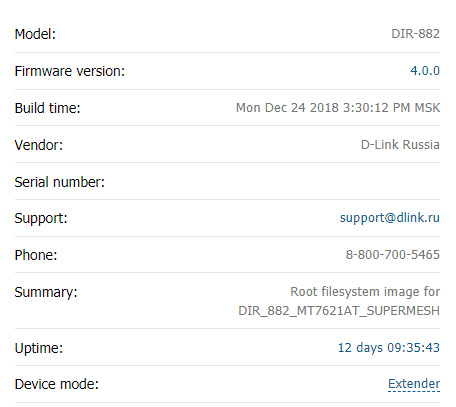 |
|
|
Nov 23 2019, 12:46 PM
Return to original view | Post
#20
|
|
Senior Member
1,250 posts Joined: Jun 2009 From: the land before time
|
QUOTE(pizzaboyj @ Nov 22 2019, 09:17 AM) eh you're right, switched to 3.5.2 and its way more stable and feels faster. i dont think you can install the US firmware on the routers that were given by time tho? I tried and it failed.tried the US firmware? the firmware dates are newer too. |
| Change to: |  0.0301sec 0.0301sec
 0.45 0.45
 7 queries 7 queries
 GZIP Disabled GZIP Disabled
Time is now: 3rd December 2025 - 06:43 PM |
 Quote
Quote