Had a tplink router with custom Time firmware. Is it good to flash it with "normal" firmware with hope to gain better performance?
TIME [OFFICIAL] TIME Fibre Broadband™ v4, Experience the ONE TRUE 2Gbps
TIME [OFFICIAL] TIME Fibre Broadband™ v4, Experience the ONE TRUE 2Gbps
|
|
 May 18 2020, 08:24 PM May 18 2020, 08:24 PM
Return to original view | Post
#1
|
 
Junior Member
205 posts Joined: Sep 2014 
|
Had a tplink router with custom Time firmware. Is it good to flash it with "normal" firmware with hope to gain better performance?
|
|
|
|
|
|
May 19 2020, 04:30 AM
Return to original view | Post
#2
|
|
Junior Member
205 posts Joined: Sep 2014
|
QUOTE(FusionXY @ May 18 2020, 10:27 PM) Is your router still under warranty? No more warranty. I should avoid the hassle to flash the firmware then. My reading room hardly get good connection even router already at middle of the house. Any good recommendation for a condo size of 1110sqft? Using Time 100Mbps.If you flash to normal firmware during warranty period. Warranty will be void. My suggestion for you is to get a new router instead. Flash Normal Firmware won't change the performance. It depends on the hardware, not the software. Thanks.  |
|
|
May 19 2020, 05:22 PM
Return to original view | Post
#3
|
|
Junior Member
205 posts Joined: Sep 2014
|
QUOTE(FusionXY @ May 19 2020, 10:18 AM) What's your budget bro? Rm300-400 range.Thanks. |
|
|
May 19 2020, 05:24 PM
Return to original view | Post
#4
|
|
Junior Member
205 posts Joined: Sep 2014
|
QUOTE(ryansxs @ May 19 2020, 10:55 AM) My personal favorite is Asus. If you are on budget, asus ac1300 does a good job for coverage. Is this model?https://www.lazada.com.my/products/asus-wif...2g7FbM&search=1 I'm doing some research now. And come out with a question that I'm not able to answer well - should I go for AX (Wifi 6) instead with a top up of RM100+. My budget is around RM300-400 range. |
|
|
May 19 2020, 11:19 PM
Return to original view | Post
#5
|
|
Junior Member
205 posts Joined: Sep 2014
|
QUOTE(FusionXY @ May 19 2020, 05:29 PM) You may get the TP-Link AX10. Haha... looking for that too.Thanks. QUOTE(ryansxs @ May 19 2020, 08:15 PM) If you are not extremely budget tight, then surely go for AX. Its future proof as many of new devices support AX mode. I just found out my company laptop is ax enable. Might getting ax... |
|
|
May 23 2020, 02:08 PM
Return to original view | Post
#6
|
|
Junior Member
205 posts Joined: Sep 2014
|
QUOTE(FusionXY @ May 19 2020, 05:29 PM) You may get the TP-Link AX10. Bought AX10 today. So far very satisfied with the speed. 5GHz performance is very stable compare to C1200. Thanks. Setup only take few minutes using Tp Link Tether App (Tips - turn off your data plan. else the app will not detect the new router). Below are the results with following conditions - Time 100Mbps subscription - 5GHz wifi - mother in law streaming Kodi iCdrama and wifi streaming Youtube while cooking 1) PC with Intel WiFi Link 5300. Located in a room that furthest in the house and placed on a floor (2 walls and 1 door). Since it is Wireless G adapter - max upload speed is 54Mbps.  2) A laptop with Intel AX200. Same location.  This post has been edited by RagingCandy: May 23 2020, 02:10 PM |
|
|
|
|
|
May 23 2020, 03:53 PM
Return to original view | Post
#7
|
|
Junior Member
205 posts Joined: Sep 2014
|
QUOTE(FusionXY @ May 23 2020, 02:36 PM) Thanks for the feedback. My PC speed is better and stable now compare to when using C1200 (flashed with EU firmware). With C1200 the download speed hardly reach 60Mbps for download and 20Mbps for upload. Cannot provides evidence to proof the comparison though as I "shelved" the C1200. I hope that you enjoy using the new router. Compared to the previous router. Speed is lower than before when using C1200? Maybe you can post the comparison so that we know more. The speed is very good with AX Adapter/Chipset. TP-Link Archer AX10 is suitable for 100Mbps... TP-Link Archer AX50 is suitable for 300Mbps and above. Have a nice day bro...   Initially planned to get AX50 but changed my mind as numerous ppls complaint about reboot issue (suspect Intel Chip generate too much heat) in official TP link community forum. This post has been edited by RagingCandy: May 23 2020, 03:57 PM |
|
|
May 24 2020, 01:21 AM
Return to original view | Post
#8
|
|
Junior Member
205 posts Joined: Sep 2014
|
When I first subscribed Time 4 years ago, some guru ask me not to turn on IPv6 as it was not stable during that time. Is it good to turn it back now?
|
|
|
May 24 2020, 07:40 AM
Return to original view | Post
#9
|
|
Junior Member
205 posts Joined: Sep 2014
|
QUOTE(FusionXY @ May 24 2020, 01:37 AM) Hello, I enabled IPv6. Oh... I should enable then. Shall I check to share session with ipv4?Never had complaints. I think the purpose is to have more IP Address... Thanks. 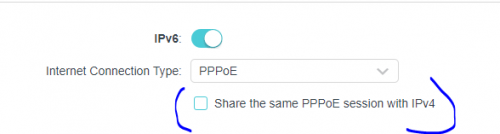 |
|
|
May 25 2020, 05:03 PM
Return to original view | IPv6 | Post
#10
|
|
Junior Member
205 posts Joined: Sep 2014
|
QUOTE(#Victor @ May 25 2020, 03:01 PM) tie the fiber cable with existing copper cable that already concealed inside wall and slowly pull up. Nice one. I did the same... running the fiber inside existing TM copper trunk pipe. If not mistaken default is 10m free fiber wire (4 years ago la. Not sure they change it or not). The technician that did the installation thanks me and gv me extra 5 meters of fiber wire FOC- bcz I helped him drilled the hole after he failed to do so and prep all the fishing line a day prior so that it can easily pull the line inside the pvc pipe.no, the suffix can be removed but technician dun allow to do so. it's okay, later when the technician left i renamed the SSID to preferred one by own 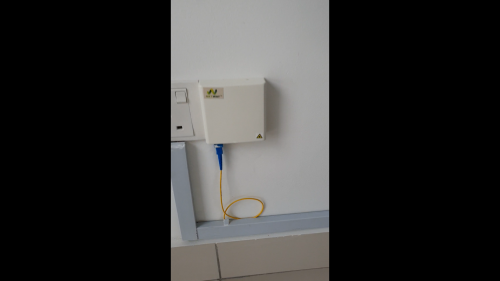  One question to ask sifu here.... is it safe to run ethernet cable inside a electric wire pipe? This post has been edited by RagingCandy: May 25 2020, 05:04 PM |
|
|
Oct 27 2020, 12:22 AM
Return to original view | Post
#11
|
|
Junior Member
205 posts Joined: Sep 2014
|
QUOTE(brandonkl @ Oct 26 2020, 08:44 PM) Recently, I have issues .. can't load some websites and have to click reload again, then okay. Maybe I need to change my DNS.. what is the best DNS to use? I'M having exact same issue! |
|
|
May 15 2021, 10:32 AM
Return to original view | Post
#12
|
|
Junior Member
205 posts Joined: Sep 2014
|
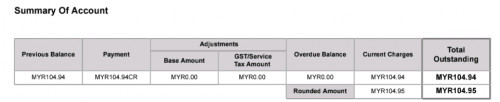
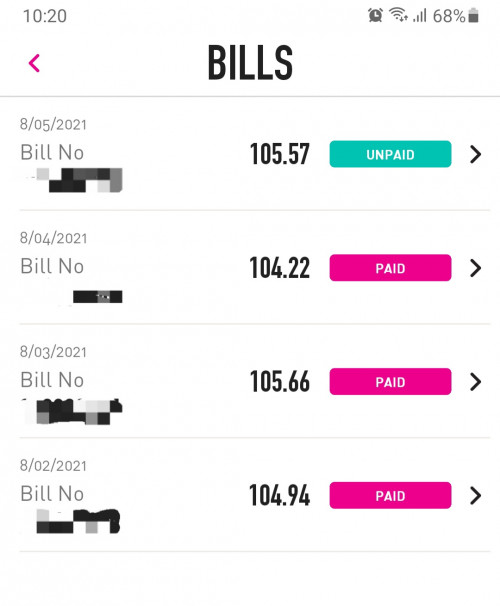
I found out the $ show on the system not tally with actual bill. Do you guys face the same issue.
P/s: I'm not using the phone and the monthly bill should be rm104.94. Example: 1) MARCH - paid rm105.66 and I check the bill again the actual payable amount was rm104.94 2) April - refunded the extra charge of rm0.72. 3) May - system ask me to pay rm105.57 again this month. » Click to show Spoiler - click again to hide... « |
|
|
Sep 7 2021, 02:03 PM
Return to original view | Post
#13
|
|
Junior Member
205 posts Joined: Sep 2014
|
it seems like TIME is offering royalty program now. +RM10 for 300Mbps + Huawei router with 2 years contract. Worth?
Besides that, just curious will Time change the ONU? |
|
|
|
|
|
Sep 7 2021, 02:03 PM
Return to original view | Post
#14
|
|
Junior Member
205 posts Joined: Sep 2014
|
-delete duplicate-
This post has been edited by RagingCandy: Sep 7 2021, 02:03 PM |
|
|
Sep 21 2021, 05:46 PM
Return to original view | Post
#15
|
|
Junior Member
205 posts Joined: Sep 2014
|
QUOTE(jjj2 @ Sep 10 2021, 02:21 PM) **Need helps** I applied for the 300Mbps plan yesterday. A check just now it seems like they have upgraded it. HOWEVER, the upload speed is not able to hit 300Mbps. Sometimes I only get a download speed of 50Mbps. It never happens with my 100Mbps plan. Any idea? Router: Tplink AX1500 Wi-Fi 6 Router 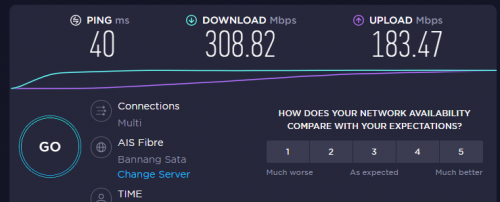 |
|
|
Sep 21 2021, 06:53 PM
Return to original view | IPv6 | Post
#16
|
|
Junior Member
205 posts Joined: Sep 2014
|
QUOTE(kmrdeva @ Sep 21 2021, 06:39 PM) Any reason why you are testing with a Thai server? Same result even connecting to TiME server or using TIME website to test it.I am in Penang and just ran a test against the Shah Alam Time server. Time Fibre plan - 500mb Phone - OnePlus 8T Router - Asus Zenwifi XT8 (5m from my primary mesh router node) 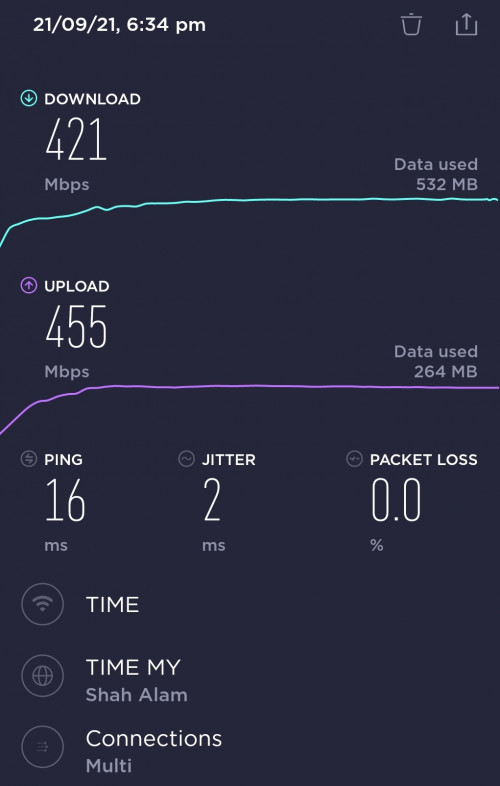 |
|
|
Sep 21 2021, 09:06 PM
Return to original view | Post
#17
|
|
Junior Member
205 posts Joined: Sep 2014
|
QUOTE(kmrdeva @ Sep 21 2021, 07:01 PM) Tried testing with a wired connection eg PC? QUOTE(xSean @ Sep 21 2021, 08:13 PM) Got called time? QUOTE(ktchang321 @ Sep 21 2021, 08:30 PM) same scenario happened to me. Tested using LAN cable connecting to my laptop. The upload speed gradually reaching 300Mbps toward the end of the testing. Like it is struggling to reach that speed.All devices with WiFi 6 are NOT ABLE to reach 300Mbps/ ONLY HALF OF IT. I yet to call TIME as the internet is currently in use for zoom call. Maybe give them a call later. |
|
|
Oct 12 2021, 07:02 PM
Return to original view | Post
#18
|
|
Junior Member
205 posts Joined: Sep 2014
|
I just get my free Huawei WA8021V5. It was loaded with TIME firmware. Does anyone manage to flash it with vanilla firmware?
Secondly, I notice there is one feature called WIFI Relay. What is that for? Noob here... |
|
|
Oct 14 2021, 12:59 PM
Return to original view | Post
#19
|
|
Junior Member
205 posts Joined: Sep 2014
|
QUOTE(Sumofwhich @ Oct 14 2021, 12:19 AM) Anyone using pi-hole and ads are blocked successfully with Huawei HG8145V5 router? Previously using Unifi and it was working correctly, after changing to Time, even though pointing my phone/devices dns server to pi-hole ip address but none of the ads are being blocked. Also facing some laggy issues streaming tea tv movies, 30Mbps Unifi to 100Mbps Time macam no difference, pls help to advise? Thanks On a side note, tvbox chrome browser speedtest.net gives about 25Mbps but downloading the speedtest.net app shows 90Mbps, really puzzled. QUOTE(PRSXFENG @ Oct 14 2021, 07:52 AM) Not sure for the other ones but somewhere in here is mentioned the TIME provided router hijacks all DNS and points it to TIME DNS instead of whatever you have set up Try use Tracert command to check whether it route to dns server you set.Replace with own router. https://support.microsoft.com/en-us/topic/h...bRHJJy4GysHeo6a Sumofwhich liked this post
|
|
|
Nov 16 2023, 08:05 PM
Return to original view | Post
#20
|
|
Junior Member
205 posts Joined: Sep 2014
|
QUOTE(FusionXY @ Nov 16 2023, 01:32 AM) Have you contact TIME to convert to bridge mode? You can do it by yourself. After login into the router, change the Uplink to AP.Sorry for the late response as currently busy. |
| Change to: |  0.0318sec 0.0318sec
 0.63 0.63
 7 queries 7 queries
 GZIP Disabled GZIP Disabled
Time is now: 17th December 2025 - 10:47 AM |
 Quote
Quote