

<deleted>
This post has been edited by Car_Kai: Oct 16 2018, 07:33 PM
TIME [OFFICIAL] TIME Fibre Broadband™ v4, Experience the ONE TRUE 2Gbps
TIME [OFFICIAL] TIME Fibre Broadband™ v4, Experience the ONE TRUE 2Gbps
|
|
 Oct 16 2018, 07:20 PM Oct 16 2018, 07:20 PM
|
 
Junior Member
23 posts Joined: Jan 2014 
|
<deleted>
This post has been edited by Car_Kai: Oct 16 2018, 07:33 PM |
|
|
|
|
|
Oct 16 2018, 07:21 PM
|

Junior Member
346 posts Joined: Jul 2012
|
QUOTE(TableBottom @ Oct 16 2018, 07:04 PM) Oh so even though when I'm on the 1gbps plan, max speed I could get is ~500? Switched my USB 3.0 ether adapter with a USB-C one and the speeds are still more or less the same. Sry, I was just pointing at the video example as he is showing 500Mbps package speed, but with USB2.0 he is bottlenecking the connection to 350Mbps. But on your case, you should be able to get ~1000/500 Mbps with your current package. Now it seems that your issue is not related to the this example above. |
|
|
Oct 16 2018, 07:23 PM
|
|
All Stars
52,874 posts Joined: Jan 2003
|
QUOTE(Car_Kai @ Oct 16 2018, 07:20 PM) So i just got my new bill. Currently at 500 Mbps Turbo and monthly Rm189.75 include SST. Did you post correctly? Today the new bill is Rm193.90 including Rm4.17 for Service Tax.  So does anyone else got the same Tax as me ? Will this tax apply monthly from now + 6% SST ? Sigh. After my contract over I will terminate this UNIFI thing. [attachmentid=10071761] This is not UniFi thread. |
|
|
Oct 16 2018, 07:35 PM
|
|
Junior Member
23 posts Joined: Jan 2014
|
QUOTE(David83 @ Oct 16 2018, 07:23 PM) Did you post correctly? Sorry my bad LOL. Well I just click which thread on top list. This is not UniFi thread.  |
|
|
Oct 16 2018, 07:43 PM
|
|
Junior Member
49 posts Joined: Jun 2014
|
QUOTE(wirelessbuyer @ Oct 16 2018, 07:21 PM) Sry, I was just pointing at the video example as he is showing 500Mbps package speed, but with USB2.0 he is bottlenecking the connection to 350Mbps. But on your case, you should be able to get ~1000/500 Mbps with your current package. Ah okay, thanks. Still trying to figure out what's the bottleneck. Even got my 2 extra CAT 7 cables that arrived today so all cables now using CAT 7, still no improvement.Now it seems that your issue is not related to the this example above. |
|
|
Oct 16 2018, 07:56 PM
|

Junior Member
272 posts Joined: Dec 2004 From: New Value City  
|
I re-tested my 1Gbps connection with cat 6 cables.
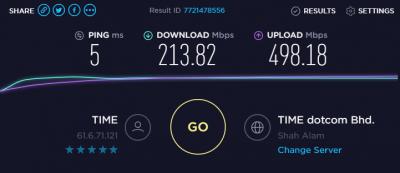
Not using USB network adapter. Not even close to 1Gbps. |
|
|
|
|
|
Oct 16 2018, 08:17 PM
Show posts by this member only | IPv6 | Post
#1027
|

Senior Member
3,834 posts Joined: Aug 2016
|
QUOTE(plague @ Oct 16 2018, 07:56 PM) I re-tested my 1Gbps connection with cat 6 cables. Have you perform a direct connection to ONU to test out.
Not using USB network adapter. Not even close to 1Gbps. It seems those who upgraded to 1Gbps now having problems with the speed. Thanks. |
|
|
Oct 16 2018, 08:50 PM
|

Junior Member
349 posts Joined: Apr 2009 From: USJ/Subang Jaya
|
QUOTE(kmrdeva @ Oct 16 2018, 05:44 PM) I have a pair of tp-link av1200 plugs. Router in the living room and PC in the study room (1 wall in between, 8m away). TP-Link utility claims a 900mbps connection between the plugs. i thought powerline can reach at least 50% or more PC connected directly to router in the living room gets 500/500. PC in the study room gets 130-190mbps up and down. Moving to mesh Wi-Fi soon in November.  |
|
|
Oct 16 2018, 08:55 PM
|
|
Junior Member
272 posts Joined: Dec 2004 From: New Value City
|
QUOTE(FusionXY @ Oct 16 2018, 08:17 PM) Have you perform a direct connection to ONU to test out. I have not. Waiting for wife to finish her meeting before i can have the internet to myself.It seems those who upgraded to 1Gbps now having problems with the speed. Thanks. I cant use office's laptop (GbE) since i got no admin to create a ppoe connection. My own laptop only support fE, so i used a dongle (usb 3.0 GbE). Might have issue as well since the test earlier with this setup doesnt go beyond 350Mbps. One guy pointed it's because usb 2.0. Verified the port is usb 3.0, might be conned by the hardware. Pening bro...hahahaha |
|
|
Oct 16 2018, 09:03 PM
Show posts by this member only | IPv6 | Post
#1030
|
|
Senior Member
3,834 posts Joined: Aug 2016
|
QUOTE(plague @ Oct 16 2018, 08:55 PM) I have not. Waiting for wife to finish her meeting before i can have the internet to myself. Hmm... So troublesome for your case. Or alternatively you can get USB 3.0 Adapter to try out. I cant use office's laptop (GbE) since i got no admin to create a ppoe connection. My own laptop only support fE, so i used a dongle (usb 3.0 GbE). Might have issue as well since the test earlier with this setup doesnt go beyond 350Mbps. One guy pointed it's because usb 2.0. Verified the port is usb 3.0, might be conned by the hardware. Pening bro...hahahaha One of the forumer here also having problems of not getting full 1Gbps using the Gigabit Ethernet Adapter. Thanks. |
|
|
Oct 16 2018, 09:14 PM
|
|
Junior Member
272 posts Joined: Dec 2004 From: New Value City
|
QUOTE(FusionXY @ Oct 16 2018, 09:03 PM) Hmm... So troublesome for your case. Or alternatively you can get USB 3.0 Adapter to try out. Thank you for understanding my situation. Might as well downgrade to 500 since very mafan to achieve 1Gbps.... But i really want to see that 1Gbps speedtest, to be proud of that Malaysia has achieve 1Gbps internet service... HaihOne of the forumer here also having problems of not getting full 1Gbps using the Gigabit Ethernet Adapter. Thanks. |
|
|
Oct 16 2018, 09:36 PM
|
|
Newbie
3 posts Joined: Oct 2015
|
QUOTE(plague @ Oct 16 2018, 09:14 PM) Thank you for understanding my situation. Might as well downgrade to 500 since very mafan to achieve 1Gbps.... But i really want to see that 1Gbps speedtest, to be proud of that Malaysia has achieve 1Gbps internet service... Haih Dear all,Just to share my experience with TIME 1G broadband.. I have done a lot of test but still not able to get reasonable result. One of my friend suggest me to switch of anti-virus & windows firewall.. After disable both apps... Hmmmmm... 900++ Yeeehaaaaaa.. 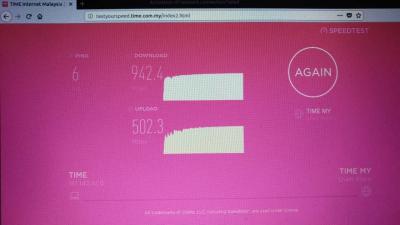
|
|
|
Oct 16 2018, 09:51 PM
|
|
Junior Member
49 posts Joined: Jun 2014
|
QUOTE(tigasinggate @ Oct 16 2018, 09:36 PM) Dear all, Interesting, after disabling mine I managed to reach 626 down, usually getting around 400. Hopefully we'll find a proper solution soon hahaJust to share my experience with TIME 1G broadband.. I have done a lot of test but still not able to get reasonable result. One of my friend suggest me to switch of anti-virus & windows firewall.. After disable both apps... Hmmmmm... 900++ Yeeehaaaaaa..
|
|
|
|
|
|
Oct 16 2018, 10:18 PM
|
|
Newbie
3 posts Joined: Oct 2015
|
QUOTE(TableBottom @ Oct 16 2018, 09:51 PM) Interesting, after disabling mine I managed to reach 626 down, usually getting around 400. Hopefully we'll find a proper solution soon haha interesting to know both apps is choking the speed pipe. at the same time don't understand why.. it's not like executing applications or downloading files from internet, where i can understand why firewall and antivirus need to play their roles. this is just a speed test... maybe our sifu here have a better explanation & experience. |
|
|
Oct 16 2018, 10:18 PM
|

Junior Member
994 posts Joined: May 2013 From: Kuala Lumpur
|
I am on 1 Gbps plan .. last two days, speed is always around 700+ mbps ... before that was able to reach 900+ mbps but not last two days.
Somehow I think Time hardware is not able to support all the 1 Gbps subscribers. The lucky ones will have no issue but there's still quite a number of users not being able to achieve at least 900+ Mpbs. All my speedtests are on wired and speedtest Windows 10 standalone app. |
|
|
Oct 16 2018, 10:26 PM
|
|
Junior Member
346 posts Joined: Jul 2012
|
QUOTE(TableBottom @ Oct 16 2018, 07:04 PM) Oh so even though when I'm on the 1gbps plan, max speed I could get is ~500? Switched my USB 3.0 ether adapter with a USB-C one and the speeds are still more or less the same. Hey, are you running on windows 10? If yes, can you check whether your ethernet adapter is running on 2.0 or 3.0 speedSetting > Device > Bluetooth & Other Device > *find your ethernet adapter* EDIT: Ahh I didn't realize your latest reply that you can achieve 600Mbps+, yours should be 3.0 then  This post has been edited by wirelessbuyer: Oct 16 2018, 10:34 PM Attached thumbnail(s) 
|
|
|
Oct 16 2018, 10:33 PM
|
|
Junior Member
49 posts Joined: Jun 2014
|
QUOTE(wirelessbuyer @ Oct 16 2018, 10:26 PM) Hey, are you running on windows 10? If yes, can you check whether your ethernet adapter is running on 2.0 or 3.0 speed Yep running W10. It says Connected to USB 3.0 (even though it's a USB-C device)Setting > Device > Bluetooth & Other Device > *find your ethernet adapter* |
|
|
Oct 16 2018, 10:34 PM
Show posts by this member only | IPv6 | Post
#1038
|

Junior Member
138 posts Joined: Sep 2014
|
Hi anyone facing trouble to speed test TIME server? other server are fine...just wondering am I the only one who experienced that...Self care page shows connection status is disconnect but my internet is working now...

|
|
|
Oct 16 2018, 10:41 PM
|
|
Junior Member
346 posts Joined: Jul 2012
|
QUOTE(TableBottom @ Oct 16 2018, 10:33 PM) Yep running W10. It says Connected to USB 3.0 (even though it's a USB-C device) Just notice your previous reply that now you can achieve more than 600Mbps, even though not yet gigabit speed as per your 1Gbps package  |
|
|
Oct 16 2018, 11:28 PM
|
|
Junior Member
49 posts Joined: Jun 2014
|
QUOTE(wirelessbuyer @ Oct 16 2018, 10:41 PM) Just notice your previous reply that now you can achieve more than 600Mbps, even though not yet gigabit speed as per your 1Gbps package Yep, slowly getting there |
| Change to: |  0.0182sec 0.0182sec
 0.53 0.53
 6 queries 6 queries
 GZIP Disabled GZIP Disabled
Time is now: 6th December 2025 - 06:37 PM |
 Quote
Quote