Outline ·
[ Standard ] ·
Linear+
TIME [OFFICIAL] TIME Fibre Broadband™ v4, Experience the ONE TRUE 2Gbps
|
plague
|
 Oct 16 2018, 01:25 PM Oct 16 2018, 01:25 PM
|
Getting Started


|
Geng,
Need advise. TIME has not responded to me on my issue.
Recently got upgraded from 300Mbps to 1Gbps, bloody excited. Old router doesn't support it (850L), go out and buy Asus AC68U.
Came back set up, speed still the same.
Using USB 3.0 network adapater, cat6 from laptop to router, cat6 from router to modem.
Laptop - HP Pavi
Core i7-6700HQ
16gb ram
240GB m.2
Speed test is 350Mbps up/down.
Wifi on 5Ghz - 290Mbps the most (p20 pro). Any advise?
Thanks
plague
|
|
|
|
|
|
plague
|
Oct 16 2018, 02:46 PM
|
Getting Started
|
QUOTE(Mr.PostMan @ Oct 16 2018, 02:11 PM) Try using Cat-7 LAN cable. i clocked 900+ Mbps Down and 600+ Mbps Up. Noted. I've ordered already cat 7 from shopee. Pending delivery. Will re test once i got it. Likely cable issue? |
|
|
|
|
|
plague
|
Oct 16 2018, 07:56 PM
|
Getting Started
|
I re-tested my 1Gbps connection with cat 6 cables. 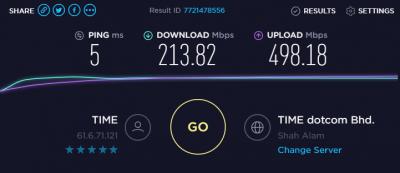
Not using USB network adapter. Not even close to 1Gbps. |
|
|
|
|
|
plague
|
Oct 16 2018, 08:55 PM
|
Getting Started
|
QUOTE(FusionXY @ Oct 16 2018, 08:17 PM) Have you perform a direct connection to ONU to test out. It seems those who upgraded to 1Gbps now having problems with the speed. Thanks. I have not. Waiting for wife to finish her meeting before i can have the internet to myself. I cant use office's laptop (GbE) since i got no admin to create a ppoe connection. My own laptop only support fE, so i used a dongle (usb 3.0 GbE). Might have issue as well since the test earlier with this setup doesnt go beyond 350Mbps. One guy pointed it's because usb 2.0. Verified the port is usb 3.0, might be conned by the hardware. Pening bro...hahahaha |
|
|
|
|
|
plague
|
Oct 16 2018, 09:14 PM
|
Getting Started
|
QUOTE(FusionXY @ Oct 16 2018, 09:03 PM) Hmm... So troublesome for your case. Or alternatively you can get USB 3.0 Adapter to try out. One of the forumer here also having problems of not getting full 1Gbps using the Gigabit Ethernet Adapter. Thanks. Thank you for understanding my situation. Might as well downgrade to 500 since very mafan to achieve 1Gbps.... But i really want to see that 1Gbps speedtest, to be proud of that Malaysia has achieve 1Gbps internet service... Haih |
|
|
|
|
|
plague
|
Oct 17 2018, 01:46 PM
|
Getting Started
|
QUOTE(jamespaul @ Oct 17 2018, 07:27 AM) Thanks bro. I didn't know this. |
|
|
|
|
|
plague
|
Oct 17 2018, 02:57 PM
|
Getting Started
|
QUOTE(ntc3freak @ Oct 17 2018, 02:50 PM) Decided to downgrade my 1Gbps plan (previously 300Mbps) down to 500Mbps plan last night (was processed and approved this morning). Decided that only my Android TV box and NAS ever gets connected to the router via Ethernet, and they don't need the Gigabit connection. The rest of my devices (iPhone X, iPads, 2017 Macbook Pro, and Gaming PC) all connect via 5GHz WiFi (over Netgear Nighthawk X8 and Ubiquiti Unifi AC-LR Access Point). No matter how much I tweaked, I couldn't for the life of me get sustained >600Mbps speed, even with top of the line wireless equipment and client devices. It made me cry inside when I clicked the confirmation to downgrade, but it was the smart move. I was extremely excited to finally have Gigabit internet in Malaysia, but alas not many of us can truly benefit from the raw speed, not even with top-of-the line equipment. Oh well, at least I pay RM60 less every month now, so that's a plus. I just did the samething. Tired already want to get the full speed. Downgraded to 500Mbps |
|
|
|
|



 Quote
Quote

 0.0312sec
 0.61
0.61
 7 queries
 GZIP Disabled