Welcome Guest ( Log In | Register )

302 Pages « < 259 260 261 262 263 > » Bottom

Outline · [ Standard ] · Linear+

Home Networking WiFi Router Discussion Thread, Updated for 2023

views
     
sitescope
post Oct 18 2023, 12:55 PM

Look at all my stars!!
*******
Senior Member
4,500 posts

Joined: Oct 2013
Which budget router has parental ctrl with below options :-

- able to restrict internet access multiple times in 1 day
Eg. Block frm 7-9am then 7-9pm

- able to block specific apps not web
- able to block all. Eg *.*
- able to block based on multiple MAC addr

This post has been edited by sitescope: Oct 18 2023, 12:58 PM
ben3003
post Oct 18 2023, 05:37 PM

10k Club
********
All Stars
10,859 posts

Joined: Jan 2003
From: Sarawak


Anyone know how does my 160mhz compatible device has connected to that bandwidth?

I see for my desktop, i use the wifi analyzer app, it show 20mhz.. but my killer 1650x card is 160mhz capable.

This post has been edited by ben3003: Oct 18 2023, 05:38 PM
sHawTY
post Oct 18 2023, 05:42 PM

Frequent Reporter
********
All Stars
14,909 posts

Joined: Jul 2005

QUOTE(ben3003 @ Oct 18 2023, 05:37 PM)
Anyone know how does my 160mhz compatible device has connected to that bandwidth?

I see for my desktop, i use the wifi analyzer app, it show 20mhz.. but my killer 1650x card is 160mhz capable.
Your router also needs to support 160MHz in order for your WiFi card to utilize it
Not all router supports 160MHz bandwidth
ben3003
post Oct 18 2023, 05:43 PM

10k Club
********
All Stars
10,859 posts

Joined: Jan 2003
From: Sarawak


QUOTE(sHawTY @ Oct 18 2023, 05:42 PM)
Your router also needs to support 160MHz in order for your WiFi card to utilize it
Not all router supports 160MHz bandwidth
*
My router tuf ax4200 support, also already enabled. Not sure is driver prob or not. Any way to confirm? Cos dunno the wifi analyzer app ok or not. No other device to test lol
Sky.Live
post Oct 19 2023, 09:24 AM

Proctected Species
*******
Senior Member
4,390 posts

Joined: Oct 2004
From: Cheras, Malaysia


hi, can you advise the difference between consumer and entry level enterprise router.

I am thinking to get a EAP660 or omada, or perhaps a Ubiquiti U6, looking at the price it is almost similar to current consumer product offering from Asus etc..

What is the difference between these consumer grade router? I am currently running an aged wireless mikrotik hAP ac routing from edgerouterX (cheapo setup).


andrewtho
post Oct 19 2023, 10:47 AM

Hooded Knight
*******
Senior Member
5,936 posts

Joined: Dec 2009
From: City of Subang Jaya
my current router is struggling to output 800Mbps on 5Ghz (currently using AC86U) - is it recommended for me to get a Wifi6 or Wifi6E router?
limcc
post Oct 19 2023, 12:22 PM

Getting Started
**
Junior Member
205 posts

Joined: Jan 2003
From: Muar/Singapore
QUOTE(andrewtho @ Oct 19 2023, 10:47 AM)
my current router is struggling to output 800Mbps on 5Ghz (currently using AC86U) - is it recommended for me to get a Wifi6 or Wifi6E router?
*
You should read the Maximum WiFi Speeds thread, just below this.

Wifi5 or 802.11AC has a max link speed of 866Mbps with 2x2 antenna, real world speed is about 5xxMbps. So 800Mbps is not possible unless you have 3x3 client.

Wifi6/E can reach 19xxMbps--real world speed with 2x2, provided your ISP can transmit at this speed.
GamaX320
post Oct 19 2023, 01:35 PM

Enthusiast
*****
Senior Member
822 posts

Joined: Sep 2012
QUOTE(Xange @ Sep 29 2023, 11:25 AM)
Update, the router firmware definitely got a new firmware update, the superadmin account is not available anymore(or maybe had a password changed), now must use the tmadmin account with the password provided on the label under the router (its "Adm@[last 4 alphanumeric of MAC]). New firmware also will compromise with your port forwarding if your firewall is set to high or medium and if your ddos protection is enabled.
*
Hi I facing same issue. What settings should we configure?

This post has been edited by GamaX320: Oct 19 2023, 01:40 PM
hasmidzul_jojo
post Oct 19 2023, 02:06 PM

Getting Started
**
Junior Member
203 posts

Joined: Feb 2008
QUOTE(Sky.Live @ Oct 19 2023, 09:24 AM)
hi, can you advise the difference between consumer and entry level enterprise router.

I am thinking to get a EAP660 or omada, or perhaps a Ubiquiti U6, looking at the price it is almost similar to current consumer product offering from Asus etc..

What is the difference between these consumer grade router? I am currently running an aged wireless mikrotik hAP ac routing from edgerouterX (cheapo setup).
*
Most entry level enterprise router based on the same chipset on consumer based nowdays.
Same MTK or Qualcomm or Broadcomm based chipset,but the difference was on the software running on these hardware.
With fancy software, you could run services like PPPOE server or macvlan just to name..not available on consumer based router.
For me, just build your network depending with your goal, go for AIO consumer based solution or SMB dedicated router/POE switches/AP setup.
Im a mikrotik user myself,with AIO router wifi for my house..only 3 wifi devices and a desktop pc. I dont need high end router and not running any services on my LAN,only wireguard and DOH.
Good enough for me.

tdled
post Oct 19 2023, 02:30 PM

Getting Started
**
Junior Member
61 posts

Joined: Aug 2008
House type: Condo
Size of house: 2000sqf, 1 floor
Features required: Antivirus? QoS? Bandwidth Limiter? VPN? None
Number of devices connected to WiFi:10
Internet Speed: 5g
Budget: RM200

Looking for router that uses sim card, as plan to buy 5g unlimited SIM card package, also need recommendations for best internet provider for mid valley area. Only need it for 6 weeks, so don't want to sign contract.

Thanks
BOTAK_WAI
post Oct 19 2023, 02:39 PM

Blow Water First Class
*******
Senior Member
4,166 posts

Joined: Jan 2003
From: Cheras, KL


QUOTE(tdled @ Oct 19 2023, 02:30 PM)
House type: Condo
Size of house: 2000sqf, 1 floor
Features required: Antivirus? QoS? Bandwidth Limiter? VPN? None
Number of devices connected to WiFi:10
Internet Speed: 5g
Budget: RM200

Looking for router that uses sim card, as plan to buy 5g unlimited SIM card package, also need recommendations for best internet provider for mid valley area. Only need it for 6 weeks, so don't want to sign contract.

Thanks
*
rm200 only can get u 4G router…5G need rm600
tdled
post Oct 19 2023, 02:53 PM

Getting Started
**
Junior Member
61 posts

Joined: Aug 2008
QUOTE(BOTAK_WAI @ Oct 19 2023, 02:39 PM)
rm200 only can get u 4G router…5G need rm600
*
How about this one?

WiFi Router Sim Card Modem 4G/5G 𝐂𝐏𝐄 𝐏𝐑𝐎 Original LTE Cat12 Up To 600Mbps 2.4G AC1200 WIFI Router
BOTAK_WAI
post Oct 19 2023, 03:03 PM

Blow Water First Class
*******
Senior Member
4,166 posts

Joined: Jan 2003
From: Cheras, KL


QUOTE(tdled @ Oct 19 2023, 02:53 PM)
those "5G" means 5GHz wifi…not real 5G
Chiggah
post Oct 19 2023, 03:04 PM

On my way
****
Junior Member
567 posts

Joined: Oct 2004
House type: Bungalow
Size of house: 2500sqf, 1 floor
Features required: Antivirus? QoS? Bandwidth Limiter? VPN? None
Number of devices connected to WiFi: 6 but not all devices are connected to use bandwidth at same time
Internet Speed: 300mbps
Budget: Can range from RM200-RM1000 . Looking for best bang for buck

Just me and wife using at the moment. I am WFH + use ethernet for desktop games. Wife is a light user.

Currently using TP Link Archer C1200.

This post has been edited by Chiggah: Oct 19 2023, 03:04 PM
MyProLife
post Oct 19 2023, 03:15 PM

I bully wumao & MPKL
*******
Senior Member
2,075 posts

Joined: Sep 2021
From: nowhere

QUOTE(Chiggah @ Oct 19 2023, 03:04 PM)
House type: Bungalow
Size of house: 2500sqf, 1 floor
Features required: Antivirus? QoS? Bandwidth Limiter? VPN? None
Number of devices connected to WiFi: 6 but not all devices are connected to use bandwidth at same time
Internet Speed: 300mbps
Budget: Can range from RM200-RM1000 . Looking for best bang for buck

Just me and wife using at the moment. I am WFH + use ethernet for desktop games. Wife is a light user.

Currently using TP Link Archer C1200.
*
If you like tp link as a whole, can get a lot choice there. Best choice would be either ax72 or ax73. Although slightly cheaper ax53 or ax55 will also suffice

But if you value long term software support, get asus. Like ax57, TUF ax4200, TUF ax6000 etc

Edit: replaced tuf 5400 with 6000 since now realised tuf6000 is newer and superior against 5400

This post has been edited by MyProLife: Oct 20 2023, 08:12 PM
Milo_O
post Oct 19 2023, 03:43 PM

Casual
***
Junior Member
432 posts

Joined: Aug 2011


House type: Landed two storey house
Size of house: 2 floors / 1600sq.ft
Number of devices connected to WiFi: Around 50 devices connected
Internet Speed:Currently 300 Mbps (will be upgrade to 500 Mbps soon)
Existing equipment : Deco M4 (2 packs) connected wireless (master at 1st floor while slave at 2nd floor)
Restrictions / Freatures :
1. Coverage is a must. The coverage at 2nd floor's room is bad. After using M4, coverage is good, however lack in speed ~50 Mbps)
2. Not possible to connect mesh with LAN due to house structure arrangement
3. I do not mind to get router instead of mesh if router are able to have good coverage on the entire house

Pls suggest and thanks in advance.

tdled
post Oct 19 2023, 03:55 PM

Getting Started
**
Junior Member
61 posts

Joined: Aug 2008
QUOTE(BOTAK_WAI @ Oct 19 2023, 03:03 PM)
those "5G" means 5GHz wifi…not real 5G
*
oh bangwall.gif
MyProLife
post Oct 19 2023, 07:36 PM

I bully wumao & MPKL
*******
Senior Member
2,075 posts

Joined: Sep 2021
From: nowhere

QUOTE(Milo_O @ Oct 19 2023, 03:43 PM)
House type: Landed two storey house
Size of house: 2 floors / 1600sq.ft
Number of devices connected to WiFi: Around 50 devices connected
Internet Speed:Currently 300 Mbps (will be upgrade to 500 Mbps soon)
Existing equipment : Deco M4 (2 packs) connected wireless (master at 1st floor while slave at 2nd floor)
Restrictions / Freatures :
  1. Coverage is a must. The coverage at 2nd floor's room is bad. After using M4, coverage is good, however lack in speed ~50 Mbps)
  2. Not possible to connect mesh with LAN due to house structure arrangement
  3. I do not mind to get router instead of mesh if router are able to have good coverage on the entire house

Pls suggest and thanks in advance.
*
Try tri band models like deco x68 or xe75
chkwong
post Oct 20 2023, 08:18 AM

Casual
***
Junior Member
411 posts

Joined: Mar 2013
QUOTE(Chiggah @ Oct 19 2023, 03:04 PM)
House type: Bungalow
Size of house: 2500sqf, 1 floor
Features required: Antivirus? QoS? Bandwidth Limiter? VPN? None
Number of devices connected to WiFi: 6 but not all devices are connected to use bandwidth at same time
Internet Speed: 300mbps
Budget: Can range from RM200-RM1000 . Looking for best bang for buck

Just me and wife using at the moment. I am WFH + use ethernet for desktop games. Wife is a light user.

Currently using TP Link Archer C1200.
*
Am using MR50G, best bang for buck IMHO. Less than RM 120. Even inside toilet got full speed. Double storey, 2k sqf. There is a newer model I think should be better. Check out blacktubi website, keyword "Mercusys".
soonwai
post Oct 20 2023, 04:10 PM


********
All Stars
11,459 posts

Joined: Oct 2007
From: KL


QUOTE(sitescope @ Oct 18 2023, 12:55 PM)
Which budget router has parental ctrl with below options :-

- able to restrict internet access multiple times in 1 day
Eg. Block frm 7-9am then 7-9pm

- able to block specific apps not web
- able to block all. Eg *.*
- able to block based on multiple MAC addr
*
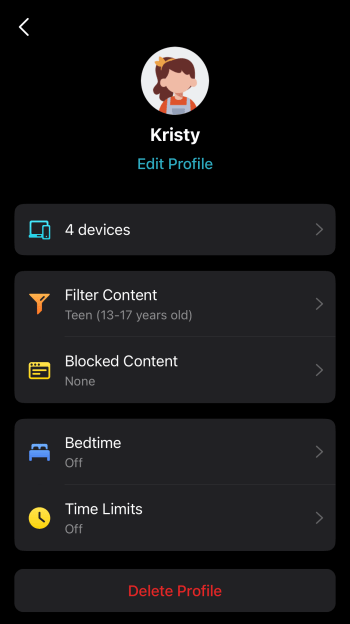
Not sure if it fulfills all your requirements but this is the parental controls page from Deco HC4. I just took the screenshot from my neighbour. I don't actually use the HC4.
user posted image

Any Mikrotik can do it but will require a bit of configuration. Their kid-control feature:
https://wiki.mikrotik.com/wiki/Manual:Kid-control

This post has been edited by soonwai: Oct 20 2023, 04:14 PM

302 Pages « < 259 260 261 262 263 > » Top
 

Change to:
| Lo-Fi Version
0.0229sec    0.86    6 queries    GZIP Disabled
Time is now: 19th December 2025 - 02:53 PM