Welcome Guest ( Log In | Register )

Outline · [ Standard ] · Linear+

Home Networking WiFi Router Discussion Thread, Updated for 2023

views
     
hasmidzul_jojo
post Oct 19 2023, 02:06 PM

Getting Started
**
Junior Member
203 posts

Joined: Feb 2008
QUOTE(Sky.Live @ Oct 19 2023, 09:24 AM)
hi, can you advise the difference between consumer and entry level enterprise router.

I am thinking to get a EAP660 or omada, or perhaps a Ubiquiti U6, looking at the price it is almost similar to current consumer product offering from Asus etc..

What is the difference between these consumer grade router? I am currently running an aged wireless mikrotik hAP ac routing from edgerouterX (cheapo setup).
*
Most entry level enterprise router based on the same chipset on consumer based nowdays.
Same MTK or Qualcomm or Broadcomm based chipset,but the difference was on the software running on these hardware.
With fancy software, you could run services like PPPOE server or macvlan just to name..not available on consumer based router.
For me, just build your network depending with your goal, go for AIO consumer based solution or SMB dedicated router/POE switches/AP setup.
Im a mikrotik user myself,with AIO router wifi for my house..only 3 wifi devices and a desktop pc. I dont need high end router and not running any services on my LAN,only wireguard and DOH.
Good enough for me.

hasmidzul_jojo
post Oct 20 2023, 08:02 PM

Getting Started
**
Junior Member
203 posts

Joined: Feb 2008
QUOTE(Sky.Live @ Oct 20 2023, 05:06 PM)
Mikrotik Hap ax3 is 600ish
U6 pro 800+
Omada eap670 700 ish

Tplink xe95 also rm800+ each

Nowadays things are not cheap 🥲
*
Not to mention, obscene price of ruckus AP brows.gif
hasmidzul_jojo
post Oct 21 2023, 01:55 PM

Getting Started
**
Junior Member
203 posts

Joined: Feb 2008
QUOTE(sitescope @ Oct 21 2023, 12:28 PM)
Look general
Wish can look config inside
But look like they dont block any web/app coz none is shown there
*
What your asking for,to block certain apps etc,most probably not invented yet.
Maybe you need enterprise DPI harware to control your kids internet usage.

Most router only restrict time based and using block list of dns type.
hasmidzul_jojo
post Dec 11 2023, 09:20 AM

Getting Started
**
Junior Member
203 posts

Joined: Feb 2008
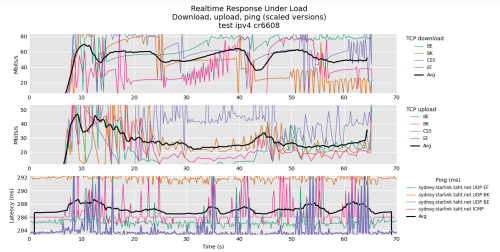
Been playing around with openwrt, cr6608, firmware 23.05.02.
Services running wireguard, dns over https, ddns.
Performance test on flent RRUL compete mixed ipv4 ipv6 test against sydney server.
Unifi 500Mbps


user posted image


hasmidzul_jojo
post Dec 11 2023, 09:26 AM

Getting Started
**
Junior Member
203 posts

Joined: Feb 2008
corection ... not RRUL compete ipv4 ipv6 test.ONLY RRUL test
hasmidzul_jojo
post Apr 19 2024, 06:29 AM

Getting Started
**
Junior Member
203 posts

Joined: Feb 2008
QUOTE(borgyang @ Apr 18 2024, 09:00 PM)


Questions:

1. Can we use back the existing Unifi/Maxis stock router and pair it to the Mesh Wi-Fi router from either TP-Link and Asus? Will there be any compatibility issues with the pairing?

Answer : Yes, but with some condition.Use match Mesh compatibility type hardware.For your parent house, fetch another SR1041Y for meshing, get another EasyMesh compatible AP for your own house eg: TPLINK Archer Ax23 or another AR2140.

2. We don’t want to buy an overkill router as we are currently on 300 Mbps plan. Our main concern is the Wi-Fi network coverage, not the speed. Should we go for AX1800 or AX3000 Wi-Fi 6 router? Does AX3000 come with a higher transmission power to strengthen signal coverage as compared to AX1800?

Answer : Just get Ax1800 devices since you have budget constrain and not for speed.Transmission power is regulated on specific country region.

3. We have budget constraints so we are looking at these entry-level Wi-Fi 6 routers. Which model is the best value for money at this price point? Which router combination works well?

Answer : As per above answer.

*
hasmidzul_jojo
post Apr 20 2024, 07:16 AM

Getting Started
**
Junior Member
203 posts

Joined: Feb 2008
QUOTE(borgyang @ Apr 19 2024, 07:30 PM)
Thanks for your suggestions!

I just did a quick price comparison online and found that the TP-Link Official Store on Shopee is selling TP-Link Archer AX53 AX3000 at RM228. We only need to top up additional RM20 from the AX1800 model, but I wonder why they sell so cheap. Have you heard of any issues or negative feedback for this model?

Wi-Fi 6 AX1800 Router
TP-Link Archer AX23 AX1800 - RM208
Asus RT-AX1800HP AX1800 - RM345

Wi-Fi 6 AX3000 Router
TP-Link Archer AX53 AX3000 - RM228
Asus RT-AX57 AX3000 - RM458

In this case, the new TP-Link Archer X53 AX3000 will be paired with the existing Unifi/Maxis stock router using Mesh Wi-Fi through wireless backhaul. How can I set up Mesh Wi-Fi between two routers of different brands?

Will there be two sets (2.4 GHz + 5 Ghz) of different SSID for this kind of setup? Will there be any issue if I use the same SSID and password for both routers?

What’s the differences between these two setups for connecting both routers using Mesh Wi-Fi through wireless backhaul?
1) 1x TP-Link Archer X53 AX3000 + 1x Unifi/Maxis stock router
2) 2x TP-Link Archer X53 AX3000

Thanks in advance!
*
tplink ax23 and ax53 using different mesh system, EASYMESH and ONEMESH, which would not work together.Since you are on a budget, the only choice was what i wrote before.Your MAxis router only work with EASYMESH and fiberhome sr1041y only work with same fiberhome ecosystem.Google for EASYMESH and ONEMESH.

The last time i setup mesh network was on wifi5 AC system (dual band wifi, not the triband one) and i dont like it.Never setup mesh system on wifi6 system or triband AP/router.

Im on wired backhaul and only use fast roaming feature on my setup.

The internet connection is 800Mbps and i use one ax6000 router and one ax1800 AP (wired).I could achieve 800mbps (speedtest.net) on strong signal,very near to AP and a minimum 2x2 80MHz(5GHz) wifi6 clients across both AP.

This post has been edited by hasmidzul_jojo: Apr 20 2024, 07:20 AM


Change to:
| Lo-Fi Version
0.0342sec    0.76    7 queries    GZIP Disabled
Time is now: 17th December 2025 - 01:57 AM