

QUOTE(theonecafe @ Jul 20 2019, 10:38 PM)
What brand reliable with mesh… asus? Or got other brand

got money - asusno money - tplink
Home Networking WiFi Router Discussion Thread, Updated for 2023
|
|
 Jul 23 2019, 09:13 AM Jul 23 2019, 09:13 AM
Return to original view | Post
#1
|
 
Senior Member
4,493 posts Joined: Oct 2013 
|
QUOTE(theonecafe @ Jul 20 2019, 10:38 PM) What brand reliable with mesh… asus? Or got other brand got money - asusno money - tplink |
|
|
|
|
|
Oct 18 2023, 12:55 PM
Return to original view | IPv6 | Post
#2
|
|
Senior Member
4,493 posts Joined: Oct 2013
|
Which budget router has parental ctrl with below options :-
- able to restrict internet access multiple times in 1 day Eg. Block frm 7-9am then 7-9pm - able to block specific apps not web - able to block all. Eg *.* - able to block based on multiple MAC addr This post has been edited by sitescope: Oct 18 2023, 12:58 PM |
|
|
Oct 21 2023, 12:28 PM
Return to original view | IPv6 | Post
#3
|
|
Senior Member
4,493 posts Joined: Oct 2013
|
QUOTE(soonwai @ Oct 20 2023, 04:10 PM) Not sure if it fulfills all your requirements but this is the parental controls page from Deco HC4. I just took the screenshot from my neighbour. I don't actually use the HC4. Look general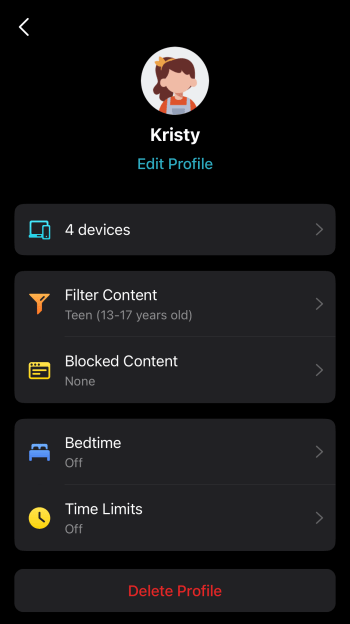 Any Mikrotik can do it but will require a bit of configuration. Their kid-control feature: https://wiki.mikrotik.com/wiki/Manual:Kid-control Wish can look config inside But look like they dont block any web/app coz none is shown there |
|
|
Oct 21 2023, 02:56 PM
Return to original view | IPv6 | Post
#4
|
|
Senior Member
4,493 posts Joined: Oct 2013
|
QUOTE(hasmidzul_jojo @ Oct 21 2023, 01:55 PM) What your asking for,to block certain apps etc,most probably not invented yet. Maybe you need enterprise DPI harware to control your kids internet usage. Most router only restrict time based and using block list of dns type. QUOTE(soonwai @ Oct 21 2023, 02:43 PM) Can have a look here. https://www.tp-link.com/my/support/faq/1598/ I think will give a try with tplink routerLooks like: 1. Blocking via device MAC address. 2. Filtered Content - looks like DNS blocklist and/or IP block 3. Blocked Content - looks like DNS blocklist and/or IP block I think OK lah for casual use. What's your target? If teens then they'll probably bypass in no time. I'm sure one of their friends in school is a hacker. 1. MAC address can be changed/spoofed easily. eg: Private MAC address already built-in to most OS. 2. DNS blocks will depend on whomever is maintaining the blocklist whether it's TPLink or one of those public blocklists. 3. DNS blocks can be bypassed by using alternative URLs. 4. DNS blocks can be bypassed by using external DNS or encryption like DOH(TTPS), DOT(TL), DOQ(UIC), etc... 5. IP a bit difficult to get all. eg: Youtube uses thousands of IP addresses. 6. VPN bypasses all unless you block the VPN. Block web or app is the same. Need to block URL or IP. Probably easier to use PC's or phone's parental control feature. Bypass by having secret 2nd device. My current tenda got weird blocking action I set at certain time but it block whole day Router time aldy sync with internet time hasmidzul_jojo liked this post
|
|
|
Nov 15 2023, 07:47 PM
Return to original view | IPv6 | Post
#5
|
|
Senior Member
4,493 posts Joined: Oct 2013
|
QUOTE(dudester @ Nov 15 2023, 03:38 PM) currently i am using TM default mesh router, i think is TPlink. does it make sense to upgrade to Asus Zenwifi AX XD5 (2 unit) for double link house? Need to draw easy to understandMy router is placed upstairs common area. I like to extend a better reach to back wet kitchen, means going through concrete floor, and 2 walls. The mesh extended router can be placed downstairs with direct line of sight, but front of house, also need to go through 2 walls to reach back wet kitchen. |
|
|
Jan 13 2024, 01:18 PM
Return to original view | IPv6 | Post
#6
|
|
Senior Member
4,493 posts Joined: Oct 2013
|
QUOTE(hammetts @ Jan 12 2024, 08:41 AM) Hi, Does anyone has experience setting KAON AR2140 (maxis free router) as repeater using easymesh function? my main router AX53 Try use cable frm ax53 lan to kaon wanIve tried but kinda fail. its detect AR2140 as mesh but when i tried the coverage it was the same whether its on or off. FYI i use this step Steps: 1) Connect a laptop to LAN port of the AR2140 2) Navigate to the address http://192.168.1.254 using your preferred browsers (Mozilla Firefox, Google Chrome, Microsoft Edge) 3) Login as administrator into the web GUI 4) Using the navigation menu that is displayed on the left side of the AR2140 web GUI, click on NETWORK and then WAN Mode to access the menu to switch the operation mode of the AR2140 5) Select the button Bridge (Repeater) and a new submenu Friendly Name will appear 6) You can change the Friendly Name to any name as identification of the MESH nodes to be displayed in the web GUI. Eg: Kitchen's MAP, Bedroom, Living Hall AP, etc. 7) Click on APPLY button and the AR2140 will reboot automatically and ready to be setup to pair to a master/controller node using the WPS button |
| Change to: |  0.3942sec 0.3942sec
 0.88 0.88
 7 queries 7 queries
 GZIP Disabled GZIP Disabled
Time is now: 8th December 2025 - 09:02 PM |
 Quote
Quote