

I am using Mikrotik HAp AC, the 2.4Ghz wireless is totally unusable.. due to a triple story house i require a router with more stable 2.4Ghz AP, any recommendation?
Home Networking WiFi Router Discussion Thread, Updated for 2023
Home Networking WiFi Router Discussion Thread, Updated for 2023
|
|
 Jun 11 2019, 07:42 PM Jun 11 2019, 07:42 PM
Return to original view | Post
#1
|
 
Senior Member
4,390 posts Joined: Oct 2004 From: Cheras, Malaysia   
|
I am using Mikrotik HAp AC, the 2.4Ghz wireless is totally unusable.. due to a triple story house i require a router with more stable 2.4Ghz AP, any recommendation?
|
|
|
|
|
|
Jun 11 2019, 10:29 PM
Return to original view | Post
#2
|
|
Senior Member
4,390 posts Joined: Oct 2004 From: Cheras, Malaysia
|
QUOTE(blacktubi @ Jun 11 2019, 09:32 PM) ASUS RT-AC86U have one of the best 2.4Ghz performance around. where to look for them? locally available?Or maybe you can consider those used Ruckus AP. They work like magic in a noisy environment and they are fairly cheap now.  |
|
|
Jun 12 2019, 11:05 AM
Return to original view | Post
#3
|
|
Senior Member
4,390 posts Joined: Oct 2004 From: Cheras, Malaysia
|
QUOTE(blacktubi @ Jun 12 2019, 01:09 AM) RT-AC86U is available everywhere. Am i the only one having problem with 2.4Ghz wifi channel? 5Ghz is perfectly fine tho. Even unifi stock dlink router also have the same problemAs for Ruckus, you need to look around. Not easily available since it is enterprise level gear |
|
|
Mar 27 2020, 06:33 PM
Return to original view | Post
#4
|
|
Senior Member
4,390 posts Joined: Oct 2004 From: Cheras, Malaysia
|
is tp-link ax10 the most value for money router out there? with lazada sales now u can buy it at RM300 at OOKLAA..
asus ax-3000 on the other hand is about RM670, but at the flexibility of adding ai mesh when you need it |
|
|
Mar 27 2020, 07:58 PM
Return to original view | Post
#5
|
|
Senior Member
4,390 posts Joined: Oct 2004 From: Cheras, Malaysia
|
QUOTE(blacktubi @ Mar 27 2020, 06:51 PM) The Archer C1200 from TM is really a cheap cut cost router else it would hurt TM bottom line. Just want a reliable router first, can expand into a better wireless setup later. The RT-AC1300UHP is a decent choice, it works well and perform rather stable. 5Ghz coverage may not be as strong as some of the newer routers out there now. The Netis is really crap. Upgrade to a better router and try a better placement. That's the most you can do with that budget. Get the Archer A7 instead. Slightly more expensive but it is more stable. Got to be frank to you, I have tried even the best router in the market costing over RM2K but a much affordable mesh WiFi system can give you better speed upstairs. The reason is simple, WiFi transmit power is limited by regulation. However, the wireless gain of a real router or mesh node will always be better than a smart phone with tiny antenna. Hope my explanation is logical to you. As for product suggestion, the Deco M5/M9 are always a good choice. Deco M5 Mesh WiFi system, may need to stretch your budget a bit and get a Gigabit switch as well. I really liked the Archer AX10. Affordable and performs really well. It does not have a USB port thou. But I don't think many actually uses USB on a router. |
|
|
Mar 27 2020, 08:56 PM
Return to original view | Post
#6
|
|
Senior Member
4,390 posts Joined: Oct 2004 From: Cheras, Malaysia
|
QUOTE(blacktubi @ Mar 27 2020, 08:36 PM) Any router will be better than the stock TM router. If you are considering the A10, I would suggest the newer Archer AX10 instead. did you test on the 2.4ghz wifi? i tried on many routers it is still very bad.. A mesh WiFi system will offer you the best 2nd floor performance. The Archer AX10 is a good choice. In fact, I prefer it over the more expensive Archer AX50. Broadcom routers are more consistent and stable. Even on my old reliable mikrotik Mikrotik RB951G-2HnD i used to use, the wifi signal is still not reliable.. |
|
|
|
|
|
Mar 27 2020, 09:48 PM
Return to original view | Post
#7
|
|
Senior Member
4,390 posts Joined: Oct 2004 From: Cheras, Malaysia
|
QUOTE(blacktubi @ Mar 27 2020, 09:32 PM) I don't bother to try 2.4Ghz these days as honestly, no one is doing particularly well. Thanks for the advice, i purchased an ax10 at RM300 just now.You need something that have really good interference mitigation as 2.4Ghz is so congested nowadays. Previously I have an old Ruckus R300 and the 2.4Ghz signal and range still beat an AX11000 router.  Mikrotik WiFi performance is no where near the big boys (Ruckus, Aruba, UBNT). For most terrace house, mesh WiFi is a much if you want good WiFi performance on second floor if router is on the ground floor. Else most mobile phone will have poor 5Ghz reception. PCIE and USB WiFi adapters generally have stronger reception due to bigger antennas. For condo, it depends. The condo I am staying in have a more rectangular layout and the router is placed at one end and it is not possible for me to relocate the router. I will need mesh WiFi else there will be no WiFi signal in the bedroom which is at another end of the condo. Hope it will be good. |
|
|
Mar 27 2020, 10:50 PM
Return to original view | Post
#8
|
|
Senior Member
4,390 posts Joined: Oct 2004 From: Cheras, Malaysia
|
QUOTE(jhleo1 @ Mar 27 2020, 10:31 PM) Before saw your reply, I just bought Archer AX10 at RM271.50 (after Lazada discount vouchers) after read your website. Actually only my wife will use WiFi from 1st floor which directly on top of the living room which router put. The rest all usage in ground floor. I think Mesh wifi system maybe my future upgrade since now only use unifi 100mpbs. so cheap, i thought i got a good deal already |
|
|
Mar 28 2020, 10:05 AM
Return to original view | Post
#9
|
|
Senior Member
4,390 posts Joined: Oct 2004 From: Cheras, Malaysia
|
Anyone tried to upgrade their laptop wifi card to take advantage of newer wireless protocol? My mom laptop is still not able to connect to 5ghz channel despite not being a very old model, 2.4ghz wireless is quite dead end now..
|
|
|
Mar 30 2020, 05:38 PM
Return to original view | Post
#10
|
|
Senior Member
4,390 posts Joined: Oct 2004 From: Cheras, Malaysia
|
QUOTE(blacktubi @ Mar 29 2020, 07:13 PM) At least one unit of the Deco must be connected to Internet source. Let me google for my mom's hp laptopI would suggest you replace the C1200 directly with the Deco M4. Totally forgotten about Lenovo. Normally those sellers will have a few versions and one of them will be Lenovo only. So far haven't heard of this restriction for Dell and ASUS. can my old macbook be change too? This post has been edited by Sky.Live: Mar 30 2020, 05:39 PM |
|
|
Oct 19 2023, 09:24 AM
Return to original view | IPv6 | Post
#11
|
|
Senior Member
4,390 posts Joined: Oct 2004 From: Cheras, Malaysia
|
hi, can you advise the difference between consumer and entry level enterprise router.
I am thinking to get a EAP660 or omada, or perhaps a Ubiquiti U6, looking at the price it is almost similar to current consumer product offering from Asus etc.. What is the difference between these consumer grade router? I am currently running an aged wireless mikrotik hAP ac routing from edgerouterX (cheapo setup). |
|
|
Oct 20 2023, 05:06 PM
Return to original view | IPv6 | Post
#12
|
|
Senior Member
4,390 posts Joined: Oct 2004 From: Cheras, Malaysia
|
QUOTE(hasmidzul_jojo @ Oct 19 2023, 02:06 PM) Most entry level enterprise router based on the same chipset on consumer based nowdays. Mikrotik Hap ax3 is 600ishSame MTK or Qualcomm or Broadcomm based chipset,but the difference was on the software running on these hardware. With fancy software, you could run services like PPPOE server or macvlan just to name..not available on consumer based router. For me, just build your network depending with your goal, go for AIO consumer based solution or SMB dedicated router/POE switches/AP setup. Im a mikrotik user myself,with AIO router wifi for my house..only 3 wifi devices and a desktop pc. I dont need high end router and not running any services on my LAN,only wireguard and DOH. Good enough for me. U6 pro 800+ Omada eap670 700 ish Tplink xe95 also rm800+ each Nowadays things are not cheap 🥲 This post has been edited by Sky.Live: Oct 20 2023, 05:07 PM |
|
|
Oct 22 2023, 03:15 PM
Return to original view | IPv6 | Post
#13
|
|
Senior Member
4,390 posts Joined: Oct 2004 From: Cheras, Malaysia
|
QUOTE(soonwai @ Oct 21 2023, 02:43 PM) Can have a look here. https://www.tp-link.com/my/support/faq/1598/ Parents nurturing next generation hackerLooks like: 1. Blocking via device MAC address. 2. Filtered Content - looks like DNS blocklist and/or IP block 3. Blocked Content - looks like DNS blocklist and/or IP block I think OK lah for casual use. What's your target? If teens then they'll probably bypass in no time. I'm sure one of their friends in school is a hacker. 1. MAC address can be changed/spoofed easily. eg: Private MAC address already built-in to most OS. 2. DNS blocks will depend on whomever is maintaining the blocklist whether it's TPLink or one of those public blocklists. 3. DNS blocks can be bypassed by using alternative URLs. 4. DNS blocks can be bypassed by using external DNS or encryption like DOH(TTPS), DOT(TL), DOQ(UIC), etc... 5. IP a bit difficult to get all. eg: Youtube uses thousands of IP addresses. 6. VPN bypasses all unless you block the VPN. Block web or app is the same. Need to block URL or IP. Probably easier to use PC's or phone's parental control feature. Bypass by having secret 2nd device.  How do you guys powered your router/modem/wireless ap/switches? Buy a multigang power adapter? I always hated the chunk of messy wire but seems like no easy solution to it This post has been edited by Sky.Live: Oct 22 2023, 04:08 PM |
|
|
Nov 20 2023, 05:45 PM
Return to original view | IPv6 | Post
#14
|
|
Senior Member
4,390 posts Joined: Oct 2004 From: Cheras, Malaysia
|
Bricked my edgerouter x.. what should i get for replacement ?
|
|
|
Nov 21 2023, 01:55 PM
Return to original view | Post
#15
|
|
Senior Member
4,390 posts Joined: Oct 2004 From: Cheras, Malaysia
|
QUOTE(soonwai @ Nov 20 2023, 10:12 PM) Mikrotik RB5009 Macam hebat. But 1.1k..  QUOTE(lancefire @ Nov 21 2023, 12:28 PM) Hello, I need some guidance from sifus here cause I've been reading around but my set up is a little bit atypical. Check ur ax20 cpu ram usage.. too much traffic toMy home setup is: 1) Unifi modem to 2) Tp-link AX20 router to 3) Engenius EWS2910P switch to 4) Engenius wireless access points 1 on ground floor and 1 on upper floor (both connected via PoE to the Eugenius Switch) 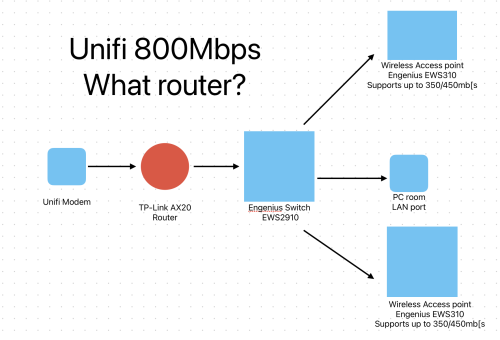 So basically I was doing okay on Unifi 500mbps but after recent speed upgrade to 800mbps, my network starts becoming unstable and disconnects especially at night. Got Unifi guys to check, basically they have ruled out external network factors, and suggest that I change a router - which they suggest a Fiberhome AX3000 which I read are not really good. So I need advice on a router that could support up to 1Gbps - the mesh or wifi function is secondary as I would usually turn it off to use my engenius access points' wifi network. Thank you! Handle perhaps |
| Change to: |  0.0265sec 0.0265sec
 0.69 0.69
 7 queries 7 queries
 GZIP Disabled GZIP Disabled
Time is now: 18th December 2025 - 06:53 AM |
 Quote
Quote