Welcome Guest ( Log In | Register )

Bump Topic Topic Closed RSS Feed
453 Pages « < 445 446 447 448 449 > » Bottom

Outline · [ Standard ] · Linear+

Unifi Official TM UniFi High Speed Broadband Thread V32, Enjoy Your Speed Upgrade

views
     
soyusa
post Mar 21 2018, 10:24 AM

On my way
****
Junior Member
575 posts

Joined: Jan 2003
From: KL KL KL
QUOTE(drbone @ Mar 21 2018, 08:25 AM)
Got a call from tm offering to upgrade my Streamyx 4mbps to Unifi 30mbps for rm139.
Any other promo or offer I should look for ?
*
That's the standard package currently offer to all ==> RM139 for 30Mbps + Unifii TV (choose either Varnam, Aneka, Jumbo Lite, Ruby or Sport, while Jumbo pack extra RM30) + 24 months contract, without 600 minutes voice call (Need to pay RM20 if you want it).

Since they give you offer, ask if they give you extra Unifi TV package, free Voice call, speed upgrade or no contract, then it would be good deal.
AVFAN
post Mar 21 2018, 11:01 AM

20k VIP Club
*********
All Stars
24,453 posts

Joined: Nov 2010
QUOTE(m_leong @ Mar 21 2018, 08:13 AM)
Hi All,

After reading this forum, I called back TM and asked for 100mbps for RM189/month but the marketing staff refused, so I canceled my upgrade.. Am currently on 50mbps, Hopefully they will call me back again in the future to give me a better offer.. 😊
*
what price now for 50mbps?

from the many recent successful cases, i thought they are now relaxed to do this upgrade with +rm20.

can call again in a week or 2.
mylinear
post Mar 21 2018, 11:07 AM

Enthusiast
*****
Senior Member
974 posts

Joined: Jan 2009
QUOTE(drbone @ Mar 21 2018, 08:25 AM)
Got a call from tm offering to upgrade my Streamyx 4mbps to Unifi 30mbps for rm139.
Any other promo or offer I should look for ?
*
What is your 4M Streamyx price now?

m_leong
post Mar 21 2018, 11:31 AM

Getting Started
**
Junior Member
107 posts

Joined: Mar 2008
QUOTE(AVFAN @ Mar 21 2018, 11:01 AM)
what price now for 50mbps?

from the many recent successful cases, i thought they are now relaxed to do this upgrade with +rm20.

can call again in a week or 2.
*
Currently paying RM179, agree with you on the recent successful cases, am surprised at the refusal... Let's see how it goes.. 😊
Iceman74
post Mar 21 2018, 11:35 AM

Regular
******
Senior Member
1,407 posts

Joined: May 2010


QUOTE(AVFAN @ Mar 20 2018, 05:40 PM)
ask how yr neighbors do it.

some houses, the cable come from the house front to grdflr, some from the back to top flr.
that will determine how long the total cable run will be for where u want it to end with the BTU (modem) - the cost for u.

if your house is small, good chance wifi will cover nicely most places, incl yr pc upstairs.
but if it's large superlink 100x30ft... tough.

note the STB (unifitv box) will likely be in living room beside yr tv, will need ethernet connection; ethernet good for yr smart tv too.

if u place the router upstairs, u will then ask "how to do unifitv with wifi"

do not make the mistake of placing modem/router in a poor place only to struggle with bad wifi issues later.
*
Being getting a lot problems on wifi due to too many 2.4Ghz interference from neighbours, old router and wifi dead spot all over the house.
Me give up on getting the best signal strength from router, no matter put where in 2 storey house.
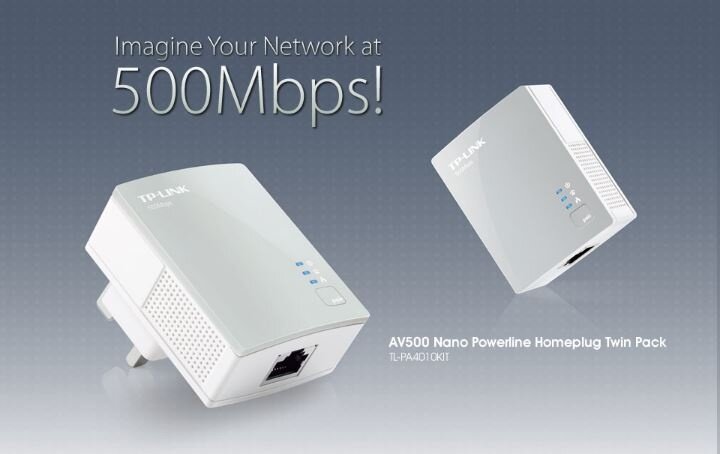
me now change router provided by unifi, add 2 home plug powerline adapter, 1 at upper floor and 1 at the back of the house since my router at front portion of the house.
settled it now and strong signal everywhere with 2.4Ghz and 5Ghz

This post has been edited by Iceman74: Mar 21 2018, 11:35 AM

suadrif
post Mar 21 2018, 11:38 AM

<Safe Online Trader>
*******
Senior Member
2,650 posts

Joined: Feb 2009


QUOTE(Iceman74 @ Mar 21 2018, 11:35 AM)
Being getting a lot problems on wifi due to too many 2.4Ghz interference from neighbours, old router and wifi dead spot all over the house.
Me give up on getting the best signal strength from router, no matter put where in 2 storey house.
me now change router provided by unifi, add 2 home plug powerline adapter, 1 atΒ  upper floor and 1 at the back of the house since my router at front portion of the house.
settled it now and strong signal everywhere with 2.4Ghz and 5Ghz
*
https://www.lazada.com.my/products/tp-link-...dR9rBi&search=1


i am using this pair of homeplug but still cannot get connected.
my house is just an apartment and my master bedroom is just behind the tv cabinet.
any reason why cannot get connected?

user posted image

user posted image

This post has been edited by suadrif: Mar 21 2018, 11:39 AM
zher4883
post Mar 21 2018, 11:39 AM

Look at all my stars!!
*******
Senior Member
4,490 posts

Joined: Oct 2014


QUOTE(suadrif @ Mar 21 2018, 11:38 AM)
https://www.lazada.com.my/products/tp-link-...dR9rBi&search=1
i am using this pair of homeplug but still cannot get connected.
my house is just an apartment and my master bedroom is just behind the tv cabinet.
any reason why cannot get connected?
*
It does connect but frequent disconnect it won't connect at all?
AVFAN
post Mar 21 2018, 11:40 AM

20k VIP Club
*********
All Stars
24,453 posts

Joined: Nov 2010
QUOTE(m_leong @ Mar 21 2018, 11:31 AM)
Currently paying RM179, agree with you on the recent successful cases, am surprised at the refusal... Let's see how it goes.. 😊
*
Try again... l failed twice, ok with 3rd try!
Your case, ikely +rm20.

QUOTE(Iceman74 @ Mar 21 2018, 11:35 AM)
Being getting a lot problems on wifi due to too many 2.4Ghz interference from neighbours, old router and wifi dead spot all over the house.
Me give up on getting the best signal strength from router, no matter put where in 2 storey house.
me now change router provided by unifi, add 2 home plug powerline adapter, 1 at  upper floor and 1 at the back of the house since my router at front portion of the house.
settled it now and strong signal everywhere with 2.4Ghz and 5Ghz
*
Good u found solution.

Homeplug.. yr house single or 3 phase power?
suadrif
post Mar 21 2018, 11:43 AM

<Safe Online Trader>
*******
Senior Member
2,650 posts

Joined: Feb 2009


QUOTE(zher4883 @ Mar 21 2018, 11:39 AM)
It does connect but frequent disconnect it won't connect at all?
*
wont connect at all
the symbol at the bottom of the screen shows connected with a yellow mark.
try to watch HyppTV but screen goes black with an error
Iceman74
post Mar 21 2018, 12:07 PM

Regular
******
Senior Member
1,407 posts

Joined: May 2010


QUOTE(suadrif @ Mar 21 2018, 11:38 AM)
https://www.lazada.com.my/products/tp-link-...dR9rBi&search=1
i am using this pair of homeplug but still cannot get connected.
my house is just an apartment and my master bedroom is just behind the tv cabinet.
any reason why cannot get connected?

user posted image

user posted image
*
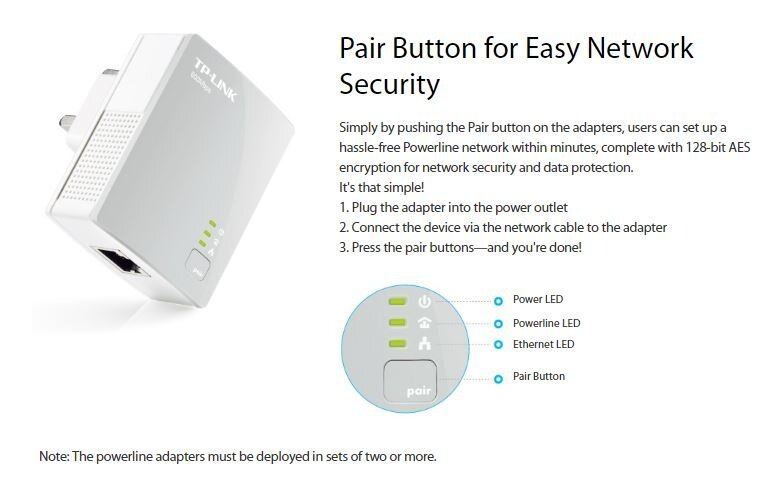
me failed the first 2 times but after read carefully the instruction menu, i press the wrong button and press too long.

do the configuration on the nearest router power plug first.
if cannot, reset it and start again.
should be ok.

QUOTE(AVFAN @ Mar 21 2018, 11:40 AM)
Try again... l failed twice, ok with 3rd try!
Your case, ikely +rm20.
Good u found solution.

Homeplug.. yr house single or 3 phase power?
*
single phase. but i heard should be no problem even on 3 phase using the new powerline. me don't have 3 phase power to test

This post has been edited by Iceman74: Mar 21 2018, 12:09 PM
AVFAN
post Mar 21 2018, 01:02 PM

20k VIP Club
*********
All Stars
24,453 posts

Joined: Nov 2010
QUOTE(Iceman74 @ Mar 21 2018, 12:07 PM)
single phase. but i heard should be no problem even on 3 phase using the new powerline. me don't have 3 phase power to test
*
single phase has always been fine.

3 phase... been reading mixed results.

but i hope u r right - that will save users a lot of trouble.
suadrif
post Mar 21 2018, 01:04 PM

<Safe Online Trader>
*******
Senior Member
2,650 posts

Joined: Feb 2009


QUOTE(Iceman74 @ Mar 21 2018, 12:07 PM)
me failed the first 2 times but after read carefully the instruction menu, i press the wrong button and press too long.

do the configuration on the nearest router power plug first.
if cannot, reset it and start again.
should be ok.
single phase. but i heard should be no problem even on 3 phase using the new powerline. me don't have 3 phase power to test
*
configuration? is there any configuration required? i thought its a plug n play?
or u mean the pairing?
AVFAN
post Mar 21 2018, 01:09 PM

20k VIP Club
*********
All Stars
24,453 posts

Joined: Nov 2010
QUOTE(suadrif @ Mar 21 2018, 01:04 PM)
configuration? is there any configuration required? i thought its a plug n play?
or u mean the pairing?
*
good case to see if these plugs work.

is yr home single phase or 3 phase power?

pair connected on same phase?
suadrif
post Mar 21 2018, 01:11 PM

<Safe Online Trader>
*******
Senior Member
2,650 posts

Joined: Feb 2009


QUOTE(AVFAN @ Mar 21 2018, 01:09 PM)
good case to see if these plugs work.

is yr home single phase or 3 phase power?

pair connected on same phase?
*
for apartment, i guess is a single phase.
Iceman74
post Mar 21 2018, 01:29 PM

Regular
******
Senior Member
1,407 posts

Joined: May 2010


QUOTE(suadrif @ Mar 21 2018, 01:04 PM)
configuration? is there any configuration required? i thought its a plug n play?
or u mean the pairing?
*
you need to make sure the connection from router to your correct powerline is ok before pairing especially the network cable if not using the provided cable. Using my long network cable got problem previously in my storeroom.

me manually configured it since i want same SSID using TP-Link software

https://youtu.be/IOoxDDZSxZY

This post has been edited by Iceman74: Mar 21 2018, 01:32 PM
suadrif
post Mar 21 2018, 01:36 PM

<Safe Online Trader>
*******
Senior Member
2,650 posts

Joined: Feb 2009


QUOTE(Iceman74 @ Mar 21 2018, 01:29 PM)
you need to make sure the connection from router to your correct powerline is ok before pairing especially the network cable if not using the provided cable. Using my long network cable got problem previously in my storeroom.

me manually configured it since i want same SSID using TP-Link software

https://youtu.be/IOoxDDZSxZY
*
this looks like wifi extender.
mine is local ethernet cable without wifi extender.


Iceman74
post Mar 21 2018, 03:10 PM

Regular
******
Senior Member
1,407 posts

Joined: May 2010


QUOTE(suadrif @ Mar 21 2018, 01:36 PM)
this looks like wifi extender.
mine is local ethernet cable without wifi extender.
*
it should work as well cos me got 1 computer attached to one ethernet point in powerline, so far ok no problems
sg999
post Mar 21 2018, 04:03 PM

Regular
******
Senior Member
1,027 posts

Joined: May 2008
Hi all, i just received call from TM
say +RM20 upgrade to 100mbps
become RM199.....
I'm now using rm179 50mbps free upgrade from 30Mbps

This post has been edited by sg999: Mar 21 2018, 04:09 PM
holymushroom
post Mar 21 2018, 04:09 PM

Casual
***
Junior Member
366 posts

Joined: Jul 2012
QUOTE(sg999 @ Mar 21 2018, 04:03 PM)
Hi all, i just received call from TM
say +RM20 upgrade to 100mbps
become RM199.....
I'm now using rm179 50mbps free upgrade from 30Mbps
*
does it include jumbo?
sg999
post Mar 21 2018, 04:11 PM

Regular
******
Senior Member
1,027 posts

Joined: May 2008
QUOTE(holymushroom @ Mar 21 2018, 05:09 PM)
does it include jumbo?
*
He said just follow my current package

453 Pages « < 445 446 447 448 449 > » Top
Topic ClosedOptions
 

Change to:
| Lo-Fi Version
0.0375sec    0.64    6 queries    GZIP Disabled
Time is now: 1st December 2025 - 01:09 PM