Welcome Guest ( Log In | Register )

Bump Topic Topic Closed RSS Feed

Outline · [ Standard ] · Linear+

Unifi Official TM UniFi High Speed Broadband Thread V32, Enjoy Your Speed Upgrade

views
     
Iceman74
post Dec 6 2017, 11:39 AM

Regular
******
Senior Member
1,407 posts

Joined: May 2010


QUOTE(gedebe @ Dec 5 2017, 10:17 PM)
anyone that have call 100 and manage to upgrade from 10 to 30mbps for rm139?
*
Mine from last time upgrade at RM169 disc RM30 = RM139
plus Hypptv RM30 & free unlimited local tm calls

total RM169 + GST

QUOTE(lati0s @ Dec 4 2017, 10:37 PM)
Finally upgraded from 30mbps to 100mbps. Quite surprised when I asked TM Point what are my options.

Was given two options :

1. +RM10/month upgrade to 50mbps or
2. +Rm10/month straight to 100mbps

...and of course I chose the later option  biggrin.gif

I went to TM Point around 3.30PM and got my completion SMS around 6.40PM.

The Speedtest showing only +-60mbps currently, tested with wired connection. Was informed by the TM Point staff that full upgrade will be available after the technician visit. Haven't got the date yet.

Checked the OCC and they already showed this :
*
damn, i should try my luck request upgrade from 30 to 100 last month
I walk in tmpoint to upgrade 10 to 50 with + rm10 and they said ok
currently billing me full package with Jumbo package
making a complaint for that
your upgrade bills no problem?

QUOTE(Icehart @ Dec 6 2017, 11:09 AM)
Oh thanks.
TM also just called me, after so much goreng goreng they finally agreed to give me discount to RM 189 as well.  rclxms.gif
*
teach us how to goreng goreng wor...
me scare my goreng not approved sweat.gif

This post has been edited by Iceman74: Dec 6 2017, 11:42 AM
Iceman74
post Feb 1 2018, 11:00 AM

Regular
******
Senior Member
1,407 posts

Joined: May 2010


QUOTE(fruitie @ Jan 30 2018, 10:25 AM)
Awesome for you. thumbup.gif

For me, I'm paying RM 189 for 100Mbps and contract is refreshed but since we have no other options in our hometown, gonna stick to UniFi for some time, so 24 months is OK.
*
you got 100Mbps for RM189 only?
with free call and hypptv packages included?
Iceman74
post Feb 1 2018, 01:12 PM

Regular
******
Senior Member
1,407 posts

Joined: May 2010


QUOTE(fruitie @ Feb 1 2018, 12:09 PM)
Good luck. smile.gif
Yes with free calls and Jumbo + Ruby.

Free calls are nothing new to me, I already got it since 50Mbps (free upgrade from 30Mbps).
*
I requested upgrade from 30 to 50 RM179 2 months ago

Wondering TM will entertain me again for 100Mbps upgrade 😉
Iceman74
post Feb 1 2018, 02:32 PM

Regular
******
Senior Member
1,407 posts

Joined: May 2010


QUOTE(enduser @ Feb 1 2018, 01:34 PM)
The rye offer is rm189 monthly for 100mbps. That is with the discount of rm150 and rn50.
But i ve feeling that only the rm150 discount is perpetual and the rn50 is not.
I am anticipated that after 2 yrs contract the monthly will become rm239.
*
The package will only get either cheaper or higher bandwidth so far in history. 2 years in broadband is very long years.

Look at the Telco package tell u this as they will cross path with broadband package
Iceman74
post Feb 27 2018, 12:07 PM

Regular
******
Senior Member
1,407 posts

Joined: May 2010


QUOTE(soyusa @ Feb 27 2018, 11:30 AM)
Don't think you can get RM189 for 100Mbps + Jumbo Pack anymore...  sweat.gif

» Click to show Spoiler - click again to hide... «

*
really?? no more chance to upgrade it bangwall.gif
Iceman74
post Feb 27 2018, 09:31 PM

Regular
******
Senior Member
1,407 posts

Joined: May 2010


QUOTE(biloxee @ Feb 27 2018, 06:35 PM)
No issues for me.

$189 + 6% GST...
*
Recently?

I just upgrade 2 months ago from 30 to 50Mbps with free call and jumbo packages RM169 to RM179 using RM10 excuse
Wondering next months can try it?
Iceman74
post Mar 8 2018, 12:28 PM

Regular
******
Senior Member
1,407 posts

Joined: May 2010


QUOTE(nimbus kayano @ Mar 7 2018, 03:09 PM)
I called TM for this RYE but I am ineligible. I am on 179/50Mbps.. what is the criteria actually?
*
u on RM179/50Mbps packages and not yet use the RYE code, can walk in Tm point and ask about it.

me on RM169/30bps upgrading using the RYE code to your packages
but sadly now can't upgrade RM189/100Mbps anymore cos already using the code as they said only can do once for 1 customer.
Now need to wait for the contract to expired or unless Maxis can offer better deals
Iceman74
post Mar 13 2018, 06:42 PM

Regular
******
Senior Member
1,407 posts

Joined: May 2010


QUOTE(nikaizad @ Mar 12 2018, 08:55 PM)
currently using D-Link DIR850L from TM. is there any way to request change router to TP-Link Archer C1200??

or is there any better router thats affordable in the market?
*
This D-Link no good?? confused.gif

Unifi changed my old router to this past week, so far everything fast, nice and stable
Iceman74
post Mar 21 2018, 11:35 AM

Regular
******
Senior Member
1,407 posts

Joined: May 2010


QUOTE(AVFAN @ Mar 20 2018, 05:40 PM)
ask how yr neighbors do it.

some houses, the cable come from the house front to grdflr, some from the back to top flr.
that will determine how long the total cable run will be for where u want it to end with the BTU (modem) - the cost for u.

if your house is small, good chance wifi will cover nicely most places, incl yr pc upstairs.
but if it's large superlink 100x30ft... tough.

note the STB (unifitv box) will likely be in living room beside yr tv, will need ethernet connection; ethernet good for yr smart tv too.

if u place the router upstairs, u will then ask "how to do unifitv with wifi"

do not make the mistake of placing modem/router in a poor place only to struggle with bad wifi issues later.
*
Being getting a lot problems on wifi due to too many 2.4Ghz interference from neighbours, old router and wifi dead spot all over the house.
Me give up on getting the best signal strength from router, no matter put where in 2 storey house.
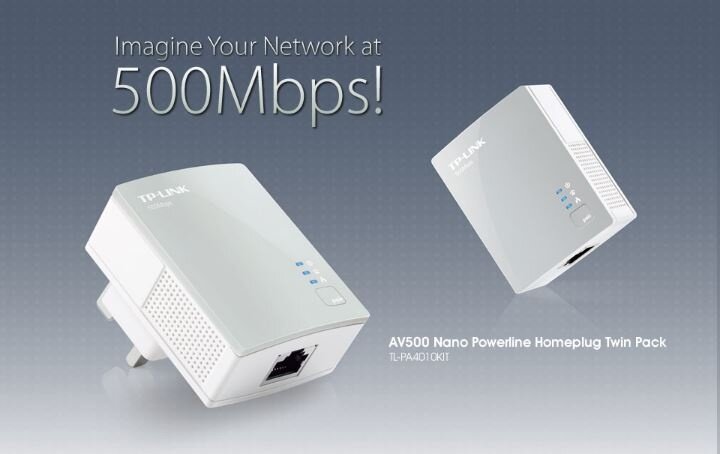
me now change router provided by unifi, add 2 home plug powerline adapter, 1 at upper floor and 1 at the back of the house since my router at front portion of the house.
settled it now and strong signal everywhere with 2.4Ghz and 5Ghz

This post has been edited by Iceman74: Mar 21 2018, 11:35 AM
Iceman74
post Mar 21 2018, 12:07 PM

Regular
******
Senior Member
1,407 posts

Joined: May 2010


QUOTE(suadrif @ Mar 21 2018, 11:38 AM)
https://www.lazada.com.my/products/tp-link-...dR9rBi&search=1
i am using this pair of homeplug but still cannot get connected.
my house is just an apartment and my master bedroom is just behind the tv cabinet.
any reason why cannot get connected?

user posted image

user posted image
*
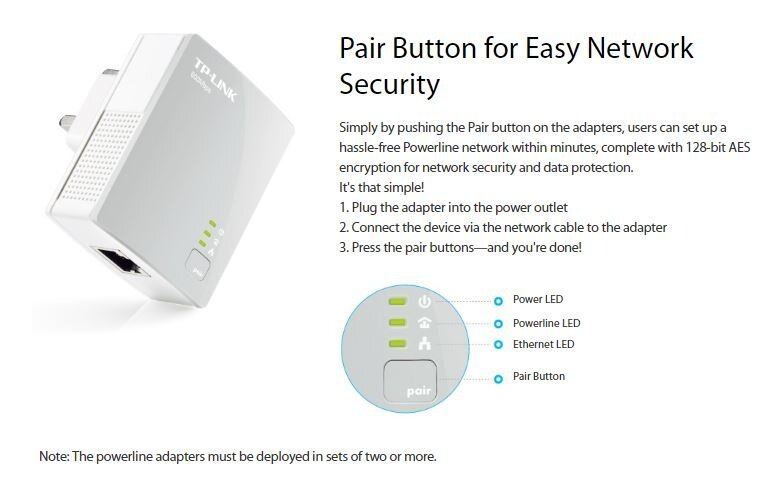
me failed the first 2 times but after read carefully the instruction menu, i press the wrong button and press too long.

do the configuration on the nearest router power plug first.
if cannot, reset it and start again.
should be ok.

QUOTE(AVFAN @ Mar 21 2018, 11:40 AM)
Try again... l failed twice, ok with 3rd try!
Your case, ikely +rm20.
Good u found solution.

Homeplug.. yr house single or 3 phase power?
*
single phase. but i heard should be no problem even on 3 phase using the new powerline. me don't have 3 phase power to test

This post has been edited by Iceman74: Mar 21 2018, 12:09 PM
Iceman74
post Mar 21 2018, 01:29 PM

Regular
******
Senior Member
1,407 posts

Joined: May 2010


QUOTE(suadrif @ Mar 21 2018, 01:04 PM)
configuration? is there any configuration required? i thought its a plug n play?
or u mean the pairing?
*
you need to make sure the connection from router to your correct powerline is ok before pairing especially the network cable if not using the provided cable. Using my long network cable got problem previously in my storeroom.

me manually configured it since i want same SSID using TP-Link software

https://youtu.be/IOoxDDZSxZY

This post has been edited by Iceman74: Mar 21 2018, 01:32 PM
Iceman74
post Mar 21 2018, 03:10 PM

Regular
******
Senior Member
1,407 posts

Joined: May 2010


QUOTE(suadrif @ Mar 21 2018, 01:36 PM)
this looks like wifi extender.
mine is local ethernet cable without wifi extender.
*
it should work as well cos me got 1 computer attached to one ethernet point in powerline, so far ok no problems

Topic ClosedOptions
 

Change to:
| Lo-Fi Version
0.2446sec    0.42    7 queries    GZIP Disabled
Time is now: 3rd December 2025 - 11:48 PM