Welcome Guest ( Log In | Register )

Bump Topic Topic Closed RSS Feed

Outline · [ Standard ] · Linear+

Unifi Official TM UniFi High Speed Broadband Thread V32, Enjoy Your Speed Upgrade

views
     
suadrif
post Nov 24 2017, 03:33 PM

<Safe Online Trader>
*******
Senior Member
2,650 posts

Joined: Feb 2009


I just upgraded from TM Unifi Lite 10Mbps to UNIFI Advance 30Mbps
the STB setup, TV setup and speed test are all done except that i was told there is NO CORDLESS PHONE given. what the heck? any other user got same case as mine?
its in the package right?
suadrif
post Nov 24 2017, 03:44 PM

<Safe Online Trader>
*******
Senior Member
2,650 posts

Joined: Feb 2009


QUOTE(tomastan4134 @ Nov 24 2017, 03:37 PM)
normally upgrade process.  cordless phone may need to redeem from TM point.
*
QUOTE(MGM @ Nov 24 2017, 03:41 PM)
AFAIK no body was offered free cordless phone.
Btw how much r u paying b4 n after upgrade?
Any STD20 b4 n after upgrade?
*
why do we need to redeem point?
isn't part of the Unifi Advance Package anyway?
we are suppose to get new STB and new cordless phone when subscribing Unifi Advance, right?
regardless of previous package or new package
suadrif
post Nov 24 2017, 03:55 PM

<Safe Online Trader>
*******
Senior Member
2,650 posts

Joined: Feb 2009


QUOTE(MGM @ Nov 24 2017, 03:52 PM)
I questioned d CS the same issue  n after she consulted the HQ Marketing dept, was told no cordless phone for upgrade.
Please answer these, TQ
Btw how much r u paying b4 n after upgrade?
Any STD20 b4 n after upgrade?
*
i see..
now i am arguing with TM customer service by live chat. quite lengthy also.
even in the term n condition got mentioned cordless phone is provided DURING INSTALLATION, not NEW INSTALLATION ONLY.
this is their T&C, not my T&C or my assumption.

if I subscribe Unifi Advance, i should receive TM REWARDS + STB + CORDLESS phone
but now when i upgrade UNIFI ADVANCE, i dont receive any point reward and no cordless phone, but still want to deduct my previous reward point?
it should be given free instead of redeeming points. redeeming points means i have to pay!

before this i am using Unifi Lite 10Mbps, no STB also (rm129)
now is with STB not sure which model 30MBps rm139

This post has been edited by suadrif: Nov 24 2017, 03:58 PM


Attached thumbnail(s)

Attached Image Attached Image

Attached image(s)
Attached Image
suadrif
post Nov 24 2017, 04:34 PM

<Safe Online Trader>
*******
Senior Member
2,650 posts

Joined: Feb 2009


QUOTE(MGM @ Nov 24 2017, 04:00 PM)
STD20 is the 600minutes free call NOT STB tvbox.
So after upgraded to rm139 plan does it come with STD20?
*
seems like no STD
no freecall
suadrif
post Nov 24 2017, 05:20 PM

<Safe Online Trader>
*******
Senior Member
2,650 posts

Joined: Feb 2009


QUOTE(MGM @ Nov 24 2017, 04:59 PM)
One guy paid rm139 for Unifi 30mbps with std20, a savings of rm20x24months= rm480. Much more worth than a cordless phone which can be bought for rm100+.
*
My understanding is STD20 should be add on. if got free, then its his luck.
cordless phone is FREE even it can be bought, so should be given for FREE instead of redeem point or buy rm100+
suadrif
post Mar 21 2018, 11:38 AM

<Safe Online Trader>
*******
Senior Member
2,650 posts

Joined: Feb 2009


QUOTE(Iceman74 @ Mar 21 2018, 11:35 AM)
Being getting a lot problems on wifi due to too many 2.4Ghz interference from neighbours, old router and wifi dead spot all over the house.
Me give up on getting the best signal strength from router, no matter put where in 2 storey house.
me now change router provided by unifi, add 2 home plug powerline adapter, 1 at  upper floor and 1 at the back of the house since my router at front portion of the house.
settled it now and strong signal everywhere with 2.4Ghz and 5Ghz
*
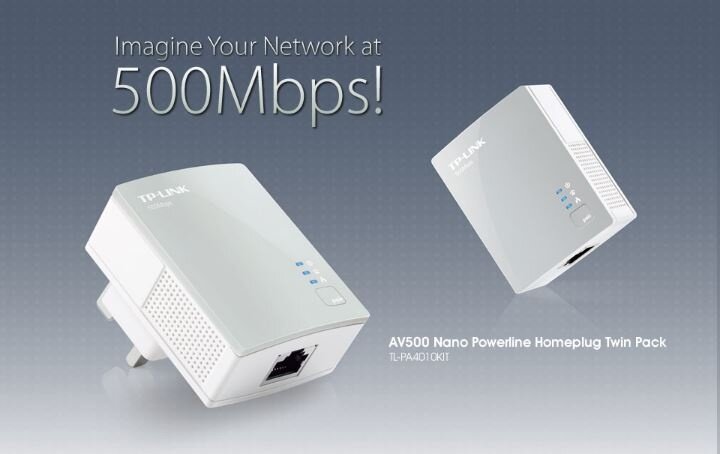
https://www.lazada.com.my/products/tp-link-...dR9rBi&search=1


i am using this pair of homeplug but still cannot get connected.
my house is just an apartment and my master bedroom is just behind the tv cabinet.
any reason why cannot get connected?

user posted image

user posted image

This post has been edited by suadrif: Mar 21 2018, 11:39 AM
suadrif
post Mar 21 2018, 11:43 AM

<Safe Online Trader>
*******
Senior Member
2,650 posts

Joined: Feb 2009


QUOTE(zher4883 @ Mar 21 2018, 11:39 AM)
It does connect but frequent disconnect it won't connect at all?
*
wont connect at all
the symbol at the bottom of the screen shows connected with a yellow mark.
try to watch HyppTV but screen goes black with an error
suadrif
post Mar 21 2018, 01:04 PM

<Safe Online Trader>
*******
Senior Member
2,650 posts

Joined: Feb 2009


QUOTE(Iceman74 @ Mar 21 2018, 12:07 PM)
me failed the first 2 times but after read carefully the instruction menu, i press the wrong button and press too long.

do the configuration on the nearest router power plug first.
if cannot, reset it and start again.
should be ok.
single phase. but i heard should be no problem even on 3 phase using the new powerline. me don't have 3 phase power to test
*
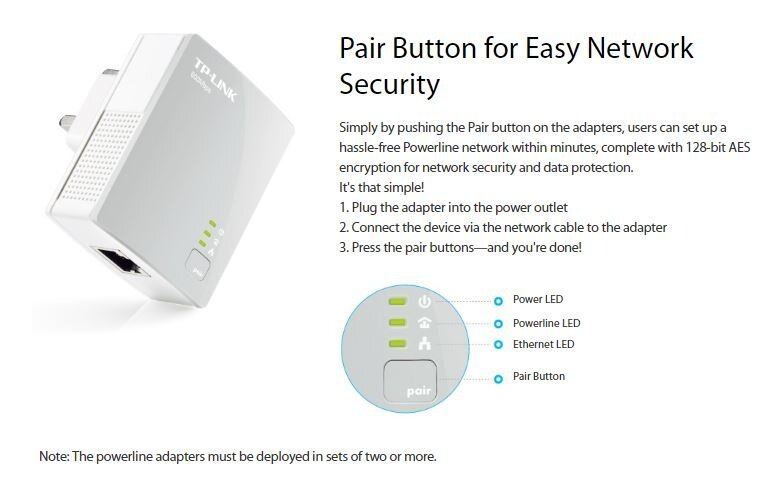
configuration? is there any configuration required? i thought its a plug n play?
or u mean the pairing?
suadrif
post Mar 21 2018, 01:11 PM

<Safe Online Trader>
*******
Senior Member
2,650 posts

Joined: Feb 2009


QUOTE(AVFAN @ Mar 21 2018, 01:09 PM)
good case to see if these plugs work.

is yr home single phase or 3 phase power?

pair connected on same phase?
*
for apartment, i guess is a single phase.
suadrif
post Mar 21 2018, 01:36 PM

<Safe Online Trader>
*******
Senior Member
2,650 posts

Joined: Feb 2009


QUOTE(Iceman74 @ Mar 21 2018, 01:29 PM)
you need to make sure the connection from router to your correct powerline is ok before pairing especially the network cable if not using the provided cable. Using my long network cable got problem previously in my storeroom.

me manually configured it since i want same SSID using TP-Link software

https://youtu.be/IOoxDDZSxZY
*
this looks like wifi extender.
mine is local ethernet cable without wifi extender.


Topic ClosedOptions
 

Change to:
| Lo-Fi Version
0.0315sec    0.37    7 queries    GZIP Disabled
Time is now: 3rd December 2025 - 06:40 PM