Welcome Guest ( Log In | Register )

475 Pages « < 408 409 410 411 412 > » Bottom

Outline · [ Standard ] · Linear+

 AMD Ryzen, AM4 / AM5 Platform

views
     
SSJBen
post Jun 14 2021, 06:07 PM

Stars deez nuts.
*******
Senior Member
4,523 posts

Joined: Apr 2006


QUOTE(sai86 @ Jun 14 2021, 05:59 PM)
revert to 3401 no longer hit 90C during steam/origin download.  rclxm9.gif
thanks alot to all sifu that gave advice as well. now i really need to open up as temp is not to my liking or ryzen 5900X is just that hot/warm even under water 70C+ is a norm??
*
Glad to hear that.
Best not to update any BIOS for now, until AGESA 1.3.0.0 releases at least.

70c spike is normal, but if sustain there then something may be wrong else where.

user posted image

As you can see mine pushing 66c spikes but idling around 50c.
sai86
post Jun 14 2021, 06:35 PM

StilL LearninG
*******
Senior Member
4,934 posts

Joined: Sep 2008
From: Setapak


QUOTE(SSJBen @ Jun 14 2021, 06:07 PM)
Glad to hear that.
Best not to update any BIOS for now, until AGESA 1.3.0.0 releases at least.

70c spike is normal, but if sustain there then something may be wrong else where.

user posted image

As you can see mine pushing 66c spikes but idling around 50c.
*
like bro Tristan said, seems like my CPU mount has issue. BF V gaming sustain 85C+ to 90C

Attached Image

This post has been edited by sai86: Jun 14 2021, 06:35 PM
1024kbps
post Jun 14 2021, 06:41 PM

李素裳
*******
Senior Member
6,015 posts

Joined: Feb 2007


QUOTE(llk @ Jun 14 2021, 11:51 AM)
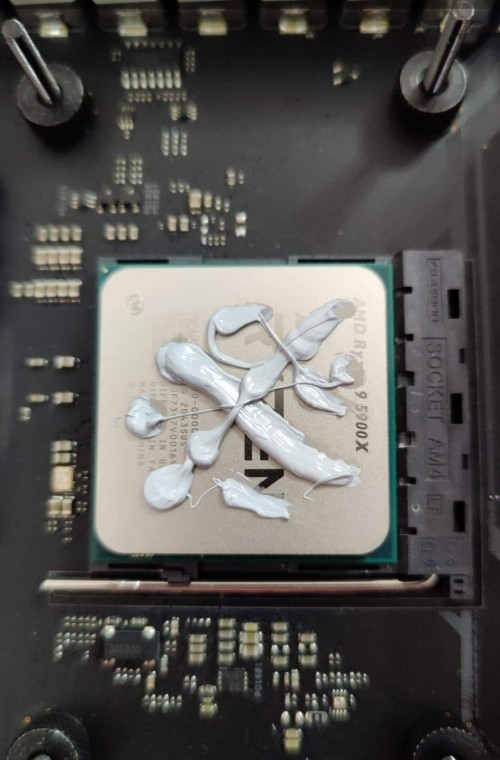
Mine..lol

user posted image
*
looks like Rune from Doom universe!
joke aside, i prefer to spread the TIM like spreading strawberry jam!
llk
post Jun 14 2021, 07:03 PM

Look at all my stars!!
*******
Senior Member
4,158 posts

Joined: Jan 2003
From: KL
QUOTE(1024kbps @ Jun 14 2021, 06:41 PM)
looks like Rune from Doom universe!
joke aside, i prefer to spread the TIM like spreading strawberry jam!
*
More is better than less right? biggrin.gif
1024kbps
post Jun 14 2021, 07:20 PM

李素裳
*******
Senior Member
6,015 posts

Joined: Feb 2007


QUOTE(llk @ Jun 14 2021, 07:03 PM)
More is better than less right?  biggrin.gif
*
the excess TIM will ooze out, cleaning it off also very mafan lol
anyway the TIM i bought came with tiny spatula, you can spread it with your credit card too. tongue.gif
llk
post Jun 14 2021, 07:30 PM

Look at all my stars!!
*******
Senior Member
4,158 posts

Joined: Jan 2003
From: KL
QUOTE(1024kbps @ Jun 14 2021, 07:20 PM)
the excess TIM will ooze out, cleaning it off also very mafan lol
anyway the TIM i bought came with tiny spatula, you can spread it with your credit card too. tongue.gif
*
No worry laa, i have few spatula as well, but most of the time i'm too lazy and just press the waterblock onto it that's all laugh.gif

This post has been edited by llk: Jun 14 2021, 07:30 PM
Bonchi
post Jun 14 2021, 07:36 PM

KittehPowah
******
Senior Member
1,649 posts

Joined: Sep 2008
QUOTE(llk @ Jun 14 2021, 07:03 PM)
More is better than less right?  biggrin.gif
*
If too much also got thermal penalty. Ideally you want a very very thin spread.

QUOTE(sai86 @ Jun 14 2021, 05:59 PM)
revert to 3401 no longer hit 90C during steam/origin download.  rclxm9.gif
thanks alot to all sifu that gave advice as well. now i really need to open up as temp is not to my liking or ryzen 5900X is just that hot/warm even under water 70C+ is a norm??
*
The issue always end up being the crappy agesa at the end of the day. If no problems better not update at all.

This post has been edited by Bonchi: Jun 14 2021, 07:39 PM
llk
post Jun 14 2021, 08:04 PM

Look at all my stars!!
*******
Senior Member
4,158 posts

Joined: Jan 2003
From: KL
QUOTE(Bonchi @ Jun 14 2021, 07:36 PM)
If too much also got thermal penalty. Ideally you want a very very thin spread.
The issue always end up being the crappy agesa at the end of the day. If no problems better not update at all.
*
My temp seem oklaa, gaming around 70, no complain.
BOTAK_WAI
post Jun 14 2021, 08:14 PM

Blow Water First Class
*******
Senior Member
4,163 posts

Joined: Jan 2003
From: Cheras, KL


QUOTE(Bonchi @ Jun 14 2021, 09:59 AM)
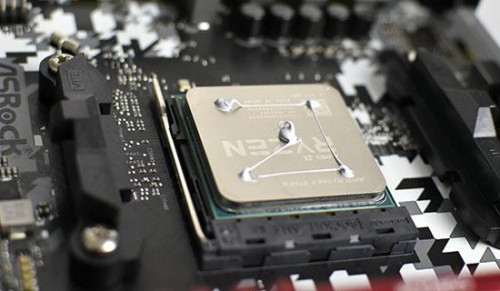
After countless tries and tests, 5 small dots seems to work best.

user posted image
*
QUOTE(llk @ Jun 14 2021, 11:51 AM)
Mine..lol

user posted image
*
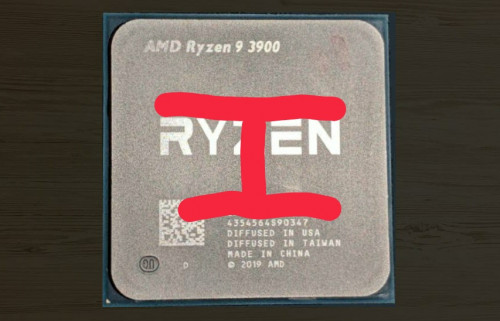
QUOTE(SSJBen @ Jun 14 2021, 01:01 PM)
user posted image

Lol I just do this.

The chiplets are under the Ryzen and the IO is under the serials. Just do a H spread and call it a day. Did this on a 3900x, did the same on a 5900x. Tried with D15s, tried with asetek AIOs, tried with EK blocks, they've always produced the best results.

Temps has never been an issue on my system.

And also to sai, please revert BIOS back to 3401. Latest BIOS has a nasty bug, been reported numerous times on OCN.
*
all 3 methods ok je…janji can cover the die area.

user posted image

simplest and cleanest way still center 1 drop


Bonchi
post Jun 14 2021, 09:40 PM

KittehPowah
******
Senior Member
1,649 posts

Joined: Sep 2008
QUOTE(BOTAK_WAI @ Jun 14 2021, 08:14 PM)
all 3 methods ok je…janji can cover the die area.

user posted image

simplest and cleanest way still center 1 drop


*
One drop subjective, cuz of am4 mounting. Coolers with 4 screws ok. Coolers that uses the stock bracket with 2 hooks then the spread can go a little off during the process of mounting it.
thankyou
post Jun 14 2021, 10:55 PM

Regular
******
Senior Member
1,941 posts

Joined: Jan 2003
EBBattlefield With stock cooler, 5700G hit thermal throttle shortly after the test. Score as attached.... It runs stable at 3.92Ghz thermal @ 85c...

nrw here's the mentioned "1-click memory overclocking" on Omen software. Tried running Ryzen master but unfortunately, 5700G is not supported yet.

"Ryzen Master does not support current processor. Unsupported Processor!"

CPU-Z info on motherboard and RAM shared as well. SDP information is not available... due to HP I guess...

Can't complain much as the PC was delivered within 2 days... Will try to upgrade CPU cooler to NH-U9S for the time being and probably add a couple of fans as well..

This post has been edited by thankyou: Jun 14 2021, 10:56 PM


Attached thumbnail(s)
Attached Image Attached Image Attached Image

Attached image(s)
Attached Image Attached Image
nrw
post Jun 14 2021, 11:26 PM

Casual
***
Junior Member
398 posts

Joined: Jul 2014


QUOTE(thankyou @ Jun 14 2021, 10:55 PM)
nrw here's the mentioned "1-click memory overclocking" on Omen software. Tried running Ryzen master but unfortunately, 5700G is not supported yet.
"Ryzen Master does not support current processor. Unsupported Processor!"
CPU-Z info on motherboard and RAM shared as well. SDP information is not available... due to HP I guess...
Can't complain much as the PC was delivered within 2 days... Will try to upgrade CPU cooler to NH-U9S for the time being and probably add a couple of fans as well..
*
thumbup.gif Thanks! Try using the Ram Turbo n see what changes.
https://zentimings.protonrom.com/ use this to check.

So worthwhile upgrades would be 1) a cheap B550 board and 2) a better cooler.
Potentially a 3) new RAM Kit for some who need a higher capacity/speed(depending on the IC on your current kit)
Still fine value right now with that 3070 (with a nice 12 pin connector btw)

I've got a B550M A-PRO here which I got with a bundle, which I might use for a Cezanne that will probably be running somewhere between 35-65W PPT and will be cooled by a Fuma 2.
Can't wait to try that then. Let's see how high I can push RAM on that shitty board laugh.gif ... endgame on RL already and bored.

This post has been edited by nrw: Jun 14 2021, 11:29 PM
yimingwuzere
post Jun 15 2021, 01:01 PM

Enthusiast
*****
Senior Member
990 posts

Joined: Sep 2005
From: Bolehland


QUOTE(EBBattlefield @ Jun 14 2021, 08:25 AM)
can do benchmark and share here?
cinebench etc. with temperature.

I have a feeling that the 5800X is the bad bin while the 5700 is the good bin in this case  laugh.gif

more or less same clock speed, lower TDP even though it comes with IGP, 100USD cheaper (or rather what the 5800X should have costed  bangwall.gif  bangwall.gif )
*
Different chips entirely, so can't even call them separate bins.

5700G is the top bin for APUs with onboard graphics and SoC all in one die.

5800X is a pure 8-core chiplet with more L3 cache, but no graphics and SoC on the same die. These are probably less than ideal bins too - 8 working cores and can hit high clockspeeds but can't meet 5950X power targets reliably seems most likely. So it ends up being a power hog for a single CCD.

QUOTE(thankyou @ Jun 14 2021, 04:24 PM)
Okay, will run Cinebench tonight with everything stock. Will feedback the score and temp. Anything you would like to know feel free to ask... Will answer if it's within my knowledge...
The board seems to be HP branded B550... It's pretty much locked down... You can do RAM OC via OMEN software (I'll share screenshot later).... and I read on reddit, anther possibility through Ryzen master? I'm not sure haven't downloaded...

BIOS also seems pretty much locked down... I will share CPU-Z screenshot later...

There's also no way to use "non-HP" branded RAM or else, it will run at default clock speed @ 2400MHz. Wanted to upgrade RAM to 32GB... so I guess I'll have to either find the HP part or forget about the upgrade...

Please find a snapshot of the motherboard and RAM.
*
Not gonna lie this looks like an awful case. I can't see any airflow going inside it from anywhere. Also interestingly enough, HP Malaysia's website says this desktop should be specced with a 5800X not 5700G?

I wonder if that GPU uses the same board layout as the 3070 FE though...

This post has been edited by yimingwuzere: Jun 15 2021, 01:31 PM

Bonchi
post Jun 15 2021, 05:05 PM

KittehPowah
******
Senior Member
1,649 posts

Joined: Sep 2008
QUOTE(nrw @ Jun 14 2021, 11:26 PM)
thumbup.gif Thanks! Try using the Ram Turbo n see what changes.
https://zentimings.protonrom.com/ use this to check.

So worthwhile upgrades would be 1) a cheap B550 board and 2) a better cooler.
Potentially a 3) new RAM Kit for some who need a higher capacity/speed(depending on the IC on your current kit)
Still fine value right now with that 3070 (with a nice 12 pin connector btw)

I've got a B550M A-PRO here which I got with a bundle, which I might use for a Cezanne that will probably be running somewhere between 35-65W PPT and will be cooled by a Fuma 2.
Can't wait to try that then. Let's see how high I can push RAM on that shitty board laugh.gif ... endgame on RL already and bored.
*
do post when you got your hands on the cezannes haha. really wonder how low can they stay on idle and also wonder how their memory latency will look like.
nrw
post Jun 15 2021, 05:39 PM

Casual
***
Junior Member
398 posts

Joined: Jul 2014


QUOTE(Bonchi @ Jun 15 2021, 05:05 PM)
do post when you got your hands on the cezannes haha. really wonder how low can they stay on idle and also wonder how their memory latency will look like.
*
Will do, I hope early August AMD MY will release them in time. Will be interesting to see how well cheap boards work with it n not a 1k myr board like the B550i Strix that I used last time (great board btw).
Latency should be (well?) below 50ns. But I doubt this will absorb the cache disadvantage.
Skylinestar
post Jun 15 2021, 05:55 PM

Mega Duck
********
All Stars
10,477 posts

Joined: Jan 2003
From: Sarawak
PSA: If you are using a 300-series AM4 motherboard with an old BIOS you may need to update the BIOS in order to install/update to Windows 10 2004/20H2/21H2.
https://www.reddit.com/r/Amd/comments/nzssu...m4_motherboard/
Bonchi
post Jun 15 2021, 06:13 PM

KittehPowah
******
Senior Member
1,649 posts

Joined: Sep 2008
QUOTE(nrw @ Jun 15 2021, 05:39 PM)
Will do, I hope early August AMD MY will release them in time. Will be interesting to see how well cheap boards work with it n not a 1k myr board like the B550i Strix that I used last time (great board btw).
Latency should be (well?) below 50ns. But I doubt this will absorb the cache disadvantage.
*
well that B550i strix is one of the best AMD board if im not mistaken to mess with rams altho i ended up with a B550i auros proAX because brand biasedness haha. Able to hit below 50ns sounds pretty impressive for AMD hmm.gif gotta go for a gaming benchmark settings that blends both gpu and cpu like 1080p ultra or 1440p high for example to somewhat nullify the cache disadvantage to see what the cezanne is capable of (which I think is a better real world scenario as compared to 1080p ultra low).
thankyou
post Jun 15 2021, 06:51 PM

Regular
******
Senior Member
1,941 posts

Joined: Jan 2003
QUOTE(yimingwuzere @ Jun 15 2021, 01:01 PM)
Different chips entirely, so can't even call them separate bins.

5700G is the top bin for APUs with onboard graphics and SoC all in one die.

5800X is a pure 8-core chiplet with more L3 cache, but no graphics and SoC on the same die. These are probably less than ideal bins too - 8 working cores and can hit high clockspeeds but can't meet 5950X power targets reliably seems most likely. So it ends up being a power hog for a single CCD.
Not gonna lie this looks like an awful case. I can't see any airflow going inside it from anywhere. Also interestingly enough, HP Malaysia's website says this desktop should be specced with a 5800X not 5700G?

I wonder if that GPU uses the same board layout as the 3070 FE though...
*
That's the price to pay for buying from Dell/HP/Lenovo... biggrin.gif

for Omen 25L, there's some mesh holes at the bottom of the case and according to reddit, it can fit 2 x 92mm fan as intake... hopefully that will help abit...
senzr
post Jun 15 2021, 07:36 PM

New Member
*
Newbie
8 posts

Joined: Jan 2006


When you guys are talking about temps, which monitor are you looking at?
There's a big discrepancy between Ryzen Master and HWinfo, at least 6-7C, and I'm not sure which is more accurate.

Gaming temps at 85C (HWinfo reading) on my 5900X are kinda worrying me, not sure if I need a better cooler.
llk
post Jun 15 2021, 07:38 PM

Look at all my stars!!
*******
Senior Member
4,158 posts

Joined: Jan 2003
From: KL
QUOTE(senzr @ Jun 15 2021, 07:36 PM)
When you guys are talking about temps, which monitor are you looking at?
There's a big discrepancy between Ryzen Master and HWinfo, at least 6-7C, and I'm not sure which is more accurate.

Gaming temps at 85C (HWinfo reading) on my 5900X are kinda worrying me, not sure if I need a better cooler.
*
Refer to HWinfo.

475 Pages « < 408 409 410 411 412 > » Top
 

Change to:
| Lo-Fi Version
0.0248sec    0.57    6 queries    GZIP Disabled
Time is now: 16th December 2025 - 04:47 PM