Welcome Guest ( Log In | Register )

475 Pages « < 386 387 388 389 390 > » Bottom

Outline · [ Standard ] · Linear+

 AMD Ryzen, AM4 / AM5 Platform

views
     
1024kbps
post Mar 28 2021, 11:22 PM

李素裳
*******
Senior Member
6,017 posts

Joined: Feb 2007


QUOTE(joeblow @ Mar 28 2021, 11:07 PM)
Wow I haven't been reading this thread ever since I got my AMD5600x plus 3070. Not sure what's the big hoo ha here.

For me I haven't encounter anything nasty with 5600x yet... touchwood. Previously I was an Intel user. First time AMD. That being said I don't overclock and hardly play games. In fact my PC is less than 50 degrees most of the time and my 3070 fans hardly spin. So far no issue with AMD yet. Those random reboots or hanging I think is more on Windows? At least I don't encounter constant reboot.

I just hope my 5600x last, I did get a good cooler and thermal paste for it.
*
CPU dont die that easily, i had my Phenom II 1050T 2.8Ghz overclocked to 3.7GHz for many years. until first gen Zen came out lol, overclocked with stock voltage.
things will get dangerous if you increase voltage too much.
SUSEBBattlefield
post Mar 29 2021, 01:22 PM

Ramadass Vijandren
****
Junior Member
637 posts

Joined: Nov 2018
From: Taman Sri Muda
is it just me or local retaillers are selling motherboards at 30-50USD markup as well?

MSI Tomahawk B550 at RM800, but newegg sell USD150....
if convert, should be 600+ only sweat.gif
Bonchi
post Mar 29 2021, 02:32 PM

KittehPowah
******
Senior Member
1,649 posts

Joined: Sep 2008
QUOTE(EBBattlefield @ Mar 29 2021, 01:22 PM)
is it just me or local retaillers are selling motherboards at 30-50USD markup as well?

MSI Tomahawk B550 at RM800, but newegg sell USD150....
if convert, should be 600+ only sweat.gif
*
Everything is at a slight markup now, even rams, ssds and even cooling products like aio... Because of opportunists. Altho some ahem stuff still remain relatively cheap.

I tegur some of the shops Im close with and they all say it is due to difficulties in getting stocks... dunno how true is their words.
1024kbps
post Mar 29 2021, 03:25 PM

李素裳
*******
Senior Member
6,017 posts

Joined: Feb 2007


QUOTE(EBBattlefield @ Mar 29 2021, 01:22 PM)
is it just me or local retaillers are selling motherboards at 30-50USD markup as well?

MSI Tomahawk B550 at RM800, but newegg sell USD150....
if convert, should be 600+ only sweat.gif
*
Singapore here selling at 900 MYR, 329 SGD.
I mean damn, if want cheaper have to look somewhere else, eg newegg or carosell
Bonchi
post Mar 29 2021, 03:42 PM

KittehPowah
******
Senior Member
1,649 posts

Joined: Sep 2008
QUOTE(1024kbps @ Mar 29 2021, 03:25 PM)
Singapore here selling at 900 MYR, 329 SGD.
I mean damn, if want cheaper have to look somewhere else, eg newegg or carosell
*
SG was never cheap... it was cheap last time many many years ago because 1sgd = RM2.3 ... now not anymore. Everything is significantly more expensive in SG, even for thumbdrives, sd cards, mouse and keyboards.

Like my mouse is RM240(79sgd) converted but in malaysia, it's only RM189.

This post has been edited by Bonchi: Mar 29 2021, 03:43 PM
raydenex
post Mar 29 2021, 03:45 PM

"Updated my journal."
****
Senior Member
588 posts

Joined: Jan 2003
From: Penang | Puchong | Malacca


QUOTE(EBBattlefield @ Mar 29 2021, 01:22 PM)
is it just me or local retaillers are selling motherboards at 30-50USD markup as well?

MSI Tomahawk B550 at RM800, but newegg sell USD150....
if convert, should be 600+ only sweat.gif
*
If my memory recall correctly, I did see some sellers listing B550 Tomahawk for about RM 650++ on Shopee.

But checking now, several sellers have it in stock at prices - 739 (pc byte) 720 (etech) 714 (artidea) 720 (sl integrated) 719 (eggcomptech)

Boleh tahan lah, not 800! haha
TristanX
post Mar 29 2021, 06:18 PM

Where is my stars?
Group Icon
Elite
24,355 posts

Joined: Nov 2004
From: Setapak, Kuala Lumpur


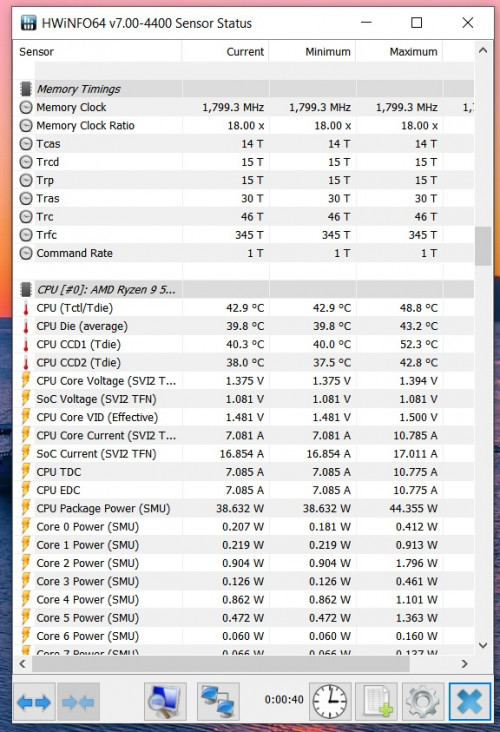
Did some tuning on my rig. CPU can fall below 40C on idle now.

» Click to show Spoiler - click again to hide... «


This post has been edited by TristanX: Mar 29 2021, 06:21 PM
1024kbps
post Mar 29 2021, 07:06 PM

李素裳
*******
Senior Member
6,017 posts

Joined: Feb 2007


QUOTE(Bonchi @ Mar 29 2021, 03:42 PM)
SG was never cheap... it was cheap last time many many years ago because 1sgd = RM2.3 ...  now not anymore. Everything is significantly more expensive in SG, even for thumbdrives, sd cards, mouse and keyboards.

Like my mouse is RM240(79sgd) converted but in malaysia, it's only RM189.
*
buy from brick and mortar shop always never cheap because their rental is absurdly high, they still have supporter from local.
Good thing is easy RMA, that's all, sometimes they do give discount if you buy in store, and give you advice if you're clueless.

Carousell pc part buyer usually only for those who know what they wants, but RMA is pain in the butt lol
General_Nic
post Mar 29 2021, 08:03 PM

D5000 fully loaded n ready to shoot~!!
*******
Senior Member
3,508 posts

Joined: Apr 2009


QUOTE(TristanX @ Mar 29 2021, 06:18 PM)
Did some tuning on my rig. CPU can fall below 40C on idle now.

» Click to show Spoiler - click again to hide... «

*
can advise where should I start tweaking with? currently my 5800x with custom waterloop dual 360 rads idle at 50C+
General_Nic
post Mar 29 2021, 08:03 PM

D5000 fully loaded n ready to shoot~!!
*******
Senior Member
3,508 posts

Joined: Apr 2009


*double post

This post has been edited by General_Nic: Mar 29 2021, 08:03 PM
1024kbps
post Mar 29 2021, 08:10 PM

李素裳
*******
Senior Member
6,017 posts

Joined: Feb 2007


QUOTE(General_Nic @ Mar 29 2021, 08:03 PM)
can advise where should I start tweaking with? currently my 5800x with custom waterloop dual 360 rads idle at 50C+
*
The first thing you should do is check the power plan you're using, AMD chipset driver install 2 additional powerplan that boost responsiveness at the cost of your power bill sweat.gif
Set it to balanced mode first before fiddle with BIOS.
TristanX
post Mar 29 2021, 08:16 PM

Where is my stars?
Group Icon
Elite
24,355 posts

Joined: Nov 2004
From: Setapak, Kuala Lumpur


QUOTE(General_Nic @ Mar 29 2021, 08:03 PM)
can advise where should I start tweaking with? currently my 5800x with custom waterloop dual 360 rads idle at 50C+
*
My exhaust fan is using Noctua NF-A14 ippc3000. Running at 2000rpm. This casing surprisingly can dampen the noise. I also used external sound card now.

Uninstall rubbish apps like Corsair iCUE. Yes, some apps keeps your CPU from going idle.
Bonchi
post Mar 29 2021, 08:21 PM

KittehPowah
******
Senior Member
1,649 posts

Joined: Sep 2008
QUOTE(1024kbps @ Mar 29 2021, 07:06 PM)
buy from brick and mortar shop always never cheap because their rental is absurdly high, they still have supporter from local.
Good thing is easy RMA, that's all, sometimes they do give discount if you buy in store, and give you advice if you're clueless.

Carousell pc part buyer usually only for those who know what they wants, but RMA is pain in the butt lol
*
Normally for SG market, i whack used parts... those are super bargain. Bought a zotac 2080 for 630sgd (before the price hike) as well as a bunch of 32gb kits for 140 ish sgd.

QUOTE(General_Nic @ Mar 29 2021, 08:03 PM)
can advise where should I start tweaking with? currently my 5800x with custom waterloop dual 360 rads idle at 50C+
*
Best to check which running application is causing it to boost first... like rgb/monitoring software, some versions of afterburner, torrents, antivirus etc. For my case it was a music player that is making all the cores stuck at 4ghz.

So when you found the culprit, then see you can live without it or not. If it's not important then just uninstall it.

This post has been edited by Bonchi: Mar 29 2021, 08:23 PM
General_Nic
post Mar 29 2021, 08:22 PM

D5000 fully loaded n ready to shoot~!!
*******
Senior Member
3,508 posts

Joined: Apr 2009


QUOTE(1024kbps @ Mar 29 2021, 08:10 PM)
The first thing you should do is check the power plan you're using, AMD chipset driver install 2 additional powerplan that boost responsiveness at the cost of your power bill sweat.gif
Set it to balanced mode first before fiddle with BIOS.
*
already on Balanced, before changing to Balanced can idle 70C to 80C shakehead.gif

QUOTE(TristanX @ Mar 29 2021, 08:16 PM)
My exhaust fan is using Noctua NF-A14 ippc3000. Running at 2000rpm. This casing surprisingly can dampen the noise. I also used external sound card now.

Uninstall rubbish apps like Corsair iCUE. Yes, some apps keeps your CPU from going idle.
*
using Unifans set to 1500rpm
tried with 2000rpm but only reduce like 5C, not worth the typhoon noise sweat.gif

using MSI mobo but didnt install Dragon Center
TristanX
post Mar 29 2021, 08:36 PM

Where is my stars?
Group Icon
Elite
24,355 posts

Joined: Nov 2004
From: Setapak, Kuala Lumpur


QUOTE(General_Nic @ Mar 29 2021, 08:22 PM)
already on Balanced, before changing to Balanced can idle 70C to 80C  shakehead.gif
using Unifans set to 1500rpm
tried with 2000rpm but only reduce like 5C, not worth the typhoon noise  sweat.gif

using MSI mobo but didnt install Dragon Center
*
Using Fractal Design Define S2 Vision RGB. This is my fan setup.

Front - Corsair LL140 X3 (mobo controlled) - intake
Bottom - Arctic Cooling P14 PST CO PWM - (90% fan speed) - intake
Back - Noctua NF-A14 ippc3000 (2000rpm) - exhaust
Top - Arctic Cooling Liquid Freezer II 360 (mobo controlled) - exhaust
Thermal paste - Thermal Grizzly Kryonaut Extreme (lipstick paste!)

You can try this power plan as well. It makes turbo less aggressive.

Attached File  install_Ryzen_5000_Powerplan.zip ( 4.75k ) Number of downloads: 19

Created by Verangry @computerbase.de

This post has been edited by TristanX: Mar 29 2021, 09:04 PM
llk
post Mar 29 2021, 08:50 PM

Look at all my stars!!
*******
Senior Member
4,158 posts

Joined: Jan 2003
From: KL
QUOTE(General_Nic @ Mar 29 2021, 08:03 PM)
can advise where should I start tweaking with? currently my 5800x with custom waterloop dual 360 rads idle at 50C+
*
Yours at a little high side, mine also with 2x360mm rads with all these rubbish apps running laugh.gif
- Bluetooth Devices
- Corsair Icue
- Creative Sound Blaster Command
- Colorful Igame center
- Nvidia control panel/Geforce experience
- MSI Afterburner
- RivaTuner

» Click to show Spoiler - click again to hide... «


This post has been edited by llk: Mar 29 2021, 08:50 PM
General_Nic
post Mar 29 2021, 09:06 PM

D5000 fully loaded n ready to shoot~!!
*******
Senior Member
3,508 posts

Joined: Apr 2009


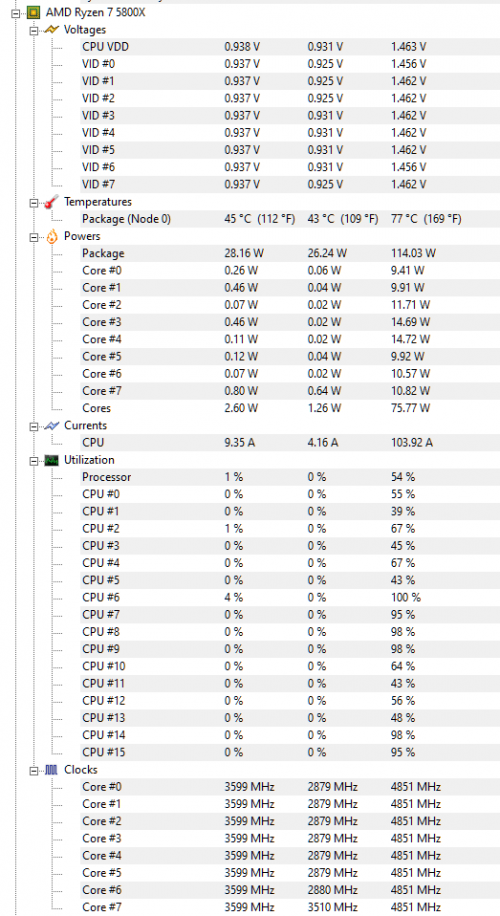
just closing chrome(facebook & LYN only) and Messenger app, reduced a lot

» Click to show Spoiler - click again to hide... «

xxboxx
post Mar 29 2021, 09:19 PM

The mind is for having ideas, not holding them
*******
Senior Member
5,261 posts

Joined: Oct 2004
From: J@Y B33


QUOTE(General_Nic @ Mar 29 2021, 08:03 PM)
can advise where should I start tweaking with? currently my 5800x with custom waterloop dual 360 rads idle at 50C+
*
At Advanced Power Settings, under Processor Power Management, check if System Cooling Policy is set to Active. Will slightly help to reduce the temperature.
If don't want the fans to ramp up and down too much, set smaller difference of fans speed between the temperature. Mine if not mistaken is set to 20% increase from 40c till 60c.

Even just idling my Chrome still take 3 to 4 % CPU processing. Sometimes spike to 5%.
user posted image
Bonchi
post Mar 29 2021, 09:20 PM

KittehPowah
******
Senior Member
1,649 posts

Joined: Sep 2008
QUOTE(General_Nic @ Mar 29 2021, 09:06 PM)
just closing chrome(facebook & LYN only) and Messenger app, reduced a lot
*
In your balanced power plan, what % is your min proc state? Try putting 99% heard it works better.

QUOTE(xxboxx @ Mar 29 2021, 09:19 PM)
At Advanced Power Settings, under Processor Power Management, check if System Cooling Policy is set to Active. Will slightly help to reduce the temperature.
If don't want the fans to ramp up and down too much, set smaller difference of fans speed between the temperature. Mine if not mistaken is set to 20% increase from 40c till 60c.

Even just idling my Chrome still take 3 to 4 % CPU processing. Sometimes spike to 5%.
*
For fans, just set an update delay like 2-5 seconds in the bios. As the temps usually spikes and drop very quickly, so this delay will work the curve a little smoother.

Also make sure c-state is not disabled if you want lower idles.

This post has been edited by Bonchi: Mar 29 2021, 09:24 PM
General_Nic
post Mar 29 2021, 09:28 PM

D5000 fully loaded n ready to shoot~!!
*******
Senior Member
3,508 posts

Joined: Apr 2009


QUOTE(TristanX @ Mar 29 2021, 08:36 PM)
You can try this power plan as well. It makes turbo less aggressive.

Attached File  install_Ryzen_5000_Powerplan.zip ( 4.75k ) Number of downloads: 19

Created by Verangry @computerbase.de
*
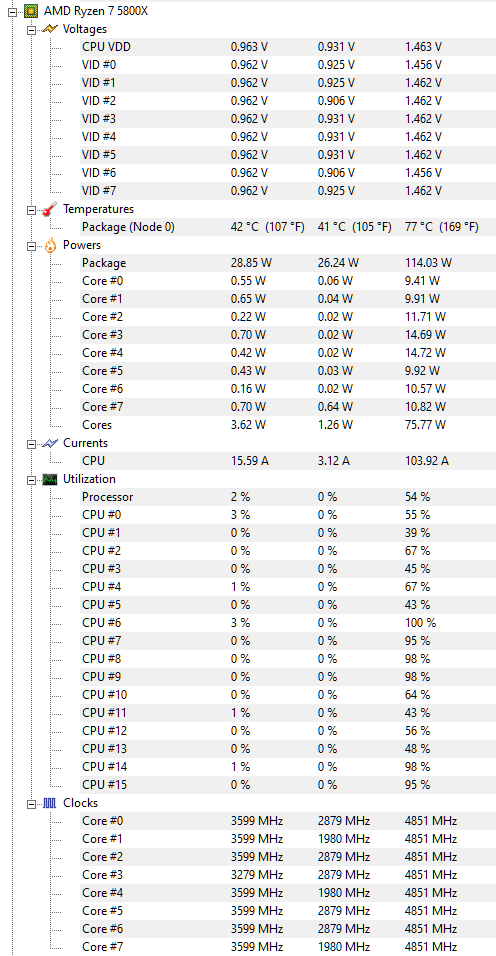
this power plan helps

this is the temperature with Chrome and Messenger still running
» Click to show Spoiler - click again to hide... «


QUOTE(xxboxx @ Mar 29 2021, 09:19 PM)
At Advanced Power Settings, under Processor Power Management, check if System Cooling Policy is set to Active. Will slightly help to reduce the temperature.
If don't want the fans to ramp up and down too much, set smaller difference of fans speed between the temperature. Mine if not mistaken is set to 20% increase from 40c till 60c.

Even just idling my Chrome still take 3 to 4 % CPU processing. Sometimes spike to 5%.
user posted image
*
checked it's active, issue is my Unifans having drivers issue so the pwm not working, now fixed at 1570rpm

QUOTE(Bonchi @ Mar 29 2021, 09:20 PM)
In your balanced power plan, what % is your min proc state? Try putting 99% heard it works better.
*
0%

the power plan tristan suggested set it at 1%

475 Pages « < 386 387 388 389 390 > » Top
 

Change to:
| Lo-Fi Version
0.0271sec    0.62    6 queries    GZIP Disabled
Time is now: 23rd December 2025 - 07:15 AM