Welcome Guest ( Log In | Register )

9 Pages  1 2 3 > » Bottom

Outline · [ Standard ] · Linear+

 AMD Ryzen, AM4 / AM5 Platform

views
     
xxboxx
post Nov 23 2018, 08:44 PM

The mind is for having ideas, not holding them
*******
Senior Member
5,261 posts

Joined: Oct 2004
From: J@Y B33


QUOTE(waka14 @ Nov 7 2018, 04:02 PM)
Well this is hardware info with prime 95 running, i can't find 'VRM' on the motherboard side, or did they name it as 'motherboard' ?
*

Check the whole entry in HWinfo for VRM MOS, sometimes it split the entry into 2 or more groups.
Usually the other temperature that as hot as CPU is the VRM or VSOC MOS. On my system VSOC MOS is written as EC_TEMP1 rclxub.gif
Or you can run CPU full load, the other temp that rise very high like CPU would be the VRM.


QUOTE(TristanX @ Nov 23 2018, 09:45 AM)
Ryzen loves RAM speed. Vengeance will win if same CAS Latency (CL). Get G.Skill Trident Z AMD compatible DDR4-3200 if you can afford it.
*
Is there a program to benchmark RAM speed and latency? I'm using Kingston 2666mhz RAM (16, 18, 18, 39) x 2 and overclock it to 3200mhz 16, 17, 17, 36.
Would like to know is it really faster than 2666mhz or just superficial.
xxboxx
post Nov 23 2018, 08:49 PM

The mind is for having ideas, not holding them
*******
Senior Member
5,261 posts

Joined: Oct 2004
From: J@Y B33


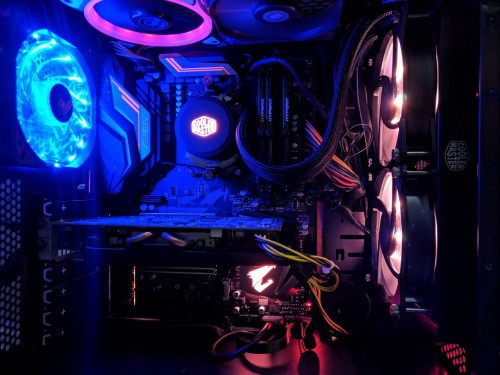
user posted image

My 2700X system. In future need to change to matching colour fans sweat.gif
xxboxx
post Nov 24 2018, 12:43 AM

The mind is for having ideas, not holding them
*******
Senior Member
5,261 posts

Joined: Oct 2004
From: J@Y B33


QUOTE(TristanX @ Nov 23 2018, 09:22 PM)
Here you go.
https://www.guru3d.com/articles-pages/amd-r...s-review,1.html

Sisoftware SANDRA can benchmark RAM.
*

QUOTE(Acid_RuleZz @ Nov 23 2018, 10:20 PM)
Aida64 have memory and cache benchmark tool. Free version can only do memory though.
*

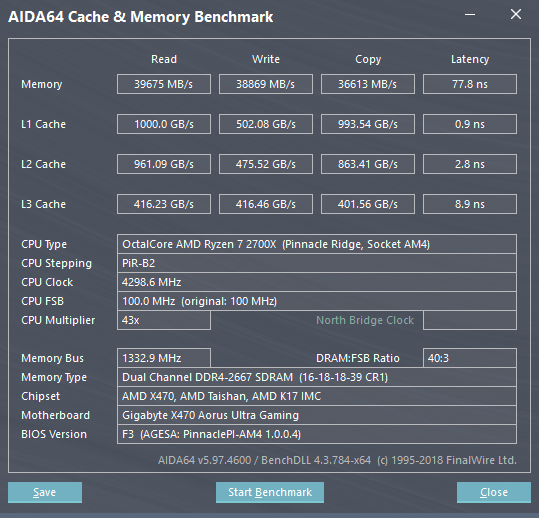
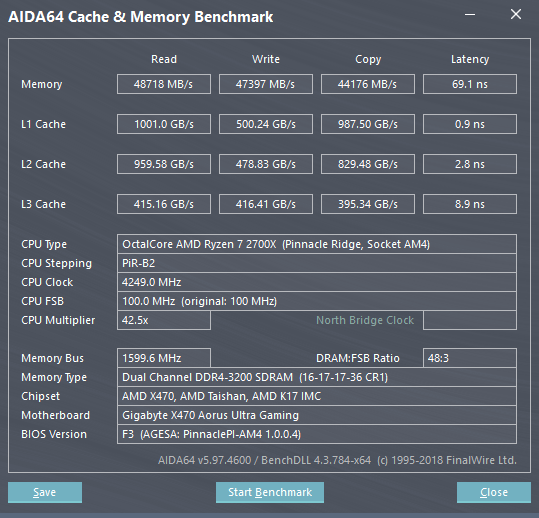
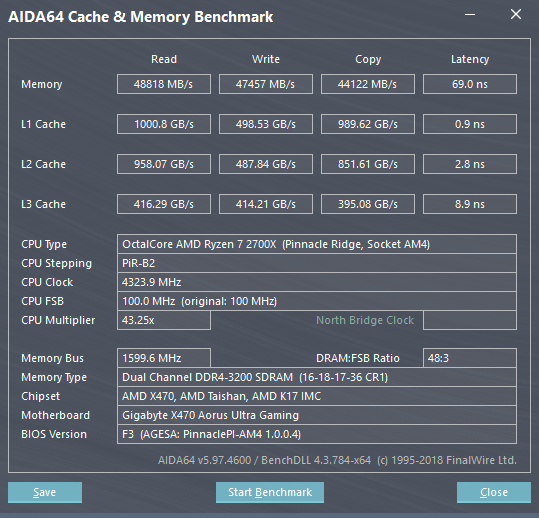
I use Aida64 since it's like very famous for RAM benchmark

1. follow the spec 2666mhz speed
2. 3200mhz with 16-17-17-36
3. 3200mhz with 16-18-17-36 (I set 16-18-18-36 on bios, but when run Windows it became 16-18-17-36. Trying this because sometimes blue screen after back from sleep when use 16-17-17-36)

user posted image user posted image user posted image
Massive difference 2666mhz compare to 3200mhz shocking.gif
I think this speed is not bad for a hynix c-die cheap RAM?

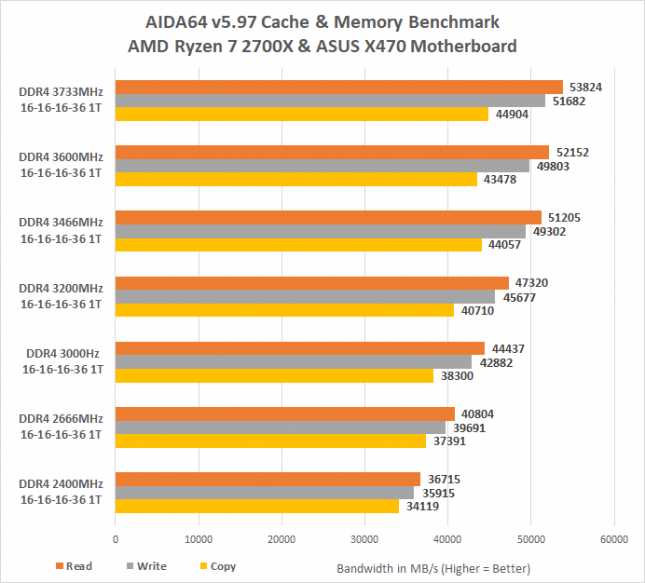
Compare to this G.SKILL Sniper X Series 16GB (2 x 8GB) DDR4 3400 with Samsung b-die, seems not much difference
user posted image
http://www.legitreviews.com/ddr4-memory-sc...platform_205154

Tried 16-16-16-36 3200mhz, can't POST
Tried 3333mhz, blue screen just after windows finish load tongue.gif
xxboxx
post Nov 24 2018, 11:51 AM

The mind is for having ideas, not holding them
*******
Senior Member
5,261 posts

Joined: Oct 2004
From: J@Y B33


QUOTE(raydenex @ Nov 24 2018, 07:21 AM)
Your third config is decent, for a kit of Hynix C-die 2666mhz.
Do also consider the fact that the G.Skill Sniper X 3466 Samsung B-die could very possibly do 3200 CL14 which I've found to be the sweet spot for speed+latency.
*

If push to 3600mhz the latency too high?

I think these B-die is more beneficial to those that OC their CPU till 4.6ghz or even 5.0ghz. See those Intel CPU that OC such high can get 100GB/s
xxboxx
post Nov 24 2018, 01:52 PM

The mind is for having ideas, not holding them
*******
Senior Member
5,261 posts

Joined: Oct 2004
From: J@Y B33


QUOTE(shirohamada @ Nov 24 2018, 01:25 PM)
kingston hyper x?
what's the voltage?
mine 2866 16-18-18-39 1.2V.
2933 1.22V.
even relaxing the latency can't get it to 2933 without voltage bump.
i haven't tested 3200, but should be possible at 1.35V like other ram rated at that speed.
*

Yes Hyper X. I put it on Auto at bios, HWinfo report it is 1.35V

Edit: That is a bit on the high side right? I now changed it manually to 1.2V at bios, but HWinfo report it as 1.224V
So far ok, system still stable.

Also noticed that RAM timing in bios is 16-18-17-36, I must miss key it yesterday and then thought the bios auto set it when load windows laugh.gif
Change back to 16-18-18-36

This post has been edited by xxboxx: Nov 24 2018, 02:18 PM
xxboxx
post Nov 24 2018, 07:08 PM

The mind is for having ideas, not holding them
*******
Senior Member
5,261 posts

Joined: Oct 2004
From: J@Y B33


QUOTE(shirohamada @ Nov 24 2018, 02:39 PM)
no, 1.35 is normal.
all the cheap 3200 is rated at that voltage.
1.224 at 3200 only if you're lucky. check for stability.
*

Spoken too soon, BSOD after a while.

I upped it to 1.25V, still monitoring if it will error.
xxboxx
post Dec 5 2018, 02:24 PM

The mind is for having ideas, not holding them
*******
Senior Member
5,261 posts

Joined: Oct 2004
From: J@Y B33


Ryzen 3000 leaked spec rumours
https://wccftech.com/amd-ryzen-3000-specs-p...-5-1ghz-on-am4/

Ryzen 5 3600X will have 8C16T, boost to 4.8ghz
Might be faster than 2700X

Ryzen 7 3700X will have 12C24T, boost to 5.0ghz
Might be faster than 2700X by 50%

And then there's Ryzen 9, 16 Cores 32 Threads, Up to 5.1ghz...

So fast already feel 2700X is very outdated...
xxboxx
post Dec 6 2018, 07:20 PM

The mind is for having ideas, not holding them
*******
Senior Member
5,261 posts

Joined: Oct 2004
From: J@Y B33


QUOTE(mbr @ Dec 5 2018, 02:30 PM)
At least Navi showing signs of life

With competition, if they are able to be priced well, consumers will have a field day... except those that just bought a rig in the past 2 months
*

Ya, like me. Buyer remorse. sweat.gif
But 3000 series will move to 7nm, there might have stability and bug issue.

At least I didn't buy a GC, seeing the Navi rumours of performance and price.

QUOTE(edmund_yung @ Dec 6 2018, 09:51 AM)
Not as fast as the i7-8700K.
*

But 9700K performance about the same with 8700K, some more don't have Hyper Threading.
xxboxx
post Dec 7 2018, 11:49 AM

The mind is for having ideas, not holding them
*******
Senior Member
5,261 posts

Joined: Oct 2004
From: J@Y B33


QUOTE(TristanX @ Dec 7 2018, 08:31 AM)
Depends on load.

Gaming = Core i7-8700K
Heavy load = Ryzen 7 2700X

Excel 2016 thumping
[attachmentid=10129718]
I dont think there will be bugs. They have been testing it for a long time.
*
Hard to say since this is the first time x86 architecture on 7nm. Until now Intel can't solve their 10nm issue.
Can't wait to see how much performance gain from these 7nm cpu.
xxboxx
post Dec 10 2018, 08:06 PM

The mind is for having ideas, not holding them
*******
Senior Member
5,261 posts

Joined: Oct 2004
From: J@Y B33


QUOTE(zinniur @ Dec 10 2018, 04:47 PM)
i think its more like the proc cannot cope with the tiny case n lack of airflow...my r5 2600 in fractal design nano temp just fine using stock cooler,temp max 75c when oc
*

I agree. Airflow is very important for Ryzen. I use AIO cooler for 2700X and it still hit on the high side of 80° C after few minutes of full load. After I open front cover to let more airflow pass the radiator it now won't exceed 70° C.
xxboxx
post Jan 6 2019, 04:51 PM

The mind is for having ideas, not holding them
*******
Senior Member
5,261 posts

Joined: Oct 2004
From: J@Y B33


QUOTE(dayojah @ Jan 5 2019, 11:55 PM)
I would like to see a Ryzen 5 with the 6 core + 6 hyperthread changed to something like 8-10 true cores.
The fixes for the various hyperthreading security bugs are basically disabling the hyperthreading, so the silicon is being wasted. It also means that a I7 is a waste of money over an I5 now.
*

Ryzen 5 hypertreading is disabled? It's not 12 threads? My Ryzen 7 is still 16 threads.
xxboxx
post Jan 6 2019, 08:21 PM

The mind is for having ideas, not holding them
*******
Senior Member
5,261 posts

Joined: Oct 2004
From: J@Y B33


QUOTE(dayojah @ Jan 6 2019, 06:35 PM)
Hyperthreading is still there, but the patches against attacks like TLBleed make it less effective.
It has got so bad that OpenBSD recommend disabling Hyperthreading in the BIOS
https://www.tomshardware.com/news/disable-i...rity,37690.html
*

But that is Intel only right?
Ryzen not affected
xxboxx
post May 2 2019, 12:33 AM

The mind is for having ideas, not holding them
*******
Senior Member
5,261 posts

Joined: Oct 2004
From: J@Y B33


QUOTE(Lineage @ May 1 2019, 10:19 AM)
CPU running stock speed..no OC..stock cooler.. wink.gif
*

Stock cooler blow the air to the surrounding motherboard, good if you're using open case but screw up the airflow if close casing. I've made suggestion to create opening on the side panel and change all casing fans to suck out air from casing, see below link for the discussion.


QUOTE(Lineage @ May 1 2019, 07:20 PM)
Thermaltake Versa H17
» Click to show Spoiler - click again to hide... «

*

Same casing with this guy, same overheat problem. Read through the pages for some idea, though the guy decide to change the case to fix the problem. I feel make a better air flow in and air flow out is sufficient to fix the temperature issue.
https://forum.lowyat.net/topic/4753871
xxboxx
post May 2 2019, 01:28 AM

The mind is for having ideas, not holding them
*******
Senior Member
5,261 posts

Joined: Oct 2004
From: J@Y B33


QUOTE(Lineage @ May 2 2019, 12:51 AM)
Thanks for the link..

Any recommendation for mid-tower case? Budget around 200..good for air ventilation..
*

Why not try create opening on the side panel? Minimal cost, only need to get filter to cover the opening.

I don't have recommendation for case. But most importantly is to get a case that will not too restrictive on fans air flow. My case front got 3 fans with acrylic cover, 2 fans at top and 1 fan at rear. Full load CPU 80° Celcius if not mistaken. After I remove the front acrylic cover temperature never exceed 72° Celcius when full load. The acrylic cover is restricting the air that flowing in.
xxboxx
post May 3 2019, 05:13 PM

The mind is for having ideas, not holding them
*******
Senior Member
5,261 posts

Joined: Oct 2004
From: J@Y B33


QUOTE(lowlock @ May 2 2019, 06:20 PM)
what is normal idle temp for 2700x?
mine is 43c and it will spike to 50-53c during idle.
while max temp is around 83c.
currently using 120mm aio from id cooling.
no oc, running stock currently.
normal or not?
*

That's normal, if you got restricted airflow. I got same CPU and 240mm AIO, 3 intake fans in front, 2 exhaust fans on top and 1 exhaust fan at back. All is 120mm and can spin 2000rpm when full load. With the front acrylic cover restricting the air flowing in, my temp around the same as yours.
My casing is ATX https://www.avf.com.my/gamingfreak.php?c=656&p=2403

After I remove the cover and put filter in it's place, now idling is 40°C and full load 70°C. Room temp around 32°C
xxboxx
post May 4 2019, 09:37 PM

The mind is for having ideas, not holding them
*******
Senior Member
5,261 posts

Joined: Oct 2004
From: J@Y B33


QUOTE(Lineage @ May 4 2019, 10:54 AM)
I guess i should just let it be, no point to spend so much.. sweat.gif
*

QUOTE(xxboxx @ May 2 2019, 01:28 AM)
Why not try create opening on the side panel? Minimal cost, only need to get filter to cover the opening.
*
|
|
|
QUOTE(Lineage @ May 4 2019, 05:28 PM)
So u mean the stock cooler isnt perform well? Or just my cooler?
*

QUOTE(xxboxx @ May 2 2019, 12:33 AM)
Stock cooler blow the air to the surrounding motherboard, good if you're using open case but screw up the airflow if close casing. I've made suggestion to create opening on the side panel and change all casing fans to suck out air from casing, see below link for the discussion.
Same casing with this guy, same overheat problem. Read through the pages for some idea, though the guy decide to change the case to fix the problem. I feel make a better air flow in and air flow out is sufficient to fix the temperature issue.
https://forum.lowyat.net/topic/4753871
*
This post has been edited by xxboxx: May 4 2019, 09:37 PM
xxboxx
post May 17 2019, 09:37 PM

The mind is for having ideas, not holding them
*******
Senior Member
5,261 posts

Joined: Oct 2004
From: J@Y B33


QUOTE(Alexdp21 @ May 17 2019, 04:06 PM)
Hi all Sifus,

I recently upgrade to Ryzen setup as per my siggy. At first im using the Segotep GP600G 500w PSU and able to enable XMP profile of my ram. Its profile is 15-17-17-35 at 3000Mhz 1.35v. However according to CPU-Z and Bios it only ran at 16-17-17-35 at 2933MHZ. After sometimes when gaming or under heavy load, it will crash, screen goes blank and reboot. The issue occurs randomly at load. Sometimes it last 5mins, sometimes it last 1 hour. I thought might be a problem with either my PSU or GPU.

So I change PSU to Cooler Master V750 (semi modular) I could not even boot the PC when enabling the XMP profile. I could only run at stock speed at 2133Mhz and it run fine without any crash.

Any idea why? Got a bad ram? or motherboard compatibility?

Here is the screenshot of the Thaiphoon.
*

Most likely RAM timing compatibility with mobo.
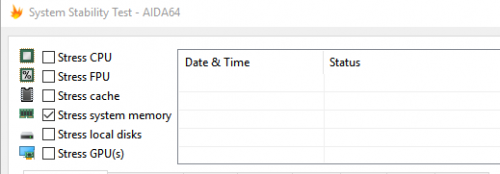
Try run System Stability Test from AIDA64 program, enable the Stress system memory. Run for an hour or so to make sure your RAM timing won't make Windows hangs.
user posted image

Try manually change the timings. Samsung B die can go much higher speed and lower timing. Try 3200mhz 14-14-14-34 or 15-15-15-36
https://www.reddit.com/r/Amd/comments/71cgv...t_3200_timings/

Or use DRAM Calculator for Ryzen to calculate the timings
xxboxx
post May 17 2019, 10:35 PM

The mind is for having ideas, not holding them
*******
Senior Member
5,261 posts

Joined: Oct 2004
From: J@Y B33


QUOTE(Alexdp21 @ May 17 2019, 10:13 PM)
So I have to manually change the timing according to the dram calculator right?

Best would be 3200 cl14?
*

Maybe can go even higher. I didn't own Samsung b die RAM. The link is showing others that manage to get such timing. You can follow them then adjust some more.

The dram calculator show you the timings that need to be changed, but it can be overwhelmed. For me I just adjust DDR Voltage, tCL, tRCDWR, tRCDRC, tRP, tRAS. Others I just leave it on auto.
xxboxx
post May 18 2019, 09:54 PM

The mind is for having ideas, not holding them
*******
Senior Member
5,261 posts

Joined: Oct 2004
From: J@Y B33


QUOTE(Alexdp21 @ May 18 2019, 03:02 PM)
Ah I still couldn't make it work. It wont boot at 3000 14-14-14-14-30 or 3200 14-14-14-14-30 or even 3200 16-16-16-16-36. I ram the voltage to 1.4v it stuck in the blank screen.
*

Then try other combination, maybe 14-15-15-15-30 and so on. Best is google what timings other have manage to get.
xxboxx
post May 21 2019, 12:52 AM

The mind is for having ideas, not holding them
*******
Senior Member
5,261 posts

Joined: Oct 2004
From: J@Y B33


QUOTE(Alexdp21 @ May 21 2019, 12:26 AM)
I see. I thought my mobo is on the mid end. I guess im wrong then. Lol.

Btw, I manage to up the frequency to 2866Mhz as per screenshot. Ran Memtest and TesMem twice with no errors.
*

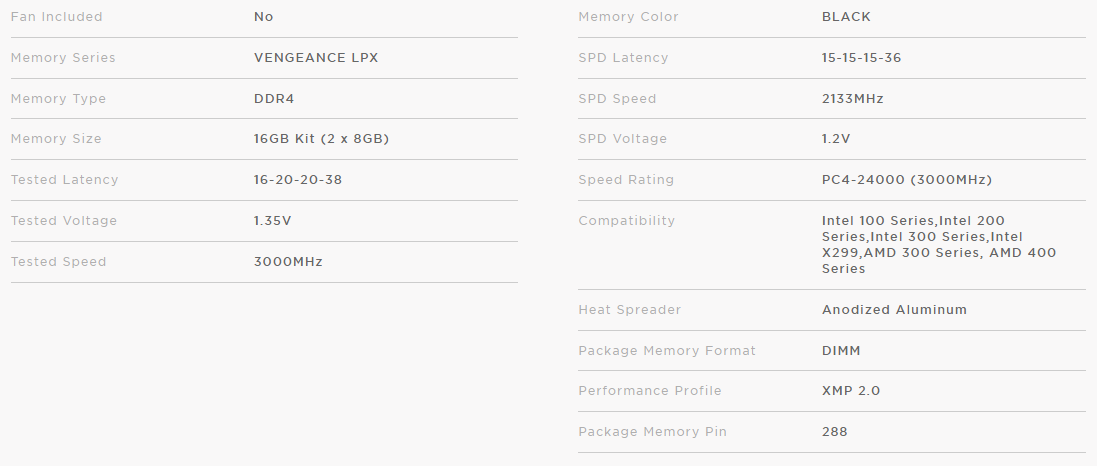
From Corsair website
user posted image

Means to get 3000mhz you need to set timing 16-20-20-38 with 1.35v
15-15-15-36 is the lowest timing, likely at 2133mhz

From this Reddit link, some people have success in running 3000mhz at 16-18-18-36.

On that link also someone comment
QUOTE
You need to check the QVL on their website. Check whether your ram is in that list.

I built my pc in the Asrock B450 Fatality Gaming K4. My 3000mhz corsair ram wont boot at 3000,2933, but I can only boot at 2800. And my ram is not on that list.

If your ram is not in that list, maybe buy the ram that is on that list (if you have not bought any ram), or you have to boot at a lower speed like me, or maybe manually OC to higher speed (not sure about this tho, and maybe will be unstable)

Asrock compatibility list for your mobo

Also do you stick your RAM at A2 & B2 slot? I read if A1 & B1 slot it will have problem going higher speed.

Actually you should aim for 3200mhz or higher. It's Samsung B die, that thing is what people use for when overclocking their RAM. Mine Hynix C die only yet still can run at 3200mhz stable, but timing is higher a bit. tongue.gif

This post has been edited by xxboxx: May 21 2019, 12:55 AM

9 Pages  1 2 3 > » Top
 

Change to:
| Lo-Fi Version
0.0271sec    0.46    7 queries    GZIP Disabled
Time is now: 5th December 2025 - 01:35 AM