Outline ·
[ Standard ] ·
Linear+
Unifi Official TM UniFi High Speed Broadband Thread V23, ( -_・) ︻デ═一▸ Maxis & Time
|
XeactorZ
|
 Jan 15 2016, 07:16 AM Jan 15 2016, 07:16 AM
|

|
QUOTE(fruitie @ Jan 15 2016, 12:03 AM) Erm, no. It is just a phone that you can buy anywhere at the electronics department.  Just plug in to the telephone port and you can use already? She is still using Streamyx. ooo, but if for unifi the cordless phone need to connect modem in order to work  |
|
|
|
|
|
Xefron
|
Jan 15 2016, 08:20 AM
|
|
|
QUOTE(XeactorZ @ Jan 15 2016, 07:16 AM) ooo, but if for unifi the cordless phone need to connect modem in order to work nop; the phone is just a normal cordless phone / DECT Phone... u can use it on every RJ11 port that has telephone line service and it need power outlet too. |
|
|
|
|
|
nikrizal
|
Jan 15 2016, 02:36 PM
|
|
|
I thought unifi is fastest between 1 - 6 am, but it seems that 7 -9 am is the best time. Maybe during that time people busy going to work, school, etc.
|
|
|
|
|
|
OKLY
|
Jan 15 2016, 04:07 PM
|
The Penguin Vader

|
Finally my ADV30 plan has 10mbps upload as well. Did not need to restart BTU/router, just suddenly noticed the increased in speed.
|
|
|
|
|
|
calvinlaw510
|
Jan 15 2016, 04:12 PM
|
|
|
QUOTE(OKLY @ Jan 15 2016, 04:07 PM) Finally my ADV30 plan has 10mbps upload as well. Did not need to restart BTU/router, just suddenly noticed the increased in speed. for my case, before restart i test only 10mbps, but after restart i test and get 20mbps |
|
|
|
|
|
fruitie
|
Jan 15 2016, 04:14 PM
|
Rise and Shine
|
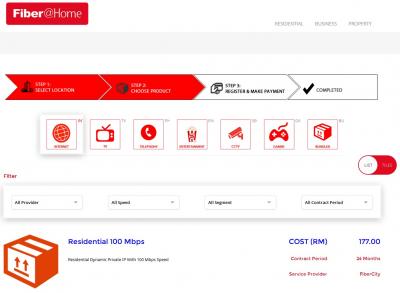
QUOTE(calvinlaw510 @ Jan 15 2016, 03:51 PM) Fiber@home 100Mbps package only RM177...  Dont know how much TM gonna charge for 100Mbps  Fiber@home Fiber@homeWell, it is affordable but the coverage is limited. The reason why TM is still so arrogant and charging crazy price for its UniFi is due to their coverage... Sigh. It goes back to this word - monopoly. QUOTE(OKLY @ Jan 15 2016, 04:07 PM) Finally my ADV30 plan has 10mbps upload as well. Did not need to restart BTU/router, just suddenly noticed the increased in speed. Congrats, finally what a long wait compared to others.  |
|
|
|
|
|
wcypierre
|
Jan 15 2016, 04:33 PM
|
Newbie Programmer

|
QUOTE(calvinlaw510 @ Jan 15 2016, 03:51 PM) Fiber@home 100Mbps package only RM177... Dont know how much TM gonna charge for 100Mbps Fiber@homeit doesn't have a public ip so your cctv, webserver at home won't be accessible. |
|
|
|
|
|
calvinlaw510
|
Jan 15 2016, 04:36 PM
|
|
|
QUOTE(wcypierre @ Jan 15 2016, 04:33 PM) it doesn't have a public ip so your cctv, webserver at home won't be accessible. only business package come with fix public ip. This post has been edited by calvinlaw510: Jan 15 2016, 04:39 PM Attached thumbnail(s)
|
|
|
|
|
|
nikrizal
|
Jan 15 2016, 04:37 PM
|
|
|
TM will soon add another package named 'Unifi Pro' with 100Mbps speed. Anybody know about this?
|
|
|
|
|
|
calvinlaw510
|
Jan 15 2016, 04:41 PM
|
|
|
QUOTE(nikrizal @ Jan 15 2016, 04:37 PM) TM will soon add another package named 'Unifi Pro' with 100Mbps speed. Anybody know about this? we heard the rumors about the 100mbps package going to launch soon...but dont know what is the price. |
|
|
|
|
|
kaywylee
|
Jan 15 2016, 04:50 PM
|
New Member

|
QUOTE(calvinlaw510 @ Jan 15 2016, 04:12 PM) for my case, before restart i test only 10mbps, but after restart i test and get 20mbps I restarted last night and also saw it was 20MBps when doing the speedtest. |
|
|
|
|
|
soonwai
|
Jan 15 2016, 05:05 PM
|
|
|
QUOTE(fruitie @ Jan 14 2016, 06:16 PM) Try running for few times and see.  Just did this a min ago. Still 1ms ping. Wierd huh? This post has been edited by soonwai: Jan 15 2016, 05:06 PM |
|
|
|
|
|
Colonel Cabuk
|
Jan 15 2016, 05:08 PM
|
|
|
QUOTE(soonwai @ Jan 15 2016, 05:05 PM) Just did this a min ago. Still 1ms ping. Wierd huh? Try the HTML5 one: beta.speedtest.net |
|
|
|
|
|
calvinlaw510
|
Jan 15 2016, 05:09 PM
|
|
|
QUOTE(soonwai @ Jan 15 2016, 05:05 PM) Just did this a min ago. Still 1ms ping. Wierd huh? try on other server |
|
|
|
|
|
soonwai
|
Jan 15 2016, 05:18 PM
|
|
|
QUOTE(Colonel Cabuk @ Jan 15 2016, 05:08 PM) Try the HTML5 one: beta.speedtest.netbeta.speedtest giving 4ms. Maxis server. http://beta.speedtest.net/result/4998709807The Puchong server giving 5ms. |
|
|
|
|
|
ronnie26
|
Jan 15 2016, 05:25 PM
|
Getting Started
|
QUOTE(wcypierre @ Jan 14 2016, 04:26 AM) Repeater = sniff the signal from your router and retransmit it to you. The downside to it is that you will lose at least half of your speed(because the repeater is acting as the middleman between you and router). Its better for you to get a new router. State your budget and forumers here will recommend a decent one for you thx for the info. budget around 150, 10 devices connecting at the same time  |
|
|
|
|
|
erik8lyt
|
Jan 15 2016, 05:26 PM
|
|
|
I'm currently subscribing Unifi Advance Plan 30mbps. There is a problem with my DL speed. I always get around 28mbps DL speed using RG4332 with LAN connection. Does changing router help to get the maximum speed? FYI, I don't want to waste money to buy another router just because of the DL speed.
|
|
|
|
|
|
jusbella
|
Jan 15 2016, 05:33 PM
|
|
|
28mbps is ad good, in term of speed, if less than 80% of the speed as advertised, den u can complain ad. QUOTE(erik8lyt @ Jan 15 2016, 05:26 PM) I'm currently subscribing Unifi Advance Plan 30mbps. There is a problem with my DL speed. I always get around 28mbps DL speed using RG4332 with LAN connection. Does changing router help to get the maximum speed? FYI, I don't want to waste money to buy another router just because of the DL speed. |
|
|
|
|
|
wcypierre
|
Jan 15 2016, 06:01 PM
|
Newbie Programmer
|
QUOTE(calvinlaw510 @ Jan 15 2016, 04:36 PM) only business package come with fix public ip. I mean the plan is cheaper because there's no public ip. |
|
|
|
|



 Quote
Quote







 0.0201sec
 1.12
1.12
 6 queries
 GZIP Disabled