Welcome Guest ( Log In | Register )

488 Pages « < 266 267 268 269 270 > » Bottom

Outline · [ Standard ] · Linear+

 The Official Maxis FTTH Thread | v5, Maxis Home Fibre Internet, from RM89

views
     
joshhd
post Aug 15 2020, 10:02 PM

Look at all my stars!!
*******
Senior Member
7,796 posts

Joined: Dec 2014
From: Malaysia


QUOTE(Mollai @ Aug 13 2020, 03:49 PM)
Hi Guys... need some advice here.

I recently changed my internet from Maxis Astro bundle to a standalone one because my parents decided to cancel Astro.
I applied for the Maxis home fibre, they sent some technician to install with a new router.
It's been a month, and I felt that the connection gets disconnected intermittently - because I am still working from home I can tell that my internet disconnected as my VPN will have a pop up that it is disconnected and reconnecting.

I called Maxis, they sent someone over.
The technician said there is nothing wrong with my internet, but my disconnection issue is probably my room is not near the router.
He explained that I never experience in the past as now we have 5g signal, so there could be interference as there are 2 signals being transmitted (2.4g and 5g)
He suggested me to get wifi booster to get a better signal.

I did some reading on wifi extender, mesh network, and also get to know that routers may also affect the connection.
So I would like to ask if anyone had similar issue, and what would be the best solution?

TL/DR version:
I experience intermittent disconnection using Maxis home fiber plan.
I stay double story, router installed in living room. My room is on 1st floor far behind.
Maxis technician suggest wifi extender - wanna ask if you had similar issue and your suggested solution.

There are only my parents and I at home, I don't really need very canggih solutions as they are not very tech-savy. I just need to work with smooth internet in my room.
In case you suggest me to work closer to the router, my job requires some privacy and my router is installed near the TV.

Any comments is very much appreciated.  notworthy.gif  notworthy.gif
*
QUOTE(numbertwo @ Aug 15 2020, 06:56 PM)
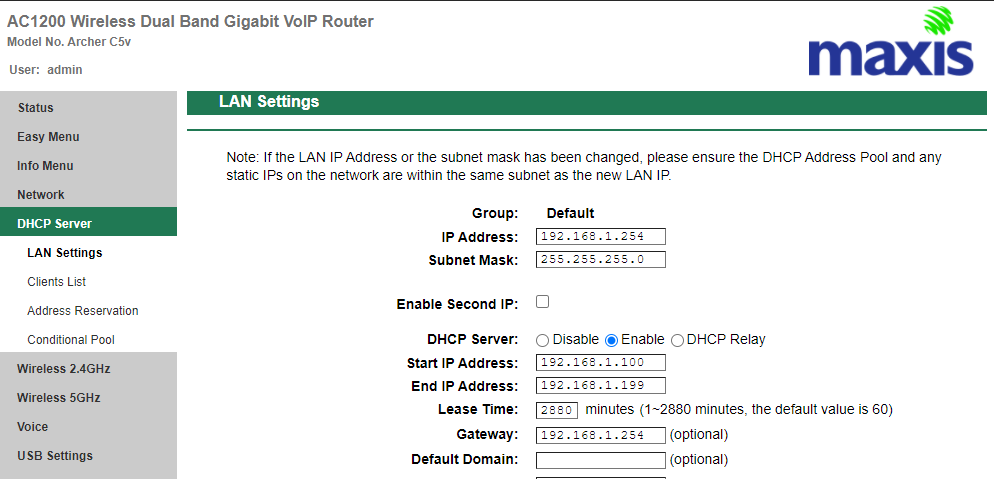
Before you follow others' suggestions to change the router, try to set the DHCP lease time in the C5v first.  Default 60 mins, try to extend to max 2880 mins and see if that helps alleviate the dis-connectivity problem first.
*

Example:
user posted image
kwai_83
post Aug 17 2020, 08:45 PM

Casual
***
Junior Member
464 posts

Joined: Dec 2004
QUOTE(Mollai @ Aug 13 2020, 03:49 PM)
Hi Guys... need some advice here.

I recently changed my internet from Maxis Astro bundle to a standalone one because my parents decided to cancel Astro.
I applied for the Maxis home fibre, they sent some technician to install with a new router.
It's been a month, and I felt that the connection gets disconnected intermittently - because I am still working from home I can tell that my internet disconnected as my VPN will have a pop up that it is disconnected and reconnecting.

I called Maxis, they sent someone over.
The technician said there is nothing wrong with my internet, but my disconnection issue is probably my room is not near the router.
He explained that I never experience in the past as now we have 5g signal, so there could be interference as there are 2 signals being transmitted (2.4g and 5g)
He suggested me to get wifi booster to get a better signal.

I did some reading on wifi extender, mesh network, and also get to know that routers may also affect the connection.
So I would like to ask if anyone had similar issue, and what would be the best solution?

TL/DR version:
I experience intermittent disconnection using Maxis home fiber plan.
I stay double story, router installed in living room. My room is on 1st floor far behind.
Maxis technician suggest wifi extender - wanna ask if you had similar issue and your suggested solution.

There are only my parents and I at home, I don't really need very canggih solutions as they are not very tech-savy. I just need to work with smooth internet in my room.
In case you suggest me to work closer to the router, my job requires some privacy and my router is installed near the TV.

Any comments is very much appreciated.  notworthy.gif  notworthy.gif
*
C
Replacement a good router with the maxis supplied stock. confirm is better than what u need. budget depends suggest u can go for ax3000 asus or ac86 confirm better

onthefly
post Aug 20 2020, 04:14 PM

Regular
******
Senior Member
1,315 posts

Joined: Aug 2007
how to get dongle ? currently on 30mb home fiber plan. dont want to change phone telco as on prepaid
onthefly
post Aug 20 2020, 04:16 PM

Regular
******
Senior Member
1,315 posts

Joined: Aug 2007
QUOTE(Mollai @ Aug 13 2020, 03:49 PM)
because I am still working from home I can tell that my internet disconnected as my VPN will have a pop up that it is disconnected and
*
confirm your internet disconnect or your VPN ?


andrewtho
post Aug 26 2020, 03:45 PM

Hooded Knight
*******
Senior Member
5,936 posts

Joined: Dec 2009
From: City of Subang Jaya
Reading so many bad reviews on Maxis Fibre - was contemplating to migrate from Unifi to Maxis because of the monthly rebate + contract cash back termination for my current Unifi plan.

Bummer indeed
joshhd
post Aug 26 2020, 04:03 PM

Look at all my stars!!
*******
Senior Member
7,796 posts

Joined: Dec 2014
From: Malaysia


QUOTE(andrewtho @ Aug 26 2020, 03:45 PM)
Reading so many bad reviews on Maxis Fibre - was contemplating to migrate from Unifi to Maxis because of the monthly rebate + contract cash back termination for my current Unifi plan.

Bummer indeed
*

It is case to case basis, and depends on area... What others experienced, are not necessary it will not happen to you.
TM also have many bad reviews what... sweat.gif
TIME Fibre also have bad reviews. So does that means, you should continue using TM? biggrin.gif
waisang
post Aug 26 2020, 07:34 PM

On my way
****
Junior Member
588 posts

Joined: Dec 2009
QUOTE(andrewtho @ Aug 26 2020, 03:45 PM)
Reading so many bad reviews on Maxis Fibre - was contemplating to migrate from Unifi to Maxis because of the monthly rebate + contract cash back termination for my current Unifi plan.

Bummer indeed
*
No issues if you have your own router to run.... the stock router is useless to me.
andrewtho
post Aug 27 2020, 08:06 AM

Hooded Knight
*******
Senior Member
5,936 posts

Joined: Dec 2009
From: City of Subang Jaya
QUOTE(waisang @ Aug 26 2020, 07:34 PM)
No issues if you have your own router to run.... the stock router is useless to me.
*
Thanks.

I have my own router(s), will probably chuck aside their stock routers like what I did for Unifi 😅
onthefly
post Aug 31 2020, 12:46 AM

Regular
******
Senior Member
1,315 posts

Joined: Aug 2007
Anybody having slowness now?
TSronnie
post Aug 31 2020, 03:23 PM

Not enough stars
*********
All Stars
21,311 posts

Joined: Jan 2003
From: Kuala Lumpur


Generally last few days has been dragging slow on Maxis Home fibre
angelofro
post Sep 4 2020, 11:15 AM

Casual
***
Junior Member
385 posts

Joined: Nov 2007


hi guys, i already installed maxis fibre. so now i wish to terminate the unifi, anything i should careful?
YoungMan
post Sep 4 2020, 02:22 PM

Look at all my stars!!
*******
Senior Member
6,806 posts

Joined: Oct 2008
From: Kuala Lumpur


QUOTE(angelofro @ Sep 4 2020, 12:15 PM)
hi guys, i already installed maxis fibre. so now i wish to terminate the unifi, anything i should careful?
*
Wait how did you install Maxis fibre without switching from Unifi? Because new procedure need to do switching just like MNP.
Btw to answer you, just need to bring the form from maxis to TM and tell them you have installed maxis and wish to terminate Unifi.
angelofro
post Sep 4 2020, 02:50 PM

Casual
***
Junior Member
385 posts

Joined: Nov 2007


QUOTE(YoungMan @ Sep 4 2020, 02:22 PM)
Wait how did you install Maxis fibre without switching from Unifi? Because new procedure need to do switching just like MNP.
Btw to answer you, just need to bring the form from maxis to TM and tell them you have installed maxis and wish to terminate Unifi.
*
because i pay both of them. coz i scare if the maxis fibre got any problem i still got unifi can use.

so i just need take the form that when maxis installer give me to the tm branch and tell then terminate then all done? those old router need to give back?
karastree
post Sep 4 2020, 04:46 PM

New Member
*
Junior Member
17 posts

Joined: Apr 2013
Hi All ,

Just want to ask some advice ,

Recently i juz upgraded my broadband to maxis one prime package consist of home broadband and data for phone , im having problem with my backup dongle, after test i cannot connect to internet, after some checking with maxis its revealed that my current sim card serial numb (for backup dongle) are not telly with the registered under my name in Maxis system , it is belong to another people. When i confront maxis installer, he keep giving me excuses and keep said about he give loan to another people, and he promise me to find back sim card with same serial number, i suspect installer are dishonest, where should i report this matter ?

This post has been edited by karastree: Sep 4 2020, 04:51 PM
YoungMan
post Sep 4 2020, 07:42 PM

Look at all my stars!!
*******
Senior Member
6,806 posts

Joined: Oct 2008
From: Kuala Lumpur


QUOTE(angelofro @ Sep 4 2020, 03:50 PM)
because i pay both of them. coz i scare if the maxis fibre got any problem i still got unifi can use.

so i just need take the form that when maxis installer give me to the tm branch and tell then terminate then all done? those old router need to give back?
*
Yes, Maxis should give you a pink form that you can bring to Tm to terminate Unifi. No need to return the BTU. But if you don't have form then have to return back equipment to TM.
Now new procedure, cannot have both running at the same time.

QUOTE(karastree @ Sep 4 2020, 05:46 PM)
Hi All ,

Just want to ask some advice ,

Recently i juz upgraded my broadband to maxis one prime package consist of home broadband and data for phone , im having problem with my backup dongle, after test i cannot connect to internet, after some checking with maxis its revealed that my current sim card serial numb (for backup dongle) are not telly with the registered under my name in Maxis system , it is belong to another people. When i confront maxis installer, he keep giving me excuses and keep said about he give loan to another people, and he promise me to find back sim card with same serial number, i suspect installer are dishonest, where should i report this matter ?
*
Report here and demand Maxis to provide you the dongle no matter what.
https://aduan.skmm.gov.my/

Kyu
post Sep 5 2020, 01:00 PM

Getting Started
**
Junior Member
83 posts

Joined: Sep 2007
I am recently offered the Maxis Fibre for my house which does not have Maxis Fibre yet.
The form given to me was offer like during MCO which it states I will receive 4g dongle and router from Maxis by mail and I will be able to use the 4g Wifi for free until installation is complete.

Had anyone received the same offered ever?
Or is this just a trick to get commision?
Can Maxis clarify?

edit1 - Fixed tag

edit2 - Have not received any mail/call from maxis/whoever regarding Maxis Fibre after 15days.

edit3 - Offered by Maxis store at their booth in rather newly developed housing area.

edit4 - Looks like I overreacted. Indeed a special arrangement from Maxis.

This post has been edited by Kyu: Sep 5 2020, 04:19 PM
layzieboy
post Sep 5 2020, 05:38 PM

Casual
***
Junior Member
496 posts

Joined: Mar 2007


Is maxis down? Link light is off..
Solomonzz
post Sep 5 2020, 06:44 PM

New Member
*
Newbie
13 posts

Joined: Feb 2017
QUOTE(Kyu @ Sep 5 2020, 01:00 PM)
I am recently offered the Maxis Fibre for my house which does not have Maxis Fibre yet.
The form given to me was offer like during MCO which it states I will receive 4g dongle and router from Maxis by mail and I will be able to use the 4g Wifi for free until installation is complete.

Had anyone received the same offered ever?
Or is this just a trick to get commision?
Can Maxis clarify?

edit1 - Fixed tag

edit2 - Have not received any mail/call from maxis/whoever regarding Maxis Fibre after 15days.

edit3 - Offered by Maxis store at their booth in rather newly developed housing area.

edit4 - Looks like I overreacted. Indeed a special arrangement from Maxis.
*
i got the 4g dongle the next day after i sign up for maxis fiber but since then its been 3weeks + and they still give me shit about how the fiber ports arnt power up yet and told me to keep using the dongle for the time being bangwall.gif bangwall.gif bangwall.gif bangwall.gif bangwall.gif bangwall.gif
joshhd
post Sep 6 2020, 01:35 AM

Look at all my stars!!
*******
Senior Member
7,796 posts

Joined: Dec 2014
From: Malaysia


QUOTE(karastree @ Sep 4 2020, 04:46 PM)
Hi All ,

Just want to ask some advice ,

Recently i juz upgraded my broadband to maxis one prime package consist of home broadband and data for phone , im having problem with my backup dongle, after test i cannot connect to internet, after some checking with maxis its revealed that my current sim card serial numb (for backup dongle) are not telly with the registered under my name in Maxis system , it is belong to another people. When i confront maxis installer, he keep giving me excuses and keep said about he give loan to another people, and he promise me to find back sim card with same serial number, i suspect installer are dishonest, where should i report this matter ?
*

You can call Maxis customer service hotline at 1800-82-4663 to complain.
y2kming
post Sep 11 2020, 09:35 PM

Casual
***
Junior Member
430 posts

Joined: Jan 2003
From: BSD


hi all sifu here,

im having issue with maxis port forwarding with tp link archer c5v.
Called to Maxis and they mention had change mine from private to publc. but they didnt guide or ask me to change pppoe id and etc.

Remote access port work fine but my specific service port for port forwarding under virtual server failed...

anyone manage to solve it ?

488 Pages « < 266 267 268 269 270 > » Top
 

Change to:
| Lo-Fi Version
0.0305sec    0.49    6 queries    GZIP Disabled
Time is now: 10th December 2025 - 09:59 PM