Welcome Guest ( Log In | Register )

826 Pages « < 393 394 395 396 397 > » Bottom

Outline · [ Standard ] · Linear+

Home Networking ASUS Malaysia Networking User & Technical Support, Managed by ASUS Malaysia Representative

views
     
AVFAN
post Jan 30 2018, 03:47 PM

20k VIP Club
*********
All Stars
24,454 posts

Joined: Nov 2010
QUOTE(dkoh703 @ Jan 30 2018, 03:30 PM)
This is what I get asked every time I report the issue via Live Chat. They will ask you which option you want. Option 1 to re-contract (if already expired) then no need to pay for RM53 and any equipment replacement cost. Option 2 - Pay for it if don't want re-contract.

Every time the technician just called and said they have reset the port. They didn't come to my house to check. Just asked me to see if the problem resolved. Anyway, just now the technician called and I was not at home, then he said he will leave the new modem at the guard house. So ok la... didn't ask me to pay.
*
Which means after dragging their feet, they eventually gave u a new modem albeit uable to install since u werent home.

Hope it works now. Yr asus router should work good.


I was out of contract once, phone dead, i suspected modem problem.

Report, did test on phone, no good... they came, test, replaced modem, all ok, foc.
SilentVampire
post Jan 30 2018, 04:52 PM

Networking Enthusiast
*******
Senior Member
5,714 posts

Joined: Mar 2007


QUOTE(dkoh703 @ Jan 30 2018, 03:30 PM)
This is what I get asked every time I report the issue via Live Chat. They will ask you which option you want. Option 1 to re-contract (if already expired) then no need to pay for RM53 and any equipment replacement cost. Option 2 - Pay for it if don't want re-contract.

Every time the technician just called and said they have reset the port. They didn't come to my house to check. Just asked me to see if the problem resolved. Anyway, just now the technician called and I was not at home, then he said he will leave the new modem at the guard house. So ok la... didn't ask me to pay.
*
All good then. New modem should solve all your problems.


QUOTE(AVFAN @ Jan 30 2018, 03:47 PM)
Which means after dragging their feet, they eventually gave u a new modem albeit uable to install since u werent home.

Hope it works now. Yr asus router should work good.
I was out of contract once, phone dead, i suspected modem problem.

Report, did test on phone, no good... they came, test, replaced modem, all ok, foc.
*
True, modem replacement is free twice for me, so am a bit surprised they want to charge it in his case. Glad to see it all resolved now.
sheemmet
post Jan 30 2018, 10:38 PM

Casual
***
Junior Member
380 posts

Joined: Jul 2014
are there ways to control FTP share speed on RT-AC1200G+ ?
maybe in future updates ?

(other than changing routeres.... )
yyteik
post Feb 1 2018, 04:25 AM

..::Upgraded::..
******
Senior Member
1,172 posts

Joined: Oct 2004
From: 7th Heaven
Can I know which ASUS router is capable for doing a site-to-site VPN connection and is compatible with Unifi/Maxis fibre?
blacktubi
post Feb 1 2018, 11:13 AM

-
Group Icon
Elite
8,409 posts

Joined: Jul 2008

QUOTE(yyteik @ Feb 1 2018, 04:25 AM)
Can I know which ASUS router is capable for doing a site-to-site VPN connection and is compatible with Unifi/Maxis fibre?
*
Most if not all mid to high range Asus routers can run VPN but I would recommend getting at least the RT-AC1300UHP for performance.


hiha123
post Feb 2 2018, 11:32 AM

Getting Started
**
Junior Member
198 posts

Joined: Nov 2017
dry.gif
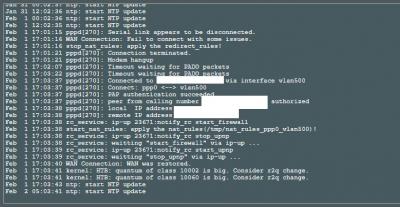
hello all guys this modem hangup is say Asus router or TM modem?


Attached thumbnail(s)
Attached Image
dsa13dsa
post Feb 2 2018, 12:54 PM

New Member
*
Newbie
5 posts

Joined: May 2017


I can not find the firmware FW_RT_AC66U_B1_3.0.0.4.380_4208 anywhere.
Maybe someone has stayed? Can you share it?

This post has been edited by dsa13dsa: Feb 2 2018, 12:55 PM
dkoh703
post Feb 2 2018, 12:58 PM

New Member
*
Junior Member
31 posts

Joined: Nov 2017
QUOTE(hiha123 @ Feb 2 2018, 11:32 AM)
dry.gif
hello all guys this modem hangup is say Asus router or TM modem?
*
I believe it is the TM modem. I was facing the same problem as well... Have requested a replacement modem from TM 2 days back. Now is observing whether the problem is still happening or not.
Kravo
post Feb 2 2018, 01:31 PM

Regular
******
Senior Member
1,230 posts

Joined: Apr 2006
RT-AC68U
recently update firmware to 3.0.0.4.384_20287
then another update 3.0.0.4.384.20308
but it doesn't seem to update or reflect the latest update
also these updates seem to slow down the network

even trying to open the router web admin page in local network need to take few seconds. it used to be almost instantly in past

what's up with the update? i'm getting a hunch that quality has dropped
BlueWind
post Feb 4 2018, 11:34 AM

Sianzation
*******
Senior Member
2,901 posts

Joined: Jan 2007


QUOTE(Kravo @ Feb 2 2018, 01:31 PM)
RT-AC68U
recently update firmware to 3.0.0.4.384_20287
then another update 3.0.0.4.384.20308
but it doesn't seem to update or reflect the latest update
also these updates seem to slow down the network

even trying to open the router web admin page in local network need to take few seconds. it used to be almost instantly in past

what's up with the update? i'm getting a hunch that quality has dropped
*
Flash Asus merlin firmware instead.
hiha123
post Feb 5 2018, 02:37 PM

Getting Started
**
Junior Member
198 posts

Joined: Nov 2017
dry.gif
After change to router Asus RT-AC1300UHP this come out again then this is say TM modem ald,but me is VDSL2,later TM change me to 2in 1 modem router how to setting icon_question.gif


Attached thumbnail(s)
Attached Image
AVFAN
post Feb 5 2018, 09:31 PM

20k VIP Club
*********
All Stars
24,454 posts

Joined: Nov 2010
QUOTE(hiha123 @ Feb 5 2018, 02:37 PM)
dry.gif
After change to router Asus RT-AC1300UHP this come out again then this is say TM modem ald,but me is VDSL2,later TM change me to 2in 1 modem router how to setting icon_question.gif
*
bro, i like to help as i m using rtac1300uhp.

but i do not understand what u r saying, what the problem is.

unifi gave u 2 in 1 modem router??
hiha123
post Feb 6 2018, 12:00 AM

Getting Started
**
Junior Member
198 posts

Joined: Nov 2017
QUOTE(AVFAN @ Feb 5 2018, 09:31 PM)
bro, i like to help as i m using rtac1300uhp.

but i do not understand what u r saying, what the problem is.

unifi gave u 2 in 1 modem router??
*
Ern,when i use full speed download and use hypptv,after feel hour the picture modem hangup(see like every 24 hour will hangup 2time,my place is very good for router and modem ),cant use internet about 10sec then Wan restored,bcz i see maybe now TM gave all VDSL2 modem is 2 in 1,i scare about later i cant use my new asus router if the old modem really want to change cry.gif
Jjuggler
post Feb 6 2018, 12:11 AM

Narcissistic Genius
******
Senior Member
1,341 posts

Joined: Dec 2016
I accidently switched off my router and when it connects again to the internet, the ip add showing is 1.35.XXX.XXX thing and after i rebooted again, it is showing 60.XX.XXX.XXX. Rebooted again and get 210.XXX.XXX.XXX. For me, i fell, the most solid ip for me is 115, 210 and 215. Even 175 is good for me. Yeah regarding the ip i get, 1 and 60, when i did speedtest on wifi and over the ethernet, the speed is around 20 to 30Mbps only. for upload i get around 13Mbps. The speed changes when i shift to the 210 ip address.
AVFAN
post Feb 6 2018, 12:28 AM

20k VIP Club
*********
All Stars
24,454 posts

Joined: Nov 2010
QUOTE(hiha123 @ Feb 6 2018, 12:00 AM)
Ern,when i use full speed download and use hypptv,after feel hour the picture modem hangup(see like every 24 hour will hangup 2time,my place is very good for router and modem ),cant use internet about 10sec then Wan restored,bcz i see maybe now TM gave all VDSL2 modem is 2 in 1,i scare about later i cant use my new asus router if the old modem really want to change cry.gif
*
i'm sorry... i still can't follow...

do u mean:

1. when downloading, hyppbox video hang after playing a few hours, internet stop for 10 secs... that happens every day?

2. u are worried that in future, unifi will give u a modem-router which will render your own router useless?


if i read u right... one possibility is your hyppbox is probably going kaput.

u should post the modem and hyppbox models, with photos preferably.

that way, everyone is clear what equipment u have, can help determine if it is modem or hyppbox or router problem.


also, put back the old unifi router - does same problem persist?

if yes, it is modem or hyppbox problem - u should call unifi to run some tests.

if no, it is yr new asus router problem.

This post has been edited by AVFAN: Feb 6 2018, 12:57 AM
dkoh703
post Feb 6 2018, 12:07 PM

New Member
*
Junior Member
31 posts

Joined: Nov 2017
QUOTE(hiha123 @ Feb 6 2018, 12:00 AM)
Ern,when i use full speed download and use hypptv,after feel hour the picture modem hangup(see like every 24 hour will hangup 2time,my place is very good for router and modem ),cant use internet about 10sec then Wan restored,bcz i see maybe now TM gave all VDSL2 modem is 2 in 1,i scare about later i cant use my new asus router if the old modem really want to change cry.gif
*
I think I had similar problem as you do, i.e: modem hangup then WAN disconnected and restored after 1-2 days. After changing the VDSL modem, I don't face this issue anymore. The old VDSL modem is from Huawei, the new one from ZTE, not sure if it makes any different. Another observation is - for the old VDSL modem the Internet light is consistently blinking, and the new one is constantly ON. And I am using Asus RT-AC58U router.
wiraevo0630
post Feb 6 2018, 02:51 PM

New Member
*
Junior Member
31 posts

Joined: Sep 2007


dear all, i have just got my unifi 30mb installed yesterday, but the modem router that TM give me is Netis, and the coverage is bad sad.gif
may i know which asus modem router can replace the netis 2 in 1 modem router?
hiha123
post Feb 6 2018, 02:52 PM

Getting Started
**
Junior Member
198 posts

Joined: Nov 2017
QUOTE(dkoh703 @ Feb 6 2018, 12:07 PM)
I think I had similar problem as you do, i.e: modem hangup then WAN disconnected and restored after 1-2 days. After changing the VDSL modem, I don't face this issue anymore. The old VDSL modem is from Huawei, the new one from ZTE, not sure if it makes any different. Another observation is - for the old VDSL modem the Internet light is consistently blinking, and the new one is constantly ON. And I am using Asus RT-AC58U router.
*
bangwall.gif I modem hangup about 10sec,if there gave ZTE modem is it 2in1?how u setting to use own router and the STB box?
firdausbhari
post Feb 6 2018, 03:56 PM

Look at all my stars!!
*******
Senior Member
2,281 posts

Joined: Feb 2012


QUOTE(wiraevo0630 @ Feb 6 2018, 02:51 PM)
dear all, i have just got my unifi 30mb installed yesterday, but the modem router that TM give me is Netis, and the coverage is bad sad.gif
may i know which asus modem router can replace the netis 2 in 1 modem router?
*
deng they give NETIS now??
dkoh703
post Feb 6 2018, 04:10 PM

New Member
*
Junior Member
31 posts

Joined: Nov 2017
QUOTE(hiha123 @ Feb 6 2018, 02:52 PM)
bangwall.gif  I modem hangup about 10sec,if there gave ZTE modem is it 2in1?how u setting to use own router and the STB box?
*
Mine is not 2 in 1 modem. It's just a ZTE VDSL modem. Not sure how to set up own router with 2 in 1 modem.

826 Pages « < 393 394 395 396 397 > » Top
 

Change to:
| Lo-Fi Version
0.1000sec    0.48    6 queries    GZIP Disabled
Time is now: 8th December 2025 - 03:47 PM