Outline ·
[ Standard ] ·
Linear+
Home Networking ASUS Malaysia Networking User & Technical Support, Managed by ASUS Malaysia Representative
|
sheemmet
|
 May 10 2015, 02:48 PM May 10 2015, 02:48 PM
|

|
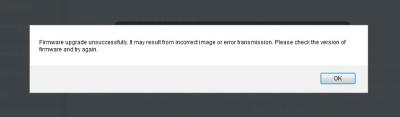
ASUSmy , i can't upgrade RT-N12HP to latest firmware Version 3.0.0.4.376.4018. But no problem with Version 3.0.0.4.376.3754. Tried with firefox and chrome. i got this error : » Click to show Spoiler - click again to hide... « my router : » Click to show Spoiler - click again to hide... « i downloaded my firmware from this page http://www.asus.com/my/Networking/RTN12HP/HelpDesk_download/please assist.  This post has been edited by sheemmet: May 10 2015, 02:49 PM This post has been edited by sheemmet: May 10 2015, 02:49 PM
|
|
|
|
|
|
sheemmet
|
May 11 2015, 11:02 AM
|
|
|
QUOTE(ASUSmy @ May 11 2015, 10:57 AM) Hi sheemmet, Thank you for your feedback, I also found the same problem. It seen like the latest firmware are for RT-N12HP_B1. I will notify our person in charge and let you know once the link is corrected. Thank you thank you very much  keep up the good work ! good day ahead !  |
|
|
|
|
|
sheemmet
|
Jan 17 2018, 05:26 PM
|
|
|
running on the latest firmware for RT-AC1200G+ (Version 3.0.0.4.382.18991)
uptime won't be more than 24h !
this is the error after random reboot:-
Kernel panic - not syncing: Out of memory: system-wide panic_on_oom is enabled
logfile already sent via pm to asusmy for help
|
|
|
|
|
|
sheemmet
|
Jan 17 2018, 11:25 PM
|
|
|
QUOTE(iymm @ Jan 17 2018, 09:00 PM) Try disable NAT Acceleration if you don't use any lan port. just flash back 3.0.0.4.380_7743 , now entering 13th hours   hopefully no issue until another new update ? lol will try your solution if friend's unit got problem thanks ! |
|
|
|
|
|
sheemmet
|
Jan 18 2018, 10:17 AM
|
|
|
QUOTE(iymm @ Jan 18 2018, 12:25 AM) Hope it help But don't put too much hope of this router... Firmware is shit since release, example from the first one until 380_7743 the router will random reboot around one weeks(or less), after 382_xxxxx firmwares wifi not stable when speed up to 100mpbs(feedback from other users) and if NAT Acceleration is enable the memory will leaking over time and then crash the router....  off NAT acceleration , it still reboot with the kernal panic message ! haha ... i also don't know what to do now  |
|
|
|
|
|
sheemmet
|
Jan 18 2018, 11:42 AM
|
|
|
QUOTE(iymm @ Jan 18 2018, 10:56 AM) Which one is your firmware that reboot with kernel panic message? 380_7743 or 382_18991? Btw do you have any chromcast devices?
Because I just found out this articles, not sure is it related or not....Known Issue: Slow Wi-Fi performance with Android and Chromecast built-in devices and TP-Link Archer C1200 WiFi Disconnects Issue and ResolutionErm...those info has been post by blacktubi.... both 380.7743 and 382.18991 with random reboot issue. upgraded from 7443 to 18991 then downgrade back to 7443 again. all upgrade and downgrade comes with factory reset , no added on USB devices or running any built in features. it just apple and android phones connecting via Wifi (less than 10 devices in total) + one PC running on LAN. i would say less streaming in my case , maybe some watching of videos on youtube. no on going BT download. Using N12 D1 and N12HP previously without any issue , but of course that is not an AC router  Will try to do some changes on Wifi setting , and see if it works. meanwhile wait for Asus representative feedback  |
|
|
|
|
|
sheemmet
|
Jan 18 2018, 05:39 PM
|
|
|
QUOTE(ASUSmy @ Jan 18 2018, 12:20 PM) Hi sheemmet, I have feedback your problem to our RD with the log provided, will update you ASAP once I got feedback from them. Thank you Thank you ! QUOTE(iymm @ Jan 18 2018, 12:23 PM) I'm sorry can't help you....  Lets wait asus representative to reply you/us this issue. nothing to be sorry about , but it is always nice to have this thread and everyone is sharing opinions of what to do ... appreciate your help |
|
|
|
|
|
sheemmet
|
Jan 19 2018, 10:21 PM
|
|
|
QUOTE(ASUSmy @ Jan 19 2018, 04:32 PM) Hi sheemmet, Can you try on the beta firmware from the link below? https://www.asuswebstorage.com/navigate/s/B...4ED4D840B31DADYThank you lol , it says :- This page cannot be used now. The files downloaded from this page is over the limit. Please try again after 2 hours. too many people downloading it ? will try it later ! |
|
|
|
|
|
sheemmet
|
Jan 20 2018, 09:23 AM
|
|
|
QUOTE(iymm @ Jan 19 2018, 11:56 PM) Please try again after 1 hours for me lol... downloaded while waiting for kernal panic again , but it has been up for 17H since i update from 380.7743 to 382.18991 again , but without factory reset once kernal panic i will update to the file given by AsusMY QUOTE(ww_lky @ Jan 20 2018, 06:31 AM) Hi there, My wifi has been failing recently. The Lan Works fine. I have a Router AC68U hooked to Unifi 24 hours a day for the past 3 years or so. May I ask if there is anyway to fix this or is it the router life span has come to an end? Thanks. Regards, K.Y. Low. i think it will be nice if you save the logfile under system log , attach here or pm asusmy for help. This post has been edited by sheemmet: Jan 20 2018, 09:24 AM |
|
|
|
|
|
sheemmet
|
Jan 20 2018, 05:30 PM
|
|
|
QUOTE(iymm @ Jan 20 2018, 12:56 PM) I'm wondering when is your router start acting like this? Since bought or just a few weeks ago? After 9 hours of using that 382_39963 firmware, the first thing I noticed is status in web page work again! (18991 will redirect me to the log in page  ) it happens every 2 or 3 days before this , it's not that frequent until 380.7743 update then 382.18991. i notice kernal panic every 6 - 8 hours. Max online time on router is less than 24h. i don't mind restart of router but it's too frequent btw , it's more than a day now on 382.18991 . haven't try the file gave by AsusMY yet. it's still same devices connecting to same router so i wondering what makes it resources hungry or some other reason? 
|
|
|
|
|
|
sheemmet
|
Jan 20 2018, 09:00 PM
|
|
|
QUOTE(iymm @ Jan 20 2018, 08:25 PM)  your router more issues than mine, have you ever though about bring it to RMA? lol ... now seems to be stable after complaint to AsusMY ... until next kernal panic , i think let it be  |
|
|
|
|
|
sheemmet
|
Jan 21 2018, 08:33 AM
|
|
|
QUOTE(ww_lky @ Jan 21 2018, 07:43 AM) I plug in the ports with existing lan cables which were working fine on another router, non of them were detected by the router. The Lan Cable lights remain off. I checked on the PC connection on the other end and it was showing no connection. since LAN is not working , did you try accessing your router using 192.168.1.1 with wifi using phone or tablet maybe ? maybe can try a factory reset if you can login via wifi |
|
|
|
|
|
sheemmet
|
Jan 30 2018, 10:38 PM
|
|
|
are there ways to control FTP share speed on RT-AC1200G+ ?
maybe in future updates ?
(other than changing routeres.... )
|
|
|
|
|
|
sheemmet
|
Sep 1 2018, 08:24 AM
|
|
|
QUOTE(shadowblack @ Sep 1 2018, 04:22 AM) Just bought asus rt-ac5300. Anybody can give me suggestion? Should i combine all signal or seperate the 2.4 and 5ghz signal? What is the difference? i think seperate the signal of 2.4 and 5 will be good ? i am running both channels for different devices |
|
|
|
|
|
sheemmet
|
Sep 1 2018, 12:01 PM
|
|
|
QUOTE(SilentVampire @ Sep 1 2018, 11:03 AM) Up to you to separate, as the router have smart connect. Remember to update your firmware. bro , forgot to quote shadowblack .... ! hahaha ... |
|
|
|
|
|
sheemmet
|
Sep 9 2018, 09:43 PM
|
|
|
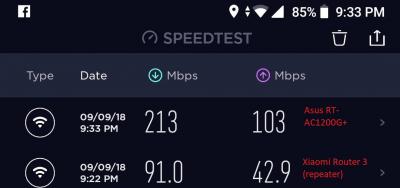
Just turbo-ed (500Mbps) hours back , didn't do any restart on the RT-AC1200G+ , nor the BTU .... WiFi connected on 5GHz @ Xiaomi Mi A2 done a speedtest by standing nearby router , the speedtest server is Extreme Broadband i think speed is acceptable until someday i got the budget to upgrade maybe to a AC86U  |
|
|
|
|
|
sheemmet
|
Sep 17 2018, 12:16 PM
|
|
|
QUOTE(chuppy @ Sep 17 2018, 12:11 PM) i was recently upgraded to 500mbps by TM unifi. And I am using RT AC55-UHP And I got speed of less than 100mbs. And this morning Telekom tech came over and test. He said maybe is this router can’t support 500mbps. Is it true?? Or is there any new configuration need to update to get for the 500mbps?? Please advise. As the technician ask me to change to tm router. look up a few post by SilentVampire , his signature links to a post , where there are some basic guidelines  |
|
|
|
|
|
sheemmet
|
Sep 19 2018, 05:41 PM
|
|
|
QUOTE(jaya7 @ Sep 19 2018, 12:33 PM) Hi, whats the max internet speed on LAN for anyone using RT-AC1200G+ ? mine hits max about 670mbps. i got 800mpbs package. im just wondering if it's expected or it should perform better ? thanks. running on 500Mbps , this is the speed i got , shared the same photo in TM thread as well. 
|
|
|
|
|
|
sheemmet
|
Sep 19 2018, 06:35 PM
|
|
|
QUOTE(stinky @ Sep 19 2018, 06:12 PM) the tm speedtest was on LAN ... |
|
|
|
|
|
sheemmet
|
Sep 20 2018, 07:52 PM
|
|
|
just curious , if set to AUTO on 2.4GHz or 5GHz on Control Channel , how often does it refresh ? is there a time schedule like every 24h or 12h ?
|
|
|
|
|




 Quote
Quote

 0.0439sec
 0.99
0.99
 7 queries
 GZIP Disabled