Welcome Guest ( Log In | Register )

826 Pages « < 758 759 760 761 762 > » Bottom

Outline · [ Standard ] · Linear+

Home Networking ASUS Malaysia Networking User & Technical Support, Managed by ASUS Malaysia Representative

views
     
Eithanius
post Jun 19 2023, 10:51 AM

::+::KukuNius(tm)::+::
*******
Senior Member
3,952 posts

Joined: Apr 2005
From: Sector 1921B, Delta Quadrant


QUOTE(eclectice @ Jun 19 2023, 09:44 AM)
I haven't updated the firmware yet since getting the issue; so, both units are still with the old stock firmware Version 3.0.0.4.386.49723
*
Why didn't you update the firmware on the XT12 see if that solves the problem...?

I would try update firmware, then restore to factory default settings and setup again...

This post has been edited by Eithanius: Jun 19 2023, 10:54 AM
eclectice
post Jun 19 2023, 10:53 AM

Look at all my stars!!
*******
Senior Member
2,734 posts

Joined: Mar 2008
QUOTE(Eithanius @ Jun 19 2023, 10:51 AM)
Why didn't you update the firmware on the XT12 see if that solves the problem...?
*
I'll try it when I get home because I can now update Pro XT12 with my current workaround network using XT8 as my primary router.

sHawTY
post Jun 19 2023, 11:07 AM

Frequent Reporter
********
All Stars
14,909 posts

Joined: Jul 2005

QUOTE(eclectice @ Jun 19 2023, 09:44 AM)
SNIP
Did you write the PPPoE username correctly?
Just in case, go back to WAN > Internet Connection: then check if your username is written like this: "example@unifi"
Once you've written everything correctly, click Apply

Then go to LAN > IPTV > Select ISP Profile > Unifi Business / UniFi Home
*If you don't use the UniFi TV set top box, you can use the UniFi Business profile

Once you've chosen the correct ISP profile, click Apply
eclectice
post Jun 19 2023, 11:25 AM

Look at all my stars!!
*******
Senior Member
2,734 posts

Joined: Mar 2008
QUOTE(sHawTY @ Jun 19 2023, 11:07 AM)
Did you write the PPPoE username correctly?
Just in case, go back to WAN > Internet Connection: then check if your username is written like this: "example@unifi"
Once you've written everything correctly, click Apply

Then go to LAN > IPTV > Select ISP Profile > Unifi Business / UniFi Home
*If you don't use the UniFi TV set top box, you can use the UniFi Business profile

Once you've chosen the correct ISP profile, click Apply
*
I did select "Unifi-Home" as my IPTV profile. After double-checking my PPPoE settings, I determined that the issue was not related to the Unifi PPPoE username or password.

Yes, I could try the "Unifi-Business" profile later, but I'm not sure how it would address the PPPoE connection issue.

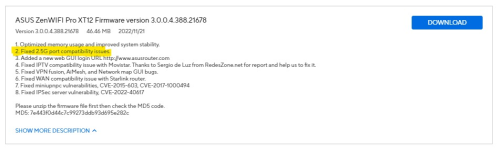
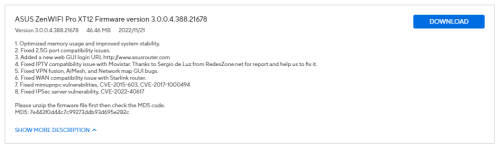
This firmware version is quite interesting and is more recent than the stock firmware:

user posted image

https://www.asus.com/my/networking-iot-serv...enWiFi-Pro-XT12

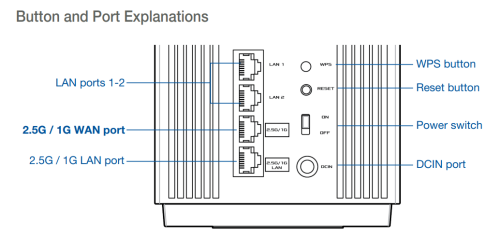
It doesn't reveal much, but given that the WAN port is of 2.5G port standard, I suspect it.

user posted image

Let's see what will happen after I update the Pro XT12 to the latest firmware when I get home.

References that I may use to troubleshoot:
https://www.asus.com/my/support/FAQ/1030645/
https://support.huawei.com/enterprise/en/do...oe-dialup-fails

This post has been edited by eclectice: Jun 19 2023, 11:49 AM
TSASUSmy
post Jun 19 2023, 12:06 PM

Look at all my stars!!
*******
Senior Member
2,319 posts

Joined: Mar 2010
QUOTE(ozmasterz @ Jun 17 2023, 03:21 PM)

The LED indicator is on.

wifi log as below:-
Hi ozmasterz,

Based on the wireless log, both 2.4GHz and 5GHz showing channel number, so it should be broadcasting the WiFi.

The 2.4GH and 5GHz SSID didn't show the WiFi name, can you help double check the WiFi name at the Wireless section?

Thank you

This post has been edited by ASUSmy: Jun 19 2023, 12:09 PM
eclectice
post Jun 19 2023, 08:18 PM

Look at all my stars!!
*******
Senior Member
2,734 posts

Joined: Mar 2008
QUOTE(eclectice @ Jun 19 2023, 11:25 AM)
I did select "Unifi-Home" as my IPTV profile. After double-checking my PPPoE settings, I determined that the issue was not related to the Unifi PPPoE username or password.

Yes, I could try the "Unifi-Business" profile later, but I'm not sure how it would address the PPPoE connection issue.

This firmware version is quite interesting and is more recent than the stock firmware:

user posted image

https://www.asus.com/my/networking-iot-serv...enWiFi-Pro-XT12

It doesn't reveal much, but given that the WAN port is of 2.5G port standard, I suspect it.

user posted image

Let's see what will happen after I update the Pro XT12 to the latest firmware when I get home.

References that I may use to troubleshoot:
https://www.asus.com/my/support/FAQ/1030645/
https://support.huawei.com/enterprise/en/do...oe-dialup-fails
*
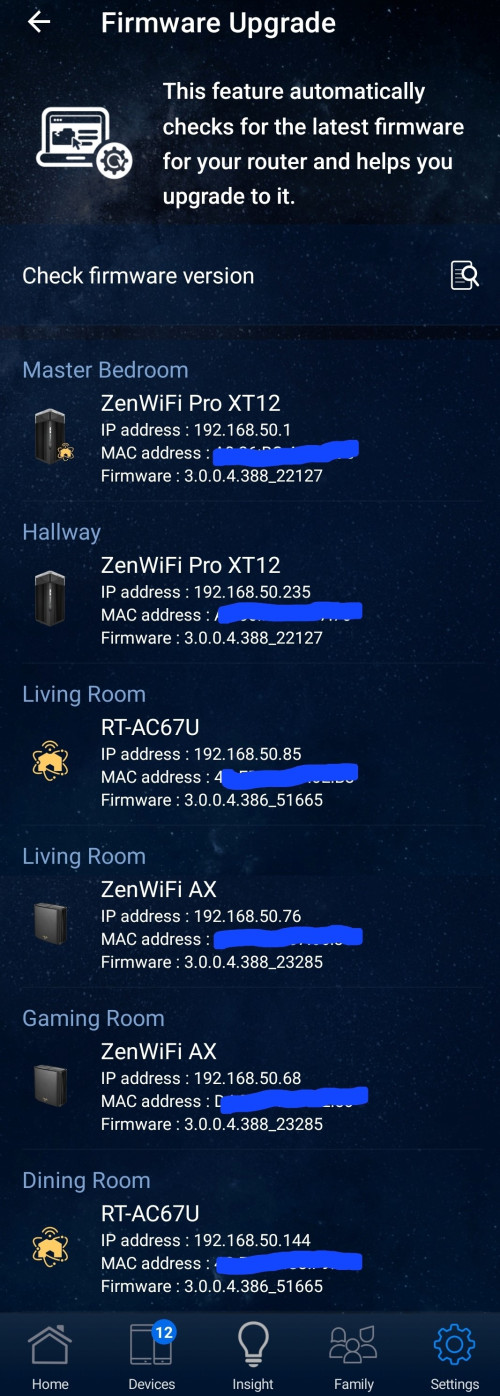
After updating my Pro XT12 router to the latest firmware ASUS ZenWiFi Pro XT12 Firmware version 3.0.0.4.388.22127, I was able to successfully resolve the issue with the WAN port in relation to PPPoE.

user posted image

user posted image

» Click to show Spoiler - click again to hide... «


This post has been edited by eclectice: Jun 19 2023, 08:33 PM
Eithanius
post Jun 19 2023, 09:01 PM

::+::KukuNius(tm)::+::
*******
Senior Member
3,952 posts

Joined: Apr 2005
From: Sector 1921B, Delta Quadrant


QUOTE(eclectice @ Jun 19 2023, 08:18 PM)
After updating my Pro XT12 router to the latest firmware ASUS ZenWiFi Pro XT12 Firmware version 3.0.0.4.388.22127, I was able to successfully resolve the issue with the WAN port in relation to PPPoE.

user posted image

user posted image

» Click to show Spoiler - click again to hide... «

*
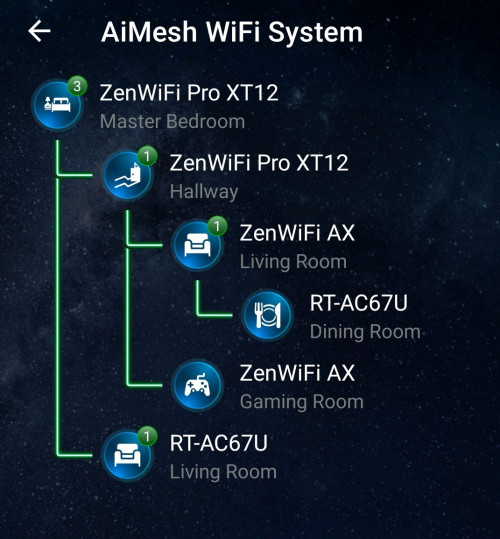
You live in a castle or something...? blink.gif blink.gif
eclectice
post Jun 19 2023, 09:06 PM

Look at all my stars!!
*******
Senior Member
2,734 posts

Joined: Mar 2008
QUOTE(Eithanius @ Jun 19 2023, 09:01 PM)
You live in a castle or something...?  blink.gif  blink.gif
*
3-story bungalow
sHawTY
post Jun 20 2023, 10:23 AM

Frequent Reporter
********
All Stars
14,909 posts

Joined: Jul 2005

QUOTE(Eithanius @ Jun 19 2023, 09:01 PM)
You live in a castle or something...?  blink.gif  blink.gif
I was about to ask the same thing laugh.gif
eclectice
post Jun 20 2023, 05:11 PM

Look at all my stars!!
*******
Senior Member
2,734 posts

Joined: Mar 2008
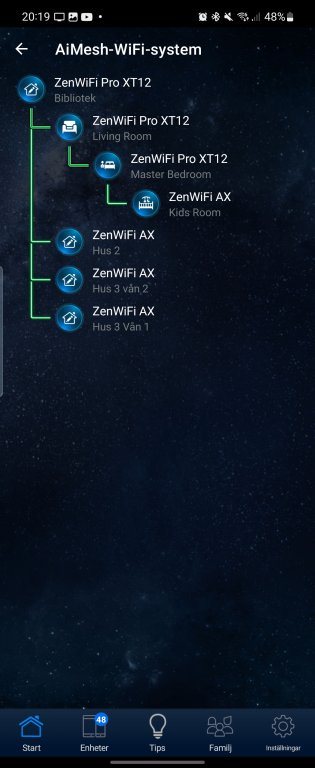
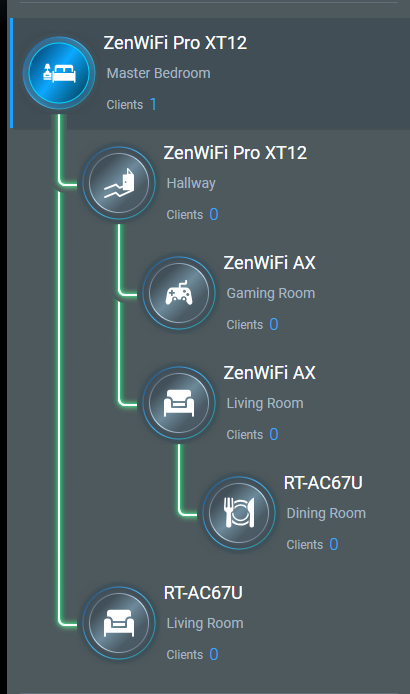
Having multiple Aimesh nodes in a house is not uncommon, especially if there are many walls and floors that obstruct the wireless signal. In fact, it is often necessary to have several nodes to ensure that the wireless signal reaches every corner of the house. It is the option left if we can't do a wired backhaul.

This Swedish person seems to have even more nodes than I do!

user posted image

This post has been edited by eclectice: Jun 20 2023, 05:53 PM
blacktubi
post Jun 20 2023, 06:25 PM

-
Group Icon
Elite
8,418 posts

Joined: Jul 2008

QUOTE(eclectice @ Jun 20 2023, 05:11 PM)
Having multiple Aimesh nodes in a house is not uncommon, especially if there are many walls and floors that obstruct the wireless signal. In fact, it is often necessary to have several nodes to ensure that the wireless signal reaches every corner of the house. It is the option left if we can't do a wired backhaul.

This Swedish person seems to have even more nodes than I do!

user posted image
*
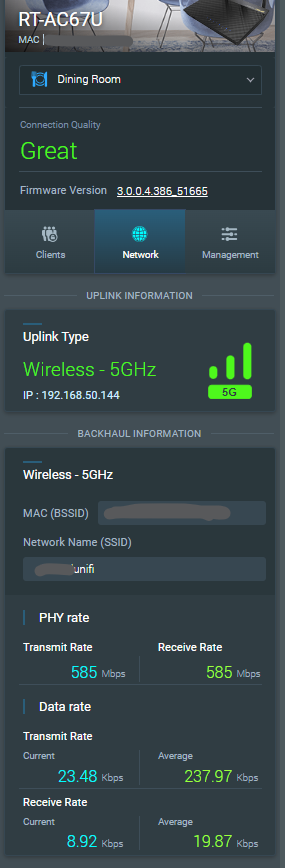
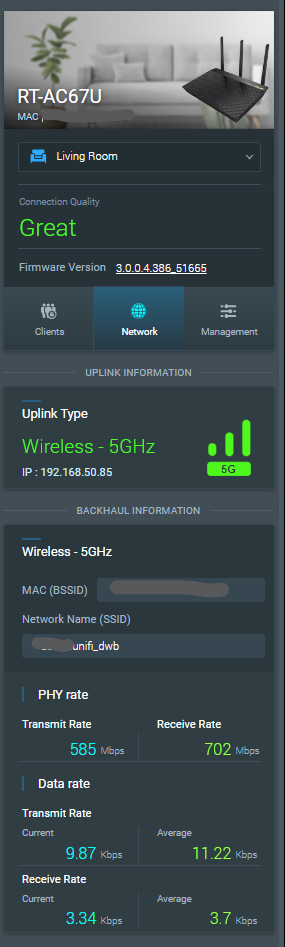
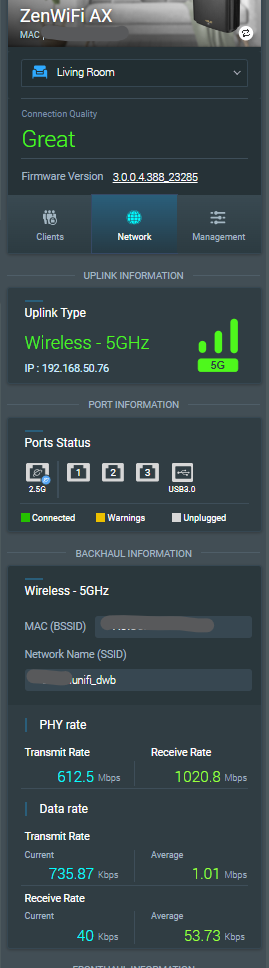
What's your performance when connected to the mesh node especially for the dining room RT-AC67U.
eclectice
post Jun 21 2023, 08:47 AM

Look at all my stars!!
*******
Senior Member
2,734 posts

Joined: Mar 2008
QUOTE(blacktubi @ Jun 20 2023, 06:25 PM)
What's your performance when connected to the mesh node especially for the dining room RT-AC67U.
*
TM Unifi plan: 800/200 Mbps (tested speed 840.39/207.75 Mbps via TM Klang using built-in Asus speed test OOKLA page; apologies for the image limit per post on the Lowyat forum)

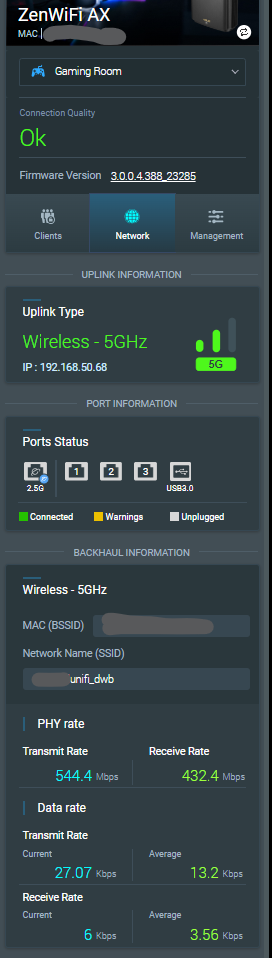
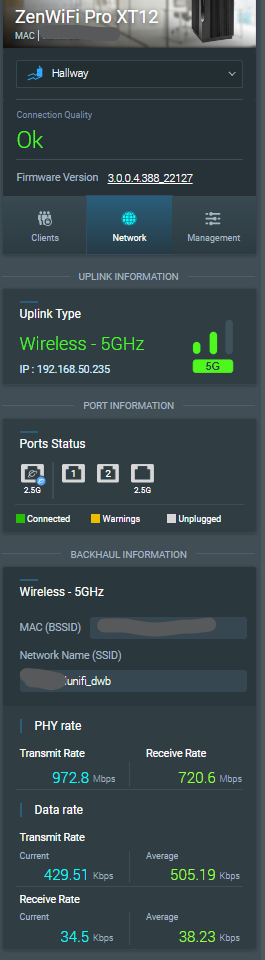
AsusWRT AiMesh page for today (21 June 2023):

user posted imageuser posted image

user posted imageuser posted image user posted image


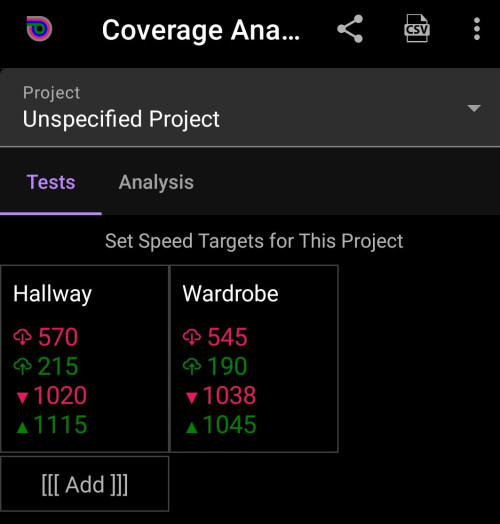
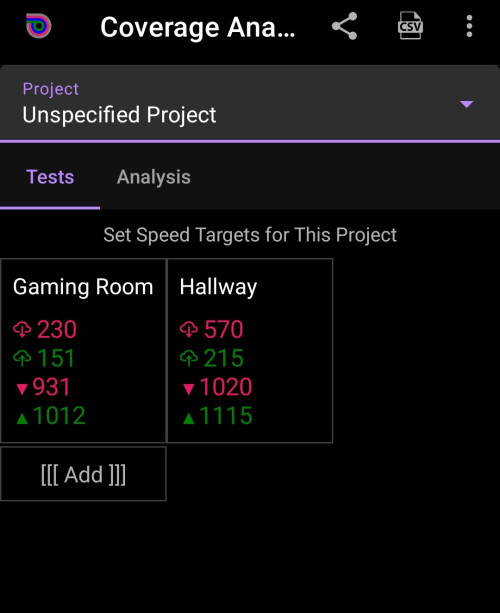
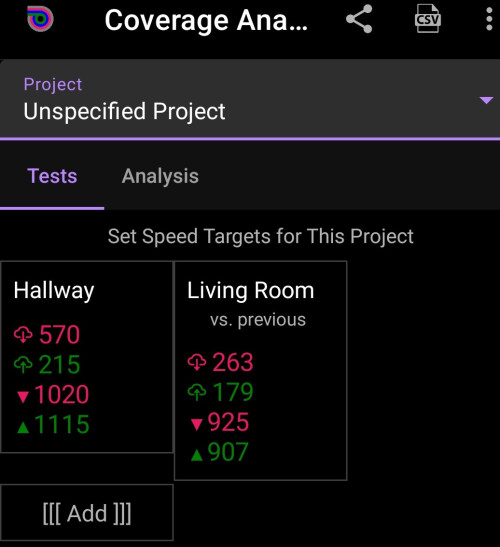
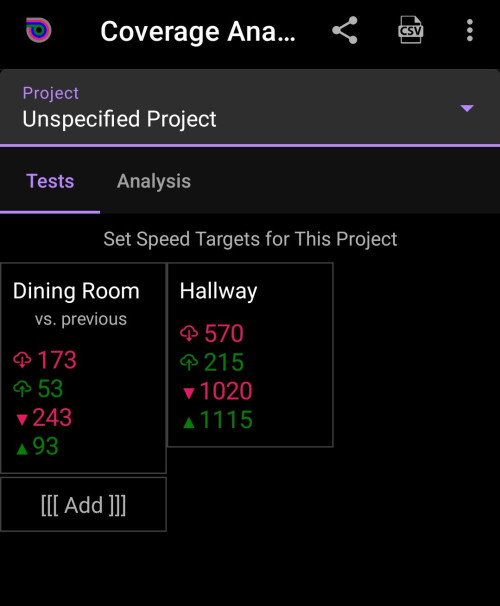
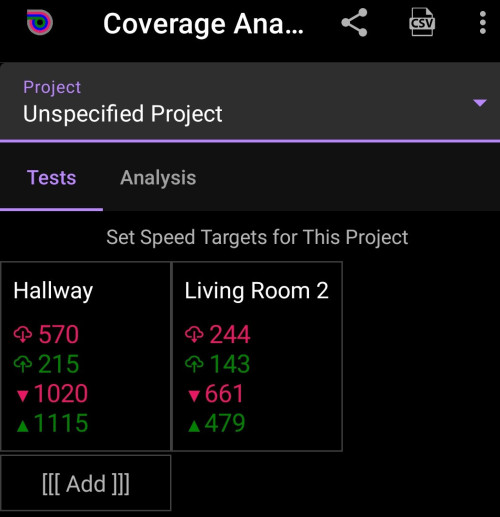
Analiti app (free account; installed on Samsung Galaxy S22) test analysis results done on 19 June 2023:

The first two are WIFI DL/UL rates (in Mbps)
The last two are WIFI mean PHY RX/TX rates (in Mbps)

Note: The PHY rate reported by the app may not always be accurate or reliable, as it may be affected by the quality of the app's algorithms and the accuracy of the data received from the device's hardware.

Hallway and Wardrobe (wardrobe in the master bedroom is where the main router XT12 resides)
user posted image

Gaming room and hallway
user posted image

Hallway and living room (I don't understand what it means by "vs. previous" remark)
user posted image

Hallway and Dining room (I don't understand what it means by "vs. previous" remark)
user posted image

Hallway and Living Room 2 where RT-AC67U is located
user posted image

This post has been edited by eclectice: Jun 21 2023, 11:40 AM
eclectice
post Jun 21 2023, 11:00 AM

Look at all my stars!!
*******
Senior Member
2,734 posts

Joined: Mar 2008
Two firmware bugs I have found so far for ASUS ZenWiFi Pro XT12 Firmware version 3.0.0.4.388.22127 (since it is the main router):

Bug#1

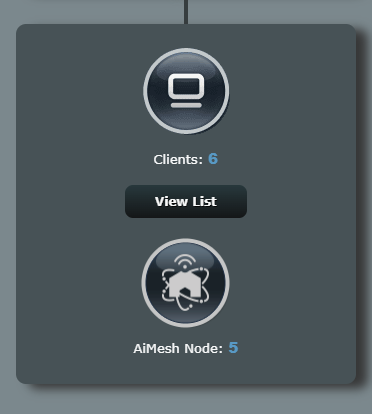
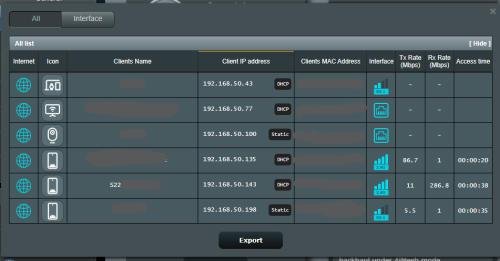
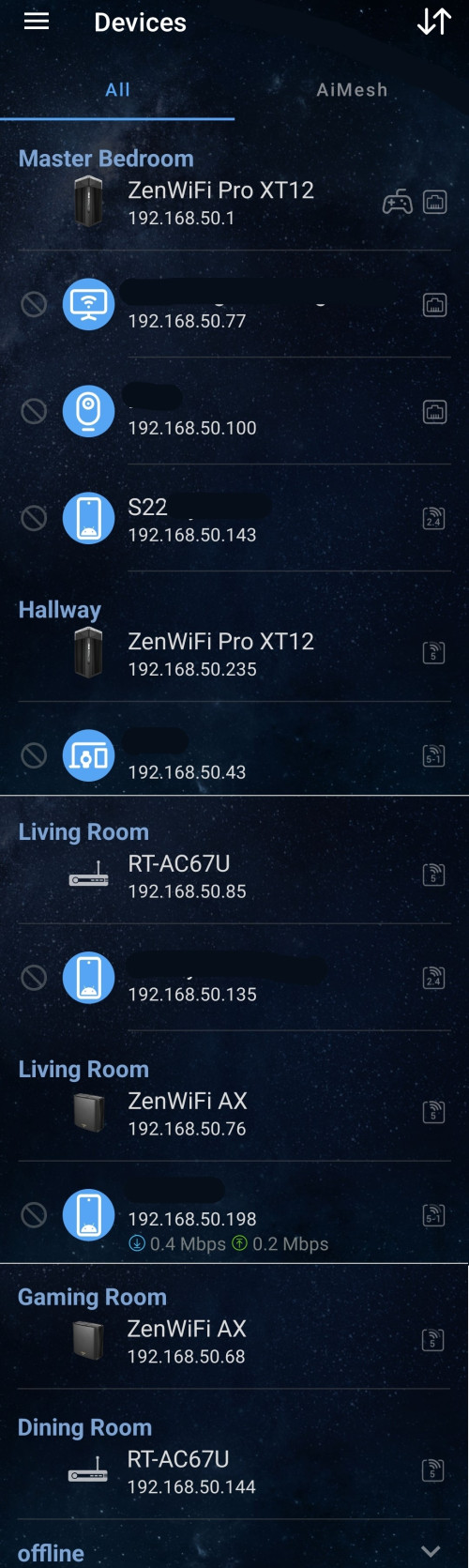
I discovered that the devices reported on the AsusWRT AiMesh page and in the Asus Router app do not tally with the newest firmware. The ASUS Router app report is right.

There is no issue with the device count and what is reported on the Network Map tab.

So, it appears to be a bug.

ASUS Router app
user posted image

ASUSWRT AiMesh page:
user posted image

ASUSWRT Network Map page:
user posted image

Bug#2

Another issue is that one of the six devices (S22 in both images below) is no longer joined to the network, yet it is still listed on both the ASUS Router app and the ASUWRT Network Map:

Therefore, we can't trust the report on each device's access time and other metrics.

user posted image

user posted image

There are references to changes made in the prior firmware, yet it appears to still have many issues:

user posted image

This post has been edited by eclectice: Jun 21 2023, 11:49 AM
blacktubi
post Jun 21 2023, 10:03 PM

-
Group Icon
Elite
8,418 posts

Joined: Jul 2008

eclectice

Thanks for sharing your speed results, that's actually pretty impressive even though it's a rojak of 3 different models.

Glad to see ASUS AiMesh has improved and it is performing rather well when crossing models now.
ntw
post Jun 22 2023, 11:12 PM

One Each At A Time
******
Senior Member
1,432 posts

Joined: Aug 2010
From: Ipoh mali~~~


» Click to show Spoiler - click again to hide... «


Used a few Asus router before and this is quite common. Instead I just use Nirsoft's Wireless Network Watcher to see what devices are currently connected to my network
TSASUSmy
post Jun 23 2023, 11:47 AM

Look at all my stars!!
*******
Senior Member
2,319 posts

Joined: Mar 2010
QUOTE(eclectice @ Jun 21 2023, 11:00 AM)
Two firmware bugs I have found so far for ASUS ZenWiFi Pro XT12 Firmware version 3.0.0.4.388.22127 (since it is the main router):

Bug#1

I discovered that the devices reported on the AsusWRT AiMesh page and in the Asus Router app do not tally with the newest firmware. The ASUS Router app report is right.

There is no issue with the device count and what is reported on the Network Map tab.

So, it appears to be a bug.

ASUS Router app
user posted image

ASUSWRT AiMesh page:
user posted image

ASUSWRT Network Map page:
user posted image

Bug#2

Another issue is that one of the six devices (S22 in both images below) is no longer joined to the network, yet it is still listed on both the ASUS Router app and the ASUWRT Network Map:

Therefore, we can't trust the report on each device's access time and other metrics.

user posted image

user posted image

There are references to changes made in the prior firmware, yet it appears to still have many issues:

user posted image
*
Hi eclectice,

Thank you for the feedback on the bugs, will send it to our RD to check and get back to you ASAP.

Can you help to send a feedback using the router GUI at Administration->Feedback.

PM me your email address used to send the feedback once done.

Thank you

james2306
post Jun 24 2023, 03:44 PM

A not so Senior, Señor
******
Senior Member
1,119 posts

Joined: Jan 2007
From: USJ


deleted

This post has been edited by james2306: Jun 24 2023, 04:01 PM
eclectice
post Jun 25 2023, 10:15 AM

Look at all my stars!!
*******
Senior Member
2,734 posts

Joined: Mar 2008
QUOTE(ASUSmy @ Jun 23 2023, 11:47 AM)
Hi eclectice,

Thank you for the feedback on the bugs, will send it to our RD to check and get back to you ASAP.

Can you help to send a feedback using the router GUI at Administration->Feedback.

PM me your email address used to send the feedback once done.

Thank you
*
Thank you but I won't.

My suspicion why this happens is my AiMesh network is no longer homogeneous due to three different models and AiMesh management report protocol doesn't work well in such setup.

Even now, I can't trust the reported AiMesh setup in both app and website page since they are not updating the current state of the devices in the network at all. It looks the same since the day I set it up. There is no change in term of the devices going in and out of the network.

Despite the reporting issue, the network works just fine.

My suspicion is valid since I have another home with two-pack ZenWifi AX XT8 only. In this homogeneous AiMesh network, its AiMesh report is correct in both the app and the website page.

This post has been edited by eclectice: Jun 27 2023, 08:42 AM
gibranhashim
post Jun 28 2023, 12:06 AM

New Member
*
Newbie
11 posts

Joined: Feb 2013
QUOTE(ASUSmy @ Jun 9 2023, 04:54 PM)
Hi jiaen0509,

You still can use ASUS router router as AP AiMesh or second router AiMesh. But this will just limit to 1Gbps only as the optical network router only have 1Gbps LAN port.

Thank you
*
I noticed the ET12 is now available for sale here. I recently upgraded to the 1gb Unifi plan but I realised the new router they gave is plugged in directly to the fibre cable with the PPPOE all handled by this router/ONU device. Let’s say I get the ET12 How do I go about setting it up? Thanks.
eclectice
post Jun 28 2023, 09:51 AM

Look at all my stars!!
*******
Senior Member
2,734 posts

Joined: Mar 2008
QUOTE(gibranhashim @ Jun 28 2023, 12:06 AM)
I noticed the ET12 is now available for sale here. I recently upgraded to the 1gb Unifi plan but I realised the new router they gave is plugged in directly to the fibre cable with the PPPOE all handled by this router/ONU device. Let’s say I get the ET12 How do I go about setting it up? Thanks.
*
Unifi provides the D-LINK DPN-FX3060V optical network router for 1 and 2 Gbps plans. I think it employs proprietary firmware developed for Unifi (as has previously occurred with all Unifi routers/modems).

The D-Link DPN-FX3060V optical network or ONR router is a fiber gateway with wireless access that acts as a fiber "modem" (the ONT) and a wireless router in one.

You should get two DPN-FX3060V units to create a mesh network: one as the main mesh router and one as a mesh node. If not, please reconfirm with Unifi.

user posted image

Double-NAT

You may have heard about single NAT and double NAT. By default, your mesh network is in a single NAT configuration with DPN-FX3060V primary router.

Single NAT and double NAT are two different ways of using Network Address Translation (NAT) to connect multiple devices to the internet.

Single NAT is the most common way to use NAT. In a single NAT configuration, there is one router that performs NAT for all of the devices on the network. This router has a public IP address that is assigned by the internet service provider (ISP). The router then translates the private IP addresses of the devices on the network to the public IP address. This allows the devices on the network to communicate with the internet.

Double NAT occurs when there are two routers that perform NAT. This can happen if you have a router from your ISP and then you add another router to your network. The second router will also perform NAT, which will create a second layer of translation.

You may need to set up a double NAT configuration to use your Asus mesh router (ZenWifi ET12) with the DPN-FX3060V router to extend your wireless network. This is because the Asus router's wireless mesh capabilities and the DPN-FX3060V's wireless mesh technology are incompatible. Unlike the DPN-FX3060V, the Asus router does not support the WIFI EasyMesh standard via its AiMesh technology.

https://www.wi-fi.org/discover-wi-fi/wi-fi-easymesh
https://dongknows.com/asus-aimesh-overview/

user posted image

While the Unifi FAQ statement is partially true, it may not be entirely accurate. If you have a wireless mesh router from a brand other than Asus that supports EasyMesh, such as the TP-LINK Deco series, you can connect it to the DPN-FX3060V mesh to extend your network coverage without performing any double-NAT configuration. However, it's important to note that the performance of the connected router may be negatively impacted if the EasyMesh implementation in the DPN-FX3060V or TP-LINK Deco is crippled or has limitations. So, you have no choice but to perform a double-NAT configuration.

The steps on how to create a double NAT configuration between an ASUS router and a DPN-FX3060V router via LAN cable:

https://dongknows.com/double-nat-vs-single-nat/

Take note that Double NAT can cause problems with some applications and services, such as gaming and file sharing.

Bridge Mode

Another alternative to double-NAT is bridge mode: setting the primary router (ISP gateway) as a bridge can be an alternative to using double NAT.

In this setup, the primary router acts as a bridge, forwarding all network traffic to the secondary router to handle routing and NAT. This eliminates double NAT issues in gaming, file sharing, and VoIP. With only one NAT device to manage, network setup is simplified, and all devices can access the full internet bandwidth, improving performance.

Since it is really difficult to get a proper user manual for DPN-FX3060V, I can't help you in this regard.

WIFI cert for DPN-FX3060V from WIFI Alliance

Attached File  WFA125713__No_.pdf ( 77.86k ) Number of downloads: 11


The aforementioned double-NAT and bridge mode enables you to take advantage of certain helpful AiMesh features. If you don't care about that, you may simply configure the Asus router as an access point (AP) or a repeater.

I recommend against using the ET12's 6GHz band as a wireless backhaul in the AiMesh configuration if you have a large home with more than two stories and at least six rooms to cover because it has a shorter range and may not give enough coverage for your needs.

This post has been edited by eclectice: Jun 28 2023, 12:32 PM

826 Pages « < 758 759 760 761 762 > » Top
 

Change to:
| Lo-Fi Version
0.0325sec    0.23    6 queries    GZIP Disabled
Time is now: 16th December 2025 - 04:52 AM