

My modem crash when I have 5 active connection on torrent at once. Any solution?
Home Networking ASUS Malaysia Networking User & Technical Support, Managed by ASUS Malaysia Representative
Home Networking ASUS Malaysia Networking User & Technical Support, Managed by ASUS Malaysia Representative
|
|
 Jul 25 2020, 06:49 AM Jul 25 2020, 06:49 AM
|
 
Probation
9 posts Joined: Jul 2020 
|
My modem crash when I have 5 active connection on torrent at once. Any solution?
|
|
|
|
|
|
Jul 25 2020, 11:42 AM
|

Junior Member
486 posts Joined: Oct 2006 
|
QUOTE(officialshalogin @ Jul 25 2020, 06:49 AM) My modem crash when I have 5 active connection on torrent at once. Any solution? reduce the peers connection |
|
|
Jul 26 2020, 05:33 PM
Show posts by this member only | IPv6 | Post
#11883
|

Senior Member
1,573 posts Joined: Jan 2003 From: Nilai, Negeri Sembilan
|
Hi @asusmy,
These new routers that have 2.5Gbps port is able to support dual WAN i assume? Does it support multi VLAN ID profilings as well? |
|
|
Jul 27 2020, 03:20 PM
|
|
Junior Member
86 posts Joined: Jun 2005
|
QUOTE(ASUSmy @ Jul 23 2020, 01:28 PM) Hi cskean, HI ASUSmy,After factory reset just now normal setup to connect to Internet and test the speedtest again. Once tested okay then you can start enabling the features you want. Thank you I need some help. I bought a Zenwifi XT8 2 weeks ago. I have upgraded firmware to the latest version. I followed the setup steps but I was unable to add AIMESH node during setup eventhough the setup completed with out any errors. When I attempted to add the node manually, it was unable to do so and main node LED is blinking blue. After 30 mins, the node was detected and it seems to be working now. However, main node is still blinking blue. I have tried to setup, factory reset and swapped main nodes 4 times and the results are always the same. The last time I tried, I followed the Asus router app instructions and it all was successful even to the point where the network was being optimised. Even that was successful but when I looked for the AIMesh node, the node was not there. So I logged into the webui with my pc and I could add the node this way. However, main node LED is still blinking blue. Is it a hardware or firmware issue? I have sent feedback via the webgui, called advancenet but no one can help me. Should I return the item and get it exchanged? |
|
|
Jul 27 2020, 10:08 PM
Show posts by this member only | IPv6 | Post
#11885
|
|
Junior Member
363 posts Joined: Sep 2014
|
Hello!
I'm having reboot issues with my AX88U, random issues and drops all WAN, LAN and WLAN connections but the system uptime does not reset. Does anybody know what all these things in the log mean? I've never seen them before and I don'y know what they are. Issues started at " FW trap has happened" what does that mean ? 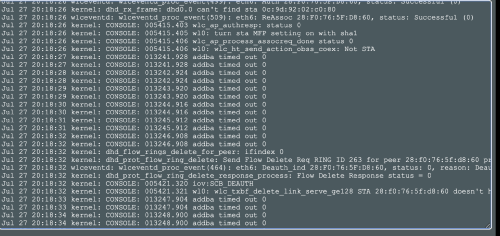 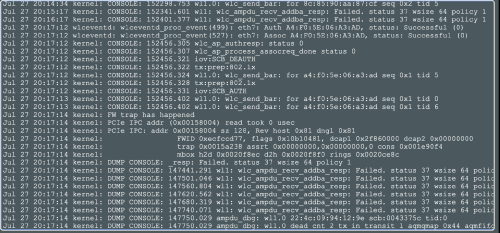 |
|
|
Jul 28 2020, 12:51 AM
|

Junior Member
374 posts Joined: Mar 2010
|
QUOTE(bluehippy @ Jul 27 2020, 03:20 PM) HI ASUSmy, You can try factory reset using reset button for both router and node. Then, set up them by placing both near to each other.I need some help. I bought a Zenwifi XT8 2 weeks ago. I have upgraded firmware to the latest version. I followed the setup steps but I was unable to add AIMESH node during setup eventhough the setup completed with out any errors. When I attempted to add the node manually, it was unable to do so and main node LED is blinking blue. After 30 mins, the node was detected and it seems to be working now. However, main node is still blinking blue. I have tried to setup, factory reset and swapped main nodes 4 times and the results are always the same. The last time I tried, I followed the Asus router app instructions and it all was successful even to the point where the network was being optimised. Even that was successful but when I looked for the AIMesh node, the node was not there. So I logged into the webui with my pc and I could add the node this way. However, main node LED is still blinking blue. Is it a hardware or firmware issue? I have sent feedback via the webgui, called advancenet but no one can help me. Should I return the item and get it exchanged? |
|
|
|
|
|
Jul 28 2020, 10:55 AM
|
|
Junior Member
86 posts Joined: Jun 2005
|
QUOTE(afif92 @ Jul 28 2020, 12:51 AM) You can try factory reset using reset button for both router and node. Then, set up them by placing both near to each other. Hi,i did do a factory reset. I also tried a hard reset but don't think it worked. The instructions are not really clear and I'm not really sure if I successfully did it. The results were still the same. Blue LED still continues to blink. BTW, do you guys know where is the best place to get support on ASUS routers? I bought ASUS because I thought support was good. But not that I've bought an ASUS, I realise support is almost impossible to get. |
|
|
Jul 28 2020, 04:19 PM
|
|
Junior Member
54 posts Joined: Sep 2017
|
QUOTE(officialshalogin @ Jul 25 2020, 06:49 AM) My modem crash when I have 5 active connection on torrent at once. Any solution? what is your modem model?? |
|
|
Jul 28 2020, 04:24 PM
|
|
Junior Member
54 posts Joined: Sep 2017
|
QUOTE(bluehippy @ Jul 28 2020, 10:55 AM) Hi, calm down bro, why don't you contact back the shop where you bought the XT8 and get the sales person to guide you?i did do a factory reset. I also tried a hard reset but don't think it worked. The instructions are not really clear and I'm not really sure if I successfully did it. The results were still the same. Blue LED still continues to blink. BTW, do you guys know where is the best place to get support on ASUS routers? I bought ASUS because I thought support was good. But not that I've bought an ASUS, I realise support is almost impossible to get. |
|
|
Jul 28 2020, 08:34 PM
|
|
Junior Member
374 posts Joined: Mar 2010
|
QUOTE(bluehippy @ Jul 28 2020, 10:55 AM) Hi, Pls someone call to assist him. Hope everything ok after that.i did do a factory reset. I also tried a hard reset but don't think it worked. The instructions are not really clear and I'm not really sure if I successfully did it. The results were still the same. Blue LED still continues to blink. BTW, do you guys know where is the best place to get support on ASUS routers? I bought ASUS because I thought support was good. But not that I've bought an ASUS, I realise support is almost impossible to get. |
|
|
Jul 29 2020, 11:23 AM
|

Junior Member
312 posts Joined: Apr 2015
|
Hi, I'm looking at ASUS router for my house and not sure which one to buy. These are the details of my requirements;
1. Unifi 300MB subscription. 2. Use mainly for streaming and work Thanks for your help. |
|
|
Jul 29 2020, 11:35 AM
|
|
Junior Member
86 posts Joined: Jun 2005
|
QUOTE(hongli.11.hongli @ Jul 28 2020, 04:24 PM) calm down bro, why don't you contact back the shop where you bought the XT8 and get the sales person to guide you? I am calm bro. Just trying to get some help from Asus MY.I bought it online and they told me to call the main distributor which is Advancenet. So I called and the guys there said that the router is too new and they don't know how to support. They asked for my email and what they did was to send me the softcopy of the user manual  . So I asked the seller again and they said I can send back but they need to send back to their distributor to check which were the ones who sent me the user manual which is already in the box and doesn't help much. Decided not to send it back since will mean that i won't have internet for a few days. . So I asked the seller again and they said I can send back but they need to send back to their distributor to check which were the ones who sent me the user manual which is already in the box and doesn't help much. Decided not to send it back since will mean that i won't have internet for a few days. |
|
|
Jul 29 2020, 03:11 PM
|

Junior Member
464 posts Joined: Dec 2004
|
QUOTE(tharmaraj @ Jul 29 2020, 11:23 AM) Hi, I'm looking at ASUS router for my house and not sure which one to buy. These are the details of my requirements; Asus ac86 good price deal now and powerful router with 4x4 mu mini.but still depends how big your house1. Unifi 300MB subscription. 2. Use mainly for streaming and work Thanks for your help. This post has been edited by kwai_83: Jul 29 2020, 03:11 PM |
|
|
|
 |
Jul 29 2020, 03:54 PM
Show posts by this member only | IPv6 | Post
#11894
|

Senior Member
2,319 posts Joined: Mar 2010
|
QUOTE(bluehippy @ Jul 29 2020, 11:35 AM) I am calm bro. Just trying to get some help from Asus MY. Hi bluehippy,I bought it online and they told me to call the main distributor which is Advancenet. So I called and the guys there said that the router is too new and they don't know how to support. They asked for my email and what they did was to send me the softcopy of the user manual . So I asked the seller again and they said I can send back but they need to send back to their distributor to check which were the ones who sent me the user manual which is already in the box and doesn't help much. Decided not to send it back since will mean that i won't have internet for a few days.Before start setting up the XT8, both the router will be in blue LED light. You can us anyone of them as a main router, make sure the second router(node) is power on and nearby the main router. Once you have finish setup the main router, the node will automatic start connecting to the main router. The LED light will start blinking in blue. If the connection was successful, both the LED light will be in white. Thank you |
|
|
Jul 29 2020, 03:57 PM
Show posts by this member only | IPv6 | Post
#11895
|
|
Senior Member
2,319 posts Joined: Mar 2010
|
QUOTE(shaktiv8 @ Jul 27 2020, 10:08 PM) Hello! Hi shaktiv8,I'm having reboot issues with my AX88U, random issues and drops all WAN, LAN and WLAN connections but the system uptime does not reset. Does anybody know what all these things in the log mean? I've never seen them before and I don'y know what they are. Issues started at " FW trap has happened" what does that mean ? Can you try updating the firmware to the latest and do a factory reset on the router and redo the setup? If the reboot issue still continue, can you send a feedback using the router GUI and PM me your email address. Thank you |
|
|
Jul 29 2020, 03:59 PM
Show posts by this member only | IPv6 | Post
#11896
|
|
Senior Member
2,319 posts Joined: Mar 2010
|
QUOTE(boxsystem @ Jul 26 2020, 05:33 PM) Hi @asusmy, Hi boxsystem,These new routers that have 2.5Gbps port is able to support dual WAN i assume? Does it support multi VLAN ID profilings as well? Unfortunately, only primary WAN has the VLAN function if you are using dual WAN. Thank you |
|
|
Jul 29 2020, 04:17 PM
|
|
Junior Member
58 posts Joined: Mar 2016
|
QUOTE(ASUSmy @ Jul 9 2020, 11:17 AM) Hi Ching Aik, Hi AsusMY,The official firmware will be available for download once RD finish test. Thank you After using the provided beta firmware (for BRT-AC828) to fixed dual-wan internet connection issue, I noticed in system log it always pop UBI error then start from yesterday around 12 noon, traffic analyzer no longer record any statistic, also no more logging since then. Below is system log for your checking: CODE Jul 28 11:01:39 kernel: [wifi1] FWLOG: [125371086] WAL_DBGID_SECURITY_ENCR_EN ( ) Jul 28 11:01:39 kernel: [wifi1] FWLOG: [125371086] WAL_DBGID_SECURITY_MCAST_KEY_SET ( 0x1 ) Jul 28 11:01:40 kernel: [wifi0] FWLOG: [125369235] WAL_DBGID_SECURITY_ENCR_EN ( ) Jul 28 11:01:40 kernel: [wifi0] FWLOG: [125369235] WAL_DBGID_SECURITY_MCAST_KEY_SET ( 0x1 ) Jul 28 11:39:57 kernel: UBI: scrubbed PEB 463 (LEB 5:657), data moved to PEB 1027 Jul 28 12:01:39 kernel: [wifi0] FWLOG: [129055242] WAL_DBGID_SECURITY_ENCR_EN ( ) Jul 28 12:01:39 kernel: [wifi0] FWLOG: [129055242] WAL_DBGID_SECURITY_MCAST_KEY_SET ( 0x2 ) Jul 28 12:01:40 kernel: [wifi1] FWLOG: [129057127] WAL_DBGID_SECURITY_ENCR_EN ( ) Jul 28 12:01:40 kernel: [wifi1] FWLOG: [129057127] WAL_DBGID_SECURITY_MCAST_KEY_SET ( 0x2 ) Jul 28 12:33:09 kernel: msm_nand_read_oob a356000 800 0 failed -74, corrected 0 Jul 28 12:33:09 kernel: msm_nand_read_oob a357000 800 0 failed -74, corrected 0 Jul 28 12:33:09 kernel: msm_nand_read_oob a358000 800 0 failed -74, corrected 0 Jul 28 12:33:09 kernel: msm_nand_read_oob a359000 800 0 failed -74, corrected 0 Jul 28 12:33:09 kernel: msm_nand_read_oob a35a000 800 0 failed -74, corrected 0 Jul 28 12:33:09 kernel: msm_nand_read_oob a35b000 800 0 failed -74, corrected 0 Jul 28 12:33:09 kernel: msm_nand_read_oob a35c000 800 0 failed -74, corrected 0 Jul 28 12:33:09 kernel: msm_nand_read_oob a35d000 800 0 failed -74, corrected 0 Jul 28 12:33:09 kernel: msm_nand_read_oob a35e000 800 0 failed -74, corrected 0 Jul 28 12:33:09 kernel: msm_nand_read_oob a35f000 800 0 failed -74, corrected 0 Jul 28 12:33:09 kernel: msm_nand_read_oob a356000 800 0 failed -74, corrected 0 Jul 28 12:33:09 kernel: msm_nand_read_oob a358000 800 0 failed -74, corrected 0 Jul 28 12:33:09 kernel: msm_nand_read_oob a359000 800 0 failed -74, corrected 0 Jul 28 12:33:09 kernel: msm_nand_read_oob a35a000 800 0 failed -74, corrected 0 Jul 28 12:33:09 kernel: msm_nand_read_oob a35b000 800 0 failed -74, corrected 0 Jul 28 12:33:09 kernel: msm_nand_read_oob a35c000 800 0 failed -74, corrected 0 Jul 28 12:33:09 kernel: msm_nand_read_oob a35d000 800 0 failed -74, corrected 0 Jul 28 12:33:09 kernel: msm_nand_read_oob a35e000 800 0 failed -74, corrected 0 Jul 28 12:33:09 kernel: msm_nand_read_oob a35f000 800 0 failed -74, corrected 0 Jul 28 12:33:09 kernel: msm_nand_read_oob a356000 800 0 failed -74, corrected 0 Jul 28 12:33:09 kernel: msm_nand_read_oob a357000 800 0 failed -74, corrected 0 Jul 28 12:33:09 kernel: msm_nand_read_oob a358000 800 0 failed -74, corrected 0 Jul 28 12:33:09 kernel: msm_nand_read_oob a359000 800 0 failed -74, corrected 0 Jul 28 12:33:09 kernel: msm_nand_read_oob a35a000 800 0 failed -74, corrected 0 Jul 28 12:33:09 kernel: msm_nand_read_oob a35b000 800 0 failed -74, corrected 0 Jul 28 12:33:09 kernel: msm_nand_read_oob a35c000 800 0 failed -74, corrected 0 Jul 28 12:33:09 kernel: msm_nand_read_oob a35d000 800 0 failed -74, corrected 0 Jul 28 12:33:09 kernel: msm_nand_read_oob a35e000 800 0 failed -74, corrected 0 Jul 28 12:33:09 kernel: msm_nand_read_oob a35f000 800 0 failed -74, corrected 0 Jul 28 12:33:09 kernel: msm_nand_read_oob a356000 800 0 failed -74, corrected 0 Jul 28 12:33:09 kernel: msm_nand_read_oob a357000 800 0 failed -74, corrected 0 Jul 28 12:33:09 kernel: msm_nand_read_oob a358000 800 0 failed -74, corrected 0 Jul 28 12:33:09 kernel: msm_nand_read_oob a359000 800 0 failed -74, corrected 0 Jul 28 12:33:09 kernel: msm_nand_read_oob a35a000 800 0 failed -74, corrected 0 Jul 28 12:33:09 kernel: msm_nand_read_oob a35b000 800 0 failed -74, corrected 0 Jul 28 12:33:09 kernel: msm_nand_read_oob a35c000 800 0 failed -74, corrected 0 Jul 28 12:33:09 kernel: msm_nand_read_oob a35d000 800 0 failed -74, corrected 0 Jul 28 12:33:09 kernel: msm_nand_read_oob a35e000 800 0 failed -74, corrected 0 Jul 28 12:33:09 kernel: msm_nand_read_oob a35f000 800 0 failed -74, corrected 0 Jul 28 12:33:09 kernel: UBI error: ubi_io_read: error -74 (ECC error) while reading 126976 bytes from PEB 1274:4096, read 126976 bytes Jul 28 12:33:09 kernel: UBIFS error (pid 351): ubifs_scan: corrupt empty space at LEB 565:87331 Jul 28 12:33:09 kernel: UBIFS error (pid 351): ubifs_scanned_corruption: corruption at LEB 565:87331 Regards ChingAik |
|
|
Jul 29 2020, 05:15 PM
Show posts by this member only | IPv6 | Post
#11898
|
|
Senior Member
2,319 posts Joined: Mar 2010
|
QUOTE(Ching Aik @ Jul 29 2020, 04:17 PM) Hi AsusMY, Hi Ching Aik,After using the provided beta firmware (for BRT-AC828) to fixed dual-wan internet connection issue, I noticed in system log it always pop UBI error then start from yesterday around 12 noon, traffic analyzer no longer record any statistic, also no more logging since then. Below is system log for your checking: CODE Jul 28 11:01:39 kernel: [wifi1] FWLOG: [125371086] WAL_DBGID_SECURITY_ENCR_EN ( ) Jul 28 11:01:39 kernel: [wifi1] FWLOG: [125371086] WAL_DBGID_SECURITY_MCAST_KEY_SET ( 0x1 ) Jul 28 11:01:40 kernel: [wifi0] FWLOG: [125369235] WAL_DBGID_SECURITY_ENCR_EN ( ) Jul 28 11:01:40 kernel: [wifi0] FWLOG: [125369235] WAL_DBGID_SECURITY_MCAST_KEY_SET ( 0x1 ) Jul 28 11:39:57 kernel: UBI: scrubbed PEB 463 (LEB 5:657), data moved to PEB 1027 Jul 28 12:01:39 kernel: [wifi0] FWLOG: [129055242] WAL_DBGID_SECURITY_ENCR_EN ( ) Jul 28 12:01:39 kernel: [wifi0] FWLOG: [129055242] WAL_DBGID_SECURITY_MCAST_KEY_SET ( 0x2 ) Jul 28 12:01:40 kernel: [wifi1] FWLOG: [129057127] WAL_DBGID_SECURITY_ENCR_EN ( ) Jul 28 12:01:40 kernel: [wifi1] FWLOG: [129057127] WAL_DBGID_SECURITY_MCAST_KEY_SET ( 0x2 ) Jul 28 12:33:09 kernel: msm_nand_read_oob a356000 800 0 failed -74, corrected 0 Jul 28 12:33:09 kernel: msm_nand_read_oob a357000 800 0 failed -74, corrected 0 Jul 28 12:33:09 kernel: msm_nand_read_oob a358000 800 0 failed -74, corrected 0 Jul 28 12:33:09 kernel: msm_nand_read_oob a359000 800 0 failed -74, corrected 0 Jul 28 12:33:09 kernel: msm_nand_read_oob a35a000 800 0 failed -74, corrected 0 Jul 28 12:33:09 kernel: msm_nand_read_oob a35b000 800 0 failed -74, corrected 0 Jul 28 12:33:09 kernel: msm_nand_read_oob a35c000 800 0 failed -74, corrected 0 Jul 28 12:33:09 kernel: msm_nand_read_oob a35d000 800 0 failed -74, corrected 0 Jul 28 12:33:09 kernel: msm_nand_read_oob a35e000 800 0 failed -74, corrected 0 Jul 28 12:33:09 kernel: msm_nand_read_oob a35f000 800 0 failed -74, corrected 0 Jul 28 12:33:09 kernel: msm_nand_read_oob a356000 800 0 failed -74, corrected 0 Jul 28 12:33:09 kernel: msm_nand_read_oob a358000 800 0 failed -74, corrected 0 Jul 28 12:33:09 kernel: msm_nand_read_oob a359000 800 0 failed -74, corrected 0 Jul 28 12:33:09 kernel: msm_nand_read_oob a35a000 800 0 failed -74, corrected 0 Jul 28 12:33:09 kernel: msm_nand_read_oob a35b000 800 0 failed -74, corrected 0 Jul 28 12:33:09 kernel: msm_nand_read_oob a35c000 800 0 failed -74, corrected 0 Jul 28 12:33:09 kernel: msm_nand_read_oob a35d000 800 0 failed -74, corrected 0 Jul 28 12:33:09 kernel: msm_nand_read_oob a35e000 800 0 failed -74, corrected 0 Jul 28 12:33:09 kernel: msm_nand_read_oob a35f000 800 0 failed -74, corrected 0 Jul 28 12:33:09 kernel: msm_nand_read_oob a356000 800 0 failed -74, corrected 0 Jul 28 12:33:09 kernel: msm_nand_read_oob a357000 800 0 failed -74, corrected 0 Jul 28 12:33:09 kernel: msm_nand_read_oob a358000 800 0 failed -74, corrected 0 Jul 28 12:33:09 kernel: msm_nand_read_oob a359000 800 0 failed -74, corrected 0 Jul 28 12:33:09 kernel: msm_nand_read_oob a35a000 800 0 failed -74, corrected 0 Jul 28 12:33:09 kernel: msm_nand_read_oob a35b000 800 0 failed -74, corrected 0 Jul 28 12:33:09 kernel: msm_nand_read_oob a35c000 800 0 failed -74, corrected 0 Jul 28 12:33:09 kernel: msm_nand_read_oob a35d000 800 0 failed -74, corrected 0 Jul 28 12:33:09 kernel: msm_nand_read_oob a35e000 800 0 failed -74, corrected 0 Jul 28 12:33:09 kernel: msm_nand_read_oob a35f000 800 0 failed -74, corrected 0 Jul 28 12:33:09 kernel: msm_nand_read_oob a356000 800 0 failed -74, corrected 0 Jul 28 12:33:09 kernel: msm_nand_read_oob a357000 800 0 failed -74, corrected 0 Jul 28 12:33:09 kernel: msm_nand_read_oob a358000 800 0 failed -74, corrected 0 Jul 28 12:33:09 kernel: msm_nand_read_oob a359000 800 0 failed -74, corrected 0 Jul 28 12:33:09 kernel: msm_nand_read_oob a35a000 800 0 failed -74, corrected 0 Jul 28 12:33:09 kernel: msm_nand_read_oob a35b000 800 0 failed -74, corrected 0 Jul 28 12:33:09 kernel: msm_nand_read_oob a35c000 800 0 failed -74, corrected 0 Jul 28 12:33:09 kernel: msm_nand_read_oob a35d000 800 0 failed -74, corrected 0 Jul 28 12:33:09 kernel: msm_nand_read_oob a35e000 800 0 failed -74, corrected 0 Jul 28 12:33:09 kernel: msm_nand_read_oob a35f000 800 0 failed -74, corrected 0 Jul 28 12:33:09 kernel: UBI error: ubi_io_read: error -74 (ECC error) while reading 126976 bytes from PEB 1274:4096, read 126976 bytes Jul 28 12:33:09 kernel: UBIFS error (pid 351): ubifs_scan: corrupt empty space at LEB 565:87331 Jul 28 12:33:09 kernel: UBIFS error (pid 351): ubifs_scanned_corruption: corruption at LEB 565:87331 Regards ChingAik Can you send a feedback and I will request our RD to check what is the problem. Thank you Ching Aik liked this post
|
|
|
Jul 29 2020, 08:48 PM
|
|
Newbie
8 posts Joined: Aug 2010
|
Hi @AsusMY
Just got the new RT-AX86U yesterday from ASUS PC LazMall. So far so good. I am able to ssh into the router. Whats the command to check temperature? cat /proc/dmu/temperature this is not working. How to monitor temperature of AC68U(without custom firmware) Anybody kind enough to check if their /proc/ directory contains this "/dmu/temperature" ? Maybe share the temperature file?  @RT-AX86U-3860:/proc# cd /dmu -sh: cd: can't cd to /dmu No dmu directory in this AX86U unfortunately. Thank you in advance. List of all NON directory content of /proc QUOTE @RT-AX86U-3860:/proc# ls -p | grep -v / List of all DIRECTORY in /procbcmlog buddyinfo cmdline config.gz consoles cpuinfo crypto device-tree devices diskstats execdomains filesystems interrupts iomem ioports kallsyms kcore kmsg kpagecount kpageflags led loadavg locks meminfo misc modules mounts mtd net pagetypeinfo partitions self slabinfo socinfo softirqs stat swaps sysrq-trigger thread-self timer_list uptime version vmallocinfo vmstat zoneinfo QUOTE @RT-AX86U-3860:/proc# ls -d */ This post has been edited by exgtigsr: Jul 29 2020, 08:52 PM1/ 1425/ 1501/ 19/ 28/ 58/ device-tree/ 10/ 1427/ 1502/ 1912/ 29/ 613/ dpsta/ 10435/ 1428/ 1503/ 1924/ 3/ 62/ driver/ 11/ 1430/ 1504/ 2/ 30/ 63/ emf/ 113/ 1437/ 1512/ 2005/ 31/ 64/ ethernet/ 115/ 1446/ 1517/ 21/ 32/ 65/ fcache/ 12/ 1449/ 1537/ 22/ 33/ 66/ fs/ 1236/ 1453/ 1539/ 2256/ 34/ 67/ irq/ 1296/ 1454/ 1543/ 2258/ 3400/ 68/ net/ 1298/ 1461/ 1544/ 23/ 35/ 7/ nvram/ 13/ 1462/ 159/ 2310/ 36/ 744/ pcie_hcd/ 1315/ 1463/ 1593/ 24/ 37/ 8/ pktrunner/ 1343/ 1464/ 16/ 249/ 3801/ 861/ scsi/ 1359/ 1466/ 1626/ 250/ 4/ 864/ self/ 1360/ 1467/ 168/ 251/ 438/ 870/ skb_free_thread/ 1361/ 1468/ 17/ 256/ 443/ 9/ sys/ 1370/ 1469/ 18/ 257/ 455/ 979/ sysvipc/ 1373/ 1471/ 1826/ 258/ 4991/ 980/ thread-self/ 14/ 1481/ 1829/ 26/ 5/ 9868/ tty/ 1409/ 1492/ 1832/ 268/ 5000/ brcm/ wfd/ 1422/ 1498/ 1876/ 27/ 5318/ bus/ |
|
|
Jul 29 2020, 10:37 PM
Show posts by this member only | IPv6 | Post
#11900
|
|
Junior Member
363 posts Joined: Sep 2014
|
QUOTE(ASUSmy @ Jul 29 2020, 03:57 PM) Hi shaktiv8, Hello, thanks for the reply!Can you try updating the firmware to the latest and do a factory reset on the router and redo the setup? If the reboot issue still continue, can you send a feedback using the router GUI and PM me your email address. Thank you I disabled SmartConnect and the console messages stopped, so i'm guessing thats the issue. Still wondering about the FW error, will try the new update and see if the issue still persists, thank you. |
| Change to: |  0.0288sec 0.0288sec
 0.36 0.36
 6 queries 6 queries
 GZIP Disabled GZIP Disabled
Time is now: 12th December 2025 - 01:30 AM |
 Quote
Quote