

Anyone knows how to enable NAT acceleration on the AX88U? I can't find it in the router settings even under LAN -> Switch Control

This post has been edited by chocobo7779: Nov 24 2019, 12:29 PM
Home Networking ASUS Malaysia Networking User & Technical Support, Managed by ASUS Malaysia Representative
|
|
 Nov 23 2019, 11:57 PM Nov 23 2019, 11:57 PM
|
 
All Stars
14,674 posts Joined: Sep 2010 
|
blacktubi sHawTY
Anyone knows how to enable NAT acceleration on the AX88U? I can't find it in the router settings even under LAN -> Switch Control This post has been edited by chocobo7779: Nov 24 2019, 12:29 PM |
|
|
|
|
|
Nov 25 2019, 01:40 AM
|

Junior Member
189 posts Joined: Jul 2018 
|
QUOTE(ASUSmy @ Nov 22 2019, 09:49 AM) Hi Aspick, Did the factory reset and reconfigure my RT-AC68U. Also placed my node RT-AC66U at a location which has better 5GHz wifi signal from main router as per @Blacktubi advice. The issue of constant offline and online to my node still persist. Can you try factory reset the RT-AC68U too and redo the configuration. In the main router GUI, what is the signal strength of the connection between the RT-AC68U and the node RT-AC66U? Do share me the system log if the problem happen again. Thank you  Signal strength of connection as shown 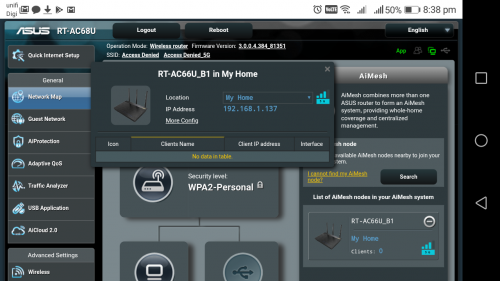 System log attached » Click to show Spoiler - click again to hide... « Any advice? QUOTE(blacktubi @ Nov 22 2019, 10:41 PM) I can see that the WiFi signal is one bar. I will next try out your suggestion.I would suggest swapping the RT-AC66U B1 to be the main router and use the old RT-AC68U as an AiMesh node. A new RT-AC66U B1 is actually better than an old RT-AC68U. RT-AC68U from 2 years ago actually have slightly different hardware. |
|
|
Nov 25 2019, 11:27 AM
|
 
Elite
8,415 posts Joined: Jul 2008 
|
QUOTE(Aspick @ Nov 25 2019, 01:40 AM) Did the factory reset and reconfigure my RT-AC68U. Also placed my node RT-AC66U at a location which has better 5GHz wifi signal from main router as per @Blacktubi advice. The issue of constant offline and online to my node still persist. Maybe you can try Firmware Version 3.0.0.4.384.45717Signal strength of connection as shown System log attached » Click to show Spoiler - click again to hide... « Any advice? I will next try out your suggestion. It is known to be less buggy. Same SOP. Flash the firmware, hard reset both units and setup again. Hard reset is super important when configuring AiMesh especially you have an older ASUS router. |
|
|
Nov 25 2019, 01:58 PM
|
|
Junior Member
27 posts Joined: Mar 2010
|
anyone experience weird behavior from GT-AC2900? i brought mine on 11.11 and i found that sometimes the 2.4ghz signal will disappeared for no reason and it wont appear until you power off and power on again the router then it will show up again
|
|
|
Nov 25 2019, 03:20 PM
|
|
Elite
8,415 posts Joined: Jul 2008
|
QUOTE(hojianming @ Nov 25 2019, 01:58 PM) anyone experience weird behavior from GT-AC2900? i brought mine on 11.11 and i found that sometimes the 2.4ghz signal will disappeared for no reason and it wont appear until you power off and power on again the router then it will show up again Have you updated to the latest firmware? https://www.asus.com/me-en/Gaming-Networkin.../HelpDesk_BIOS/ |
|
|
Nov 25 2019, 03:50 PM
|
|
Junior Member
27 posts Joined: Mar 2010
|
QUOTE(blacktubi @ Nov 25 2019, 03:20 PM) Have you updated to the latest firmware? Yes i did updated to latest firmwarehttps://www.asus.com/me-en/Gaming-Networkin.../HelpDesk_BIOS/ |
|
|
|
|
|
Nov 25 2019, 04:32 PM
|

Senior Member
852 posts Joined: Mar 2005 From: Penang
|
Is the latest Ac86u firmware stable (384_81351)?
|
|
|
Nov 26 2019, 05:48 PM
Show posts by this member only | IPv6 | Post
#10688
|
|
Junior Member
355 posts Joined: Nov 2013
|
E = mc2
-problem solved- This post has been edited by myrancid: Nov 26 2019, 06:11 PM |
|
|
Nov 26 2019, 06:18 PM
|
|
Junior Member
262 posts Joined: Oct 2019
|
QUOTE(myrancid @ Nov 26 2019, 05:48 PM) E = mc2 Previously your problem was that you did not set Unifi-Home as your ISP Profile-problem solved- |
|
|
Nov 26 2019, 07:13 PM
|
|
Junior Member
355 posts Joined: Nov 2013
|
QUOTE(CrimsonKing @ Nov 26 2019, 06:18 PM) Previously your problem was that you did not set Unifi-Home as your ISP Profile Yes..  |
|
|
Nov 27 2019, 12:23 AM
|
|
Junior Member
189 posts Joined: Jul 2018
|
ASUSmy
I replaced my existing main router RT-AC68U with the RT-AC66U B1. Running solely as main router with latest firmware 3.0.0.4.384_81351, I discovered that both 2.4GHz and 5GHGz wifi signal will occasionally disappear and appear again causing my clients to log out and log in again. The led lights on the router was up all the time when the wifi signal went off and on again. The system log as attached » Click to show Spoiler - click again to hide... « I thought the latest firmware could be buggy. So I follow @blacktubi advice and downgrade to firmware 3.0.0.4.384.45717. Did the whole hard reset and reconfigure again the RT-AC66U as main router. Again the same symptom of the wifi signal disappearing and later appearing again. Led lights were constantly on when the issue happens. The system log of the router with older firmware as attached » Click to show Spoiler - click again to hide... « I suspect the router is definitely having hardware issues. Can I get a replacement unit? QUOTE(blacktubi @ Nov 25 2019, 11:27 AM) Maybe you can try Firmware Version 3.0.0.4.384.45717 Thanks for the suggestions and help. But all those method didn't work. I suspect the unit is a lemon.It is known to be less buggy. Same SOP. Flash the firmware, hard reset both units and setup again. Hard reset is super important when configuring AiMesh especially you have an older ASUS router. This post has been edited by Aspick: Nov 27 2019, 12:25 AM |
 |
Nov 27 2019, 02:13 PM
Show posts by this member only | IPv6 | Post
#10692
|

Senior Member
2,319 posts Joined: Mar 2010
|
QUOTE(Aspick @ Nov 27 2019, 12:23 AM) ASUSmy Hi Aspick,I replaced my existing main router RT-AC68U with the RT-AC66U B1. Running solely as main router with latest firmware 3.0.0.4.384_81351, I discovered that both 2.4GHz and 5GHGz wifi signal will occasionally disappear and appear again causing my clients to log out and log in again. The led lights on the router was up all the time when the wifi signal went off and on again. The system log as attached » Click to show Spoiler - click again to hide... « I thought the latest firmware could be buggy. So I follow @blacktubi advice and downgrade to firmware 3.0.0.4.384.45717. Did the whole hard reset and reconfigure again the RT-AC66U as main router. Again the same symptom of the wifi signal disappearing and later appearing again. Led lights were constantly on when the issue happens. The system log of the router with older firmware as attached » Click to show Spoiler - click again to hide... « I suspect the router is definitely having hardware issues. Can I get a replacement unit? Thanks for the suggestions and help. But all those method didn't work. I suspect the unit is a lemon. If tried different firmware also same then you may send it for the warranty claim. Thank you |
|
|
Nov 27 2019, 03:29 PM
Show posts by this member only | IPv6 | Post
#10693
|
|
Junior Member
189 posts Joined: Jul 2018
|
QUOTE(ASUSmy @ Nov 27 2019, 02:13 PM) Hi Aspick, I'm staying in PJ Selangor. Where is the nearest service center i can send to?If tried different firmware also same then you may send it for the warranty claim. Thank you Btw i bought online and received the RT-AC66U B1 on 15/11/19. I haven't register the product for warranty yet. Do i need to register? |
|
|
|
|
|
Nov 27 2019, 03:37 PM
Show posts by this member only | IPv6 | Post
#10694
|

Junior Member
140 posts Joined: Sep 2005 From: Penang
|
Looking to purchase a Asus router and doing some comparison.
Found that need model like RTAC1500UHT and RT-AC59 have much lesser memory compare to old model like RTAC1300UHP. Should I just get the older model with higher memory? Or latest model just need less memory? Appreciate your advice |
|
|
Nov 27 2019, 03:39 PM
Show posts by this member only | IPv6 | Post
#10695
|
|
Junior Member
140 posts Joined: Sep 2005 From: Penang
|
Looking to purchase a Asus router and doing some comparison.
Found that new model like RTAC1500UHT and RT-AC59 have much lesser memory compare to old model like RTAC1300UHP. Should I just get the older model with higher memory? Or latest model just need less memory? This post has been edited by Maxram: Nov 27 2019, 03:41 PM |
|
|
Nov 27 2019, 05:54 PM
|
|
Senior Member
2,319 posts Joined: Mar 2010
|
QUOTE(Aspick @ Nov 27 2019, 03:29 PM) I'm staying in PJ Selangor. Where is the nearest service center i can send to? Hi Aspick,Btw i bought online and received the RT-AC66U B1 on 15/11/19. I haven't register the product for warranty yet. Do i need to register? Nearest will be at the following address. You can bring the receipt together for the warranty claim. ADVANCENET KL 145,JALAN KENARI 23A, BANDAR PUCHONG JAYA, PUCHONG, 47100, SELANGOR DARUL EHSAN 9AM - 6PM - Monday to Friday, excluding Public Holidays and State Holidays Thank you |
|
|
Nov 28 2019, 09:08 AM
|

Senior Member
1,341 posts Joined: Dec 2016
|
QUOTE(Maxram @ Nov 27 2019, 03:39 PM) Looking to purchase a Asus router and doing some comparison. Add up your cash to buy AC68U instead. That router considered as one of the legendary router from ASUS that works like a charm.Found that new model like RTAC1500UHT and RT-AC59 have much lesser memory compare to old model like RTAC1300UHP. Should I just get the older model with higher memory? Or latest model just need less memory? |
|
|
Nov 28 2019, 11:06 AM
|

Senior Member
2,348 posts Joined: Apr 2008
|
QUOTE(chocobo7779 @ Nov 23 2019, 11:57 PM) blacktubi sHawTY This router does not need NAT acceleration, this function only for mid-end router. High-end router already is default as NAT accelerated because its CPU is fast enough to handle that high speed gigabit connections without the requirement to manually enable the "NAT acceleration", in order to further boost up the CPU speed in the router.Anyone knows how to enable NAT acceleration on the AX88U? I can't find it in the router settings even under LAN -> Switch Control This post has been edited by junclj: Nov 28 2019, 11:11 AM |
|
|
Nov 28 2019, 11:13 AM
|
|
Senior Member
2,348 posts Joined: Apr 2008
|
QUOTE(yfyap69 @ Nov 25 2019, 04:32 PM) Is the latest Ac86u firmware stable (384_81351)? I'm using it, does not find any issue with this version. |
|
|
Nov 28 2019, 12:58 PM
Show posts by this member only | IPv6 | Post
#10700
|
|
Senior Member
852 posts Joined: Mar 2005 From: Penang
|
QUOTE(junclj @ Nov 28 2019, 11:13 AM) I'm using it, does not find any issue with this version. TQ |
| Change to: |  0.0355sec 0.0355sec
 0.59 0.59
 6 queries 6 queries
 GZIP Disabled GZIP Disabled
Time is now: 11th December 2025 - 05:10 PM |
 Quote
Quote
