Outline ·
[ Standard ] ·
Linear+
Home Networking ASUS Malaysia Networking User & Technical Support, Managed by ASUS Malaysia Representative
|
chocobo7779
|
 Nov 21 2019, 10:37 AM Nov 21 2019, 10:37 AM
|

|
QUOTE(SilentVampire @ Nov 20 2019, 09:41 PM) You do realize that there is NO way that 2.4GHz can go up to 750Mbps? Honestly, a few users have educated you on it, so I wouldn't waste my time anymore. We can safely assume that it is 5Ghz because it is the only possible way to be able to reach that speed. Don't type things that you have no idea about, and I suggest reading more about networking before replying. It will just make you look dumb if you reply without knowing what you are talking about. Click the link on my signature and read ALL the green text. I have written it for newbies like you. Most router speeds are advertised in such a manner that: 1. The rated speeds are the combined speeds of all the two/three wireless bands 2. The speeds are rated in a laboratory condition which is impossible to achieve in real world conditions  This post has been edited by chocobo7779: Nov 21 2019, 10:38 AM This post has been edited by chocobo7779: Nov 21 2019, 10:38 AM |
|
|
|
|
|
SilentVampire
|
Nov 21 2019, 10:39 AM
|
|
|
QUOTE(chocobo7779 @ Nov 21 2019, 10:37 AM) Most router speeds are advertised in such a manner that: 1. The rated speeds are the combined speeds of all the two/three wireless bands 2. The speeds are rated in a laboratory condition which is impossible to achieve in real world conditions Yes, I know all that. You should be replying to the other guy lol, instead of me. |
|
|
|
|
|
chocobo7779
|
Nov 21 2019, 10:40 AM
|
|
|
QUOTE(wheelhot @ Nov 20 2019, 12:39 AM) Hello, I guess I'll post my question here. I have tried 3 routers (2 DLinks and 1 Asus; latest) and all of the routers doesn't give me 500mbps WiFi speed when I connect to 802.11ac devices such as iPhone XS, 11in iPad Pro, 2016 MacBook Pro and etc. The router in question is Asus AC86U and the best speed I ever get is 270mbps, in the same room and about 1m away from the router. If connect via ethernet, I am able to get 500mbps no problem. Please advise, thanks. Which band and what channel width? At such speeds you almost need 80Mhz channel width for that |
|
|
|
|
|
wheelhot
|
Nov 21 2019, 12:23 PM
|
New Member

|
QUOTE(chocobo7779 @ Nov 21 2019, 10:40 AM) Which band and what channel width? At such speeds you almost need 80Mhz channel width for that Thanks for the reply, but I wrote the update 6 posts before this. And it's 5GHz at 80Mhz |
|
|
|
|
|
chocobo7779
|
Nov 21 2019, 12:39 PM
|
|
|
QUOTE(wheelhot @ Nov 21 2019, 12:23 PM) Thanks for the reply, but I wrote the update 6 posts before this. And it's 5GHz at 80Mhz 80Mhz only or 20/40/80Mhz? |
|
|
|
|
|
wheelhot
|
Nov 21 2019, 01:48 PM
|
New Member
|
QUOTE(chocobo7779 @ Nov 21 2019, 12:39 PM) 80Mhz only or 20/40/80Mhz? 20/40/80Mhz but my device connects at the 80Mhz frequency, I can change it to 20 or 40 but I guess it'll limit my speed. This post has been edited by wheelhot: Nov 21 2019, 01:48 PM |
|
|
|
|
|
Aspick
|
Nov 22 2019, 03:27 AM
|
Getting Started
|
I think my newly purchased RT-AC66U B1 is defective. Here is my story. I bought it for purpose of setting up Aimesh in my home. Wanted to set it as a node link to my main router which is a RT-AC68U. I had upgraded both routers to latest firmware which is Version 3.0.0.4.384.81351 . Then did a factory reset to RT-AC66U before configuring it as a node. After that search the node from my RT-AC68U main router and successfully linked them up. Placed the RT-AC66U on the 1st floor almost directly above the main router on ground floor. That's when my problem start.  I noticed my node router (RT-AC66U) will frequently goes offline and online again. This will happen many times within an hour. I tracked this abnormality thru my PC which is connected by wire to the lan port of the node. At first I thought it could be the settings in my main router. I googled around and follow some of the advice in forums like snbforums. Even though after I changed and tried different settings, the constant offline and online still happening to my node.  After few days of frustration with failure in getting a stable Aimesh system, I decided to try something different by configuring the RT-AC66U B1 as a repeater utilizing the 5GHz wifi signal. This is when I realized the RT-AC66U as a repeater will also constantly disconnect and reconnect back to my main router. I suspect the unit I bought is a lemon. ASUSmy or SIFUS here got any advice for me? This post has been edited by Aspick: Nov 22 2019, 03:28 AM |
|
|
|
|
|
BTS1501
|
Nov 22 2019, 09:19 AM
|
Getting Started
|
QUOTE(mztang52 @ Nov 20 2019, 06:27 PM) Thus in conclude that the reasons of why 5Ghz are seemingly to be more possible to reach speeds like 200Mbps but not 2.4Ghz WiFi in the real world. Hope my best try of explanations can make you understand better. Feel free to ask me anymore questions if you have any other doubts. Thanks, but 160Mbps is achievable on 2.4Ghz, and it also depends on what time of day you do the speedtest, and like what the original person said, depends on servers too. so that's why 270Mbps on 2.4Ghz to me is also achievable, on AC routers. |
|
|
|
|
|
BTS1501
|
Nov 22 2019, 09:21 AM
|
Getting Started
|
QUOTE(chocobo7779 @ Nov 21 2019, 10:36 AM) Even on 5GHz ac 500Mbps is quite hard to achieve unless multiple streams/antennas are used You almost need an ax (WiFi 6) capable router for this AC routers can do more than 500Mbps, even > 1Gbps on 3x3 AC, don't need AX routers, you just don't know how to do it, or you are still using old routers. |
|
|
|
|
TSASUSmy
|
Nov 22 2019, 09:49 AM
|
|
|
QUOTE(Aspick @ Nov 22 2019, 03:27 AM) I think my newly purchased RT-AC66U B1 is defective. Here is my story. I bought it for purpose of setting up Aimesh in my home. Wanted to set it as a node link to my main router which is a RT-AC68U. I had upgraded both routers to latest firmware which is Version 3.0.0.4.384.81351 . Then did a factory reset to RT-AC66U before configuring it as a node. After that search the node from my RT-AC68U main router and successfully linked them up. Placed the RT-AC66U on the 1st floor almost directly above the main router on ground floor. That's when my problem start. I noticed my node router (RT-AC66U) will frequently goes offline and online again. This will happen many times within an hour. I tracked this abnormality thru my PC which is connected by wire to the lan port of the node. At first I thought it could be the settings in my main router. I googled around and follow some of the advice in forums like snbforums. Even though after I changed and tried different settings, the constant offline and online still happening to my node. After few days of frustration with failure in getting a stable Aimesh system, I decided to try something different by configuring the RT-AC66U B1 as a repeater utilizing the 5GHz wifi signal. This is when I realized the RT-AC66U as a repeater will also constantly disconnect and reconnect back to my main router. I suspect the unit I bought is a lemon. ASUSmy or SIFUS here got any advice for me? Hi Aspick, Can you try factory reset the RT-AC68U too and redo the configuration. In the main router GUI, what is the signal strength of the connection between the RT-AC68U and the node RT-AC66U? Do share me the system log if the problem happen again. Thank you |
|
|
|
|
|
blacktubi
|
Nov 22 2019, 11:32 AM
|
-

|
QUOTE(Aspick @ Nov 22 2019, 03:27 AM) I think my newly purchased RT-AC66U B1 is defective. Here is my story. I bought it for purpose of setting up Aimesh in my home. Wanted to set it as a node link to my main router which is a RT-AC68U. I had upgraded both routers to latest firmware which is Version 3.0.0.4.384.81351 . Then did a factory reset to RT-AC66U before configuring it as a node. After that search the node from my RT-AC68U main router and successfully linked them up. Placed the RT-AC66U on the 1st floor almost directly above the main router on ground floor. That's when my problem start. I noticed my node router (RT-AC66U) will frequently goes offline and online again. This will happen many times within an hour. I tracked this abnormality thru my PC which is connected by wire to the lan port of the node. At first I thought it could be the settings in my main router. I googled around and follow some of the advice in forums like snbforums. Even though after I changed and tried different settings, the constant offline and online still happening to my node. After few days of frustration with failure in getting a stable Aimesh system, I decided to try something different by configuring the RT-AC66U B1 as a repeater utilizing the 5GHz wifi signal. This is when I realized the RT-AC66U as a repeater will also constantly disconnect and reconnect back to my main router. I suspect the unit I bought is a lemon. ASUSmy or SIFUS here got any advice for me? 1) Turn of RT-AC66U B1 2) Stand at the same spot where you use the RT-AC66U B1 3) Perform a speedtest while connected to RT-AC68U 4) Could be a weak signal issue |
|
|
|
|
|
chocobo7779
|
Nov 22 2019, 12:36 PM
|
|
|
QUOTE(BTS1501 @ Nov 22 2019, 09:21 AM) AC routers can do more than 500Mbps, even > 1Gbps on 3x3 AC, don't need AX routers, you just don't know how to do it, or you are still using old routers. Ah, I stand corrected  |
|
|
|
|
|
yongtjunkit
|
Nov 22 2019, 05:24 PM
|
|
|
Deleted
This post has been edited by yongtjunkit: Nov 22 2019, 05:25 PM
|
|
|
|
|
|
yongtjunkit
|
Nov 22 2019, 05:55 PM
|
|
|
QUOTE(BTS1501 @ Nov 22 2019, 09:19 AM) Thanks, but 160Mbps is achievable on 2.4Ghz, and it also depends on what time of day you do the speedtest, and like what the original person said, depends on servers too. so that's why 270Mbps on 2.4Ghz to me is also achievable, on AC routers. Wah really ah, can share with us how to achieve that speed ah |
|
|
|
|
|
rioven
|
Nov 22 2019, 07:21 PM
|
|
|
the only way that i think 1. the router/access point that 3x3 with NitroQAM 2. client also need 3x3 capable with NitroQAM 3. low noise environment 4. distance is short between router/access point and client On router part, no problem. Client side..kinda helpless unless user is using pcie wireless with 3x3 or 4x4 broadcom. most device are 1x1 or 2x2. 2.4ghz is getting crowded. 270mbps is kinda tough to archive on 2.4ghz, unless on 5ghz Note 8 NitroQAM Credit to Jayce Ooi |
|
|
|
|
|
Aspick
|
Nov 22 2019, 10:07 PM
|
Getting Started
|
QUOTE(ASUSmy @ Nov 22 2019, 09:49 AM) Hi Aspick, Can you try factory reset the RT-AC68U too and redo the configuration. In the main router GUI, what is the signal strength of the connection between the RT-AC68U and the node RT-AC66U? Do share me the system log if the problem happen again. Thank you Ok will try your suggestion and report back later. QUOTE(blacktubi @ Nov 22 2019, 11:32 AM) 1) Turn of RT-AC66U B1 2) Stand at the same spot where you use the RT-AC66U B1 3) Perform a speedtest while connected to RT-AC68U 4) Could be a weak signal issue Based on your suggestion, i have this result from my phone speedtest. Doesn't seem to be weak signal. 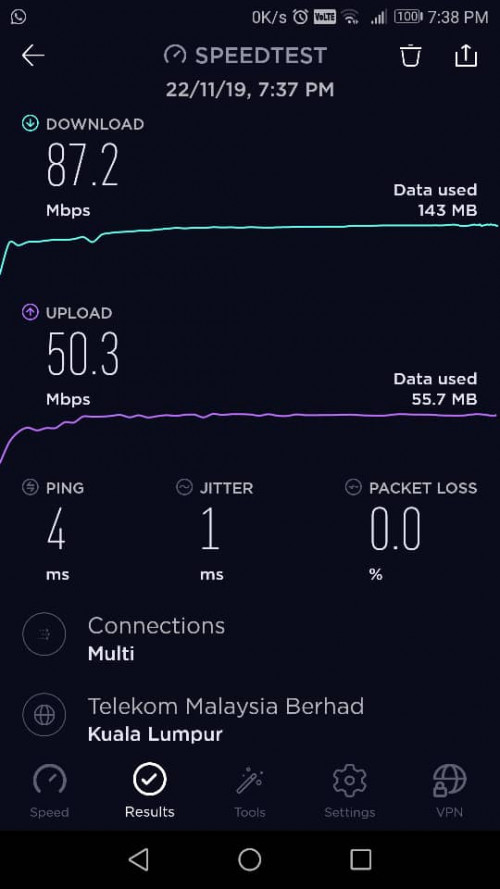 |
|
|
|
|
|
blacktubi
|
Nov 22 2019, 10:41 PM
|
-
|
QUOTE(Aspick @ Nov 22 2019, 10:07 PM) Ok will try your suggestion and report back later. Based on your suggestion, i have this result from my phone speedtest. Doesn't seem to be weak signal. I can see that the WiFi signal is one bar. I would suggest swapping the RT-AC66U B1 to be the main router and use the old RT-AC68U as an AiMesh node. A new RT-AC66U B1 is actually better than an old RT-AC68U. RT-AC68U from 2 years ago actually have slightly different hardware. |
|
|
|
|
|
archimedes
|
Nov 23 2019, 09:16 AM
|
New Member
|
QUOTE(blacktubi @ Oct 18 2019, 04:34 PM) RP-AC55 Cheapest with AiMesh support If you want better performance you can up your budget and get RT-AC66U B1 Btw can RP AC55 support aimesh? I've got a free unit with the purchase recently but it seems it works only as an extender. Followed the instructions but somehow there is no mesh set-up option. Any updates I need to do? Thanks |
|
|
|
|
|
yongtjunkit
|
Nov 23 2019, 10:21 AM
|
|
|
QUOTE(archimedes @ Nov 23 2019, 09:16 AM) Btw can RP AC55 support aimesh? I've got a free unit with the purchase recently but it seems it works only as an extender. Followed the instructions but somehow there is no mesh set-up option. Any updates I need to do? Thanks Yes, update it to the latest firmware(Version 3.0.0.4.384.80710) then factory reset it This post has been edited by yongtjunkit: Nov 23 2019, 12:05 PM |
|
|
|
|
|
blacktubi
|
Nov 23 2019, 03:23 PM
|
-
|
QUOTE(archimedes @ Nov 23 2019, 09:16 AM) Btw can RP AC55 support aimesh? I've got a free unit with the purchase recently but it seems it works only as an extender. Followed the instructions but somehow there is no mesh set-up option. Any updates I need to do? Thanks Upgrade firmware of the extender then use the reset button to factory reset. Login to your router, change 5Ghz channel to channel 36 then search for AiMesh node. https://youtu.be/hs_HfDZeCqY |
|
|
|
|



 Quote
Quote


 0.0330sec
 0.59
0.59
 6 queries
 GZIP Disabled