

So any tips and tricks what to set on 192.168.1.1 for RT-AC86U?
Home Networking ASUS Malaysia Networking User & Technical Support, Managed by ASUS Malaysia Representative
Home Networking ASUS Malaysia Networking User & Technical Support, Managed by ASUS Malaysia Representative
|
|
 Nov 29 2019, 07:32 PM Nov 29 2019, 07:32 PM
|
 
Junior Member
355 posts Joined: Nov 2013 
|
So any tips and tricks what to set on 192.168.1.1 for RT-AC86U?
|
|
|
|
|
|
Nov 30 2019, 12:06 PM
|
|
Newbie
26 posts Joined: Feb 2014 
|
Hmm, anyone had problems with Asus router causing PS4 Wifi (2.4Ghz band) to show a disconnect notification but streaming seems to be unaffected by that notification?
My theory is, it disconnects, but instantly reconnect but as the stream has some streaming buffer. The main obvious issue is if you use YouTube App on your phone as remote to control YouTube PS4, once it disconnects, it cannot reconnect unless you close the YT PS4 app. I did not have this issue with my old TP Link router nor the previous DLink router, so it feels it has something to do with the Asus RT86U router. This post has been edited by wheelhot: Nov 30 2019, 12:07 PM |
|
|
Dec 2 2019, 01:10 AM
|
|
Junior Member
298 posts Joined: Jul 2005
|
Hi I just bought asus usb-ac53nano speed seems to stuck at 190Mbps at 5Ghz
right in front of router(stock unifi tplink archer c1200) However,my phone is getting about 270Mbps. What happened to be balance? Sucribed to unifi 300Mbps |
 |
Dec 3 2019, 09:24 AM
Show posts by this member only | IPv6 | Post
#10704
|

Senior Member
2,319 posts Joined: Mar 2010
|
QUOTE(myrancid @ Nov 29 2019, 07:32 PM) So any tips and tricks what to set on 192.168.1.1 for RT-AC86U? Hi myrancid, If you mean setting up the router, you may refer to my signature. Thank you. |
|
|
Dec 3 2019, 09:31 AM
Show posts by this member only | IPv6 | Post
#10705
|
|
Senior Member
2,319 posts Joined: Mar 2010
|
QUOTE(wheelhot @ Nov 30 2019, 12:06 PM) Hmm, anyone had problems with Asus router causing PS4 Wifi (2.4Ghz band) to show a disconnect notification but streaming seems to be unaffected by that notification? Hi wheelhot,My theory is, it disconnects, but instantly reconnect but as the stream has some streaming buffer. The main obvious issue is if you use YouTube App on your phone as remote to control YouTube PS4, once it disconnects, it cannot reconnect unless you close the YT PS4 app. I did not have this issue with my old TP Link router nor the previous DLink router, so it feels it has something to do with the Asus RT86U router. Do update the firmware of the router to the latest and try fix the WiFi channel for 2.4GHz. Beside your PS4, is other devices having the same problem with 2.4GHz? Thank you |
|
|
Dec 3 2019, 12:28 PM
Show posts by this member only | IPv6 | Post
#10706
|
|
Senior Member
2,319 posts Joined: Mar 2010
|
QUOTE(pho3n1x @ Dec 2 2019, 01:10 AM) Hi I just bought asus usb-ac53nano speed seems to stuck at 190Mbps at 5Ghz Hi pho3n1x,right in front of router(stock unifi tplink archer c1200) However,my phone is getting about 270Mbps. What happened to be balance? Sucribed to unifi 300Mbps Yes, the speedtest for the USB-AC53 Nano are around there due to it is using USB 2.0 connection. Thank you |
|
|
|
|
|
Dec 3 2019, 05:31 PM
|

Senior Member
1,031 posts Joined: Jun 2011 From: #KajangTop
|
Hi
Just to enquire if DSL-AC52U can support AiMesh or not ? Since upgrade to fibre, I'm using RT-AC86U as the main device. |
|
|
Dec 4 2019, 09:10 AM
|
|
Senior Member
2,319 posts Joined: Mar 2010
|
QUOTE(cHiLdHo0drEaMz @ Dec 3 2019, 05:31 PM) Hi Hi cHiLdHo0drEaMz,Just to enquire if DSL-AC52U can support AiMesh or not ? Since upgrade to fibre, I'm using RT-AC86U as the main device. You may refer to the link below for the AiMesh supported model and DSL-AC52U is not one of them. https://www.asus.com/Networking/Wi-Fi-System-Products/ Thank you |
|
|
Dec 4 2019, 09:52 AM
|
|
Senior Member
1,031 posts Joined: Jun 2011 From: #KajangTop
|
QUOTE(ASUSmy @ Dec 4 2019, 09:10 AM) Hi cHiLdHo0drEaMz, Thank you for the reply You may refer to the link below for the AiMesh supported model and DSL-AC52U is not one of them. https://www.asus.com/Networking/Wi-Fi-System-Products/ Thank you  |
|
|
Dec 4 2019, 05:49 PM
|

Junior Member
37 posts Joined: Aug 2017
|
Asus PCE-AX58BT PCIe wifi network card upload very slow.
I just bought a Asus PCE-AX58BT wifi network card and I find that the upload speed is very slow. The download speed is OK. I am using the latest Intel driver, version 21.50.1.1 (6 Oct 2019) and is connected to a Asus RT-AC86U router with firmware 3.0.0.4.384_81351 using 5GHz. OS is Windows 10 Pro version 1909 (18363.476). Speedtests using Oolka give downloads about 130Mbps and uploads about 0.6Mbps. Uploads are consistently less than 1Mbps. These results are for about 5 speedtests. I am on Maxis fibre 100Mbps package. Using network cable, speedtests give downloads about 130Mbps and uploads about 70Mbps. Speedtests using a Asus android tablet connected to the router using wifi 5GHz also give downloads about 130Mbps and uploads about 70Mbps. So it seem that the slow upload issue is related to the Asus PCE-AX58BT. So I wonder if this card is faulty or are there any other things that I can do to made the upload faster. ASUSmy |
|
|
Dec 5 2019, 11:14 AM
|
|
Senior Member
2,319 posts Joined: Mar 2010
|
QUOTE(jbmsia @ Dec 4 2019, 05:49 PM) Asus PCE-AX58BT PCIe wifi network card upload very slow. Hi jbmsia,I just bought a Asus PCE-AX58BT wifi network card and I find that the upload speed is very slow. The download speed is OK. I am using the latest Intel driver, version 21.50.1.1 (6 Oct 2019) and is connected to a Asus RT-AC86U router with firmware 3.0.0.4.384_81351 using 5GHz. OS is Windows 10 Pro version 1909 (18363.476). Speedtests using Oolka give downloads about 130Mbps and uploads about 0.6Mbps. Uploads are consistently less than 1Mbps. These results are for about 5 speedtests. I am on Maxis fibre 100Mbps package. Using network cable, speedtests give downloads about 130Mbps and uploads about 70Mbps. Speedtests using a Asus android tablet connected to the router using wifi 5GHz also give downloads about 130Mbps and uploads about 70Mbps. So it seem that the slow upload issue is related to the Asus PCE-AX58BT. So I wonder if this card is faulty or are there any other things that I can do to made the upload faster. ASUSmy Have you try to update the RT-AC86U router firmware to the latest? Can you log into router and go to the System Log->Wireless Log and show us what is the TX_RATE and RX_RATE you are getting for the PCE-AX58BT. Capture the image before and when testing the speedtest. Thank you |
|
|
Dec 5 2019, 11:33 AM
|
|
Junior Member
37 posts Joined: Aug 2017
|
QUOTE(ASUSmy @ Dec 5 2019, 11:14 AM) Hi jbmsia, ASUSmyHave you try to update the RT-AC86U router firmware to the latest? Can you log into router and go to the System Log->Wireless Log and show us what is the TX_RATE and RX_RATE you are getting for the PCE-AX58BT. Capture the image before and when testing the speedtest. Thank you The router firmware version 3.0.0.4.384_81351 is the latest that I can find on your website. Updating the firmware was one of first step I tried. I will check the TX_RATE and RX_RATE once I get home. Thanks |
|
|
Dec 5 2019, 06:35 PM
Show posts by this member only | IPv6 | Post
#10713
|
 
Elite
15,694 posts Joined: Mar 2008
|
QUOTE(jbmsia @ Dec 5 2019, 11:33 AM) ASUSmy Just got the card, no issue with upload speed. The router firmware version 3.0.0.4.384_81351 is the latest that I can find on your website. Updating the firmware was one of first step I tried. I will check the TX_RATE and RX_RATE once I get home. Thanks  I'm using RT-N18U though. I'm using RT-N18U though. |
|
|
|
|
|
Dec 6 2019, 01:13 PM
|
|
Junior Member
37 posts Joined: Aug 2017
|
QUOTE(kingkingyyk @ Dec 5 2019, 06:35 PM) Just got the card, no issue with upload speed. I did some troubleshooting and it appears that my problem have to do with Win 10 Hyper-V virtual switch. Once I removed the PCE-AX58BT from the Win 10 Hyper-V virtual switch, the upload speed went up to between 60Mbps to 80Mbps. I'm using RT-N18U though.And when I add the PCE-AX58BT to the Win 10 Hyper-V virtual switch again, the upload speed drop to below 1Mbps, now even the download speed is only about 1 Mbps to 2 Mbps.  I didn't have time to check the router log on the TX_RATE and RX_RATE. ASUSmy Can you help me feedback to your support team about this problem. Or if you have any solution, please let me know. |
|
|
Dec 6 2019, 07:47 PM
|

Senior Member
3,435 posts Joined: Oct 2008 From: Kota Bharu 
|
RT-AC1300UHP doesn’t support aimesh right?
This post has been edited by FaezFarhan: Dec 7 2019, 06:17 AM |
|
|
Dec 7 2019, 12:45 PM
|

Elite
8,415 posts Joined: Jul 2008 
|
QUOTE(jbmsia @ Dec 6 2019, 01:13 PM) I did some troubleshooting and it appears that my problem have to do with Win 10 Hyper-V virtual switch. Once I removed the PCE-AX58BT from the Win 10 Hyper-V virtual switch, the upload speed went up to between 60Mbps to 80Mbps. Sounds like a bug with the Hyper-V or the Intel driver. And when I add the PCE-AX58BT to the Win 10 Hyper-V virtual switch again, the upload speed drop to below 1Mbps, now even the download speed is only about 1 Mbps to 2 Mbps. I didn't have time to check the router log on the TX_RATE and RX_RATE. ASUSmy Can you help me feedback to your support team about this problem. Or if you have any solution, please let me know. I found a few users with similar issue. https://social.technet.microsoft.com/Forums...=win10itprovirt https://social.technet.microsoft.com/Forums...-all?forum=MVMC QUOTE(FaezFarhan @ Dec 6 2019, 07:47 PM) RT-AC1300UHP doesn’t support aimesh right? Nope |
|
|
Dec 7 2019, 12:50 PM
|
|
Senior Member
3,435 posts Joined: Oct 2008 From: Kota Bharu
|
QUOTE(blacktubi @ Dec 7 2019, 12:45 PM) Nope Going for the RT-AC86U & the RP-AC55 for my aimesh setup. Do you think it’s a good choice? |
|
|
Dec 7 2019, 01:11 PM
|
|
Elite
8,415 posts Joined: Jul 2008
|
QUOTE(FaezFarhan @ Dec 7 2019, 12:50 PM) Going for the RT-AC86U & the RP-AC55 for my aimesh setup. Do you think it’s a good choice? I would top up a bit and go for the RT-AC66U B1 as AiMesh node instead. The performance is much better that way.Or, you can check out ZenWiFi CT8, it is available now.  https://www.blacktubi.com/review/asus-zenwifi-ac-ct8/ |
|
|
Dec 8 2019, 02:12 AM
|
|
Senior Member
3,435 posts Joined: Oct 2008 From: Kota Bharu
|
QUOTE(blacktubi @ Dec 7 2019, 01:11 PM) I would top up a bit and go for the RT-AC66U B1 as AiMesh node instead. The performance is much better that way. The CT8 is too expensive for me haha. I’m trying to cancel the RP-AC55 I purchased on shopee & go for the RT-AC66U B1 instead as it’s only rm100 difference. Thanks!Or, you can check out ZenWiFi CT8, it is available now. https://www.blacktubi.com/review/asus-zenwifi-ac-ct8/ RT-AC86U as main router in the third floor, RT-AC66U as an aimesh node on the second floor. This post has been edited by FaezFarhan: Dec 8 2019, 02:14 AM |
|
|
Dec 8 2019, 04:36 PM
|
|
Senior Member
3,435 posts Joined: Oct 2008 From: Kota Bharu
|
It has arrived.
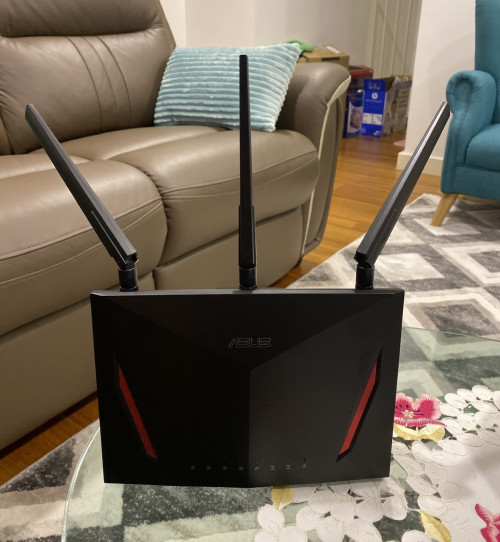 Does antenna orientation matter? Now I’m waiting for the RT-AC66U to arrive. |
| Change to: |  0.0305sec 0.0305sec
 0.42 0.42
 6 queries 6 queries
 GZIP Disabled GZIP Disabled
Time is now: 12th December 2025 - 11:55 PM |
 Quote
Quote