QUOTE(tomastan4134 @ Nov 10 2019, 09:57 PM)
Yes after you flashed with the latest firmware. I've an extra unit if you're interested pm me.
This post has been edited by Aspick: Nov 16 2019, 10:13 PM
Home Networking ASUS Malaysia Networking User & Technical Support, Managed by ASUS Malaysia Representative
|
|
Nov 16 2019, 10:12 PM
Return to original view | Post
#1
|
![]() ![]()
Junior Member
189 posts Joined: Jul 2018 |
|
|
|
|
|
|
Nov 22 2019, 03:27 AM
Return to original view | Post
#2
|
![]() ![]()
Junior Member
189 posts Joined: Jul 2018 |
I think my newly purchased RT-AC66U B1 is defective. Here is my story.
I bought it for purpose of setting up Aimesh in my home. Wanted to set it as a node link to my main router which is a RT-AC68U. I had upgraded both routers to latest firmware which is Version 3.0.0.4.384.81351 . Then did a factory reset to RT-AC66U before configuring it as a node. After that search the node from my RT-AC68U main router and successfully linked them up. Placed the RT-AC66U on the 1st floor almost directly above the main router on ground floor. That's when my problem start. I noticed my node router (RT-AC66U) will frequently goes offline and online again. This will happen many times within an hour. I tracked this abnormality thru my PC which is connected by wire to the lan port of the node. At first I thought it could be the settings in my main router. I googled around and follow some of the advice in forums like snbforums. Even though after I changed and tried different settings, the constant offline and online still happening to my node. After few days of frustration with failure in getting a stable Aimesh system, I decided to try something different by configuring the RT-AC66U B1 as a repeater utilizing the 5GHz wifi signal. This is when I realized the RT-AC66U as a repeater will also constantly disconnect and reconnect back to my main router. I suspect the unit I bought is a lemon. ASUSmy or SIFUS here got any advice for me? This post has been edited by Aspick: Nov 22 2019, 03:28 AM |
|
|
Nov 22 2019, 10:07 PM
Return to original view | Post
#3
|
![]() ![]()
Junior Member
189 posts Joined: Jul 2018 |
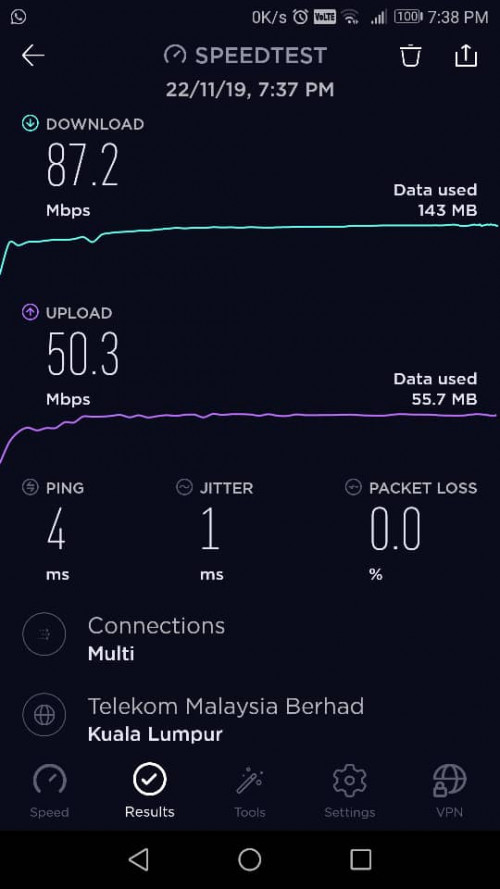
QUOTE(ASUSmy @ Nov 22 2019, 09:49 AM) Hi Aspick, Ok will try your suggestion and report back later. Can you try factory reset the RT-AC68U too and redo the configuration. In the main router GUI, what is the signal strength of the connection between the RT-AC68U and the node RT-AC66U? Do share me the system log if the problem happen again. Thank you QUOTE(blacktubi @ Nov 22 2019, 11:32 AM) 1) Turn of RT-AC66U B1 Based on your suggestion, i have this result from my phone speedtest. Doesn't seem to be weak signal.2) Stand at the same spot where you use the RT-AC66U B1 3) Perform a speedtest while connected to RT-AC68U 4) Could be a weak signal issue ![]() |
|
|
Nov 25 2019, 01:40 AM
Return to original view | Post
#4
|
![]() ![]()
Junior Member
189 posts Joined: Jul 2018 |
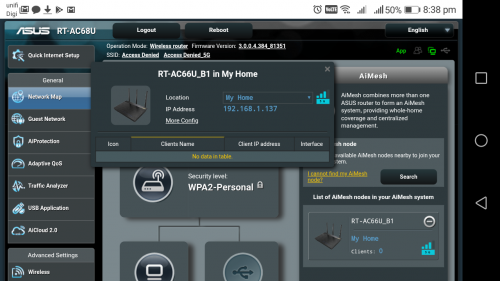
QUOTE(ASUSmy @ Nov 22 2019, 09:49 AM) Hi Aspick, Did the factory reset and reconfigure my RT-AC68U. Also placed my node RT-AC66U at a location which has better 5GHz wifi signal from main router as per @Blacktubi advice. The issue of constant offline and online to my node still persist. Can you try factory reset the RT-AC68U too and redo the configuration. In the main router GUI, what is the signal strength of the connection between the RT-AC68U and the node RT-AC66U? Do share me the system log if the problem happen again. Thank you Signal strength of connection as shown System log attached » Click to show Spoiler - click again to hide... « Any advice? QUOTE(blacktubi @ Nov 22 2019, 10:41 PM) I can see that the WiFi signal is one bar. I will next try out your suggestion.I would suggest swapping the RT-AC66U B1 to be the main router and use the old RT-AC68U as an AiMesh node. A new RT-AC66U B1 is actually better than an old RT-AC68U. RT-AC68U from 2 years ago actually have slightly different hardware. |
|
|
Nov 27 2019, 12:23 AM
Return to original view | Post
#5
|
![]() ![]()
Junior Member
189 posts Joined: Jul 2018 |
ASUSmy
I replaced my existing main router RT-AC68U with the RT-AC66U B1. Running solely as main router with latest firmware 3.0.0.4.384_81351, I discovered that both 2.4GHz and 5GHGz wifi signal will occasionally disappear and appear again causing my clients to log out and log in again. The led lights on the router was up all the time when the wifi signal went off and on again. The system log as attached » Click to show Spoiler - click again to hide... « I thought the latest firmware could be buggy. So I follow @blacktubi advice and downgrade to firmware 3.0.0.4.384.45717. Did the whole hard reset and reconfigure again the RT-AC66U as main router. Again the same symptom of the wifi signal disappearing and later appearing again. Led lights were constantly on when the issue happens. The system log of the router with older firmware as attached » Click to show Spoiler - click again to hide... « I suspect the router is definitely having hardware issues. Can I get a replacement unit? QUOTE(blacktubi @ Nov 25 2019, 11:27 AM) Maybe you can try Firmware Version 3.0.0.4.384.45717 Thanks for the suggestions and help. But all those method didn't work. I suspect the unit is a lemon.It is known to be less buggy. Same SOP. Flash the firmware, hard reset both units and setup again. Hard reset is super important when configuring AiMesh especially you have an older ASUS router. This post has been edited by Aspick: Nov 27 2019, 12:25 AM |

|
|
Nov 27 2019, 03:29 PM
Return to original view | IPv6 | Post
#6
|
![]() ![]()
Junior Member
189 posts Joined: Jul 2018 |
QUOTE(ASUSmy @ Nov 27 2019, 02:13 PM) Hi Aspick, I'm staying in PJ Selangor. Where is the nearest service center i can send to?If tried different firmware also same then you may send it for the warranty claim. Thank you Btw i bought online and received the RT-AC66U B1 on 15/11/19. I haven't register the product for warranty yet. Do i need to register? |
|
|
Feb 7 2021, 09:21 PM
Return to original view | IPv6 | Post
#7
|
![]() ![]()
Junior Member
189 posts Joined: Jul 2018 |
This evening lightning strike the unifi pole behind my house. My unifi BTU display light went dead. I suspect it must have burnt the unit. Have reported to unifi technical.
Later I found out that my AC66U B1 which I bought less than 3 years ago also went dead with no led display lights. Can anyone confirm is warranty covered for lightning strike? |
|
|
Jul 19 2021, 11:42 AM
Return to original view | IPv6 | Post
#8
|
![]() ![]()
Junior Member
189 posts Joined: Jul 2018 |
QUOTE(Reyz @ Jul 17 2021, 10:06 PM) Hi ASUSmy.mind to ask why i still can see client device online which already out from aimesh system 3 days ago in Asus Router apps.And many times i saw connection status error the device use wifi it shown using wired connection.its happen since 2-3 version of apps and router firmware before.fyi im on my ax11000+2pck xt8 aimesh system.all latest firmware inc asus apps in latest update I am also having this same issue when I login to the Asus app. I'm running 2 RT-AC68 on latest AImesh firmware.Can @Asusmy explain? |
| Change to: | 0.2359sec
0.86
7 queries
GZIP Disabled
Time is now: 10th December 2025 - 02:42 AM |