Welcome Guest ( Log In | Register )

826 Pages « < 527 528 529 530 531 > » Bottom

Outline · [ Standard ] · Linear+

Home Networking ASUS Malaysia Networking User & Technical Support, Managed by ASUS Malaysia Representative

views
     
archimedes
post Nov 2 2019, 12:03 PM

New Member
*
Junior Member
44 posts

Joined: Sep 2013


quick question.. recently upgraded to unifi 300 mbps.. on my asus rt ac68u, i can only get speed of around 160mbps even connected to LAN.

so got unifi to come over and check.. but when they swapped with TP link router, the speed showed 300mbps..

any idea what went wrong with my asus rt ac68u? firmware is updated and everything seems ok. not even on vpn..

thanks in advance.
SUSraynman
post Nov 2 2019, 12:14 PM

Look at all my stars!!
*******
Senior Member
4,333 posts

Joined: Jan 2003


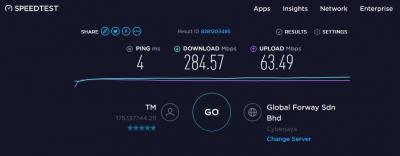
This is the speedtest result of my Unifi 300Mbps using a Huawei WS880 dual band ac router (with Asuswrt-Merlin firmware) and Netgear A6210 ac usb adapter.

Download Speed 284 Mbps. No bad smile.gif


Attached thumbnail(s)
Attached Image
blacktubi
post Nov 2 2019, 01:30 PM

-
Group Icon
Elite
8,415 posts

Joined: Jul 2008

QUOTE(sHawTY @ Nov 2 2019, 12:56 AM)
Send to ASUS Malaysia service center in Lowyat
https://www.plazalowyat.com/asus-service-center

Make sure you bring the receipt
*
If I’m not mistaken normal ASUS service center do not accept wireless router. Maybe ASUS can clarify further.

You need to go to their router service center by Advancenet.

https://www.asus.com/my/support/service-center/malaysia#

Filter by wireless in this link.

QUOTE(archimedes @ Nov 2 2019, 12:03 PM)
quick question.. recently upgraded to unifi 300 mbps.. on my asus rt ac68u, i can only get speed of around 160mbps even connected to LAN.

so got unifi to come over and check.. but when they swapped with TP link router, the speed showed 300mbps..

any idea what went wrong with my asus rt ac68u? firmware is updated and everything seems ok. not even on vpn..

thanks in advance.
*
Flash to new firmware, hard reset and setup again.

Very important if you owned your RT-AC68U for several years.

https://www.asus.com/my/support/FAQ/1039074
doobi
post Nov 2 2019, 02:49 PM

New Member
*
Junior Member
37 posts

Joined: Nov 2006
Guys, i using unifi 100 mbps for a double storey house.
Please advice which router is good enough to replace the TP link AC1200C.

May i know what is the difference between 66u/66u b1/68u?
billysiah
post Nov 2 2019, 04:22 PM

Getting Started
**
Junior Member
134 posts

Joined: Jan 2008


QUOTE(blacktubi @ Oct 18 2019, 05:21 PM)
Make sure to downgrade your main router and AiMesh node

81049 is unstable on AiMesh.
*
Hi Blacktubi, do you know if merlin 384.13 is better then stock 45717? Seems that 45717 is also not that stable on aimesh for 2.4ghz wifi.
sHawTY
post Nov 2 2019, 04:52 PM

Frequent Reporter
********
All Stars
14,909 posts

Joined: Jul 2005

QUOTE(doobi @ Nov 2 2019, 02:49 PM)
Guys, i using unifi 100 mbps for a double storey house.
Please advice which router is good enough to replace the TP link AC1200C.

May i know what is the difference between 66u/66u b1/68u?
Get RT-AC67U AiMesh Twin Pack & setup them as AiMesh
1 on the 1st floor & 1 on the 2nd floor

This post has been edited by sHawTY: Nov 2 2019, 04:52 PM
AV_2018
post Nov 2 2019, 04:59 PM

Casual
***
Junior Member
451 posts

Joined: Apr 2018
QUOTE(archimedes @ Nov 2 2019, 12:03 PM)
quick question.. recently upgraded to unifi 300 mbps.. on my asus rt ac68u, i can only get speed of around 160mbps even connected to LAN.

so got unifi to come over and check.. but when they swapped with TP link router, the speed showed 300mbps..

any idea what went wrong with my asus rt ac68u? firmware is updated and everything seems ok. not even on vpn..

thanks in advance.
*
QUOTE(blacktubi @ Nov 2 2019, 01:30 PM)
Flash to new firmware, hard reset and setup again.

Very important if you owned your RT-AC68U for several years.

https://www.asus.com/my/support/FAQ/1039074
*
Try follow blacktubi advice. I'm using AC68U and can reach 800+Mbps on Ethernet cable. Test it with AiProtection and QoS disabled too although the last time I tested, it can reach 700Mbps even with those enabled.
blacktubi
post Nov 2 2019, 06:08 PM

-
Group Icon
Elite
8,415 posts

Joined: Jul 2008

QUOTE(billysiah @ Nov 2 2019, 04:22 PM)
Hi Blacktubi, do you know if merlin 384.13 is better then stock 45717? Seems that 45717 is also not that stable on aimesh for 2.4ghz wifi.
*
You can try but I generally don’t recommend AiMesh on Merlin.

One thing you can do is disable roaming assistant and beam forming for 2.4Ghz.
mel5582
post Nov 2 2019, 08:06 PM

None
*****
Senior Member
777 posts

Joined: Jan 2003
From: Not definite


Anyone knows where I can fix my router? My maid broke 1 of the antennas - RT-AC88U

The pin was dislodged from the PCB.. Probably need some soldering back and I've checked with Advancenet which they cannot help unfortunately.

Not Malaysian unit.

This post has been edited by mel5582: Nov 2 2019, 08:07 PM
SilentVampire
post Nov 2 2019, 10:12 PM

Networking Enthusiast
*******
Senior Member
5,714 posts

Joined: Mar 2007


QUOTE(mel5582 @ Nov 2 2019, 08:06 PM)
Anyone knows where I can fix my router? My maid broke 1 of the antennas - RT-AC88U

The pin was dislodged from the PCB.. Probably need some soldering back and I've checked with Advancenet which they cannot help unfortunately.

Not Malaysian unit.
*
If it is not a Malaysian unit, you will have to send it back to China for warranty claims as Asus Malaysia won't fix it.
sHawTY
post Nov 2 2019, 11:00 PM

Frequent Reporter
********
All Stars
14,909 posts

Joined: Jul 2005

QUOTE(SilentVampire @ Nov 2 2019, 10:12 PM)
If it is not a Malaysian unit, you will have to send it back to China for warranty claims as Asus Malaysia won't fix it.
Doesn't matter if it's Malaysia or China unit, that's a physical damage, so the warranty is definitely void

mel5582 you can forget about warranty, because your warranty is definitely void caused by physical damage. So the only way to fix it is to send it to a repair man. But you need to hold high hopes that the PCB isn't broken
If the PCB is broken, very low percentage that your router can be fixed
mel5582
post Nov 2 2019, 11:10 PM

None
*****
Senior Member
777 posts

Joined: Jan 2003
From: Not definite


Actually I don't mind looking for the repair man. The router is still working and there are no breakage to the PCB. Just the pin got dislodged which I don't feel confident to solve it myself.

No point sending it for warranty since the unit is from US so I was more inclined to look for a shop to get it fixed.
billysiah
post Nov 3 2019, 01:22 AM

Getting Started
**
Junior Member
134 posts

Joined: Jan 2008


QUOTE(blacktubi @ Nov 2 2019, 06:08 PM)
You can try but I generally don’t recommend AiMesh on Merlin.

One thing you can do is disable roaming assistant and beam forming for 2.4Ghz.
*
Disable both universal and explicit beamforming?
SUSnasilemaksedap
post Nov 4 2019, 03:33 AM

Getting Started
**
Junior Member
120 posts

Joined: Sep 2019


QUOTE(SilentVampire @ Nov 2 2019, 10:12 PM)
If it is not a Malaysian unit, you will have to send it back to China for warranty claims as Asus Malaysia won't fix it.
*
What about if willing to pay? They wont fix it as well?
SUSCrimsonKing
post Nov 4 2019, 06:51 AM

Getting Started
**
Junior Member
262 posts

Joined: Oct 2019
QUOTE(nasilemaksedap @ Nov 4 2019, 03:33 AM)
What about if willing to pay? They wont fix it as well?
*
It depends on Asus.

I bought a Samsung Galaxy S8 Plus handphone from the U.S. so it is slightly different in specs from the Malaysian version.

My S8 Plus is out of warranty.

A few months ago I called up an authorised Samsung Service Center at the Mines Shopping Center and asked if they would service my phone.

They said they can replace parts which are common, like batteries, screens and digitizers but not the motherboard because the processors are different.

They will also impose a surcharge for non-Malaysian sets.

Bottom line is, Samsung will fix it for you if you are willing to pay. smile.gif

SUSnasilemaksedap
post Nov 4 2019, 07:36 AM

Getting Started
**
Junior Member
120 posts

Joined: Sep 2019


QUOTE(CrimsonKing @ Nov 4 2019, 06:51 AM)
It depends on Asus.

I bought a Samsung Galaxy S8 Plus handphone from the U.S. so it is slightly different in specs from the Malaysian version.

My S8 Plus is out of warranty.

A few months ago I called up an authorised Samsung Service Center at the Mines Shopping Center and asked if they would service my phone.

They said they can replace parts which are common, like batteries, screens and digitizers but not the motherboard because the processors are different.

They will also impose a surcharge for non-Malaysian sets.

Bottom line is, Samsung will fix it for you if you are willing to pay.  smile.gif
*
Hmm I guess it should be fonecas long as ure willing to pay.
SUSnasilemaksedap
post Nov 4 2019, 08:10 AM

Getting Started
**
Junior Member
120 posts

Joined: Sep 2019


Some ax89x review I found. But its in chinese

https://wemp.app/posts/3a3bf677-3779-4573-8143-6c71a7cf5559

user posted image

Two thing I notice from the pic I don't like first is I think the antenna cannot be detach which mean cannot replace or upgrade antenna

Second is got fan which mean fan will fail some day due to dust and also 24/7 use by most people

Third is the price at rm4k++ lol

The pro is it offer latest wifi 6 tech and blazing fast 10G and sfp+ interface and 8x8:8 mimo and many more.

As comapred with my ax11000 don't have fan but got heatsink with fins which imho is better for 24/7 operation as well as detacheble antenna.

For me I'll still recomend the ax11000 as it offer very high performance and 10G speed won't arrive in malaysia anytime soon. But as always if money is not an issue and you want top tier performance along with the latest wifi tech by all means get the ax89x. thumbup.gif

This post has been edited by nasilemaksedap: Nov 4 2019, 08:23 AM
SilentVampire
post Nov 4 2019, 11:49 AM

Networking Enthusiast
*******
Senior Member
5,714 posts

Joined: Mar 2007


QUOTE(nasilemaksedap @ Nov 4 2019, 03:33 AM)
What about if willing to pay? They wont fix it as well?
*
They probably will, if you pay.
kmf165
post Nov 5 2019, 03:47 PM

Getting Started
**
Junior Member
100 posts

Joined: Sep 2006
Hi,

I just bought ASUS RT-AC88U from Digital mall. I try to setup but failed. There is no option to choose unifi ISP. Anyone can guide?

The firm ware is 3.0.0.4.384_20942-ge38bead


Thanks

SilentVampire
post Nov 5 2019, 03:58 PM

Networking Enthusiast
*******
Senior Member
5,714 posts

Joined: Mar 2007


QUOTE(kmf165 @ Nov 5 2019, 03:47 PM)
Hi,

I just bought ASUS RT-AC88U from Digital mall. I try to setup but failed. There is no option to choose unifi ISP. Anyone can guide?

The firm ware is 3.0.0.4.384_20942-ge38bead
Thanks
*
Yes, please refer here: https://www.blacktubi.com/guide/setup-asus-router-for-unifi/

Credits to bro blacktubi.

See this second link too: https://www.asus.com/my/support/FAQ/1011708/

826 Pages « < 527 528 529 530 531 > » Top
 

Change to:
| Lo-Fi Version
0.0365sec    0.49    6 queries    GZIP Disabled
Time is now: 12th December 2025 - 12:19 AM