Welcome Guest ( Log In | Register )

826 Pages « < 528 529 530 531 532 > » Bottom

Outline · [ Standard ] · Linear+

Home Networking ASUS Malaysia Networking User & Technical Support, Managed by ASUS Malaysia Representative

views
     
kmf165
post Nov 5 2019, 04:43 PM

Getting Started
**
Junior Member
100 posts

Joined: Sep 2006
QUOTE(SilentVampire @ Nov 5 2019, 03:58 PM)
Yes, please refer here: https://www.blacktubi.com/guide/setup-asus-router-for-unifi/

Credits to bro blacktubi.

See this second link too: https://www.asus.com/my/support/FAQ/1011708/
*
Thanks for quick reply

I checked black turbo page before, I do not have the option Unifi-Home for Special Requirement from ISP. There is no option to be choose.

Thanks

TSASUSmy
post Nov 5 2019, 05:34 PM

Look at all my stars!!
*******
Senior Member
2,319 posts

Joined: Mar 2010
QUOTE(kmf165 @ Nov 5 2019, 04:43 PM)
Thanks for quick reply

I checked black turbo page before, I do not have the option Unifi-Home for Special Requirement from ISP. There is no option to be choose.

Thanks
*
Hi kmf165,

Can you share us the image of the ISP profile list? And try updating the router firmware too.

Thank you
boxsystem
post Nov 5 2019, 07:19 PM

Legend
******
Senior Member
1,573 posts

Joined: Jan 2003
From: Nilai, Negeri Sembilan
Hi guys,

Apparently I have 2 connections at home with one being Unifi and the other is Maxis.

Currently, I am using AC86U as the main router whereby I still need Maxis Alminia router to dialup PPPoE and combined them together via Dual WAN settings.

I am wondering whether is it possible to have both connections to be dialup by Asus router ONLY and how do I combine the VLAN IDs for the internet?

FYI..

Unifi uses VLAN 500
Maxis uses VLAN 621


This post has been edited by boxsystem: Nov 5 2019, 10:18 PM
sHawTY
post Nov 5 2019, 07:52 PM

Frequent Reporter
********
All Stars
14,909 posts

Joined: Jul 2005

boxsystem hide your MAC addresses
blacktubi
post Nov 5 2019, 08:13 PM

-
Group Icon
Elite
8,414 posts

Joined: Jul 2008

QUOTE(boxsystem @ Nov 5 2019, 07:19 PM)
Hi guys,

Apparently I have 2 connections at home with one being Unifi and the other is Maxis.

Currently, I am using AC86U as the main router whereby I still need Maxis Alminia router to dialup PPPoE and combined them together via Dual WAN settings.

I am wondering whether is it possible to have both connections to be dialup by Asus router ONLY and how do I combine the VLAN IDs for the internet?

FYI..

I have added some photos for your reference..
*
ASUSWRT can support dual PPPOE but it cannot handle dual VLAN.

The simplest solution is to get a cheap VLAN switch to trunk VLAN so the router and dial the PPPOE session directly without having to use the VLAN profile.

I write about one of the use case in my blog below.
https://www.blacktubi.com/guide/make-any-ro...-work-on-unifi/
SilentVampire
post Nov 5 2019, 08:44 PM

Networking Enthusiast
*******
Senior Member
5,714 posts

Joined: Mar 2007


QUOTE(kmf165 @ Nov 5 2019, 04:43 PM)
Thanks for quick reply

I checked black turbo page before, I do not have the option Unifi-Home for Special Requirement from ISP. There is no option to be choose.

Thanks
*
Update your firmware.
sHawTY
post Nov 5 2019, 09:19 PM

Frequent Reporter
********
All Stars
14,909 posts

Joined: Jul 2005

QUOTE(blacktubi @ Nov 5 2019, 08:13 PM)
ASUSWRT can support dual PPPOE but it cannot handle dual VLAN.
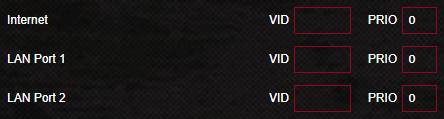
I thought that can be enabled through the LAN>IPTV>Manual Settings?

user posted image

I really don't know because there is no way for me to test it out as I only have UniFi
boxsystem
post Nov 5 2019, 10:20 PM

Legend
******
Senior Member
1,573 posts

Joined: Jan 2003
From: Nilai, Negeri Sembilan
QUOTE(sHawTY @ Nov 5 2019, 07:52 PM)
boxsystem hide your MAC addresses
*
Removed the photos altogether .. haha.. thanks

QUOTE(sHawTY @ Nov 5 2019, 09:19 PM)
I thought that can be enabled through the LAN>IPTV>Manual Settings?

user posted image

I really don't know because there is no way for me to test it out as I only have UniFi
*
I saw this option as well. but from my understanding that Lan Port 3 and Port 4 is more to output rather than input? or I might be wrong ..

I will give this option a try later on...
blacktubi
post Nov 5 2019, 10:21 PM

-
Group Icon
Elite
8,414 posts

Joined: Jul 2008

QUOTE(sHawTY @ Nov 5 2019, 09:19 PM)
I thought that can be enabled through the LAN>IPTV>Manual Settings?

user posted image

I really don't know because there is no way for me to test it out as I only have UniFi
*
This is only applicable for trunking VLAN from the WAN port to the LAN port, not applicable for dual WAN.
sHawTY
post Nov 5 2019, 10:58 PM

Frequent Reporter
********
All Stars
14,909 posts

Joined: Jul 2005

QUOTE(blacktubi @ Nov 5 2019, 10:21 PM)
This is only applicable for trunking VLAN from the WAN port to the LAN port, not applicable for dual WAN.
Noted. Is this a hardware limitation or a firmware limitation?
ASUSmy Is something like this possible?
Dannyoski
post Nov 6 2019, 08:56 AM

Getting Started
**
Junior Member
226 posts

Joined: Oct 2008


Hi all,

Im having problem to setup nic teaming between router to laptop.

Router : BRT-AC828 with 8x gigabit lan
NAS: Qnap ts-831x with 2 X gigabit LAN
Laptop: 1x gigabit LAN + 1x usb3.0 gigabit LAN adapter.

Currently my NAS teaming enabled with 2 Gbps and able to get download speed of 113MB/s concurrently from 2 PC with 1 Gbps Lan port. (Transfer file from NAS to PC)

I failed to enable 1 laptop with 2gbps speed by teaming the nic from its 1x gigabit + 1x usb3.0 gigabit LAN adapter both connected to the Asus router.

Alternate approach also failed to set the nic teaming at windows 10 as it no longer supported.

Please help to advice / share Ur setup experience. Really appreciated. 10q 10q 10q

ASUSmy

This post has been edited by Dannyoski: Nov 6 2019, 09:48 AM
TSASUSmy
post Nov 6 2019, 04:08 PM

Look at all my stars!!
*******
Senior Member
2,319 posts

Joined: Mar 2010
QUOTE(sHawTY @ Nov 5 2019, 10:58 PM)
Noted. Is this a hardware limitation or a firmware limitation?
ASUSmy Is something like this possible?
*
Hi sHawTY,

Currently it is not possible to support 2 ISP connection with VLAN. Only the primary WAN support the VLAN setting.

Thank you
TSASUSmy
post Nov 6 2019, 04:56 PM

Look at all my stars!!
*******
Senior Member
2,319 posts

Joined: Mar 2010
QUOTE(Dannyoski @ Nov 6 2019, 08:56 AM)
Hi all,

Im having problem to setup nic teaming between router to laptop.

Router : BRT-AC828 with 8x gigabit lan
NAS: Qnap ts-831x with 2 X gigabit LAN
Laptop: 1x gigabit LAN + 1x usb3.0 gigabit LAN adapter.

Currently my NAS teaming enabled with 2 Gbps and able to get download speed of 113MB/s concurrently from 2 PC with 1 Gbps Lan port. (Transfer file from NAS to PC)

I failed to enable 1 laptop with 2gbps speed by teaming the nic from its 1x gigabit + 1x usb3.0 gigabit LAN adapter both connected to the Asus router.

Alternate approach also failed to set the nic teaming at windows 10 as it no longer supported.

Please help to advice / share Ur setup experience. Really appreciated. 10q 10q 10q

ASUSmy
*
Hi Dannyoski,

May I know what ISP are you using? If the ISP are using VLAN then the link aggregation on the router unable to work as it share the same switch with the VLAN.

Below link is an example how the setup are done.

https://www.asus.com/support/FAQ/1016088/

Thank you
Dannyoski
post Nov 6 2019, 05:00 PM

Getting Started
**
Junior Member
226 posts

Joined: Oct 2008


QUOTE(ASUSmy @ Nov 6 2019, 04:56 PM)
Hi Dannyoski,

May I know what ISP are you using? If the ISP are using VLAN then the link aggregation on the router unable to work as it share the same switch with the VLAN.

Below link is an example how the setup are done.

https://www.asus.com/support/FAQ/1016088/

Thank you
*
Hi Admin,

Many thanks for fast response.

I'm using TimeDotCom 1gpbs connecting modem output port to the router WAN 1 input port.
I had tried the method from the link you provided. It will disconnect the ISP internet access.

Which layer should I use?

layer 2
layer 2+3
layer 3
layer 3+4

static or dynamic LAG?

Thanks
Danny Ong

This post has been edited by Dannyoski: Nov 6 2019, 05:04 PM
jpong1
post Nov 6 2019, 10:19 PM

Getting Started
**
Junior Member
292 posts

Joined: Jun 2016
QUOTE(hghg.hg @ Oct 31 2019, 09:01 PM)
Alright, thank you ASUSmy jpong1 .will try it out
*
how ? all ok ?

TSASUSmy
post Nov 7 2019, 10:50 AM

Look at all my stars!!
*******
Senior Member
2,319 posts

Joined: Mar 2010
QUOTE(Dannyoski @ Nov 6 2019, 05:00 PM)
Hi Admin,

Many thanks for fast response.

I'm using TimeDotCom 1gpbs connecting modem output port to the router WAN 1 input port.
I had tried the method from the link you provided. It will disconnect the ISP internet access.

Which layer should I use?

layer 2
layer 2+3
layer 3
layer 3+4

static or dynamic LAG?

Thanks
Danny Ong
*
Hi Dannyoski,

May I know what firmware version you are using and can you show me the page how you setup the link aggregation.

Thank you
sHawTY
post Nov 7 2019, 11:45 AM

Frequent Reporter
********
All Stars
14,909 posts

Joined: Jul 2005

QUOTE(ASUSmy @ Nov 6 2019, 04:08 PM)
Currently it is not possible to support 2 ISP connection with VLAN. Only the primary WAN support the VLAN setting.
Is that a hardware limitation or firmware limitation?
Zhe Xia
post Nov 9 2019, 05:18 PM

Getting Started
**
Junior Member
57 posts

Joined: Jan 2014


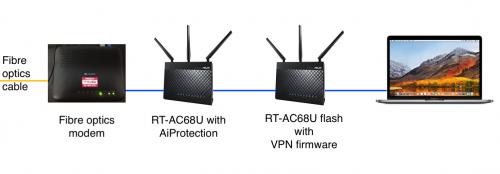
I am wondering will AiProtection still working if use VPN? like the configuration below:
I use two routers RT-AC68U, 1st router connect to fibre optics modem,
2nd router flashed with VPN firmware and it seats between the 1st router and laptop.

If all traffics are now encrypted with VPN, how the AiProtection's Trendmicro is able to detect malware and viruses?


user posted image
blacktubi
post Nov 9 2019, 09:35 PM

-
Group Icon
Elite
8,414 posts

Joined: Jul 2008

QUOTE(Zhe Xia @ Nov 9 2019, 05:18 PM)
I am wondering will AiProtection still working if use VPN? like the configuration below:
I use two routers RT-AC68U, 1st router connect to fibre optics modem,
2nd router flashed with VPN firmware and it seats between the 1st router and laptop.

If all traffics are now encrypted with VPN, how the AiProtection's Trendmicro is able to detect malware and viruses?
user posted image
*
Wouldn’t work as your connection is encapsulated during a VPN tunnel.
syong888
post Nov 10 2019, 10:45 AM

Casual
***
Junior Member
364 posts

Joined: Dec 2008
Please help to advise the best AiMesh Set Up

RT-AC5300 ( Ground Floor - Fiber Input )

Configuration 1
RT-AC68U ( 1st Floor - TV Box )
RT-AC88U ( 2nd Floor - Gaming )

OR

Configuration 2
RT-AC88U ( 1st Floor - TV Box )
RT-AC68U ( 2nd Floor - Gaming )

Thank you in advance

826 Pages « < 528 529 530 531 532 > » Top
 

Change to:
| Lo-Fi Version
0.0221sec    0.63    6 queries    GZIP Disabled
Time is now: 10th December 2025 - 05:35 PM