Outline ·
[ Standard ] ·
Linear+
Home Networking ASUS Malaysia Networking User & Technical Support, Managed by ASUS Malaysia Representative
|
nitehawk
|
 Nov 10 2019, 07:06 PM Nov 10 2019, 07:06 PM
|

|
I'm currently using Asus RT-AC55UHP on a 2.5 storey house and my UniFi is 100Mbps. Recently the Asus router is behaving strangely and I'm looking for a replacement router.
What would you recommend?
|
|
|
|
|
|
SUSCrimsonKing
|
Nov 10 2019, 08:07 PM
|
Getting Started

|
QUOTE(nitehawk @ Nov 10 2019, 07:06 PM) I'm currently using Asus RT-AC55UHP on a 2.5 storey house and my UniFi is 100Mbps. Recently the Asus router is behaving strangely and I'm looking for a replacement router. What would you recommend? What do you mean by "behaving strangely"? |
|
|
|
|
|
nitehawk
|
Nov 10 2019, 09:19 PM
|
|
|
QUOTE(CrimsonKing @ Nov 10 2019, 08:07 PM) What do you mean by "behaving strangely"? Most of my devices get frequently disconnected and auto-reconnect. |
|
|
|
|
|
tomastan4134
|
Nov 10 2019, 09:57 PM
|
|
|
i does asus rp-ac55 support aimesh? planning to get this to aimesh with my ac88u router
|
|
|
|
|
|
jpong1
|
Nov 11 2019, 10:02 AM
|
Getting Started
|
QUOTE(nitehawk @ Nov 10 2019, 09:19 PM) Most of my devices get frequently disconnected and auto-reconnect. have you updated to latest firmware ? |
|
|
|
|
|
nitehawk
|
Nov 11 2019, 12:54 PM
|
|
|
QUOTE(jpong1 @ Nov 11 2019, 10:02 AM) have you updated to latest firmware ? Yes, latest official firmware. |
|
|
|
|
|
jpong1
|
Nov 11 2019, 01:27 PM
|
Getting Started
|
QUOTE(nitehawk @ Nov 11 2019, 12:54 PM) Yes, latest official firmware. after updated to latest firmware, need to do factory reset. If after factory reset , problem still remain, then call ASUS help centre...or maybe can tag @ASUSMY here. |
|
|
|
|
|
nitehawk
|
Nov 11 2019, 02:34 PM
|
|
|
QUOTE(jpong1 @ Nov 11 2019, 01:27 PM) after updated to latest firmware, need to do factory reset. If after factory reset , problem still remain, then call ASUS help centre...or maybe can tag @ASUSMY here. How do I keep current configuration before factory restore? |
|
|
|
|
|
jpong1
|
Nov 11 2019, 02:41 PM
|
Getting Started
|
QUOTE(nitehawk @ Nov 11 2019, 02:34 PM) How do I keep current configuration before factory restore? write down your ID and password ; SSID , etc the rest shall be select UniFi preset will do. OR back-up and restore back after factory reset; suggest write down ID and password (very important). |
|
|
|
|
|
nitehawk
|
Nov 12 2019, 03:57 PM
|
|
|
QUOTE(jpong1 @ Nov 11 2019, 02:41 PM) write down your ID and password ; SSID , etc the rest shall be select UniFi preset will do. OR back-up and restore back after factory reset; suggest write down ID and password (very important). Thanks! |
|
|
|
|
|
Jjuggler
|
Nov 12 2019, 06:50 PM
|
|
|
QUOTE(nitehawk @ Nov 11 2019, 02:34 PM) How do I keep current configuration before factory restore? Only keep your xxxx@unifi<username> and xxxxxxxxx <password> is enough. Don't really need to save the configuration and re-load back again after factory reset. It is same as you bring in the same problem after reset process. Same as, you injured yourself while playing football, and after you recovered enough, you back again to play the football again. Most of router's recommended settings can be found at ASUS's website or a third-party website that dealing with ASUS routers. |
|
|
|
|
|
AV_2018
|
Nov 13 2019, 06:22 PM
|
|
|
QUOTE(nitehawk @ Nov 11 2019, 02:34 PM) How do I keep current configuration before factory restore? QUOTE(jpong1 @ Nov 11 2019, 02:41 PM) write down your ID and password ; SSID , etc the rest shall be select UniFi preset will do. OR back-up and restore back after factory reset; suggest write down ID and password (very important). QUOTE(Jjuggler @ Nov 12 2019, 06:50 PM) Only keep your xxxx@unifi<username> and xxxxxxxxx <password> is enough. Don't really need to save the configuration and re-load back again after factory reset. It is same as you bring in the same problem after reset process. Same as, you injured yourself while playing football, and after you recovered enough, you back again to play the football again. Most of router's recommended settings can be found at ASUS's website or a third-party website that dealing with ASUS routers. According to developer of asuswrt-merlin, restoring from backup after factory reset defeats the purpose of a factory reset. Source: https://www.snbforums.com/threads/faq-nvram...lt-reset.22822/ |
|
|
|
|
|
jpong1
|
Nov 13 2019, 06:38 PM
|
Getting Started
|
QUOTE(AV_2018 @ Nov 13 2019, 06:22 PM) According to developer of asuswrt-merlin, restoring from backup after factory reset defeats the purpose of a factory reset. Source: https://www.snbforums.com/threads/faq-nvram...lt-reset.22822/thank you, this info is good. |
|
|
|
|
|
mynewuser
|
Nov 14 2019, 08:46 AM
|
|
|
I looking for fiber router with backup sim slot. Any recommendation?
Currently using maxis default router now.
|
|
|
|
|
|
Jjuggler
|
Nov 14 2019, 03:14 PM
|
|
|
QUOTE(AV_2018 @ Nov 13 2019, 06:22 PM) According to developer of asuswrt-merlin, restoring from backup after factory reset defeats the purpose of a factory reset. Source: https://www.snbforums.com/threads/faq-nvram...lt-reset.22822/You got that right mate. |
|
|
|
|
|
uberific
|
Nov 14 2019, 09:07 PM
|
|
|
Hi i just bought a unit RT-AC86U, now my unifi cant connect even settings are done correctly. WAN led on the router is forever red. Any idea how i fix this?
its a local unit i guess, bought from All-IT
This post has been edited by uberific: Nov 14 2019, 09:08 PM
|
|
|
|
|
|
jusbella
|
Nov 14 2019, 09:18 PM
|
|
|
QUOTE(uberific @ Nov 14 2019, 09:07 PM) Hi i just bought a unit RT-AC86U, now my unifi cant connect even settings are done correctly. WAN led on the router is forever red. Any idea how i fix this? its a local unit i guess, bought from All-IT Did u choose correct profile under Lan, iptv section? Make sure pppoe password correct as well. |
|
|
|
|
|
SilentVampire
|
Nov 14 2019, 10:01 PM
|
|
|
QUOTE(uberific @ Nov 14 2019, 09:07 PM) Hi i just bought a unit RT-AC86U, now my unifi cant connect even settings are done correctly. WAN led on the router is forever red. Any idea how i fix this? its a local unit i guess, bought from All-IT You need to enable VLAN tagging, via the IPTV section. |
|
|
|
|
|
uberific
|
Nov 14 2019, 11:00 PM
|
|
|
QUOTE(SilentVampire @ Nov 14 2019, 10:01 PM) You need to enable VLAN tagging, via the IPTV section. Is this correct? what does it mean by LAN4. 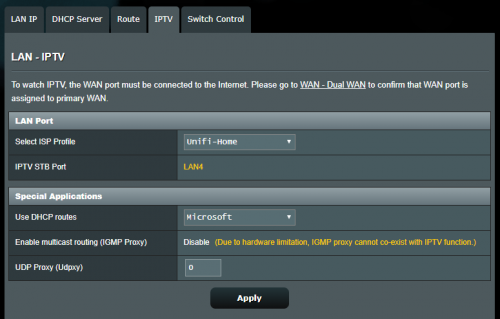 i played around with the Unifi home and unifi business. Funny thing is that i cant get an IP using uinifi home but i got connected with no internet on unifi business |
|
|
|
|
|
SilentVampire
|
Nov 14 2019, 11:59 PM
|
|
|
QUOTE(uberific @ Nov 14 2019, 11:00 PM) Is this correct? what does it mean by LAN4. i played around with the Unifi home and unifi business. Funny thing is that i cant get an IP using uinifi home but i got connected with no internet on unifi business Yes, this is correct. LAN4 is supposed to be used for Unifi TV, but if you are not using unifiTV, you can set it to unifi business. Either one should work. |
|
|
|
|



 Quote
Quote


 0.0313sec
 0.84
0.84
 6 queries
 GZIP Disabled