Welcome Guest ( Log In | Register )

826 Pages « < 499 500 501 502 503 > » Bottom

Outline · [ Standard ] · Linear+

Home Networking ASUS Malaysia Networking User & Technical Support, Managed by ASUS Malaysia Representative

views
     
SUSpakji
post Mar 17 2019, 11:19 PM

Regular
******
Senior Member
1,386 posts

Joined: Nov 2012


QUOTE(blacktubi @ Mar 17 2019, 10:52 PM)
https://play.google.com/store/apps/details?...us.aihome&hl=en

Download this app for your Asus router. Only works for legit Asus router. smile.gif
If you happen to have the provided Archer C5V, that router is crap.

I recommend getting at least the RT-AC66U for double storey house.

https://www.lazada.com.my/products/asus-rt-...s637740511.html
*
i using ASUS RT-AC68U its already power full

i must download phone

cannot do PC to use like 192.168.1.1 ??

This post has been edited by pakji: Mar 17 2019, 11:20 PM
voncrane
post Mar 18 2019, 09:23 AM

Noir et fier!
*******
Senior Member
7,118 posts

Joined: Oct 2011
From: Wakanda


QUOTE(pakji @ Mar 17 2019, 11:19 PM)
i using ASUS RT-AC68U its already power full

i must download phone

cannot do PC to use like 192.168.1.1 ??
*
I give up.. doh.gif doh.gif
TSASUSmy
post Mar 18 2019, 10:36 AM

Look at all my stars!!
*******
Senior Member
2,319 posts

Joined: Mar 2010
QUOTE(zs1116 @ Mar 17 2019, 03:59 PM)
Hi, i am currently using maxis home fibre with 100mbps, it's located at my living room and it's signal are not very good in my 2nd floor room, may i know which model is recommended for this issue? Thank you
*
Hi zs1116,

May I know how many signal bar that you are getting from the Maxis router?

If you are looking for router that has better coverage compare to the Maxis router, you can have a look at below models.

Depending on your budget, if it is around RM1000, I would recommend the RT-AC67U(Twin Pack).

RT-AC66U B1
RT-AC67U
RT-AC68U
RT-AC86U
RT-AC88U
RT-AC5300
RT-AX88U
GT-AX11000.

Thank you
TSASUSmy
post Mar 18 2019, 10:40 AM

Look at all my stars!!
*******
Senior Member
2,319 posts

Joined: Mar 2010
QUOTE(giggs_509 @ Mar 13 2019, 05:50 PM)
Hi asus. My ac86u is dead after few months. What do i need to do to claim warranty? What documents i need to bring to service centre?
*
Hi giggs_509,

You can send it to the place you bought it or the following location for the warranty claim. Make sure you bring the adapter, antenna and the invoice(if available).

ADVANCENET KL
145,JALAN KENARI 23A, BANDAR PUCHONG JAYA, PUCHONG, 47100, SELANGOR DARUL EHSAN

ADVANCENET PENANG
NO. 105-08-02 (8TH FLOOR), HEXAGON TECH PARK, JALAN GURDWARA, 10300, PENANG

ADVANCENET MELAKA
G-10, JALAN PM5, PLAZA MAHKOTA, 75000 MELAKA

ADVANCENET JB
NO56, JALAN MOLEK 1/28, TAMAN MOLEK, 81100 JOHOR BAHRU

ADVANCENET KCH
31, GROUND FLOOR, S/L 5, BLK 10, HOCK KUI COMMERCIAL CENTRE PHASE 3, JLN TUN AHMAD ZAIDI ADCURE, 93150 KUCHING

ADVANCENET KK
LOT 16. 1ST FLOOR, KOLAM CENTRE PH1, JALAN LINTAS, 88300 KOTA KINABALU

Thank you
TSASUSmy
post Mar 18 2019, 10:46 AM

Look at all my stars!!
*******
Senior Member
2,319 posts

Joined: Mar 2010
QUOTE(maiself @ Mar 12 2019, 12:59 PM)
Guys,
My Macbook WiFi Link speed only shows 11Mbps when connected to Wireless 5GHz on RT AC88U. Any idea? When connected to my other router it shows 867Mbps

I plan to factory reset the AC88U soon, but want to ask here if others experienced similar issue before...
*
Hi maiself,

I would suggest you to update the firmware to the latest and do a factory reset after the update.

But you can also try set the 5GHz Control Bandwidth to 80MHz at Wireless->General->select 5GHz->Control Bandwidth.

Thank you
TSASUSmy
post Mar 18 2019, 11:21 AM

Look at all my stars!!
*******
Senior Member
2,319 posts

Joined: Mar 2010
QUOTE(pakji @ Mar 17 2019, 11:19 PM)
i using ASUS RT-AC68U its already power full

i must download phone

cannot do PC to use like 192.168.1.1 ??
*
Hi pakji,

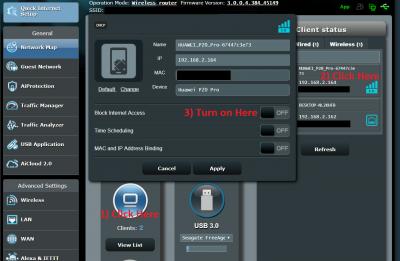
What other forumer trying to said is, you can use phone to do the blocking. Download the ASUS Router app, in the video below, after 38 second of the video, you can see the Block Internet Access after you choose the PC you want to block. Enable it.

https://youtu.be/_EYW363-o1o

This can be done using PC too. Log in to 192.168.1.1. At Network Map, Click the Clients icon, click on the PC you want to block the Internet Access on right side. Please refer to the image below.

Thank you


Attached thumbnail(s)
Attached Image
SUSpakji
post Mar 18 2019, 05:35 PM

Regular
******
Senior Member
1,386 posts

Joined: Nov 2012


QUOTE(ASUSmy @ Mar 18 2019, 11:21 AM)
Hi pakji,

What other forumer trying to said is, you can use phone to do the blocking. Download the ASUS Router app, in the video below, after 38 second of the video, you can see the Block Internet Access after you choose the PC you want to block. Enable it.

https://youtu.be/_EYW363-o1o

This can be done using PC too. Log in to 192.168.1.1. At Network Map, Click the Clients icon, click on the PC you want to block the Internet Access on right side. Please refer to the image below.

Thank you
*
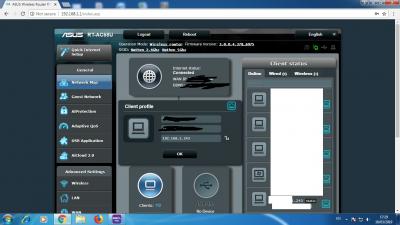
see screenhot
Attached Image

This post has been edited by pakji: Mar 18 2019, 05:35 PM
TSASUSmy
post Mar 19 2019, 09:44 AM

Look at all my stars!!
*******
Senior Member
2,319 posts

Joined: Mar 2010
QUOTE(pakji @ Mar 18 2019, 05:35 PM)
see screenhot
Attached Image
*
Hi pakji,

The firmware you have is very old version, can you update the firmware to the latest version? Because there is major change for the new firmware, you are require to do a factory reset on the router and redo the setup.

3.0.0.4.384.45149

https://www.asus.com/my/Networking/RTAC68U/...pDesk_Download/

Thank you
AVFAN
post Mar 20 2019, 05:53 PM

20k VIP Club
*********
All Stars
24,453 posts

Joined: Nov 2010
rtac1300uhp... new official firmware since jan:

RT-AC1300UHP_3.0.0.4_380_8457-g43a391a.trx

works good.
rjflyguy
post Mar 21 2019, 06:49 PM

Casual
***
Junior Member
324 posts

Joined: Jan 2006


QUOTE(pakji @ Mar 16 2019, 10:42 PM)
help me

i did do https://www.asus.com/support/FAQ/1013636/

i did set White list but all computer cannot access internet

i looking one computer block internet

other computer access internet just one computer no internet

i did set Network Service Filter one pc ip address source IP i fill 192.168.1.243 and Destination IP 192.168.1.243 and i set protocol TCP ALL and submit done

but all pc cannot access internet  sad.gif
*
Hi Pakji...

I saw your posts and the replies... rclxub.gif biggrin.gif

Let me try to help you. Now I understand that you want to block 1 IP address (192.168.1.243) to go to Internet while other IP addresses are okay. Correct? If that is the case, you can use the following steps:

1. Use your PC browser and open http://192.168.1.1 or access setting page via https://192.168.1.1:8443 (if you set to use only https)
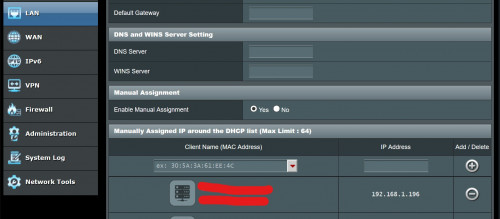
2. If DHCP is enabled on your router, you must go to LAN (on left Menu under Advance Settings). You must choose the PC that you want to block and manually assign the IP address.

user posted image

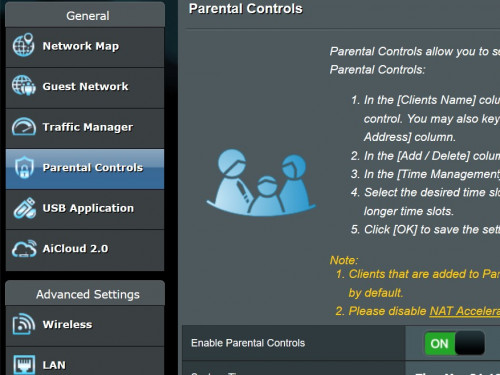
3. Go to Parental Control and enable it.

user posted image

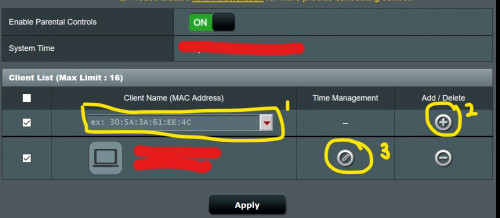
4. Choose the PC you wanted to block (192.168.1.243) or whatever IP address that you have assigned in Step 2. Click on the Add or plus sign + on the right (number 2). The PC you selected will appear in the column below. Then click on the Time Management (number 3)

user posted image

5. Select the time that you allow/disallow that PC from connecting to the router.

OR

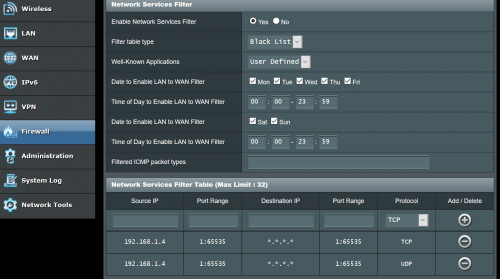
You can use Network Service Filter by choosing Firewall menu on the left. And then choose option "BlackList". At the "Network Services Filter Table", key in the IP address of the PC you wanted to block in the Source IP and do it for TCP and UDP. Please follow the picture below.

user posted image


Hope that helps....


SUSpakji
post Mar 21 2019, 10:32 PM

Regular
******
Senior Member
1,386 posts

Joined: Nov 2012


QUOTE(rjflyguy @ Mar 21 2019, 06:49 PM)
Hi Pakji...

I saw your posts and the replies...  rclxub.gif  biggrin.gif

Let me try to help you. Now I understand that you want to block 1 IP address (192.168.1.243) to go to Internet while other IP addresses are okay. Correct? If that is the case, you can use the following steps:

1. Use your PC browser and open http://192.168.1.1 or access setting page via https://192.168.1.1:8443 (if you set to use only https)
2. If DHCP is enabled on your router, you must go to LAN (on left Menu under Advance Settings). You must choose the PC that you want to block and manually assign the IP address.

user posted image

3. Go to Parental Control and enable it.

user posted image

4. Choose the PC you wanted to block (192.168.1.243) or whatever IP address that you have assigned in Step 2. Click on the Add or plus sign + on the right (number 2). The PC you selected will appear in the column below. Then click on the Time Management (number 3)

user posted image

5. Select the time that you allow/disallow that PC from connecting to the router.

OR

You can use Network Service Filter by choosing Firewall menu on the left. And then choose option "BlackList". At the "Network Services Filter Table", key in the IP address of the PC you wanted to block in the Source IP and do it for TCP and UDP. Please follow the picture below.

user posted image
Hope that helps....
*
Let me try to help you. Now I understand that you want to block 1 IP address (192.168.1.243) to go to Internet while other IP addresses are okay. Correct

answer Correct want block internet access

i will try tomorrow you give step by step
jonathanwhm
post Mar 27 2019, 09:45 PM

Getting Started
**
Junior Member
87 posts

Joined: Jun 2011
Dear all sifus,

Is there a guide to configure Dual-WAN (Unifi & Maxis) settings on BRT-AC828 router? Thanks!
blacktubi
post Mar 27 2019, 10:12 PM

-
Group Icon
Elite
8,400 posts

Joined: Jul 2008

QUOTE(jonathanwhm @ Mar 27 2019, 09:45 PM)
Dear all sifus,

Is there a guide to configure Dual-WAN (Unifi & Maxis) settings on BRT-AC828 router? Thanks!
*
I don't think it is possible as it will be double VLAN. Don't think ASUSWRT allows such flexibility. hmm.gif

I suggest getting a VLAN switch to trunk the VLAN, it will be a better solution as you can directly use the DUAL WAN port.

This post has been edited by blacktubi: Mar 27 2019, 10:12 PM
jonathanwhm
post Mar 27 2019, 10:24 PM

Getting Started
**
Junior Member
87 posts

Joined: Jun 2011
QUOTE(blacktubi @ Mar 27 2019, 11:12 PM)
I don't think it is possible as it will be double VLAN. Don't think ASUSWRT allows such flexibility. hmm.gif

I suggest getting a VLAN switch to trunk the VLAN, it will be a better solution as you can directly use the DUAL WAN port.
*
Thanks for the suggestion. What if I bridge the Unifi profile (with vlan500) by using one of the LAN port instead of using WAN1 and a normal PPPOE (Maxis) on WAN2?
hmm.gif hmm.gif

This post has been edited by jonathanwhm: Mar 27 2019, 10:24 PM
blacktubi
post Mar 27 2019, 11:08 PM

-
Group Icon
Elite
8,400 posts

Joined: Jul 2008

QUOTE(jonathanwhm @ Mar 27 2019, 10:24 PM)
Thanks for the suggestion. What if I bridge the Unifi profile (with vlan500) by using one of the LAN port instead of using WAN1 and a normal PPPOE (Maxis) on WAN2?
hmm.gif  hmm.gif
*
You can try but I prefer the 2 VLAN bridge solution as it is "cleaner".
jonathanwhm
post Mar 28 2019, 11:23 AM

Getting Started
**
Junior Member
87 posts

Joined: Jun 2011
QUOTE(blacktubi @ Mar 28 2019, 12:08 AM)
You can try but I prefer the 2 VLAN bridge solution as it is "cleaner".
*
Cool. Thanks!
nitehawk
post Mar 28 2019, 06:04 PM

On my way
****
Senior Member
699 posts

Joined: May 2006


What is the recommended replacement of RT-AC55UHP for 2.5 storey house?
SilentVampire
post Mar 28 2019, 07:50 PM

Networking Enthusiast
*******
Senior Member
5,714 posts

Joined: Mar 2007


QUOTE(nitehawk @ Mar 28 2019, 06:04 PM)
What is the recommended replacement of RT-AC55UHP for 2.5 storey house?
*
Mesh WiFi.
blacktubi
post Mar 29 2019, 10:09 AM

-
Group Icon
Elite
8,400 posts

Joined: Jul 2008

QUOTE(nitehawk @ Mar 28 2019, 06:04 PM)
What is the recommended replacement of RT-AC55UHP for 2.5 storey house?
*
Middle of the house, some where near the stairs.
jonathanwhm
post Mar 29 2019, 03:11 PM

Getting Started
**
Junior Member
87 posts

Joined: Jun 2011
QUOTE(blacktubi @ Mar 28 2019, 12:08 AM)
You can try but I prefer the 2 VLAN bridge solution as it is "cleaner".
*
In that case, what I need to do is do get a cheap 5-ports switch with vlan feature and configure 3 vlans as follow? hmm.gif hmm.gif

1) vlan 1 (default vlan across 5 ports) and the ONU unit connected to port#1
2) vlan 500 & 621 for Unifi & Maxis Internet - ASUS Dual-WAN router connected to port#2 (Wondering whether can configure 2 PVID on same port?)
3) vlan 600 (Unifi IPTV) - connected to port#3

This post has been edited by jonathanwhm: Mar 29 2019, 03:13 PM

826 Pages « < 499 500 501 502 503 > » Top
 

Change to:
| Lo-Fi Version
0.0262sec    0.38    6 queries    GZIP Disabled
Time is now: 1st December 2025 - 06:21 PM