Outline ·
[ Standard ] ·
Linear+
Home Networking ASUS Malaysia Networking User & Technical Support, Managed by ASUS Malaysia Representative
|
hafiez
|
 Mar 1 2019, 12:57 PM Mar 1 2019, 12:57 PM
|

|
hi
is it normal for the 5GHz wifi to become unstable due to heat?
using ac87u. last time I put some notebook cooler under the router and it works normally. only recently when the cooler spoilt, 5GHz signal seems unstable.
already lifted up the router and put some riser under it on a flat surface.
|
|
|
|
|
|
alpidot
|
Mar 1 2019, 01:06 PM
|
Getting Started

|
QUOTE(blacktubi @ Mar 1 2019, 12:51 PM) Asus RT-AC67U AiMesh 2 pack should be the one you are looking for. https://www.lazada.com.my/products/asus-rt-...s637760959.htmlthanks for the reply, currently im using mi router 3 rooted with padavan firmware. U think if i buy 1 unit RT-AC67U it can detect my mi router 3 as AiMesh? |
|
|
|
|
|
blacktubi
|
Mar 1 2019, 01:09 PM
|
-

|
QUOTE(alpidot @ Mar 1 2019, 01:06 PM) thanks for the reply, currently im using mi router 3 rooted with padavan firmware. U think if i buy 1 unit RT-AC67U it can detect my mi router 3 as AiMesh? It won't. All clone ASUSWRT firmware do not come with AiMesh. QUOTE(hafiez @ Mar 1 2019, 12:57 PM) hi is it normal for the 5GHz wifi to become unstable due to heat? using ac87u. last time I put some notebook cooler under the router and it works normally. only recently when the cooler spoilt, 5GHz signal seems unstable. already lifted up the router and put some riser under it on a flat surface. Normal for RT-AC87U. It is known to run hot and will be unstable due to Quantenna chipset. This post has been edited by blacktubi: Mar 1 2019, 01:10 PM |
|
|
|
|
|
alpidot
|
Mar 1 2019, 04:30 PM
|
Getting Started
|
QUOTE(blacktubi @ Mar 1 2019, 01:09 PM) It won't. All clone ASUSWRT firmware do not come with AiMesh. Normal for RT-AC87U. It is known to run hot and will be unstable due to Quantenna chipset. OK thanks, it oso support VLAN for Unifi TV rite? |
|
|
|
|
|
blacktubi
|
Mar 1 2019, 04:41 PM
|
-
|
QUOTE(alpidot @ Mar 1 2019, 04:30 PM) OK thanks, it oso support VLAN for Unifi TV rite? Yup. Features like all Asus routers. |
|
|
|
|
|
alpidot
|
Mar 2 2019, 09:20 AM
|
Getting Started
|
QUOTE(blacktubi @ Mar 1 2019, 04:41 PM) Yup. Features like all Asus routers. ok, purchased yesterday...will update soon after setup thanks |
|
|
|
|
|
hafiez
|
Mar 3 2019, 02:19 AM
|
|
|
QUOTE(blacktubi @ Mar 1 2019, 01:09 PM) It won't. All clone ASUSWRT firmware do not come with AiMesh. Normal for RT-AC87U. It is known to run hot and will be unstable due to Quantenna chipset. any solution for it? when that happened, does the chipset already burned and no use to put fan already? the speed still okay when operates normally. but suddenly speed drop like 56kbps modem. let say im viewing a 5 minutes video on fB, at the 2.3minutes, the video stop and buffer icon come out. |
|
|
|
|
|
blacktubi
|
Mar 3 2019, 11:29 AM
|
-
|
QUOTE(hafiez @ Mar 3 2019, 02:19 AM) any solution for it? when that happened, does the chipset already burned and no use to put fan already? the speed still okay when operates normally. but suddenly speed drop like 56kbps modem. let say im viewing a 5 minutes video on fB, at the 2.3minutes, the video stop and buffer icon come out. It is the nature of RT-AC87U. Cooling it down will help. I think this model is less than 3 years in Malaysia. RMA it. |
|
|
|
|
|
Jeremy_John
|
Mar 3 2019, 05:47 PM
|
Getting Started
|
Hi, I have an Asus RT-AC86U which hangs for 3-5 minutes once a day and when I check the logs this is the one of the abnormal lines that repeated it self before it auto rebooted. CODE
dnsmasq[820]: Maximum number of concurrent DNS queries reached (max: 150)
The Router is brand new and I have auto updated to the latest firmware. The area where the router is placed at is not hot as it's in an air-cond environment. I have 20-30 clients using it simultaneously. All the devices connected are iPhones, Androids, Macbooks, Laptops, Desktops (Ubuntu/Windows), Sony Android TV and Canon WiFi Printer. My LAN DNS settings is as below: 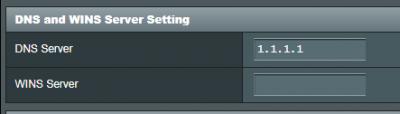 and WAN DNS:  This post has been edited by Jeremy_John: Mar 4 2019, 09:36 AM This post has been edited by Jeremy_John: Mar 4 2019, 09:36 AM |
|
|
|
|
|
SilentVampire
|
Mar 3 2019, 06:59 PM
|
|
|
QUOTE(Jeremy_John @ Mar 3 2019, 05:47 PM) Hi, I have an Asus RT-AC86U which hangs for 3-5 minutes once a day and when I check the logs this is the one of the abnormal lines that repeated it self before it auto rebooted. CODE
Maximum number of concurrent DNS queries reached (max: 150)
The Router is brand new and I have auto updated to the latest firmware. The area where the router is placed at is not hot as it's in an air-cond environment. I have 20-30 clients using it simultaneously. All the devices connected are iPhones, Androids, Macbooks, Laptops, Desktops (Ubuntu/Windows), Sony Android TV and Canon WiFi Printer. My LAN DNS settings is as below: and WAN DNS: If you are adventurous, try flashing to Merlin firmware and see if that helps. |
|
|
|
|
TSASUSmy
|
Mar 4 2019, 04:57 PM
|
|
|
QUOTE(Jeremy_John @ Mar 3 2019, 05:47 PM) Hi, I have an Asus RT-AC86U which hangs for 3-5 minutes once a day and when I check the logs this is the one of the abnormal lines that repeated it self before it auto rebooted. CODE
dnsmasq[820]: Maximum number of concurrent DNS queries reached (max: 150)
The Router is brand new and I have auto updated to the latest firmware. The area where the router is placed at is not hot as it's in an air-cond environment. I have 20-30 clients using it simultaneously. All the devices connected are iPhones, Androids, Macbooks, Laptops, Desktops (Ubuntu/Windows), Sony Android TV and Canon WiFi Printer. My LAN DNS settings is as below: and WAN DNS: Hi Jeremy_John, Can you try do a factory reset on the router and test again. After that, try not to set the DNS and see whether the error message will still show on the system log or not. If yes, you can share me the full system log for checking? Thank you |
|
|
|
|
|
TSASUSmy
|
Mar 4 2019, 05:05 PM
|
|
|
QUOTE(Icehart @ Feb 28 2019, 10:19 PM) I recently changed my router from Dlink DIR890L to Asus RT5300. So far everything seems to work, except the wireless printing to my printer. I've tried to search online but can't find the solution. Anyone experience the same issue? My Windows unable to detect the printer. Any known issue on this? Hi Icehart, May I know the printer are connected by using USB, WiFi or LAN cable? Thank you |
|
|
|
|
|
Jeremy_John
|
Mar 4 2019, 05:10 PM
|
Getting Started
|
QUOTE(ASUSmy @ Mar 4 2019, 04:57 PM) Hi Jeremy_John, Can you try do a factory reset on the router and test again. After that, try not to set the DNS and see whether the error message will still show on the system log or not. If yes, you can share me the full system log for checking? Thank you Alright will do. So no need to set DNS for both WAN and LAN? Could it be due to Torrenting or Skype? |
|
|
|
|
|
TSASUSmy
|
Mar 4 2019, 05:15 PM
|
|
|
QUOTE(Jeremy_John @ Mar 4 2019, 05:10 PM) Alright will do. So no need to set DNS for both WAN and LAN? Could it be due to Torrenting or Skype? Hi Jeremy_John, You can try test it first without the DNS. Then test the DNS for the LAN and WAN, one by one to see which causes the problem. Is the problem always happen when you torrenting? Thank you |
|
|
|
|
|
Jeremy_John
|
Mar 4 2019, 05:28 PM
|
Getting Started
|
QUOTE(ASUSmy @ Mar 4 2019, 05:15 PM) Hi Jeremy_John, You can try test it first without the DNS. Then test the DNS for the LAN and WAN, one by one to see which causes the problem. Is the problem always happen when you torrenting? Thank you I'm not sure because it's in an office. we use Skype and some users might be using torrent. I read somewhere they said it's because of p2p but it should not even be a problem. I personally have an RT-AC1300UHP torrent and Skype is all fine I've never had this problem. |
|
|
|
|
|
Icehart
|
Mar 4 2019, 06:16 PM
|
|
|
QUOTE(ASUSmy @ Mar 4 2019, 05:05 PM) Hi Icehart, May I know the printer are connected by using USB, WiFi or LAN cable? Thank you It is connected via WiFi |
|
|
|
|
|
TSASUSmy
|
Mar 4 2019, 07:02 PM
|
|
|
QUOTE(Icehart @ Mar 4 2019, 06:16 PM) Hi Icehart, Does the printer has fixed IP address? Thank you |
|
|
|
|
|
Icehart
|
Mar 4 2019, 07:18 PM
|
|
|
QUOTE(ASUSmy @ Mar 4 2019, 07:02 PM) Hi Icehart, Does the printer has fixed IP address? Thank you Hi no, it is connected via DHCP. Do I need to assign a FixedIP? |
|
|
|
|
|
eclectice
|
Mar 4 2019, 07:31 PM
|
|
|
QUOTE(Jeremy_John @ Mar 4 2019, 05:10 PM) Alright will do. So no need to set DNS for both WAN and LAN? Could it be due to Torrenting or Skype? It could be. DNS flooding or DNS denial of service. |
|
|
|
|
|
Barricade
|
Mar 6 2019, 11:41 PM
|
|
|
Is there any way to block Netflix only but not other streaming service like YouTube? Running on AC86U
|
|
|
|
|



 Quote
Quote




 0.0231sec
 0.20
0.20
 6 queries
 GZIP Disabled