Outline ·
[ Standard ] ·
Linear+
Home Networking ASUS Malaysia Networking User & Technical Support, Managed by ASUS Malaysia Representative
TSASUSmy
|
 Apr 3 2019, 10:43 AM Apr 3 2019, 10:43 AM
|

|
QUOTE(Lord Suave @ Apr 2 2019, 09:39 PM) wow, thanks so much for understanding my predicament! decided now that will be getting AC-86U as my main router and AC-68U as my node under AiMesh or AC-88U as main and 86U as node. Can i confirm that both 68U or 88U when act as main router, both 5Ghz and 2.4Ghz can be setup under one SSID and traffic would be automatically assigned to minimize the clog of bandwidth? also can i confirm that the node will not require manual activation of node when i roam into area of coverage? oh btw, the main router will be upstairs and i have ran network cable to downstairs area where i could plug in the node to allow aimesh via ethernet Hi Lord Suave, Indeed you can use 1 SSID only, but some like to separate it so that he know which one that he connect to. Yes, after you have added the AiMesh node, you can set the node with Ethernet LAN as the connection priority. Thank you |
|
|
|
|
|
TSASUSmy
|
Apr 3 2019, 10:48 AM
|
|
|
QUOTE(Nando's @ Apr 3 2019, 09:07 AM) Hi, can i setup AiMesh through switch? E.g. Asus RT86U -> Switch -> Asus RT86U Hi Nando's, You will need to add the AiMesh node first and then change the connection priority to Ethernet at the node before you can connect them using the switch. Thank you |
|
|
|
|
|
Nando's
|
Apr 3 2019, 11:11 AM
|
|
|
QUOTE(ASUSmy @ Apr 3 2019, 10:48 AM) Hi Nando's, You will need to add the AiMesh node first and then change the connection priority to Ethernet at the node before you can connect them using the switch. Thank you Alright, thank you very much. |
|
|
|
|
|
cyclone2
|
Apr 3 2019, 10:42 PM
|
|
|
ASUSMY,
I had a AC5300 run as AIMesh router and AC86U AIMesh Node. After I changed the connection from wireless to wired in AIMesh router, I noticed that 2nd 5GHz is still used as dedicated backhaul, but I already switch to wired mode, how to enable back the 2nd 5GHz for normal wifi connection?
Also yesterday my AC5300 was spoilt and I get a new replacement unit today, but my DDNS was registered on the old router, how to recover my ddns registration?
This post has been edited by cyclone2: Apr 3 2019, 10:46 PM
|
|
|
|
|
|
TSASUSmy
|
Apr 4 2019, 11:14 AM
|
|
|
QUOTE(cyclone2 @ Apr 3 2019, 10:42 PM) ASUSMY, I had a AC5300 run as AIMesh router and AC86U AIMesh Node. After I changed the connection from wireless to wired in AIMesh router, I noticed that 2nd 5GHz is still used as dedicated backhaul, but I already switch to wired mode, how to enable back the 2nd 5GHz for normal wifi connection? Also yesterday my AC5300 was spoilt and I get a new replacement unit today, but my DDNS was registered on the old router, how to recover my ddns registration? Hi cyclone2, Make sure all the firmware is the latest and factory reset if needed. Can you provide the serial number, DDNS name and MAC address of the old router? I will help request HQ to release the DDNS. Thank you |
|
|
|
|
|
cyclone2
|
Apr 4 2019, 12:47 PM
|
|
|
QUOTE(ASUSmy @ Apr 4 2019, 11:14 AM) Hi cyclone2, Make sure all the firmware is the latest and factory reset if needed. Can you provide the serial number, DDNS name and MAC address of the old router? I will help request HQ to release the DDNS. Thank you Hi, The spoilt unit already collect back by service center. But the old box still with me, will try to check the old box then PM you later. Thanks for your help. |
|
|
|
|
|
darkskies
|
Apr 10 2019, 03:39 PM
|
|
|
hiya.
Asus RT14UHP
Gateway 192.168.1.1/24
L3 switch Port 24 ->192.168.1.2 to Gateway LAN1.
PC1 192.168.2.5/24 GW192.168.2.1 DNS:192.168.1.1
PC2 192.168.3.6/24 GW192.168.3.1 DNS:192.168.1.1
PC3 192.168.4.6/24 GW192.168.4.1 DNS:192.168.1.1
Static route->192.168.2.0/24 to 192.168.1.1 metric 1 LAN
Static route->192.168.3.0/24 to 192.168.1.1 metric 1 LAN
Static route->192.168.4.0/24 to 192.168.1.1 metric 1 LAN
Cannot go internet.
All PC can pink internally .
Any idea ?
|
|
|
|
|
|
jusbella
|
Apr 10 2019, 07:59 PM
|
|
|
QUOTE(darkskies @ Apr 10 2019, 03:39 PM) hiya. Asus RT14UHP Gateway 192.168.1.1/24 L3 switch Port 24 ->192.168.1.2 to Gateway LAN1. PC1 192.168.2.5/24 GW192.168.2.1 DNS:192.168.1.1 PC2 192.168.3.6/24 GW192.168.3.1 DNS:192.168.1.1 PC3 192.168.4.6/24 GW192.168.4.1 DNS:192.168.1.1 Static route->192.168.2.0/24 to 192.168.1.1 metric 1 LAN Static route->192.168.3.0/24 to 192.168.1.1 metric 1 LAN Static route->192.168.4.0/24 to 192.168.1.1 metric 1 LAN Cannot go internet. All PC can pink internally . Any idea ? Dns put auto or use Google dns. |
|
|
|
|
|
darkskies
|
Apr 11 2019, 01:54 PM
|
|
|
auto. most probably i'll refer to gateway
|
|
|
|
|
|
pl95077
|
Apr 11 2019, 06:11 PM
|
Getting Started

|
QUOTE(Lord Suave @ Apr 2 2019, 10:39 PM) wow, thanks so much for understanding my predicament! decided now that will be getting AC-86U as my main router and AC-68U as my node under AiMesh or AC-88U as main and 86U as node. Can i confirm that both 68U or 88U when act as main router, both 5Ghz and 2.4Ghz can be setup under one SSID and traffic would be automatically assigned to minimize the clog of bandwidth? also can i confirm that the node will not require manual activation of node when i roam into area of coverage? oh btw, the main router will be upstairs and i have ran network cable to downstairs area where i could plug in the node to allow aimesh via ethernet I think this video will clear all your doubt https://www.youtube.com/watch?v=qusVMXQC9zU&t=190s |
|
|
|
|
|
Lord Suave
|
Apr 12 2019, 01:29 PM
|
Getting Started
|
QUOTE(pl95077 @ Apr 11 2019, 06:11 PM) thanks for being such an awesome guy! i got both units and everything works perfectly well! highly recommended for novice like me! |
|
|
|
|
|
darkskies
|
Apr 12 2019, 05:07 PM
|
|
|
QUOTE(jusbella @ Apr 10 2019, 07:59 PM) Dns put auto or use Google dns. Ny idea if my settings are wrong ? |
|
|
|
|
|
jusbella
|
Apr 12 2019, 05:22 PM
|
|
|
QUOTE(darkskies @ Apr 12 2019, 05:07 PM) Ny idea if my settings are wrong ? Setting wrong no connection. |
|
|
|
|
|
K4iz3n
|
Apr 13 2019, 08:25 PM
|
Getting Started
|
Dear AsusMY,
Currently using AX88U as my main router and AC68U as my AiMesh router. My laptop is connected wired to the AC68U.
1. I cannot connect to the router using my laptop. Only using iPad I can connect to my main router. Do you know why?
2. Router is 5 meters apart. Yet the best speed I can get is 190Mb when I have 1Gb connection. Any settings I can change to have better speed?
|
|
|
|
|
|
blacktubi
|
Apr 14 2019, 01:19 AM
|
-

|
QUOTE(K4iz3n @ Apr 13 2019, 08:25 PM) Dear AsusMY, Currently using AX88U as my main router and AC68U as my AiMesh router. My laptop is connected wired to the AC68U. 1. I cannot connect to the router using my laptop. Only using iPad I can connect to my main router. Do you know why? 2. Router is 5 meters apart. Yet the best speed I can get is 190Mb when I have 1Gb connection. Any settings I can change to have better speed? 1. I cannot connect to the router using my laptop. Only using iPad I can connect to my main router. Do you know why? Do you mean your laptop cannot connect to the WiFi connection of the main router? 2. Router is 5 meters apart. Yet the best speed I can get is 190Mb when I have 1Gb connection. Any settings I can change to have better speed? What laptop you use? |
|
|
|
|
|
K4iz3n
|
Apr 14 2019, 09:38 AM
|
Getting Started
|
QUOTE(blacktubi @ Apr 14 2019, 01:19 AM) 1. I cannot connect to the router using my laptop. Only using iPad I can connect to my main router. Do you know why? Do you mean your laptop cannot connect to the WiFi connection of the main router? 2. Router is 5 meters apart. Yet the best speed I can get is 190Mb when I have 1Gb connection. Any settings I can change to have better speed? What laptop you use? 1. I cannot connect to my router using my laptop, either using router.asus.com or 191.168.1.1. 2. Alienware M17 |
|
|
|
|
|
blacktubi
|
Apr 14 2019, 11:42 AM
|
-
|
QUOTE(K4iz3n @ Apr 14 2019, 09:38 AM) 1. I cannot connect to my router using my laptop, either using router.asus.com or 191.168.1.1. 2. Alienware M17 1. You mean you cannot access the web admin page. Try 192.168.0.1 and use the Asus device discovery tool. https://dlcdnets.asus.com/pub/ASUS/wireless...overy_V1482.zip2. Try turning off the RT-AC68U and see if the WiFi speed is better. Your laptop should get at least around 300-400Mbps at around 5m distance with no obstruction if it has an AC1200 WiFi card. |
|
|
|
|
|
K4iz3n
|
Apr 14 2019, 03:05 PM
|
Getting Started
|
QUOTE(blacktubi @ Apr 14 2019, 11:42 AM) 2. Try turning off the RT-AC68U and see if the WiFi speed is better. Your laptop should get at least around 300-400Mbps at around 5m distance with no obstruction if it has an AC1200 WiFi card. I have Asus USB68U with the laptop and I am getting 10-30Mb speed most of the time. |
|
|
|
|
|
arza04
|
Apr 15 2019, 09:59 PM
|
|
|
QUOTE(arza04 @ Apr 15 2019, 09:30 PM) Sorry to bump old thread but appreciate if someone here knows how to fix my issue My stock archer c5v is dead so plug in my asus router (rt-n12hp & rt-n14uhp) but no luck to get it connected Follow all the steps online but no luck. Then i noticed the yellow LED at the TM BTU modem does not lit up ( only orange led lit up). When i plug in my old maxis stock router the both led lit up like in picture below When connect to asus router 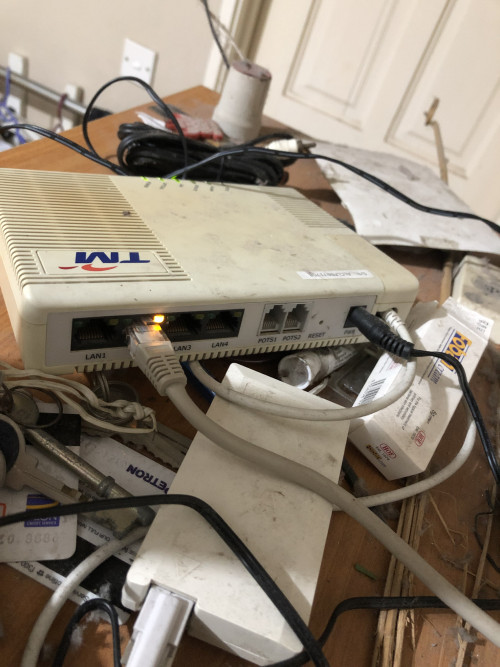 When connect to old maxis router 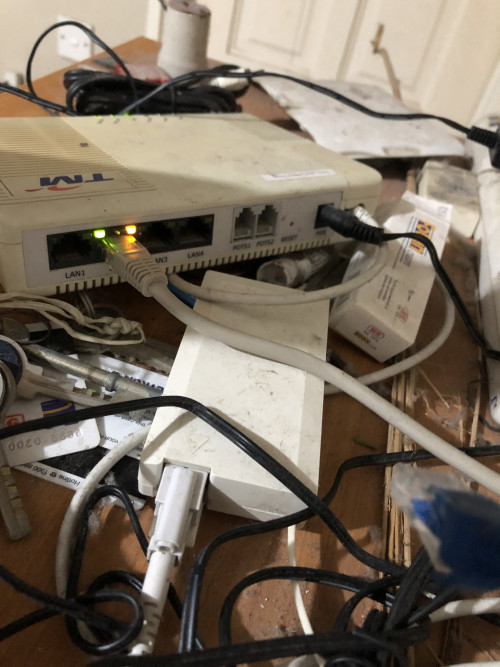 Hope someone here can help. Im using maxis fibre 30mbps plan UPDATE EDIT: Actually no problem, asus router cannot connect due to Maxis Fibre downtime for the past 3 days. Now all is fine  Hi everyone  Anyone here knows how to fix my issue? I have both asus rt-n12hp and rt-nt14uhp but no luck to get it connected online. Old maxis stock router and tp-link is working fine This post has been edited by arza04: Apr 16 2019, 08:03 PM |
|
|
|
|
|
goolias
|
Apr 15 2019, 10:46 PM
|
|
|
QUOTE(arza04 @ Apr 15 2019, 09:59 PM) Hi everyone Anyone here knows how to fix my issue? I have both asus rt-n12hp and rt-nt14uhp but no luck to get it connected online. Old maxis stock router and tp-link is working fine are your routers support vlan? |
|
|
|
|



 Quote
Quote


 0.0240sec
 0.24
0.24
 6 queries
 GZIP Disabled