

topic close
This post has been edited by chuahcs79: Nov 19 2012, 12:00 AM
Tp Link TL-MR3420 3G/3.75G router owner club V1
Tp Link TL-MR3420 3G/3.75G router owner club V1
|
|
 Oct 13 2011, 03:42 AM, updated 14y ago Oct 13 2011, 03:42 AM, updated 14y ago
Show posts by this member only | Post
#1
|
 
Elite
6,931 posts Joined: Apr 2011 From: Bolehland for sure ^_^  
|
topic close
This post has been edited by chuahcs79: Nov 19 2012, 12:00 AM |
|
|
|
|
|
Oct 13 2011, 12:16 PM
Show posts by this member only | Post
#2
|
 
Senior Member
1,187 posts Joined: Oct 2009
|
How much for the router you bought?
I asked a seller for RM9x,cheap? But my friend told me that, TP-Link products are not that good. Easy drop, slower compare with other brands like Aztech,Dlink... And how about the strainer?How to you get it and how much ? |
|
|
Oct 13 2011, 12:31 PM
Show posts by this member only | Post
#3
|
|
Elite
6,931 posts Joined: Apr 2011 From: Bolehland for sure ^_^
|
QUOTE(wc_how @ Oct 13 2011, 12:16 PM) How much for the router you bought? i brought it at RM 85 ( new ). using it for months now, compare with other brand 3G router, TPLNK have more tweak and detail in setting, and from what i know it support Sonyericsson phone as modem too,. and it is the only router will show you the signal strength on your 3G modem,.. i am using it 24/7 . consider worth for me,. I asked a seller for RM9x,cheap? But my friend told me that, TP-Link products are not that good. Easy drop, slower compare with other brands like Aztech,Dlink... And how about the strainer?How to you get it and how much ?  strainer i buy at RM11.50. is a cheaper way to enhance your signal,. if u have higher budget, get yourself a phone. phone can get signal stronger than usb modem in poor coverages area  |
|
|
Oct 13 2011, 01:54 PM
Show posts by this member only | Post
#4
|
|
Junior Member
278 posts Joined: Aug 2008
|
i have 2 of this 3g router...
one for my celcom bb (private use with password and mac filtering) and other one for digi bb prepaid (open access with monitoring). happy with both of them, but sometime cant detect zte MF110 modem. use for nearly 2years. celcom - attach with e1550 modem. digi - attach with e153 modem. |
|
|
Oct 13 2011, 02:09 PM
Show posts by this member only | Post
#5
|
|
Elite
6,931 posts Joined: Apr 2011 From: Bolehland for sure ^_^
|
QUOTE(WanR @ Oct 13 2011, 01:54 PM) i have 2 of this 3g router... when u use the zte mf 110, do u need to turn off the auto run first so the router can detect the zte modem ? one for my celcom bb (private use with password and mac filtering) and other one for digi bb prepaid (open access with monitoring). happy with both of them, but sometime cant detect zte MF110 modem. use for nearly 2years. celcom - attach with e1550 modem. digi - attach with e153 modem. i have to turn off the auto run on my mf627 first before plug in though  |
|
|
Oct 13 2011, 02:21 PM
Show posts by this member only | Post
#6
|

Senior Member
6,804 posts Joined: Sep 2010
|
sifu chuah, congratulation for your "shop open".... as u always said, sharing is caring.... haha. good work.
donno SE 2nd phone price will raise up or not after you start this topic...i am looking for 1 also actually. This post has been edited by vostro78: Oct 13 2011, 02:21 PM |
|
|
|
|
|
Oct 13 2011, 02:29 PM
Show posts by this member only | Post
#7
|
|
Elite
6,931 posts Joined: Apr 2011 From: Bolehland for sure ^_^
|
QUOTE(vostro78 @ Oct 13 2011, 02:21 PM) sifu chuah, congratulation for your "shop open".... as u always said, sharing is caring.... haha. good work. many people selling, dont need to buy expensive model, any model that support 7.2 or 10.2Mbps download speed will do,. i choose sonyericsson because is cooler running in long hour like ZTE modem ... as a modem purpose, second hand phone is great option,..donno SE 2nd phone price will raise up or not after you start this topic...i am looking for 1 also actually. |
|
|
Oct 13 2011, 02:37 PM
Show posts by this member only | Post
#8
|
 
Staff
72,807 posts Joined: Sep 2005 From: KUL 
|
I'm currently using my E1762 with Aztech HW550. Overall it is a good router, nothing to be complained about.
 Recently got "infected" too much by these guys here, I'll be getting a TP Link MR3420 to place it permanently at my PJ house and this Aztech HW550 will be transported back to PD to be placed there. So, that I don't need to bring it around when I go back PD, saves so much of life. Next time just bring back my E1762.  |
|
|
Oct 13 2011, 02:39 PM
Show posts by this member only | Post
#9
|
|
Elite
6,931 posts Joined: Apr 2011 From: Bolehland for sure ^_^
|
QUOTE(fruitie @ Oct 13 2011, 02:37 PM) I'm currently using my E1762 with Aztech HW550. Overall it is a good router, nothing to be complained about. yea great thinking,. leave teh aztech back home and use TP LINK, ha ha,.. well so far is good for me, as i love the 100% signal from SE plug in,.. work like a charm,. Recently got "infected" too much by these guys here, I'll be getting a TP Link MR3420 to place it permanently at my PJ house and this Aztech HW550 will be transported back to PD to be placed there. So, that I don't need to bring it around when I go back PD, saves so much of life. Next time just bring back my E1762. |
|
|
Oct 13 2011, 02:52 PM
|
|
Staff
72,807 posts Joined: Sep 2005 From: KUL
|
QUOTE(chuahcs79 @ Oct 13 2011, 02:39 PM) yea great thinking,. leave teh aztech back home and use TP LINK, ha ha,.. well so far is good for me, as i love the 100% signal from SE plug in,.. work like a charm,. One thing I like about this router is that it accepts almost all types of modems available on the market.Does it require firmware update to accept newer types of modems? I know Aztech does but still I have to wait till Aztech releases a list of compatible modems. Earlier Aztech wasn't even compatible with E1762.  Luckily with simple steps to update its firmware, it is compatible now and works charmingly. Luckily with simple steps to update its firmware, it is compatible now and works charmingly. |
|
|
Oct 13 2011, 02:54 PM
|
|
Elite
6,931 posts Joined: Apr 2011 From: Bolehland for sure ^_^
|
QUOTE(fruitie @ Oct 13 2011, 02:52 PM) One thing I like about this router is that it accepts almost all types of modems available on the market. so far the list is :Does it require firmware update to accept newer types of modems? I know Aztech does but still I have to wait till Aztech releases a list of compatible modems. Earlier Aztech wasn't even compatible with E1762. Luckily with simple steps to update its firmware, it is compatible now and works charmingly. Malaysia Model No. Brand Celcom E1550 HUAWEI E173 HUAWEI K3565 HUAWEI MF190 ZTE MF627 ZTE Digi E1550 HUAWEI E160E HUAWEI E160X HUAWEI E230 HUAWEI MF102 ZTE Maxis E1552 HUAWEI E156G HUAWEI E169 HUAWEI E1762 HUAWEI E220 HUAWEI Umobile MF180 ZTE MF190 ZTE MF622 ZTE Other Compatible Models AC2736 ZTE AC306 Sierra Wireless AC581 ZTE BandLuxe C120 BandRich CS-10 NOKIA CS-12 NOKIA CS-15 NOKIA Compass 881U Sierra Wireless Compass 885U Sierra Wireless Compass 889 Sierra Wireless DWM-151 DLINK DWM-152 DLINK DWM-156 DLINK DWM-652 DLINK E122 HUAWEI E1550 HUAWEI E1552 HUAWEI E156 HUAWEI E156B HUAWEI E156C HUAWEI E156G HUAWEI E160 HUAWEI E169 HUAWEI E169G HUAWEI E173 HUAWEI E1756 HUAWEI E1762 HUAWEI E180 HUAWEI E1820 HUAWEI E182E HUAWEI E220 HUAWEI E226 HUAWEI E230 HUAWEI E270 HUAWEI E272 HUAWEI EC122 HUAWEI EC1260 HUAWEI EC1261 HUAWEI EC169 HUAWEI K3520 HUAWEI K3520 Vodafone K3565 Vodafone K3565 HUAWEI K3565-Z Vodafone K3565-Z ZTE K3715 HUAWEI K3765 HUAWEI K3765 Vodafone K3765-Z Vodafone K3765-Z ZTE K4505 Vodafone K4505 HUAWEI MF100 ZTE MF102 ZTE MF110 ZTE MF160 ZTE MF190 ZTE MF622 ZTE MF626 ZTE MF627 ZTE MF636 ZTE MF637 ZTE MF637U ZTE MF645 ZTE MF668+ ZTE MU351 ZTE U1 CSL U1-TF CSL X060S ALCATEL X070S ALCATEL X080S and i know it also support sonyericsson phone as modem,.!!! if not support, u can download the modem setting seperately and then install in your router,. This post has been edited by chuahcs79: Oct 13 2011, 02:56 PM |
|
|
Oct 13 2011, 04:23 PM
|
|
Senior Member
6,804 posts Joined: Sep 2010
|
erm , i prefer tplink more to dlink, as dlink easily generate more heat compare to tp link.
|
|
|
Oct 13 2011, 04:53 PM
|
|
Senior Member
1,187 posts Joined: Oct 2009
|
btw, SE phone will have stronger signal?
at least not for me, i have 2 SE phones and both are in 1 signal bar,sometimes 0 if i choose 3G only. But my ZTE MF190 still able to reach 3 bars. |
|
|
|
|
|
Oct 13 2011, 06:48 PM
|

Senior Member
1,411 posts Joined: Dec 2004 From: Batu Pahat
|
QUOTE(vostro78 @ Oct 13 2011, 04:23 PM) erm , i prefer tplink more to dlink, as dlink easily generate more heat compare to tp link. this tplink also run very hot. |
|
|
Oct 13 2011, 06:57 PM
|
|
Senior Member
6,804 posts Joined: Sep 2010
|
yes, but when once u compare to dlink , u will take tplink, cause dlink not only hot, it hang.
|
|
|
Oct 13 2011, 08:37 PM
|
|
Junior Member
278 posts Joined: Aug 2008
|
QUOTE(chuahcs79 @ Oct 13 2011, 02:09 PM) when u use the zte mf 110, do u need to turn off the auto run first so the router can detect the zte modem ? how to do that? turn off autorun for modem?i have to turn off the auto run on my mf627 first before plug in though it said unrecognized modem. but when i move to other router, successfully detect and use. but nvm, already have other modem + both digi n celcom not provide speed >3.6mbps. so hsdpa 3.6mbps modem still sufficient. |
|
|
Oct 13 2011, 11:14 PM
|
|
Elite
6,931 posts Joined: Apr 2011 From: Bolehland for sure ^_^
|
QUOTE(vostro78 @ Oct 13 2011, 04:23 PM) erm , i prefer tplink more to dlink, as dlink easily generate more heat compare to tp link. yea agree,.. i use Dlink product before,. compare to tp link, dlink is generate more heat,..Added on October 13, 2011, 11:15 pm QUOTE(wc_how @ Oct 13 2011, 04:53 PM) btw, SE phone will have stronger signal? well, depends on which model u have,. some SE phone support 7.2Mbps or 10.2Mbps download will have better signal compare to usb modem,. like the one i am using is W705at least not for me, i have 2 SE phones and both are in 1 signal bar,sometimes 0 if i choose 3G only. But my ZTE MF190 still able to reach 3 bars. Added on October 13, 2011, 11:19 pm QUOTE(WanR @ Oct 13 2011, 08:37 PM) how to do that? turn off autorun for modem? u plug in the zte modem, -> open command prompt-> type in the command u want as below -> enter.it said unrecognized modem. but when i move to other router, successfully detect and use. but nvm, already have other modem + both digi n celcom not provide speed >3.6mbps. so hsdpa 3.6mbps modem still sufficient. then your ZTE MF190 can use in tp link router after disable the auto run.. AT commands Command Description ATI Returns modem information AT+COPS=? Returns the list of operators present in the network AT+ZCDRUN=8 Disable cd (flashdrive) autorun AT+ZCDRUN=9 Enable cd (flashdrive) autorun AT+ZBANDI=0 Automatic band selection (default) AT+ZBANDI=1 UMTS 850 + GSM 900/1800 AT+ZBANDI=2 UMTS 2100 + GSM 900/1800 (Europe) AT+ZBANDI=3 UMTS 850/2100 + GSM 900/1800 AT+ZBANDI=4 UMTS 850/1900 + GSM 850/1900 AT+ZBANDI? Report band selection mode AT+ZSNT=0,0,0 AUTOMATIC network selection, GSM+WCDMA AT+ZSNT=0,0,1 AUTOMATIC network selection, GSM+WCDMA,GSM preferred AT+ZSNT=0,0,2 AUTOMATIC network selection, GSM+WCDMA,WCDMA preferred AT+ZSNT=1,0,0 AUTOMATIC network selection, GSM only AT+ZSNT=2,0,0 AUTOMATIC network selection, WCDMA only AT+ZSNT? Returns network selection mode Link This post has been edited by chuahcs79: Oct 13 2011, 11:20 PM |
|
|
Oct 14 2011, 12:18 AM
|

Senior Member
2,200 posts Joined: Jan 2003
|
Good! good to start this thread.
running 3420 for the past err.. 3-4 months 24/7 on digi-huawei modem with no issue at all! I have been tp-link supporter since my old wifi router. in use for years and still kicking! |
|
|
Oct 14 2011, 12:24 AM
|
|
Elite
6,931 posts Joined: Apr 2011 From: Bolehland for sure ^_^
|
QUOTE(lj0000 @ Oct 14 2011, 12:18 AM) Good! good to start this thread. glad to know now have another satisfy user of this router,.. i also very satisfy with this router,. no problems at all,. many tweak and setting can set too,.running 3420 for the past err.. 3-4 months 24/7 on digi-huawei modem with no issue at all! I have been tp-link supporter since my old wifi router. in use for years and still kicking! mine running 24/7 every day too ,.  |
|
|
Oct 14 2011, 01:13 PM
|
|
Senior Member
6,804 posts Joined: Sep 2010
|
ya, my house now got 2 tplink already. 1 got 3g, another is for streamyx line, cheap and reliable product.
|
|
|
Oct 14 2011, 01:32 PM
|
|
Elite
6,931 posts Joined: Apr 2011 From: Bolehland for sure ^_^
|
QUOTE(vostro78 @ Oct 14 2011, 01:13 PM) ya, my house now got 2 tplink already. 1 got 3g, another is for streamyx line, cheap and reliable product. yea agree, tp link is good product for sure,.. am satisfy with it,.. |
|
|
Oct 14 2011, 04:13 PM
|
|
Senior Member
6,804 posts Joined: Sep 2010
|
previously i am using belkin, but after 2 years the belkin performance become unstable from time to time... after found out tplink recommended by supplier, i nvr hv problem on my WIFI..
|
|
|
Oct 14 2011, 04:42 PM
|
|
Junior Member
384 posts Joined: Jan 2006 From: Penang 
|
congrats on the new thread, chuah! I'm using this router on Maxis, 2 of them actually. As the signal coverage in my house wasn't great, less than 30%. I linked up these 2 routers via WDS where I put one at the balcony (better signal but not great ~45%) and another one near my computer to connect to the home network.
Never failed me so far (touch wood ). The boot up is faster than Aztech HW550-3G and Prolink PWH2004 which I have as well. haha.. too many routers.. after seeing your results with SE phones, I guess most of us will start to hunt for one now.  This post has been edited by maxcheam: Oct 14 2011, 04:43 PM |
|
|
Oct 14 2011, 04:49 PM
|
|
Senior Member
6,804 posts Joined: Sep 2010
|
ya...SE & Nokia should thanks to you... hahaha
|
|
|
Oct 14 2011, 05:07 PM
|
|
Senior Member
1,187 posts Joined: Oct 2009
|
TP-Link is good enough for normal user.
But TP-Link will has worse performance than other if the area is a noisy place. My friend always drop the line even in very very near the router, where his working place is very noisy from the machine. |
|
|
Oct 14 2011, 05:22 PM
|
|
Junior Member
384 posts Joined: Jan 2006 From: Penang
|
QUOTE(vostro78 @ Oct 14 2011, 04:49 PM) ya...SE & Nokia should thanks to you... hahaha still waiting for the Nokia results... haha.. |
|
|
Oct 14 2011, 07:25 PM
|
|
Elite
6,931 posts Joined: Apr 2011 From: Bolehland for sure ^_^
|
QUOTE(maxcheam @ Oct 14 2011, 04:42 PM) congrats on the new thread, chuah! I'm using this router on Maxis, 2 of them actually. As the signal coverage in my house wasn't great, less than 30%. I linked up these 2 routers via WDS where I put one at the balcony (better signal but not great ~45%) and another one near my computer to connect to the home network. thanks max,. yea i guess i am lucky to know SE can get 100% signal and also can use with our router,. Never failed me so far (touch wood ). The boot up is faster than Aztech HW550-3G and Prolink PWH2004 which I have as well. haha.. too many routers.. after seeing your results with SE phones, I guess most of us will start to hunt for one now. Added on October 14, 2011, 7:26 pm QUOTE(vostro78 @ Oct 14 2011, 04:49 PM) ya...SE & Nokia should thanks to you... hahaha good thing meant to be share,  This post has been edited by chuahcs79: Oct 14 2011, 07:26 PM |
|
|
Oct 14 2011, 11:54 PM
|
|
Senior Member
6,804 posts Joined: Sep 2010
|
eh, post ur result here for nokia +tplink.
|
|
|
Oct 15 2011, 12:01 AM
|
|
Elite
6,931 posts Joined: Apr 2011 From: Bolehland for sure ^_^
|
QUOTE(vostro78 @ Oct 14 2011, 11:54 PM) eh, post ur result here for nokia +tplink. too bad nokia x3-02 not support by this router,.. but direct plug in result cause super low ping,. but at least still have this SE W705 + router [attachmentid=2485839] This post has been edited by chuahcs79: Oct 15 2011, 12:05 AM |
|
|
Oct 15 2011, 10:00 AM
|
|
Senior Member
6,804 posts Joined: Sep 2010
|
oh...then ur investment for x3 is a waste .... really a risk to take in order to try different hp set...
|
|
|
Oct 15 2011, 01:17 PM
|

Junior Member
142 posts Joined: Sep 2011
|
tp-link-er here
|
|
|
Oct 15 2011, 04:07 PM
|

Junior Member
128 posts Joined: Nov 2006 From: PeeJay
|
.
This post has been edited by junks6767: Oct 15 2011, 05:24 PM |
|
|
Oct 16 2011, 11:54 AM
|

Senior Member
4,582 posts Joined: Jan 2003 From: West johor
|
QUOTE(vostro78 @ Oct 14 2011, 11:54 PM) eh, post ur result here for nokia +tplink. nokia 3120c not support. |
|
|
Oct 16 2011, 03:52 PM
|
|
Elite
6,931 posts Joined: Apr 2011 From: Bolehland for sure ^_^
|
so far SE yari u100 & SE W705 both supported,.. signal wise W705 is better,.!!
Added on October 17, 2011, 2:58 amok , guys. the result u all been waiting for,.. guess 10.2Mbps is possible now,....  problems solve, is device problems,.  and now is gone when i use the Nokia X03-02 ,..  and i Guess MAXIS is back to business in my area ,..    --------------------------------------------------------------------------    --------------------------------------------------------------------------    This post has been edited by chuahcs79: Oct 17 2011, 02:58 AM |
|
|
Oct 19 2011, 12:35 AM
|
|
Senior Member
6,804 posts Joined: Sep 2010
|
chuah , how do you setup the SE yari link to tplink? i want to know ur SE side setting...thanks
|
|
|
Oct 19 2011, 12:50 AM
|
|
Elite
6,931 posts Joined: Apr 2011 From: Bolehland for sure ^_^
|
QUOTE(vostro78 @ Oct 19 2011, 12:35 AM) chuah , how do you setup the SE yari link to tplink? i want to know ur SE side setting...thanks u go to your SE phone:menu-> setting-> connectivity-> usb-> usb network -> usb network type-> select phone as modem / via phone ( dont select Via Computer )-> plug the usb data cable direct in router.. and ur router will recognise your SE phone as modem under the usb setting there, no matter u set the maxis as default or not is not important, it will connect with maxis,.. This post has been edited by chuahcs79: Oct 19 2011, 12:52 AM |
|
|
Oct 21 2011, 07:17 PM
|

Senior Member
8,621 posts Joined: Nov 2004
|
using TL-MR3220 with same DIY enhanced E1762 antenna, the speed pretty much better than direct E1762 USB to windows 7. Although Signal Strength just 32% - 38%. Will make another antenna like TS did & compare which better
just amazed by TP-Link 3G router This post has been edited by iRonTech: Oct 21 2011, 07:21 PM |
|
|
Oct 21 2011, 10:21 PM
|
|
Elite
6,931 posts Joined: Apr 2011 From: Bolehland for sure ^_^
|
QUOTE(iRonTech @ Oct 21 2011, 07:17 PM) using TL-MR3220 with same DIY enhanced E1762 antenna, the speed pretty much better than direct E1762 USB to windows 7. Although Signal Strength just 32% - 38%. Will make another antenna like TS did & compare which better wow great to know,. thanks for sharing,.. just amazed by TP-Link 3G router |
|
|
Oct 22 2011, 06:41 PM
|
|
Staff
72,807 posts Joined: Sep 2005 From: KUL
|
For those who want to buy this router, get it from Viewnet LYP for only RM 79. Promotion price.
|
|
|
Oct 22 2011, 06:58 PM
|
|
Elite
6,931 posts Joined: Apr 2011 From: Bolehland for sure ^_^
|
QUOTE(fruitie @ Oct 22 2011, 06:41 PM) For those who want to buy this router, get it from Viewnet LYP for only RM 79. Promotion price. wow RM79 is very good bargain price,.. |
|
|
Oct 22 2011, 07:08 PM
|

Senior Member
3,725 posts Joined: Jul 2005 From: In /hardware/
|
My boss bought from All IT Lowyat on Monday (1 antenna version) at the price of RM 72. Works well and we even use it at datacenter to transform wired connection to wireless.
|
|
|
Oct 22 2011, 07:12 PM
|
|
Staff
72,807 posts Joined: Sep 2005 From: KUL
|
QUOTE(soundsyst64 @ Oct 22 2011, 07:08 PM) My boss bought from All IT Lowyat on Monday (1 antenna version) at the price of RM 72. Works well and we even use it at datacenter to transform wired connection to wireless. That's TP-Link MR3220 version.  Ya, RM 72 at All IT. |
|
|
Oct 26 2011, 03:19 PM
|
|
Elite
6,931 posts Joined: Apr 2011 From: Bolehland for sure ^_^
|
great news that TL-MR3420 does support more than 1.2Mbps upload speed,..
This post has been edited by chuahcs79: Oct 28 2011, 05:13 AM |
|
|
Oct 28 2011, 05:12 AM
|
|
Elite
6,931 posts Joined: Apr 2011 From: Bolehland for sure ^_^
|
finally able to get more than 1.2Mbps upload witth this router now,
 |
|
|
Oct 28 2011, 07:55 AM
|
|
Senior Member
8,621 posts Joined: Nov 2004
|
QUOTE(chuahcs79 @ Oct 28 2011, 05:12 AM) finally able to get more than 1.2Mbps upload witth this router now, by what tweak? |
|
|
Oct 28 2011, 03:56 PM
|
|
Elite
6,931 posts Joined: Apr 2011 From: Bolehland for sure ^_^
|
QUOTE(iRonTech @ Oct 28 2011, 07:55 AM) by what tweak? u can tweak the MTU, or DNS, or APN, or you can upgrade the firmware of the usb modem u use, or u can add in directional antenna with the usb modem too,. i basically try almost everything,. one more thing is Sonyericsson phone is very good match with this router as very easy to get 100% or very high signal,.. u might want to try out,.. just remember to place both your router + SE phone on top of cooler pad,.. and open up the SE phone cover,. so it wont get over heated,.. |
|
|
Oct 30 2011, 01:07 AM
|

Senior Member
826 posts Joined: Jan 2009
|
Hi,
I just bought this router today. I'm using it with my Sony Ericsson K660i. At first I was skeptical because last time I tried the phone with other router (don't remember the brand), it doesn't work. I was going to buy 3G (HSPA) USB modem today but all shop I go didn't sell them. Thankfully I'm unable to buy one because when I connect my phone to TP-Link router & after simple configuration, it successfully make a connection. However, there is a problem though. Download speed only 54 KB/s max. If I connect the phone directly to laptop, the download speed is around 2XX to 3XX KB/s. Do anyone know why the speed is so low? |
|
|
Oct 30 2011, 01:13 AM
|
|
Elite
6,931 posts Joined: Apr 2011 From: Bolehland for sure ^_^
|
QUOTE(kizwan @ Oct 30 2011, 01:07 AM) Hi, when u direct plug into laptop, what window u use ? and did u tweak the MTU setting ? or DNS ? or APN ?I just bought this router today. I'm using it with my Sony Ericsson K660i. At first I was skeptical because last time I tried the phone with other router (don't remember the brand), it doesn't work. I was going to buy 3G (HSPA) USB modem today but all shop I go didn't sell them. Thankfully I'm unable to buy one because when I connect my phone to TP-Link router & after simple configuration, it successfully make a connection. However, there is a problem though. Download speed only 54 KB/s max. If I connect the phone directly to laptop, the download speed is around 2XX to 3XX KB/s. Do anyone know why the speed is so low? u can also try to upgrade the firmware too. i have try Sonyericsson phone with W705 and Yari U100. both work like a charm, speed wise no different with direct pc plug in too,.. as i did upgrade my router firmware and my sonyericsson phone firmware too,.. hope that helps,.  This post has been edited by chuahcs79: Oct 30 2011, 01:14 AM |
|
|
Oct 30 2011, 01:23 AM
|
|
Senior Member
826 posts Joined: Jan 2009
|
I'm using windows 7. I did tweak MTU. What value for MTU & APN you use?
I did upgrade the router firmware to latest version but the download speed still low. I did checked firmware for my phone, there is no firmware update for it. |
|
|
Oct 30 2011, 01:37 AM
|
|
Elite
6,931 posts Joined: Apr 2011 From: Bolehland for sure ^_^
|
QUOTE(kizwan @ Oct 30 2011, 01:23 AM) I'm using windows 7. I did tweak MTU. What value for MTU & APN you use? MTU is very different number for everyone,. for my case i use 1390 , i slowly tweak from 1480 ( default ) one by one number until i get the exact direct plug in speed because i dont know how to calculate the MTU,. I did upgrade the router firmware to latest version but the download speed still low. I did checked firmware for my phone, there is no firmware update for it. u also can restore default setting on router & se phone too, they might work out,. for my case SE phone can get better signal than current usb modem in market as screen shot in first post,.. if u using maxis 3G , then u can select unet or maxisbb or bbnet. all 3 apn is working, and u just need to try out which one is better for you in your case,.. This post has been edited by chuahcs79: Oct 30 2011, 01:38 AM |
|
|
Oct 30 2011, 02:25 AM
|
|
Senior Member
826 posts Joined: Jan 2009
|
I noticed in the log it execute this command:-
CODE pppd /dev/ttyACM1 115200 connect "chat -s -v -f /etc/ppp/conn-s Does yours also executed the same command? Especially the "115200". |
|
|
Oct 30 2011, 02:28 AM
|
|
Elite
6,931 posts Joined: Apr 2011 From: Bolehland for sure ^_^
|
QUOTE(kizwan @ Oct 30 2011, 02:25 AM) I noticed in the log it execute this command:- yea mine is the same too,. i am wondering about that for a while, CODE pppd /dev/ttyACM1 115200 connect "chat -s -v -f /etc/ppp/conn-s Does yours also executed the same command? Especially the "115200". |
|
|
Oct 30 2011, 02:33 AM
|
|
Senior Member
826 posts Joined: Jan 2009
|
Weird, I got low speed.
 Maybe incompatibility between the phone & router? Maybe incompatibility between the phone & router?Added on October 30, 2011, 4:18 pmI figured out what's wrong. The phone didn't get enough current to support HSPA speed. I connected the phone to USB hub & connected the USB hub to TP-Link router. The USB hub have AC adapter plugged to it & this make the USB hub is self-powered. The download speed I got now is 1XX KB/s, still below 200KB/s but at least it faster now. I'll try to tweak the MTU later to get faster speed. This post has been edited by kizwan: Oct 30 2011, 04:18 PM |
|
|
Oct 30 2011, 05:11 PM
|
|
Elite
6,931 posts Joined: Apr 2011 From: Bolehland for sure ^_^
|
QUOTE(kizwan @ Oct 30 2011, 02:33 AM) Weird, I got low speed. wow good news,. at least u get higher speed now,.. keep trying anything is possible,.. Maybe incompatibility between the phone & router?Added on October 30, 2011, 4:18 pmI figured out what's wrong. The phone didn't get enough current to support HSPA speed. I connected the phone to USB hub & connected the USB hub to TP-Link router. The USB hub have AC adapter plugged to it & this make the USB hub is self-powered. The download speed I got now is 1XX KB/s, still below 200KB/s but at least it faster now. I'll try to tweak the MTU later to get faster speed. |
|
|
Nov 2 2011, 10:42 PM
|
|
Junior Member
4 posts Joined: Sep 2011
|
HUAWEI E182E unlocked from mobile2wifi.co.uk for ref. hope it helps.
|
|
|
Nov 3 2011, 04:42 AM
|
|
Elite
6,931 posts Joined: Apr 2011 From: Bolehland for sure ^_^
|
QUOTE(Tomas_L @ Nov 2 2011, 10:42 PM) yea but is not confirm that u wil guarantee get higher or fasterspeed.. i still believe that phone can achieve better speed or signal than usb modem.... |
|
|
Nov 3 2011, 08:54 PM
|

Junior Member
378 posts Joined: Apr 2006 From: Kuala Lumpur
|
My MR3420 sometime can detect my MF190 Umobile modem but sometime unable to identify the 3G modem wor.. Is this normal or is there any way around it?
|
|
|
Nov 3 2011, 11:45 PM
|
|
Elite
6,931 posts Joined: Apr 2011 From: Bolehland for sure ^_^
|
QUOTE(weichieh007 @ Nov 3 2011, 08:54 PM) My MR3420 sometime can detect my MF190 Umobile modem but sometime unable to identify the 3G modem wor.. Is this normal or is there any way around it? have u upgrade ur firmware or re flashy our firmware again ? if problems persist may be u can restore original factory setting ??normally i turn off the router when i want to plug or unplug modem in usb port,.. hope it helps,. and i also did upgrade and reflash the latest firmware too,.. |
|
|
Nov 4 2011, 12:06 PM
|
|
Junior Member
378 posts Joined: Apr 2006 From: Kuala Lumpur
|
QUOTE(chuahcs79 @ Nov 3 2011, 11:45 PM) have u upgrade ur firmware or re flashy our firmware again ? if problems persist may be u can restore original factory setting ?? Ok, I'm gonna try update the firmware.. Thanks..normally i turn off the router when i want to plug or unplug modem in usb port,.. hope it helps,. and i also did upgrade and reflash the latest firmware too,.. |
|
|
Nov 6 2011, 02:13 AM
|

Junior Member
43 posts Joined: Jan 2009
|
QUOTE(chuahcs79 @ Oct 13 2011, 11:14 PM) u plug in the zte modem, -> open command prompt-> type in the command u want as below -> enter. cant make this happen, whats the proper steps. i think some steps is missing... please help thank you.then your ZTE MF190 can use in tp link router after disable the auto run.. AT commands Command Description ATI Returns modem information AT+COPS=? Returns the list of operators present in the network AT+ZCDRUN=8 Disable cd (flashdrive) autorun AT+ZCDRUN=9 Enable cd (flashdrive) autorun AT+ZBANDI=0 Automatic band selection (default) AT+ZBANDI=1 UMTS 850 + GSM 900/1800 AT+ZBANDI=2 UMTS 2100 + GSM 900/1800 (Europe) AT+ZBANDI=3 UMTS 850/2100 + GSM 900/1800 AT+ZBANDI=4 UMTS 850/1900 + GSM 850/1900 AT+ZBANDI? Report band selection mode AT+ZSNT=0,0,0 AUTOMATIC network selection, GSM+WCDMA AT+ZSNT=0,0,1 AUTOMATIC network selection, GSM+WCDMA,GSM preferred AT+ZSNT=0,0,2 AUTOMATIC network selection, GSM+WCDMA,WCDMA preferred AT+ZSNT=1,0,0 AUTOMATIC network selection, GSM only AT+ZSNT=2,0,0 AUTOMATIC network selection, WCDMA only AT+ZSNT? Returns network selection mode Link |
|
|
Nov 6 2011, 02:15 AM
|
|
Elite
6,931 posts Joined: Apr 2011 From: Bolehland for sure ^_^
|
QUOTE(miskol @ Nov 6 2011, 02:13 AM) cant make this happen, whats the proper steps. i think some steps is missing... please help thank you. i quote from this linkhttp://lgallardo.com/en/2010/02/02/comando...odem-zte-mf626/ the command to turn off auto run is working me ,.. hope it helps |
|
|
Nov 6 2011, 06:43 PM
|

Senior Member
2,759 posts Joined: Jan 2009
|
bot de router... easy to setup... good!
but sucky part is... de signal of my umobile is not that strong ler... 45% gets me 2.6mbps... acceptable but i got2 put de modem at my living room... put it deeper in, gets 19% signal nia and gets me ard 1mbps and sometimes under 1mbps... hmm... 1na get a looooonnngggg usb cable and hang the usb modem outside i wonder will it work? |
|
|
Nov 6 2011, 06:44 PM
|
|
Senior Member
2,759 posts Joined: Jan 2009
|
btw.... using umobile's zte mf190 modem...
no regret buying the router... stable... but guys, wat's de QSS button for ar? i still don understand wat i meant tho... hehe...  |
|
|
Nov 6 2011, 06:46 PM
|
|
Staff
72,807 posts Joined: Sep 2005 From: KUL
|
QUOTE(radi0head @ Nov 6 2011, 06:44 PM) btw.... using umobile's zte mf190 modem... Google and results me this: http://www.tp-link.com/mx/support/showfaq.asp?id=171no regret buying the router... stable... but guys, wat's de QSS button for ar? i still don understand wat i meant tho... hehe... |
|
|
Nov 6 2011, 07:07 PM
|
|
Elite
6,931 posts Joined: Apr 2011 From: Bolehland for sure ^_^
|
QUOTE(radi0head @ Nov 6 2011, 06:43 PM) bot de router... easy to setup... good! yea of course it will work,. using usb extension to places your modem,. your modem need to see the sky or somewhere near window,.. then your signal will be better and higher,.. but sucky part is... de signal of my umobile is not that strong ler... 45% gets me 2.6mbps... acceptable but i got2 put de modem at my living room... put it deeper in, gets 19% signal nia and gets me ard 1mbps and sometimes under 1mbps... hmm... 1na get a looooonnngggg usb cable and hang the usb modem outside i wonder will it work? Added on November 6, 2011, 7:09 pm QUOTE(fruitie @ Nov 6 2011, 06:46 PM) wow good stuff,.. nice one,.. will pin this to first post,. thanks fruitie,This post has been edited by chuahcs79: Nov 6 2011, 07:09 PM |
|
|
Nov 6 2011, 07:25 PM
|
|
Staff
72,807 posts Joined: Sep 2005 From: KUL
|
Erm, plan to buy this router to use with my E1762. After started using E1762 with my Aztech HW550-3G, I noticed that it is difficult to get it connected. The blue LED on E1762 keeps blinking non-stop and I can't seem to get it connected.
However, when I was using ZTE MF622 such issue did not happen. It got connected easily... For those using this router with E1762, is it difficult to get it connected? Or it takes long time to be connected? |
|
|
Nov 6 2011, 07:30 PM
|
|
Elite
6,931 posts Joined: Apr 2011 From: Bolehland for sure ^_^
|
QUOTE(fruitie @ Nov 6 2011, 07:25 PM) Erm, plan to buy this router to use with my E1762. After started using E1762 with my Aztech HW550-3G, I noticed that it is difficult to get it connected. The blue LED on E1762 keeps blinking non-stop and I can't seem to get it connected. nope, it connected very easily and fast too, same to SE phone,.. However, when I was using ZTE MF622 such issue did not happen. It got connected easily... For those using this router with E1762, is it difficult to get it connected? Or it takes long time to be connected? |
|
|
Nov 6 2011, 07:37 PM
|
|
Staff
72,807 posts Joined: Sep 2005 From: KUL
|
QUOTE(chuahcs79 @ Nov 6 2011, 07:30 PM) nope, it connected very easily and fast too, same to SE phone,.. Thanks for the update, until one day which I can't tolerate the slowness anymore, I'll get this router. I foresee this day will come very soon. |
|
|
Nov 6 2011, 08:18 PM
|
|
Elite
6,931 posts Joined: Apr 2011 From: Bolehland for sure ^_^
|
QUOTE(fruitie @ Nov 6 2011, 07:37 PM) Thanks for the update, until one day which I can't tolerate the slowness anymore, I'll get this router. yea one problems is with aztech 3G router, they dont dial fast enough,. and sometimes certain modem cannot connect even,.. I foresee this day will come very soon. yea, join us in TP LINK TL-MR3420 club then,.  |
|
|
Nov 6 2011, 08:21 PM
|
|
Staff
72,807 posts Joined: Sep 2005 From: KUL
|
QUOTE(chuahcs79 @ Nov 6 2011, 08:18 PM) yea one problems is with aztech 3G router, they dont dial fast enough,. and sometimes certain modem cannot connect even,.. I couldn't deny this point but surprisingly this wasn't an issue when I used it with ZTE MF622.yea, join us in TP LINK TL-MR3420 club then,. |
|
|
Nov 6 2011, 08:22 PM
|
|
Elite
6,931 posts Joined: Apr 2011 From: Bolehland for sure ^_^
|
QUOTE(fruitie @ Nov 6 2011, 08:21 PM) I couldn't deny this point but surprisingly this wasn't an issue when I used it with ZTE MF622. yea so far out of so many brand 3G router,. tp link one is much more versatile and not that fussy when come to modem,... even SE phone can use too,. ( this is bonus point ) and dialing to connect is fast,.. |
|
|
Nov 10 2011, 11:03 AM
|

Junior Member
33 posts Joined: Mar 2007
|
I sincerely want to thank all the forummers which have been contributing to this thread.
I signed up for the Maxis Wireless Broadband 6GB package with max speed quite some time ago and I have been troubleshooting for a very long time on how to get the ZTE MF190 usb stick working with any 3g router. It just won't recognize until I came across this thread on how to disable the USB Autorun feature via HyperTerminal I done that and woola! Finally... i am able to utilize the ZTE MF190 usb stick on my TP-LINK 3.5/3.75G router. The speed is tremendous and I have updated my signature to show the current speed which I am running at! Great jobs guys and gals! Thanks. |
|
|
Nov 10 2011, 11:18 AM
|
|
Staff
72,807 posts Joined: Sep 2005 From: KUL
|
Great that it works well for you.
I have observed that speed produced by plug-in does show little slowness compared to going through 3G router. |
|
|
Nov 10 2011, 05:02 PM
|
|
Elite
6,931 posts Joined: Apr 2011 From: Bolehland for sure ^_^
|
@knightltu:
glad to know this thread able to help you ad solve your problems, via this router the connection will be much stable and consistent,. sharing is caring |
|
|
Nov 11 2011, 10:37 PM
|
|
Junior Member
9 posts Joined: Nov 2011
|
Hey, as TP-LINK support was as useless as it can get, i believe you guys are more competent.
Problem: 3G connection gets randomly disconnected in every 20min - 1hour. Router has only 3G connection; newest firmware. Location: Estonia (north-eastern Europe); carrier EMT. Modem ZTE MF636 Settings: link 1 and link 2 >Log containing the '3g link is down' part. As time goes by, suddenly the connection drops, for a minute or so router's admin page says nothing about disconnection, then "3G USB Modem:" field goes "Identifying..." and status is "connecting..." Also the dialing takes forever. The steady light on modem, indicating active 3.5g connection, comes alive long before the router gets connected. Modem identification isn't too quick either. Signal strength is between 35-50%, never had similar problems with modem connected directly to computer. Any suggestions? Edit: following instructions found on this topic, I also disabled autorun on the modem. This post has been edited by layr: Nov 11 2011, 11:31 PM |
|
|
Nov 11 2011, 11:36 PM
|
|
Elite
6,931 posts Joined: Apr 2011 From: Bolehland for sure ^_^
|
QUOTE(layr @ Nov 11 2011, 10:37 PM) Hey, as TP-LINK support was as useless as it can get, i believe you guys are more competent. hi thereProblem: 3G connection gets randomly disconnected in every 20min - 1hour. Router has only 3G connection; newest firmware. Location: Estonia (north-eastern Europe); carrier EMT. Modem ZTE MF636 Settings: link 1 and link 2 >Log containing the '3g link is down' part. As time goes by, suddenly the connection drops, for a minute or so router's admin page says nothing about disconnection, then "3G USB Modem:" field goes "Identifying..." and status is "connecting..." Also the dialing takes forever. The steady light on modem, indicating active 3.5g connection, comes alive long before the router gets connected. Modem identification isn't too quick either. Signal strength is between 35-50%, never had similar problems with modem connected directly to computer. Any suggestions? Edit: following instructions found on this topic, I also disabled autorun on the modem. as zte mf 636 detail as : HSDPA/HSUPA/UMTS 850/1900/2100 MHz GSM/GPRS/EDGE 850/900/1800/1900 MHz HSDPA DL 7.2Mbps HSUPA UL 2Mbps Four colour LED status indicators. Supports up to 4GB Micro SD Memory Card. USB 2.0 Interface USB 2.0 Interface Compact size 69 x 26.5 x 12 mm Weight 28g so do u know what 3G band requency your carrier is using ? if Ur EMT carrier is using other 3G band frequency that the zte mf636 support, than it can slow your modem connection, or even slow down the router dialing process,.. did u disable the autorun first ? is your zte mf 636 modem firmware is original or u flash it before ? |
|
|
Nov 11 2011, 11:43 PM
|
|
Staff
72,807 posts Joined: Sep 2005 From: KUL
|
Just for your information, layr is located at Estonia.
So, our support needs to be in general form rather than Malaysialised. |
|
|
Nov 11 2011, 11:56 PM
|
|
Junior Member
9 posts Joined: Nov 2011
|
QUOTE(chuahcs79 @ Nov 11 2011, 06:36 PM) so do u know what 3G band requency your carrier is using ? if Ur EMT carrier is using other 3G band frequency that the zte mf636 support, than it can slow your modem connection, or even slow down the router dialing process,.. Whoa, fast reply.did u disable the autorun first ? is your zte mf 636 modem firmware is original or u flash it before ? I'm not 100% sure about the carrier band, but as i mentioned, modem worked fine when used with laptop (under Win XP and various Linux distros). Nope, i disabled the autorun 10min ago or so. Never modified the modem in any way whatsoever (except the autorun disabling part). Edit: sometimes the admin page is inaccessible for some time when the connection has been lost; pinging 192.168.1.1 is successful though. This post has been edited by layr: Nov 12 2011, 12:20 AM |
|
|
Nov 12 2011, 01:46 AM
|

Senior Member
766 posts Joined: Mar 2009 From: Terengganu, Malaysia 
|
QUOTE(fruitie @ Nov 6 2011, 06:46 PM) 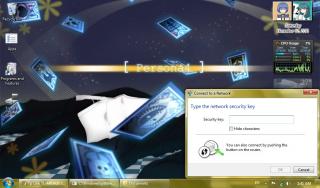
This shows the QSS function... Just bought this modem yesterday. |
|
|
Nov 12 2011, 02:20 AM
|
|
Elite
6,931 posts Joined: Apr 2011 From: Bolehland for sure ^_^
|
QUOTE(mochachoke @ Nov 12 2011, 01:46 AM)
This shows the QSS function... Just bought this modem yesterday. u like this router ? |
|
|
Nov 12 2011, 08:37 PM
|
|
Staff
72,807 posts Joined: Sep 2005 From: KUL
|
Chuah, please do something to get the router work with Nokia phones.
Then I might considering getting a cheapo HSPA Nokia phone to pair with it. |
|
|
Nov 12 2011, 09:51 PM
|
|
Elite
6,931 posts Joined: Apr 2011 From: Bolehland for sure ^_^
|
QUOTE(fruitie @ Nov 12 2011, 08:37 PM) Chuah, please do something to get the router work with Nokia phones. trust me fruitie, i really trying,. was hoping this router can support nokia x3-02,but oh well at the moments nothing works unless someone know how to flash it open-wrt then add in the nokia driver manually,... it might work,... which i totally dont know much about linux,. Then I might considering getting a cheapo HSPA Nokia phone to pair with it.  |
|
|
Nov 14 2011, 05:58 AM
|
|
Junior Member
9 posts Joined: Nov 2011
|
Can anyone explain what's the difference between IP reservation and IP & MAC binding?
|
|
|
Nov 15 2011, 01:24 PM
|

Junior Member
187 posts Joined: Sep 2010
|
Anyone use the u-mobile 42 Mbps modem with this router.
|
|
|
Nov 15 2011, 01:52 PM
|
|
Senior Member
826 posts Joined: Jan 2009
|
QUOTE(layr @ Nov 14 2011, 05:58 AM) Can anyone explain what's the difference between IP reservation and IP & MAC binding? IP reservation & "IP & MAC Binding" are basically the same thing except the latter "bind" the IP address to MAC address. Meaning, for example IP address AA.BB.CC.DD is bind to MAC address 00-11-22-33-44-55. If there is another PC (which obviously have different MAC address) trying to use the IP address AA.BB.CC.DD, that PC will be blocked by router from communicating with other PC/device in the network. "IP reservation" didn't enforce this. If two PC/devices using the same IP address, one or both will failed to communicate due to IP address conflict.This post has been edited by kizwan: Nov 15 2011, 01:59 PM |
|
|
Nov 16 2011, 03:41 PM
|

Senior Member
777 posts Joined: Jan 2003 From: Not definite
|
Hey folks, thinking of getting this router. I'm planning to use it with E1762 (for parents in PG). Chuah, is this modem easy to manage? Old folks are not too tech savvy so I'm planning to configure and let them plug and play. More like 1 time settle, no more worries.
|
|
|
Nov 17 2011, 12:21 AM
|
|
Elite
6,931 posts Joined: Apr 2011 From: Bolehland for sure ^_^
|
QUOTE(mel5582 @ Nov 16 2011, 03:41 PM) Hey folks, thinking of getting this router. I'm planning to use it with E1762 (for parents in PG). Chuah, is this modem easy to manage? Old folks are not too tech savvy so I'm planning to configure and let them plug and play. More like 1 time settle, no more worries. well, this TpLink router is very flexible compare with Aztech or other 3G brand router,. can even plug in your sonyericsson phone,.. yea u just need to set it properly and then second time onwards is plug N play only,. works great for sure if have more than 2 device,.. for signal the wireless N really penetrate well in my house,.. good enough for me,. |
|
|
Nov 17 2011, 08:58 AM
|
|
Junior Member
187 posts Joined: Sep 2010
|
QUOTE(chuahcs79 @ Nov 17 2011, 12:21 AM) well, this TpLink router is very flexible compare with Aztech or other 3G brand router,. can even plug in your sonyericsson phone,.. yea u just need to set it properly and then second time onwards is plug N play only,. works great for sure if have more than 2 device,.. for signal the wireless N really penetrate well in my house,.. good enough for me,. I am also planning to get this TP Link MR3420 router, and also planning to get U-Mobile 42 Mbps modem is it compatible.This post has been edited by wongsf: Nov 17 2011, 08:58 AM |
|
|
Nov 17 2011, 10:23 AM
|

Senior Member
898 posts Joined: Aug 2006 From: Kajang, Selangor
|
QUOTE(wongsf @ Nov 15 2011, 01:24 PM) Anyone use the u-mobile 42 Mbps modem with this router. the model is ZTE MF680i saw the modem yesterday at plaza alam sentral shah alam but i cannot buy the modem seperately.. must subscribe to U postpaid.. so i notice for HSPA+ it only supports 2100MHz... so for maxis n celcom who is rolling out 900MHz HSPA cannot be support by this ZTE modem |
|
|
Nov 17 2011, 10:36 AM
|
|
Junior Member
187 posts Joined: Sep 2010
|
I rephrase my question. Can I use the ZTE MR680 modem with the TP Link MR3420 Router. TQ.
This post has been edited by wongsf: Nov 17 2011, 10:36 AM |
|
|
Nov 17 2011, 10:38 AM
|
|
Staff
72,807 posts Joined: Sep 2005 From: KUL
|
QUOTE(wongsf @ Nov 17 2011, 10:36 AM) I rephrase my question. Can I use the ZTE MR680 modem with the TP Link MR3420 Router. TQ. You see, none of u knows because we don't own that modem. If follow the compatible list on TP-Link's site, clearly shows this modem is not in the list. |
|
|
Nov 17 2011, 08:48 PM
|
|
Junior Member
9 posts Joined: Nov 2011
|
Update:
got a hold of ZTE MF100 and it worked flawlessly, so my guess would be the problem lies in router driver support or in my MF636. So whoever is going to buy MR3420 for MF636 be careful. |
|
|
Nov 17 2011, 11:05 PM
|
|
Elite
6,931 posts Joined: Apr 2011 From: Bolehland for sure ^_^
|
QUOTE(layr @ Nov 17 2011, 08:48 PM) Update: some ZTE modem doesnt support . i think the tp link firmware dont include it yet, got a hold of ZTE MF100 and it worked flawlessly, so my guess would be the problem lies in router driver support or in my MF636. So whoever is going to buy MR3420 for MF636 be careful. |
|
|
Nov 18 2011, 01:36 AM
|
|
Junior Member
9 posts Joined: Nov 2011
|
QUOTE(chuahcs79 @ Nov 17 2011, 06:05 PM) some ZTE modem doesnt support . i think the tp link firmware dont include it yet, But it should. MF636 is mentioned on the box as supported modem model. |
|
|
Nov 18 2011, 05:02 AM
|
|
Elite
6,931 posts Joined: Apr 2011 From: Bolehland for sure ^_^
|
QUOTE(layr @ Nov 18 2011, 01:36 AM) But it should. MF636 is mentioned on the box as supported modem model. oh for MF 636 u need to go to HERE and download the ZTE MF636 modem bin to add in your TP LINK router, then reboot and u are good to go with ZTE MF636 hope it helps,.. This post has been edited by chuahcs79: Nov 18 2011, 05:04 AM |
|
|
Nov 18 2011, 02:34 PM
|
|
Junior Member
9 posts Joined: Nov 2011
|
QUOTE(chuahcs79 @ Nov 18 2011, 12:02 AM) oh for MF 636 u need to go to HERE and download the ZTE MF636 modem bin to add in your TP LINK router, then reboot and u are good to go with ZTE MF636 Nope, that made no difference either.hope it helps,.. |
|
|
Nov 18 2011, 05:42 PM
|
|
Elite
6,931 posts Joined: Apr 2011 From: Bolehland for sure ^_^
|
QUOTE(layr @ Nov 18 2011, 02:34 PM) Nope, that made no difference either. is weird that is the ZTE MF 636 modem bin file though, have u flash your ZTE MF636 yourself before ? |
|
|
Nov 18 2011, 06:13 PM
|
|
Junior Member
384 posts Joined: Jan 2006 From: Penang
|
QUOTE(layr @ Nov 18 2011, 02:34 PM) Nope, that made no difference either. there are 2 different versions of modem bin files on the page, tried all already?This post has been edited by maxcheam: Nov 18 2011, 06:14 PM |
|
|
Nov 18 2011, 07:22 PM
|
|
Elite
6,931 posts Joined: Apr 2011 From: Bolehland for sure ^_^
|
QUOTE(maxcheam @ Nov 18 2011, 06:13 PM) there are 2 different versions of modem bin files on the page, tried all already? is weird because the bin file there stated is fro ZTE MF636,.. weird |
|
|
Nov 19 2011, 01:20 AM
|
|
Junior Member
9 posts Joined: Nov 2011
|
QUOTE(maxcheam @ Nov 18 2011, 01:13 PM) there are 2 different versions of modem bin files on the page, tried all already? I couldn't test the Australian ISP 636 bin file. It's too big for uploading (at least that's the error i got)Nope, haven't flashed the modem; only thing i have done is disabling the autorun with AT command, and that was done after i got the router. |
|
|
Nov 19 2011, 05:53 AM
|
|
Elite
6,931 posts Joined: Apr 2011 From: Bolehland for sure ^_^
|
QUOTE(layr @ Nov 19 2011, 01:20 AM) I couldn't test the Australian ISP 636 bin file. It's too big for uploading (at least that's the error i got) have you flash your router to latest firmware yet? Or you can try to restore factory setting . It might work out for your zte mf636.Nope, haven't flashed the modem; only thing i have done is disabling the autorun with AT command, and that was done after i got the router. |
|
|
Nov 19 2011, 01:21 PM
|
|
Junior Member
9 posts Joined: Nov 2011
|
QUOTE(chuahcs79 @ Nov 19 2011, 12:53 AM) have you flash your router to latest firmware yet? Or you can try to restore factory setting . It might work out for your zte mf636. Tried different firmwares, restoring etcetc (you have to restore after upgrading firmware anyway).But never mind, i'll buy an old MF100 and everything should be ok:) |
|
|
Nov 19 2011, 03:34 PM
|
|
Elite
6,931 posts Joined: Apr 2011 From: Bolehland for sure ^_^
|
QUOTE(layr @ Nov 19 2011, 01:21 PM) Tried different firmwares, restoring etcetc (you have to restore after upgrading firmware anyway). why not u get yourself a Huawei E1762 instead of ZTE MF100 ? most of us here using E1762 and it support by this router and speed can gain higher than ZTE MF100 too But never mind, i'll buy an old MF100 and everything should be ok:) |
|
|
Nov 21 2011, 10:21 AM
|

Junior Member
41 posts Joined: Nov 2007
|
Hi, Chuah sifu
Is all SE phone compatibale with this router? i have SE K530i and K770i, but i facing the problem to connect to the router. The router need configuration file to detect the SE phone. Your help is highly appreciated. Thanks |
|
|
Nov 22 2011, 08:04 PM
|
|
Elite
6,931 posts Joined: Apr 2011 From: Bolehland for sure ^_^
|
QUOTE(hwazai @ Nov 21 2011, 10:21 AM) Hi, Chuah sifu not all model, i believe those SE phone under SE own OS can work,. use the usb cable and plug it in,. go to setting->usb -> usb network -> usb network type -> phone as modem,.. then plug it into router,.. it will auto recognize after,.. Is all SE phone compatibale with this router? i have SE K530i and K770i, but i facing the problem to connect to the router. The router need configuration file to detect the SE phone. Your help is highly appreciated. Thanks u also need to make sure your router firmware is up to date,.. and your phone firmware too,. This post has been edited by chuahcs79: Nov 22 2011, 08:05 PM |
|
|
Nov 23 2011, 11:24 AM
|
|
Senior Member
6,804 posts Joined: Sep 2010
|
SE Elm works for me...the rest i not sure.
|
|
|
Nov 23 2011, 05:17 PM
|
|
Elite
6,931 posts Joined: Apr 2011 From: Bolehland for sure ^_^
|
QUOTE(vostro78 @ Nov 23 2011, 11:24 AM) SE Elm works for me...the rest i not sure. good to know,.. |
|
|
Nov 24 2011, 12:33 PM
|

Senior Member
1,040 posts Joined: Mar 2006
|
Hi,
Does yall can visit this www.moneybookers.com with this router ? I cant access the website with this modem and especially SSL page. Need help Any idea ? I had tired 4 pc which is connect with this router so i dont think the problem is come from the pc/browser. Thanks |
|
|
Nov 24 2011, 12:53 PM
|
|
Elite
6,931 posts Joined: Apr 2011 From: Bolehland for sure ^_^
|
QUOTE(lwk523 @ Nov 24 2011, 12:33 PM) Hi, yes no problems in access that pagesDoes yall can visit this www.moneybookers.com with this router ? I cant access the website with this modem and especially SSL page. Need help Any idea ? I had tired 4 pc which is connect with this router so i dont think the problem is come from the pc/browser. Thanks [attachmentid=2551196] am using this router with Huawei E1762 modem + open DNS ( 208.67.222.222 , 208.67.220.220 ) by the way, what modem u use ? This post has been edited by chuahcs79: Nov 24 2011, 12:54 PM |
|
|
Nov 25 2011, 04:54 AM
|
|
Junior Member
9 posts Joined: Nov 2011
|
QUOTE(chuahcs79 @ Nov 19 2011, 10:34 AM) why not u get yourself a Huawei E1762 instead of ZTE MF100 ? most of us here using E1762 and it support by this router and speed can gain higher than ZTE MF100 too Had to get it fast and it was available (and cheap lol). Also the speeds rarely get beyond MF100 limits here. New question - I can't access my ssh server from outside; neither can I ping my IP, even if the server is DMZ-d. (and I did forward the port i'm using for SSH to the server) It should also be mentioned, that ports are opened from the ISP side. This post has been edited by layr: Nov 25 2011, 11:09 PM |
|
|
Nov 28 2011, 02:42 PM
|

Junior Member
379 posts Joined: Jan 2006 From: BbBangi,Miat-Easa 
|
hye... i try the command AT+ZCDRUN=8 in cmd but it tell me that AT+ZCDRUN=8 is not recognized as internal or external command,
operable program or batch file so actually what is step by step way to disable the autorun? i try the method here https://wiki.archlinux.org/index.php/ZTE_MF626_/_MF636 but cant find hyperterminal software |
|
|
Nov 28 2011, 03:12 PM
|
|
Elite
6,931 posts Joined: Apr 2011 From: Bolehland for sure ^_^
|
QUOTE(pal33x @ Nov 28 2011, 02:42 PM) hye... i try the command AT+ZCDRUN=8 in cmd but it tell me that AT+ZCDRUN=8 is not recognized as internal or external command, go to comand prompt and type in the comand and press enter when u done,..operable program or batch file so actually what is step by step way to disable the autorun? i try the method here https://wiki.archlinux.org/index.php/ZTE_MF626_/_MF636 but cant find hyperterminal software |
|
|
Nov 28 2011, 03:33 PM
|
|
Senior Member
826 posts Joined: Jan 2009
|
I found PDF file explaining how to properly disabled autorun on ZTE modem. Instead Hyperterminal, you can use Putty too.
 USB_Modem_Config_Procedure.pdf ( 27.2k )
Number of downloads: 128
USB_Modem_Config_Procedure.pdf ( 27.2k )
Number of downloads: 128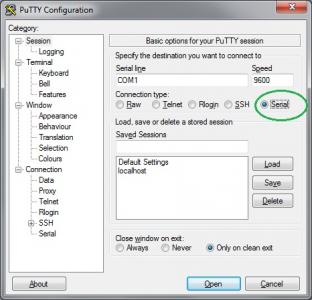
To know the correct COM# port, I believe you can check it in Device Manager, under "Ports (COM & LPT)". After you have put the correct settings in Putty, click Open to make the connection. In case you only see black terminal, press "Enter" one time. 
This post has been edited by kizwan: Nov 28 2011, 03:37 PM |
|
|
Nov 28 2011, 03:36 PM
|
|
Elite
6,931 posts Joined: Apr 2011 From: Bolehland for sure ^_^
|
QUOTE(kizwan @ Nov 28 2011, 03:33 PM) I found PDF file explaining how to properly disabled autorun on ZTE modem. Instead Hyperterminal, you can use Putty too. that's a good solution, i will pitch this at first post,.. thanks for sharing,..
USB_Modem_Config_Procedure.pdf ( 27.2k )
Number of downloads: 128
To know the correct COM# port, I believe you can check it in Device Manager, under "Ports (COM & LPT)". Then click Open to make the connection. In case you only see black terminal, press "Enter" one time.
|
|
|
Nov 28 2011, 08:02 PM
|
|
Junior Member
384 posts Joined: Jan 2006 From: Penang
|
QUOTE(layr @ Nov 25 2011, 04:54 AM) Had to get it fast and it was available (and cheap lol). Also the speeds rarely get beyond MF100 limits here. As far as I know, we can't host anything using Maxis Mobile Internet or Maxis Broadband. Not sure about corporate plans though.New question - I can't access my ssh server from outside; neither can I ping my IP, even if the server is DMZ-d. (and I did forward the port i'm using for SSH to the server) It should also be mentioned, that ports are opened from the ISP side. |
|
|
Nov 28 2011, 08:04 PM
|
|
Elite
6,931 posts Joined: Apr 2011 From: Bolehland for sure ^_^
|
QUOTE(maxcheam @ Nov 28 2011, 08:02 PM) As far as I know, we can't host anything using Maxis Mobile Internet or Maxis Broadband. Not sure about corporate plans though. QUOTE(layr @ Nov 11 2011, 10:37 PM) Hey, as TP-LINK support was as useless as it can get, i believe you guys are more competent. Max, he is from Estonia,..Problem: 3G connection gets randomly disconnected in every 20min - 1hour. Router has only 3G connection; newest firmware. Location: Estonia (north-eastern Europe); carrier EMT. Modem ZTE MF636 Settings: link 1 and link 2 >Log containing the '3g link is down' part. As time goes by, suddenly the connection drops, for a minute or so router's admin page says nothing about disconnection, then "3G USB Modem:" field goes "Identifying..." and status is "connecting..." Also the dialing takes forever. The steady light on modem, indicating active 3.5g connection, comes alive long before the router gets connected. Modem identification isn't too quick either. Signal strength is between 35-50%, never had similar problems with modem connected directly to computer. Any suggestions? Edit: following instructions found on this topic, I also disabled autorun on the modem. |
|
|
Nov 28 2011, 08:04 PM
|
|
Junior Member
384 posts Joined: Jan 2006 From: Penang
|
QUOTE(vostro78 @ Nov 23 2011, 11:24 AM) SE Elm works for me...the rest i not sure. I've tested SE Cedar and it's working as well. Just need to change the USB default mode to "Other OS - Mac or Linux" instead of "PC Mode for Windows". The router that we're using runs on Linux. Added on November 28, 2011, 8:06 pm QUOTE(chuahcs79 @ Nov 28 2011, 08:04 PM) Max, he is from Estonia,.. haha.. pardon me for not checking properly. Can't help there. Just need to make sure your mobile broadband provider allows you to host servers using their service. This post has been edited by maxcheam: Nov 28 2011, 08:06 PM |
|
|
Nov 28 2011, 08:06 PM
|
|
Elite
6,931 posts Joined: Apr 2011 From: Bolehland for sure ^_^
|
QUOTE(maxcheam @ Nov 28 2011, 08:04 PM) I've tested SE Cedar and it's working as well. Just need to change the USB default mode to "Other OS - Mac or Linux" instead of "PC Mode for Windows". The router that we're using runs on Linux. nice to know this router is so flexible to support SE,.. Added on November 28, 2011, 8:06 pm haha.. pardon me for not checking properly. Can't help there. Just need to make sure your mobile broadband provider allows you to host servers using their service. Added on November 28, 2011, 8:07 pm QUOTE(maxcheam @ Nov 28 2011, 08:04 PM) Added on November 28, 2011, 8:06 pm haha.. pardon me for not checking properly. Can't help there. Just need to make sure your mobile broadband provider allows you to host servers using their service. This post has been edited by chuahcs79: Nov 28 2011, 08:07 PM |
|
|
Nov 28 2011, 08:13 PM
|
|
Junior Member
384 posts Joined: Jan 2006 From: Penang
|
QUOTE(chuahcs79 @ Nov 28 2011, 08:06 PM) nice to know this router is so flexible to support SE,.. too bad using SE phone doesn't help me in my area. Speed is worse than my E1762.I'm waiting for this new travel 3G router from TP-Link - TL-MR3020 to be available in Malaysia. Would love to use it whenever I travel. It can be powered by any kind of USB power sources. I don't like to use MiFi devices as they need to use with battery. Though Yes Huddle can be used without the battery, but it's still expensive to use Yes 4G all over the place. Currently using it for CCTV and VNC purposes only.  |
|
|
Nov 28 2011, 09:17 PM
|
|
Junior Member
379 posts Joined: Jan 2006 From: BbBangi,Miat-Easa
|
alrite thnx for the answer.
but from ur guide it seem just open cmd and then type AT+ZCDRUN=8 but it tell me that AT+ZCDRUN=8 is not recognized as internal or external command operable program or batch file which mean it cannot open the software so any1 can teach me step by step to disable it? cuz i scared it will void my umobile modem warranty and how to revert it back |
|
|
Nov 28 2011, 09:21 PM
|
|
Elite
6,931 posts Joined: Apr 2011 From: Bolehland for sure ^_^
|
QUOTE(pal33x @ Nov 28 2011, 09:17 PM) alrite thnx for the answer. which window u use ? xp or 7 ?but from ur guide it seem just open cmd and then type AT+ZCDRUN=8 but it tell me that AT+ZCDRUN=8 is not recognized as internal or external command operable program or batch file which mean it cannot open the software so any1 can teach me step by step to disable it? cuz i scared it will void my umobile modem warranty and how to revert it back Added on November 28, 2011, 9:26 pmfor window 7 ->plug your modem into your pc and wait for pc to recognise it ( close the dialer if it pop up ) -> click start -> enter CMD in search column -> type in AT+ZCDRUN=8 (Disable cd /flashdrive autorun ) -> press enter -> done ( u will see a message showing u that autorun is disable ) -> unplug the modem from pc -> plug it in your tp link 3G router -> router will auto recognize it now This post has been edited by chuahcs79: Nov 28 2011, 09:26 PM |
|
|
Nov 28 2011, 09:36 PM
|
|
Junior Member
379 posts Joined: Jan 2006 From: BbBangi,Miat-Easa
|
already add some pic
what did i do wrong here? thnx Attached thumbnail(s) 
|
|
|
Nov 28 2011, 09:38 PM
|
|
Elite
6,931 posts Joined: Apr 2011 From: Bolehland for sure ^_^
|
QUOTE(pal33x @ Nov 28 2011, 09:36 PM) already add some pic did u plug your ZTE modem in and wait for your pc to recognize it before run the CMD thing ?what did i do wrong here? thnx between ZT & + no space,.. This post has been edited by chuahcs79: Nov 28 2011, 09:40 PM |
|
|
Nov 28 2011, 09:51 PM
|
|
Senior Member
826 posts Joined: Jan 2009
|
QUOTE(pal33x @ Nov 28 2011, 09:36 PM) already add some pic You can't execute the command in CMD. You need to connect to the modem first. For this you can use Putty. After you have made the connection, then you can run the command to disabled autorun.what did i do wrong here? thnx |
|
|
Nov 28 2011, 10:21 PM
|
|
Junior Member
379 posts Joined: Jan 2006 From: BbBangi,Miat-Easa
|
oic...thnx....will test tomorrow...wan tutup already .if succesful will recommend this router to my customer...btw im a umobile worker hee~
thnx ya kizwan and chuah )This post has been edited by pal33x: Nov 28 2011, 10:21 PM |
|
|
Nov 28 2011, 10:29 PM
|
|
Elite
6,931 posts Joined: Apr 2011 From: Bolehland for sure ^_^
|
QUOTE(pal33x @ Nov 28 2011, 10:21 PM) oic...thnx....will test tomorrow...wan tutup already .if succesful will recommend this router to my customer...btw im a umobile worker hee~ anytime bro,. sharing is caring.. thnx ya kizwan and chuah ) |
|
|
Nov 30 2011, 10:15 PM
|
|
Junior Member
379 posts Joined: Jan 2006 From: BbBangi,Miat-Easa
|
hye there i still unable to disable the autorun feature.
actually what is step by step procedure? 1.launch putty (i dl latest ver 0.61 beta) 2.set the command as the pic. 3.? 4.? 5.? sorry i already tried but still cant.its not like i want to be spoonfeed but still cant use my umobile with the router |
|
|
Nov 30 2011, 10:18 PM
|
|
Elite
6,931 posts Joined: Apr 2011 From: Bolehland for sure ^_^
|
QUOTE(pal33x @ Nov 30 2011, 10:15 PM) hye there i still unable to disable the autorun feature. u can try to use the window xp or win 7 method instead of putty,.actually what is step by step procedure? 1.launch putty (i dl latest ver 0.61 beta) 2.set the command as the pic. 3.? 4.? 5.? sorry i already tried but still cant.its not like i want to be spoonfeed but still cant use my umobile with the router |
|
|
Nov 30 2011, 10:24 PM
|
|
Junior Member
379 posts Joined: Jan 2006 From: BbBangi,Miat-Easa
|
QUOTE(chuahcs79 @ Nov 30 2011, 10:18 PM) u can try to use the window xp or win 7 method instead of putty,. and what is the method? i try the cmd thing but noting happen wor it said cant execute  |
|
|
Nov 30 2011, 11:06 PM
|
|
Elite
6,931 posts Joined: Apr 2011 From: Bolehland for sure ^_^
|
QUOTE(pal33x @ Nov 30 2011, 10:24 PM) and what is the method? i try the cmd thing but noting happen wor it said cant execute You can't execute the command in CMD without step below->You need to connect to the modem first. ->For this you can use Putty ( FOLLOW THE FIRST POST ). ->After you have made the connection, then you can run the command to disabled autorun. This post has been edited by chuahcs79: Nov 30 2011, 11:07 PM |
|
|
Dec 1 2011, 12:20 PM
|
|
Junior Member
379 posts Joined: Jan 2006 From: BbBangi,Miat-Easa
|
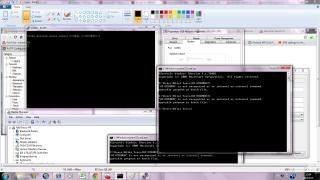
ok so the outcome should be like this? then can use?
sorry im ask here cuz need to settle my customer problem with their modem Attached thumbnail(s) 
|
|
|
Dec 1 2011, 12:54 PM
|
|
Elite
6,931 posts Joined: Apr 2011 From: Bolehland for sure ^_^
|
QUOTE(pal33x @ Dec 1 2011, 12:20 PM) ok so the outcome should be like this? then can use? yea u did it already ,. u see from the screen shot it stated, 0 failed : 1 success.. in putty CMDsorry im ask here cuz need to settle my customer problem with their modem that mean is done,.. now u can plug this modem in TP LINK router,.. and enjoy,.. This post has been edited by chuahcs79: Dec 1 2011, 12:55 PM |
|
|
Dec 2 2011, 10:52 PM
|
|
Junior Member
379 posts Joined: Jan 2006 From: BbBangi,Miat-Easa
|
thnx all it work perfectly ~
but my customer complain cannot connect with lan to get the internet 3g since the modem is not with me so i cannot check the setting la. so if cucuk usb modem then connect lan port shud be automatic get internet rite or need some sort of setting? This post has been edited by pal33x: Dec 2 2011, 10:53 PM |
|
|
Dec 2 2011, 11:35 PM
|
|
Elite
6,931 posts Joined: Apr 2011 From: Bolehland for sure ^_^
|
QUOTE(pal33x @ Dec 2 2011, 10:52 PM) thnx all it work perfectly ~ the TL-MR3420 router default setting is auto connect and just need to set the apn or slelect it from country -> apn ( default ) but my customer complain cannot connect with lan to get the internet 3g since the modem is not with me so i cannot check the setting la. so if cucuk usb modem then connect lan port shud be automatic get internet rite or need some sort of setting? so far i only choose maxis since i am using maxis then it auto dial and connect,.. no other setting needed though,. can u explain in detail what your customer mean by cannot connect with LAN to get internet 3G ? |
|
|
Dec 3 2011, 12:27 AM
|
|
Senior Member
826 posts Joined: Jan 2009
|
Whether connected via ethernet (wired) or wireless, client computer will get an IP address from router (DHCP). If the customer is using wired connection & unable to browse internet, most probably the computer didn't get an IP address or he set static IP address on the ethernet port on his computer.
|
|
|
Dec 3 2011, 02:31 AM
|
|
Junior Member
379 posts Joined: Jan 2006 From: BbBangi,Miat-Easa
|
QUOTE(kizwan @ Dec 3 2011, 12:27 AM) Whether connected via ethernet (wired) or wireless, client computer will get an IP address from router (DHCP). If the customer is using wired connection & unable to browse internet, most probably the computer didn't get an IP address or he set static IP address on the ethernet port on his computer. oic so if automatic can get internet its mean that my client pc is too old or he not set auto in network setting thnx |
|
|
Dec 5 2011, 12:04 AM
|
|
Elite
6,931 posts Joined: Apr 2011 From: Bolehland for sure ^_^
|
QUOTE(pal33x @ Dec 3 2011, 02:31 AM) oic so if automatic can get internet its mean that my hope u able to get it work out for your customer,.. client pc is too old or he not set auto in network setting thnx |
|
|
Dec 9 2011, 01:00 PM
|

Junior Member
28 posts Joined: Jan 2011
|
Speedtest when im using Huawei E220 + TPLink MR3420 + TPLINK WN821N(on my desktop) + im using Google DNS Server
8.8.8.8 Primary, 8.8.4.4 Secondary  Speedtest when im using ZTE MF190(given by Umoble) directly port to my desktop This one im using Umobile Provided DNS Server  Im not using any speed booster. is this consider okay guys?Ampang area near Hospital Ampang-Pandan Mewah  This post has been edited by Chan Hensem: Dec 9 2011, 01:03 PM |
|
|
Dec 9 2011, 05:33 PM
|
|
Elite
6,931 posts Joined: Apr 2011 From: Bolehland for sure ^_^
|
QUOTE(Chan Hensem @ Dec 9 2011, 01:00 PM) Speedtest when im using Huawei E220 + TPLink MR3420 + TPLINK WN821N(on my desktop) + im using Google DNS Server i think in term of download speed, your E220 + TL-MR3420 doing a better job for your UM compare to ZTE MF 190 direct plug in alone,.. 8.8.8.8 Primary, 8.8.4.4 Secondary Speedtest when im using ZTE MF190(given by Umoble) directly port to my desktop This one im using Umobile Provided DNS Server Im not using any speed booster. is this consider okay guys?Ampang area near Hospital Ampang-Pandan Mewah |
|
|
Dec 16 2011, 11:02 AM
|
|
Junior Member
168 posts Joined: Oct 2008
|
QUOTE(chuahcs79 @ Dec 9 2011, 05:33 PM) Can I connect my YES Zoom to the WAN port and use it as router and as wifi access point? If I place my Zoom at 1st floor i can get 3-4 bars, but only 1 bar at ground floor. So if i place my Zoom at 1st floor and connect it to MR3420 which will be place at ground floor, and use it as wifi hot spot can? or i connect my notebook via RJ45 to this router. |
|
|
Dec 16 2011, 04:15 PM
|
|
Elite
6,931 posts Joined: Apr 2011 From: Bolehland for sure ^_^
|
QUOTE(ERN2 @ Dec 16 2011, 11:02 AM) QUOTE(chuahcs79 @ Dec 9 2011, 05:33 PM) Can I connect my YES Zoom to the WAN port and use it as router and as wifi access point? If I place my Zoom at 1st floor i can get 3-4 bars, but only 1 bar at ground floor. So if i place my Zoom at 1st floor and connect it to MR3420 which will be place at ground floor, and use it as wifi hot spot can? or i connect my notebook via RJ45 to this router. |
|
|
Dec 18 2011, 06:59 PM
|
|
Junior Member
65 posts Joined: Jul 2009
|
hello guys, i am also happy owner of this router.
been using it for around 1 year. 24/7 online with e173 on maxis 3g. i prefer openwrt firmware, it seems more stable than the stock firmware. anyone here uses openwrt too? care to share your experience |
|
|
Dec 18 2011, 07:12 PM
|
|
Elite
6,931 posts Joined: Apr 2011 From: Bolehland for sure ^_^
|
QUOTE(shinichi87 @ Dec 18 2011, 06:59 PM) hello guys, i am also happy owner of this router. i wanted to try with the open wrt , but i havent try it yet,.. been using it for around 1 year. 24/7 online with e173 on maxis 3g. i prefer openwrt firmware, it seems more stable than the stock firmware. anyone here uses openwrt too? care to share your experience are u using open wrt now ? |
|
|
Dec 18 2011, 07:28 PM
|
|
Junior Member
65 posts Joined: Jul 2009
|
yep, been using openwrt firmware for at least 5 months and still using it right now
Added on December 18, 2011, 7:31 pmMy area: wangsa maju  This post has been edited by shinichi87: Dec 18 2011, 07:31 PM |
|
|
Dec 18 2011, 08:21 PM
|
|
Senior Member
826 posts Joined: Jan 2009
|
Hi,
How to install the openwrt firmware? Can you give instruction to install the firmware? |
|
|
Dec 18 2011, 08:34 PM
|
|
Elite
6,931 posts Joined: Apr 2011 From: Bolehland for sure ^_^
|
QUOTE(shinichi87 @ Dec 18 2011, 07:28 PM) yep, been using openwrt firmware for at least 5 months and still using it right now if we flash it to open wrt, we still can flash it back to stock firmware anytime right ? Added on December 18, 2011, 7:31 pmMy area: wangsa maju wondering how to flash it to open wrt properly too, any guide there for refer ? |
|
|
Dec 18 2011, 10:37 PM
|
|
Senior Member
826 posts Joined: Jan 2009
|
The instruction at openwrt website is a bit confusing. However, I managed to install the openwrt firmware on my router. The firmware I use doesn't have Web GUI. To be honest, I don't know it doesn't have Web GUI until it finish updating the firmware. So, I need to install Web GUI manually. The Web GUI sorted out but unfortunately, I can't figure out how to use it with 3G modem.
EDIT: OK, there is one last configuration I need to do before I can use 3G modem with it. In summary:-
This post has been edited by kizwan: Dec 18 2011, 10:53 PM |
|
|
Dec 19 2011, 01:33 AM
|
|
Elite
6,931 posts Joined: Apr 2011 From: Bolehland for sure ^_^
|
QUOTE(kizwan @ Dec 18 2011, 10:37 PM) The instruction at openwrt website is a bit confusing. However, I managed to install the openwrt firmware on my router. The firmware I use doesn't have Web GUI. To be honest, I don't know it doesn't have Web GUI until it finish updating the firmware. So, I need to install Web GUI manually. The Web GUI sorted out but unfortunately, I can't figure out how to use it with 3G modem. so complicated,.. EDIT: OK, there is one last configuration I need to do before I can use 3G modem with it. In summary:-
 think i will stay with stock firmware,.. |
|
|
Dec 19 2011, 01:50 AM
|
|
Senior Member
826 posts Joined: Jan 2009
|
Good call!
|
|
|
Dec 19 2011, 04:38 PM
|
|
Elite
6,931 posts Joined: Apr 2011 From: Bolehland for sure ^_^
|
QUOTE(kizwan @ Dec 19 2011, 01:50 AM) Good call! i just dont want to bricks my to-mr 3420 router as i am not very good in those thingy work,. |
|
|
Dec 19 2011, 05:34 PM
|
|
Senior Member
826 posts Joined: Jan 2009
|
I tried it last night. I want to see if I get faster speed with openwrt firmware. (Bringing you back to the past; do you remember that my SE phone when connected to the router, speed is slow? Because of this, I didn't use the router, I just plug my SE phone directly to my notebook.) Everything configured except I can't open any website. I can ping, nslookup & everything but I can't open any website. I checked & found out the firewall in the router blocked port 80 (http). Since it's very late when I try this, I didn't tried my best to solved the firewall problem. So, I flashed with original firmware before I go to sleep.
@shinichi87, can you help me solved the firewall issue? Thanks. This post has been edited by kizwan: Dec 19 2011, 05:36 PM |
|
|
Dec 19 2011, 05:46 PM
|
|
Elite
6,931 posts Joined: Apr 2011 From: Bolehland for sure ^_^
|
QUOTE(kizwan @ Dec 19 2011, 05:34 PM) I tried it last night. I want to see if I get faster speed with openwrt firmware. (Bringing you back to the past; do you remember that my SE phone when connected to the router, speed is slow? Because of this, I didn't use the router, I just plug my SE phone directly to my notebook.) Everything configured except I can't open any website. I can ping, nslookup & everything but I can't open any website. I checked & found out the firewall in the router blocked port 80 (http). Since it's very late when I try this, I didn't tried my best to solved the firewall problem. So, I flashed with original firmware before I go to sleep. when i plug my SE W705 into my router, speed is normal and everything work fine, just that router dial the phone slow sometimes takes around 15~45sec,.. and the H signal is gone by the time router start dialing,.. @shinichi87, can you help me solved the firewall issue? Thanks. |
|
|
Dec 19 2011, 06:08 PM
|
|
Senior Member
826 posts Joined: Jan 2009
|
You're using original SE USB data cable right?
 This post has been edited by kizwan: Dec 19 2011, 06:16 PM |
|
|
Dec 19 2011, 08:33 PM
|
|
Junior Member
65 posts Joined: Jul 2009
|
well, the easiest way to use openwrt firmware, is to use the one that has already been configured with a web GUI. in my opinion, if you afraid you might brick your router, i suggest to go with this http://eko.one.pl/?p=openwrt-gargoylepl
the only thing that makes your life a lil bit difficult is that, the firmware is not in english, but it is easily configured i'll post some steps in the next post after getting some screenshots for you guys to view |
|
|
Dec 19 2011, 08:35 PM
|
|
Elite
6,931 posts Joined: Apr 2011 From: Bolehland for sure ^_^
|
QUOTE(kizwan @ Dec 19 2011, 06:08 PM) You're using original SE USB data cable right? yes. i am using that with router and direct plug with pc,.. |
|
|
Dec 19 2011, 08:47 PM
|
|
Junior Member
65 posts Joined: Jul 2009
|
1) download openwrt firmware from http://ecco.selfip.net/gargoyle-pl/ar71xx/...hfs-factory.bin
2) upgrade your tl-mr3420 firmware just as you normally do with the openwrt firmware you just downloaded 3) you will see your web interface like this 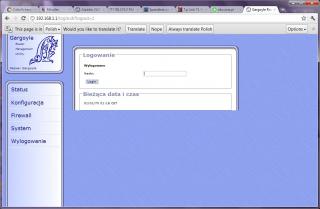
4) the default password for the web GUI is 'password' without the '. after you have enter the password, it will ask for new password you want to use for the web GUI. 5) next configure your router setting similar like this, 3g UMTS and set your apn / username /password. also configure your wifi as needed, then you're done 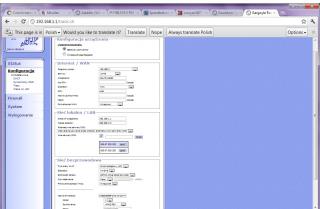
6) if you want to change to stock firmware, you can go to here 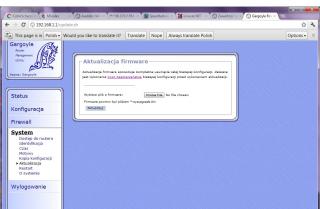
|
|
|
Dec 19 2011, 08:57 PM
|
|
Elite
6,931 posts Joined: Apr 2011 From: Bolehland for sure ^_^
|
QUOTE(shinichi87 @ Dec 19 2011, 08:47 PM) 1) download openwrt firmware from http://ecco.selfip.net/gargoyle-pl/ar71xx/...hfs-factory.bin so does this open wrt support se phone like stock firmware ? or it only support usb modem ?2) upgrade your tl-mr3420 firmware just as you normally do with the openwrt firmware you just downloaded 3) you will see your web interface like this
4) the default password for the web GUI is 'password' without the '. after you have enter the password, it will ask for new password you want to use for the web GUI. 5) next configure your router setting similar like this, 3g UMTS and set your apn / username /password. also configure your wifi as needed, then you're done
6) if you want to change to stock firmware, you can go to here
|
|
|
Dec 19 2011, 09:01 PM
|
|
Junior Member
65 posts Joined: Jul 2009
|
QUOTE(chuahcs79 @ Dec 19 2011, 08:57 PM) so does this open wrt support se phone like stock firmware ? or it only support usb modem ? well i dont have experience with that, never tried. but i think it should be able to detect the phone at least, if the stock firmware can. you can always revert to your previous firmware without any problem. |
|
|
Dec 19 2011, 09:22 PM
|
|
Elite
6,931 posts Joined: Apr 2011 From: Bolehland for sure ^_^
|
QUOTE(shinichi87 @ Dec 19 2011, 09:01 PM) well i dont have experience with that, never tried. but i think it should be able to detect the phone at least, if the stock firmware can. you can always revert to your previous firmware without any problem. yea i am trying to flash it now,. will try what device it can support, as the stock firmware is really poor,. because most people using open wrt saying comments that it does help on boost performances on modem instead of like mine drag down the performances,.. Added on December 19, 2011, 10:25 pm QUOTE(shinichi87 @ Dec 19 2011, 09:01 PM) well i dont have experience with that, never tried. but i think it should be able to detect the phone at least, if the stock firmware can. you can always revert to your previous firmware without any problem. Just tested with that open wrt,.. too bad it cannot support SE phone,. and the status pages even show the signal in % and RSSI in -dBm too,. good firmware though,.. but it doesnt make any different in speed, still have to depends on what modem we use,. summary for people who using this router with SE phone, best is stay with stock firmware,.. This post has been edited by chuahcs79: Dec 19 2011, 10:25 PM |
|
|
Dec 20 2011, 07:42 PM
|
|
Junior Member
77 posts Joined: May 2008
|
I just bought this router and while surfing through TP-Link's website I notice that it has different firmware versions. What is the correct version to use or is it like D-link that says not to upgrade if bought out of South East Asia?
|
|
|
Dec 20 2011, 07:45 PM
|
|
Elite
6,931 posts Joined: Apr 2011 From: Bolehland for sure ^_^
|
QUOTE(Erehwon @ Dec 20 2011, 07:42 PM) I just bought this router and while surfing through TP-Link's website I notice that it has different firmware versions. What is the correct version to use or is it like D-link that says not to upgrade if bought out of South East Asia? just check whether ur current firmware is newer or the websites is newer.. if your current firmware is working fine for your router , just leave it and dont upgrade,.. if u feel like there is slightly problems and so on, u can choose to upgrade it,. download from the websites,.. |
|
|
Dec 20 2011, 08:08 PM
|
|
Senior Member
826 posts Joined: Jan 2009
|
QUOTE(chuahcs79 @ Dec 19 2011, 09:22 PM) Just tested with that open wrt,.. too bad it cannot support SE phone,. In the configuration page, does 3G modem is detected as /dev/ttyACMX (X is 0 or 1 or so on)? and the status pages even show the signal in % and RSSI in -dBm too,. good firmware though,.. but it doesnt make any different in speed, still have to depends on what modem we use,. summary for people who using this router with SE phone, best is stay with stock firmware,.. |
|
|
Dec 20 2011, 08:10 PM
|
|
Elite
6,931 posts Joined: Apr 2011 From: Bolehland for sure ^_^
|
QUOTE(kizwan @ Dec 20 2011, 08:08 PM) In the configuration page, does 3G modem is detected as /dev/ttyACMX (X is 0 or 1 or so on)? well that pages all in polish a bit confusing, LOL, i waited 15 minutes nothing show and nothing connect,. my 3G LED light is not on when i plug in SE W705 |
|
|
Dec 20 2011, 11:49 PM
|
|
Junior Member
77 posts Joined: May 2008
|
Nvrm solved.. din realise that Putty doesnt display typed words
This post has been edited by Erehwon: Dec 21 2011, 12:06 AM |
|
|
Dec 21 2011, 01:31 AM
|
|
Elite
6,931 posts Joined: Apr 2011 From: Bolehland for sure ^_^
|
QUOTE(Erehwon @ Dec 20 2011, 11:49 PM) Nvrm solved.. din realise that Putty doesnt display typed words good to know,.. hope it works out for you |
|
|
Dec 21 2011, 02:15 AM
|
|
Junior Member
77 posts Joined: May 2008
|
Ugh still struggling.. either the router hates ps3 or umobile hates ps3
|
|
|
Dec 21 2011, 02:22 AM
|
|
Senior Member
826 posts Joined: Jan 2009
|
Finally, I get correct 3G speed now with OpenWRT firmware. The pppd in original firmware is not compatible with my SE phone. That's why I got low speed. Now, the speed I get using this 3G router is similar with what I get when connected directly to notebook.
I use OpenWRT firmware from Trunk & using manual installation method.   This post has been edited by kizwan: Dec 21 2011, 02:59 AM |
|
|
Dec 21 2011, 02:39 AM
|
|
Elite
6,931 posts Joined: Apr 2011 From: Bolehland for sure ^_^
|
QUOTE(kizwan @ Dec 21 2011, 02:22 AM) Finally, I get correct 3G speed now with OpenWRT firmware. The pppd in original firmware is not compatible with my SE phone. That's why I got low speed. Now, the speed I get using this 3G router is similar with what I get when connected directly to notebook. can that support nokia phone as modem ? wanted to try out,. I use OpenWRT firmware from Trunk & using manual installation method.  which version u install ? This post has been edited by chuahcs79: Dec 21 2011, 02:41 AM |
|
|
Dec 21 2011, 02:58 AM
|
|
Senior Member
826 posts Joined: Jan 2009
|
I use firmware "Web interface" (in "None" column), branch Trunk, under "*-factory.bin" table/release ( http://wiki.openwrt.org/toh/tp-link/tl-mr3420 ). Remember, this one doesn't have Web GUI & 3G function. So you need to install Web GUI & 3G function manually ( http://forum.lowyat.net/index.php?showtopi...post&p=47556174 ).
I don't know whether Nokia phones are supported or not. If your phones, regardless any brands, works in linux, so I guess it should work with OpenWRT firmware. This post has been edited by kizwan: Dec 21 2011, 03:06 AM |
|
|
Dec 21 2011, 03:03 AM
|
|
Elite
6,931 posts Joined: Apr 2011 From: Bolehland for sure ^_^
|
QUOTE(kizwan @ Dec 21 2011, 02:58 AM) I use "Web interface" (in "None" column), Branch Trunk ( http://wiki.openwrt.org/toh/tp-link/tl-mr3420 ). Remember, this one doesn't have Web GUI & 3G function. So you need to install Web GUI & 3G function manually ( http://forum.lowyat.net/index.php?showtopi...post&p=47556174 ). just though is kind of like wasted since nokia X3-02 can get me high speed in maxis, but kind of like no point if i cannot use it with my this router to share the connection,.. using connectify is sometimes troublesome,. I don't know whether Nokia phones are supported or not. If your phones, regardless any brands, works in linux, so I guess it should work with OpenWRT firmware. |
|
|
Dec 21 2011, 03:07 AM
|
|
Senior Member
826 posts Joined: Jan 2009
|
If your nokia can connect using ppp in linux, it should work with this router too using openwrt firmware.
|
|
|
Dec 21 2011, 03:09 AM
|
|
Elite
6,931 posts Joined: Apr 2011 From: Bolehland for sure ^_^
|
QUOTE(kizwan @ Dec 21 2011, 03:07 AM) If your nokia can connect using ppp in linux, it should work with this router too using openwrt firmware. not very sure whether nokia can work with linux or not, because i am not very good in linux, my current stock firmware cannot dial this nokia x3-02 phone,. but the 3G LED light is ON,.. |
|
|
Dec 23 2011, 02:39 PM
|
|
Junior Member
168 posts Joined: Oct 2008
|
QUOTE Can I connect my YES Zoom to the WAN port and use it as router and as wifi access point? If I place my Zoom at 1st floor i can get 3-4 bars, but only 1 bar at ground floor. So if i place my Zoom at 1st floor and connect it to MR3420 which will be place at ground floor, and use it as wifi hot spot can? or i connect my notebook via RJ45 to this router. QUOTE(chuahcs79 @ Dec 16 2011, 04:15 PM) yes u can, u can plug in and use this router as wireless acess point as wan port I was comtemplating between MR3420 and WR1043 for few days upto last minutes when I was in shop.I could not decide betwwen the 2, I dont need the 3G on MR3420, and I dont need the disk share on Wr1043. cost about 50% different. just for the term Gigabit, at the end i opted for WR1043. may need the SG1005D gigabit switch in later stage. This post has been edited by ERN2: Dec 23 2011, 02:40 PM |
|
|
Dec 23 2011, 07:08 PM
|
|
Junior Member
188 posts Joined: Jun 2008
|
hi all..help needed..just bought my tp link mr3220 router today..rm75 at digital mall..now my router cannot detect my ZTE MF190 ( umobile)..how to make it? already try using instruction from page 1 :-
type in AT+ZCDRUN=8 (Disable cd /flashdrive autorun ) -> press enter after press enter the msg appear :- 'AT+ZCDRUN' not recognized as an internal or external command,operable program or batch file. any idea? tq This post has been edited by kazibul: Dec 23 2011, 08:02 PM |
|
|
Dec 23 2011, 09:20 PM
|
|
Elite
6,931 posts Joined: Apr 2011 From: Bolehland for sure ^_^
|
QUOTE(ERN2 @ Dec 23 2011, 02:39 PM) I was comtemplating between MR3420 and WR1043 for few days upto last minutes when I was in shop. well either one of it is good choices,.. I could not decide betwwen the 2, I dont need the 3G on MR3420, and I dont need the disk share on Wr1043. cost about 50% different. just for the term Gigabit, at the end i opted for WR1043. may need the SG1005D gigabit switch in later stage. Added on December 23, 2011, 9:22 pm QUOTE(kazibul @ Dec 23 2011, 07:08 PM) hi all..help needed..just bought my tp link mr3220 router today..rm75 at digital mall..now my router cannot detect my ZTE MF190 ( umobile)..how to make it? already try using instruction from page 1 :- well, first of all, u need to plug your ZTE MF190 in your pc, then install the dialer software for your pc to recognize this zte mf190 modem. after all drivers install then u can start this type in AT+ZCDRUN=8 (Disable cd /flashdrive autorun ) -> press enter after press enter the msg appear :- 'AT+ZCDRUN' not recognized as an internal or external command,operable program or batch file. any idea? tq For window xp : -> plug in your zte modem in pc/laptop -> wait for your pc/laptop to recognize your modem ( close the dialer if it pop up ) -> click start -> click run -> type in CMD ( comand prompt ) -> type in AT+ZCDRUN=8 (Disable cd /flashdrive autorun ) -> press enter -> done ( u will see a message showing that autorun is diable now ) -> unplug your modem from pc now -> plug it into TP Link 3G router -> router will auto recognize it now and start dialer your ZTE modem For window 7: ->plug your ZTE modem into your pc/laptop -> wait for pc/laptop to recognise it ( close the dialer if it pop up ) -> click start -> enter CMD in search column -> type in AT+ZCDRUN=8 (Disable cd /flashdrive autorun ) -> press enter -> done ( u will see a message showing u that autorun is disable ) -> unplug the modem from pc -> plug it in your TP Link 3G router -> router will auto recognize it now and start dialer your ZTE modem There is few people using ZTE MF190 with tp link router, they follow those steps and their router can recognize the zte mf190 modem now. ( for tp link router to recognize Zte modem, u will have to do those step to turn off the autorun CD function.. ) hope this helps,.. This post has been edited by chuahcs79: Dec 23 2011, 09:24 PM |
|
|
Dec 23 2011, 09:33 PM
|
|
Junior Member
188 posts Joined: Jun 2008
|
QUOTE(chuahcs79 @ Dec 23 2011, 09:20 PM) well either one of it is good choices,.. tq bro..follow the steps laready before for windows 7..after press enter instead of msg showing autorun is disable this msg appear:-Added on December 23, 2011, 9:22 pm well, first of all, u need to plug your ZTE MF190 in your pc, then install the dialer software for your pc to recognize this zte mf190 modem. after all drivers install then u can start this For window xp : -> plug in your zte modem in pc/laptop -> wait for your pc/laptop to recognize your modem ( close the dialer if it pop up ) -> click start -> click run -> type in CMD ( comand prompt ) -> type in AT+ZCDRUN=8 (Disable cd /flashdrive autorun ) -> press enter -> done ( u will see a message showing that autorun is diable now ) -> unplug your modem from pc now -> plug it into TP Link 3G router -> router will auto recognize it now and start dialer your ZTE modem For window 7: ->plug your ZTE modem into your pc/laptop -> wait for pc/laptop to recognise it ( close the dialer if it pop up ) -> click start -> enter CMD in search column -> type in AT+ZCDRUN=8 (Disable cd /flashdrive autorun ) -> press enter -> done ( u will see a message showing u that autorun is disable ) -> unplug the modem from pc -> plug it in your TP Link 3G router -> router will auto recognize it now and start dialer your ZTE modem There is few people using ZTE MF190 with tp link router, they follow those steps and their router can recognize the zte mf190 modem now. ( for tp link router to recognize Zte modem, u will have to do those step to turn off the autorun CD function.. ) hope this helps,.. 'AT+ZCDRUN' not recognized as an internal or external command,operable program or batch file. any idea..tq |
|
|
Dec 23 2011, 09:54 PM
|
|
Elite
6,931 posts Joined: Apr 2011 From: Bolehland for sure ^_^
|
QUOTE(kazibul @ Dec 23 2011, 09:33 PM) tq bro..follow the steps laready before for windows 7..after press enter instead of msg showing autorun is disable this msg appear:- have u try the putty method by Kizwan ? 'AT+ZCDRUN' not recognized as an internal or external command,operable program or batch file. any idea..tq |
|
|
Dec 23 2011, 10:24 PM
|
|
Junior Member
188 posts Joined: Jun 2008
|
problem solve bro..dun know how now my router can detect the mf 190..me also feel weird coz follow the same step still same message appear..feel give up ..unplug my modem plug it to the router suddenly it detect..huhuhu..dun know how it happen..tq all..
|
|
|
Dec 23 2011, 10:29 PM
|
|
Elite
6,931 posts Joined: Apr 2011 From: Bolehland for sure ^_^
|
QUOTE(kazibul @ Dec 23 2011, 10:24 PM) problem solve bro..dun know how now my router can detect the mf 190..me also feel weird coz follow the same step still same message appear..feel give up ..unplug my modem plug it to the router suddenly it detect..huhuhu..dun know how it happen..tq all.. so glad to hear that. i guess what u did all those step really does work, other than display the failed messages, LOL enjoy your router now FULLY,. congrats bro |
|
|
Dec 23 2011, 11:09 PM
|
|
Junior Member
188 posts Joined: Jun 2008
|
QUOTE(chuahcs79 @ Dec 23 2011, 10:29 PM) so glad to hear that. i guess what u did all those step really does work, other than display the failed messages, LOL yup..thanks bro..also wondering how..hahaha..does'nt matter as long it work..tq for the step..now enjoy sharing wireless with my brother...using celcom skmm pack..rm25 for unlimited quota..quite okla...can maintain 50~80 kbps for torrent downloading..planning to terminate my u-mobile..huhuhu enjoy your router now FULLY,. congrats bro |
|
|
Dec 24 2011, 04:49 AM
|
|
Elite
6,931 posts Joined: Apr 2011 From: Bolehland for sure ^_^
|
QUOTE(kazibul @ Dec 23 2011, 11:09 PM) yup..thanks bro..also wondering how..hahaha..does'nt matter as long it work..tq for the step..now enjoy sharing wireless with my brother...using celcom skmm pack..rm25 for unlimited quota..quite okla...can maintain 50~80 kbps for torrent downloading..planning to terminate my u-mobile..huhuhu well, as i always believe "sharing is Caring".. yea, we as consumer will always go for the cheapest and better deal for sure,.. |
|
|
Dec 28 2011, 12:33 PM
|

All Stars
15,773 posts Joined: Jan 2003 From: Capital Wasteland 
|
QUOTE(fruitie @ Nov 6 2011, 07:25 PM) Erm, plan to buy this router to use with my E1762. After started using E1762 with my Aztech HW550-3G, I noticed that it is difficult to get it connected. The blue LED on E1762 keeps blinking non-stop and I can't seem to get it connected. I have this issue for my E1762 (not sure why) However, when I was using ZTE MF622 such issue did not happen. It got connected easily... For those using this router with E1762, is it difficult to get it connected? Or it takes long time to be connected? random disconnection and very slow to reconnect. So for me the fastest way is to reboot the modem (in some cases, I have to power off and on the router). I notice if the line (maxis) is down (due to bad weather/no signal), it will somehow hang my router Currently using my old K3565, and so far stable for the last 2 weeks. btw some antenna and it manage to boost up the signal from 10 to 50% |
|
|
Dec 28 2011, 12:53 PM
|
|
Elite
6,931 posts Joined: Apr 2011 From: Bolehland for sure ^_^
|
QUOTE(miloy2k @ Dec 28 2011, 12:33 PM) I have this issue for my E1762 (not sure why) well, if u using maxis, u could try to use MDMA to force your E1762 work on single 3G band 900 or 2100 instead of scanning through out all signal available before can connect,.. random disconnection and very slow to reconnect. So for me the fastest way is to reboot the modem (in some cases, I have to power off and on the router). I notice if the line (maxis) is down (due to bad weather/no signal), it will somehow hang my router Currently using my old K3565, and so far stable for the last 2 weeks. btw some antenna and it manage to boost up the signal from 10 to 50% u can download it here refer here open the file u download, then plug your E1762 in your computer, and go under band config to select single 3G signal u want to use, and then click apply and ok, and unplug it from pc and plug in router,.. ur router will dialer faster than last time,.. hope it helps you outs,.. |
|
|
Dec 28 2011, 03:46 PM
|
|
All Stars
15,773 posts Joined: Jan 2003 From: Capital Wasteland
|
tq bro, will test out when I reach home
|
|
|
Dec 28 2011, 07:45 PM
|
|
Staff
72,807 posts Joined: Sep 2005 From: KUL
|
QUOTE(miloy2k @ Dec 28 2011, 12:33 PM) I have this issue for my E1762 (not sure why) I don't have random disconnection anymore after I flashed to the latest firmware and using RAS (modem) now instead of NDIS. random disconnection and very slow to reconnect. So for me the fastest way is to reboot the modem (in some cases, I have to power off and on the router). I notice if the line (maxis) is down (due to bad weather/no signal), it will somehow hang my router Currently using my old K3565, and so far stable for the last 2 weeks. btw some antenna and it manage to boost up the signal from 10 to 50% This post has been edited by fruitie: Dec 28 2011, 07:46 PM |
|
|
Jan 1 2012, 10:09 AM
|
|
Senior Member
1,187 posts Joined: Oct 2009
|
happy new year everyone.
i face problem to turn off autorun for my MF190 when i connect it with putty, and it just stuck there forvever and nothing happen. |
|
|
Jan 2 2012, 10:26 AM
|
|
Elite
6,931 posts Joined: Apr 2011 From: Bolehland for sure ^_^
|
QUOTE(wc_how @ Jan 1 2012, 10:09 AM) happy new year everyone. did you install the drivers and wait for your pc to recognize it before you start putty ? i face problem to turn off autorun for my MF190 when i connect it with putty, and it just stuck there forvever and nothing happen. |
|
|
Jan 2 2012, 11:10 AM
|
|
Senior Member
1,187 posts Joined: Oct 2009
|
yup, i spent with the usb modem for 3months before i move to the router.
and i can see the modem com port in device manager. it just stuck there forever :s |
|
|
Jan 2 2012, 11:25 AM
|
|
Elite
6,931 posts Joined: Apr 2011 From: Bolehland for sure ^_^
|
QUOTE(wc_how @ Jan 2 2012, 11:10 AM) yup, i spent with the usb modem for 3months before i move to the router. did you miss any step ? if u able to see the comport then should be able to turn it off,.. weird and i can see the modem com port in device manager. it just stuck there forever :s |
|
|
Jan 2 2012, 02:34 PM
|
|
Senior Member
1,187 posts Joined: Oct 2009
|
plug the modem, wait the dialer, close it
open the putty, setup all the setting, and finally connect. i guess i never miss a step. |
|
|
Jan 2 2012, 02:59 PM
|
|
Senior Member
826 posts Joined: Jan 2009
|
Does com port number is correct? You did check it in Device Manager, right?
|
|
|
Jan 2 2012, 03:02 PM
|
|
Elite
6,931 posts Joined: Apr 2011 From: Bolehland for sure ^_^
|
if everything is correctthe putty should work the way it should though,..
|
|
|
Jan 2 2012, 08:48 PM
|
|
Senior Member
1,187 posts Joined: Oct 2009
|
i guess everything is correct.
just dont know why it can't connect via putty. |
|
|
Jan 2 2012, 09:36 PM
|
|
Senior Member
826 posts Joined: Jan 2009
|
Putty make connection via COM port. So, COM port number must correct for successful connection. Did you check it in Device Manager for the COM port number?
|
|
|
Jan 2 2012, 11:03 PM
|
|
Senior Member
1,187 posts Joined: Oct 2009
|
yes,i did.
it just stuck there forever. i tried to unplug the modem, and the result was immediately connection lost from putty. |
|
|
Jan 3 2012, 01:04 PM
|
|
Elite
6,931 posts Joined: Apr 2011 From: Bolehland for sure ^_^
|
i think is easier to screenshot it and posted here, so we know where u stuck actually.. is weird quite a lot of people go through with every step with putty without any problems,..
|
|
|
Jan 3 2012, 03:55 PM
|
|
Senior Member
1,187 posts Joined: Oct 2009
|
hmm... i might post a screenshot i am free later.i am on office pc now.
it stuck after i click connect in putty. the program is whole black page, with a square on top. cannot click anything or type anything. Added on January 3, 2012, 7:21 pmThe putty just stuck in here forever.  This post has been edited by wc_how: Jan 3 2012, 07:21 PM |
|
|
Jan 15 2012, 11:58 PM
|

Senior Member
591 posts Joined: Jan 2003
|
how much is it now? Is it still a good router compare to much newer router released?
|
|
|
Jan 16 2012, 08:13 AM
|

Senior Member
8,025 posts Joined: Feb 2005 From: Planet Boleland
|
MF691 and UMG1831 is compatible with MR3420

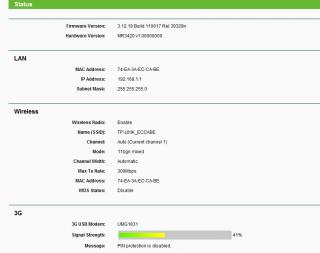
|
|
|
Jan 17 2012, 06:11 AM
|

Senior Member
2,240 posts Joined: Mar 2007 From: Johor
|
The annoying thing about this router is that it can take very long to initialise a modem.
And if the signal is weak it takes even longer. Added on January 17, 2012, 6:24 am QUOTE(fruitie @ Dec 28 2011, 07:45 PM) I don't have random disconnection anymore after I flashed to the latest firmware and using RAS (modem) now instead of NDIS. How do I select RAS instead of NDIS?This post has been edited by MYstombox: Jan 17 2012, 06:24 AM |
|
|
Jan 17 2012, 07:26 AM
|
|
Staff
72,807 posts Joined: Sep 2005 From: KUL
|
QUOTE(MYstombox @ Jan 17 2012, 06:11 AM) How do I select RAS instead of NDIS? Er, you can select on your default dashboard.That means, you do that via plug in and select from the dashboard. Which modem are you using? |
|
|
Jan 17 2012, 08:40 AM
|
|
Senior Member
2,240 posts Joined: Mar 2007 From: Johor
|
I am currently testing a huawei UMG1831
Okay, I try and see how to configure using dashboard. I already forced the modem to be on UMTS2100 via MDMA. But my office the 3G signal is weak so I can't test it out. Need to wait for tonight. The UMG1831 signal reception is very weak, at my parents place cannot latch onto any 3G signal, and if can it's only 3% Added on January 17, 2012, 8:43 amOkay, the modem is already on RAS, since yesterday, but even then last night when I was testing the reception was terrible. And it kept disconnecting and the upload was only 500kb. Yesterday I didn't force the bands, but today I have. I can't test it for very long because different location Tonight will test again. Added on January 22, 2012, 5:48 pmI am experiencing some odd things with the router. I am not sure if it's the channel width being the issue. The router is currently set @ Channel 1 mix mode auto channel width 300mbps transmission For my own devices, SGS2 and my mom's laptop the wifi does not 'hang'. But for ipad 1 and ipad 2, even though it shows connected, the wifi is 'stuck' and not seem to be transmitting. When this happens, other devices that are connected can still work without issues. Any one experiencing it? and if you did and managed to solve it, any setting change? This post has been edited by MYstombox: Jan 22 2012, 05:48 PM |
|
|
Jan 24 2012, 02:13 AM
|
|
Senior Member
591 posts Joined: Jan 2003
|
purchased my 3420 from cycom for 85
mr3420 + e1762 modem ready to connect for about 4min.getting 45% signal strength only. at times the e1762 will disconnected after 30 minutes or 1 hour usage. take times to reconnect back, at times need to power off router. how to settle this issue ya? |
|
|
Jan 25 2012, 11:36 AM
|
|
Senior Member
1,330 posts Joined: Apr 2008
|
Does this modem support u-mobile M68 plan modem?
|
|
|
Jan 26 2012, 12:20 PM
|

Senior Member
822 posts Joined: Jan 2007 From: Sepang, KLIA - Malaysia / York - UK
|
QUOTE(ChipZ @ Jan 25 2012, 11:36 AM) Does this modem support u-mobile M68 plan modem? ya, does anyone know if the new modem ZTE MF190 (the one umobile use for MB68) works? |
|
|
Jan 26 2012, 12:36 PM
|
|
Senior Member
2,240 posts Joined: Mar 2007 From: Johor
|
mf190 works
ss_izal, sometimes mine disconnects as well. Maybe its due to weak signal. I'll try placing the modem in another place over the weekend. |
|
|
Jan 26 2012, 05:22 PM
|
|
Elite
6,931 posts Joined: Apr 2011 From: Bolehland for sure ^_^
|
QUOTE(MYstombox @ Jan 17 2012, 08:40 AM) I am currently testing a huawei UMG1831 have u try other channel ? like channel 11 ?Okay, I try and see how to configure using dashboard. I already forced the modem to be on UMTS2100 via MDMA. But my office the 3G signal is weak so I can't test it out. Need to wait for tonight. The UMG1831 signal reception is very weak, at my parents place cannot latch onto any 3G signal, and if can it's only 3% Added on January 17, 2012, 8:43 amOkay, the modem is already on RAS, since yesterday, but even then last night when I was testing the reception was terrible. And it kept disconnecting and the upload was only 500kb. Yesterday I didn't force the bands, but today I have. I can't test it for very long because different location Tonight will test again. Added on January 22, 2012, 5:48 pmI am experiencing some odd things with the router. I am not sure if it's the channel width being the issue. The router is currently set @ Channel 1 mix mode auto channel width 300mbps transmission For my own devices, SGS2 and my mom's laptop the wifi does not 'hang'. But for ipad 1 and ipad 2, even though it shows connected, the wifi is 'stuck' and not seem to be transmitting. When this happens, other devices that are connected can still work without issues. Any one experiencing it? and if you did and managed to solve it, any setting change? Added on January 26, 2012, 5:24 pm QUOTE(ss_izal @ Jan 24 2012, 02:13 AM) purchased my 3420 from cycom for 85 well, mine router with E1762 + maxis DC 3~15 times per day,. i guess nothing wrong with my device because when i put celcom sim in the set,. it didnt dc at al running for 65hour +++ continuely. i think this somehow is the signal tower issue,. either the tower is overpack or some technic issue ,. mr3420 + e1762 modem ready to connect for about 4min.getting 45% signal strength only. at times the e1762 will disconnected after 30 minutes or 1 hour usage. take times to reconnect back, at times need to power off router. how to settle this issue ya? Added on January 26, 2012, 5:25 pm QUOTE(xKAIZERUx @ Jan 26 2012, 12:20 PM) ya, does anyone know if the new modem ZTE MF190 (the one umobile use for MB68) works? for ZTE MF190 it works, of course, u just need to turn off the autorun first, then router can recognize it and works well after.This post has been edited by chuahcs79: Jan 26 2012, 05:25 PM |
|
|
Jan 27 2012, 06:19 AM
|
|
Senior Member
2,240 posts Joined: Mar 2007 From: Johor
|
chuah, wifi wise I don't have disconnection problem.
Anyway I solved that issue. Now the issue is that the modem will disconnect itself after some time, maybe its the cell tower. But it happens at 2 different sites. |
|
|
Jan 27 2012, 06:22 AM
|
|
Elite
6,931 posts Joined: Apr 2011 From: Bolehland for sure ^_^
|
QUOTE(MYstombox @ Jan 27 2012, 06:19 AM) chuah, wifi wise I don't have disconnection problem. mine router using maxis also happen the same, disconnect itself 3~15 times per day,. even on 900 or 2100 tower,..Anyway I solved that issue. Now the issue is that the modem will disconnect itself after some time, maybe its the cell tower. But it happens at 2 different sites. but when i use digi, celcom or u mobile, it stay connected as long as 40~65 hour without DC,. i suspect is signal tower problems issue,.. |
|
|
Jan 27 2012, 06:26 AM
|
|
Senior Member
2,240 posts Joined: Mar 2007 From: Johor
|
@chuah, the ipad doesn't seem to play nice with hidden SSID. I changed to non-hidden SSID and now its okay. Sigh. But it worked okay when I was using the TPlink ADSL router with hidden SSID. With the MR3420 got problem.
And its not the channel, because on channel 1 there is no interference in my area. Anyway I went other ways to configure the router to prevent unauthorised access. Yes, on 2 sites, maxis disconnects a few times a day. At one site the reception is ~67% (e173), another it's 45% (Icon505). When connected, no issues with speed,ping etc. But intermittent disconnections causing video streaming problems. It's been happening since I first deployed the icon 505. |
|
|
Jan 27 2012, 06:46 AM
|
|
Elite
6,931 posts Joined: Apr 2011 From: Bolehland for sure ^_^
|
u need to call maxis and file a complain get a complain case number, and make sure they follow through and check the signal tower in ur area,.. ia m sure is signal tower problems,.
if is not, why celcom digi and u mobile was perfectly fine with the same combination ? |
|
|
Jan 27 2012, 08:22 AM
|
|
Senior Member
2,240 posts Joined: Mar 2007 From: Johor
|
The problem is I got 2 location and also face this issue.
And they are like 12km apart, totally different area. chuah, did u make a complain on this case? I'll do it over the weekend. |
|
|
Jan 28 2012, 04:03 PM
|

Senior Member
706 posts Joined: Jan 2005
|
Guys , can i do bridging with this router, eg i need to connect to my neighbours router so we can share the internet and network. can the data transfer reach upto 200mbit ?
can some 1 guide me on how to setup with this WDS ? |
|
|
Jan 28 2012, 04:20 PM
|
|
Senior Member
2,240 posts Joined: Mar 2007 From: Johor
|
Have you read the manual? Inside should write.
Added on January 28, 2012, 4:21 pmYou can download from TPlink website. Reach 200mbits, maybe, totally depends on the signal strength. Added on January 28, 2012, 11:13 pmActually how far is your neighbour? Maybe just run a long RJ45 cable is better :S I set up WDS using tplink routers before, cannot do WPA security. Not sure about now though. It was only WEP. This post has been edited by MYstombox: Jan 28 2012, 11:13 PM |
|
|
Jan 30 2012, 01:18 AM
|
|
Junior Member
205 posts Joined: Jan 2003 From: Muar/Singapore
|
trying to use MR3420 with Omnia II i8000 as a USB CDMA modem. anyone know how to do it?
I connect the phone to the router and it said unknown modem, I did tried using USB-Phone and USB-PDA, both don't work. |
|
|
Jan 30 2012, 08:20 AM
|
|
Senior Member
2,240 posts Joined: Mar 2007 From: Johor
|
limcc, u can ask chuah how he gets nokias to work with the mr3420, maybe its similar.
|
|
|
Jan 30 2012, 10:47 AM
|

Senior Member
3,123 posts Joined: Sep 2008 From: OUG - Muhibbah LRT
|
What the difference between Aztech HW550 and this?
@ chuah TS I include ur thread in my thread http://forum.lowyat.net/index.php?showtopi...post&p=44010532 Added on January 30, 2012, 10:57 amBoth same price Can this support HSPA+ modem? This post has been edited by wkkm007: Jan 30 2012, 10:57 AM |
|
|
Jan 30 2012, 12:08 PM
|
|
Senior Member
2,240 posts Joined: Mar 2007 From: Johor
|
depends on the modem, it can support most huawei modems.
Can support icon505 as well. |
|
|
Jan 30 2012, 12:11 PM
|
|
Senior Member
3,123 posts Joined: Sep 2008 From: OUG - Muhibbah LRT
|
I mean the 21,42 Mbps 1...
|
|
|
Jan 30 2012, 03:05 PM
|
|
Senior Member
2,240 posts Joined: Mar 2007 From: Johor
|
Do you have the modem right now?
Why don't u contact someone in the forum, see if u can meet up and test the modem. I can't really tell you for sure if the HSPA+ modem can be detected and recognised. |
|
|
Jan 30 2012, 08:50 PM
|
|
Junior Member
205 posts Joined: Jan 2003 From: Muar/Singapore
|
QUOTE(MYstombox @ Jan 30 2012, 08:20 AM) limcc, u can ask chuah how he gets nokias to work with the mr3420, maybe its similar. I will try PM Chuah, thanks. |
|
|
Jan 30 2012, 11:38 PM
|
|
Senior Member
2,240 posts Joined: Mar 2007 From: Johor
|
chuah doesn't read his PMs, but have you tried this?
http://windows.modaco.com/topic/272574-omnia-as-modem/ QUOTE after you connect Samsung Omnia to PC, on your mobile device go to START->PROGRAMS->INTERNET SHARING and select the connection type (bluetooth or USB - most commonly used would be USB); tap "Connect". Your Samsung Omnia will connect to the mobile network if you have set up a profile for GPRS/HSDPA according to your billing plan provided by the network operator. Did you try internet sharing via USB on your phone? This post has been edited by MYstombox: Jan 30 2012, 11:46 PM |
|
|
Jan 31 2012, 02:55 AM
|
|
Junior Member
205 posts Joined: Jan 2003 From: Muar/Singapore
|
I'm using this method to share the 3g connection to my notebook currently, but this work with computer as the internet connection is routed thru the phone to the computer. the phone doesn't act as a modem but a internet sharing device--like a router.
but seems like MR3420 only accept a USB modem and dial to the ISP using its own utilities. that's probably why it doesn't detect the phone when I tried this method. I probably need to somehow transform the phone to a modem only device for MR3420 to detect it. also, I notice it doesn't charge the phone like the connection to PC, it also can't detect the phone when its turn off, unlike the computer. maybe I need to connect it thru a active USB hub? quite a bummer as older phone can work as a pure modem like my very old Ericsson SH888i, unfortunately, it was made in the analog modem era, 3g wasn't invented then. |
|
|
Jan 31 2012, 06:38 AM
|
|
Senior Member
2,240 posts Joined: Mar 2007 From: Johor
|
Try and see if a USB to ethernet adapter works.
You can alternatively connect the phone then share it via USB, connect it to the WAN ethernet port. Added on January 31, 2012, 6:40 amWell, some nokia phones also can work purely as modem. Not exactly sure why the omnia can't This post has been edited by MYstombox: Jan 31 2012, 06:40 AM |
|
|
Feb 1 2012, 01:41 AM
|

Junior Member
122 posts Joined: Feb 2009
|
wanna ask if this router can support USB extension.
|
|
|
Feb 1 2012, 02:10 AM
|
|
Senior Member
826 posts Joined: Jan 2009
|
Yes. I connected my phone (modem) to USB hub & the USB hub connected to router.
|
|
|
Feb 2 2012, 01:37 PM
|
|
Junior Member
122 posts Joined: Feb 2009
|
thx for the reply bro.
can someone teach me how to port forward? im using celcom btw |
|
|
Feb 2 2012, 03:41 PM
|
|
Senior Member
2,240 posts Joined: Mar 2007 From: Johor
|
Read the manual to port forward, it is not dependent on your ISP but the router.
|
|
|
Feb 5 2012, 01:37 PM
|
|
Senior Member
706 posts Joined: Jan 2005
|
Guys I need to connect my dsl modem to this router. Can some 1 guide me. Username/ pass shouuld I enter on dsl modem or tplink ?
|
|
|
Feb 5 2012, 11:50 PM
|
|
Newbie
1 posts Joined: Feb 2012
|
Hi,
I am having troubles to connect ZTE AX326 modem to TL-MR3220 router. I can't set autorun off. I think it is because in device manager my modem is recognised as Network adapter, not a modem. I don't know what to do |
|
|
Feb 12 2012, 02:00 PM
|
|
Elite
6,931 posts Joined: Apr 2011 From: Bolehland for sure ^_^
|
QUOTE(Elanges @ Feb 5 2012, 01:37 PM) Guys I need to connect my dsl modem to this router. Can some 1 guide me. Username/ pass shouuld I enter on dsl modem or tplink ? u should enter it in DSL modemAdded on February 12, 2012, 2:00 pm QUOTE(kulka @ Feb 5 2012, 11:50 PM) Hi, try other modem if u have,.. see can connect or notI am having troubles to connect ZTE AX326 modem to TL-MR3220 router. I can't set autorun off. I think it is because in device manager my modem is recognised as Network adapter, not a modem. I don't know what to do This post has been edited by chuahcs79: Feb 12 2012, 02:00 PM |
|
|
Feb 13 2012, 06:25 PM
|
|
Junior Member
14 posts Joined: Oct 2007
|
Hi,
Can I connect my pendrive or external hardisk to the modem's usb port??? To act as a network storage. This post has been edited by malcoms: Feb 13 2012, 06:26 PM |
|
|
Feb 14 2012, 03:29 AM
|
|
Elite
6,931 posts Joined: Apr 2011 From: Bolehland for sure ^_^
|
QUOTE(malcoms @ Feb 13 2012, 06:25 PM) Hi, if u able to flash this 3G router to other model firmware , i believe u can do so,.. Can I connect my pendrive or external hardisk to the modem's usb port??? To act as a network storage. |
|
|
Feb 15 2012, 11:16 PM
|

Senior Member
1,851 posts Joined: Apr 2005 From: kuala lumpur
|
hi guy, just recently bought this router, plug in the maxis e173 3.5g modem. i found there is some problems of the wifi connection, around 20 to 30 minutes the wifi connection will die, need to diagnose the wifi of my notebook, then turn back to normal, any1 face that?
i plug in the e173 into my notebook, never have disconnect problems, i think this is not all modem problems, i think is the wifi problems. any sifu can help? |
|
|
Feb 16 2012, 07:26 PM
|
|
Elite
6,931 posts Joined: Apr 2011 From: Bolehland for sure ^_^
|
QUOTE(jeremy05 @ Feb 15 2012, 11:16 PM) hi guy, just recently bought this router, plug in the maxis e173 3.5g modem. i found there is some problems of the wifi connection, around 20 to 30 minutes the wifi connection will die, need to diagnose the wifi of my notebook, then turn back to normal, any1 face that? try to change the channel of the wifi u are using,. under the 192.168.1.1, there is section of wifi channel,..i plug in the e173 into my notebook, never have disconnect problems, i think this is not all modem problems, i think is the wifi problems. any sifu can help? |
|
|
Feb 16 2012, 09:02 PM
|
|
Senior Member
1,851 posts Joined: Apr 2005 From: kuala lumpur
|
QUOTE(chuahcs79 @ Feb 16 2012, 07:26 PM) try to change the channel of the wifi u are using,. under the 192.168.1.1, there is section of wifi channel,.. ok i will try it, what channel you using now is not this problems? |
|
|
Feb 18 2012, 03:27 AM
|
|
Elite
6,931 posts Joined: Apr 2011 From: Bolehland for sure ^_^
|
QUOTE(jeremy05 @ Feb 16 2012, 09:02 PM) ok i will try it, what channel you using now is not this problems? if ur channel is similar channel with your surround area using, it will crash and DC a lot,. i used to put auto and DC often, now i use channel 11,.. |
|
|
Feb 20 2012, 11:01 PM
|

Senior Member
1,514 posts Joined: Nov 2010 From: Penang
|
what is the difference between 1 antenna and 2 antennas?
|
|
|
Feb 21 2012, 09:47 AM
|
|
Elite
6,931 posts Joined: Apr 2011 From: Bolehland for sure ^_^
|
QUOTE(hown @ Feb 20 2012, 11:01 PM) what is the difference between 1 antenna and 2 antennas? signal broadcast stronger with 2 antenna, connection much more stable as well |
|
|
Feb 23 2012, 12:12 PM
|
|
Junior Member
30 posts Joined: Jan 2008
|
hi, i just try putty method, also run cmd promp, but i still can't disable autorun the ZTE MF190 modem. so it can't connect to my MR3420...so actually how to do that.
USING CMD PROMP: msg appear not recognize USING PUTTY: (after change port no n click OK) msg appear unable to open connection eerrrmmm how???? huhuhuuhuhu |
|
|
Feb 23 2012, 04:10 PM
|
|
Senior Member
2,240 posts Joined: Mar 2007 From: Johor
|
I use channel depending on whether other people are around me using specific channels.
I use android wifi analyzer to identify if there are any interfering channels in my area. Then set mine accordingly. |
|
|
Feb 24 2012, 01:21 AM
|

Junior Member
296 posts Joined: Nov 2010
|
Hi all the sifu
got any wireless router can support u mobile 42mbps usb modem? model is mf680 |
|
|
Feb 24 2012, 09:00 PM
|
|
Elite
6,931 posts Joined: Apr 2011 From: Bolehland for sure ^_^
|
QUOTE(cubesquare @ Feb 24 2012, 01:21 AM) Hi all the sifu sorry , dont have any modem of those, so never really try before,. got any wireless router can support u mobile 42mbps usb modem? model is mf680 |
|
|
Feb 25 2012, 08:51 PM
|
|
Junior Member
4 posts Joined: Jul 2007
|
I am running TP-LINK mode with Maxis broadband (Digi sim) inside.
the 3G , can i change the DNS 8.8.8.8 , 8.8.4.4 . is it gonna make my connection faster or slower? what is default digi DNS server? |
|
|
Feb 27 2012, 01:17 AM
|
|
Junior Member
296 posts Joined: Nov 2010
|
QUOTE(chuahcs79 @ Oct 13 2011, 03:42 AM) for phone side, need to do any configuration? or will auto recognize the phone? |
|
|
Feb 27 2012, 03:40 AM
|
|
Elite
6,931 posts Joined: Apr 2011 From: Bolehland for sure ^_^
|
QUOTE(cubesquare @ Feb 27 2012, 01:17 AM) Hi, if connect using sony phone the SE phone can support that is with Sony Ericsson original own OS,.. those andriod most probably cann auto detect recognize,.. so far i test with W705, Yari u100, Elm,,for phone side, need to do any configuration? or will auto recognize the phone? |
|
|
Feb 27 2012, 03:44 AM
|
|
Junior Member
296 posts Joined: Nov 2010
|
QUOTE(chuahcs79 @ Feb 27 2012, 03:40 AM) the SE phone can support that is with Sony Ericsson original own OS,.. those andriod most probably cann auto detect recognize,.. so far i test with W705, Yari u100, Elm,, great, i got 1 extra SE W705, can test with it 1st... |
|
|
Feb 27 2012, 03:47 AM
|
|
Elite
6,931 posts Joined: Apr 2011 From: Bolehland for sure ^_^
|
QUOTE(cubesquare @ Feb 27 2012, 03:44 AM) great, i got 1 extra SE W705, can test with it 1st... after plug it , it will auto recognize, should be able to detect and auto connect,.. only sometimes the device detect name is strange and weird, once a while it will stated SnyEricsson W705 in device name,. only once a while, LOL |
|
|
Feb 27 2012, 11:09 AM
|
|
Junior Member
460 posts Joined: Jan 2009
|
What is the highest speed that this modem can support? I know certain model of 3G routers have limitation in terms of the fastest download speed, wondering if this router can support HSPA+ speed.
|
|
|
Feb 27 2012, 11:41 AM
|

Junior Member
213 posts Joined: Nov 2005 From: Batu Pahat, Johor
|
I'm using digi with an unlocked e1762 from maxis. prior this, i'm using an e220 huawei modem. my router can find & dial the huawei. however, the modem has died. so, i'm using the maxis e1762. but my router can only find the modem. detect & tried connecting. but it will eventually showed the modem has been disconnected. i sent to the supplier and they showed that they can use an 1550 from maxis. i'm a bit puzzled. since some of u using an e1762 modem without a problem.
i tried using an original huawei mobile partner in the modem. but the result is still the same. please help me. |
|
|
Feb 27 2012, 12:00 PM
|
|
Elite
6,931 posts Joined: Apr 2011 From: Bolehland for sure ^_^
|
QUOTE(ks98 @ Feb 27 2012, 11:09 AM) What is the highest speed that this modem can support? I know certain model of 3G routers have limitation in terms of the fastest download speed, wondering if this router can support HSPA+ speed. i dont think this router FULLY support HSPA+ modem yet.. well so far i not yet really try since i only have HSPA modem Added on February 27, 2012, 12:01 pm QUOTE(sinisterair @ Feb 27 2012, 11:41 AM) I'm using digi with an unlocked e1762 from maxis. prior this, i'm using an e220 huawei modem. my router can find & dial the huawei. however, the modem has died. so, i'm using the maxis e1762. but my router can only find the modem. detect & tried connecting. but it will eventually showed the modem has been disconnected. i sent to the supplier and they showed that they can use an 1550 from maxis. i'm a bit puzzled. since some of u using an e1762 modem without a problem. u can try to go to your Dashboard, go to option, try to tweak within RAS or NDIS... the router confirm will connect E1762. as most of us is using E1762,.. i tried using an original huawei mobile partner in the modem. but the result is still the same. please help me. This post has been edited by chuahcs79: Feb 27 2012, 12:01 PM |
|
|
Feb 27 2012, 01:05 PM
|
|
Senior Member
826 posts Joined: Jan 2009
|
QUOTE(cubesquare @ Feb 27 2012, 01:17 AM) Hi, if connect using sony phone Just need to set "Phone as a modem" or similar.for phone side, need to do any configuration? or will auto recognize the phone? |
|
|
Feb 27 2012, 02:54 PM
|
|
Newbie
1 posts Joined: Feb 2012
|
HI guys, Yesterday I bought TP link 3G Router TL-MR 3220, Unfortunately I was thinking that it support all 3G USB Modem but its not so. Now I have two 3G USB Modem one is Bandluxe 3.5G( I m not sure for model) and other is Lava 720G. None of Modem is working with Router.
But I think there is a little hope for me because I don't know how but after trying so many times only one time TP Link Router Identify Lava 720G modem shows as "HSPA USB Modem" and then I set APN etc and Internet Get connected, I really Don't know How that was happen? But again its not identifying any of the modem I have Upgraded Firmware, Try to use bin file for individual modem setting but nothing is working. Suddenly I see this thread so I think this is the best place to get a solution for my Problem. Please frnds help me Many Many Thanks in Advance Nitin Raj This post has been edited by incrediblenitin: Feb 27 2012, 02:56 PM |
|
|
Feb 27 2012, 11:32 PM
|
|
Junior Member
296 posts Joined: Nov 2010
|
now i plug in the ZTE MF190
i try to disable the auto run in cmd but this massage come out. CODE Microsoft Windows [Version 6.1.7601] Copyright (c) 2009 Microsoft Corporation. All rights reserved. C:\Users\Nic>at+zcdrun=8 'at+zcdrun' is not recognized as an internal or external command, operable program or batch file. C:\Users\Nic> and i using Huawei E173, it keep show identifying only... [/quote] This post has been edited by cubesquare: Feb 28 2012, 12:31 AM |
|
|
Feb 28 2012, 07:45 AM
|
|
Junior Member
30 posts Joined: Jan 2008
|
hi all, i'm also get the same result as cubesquare. i try to use putty also not success. its shows only black blank page and nothing happen at all. i try to wait more than 5 minutes and nothing happen. so actually how to disable the autorun?....one more thing i'm also run CMD using administrator still get the same result
modem: ZTE MF190 wireless router: MR3420 win: Windows 7 |
|
|
Feb 28 2012, 08:01 AM
|
|
Senior Member
826 posts Joined: Jan 2009
|
Use Hyperterminal http://www.hilgraeve.com/hyperterminal-trial/
If you got blank window when connected to your modem COM port, try press Enter to activate it. This post has been edited by kizwan: Feb 28 2012, 08:06 AM |
|
|
Feb 28 2012, 09:52 PM
|
|
Junior Member
30 posts Joined: Jan 2008
|
ok i'll try it later ok...anyway thanks so much for ur reply. later i'll inform here
|
|
|
Feb 29 2012, 09:58 AM
|
|
Junior Member
460 posts Joined: Jan 2009
|
QUOTE(longterm @ Feb 28 2012, 07:45 AM) hi all, i'm also get the same result as cubesquare. i try to use putty also not success. its shows only black blank page and nothing happen at all. i try to wait more than 5 minutes and nothing happen. so actually how to disable the autorun?....one more thing i'm also run CMD using administrator still get the same result I used Putty to disable MF190 before. The first thing is you need to set correct COM port and then, type the command via keyboard and press "Enter". For my case, I didn't see anything on screen when I typed but if you waited for a while, then you'll see a response from the terminal on whether the command is successful.modem: ZTE MF190 wireless router: MR3420 win: Windows 7 Added on February 29, 2012, 10:00 amHas anybody tried Huawei UMG1831 on this router? This post has been edited by ks98: Feb 29 2012, 10:00 AM |
|
|
Feb 29 2012, 09:26 PM
|
|
Elite
6,931 posts Joined: Apr 2011 From: Bolehland for sure ^_^
|
QUOTE(ks98 @ Feb 29 2012, 09:58 AM) I used Putty to disable MF190 before. The first thing is you need to set correct COM port and then, type the command via keyboard and press "Enter". For my case, I didn't see anything on screen when I typed but if you waited for a while, then you'll see a response from the terminal on whether the command is successful. yes UMG1831 working well with this router,.. few user try already Added on February 29, 2012, 10:00 amHas anybody tried Huawei UMG1831 on this router? |
|
|
Feb 29 2012, 09:38 PM
|
|
Senior Member
826 posts Joined: Jan 2009
|
QUOTE(ks98 @ Feb 29 2012, 09:58 AM) I used Putty to disable MF190 before. The first thing is you need to set correct COM port and then, type the command via keyboard and press "Enter". For my case, I didn't see anything on screen when I typed but if you waited for a while, then you'll see a response from the terminal on whether the command is successful. Yes, exactly like that. I don't know how to explain it in a layman way. Sometime you need to press Enter before you can see any output in Putty or Hyperterminal window.This post has been edited by kizwan: Feb 29 2012, 09:39 PM |
|
|
Feb 29 2012, 11:16 PM
|
|
Junior Member
460 posts Joined: Jan 2009
|
QUOTE(chuahcs79 @ Feb 29 2012, 09:26 PM) yes UMG1831 working well with this router,.. few user try already Thanks for the info and great to hear that btw, can we get full speed when plug into this modem? Assuming the ISP supports such a high speed... |
|
|
Feb 29 2012, 11:21 PM
|
|
Elite
6,931 posts Joined: Apr 2011 From: Bolehland for sure ^_^
|
QUOTE(ks98 @ Feb 29 2012, 11:16 PM) Thanks for the info and great to hear that impossible to get full speed, as current non of the telco ISP provider provider FULL HSPA+ yet,.. btw, can we get full speed when plug into this modem? Assuming the ISP supports such a high speed... |
|
|
Feb 29 2012, 11:58 PM
|
|
Junior Member
460 posts Joined: Jan 2009
|
QUOTE(chuahcs79 @ Feb 29 2012, 11:21 PM) impossible to get full speed, as current non of the telco ISP provider provider FULL HSPA+ yet,.. The reason I'm asking these questions is I found out that my wireless broadband actually runs slower when plug into a 3G wireless router. I can get >4Mbps when run it directly from my laptop but only ~3Mbps on the router. This makes me believe that 3G wireless router could slow us down if the firmware is not good enough. So, I'm considering MR3420 right now in order to get back the "original" speed and at the same time, wondering if I can get >7Mbps with this UMG1831 since my area is within U mobile 42Mbps coverage. I'm using Siera 885 right now which only supports up to 7.2Mbps. |
|
|
Mar 1 2012, 12:32 AM
|
|
Senior Member
826 posts Joined: Jan 2009
|
I also faced the same scenario when using stock firmware. The download speed is very slow when connected to router. After I changed to OpenWrt firmware, I get full speed like when connected directly to my notebook.
|
|
|
Mar 3 2012, 09:00 AM
|
|
Senior Member
4,582 posts Joined: Jan 2003 From: West johor
|
Can u do some tutorial how to install OpenWrt firmware ?
Which Web interface LuCI or Gargoyle noob friendly ? |
|
|
Mar 3 2012, 09:01 PM
|
|
Junior Member
460 posts Joined: Jan 2009
|
Bought MR3420 today but frequently fail to identify my Sierra 885.
Updated to latest firmware but didn't help. So, no choice have to use my MF190 for sharing my internet. However, i notice that the speed is slightly lower than directly plug the modem into laptop. May be have to flash OpenWrt firmware... After reading thru the instruction for OpenWrt firmware, i decided to stay with stock firmware The steps sound too complex...This post has been edited by ks98: Mar 3 2012, 10:55 PM |
|
|
Mar 4 2012, 01:16 AM
|
|
Senior Member
826 posts Joined: Jan 2009
|
QUOTE(fat16 @ Mar 3 2012, 09:00 AM) Flashing OpenWrt firmware is very easy. But after flashing OpenWrt firmware, you need to do initial configuration. This is where your basic knowledge on linux in text-mode will be needed. This is summarized version on how to do the initial configuration:-QUOTE(kizwan @ Dec 18 2011, 10:37 PM)
QUOTE(kizwan @ Dec 21 2011, 02:58 AM) I use firmware "Web interface" (in "None" column), branch Trunk, under "*-factory.bin" table/release ( http://wiki.openwrt.org/toh/tp-link/tl-mr3420 ). QUOTE(fat16 @ Mar 3 2012, 09:00 AM) Which Web interface LuCI or Gargoyle noob friendly ? I don't know. I only use LuCI & it only need minor configuration.
This post has been edited by kizwan: Mar 4 2012, 02:01 AM |
|
|
Mar 4 2012, 09:00 AM
|

Senior Member
1,404 posts Joined: Jul 2006 From: Puchong
|
i still not able to run the AT command to disable autorun, how come? i even change the drive to the modem to give it a try, but command not valid...hmm..i try many times also same..how come?
|
|
|
Mar 4 2012, 12:35 PM
|
|
Senior Member
826 posts Joined: Jan 2009
|
You should connect to 3g modem COM port using Putty or Hyperterminal. Follow the PDF file at first post.
|
|
|
Mar 4 2012, 02:45 PM
|
|
Senior Member
1,404 posts Joined: Jul 2006 From: Puchong
|
QUOTE(kizwan @ Mar 4 2012, 12:35 PM) You should connect to 3g modem COM port using Putty or Hyperterminal. Follow the PDF file at first post. ok finally got it..the problem is i use the wrong COMP no.Thanks kizwan er...home come it still autorun after i successfully disable it in PuTTY?... em.. This post has been edited by JayC75: Mar 4 2012, 03:03 PM |
|
|
Mar 4 2012, 04:01 PM
|
|
Senior Member
2,240 posts Joined: Mar 2007 From: Johor
|
QUOTE(chuahcs79 @ Feb 29 2012, 11:21 PM) impossible to get full speed, as current non of the telco ISP provider provider FULL HSPA+ yet,.. You're wrong.I got 21mbps from 1831 when I had it for a week. But it was unstable cause of bad firmware. Added on March 4, 2012, 4:01 pm QUOTE(ks98 @ Mar 3 2012, 09:01 PM) Bought MR3420 today but frequently fail to identify my Sierra 885. Check if the 3420 has a modem file for the sierra 885.Updated to latest firmware but didn't help. So, no choice have to use my MF190 for sharing my internet. However, i notice that the speed is slightly lower than directly plug the modem into laptop. May be have to flash OpenWrt firmware... After reading thru the instruction for OpenWrt firmware, i decided to stay with stock firmware The steps sound too complex...This post has been edited by MYstombox: Mar 4 2012, 04:01 PM |
|
|
Mar 4 2012, 04:02 PM
|
|
Elite
6,931 posts Joined: Apr 2011 From: Bolehland for sure ^_^
|
QUOTE(MYstombox @ Mar 4 2012, 04:01 PM) You're wrong. every modem cannot go 100% ALL TIME of FULL SPEED, sorry i disagree with you on this,.. plus the current HSPA+ is not FULL HSPA+ ,..I got 21mbps from 1831 when I had it for a week. But it was unstable cause of bad firmware. Added on March 4, 2012, 4:01 pm Check if the 3420 has a modem file for the sierra 885. i believe what u getting is spikes to up 21Mbps ? how long the 21Mbps speed last ? 1 min ? 1 week ? LOL This post has been edited by chuahcs79: Mar 4 2012, 04:03 PM |
|
|
Mar 4 2012, 09:12 PM
|
|
Senior Member
2,240 posts Joined: Mar 2007 From: Johor
|
Don't understand what you mean by full HSPA+, maxis offers HSPA+ up to 21mbps. And if you can hit that, it already means it reaches the theoretical max. What other 'full HSPA+' do you mean?
Because clearly the telco does support the speeds. |
|
|
Mar 4 2012, 09:25 PM
|
|
Junior Member
460 posts Joined: Jan 2009
|
QUOTE(MYstombox @ Mar 4 2012, 09:12 PM) Don't understand what you mean by full HSPA+, maxis offers HSPA+ up to 21mbps. And if you can hit that, it already means it reaches the theoretical max. What other 'full HSPA+' do you mean? Theoretically, HSPA+ supports up to 168Mbps of download speed and 22Mbps of upload speed. Because clearly the telco does support the speeds. For Maxis, even they're using the same technology but it supports only up to 21Mbps. |
|
|
Mar 4 2012, 09:31 PM
|
|
Staff
72,807 posts Joined: Sep 2005 From: KUL
|
QUOTE(MYstombox @ Mar 4 2012, 04:01 PM) You're wrong. That's just a sudden burst. I got 21mbps from 1831 when I had it for a week. But it was unstable cause of bad firmware. We haven't implemented 21Mbps yet, for Maxis at least. So far only U Mobile has. |
|
|
Mar 5 2012, 10:50 AM
|

Junior Member
467 posts Joined: Dec 2009 From: ~!!! in BolehLand !!!~
|
how stable is this OpenWrt custom firmware..
|
|
|
Mar 5 2012, 01:16 PM
|
|
Senior Member
4,582 posts Joined: Jan 2003 From: West johor
|
For me OpenWrt custom firmware very stable. With tp-link firmware 3G always dc after 1 hours or WLAN connected but no internet.
I'm using kaskus version Firmware V.1 Openwrt by Mang + update Firmware V.1.2. |
|
|
Mar 5 2012, 05:02 PM
|
|
Junior Member
384 posts Joined: Jan 2006 From: Penang
|
Not sure if anyone has shared this before, but here goes:
http://mybroadband.co.za/vb/showthread.php...ink-3420-router Apparently, someone from TP-Link provided a link for a tool called USB Sniffer to create the modem bin file for most modems that aren't able to detect on MR3420/MR3220. If you're into the technical stuff, I'm supposed this is worth to look into. One thing to note is that folks in the forum mentioned that the tool only works in WinXP. Good luck! This post has been edited by maxcheam: Mar 5 2012, 05:08 PM |
|
|
Mar 5 2012, 05:42 PM
|
|
Junior Member
460 posts Joined: Jan 2009
|
QUOTE(maxcheam @ Mar 5 2012, 05:02 PM) Not sure if anyone has shared this before, but here goes: Here is the exact link for the USB Sniffer, ftp://tplink:wr641g@ftp.tp-link.com/Temp/...r_Guide_105.zip.http://mybroadband.co.za/vb/showthread.php...ink-3420-router Apparently, someone from TP-Link provided a link for a tool called USB Sniffer to create the modem bin file for most modems that aren't able to detect on MR3420/MR3220. If you're into the technical stuff, I'm supposed this is worth to look into. One thing to note is that folks in the forum mentioned that the tool only works in WinXP. Good luck! This post has been edited by ks98: Mar 5 2012, 05:58 PM |
|
|
Mar 5 2012, 06:28 PM
|
|
Senior Member
4,582 posts Joined: Jan 2003 From: West johor
|
TP-LINK_3G_USBSniffer_Guide_10.zip mirror
http://www.4shared.com/zip/Pzou9EOD/TP-LIN...r_Guide_10.html |
|
|
Mar 6 2012, 12:09 PM
|

Senior Member
1,524 posts Joined: Apr 2008
|
QUOTE(fruitie @ Mar 4 2012, 09:31 PM) That's just a sudden burst. i'm using digi dayplan, my burst speed is 1Mbps, minus the figure 2 in front ... We haven't implemented 21Mbps yet, for Maxis at least. So far only U Mobile has. |
|
|
Mar 6 2012, 12:14 PM
|
|
Elite
6,931 posts Joined: Apr 2011 From: Bolehland for sure ^_^
|
QUOTE(coolstore @ Mar 6 2012, 12:09 PM) i'm using digi dayplan, my burst speed is 1Mbps, minus the figure 2 in front ... LOL... 1Mbps for digi consider very high speed,.. |
|
|
Mar 6 2012, 06:09 PM
|
|
Junior Member
460 posts Joined: Jan 2009
|
Tried this router with UMG1831 that bought from coolstore. It works well once it's identified correctly by router. But, the identify process takes ~5 minutes, is this considered normal?
I'm already at latest firmware |
|
|
Mar 6 2012, 08:34 PM
|
|
Senior Member
2,240 posts Joined: Mar 2007 From: Johor
|
UMG1831 takes v long to initiate the modem from my experience.
Maybe you need to add in the modem bin file. |
|
|
Mar 10 2012, 10:24 PM
|
|
Junior Member
460 posts Joined: Jan 2009
|
Anybody has luck to get a working bin file? I tried the sniffer tool several time but still couldn't get my bin file working for UMG1831. Looks like have to ask help from TP Link.
|
|
|
Mar 12 2012, 06:22 PM
|
|
Junior Member
65 posts Joined: Jul 2009
|
QUOTE(ks98 @ Mar 10 2012, 10:24 PM) Anybody has luck to get a working bin file? I tried the sniffer tool several time but still couldn't get my bin file working for UMG1831. Looks like have to ask help from TP Link. hi there, i'd like to recommend openwrt firmware for you or any other user using umg1831 with this router. it is considerably much more faster than the existing firmware.Added on March 12, 2012, 6:24 pmthis is an excellent openwrt firmware that i have just discovered Openwrt firmware 1) flash the router with this new firmware 2) to turn on the wifi after firmware update, wait until the 'sys' LED stop blinking and then press QSS button on the router. there will be 'openwrt' wifi 3) logon into http://192.168.1.1 .. the default username is 'root' and the default password is 'password' 4) go into network tab and you'll see two network interfaces. click 'edit' button for WAN interface and change the protocol to UMTS/GPRS/EV-DO then you'll be familiar with the setting. apn username password etc 5) customize your wireless setting security done done.. This post has been edited by shinichi87: Mar 12 2012, 06:36 PM |
|
|
Mar 13 2012, 09:18 PM
|
|
Junior Member
460 posts Joined: Jan 2009
|
QUOTE(shinichi87 @ Mar 12 2012, 06:22 PM) hi there, i'd like to recommend openwrt firmware for you or any other user using umg1831 with this router. it is considerably much more faster than the existing firmware. Thanks for the guidance and will try it out this weekend...Added on March 12, 2012, 6:24 pmthis is an excellent openwrt firmware that i have just discovered Openwrt firmware 1) flash the router with this new firmware 2) to turn on the wifi after firmware update, wait until the 'sys' LED stop blinking and then press QSS button on the router. there will be 'openwrt' wifi 3) logon into http://192.168.1.1 .. the default username is 'root' and the default password is 'password' 4) go into network tab and you'll see two network interfaces. click 'edit' button for WAN interface and change the protocol to UMTS/GPRS/EV-DO then you'll be familiar with the setting. apn username password etc 5) customize your wireless setting security done done.. Added on March 13, 2012, 11:57 pm QUOTE(ks98 @ Mar 13 2012, 09:18 PM) Thanks for the guidance and will try it out this weekend... Just can't wait and tried the firmware just now. The result is just amazing!!! The router takes 1 min 17 sec to boot and establish 3G connection with UMG1831. It's >1x faster than before. Thanks for the tips!!! Btw, we also need to choose correct USB under "Modem Device" in 3G setup and for my case, it's USB0. It also doesn't have 3G signal strength bar now and I just ignore other features as i don't bother about them. This post has been edited by ks98: Mar 13 2012, 11:57 PM |
|
|
Mar 14 2012, 09:52 AM
|
|
Senior Member
4,582 posts Joined: Jan 2003 From: West johor
|
how to setup OpenDNS FamilyShield with OpenWrt ?
OpenDNS FamilyShield 208.67.222.123 208.67.220.123 OpenDNS standard 208.67.222.222 208.67.220.220 |
|
|
Mar 14 2012, 08:34 PM
|
|
Junior Member
460 posts Joined: Jan 2009
|
QUOTE(fat16 @ Mar 14 2012, 09:52 AM) how to setup OpenDNS FamilyShield with OpenWrt ? Goto "Network" -> "Interface" -> LAN "Edit" -> Enter into "Use custom DNS servers"OpenDNS FamilyShield 208.67.222.123 208.67.220.123 OpenDNS standard 208.67.222.222 208.67.220.220 |
|
|
Mar 17 2012, 08:58 PM
|
|
Junior Member
116 posts Joined: Aug 2007
|
Hi all, just bought my MR 3420 a few hours ago.
Anyone manage to get it working ith ZTE MF110 modem. I still can't configure mine to work now. |
|
|
Mar 17 2012, 11:18 PM
|
|
Junior Member
460 posts Joined: Jan 2009
|
QUOTE(apersaje @ Mar 17 2012, 08:58 PM) Hi all, just bought my MR 3420 a few hours ago. I think you need to disable auto-run. The instruction is inside this thread.Anyone manage to get it working ith ZTE MF110 modem. I still can't configure mine to work now. |
|
|
Mar 18 2012, 02:41 AM
|
|
Elite
6,931 posts Joined: Apr 2011 From: Bolehland for sure ^_^
|
This Router can support Huawei E353 perfectly,.. ^^ just though anyone wanted to know,..
|
|
|
Mar 18 2012, 04:19 PM
|

Senior Member
2,954 posts Joined: Apr 2008
|
I wondering does this router support LTE or not
|
|
|
Mar 18 2012, 07:23 PM
|
|
Junior Member
14 posts Joined: Nov 2011
|
Please help me... I'm going to buy this router soon and will use it with my unlocked huawei e1552. So the question here is how to configure moonlight vpn on this setup? TQ in advance.
|
|
|
Mar 19 2012, 06:44 PM
|
|
Senior Member
2,954 posts Joined: Apr 2008
|
QUOTE(al5911 @ Mar 18 2012, 07:23 PM) Please help me... I'm going to buy this router soon and will use it with my unlocked huawei e1552. So the question here is how to configure moonlight vpn on this setup? TQ in advance. Your moonlight VPN is using a software to connect it right?If yes, just use the same method to connect it Currently I'm using VPN with this router as well by connecting the software on the pc it self. Do note, only work on that pc This post has been edited by KKW: Mar 19 2012, 06:45 PM |
|
|
Mar 20 2012, 11:00 AM
|

Junior Member
121 posts Joined: Feb 2010
|
just wanna express my gratitude to TS and others to contribute this thread to answer my question and resolve my problem. Keep it up!
|
|
|
Mar 20 2012, 11:44 PM
|
|
Junior Member
14 posts Joined: Nov 2011
|
@KKW thanks mate for the info. Appreciate it
|
|
|
Mar 23 2012, 10:24 AM
|
|
Junior Member
11 posts Joined: Mar 2011
|
Hi all,
i followed the steps mentions above to disable my ZTE Mf190 3G modem. but i wan unable to do so, below is the message after i press Enter in the command prompt; 'AT=ZCDRUN=8' is not recognized as an internal or external command, operable program or batch file. do you guys face this problem before? how to solve it? Thanks! Added on March 23, 2012, 10:25 amsorry typo error, should be 'AT+ZCDRUN=8', not 'AT=ZCDRUN=8' This post has been edited by sglalang: Mar 23 2012, 10:25 AM |
|
|
Mar 23 2012, 10:35 AM
|
|
Elite
6,931 posts Joined: Apr 2011 From: Bolehland for sure ^_^
|
QUOTE(MPK @ Mar 20 2012, 11:00 AM) just wanna express my gratitude to TS and others to contribute this thread to answer my question and resolve my problem. Keep it up! You're most welcome, i just open this thread try to gather every knowledge everyone know about this router to share with everyone,.if u have any knowledge u love to donate too, plase dont hestitate to post here,.. everyone is welcome to share Added on March 23, 2012, 10:35 am QUOTE(sglalang @ Mar 23 2012, 10:24 AM) Hi all, did u try ti use the putty in method 2 ? i followed the steps mentions above to disable my ZTE Mf190 3G modem. but i wan unable to do so, below is the message after i press Enter in the command prompt; 'AT=ZCDRUN=8' is not recognized as an internal or external command, operable program or batch file. do you guys face this problem before? how to solve it? Thanks! Added on March 23, 2012, 10:25 amsorry typo error, should be 'AT+ZCDRUN=8', not 'AT=ZCDRUN=8' This post has been edited by chuahcs79: Mar 23 2012, 10:35 AM |
|
|
Mar 23 2012, 09:48 PM
|
|
Junior Member
121 posts Joined: Feb 2010
|
QUOTE(chuahcs79 @ Mar 23 2012, 10:35 AM) You're most welcome, i just open this thread try to gather every knowledge everyone know about this router to share with everyone,. Yes...pls use putty way to disable auto run. I got d same problem like u but manage to solve with putty. Just follow d steps at page 1. if u have any knowledge u love to donate too, plase dont hestitate to post here,.. everyone is welcome to share Added on March 23, 2012, 10:35 am did u try ti use the putty in method 2 ? |
|
|
Mar 25 2012, 03:54 AM
|
|
Elite
6,931 posts Joined: Apr 2011 From: Bolehland for sure ^_^
|
if Anyone have anything to share on this TL-MR3420 router, dont hesitate to post and share
|
|
|
Mar 27 2012, 12:45 AM
|
|
Senior Member
8,025 posts Joined: Feb 2005 From: Planet Boleland
|
why is it when i use this MR3420 and i key in 192.168.1.1 , i cant go into the menu/home page?
thanks |
|
|
Mar 27 2012, 01:03 AM
|
|
Senior Member
826 posts Joined: Jan 2009
|
Did you remember to set the IP address on the computer you're using? The IP address must in the same subnet 192.168.1.X
This post has been edited by kizwan: Mar 27 2012, 01:04 AM |
|
|
Mar 27 2012, 01:13 AM
|
|
Senior Member
8,025 posts Joined: Feb 2005 From: Planet Boleland
|
QUOTE(kizwan @ Mar 27 2012, 01:03 AM) Did you remember to set the IP address on the computer you're using? The IP address must in the same subnet 192.168.1.X how to chk the subnet?last time i just key in 192.168.1.1, now cannot ady |
|
|
Mar 27 2012, 01:22 AM
|
|
Senior Member
826 posts Joined: Jan 2009
|
The router (MR3420) IP address is 192.168.1.1
So, your computer should use IP address in the same subnet, 192.168.1.X For your computer, you can use any IP address in this range: 192.168.1.2 - 192.168.1.254 Just set the IP address on your computer to 192.168.1.2 |
|
|
Mar 27 2012, 11:14 PM
|
|
Junior Member
7 posts Joined: Mar 2012
|
Hi all,
I've just signed up for umobile (zte mf190 usb modem) and after reading through this thread, I decided to get tp link tl-mr3420 router. Question is, how do i disable the autorun on a mac? Really appreciate if anyone can help me with this. Thanks. |
|
|
Mar 30 2012, 11:26 AM
|
|
Elite
6,931 posts Joined: Apr 2011 From: Bolehland for sure ^_^
|
QUOTE(nodsteroo @ Mar 27 2012, 11:14 PM) Hi all, so sorry that i am a window OS user,. i dont have ideas on how to do so with Mac OS<.. .. I've just signed up for umobile (zte mf190 usb modem) and after reading through this thread, I decided to get tp link tl-mr3420 router. Question is, how do i disable the autorun on a mac? Really appreciate if anyone can help me with this. Thanks. |
|
|
Mar 30 2012, 07:07 PM
|
|
Junior Member
7 posts Joined: Mar 2012
|
That's alright.
I got it sorted out somehow haha. Now the trick is to get better signal strength. |
|
|
Mar 31 2012, 03:01 AM
|
|
Staff
72,807 posts Joined: Sep 2005 From: KUL
|
Yeah, I have finally bought this router.
Added on March 31, 2012, 3:02 am  This post has been edited by fruitie: Mar 31 2012, 03:02 AM |
|
|
Mar 31 2012, 03:09 AM
|
|
Senior Member
2,954 posts Joined: Apr 2008
|
QUOTE(fruitie @ Mar 31 2012, 03:01 AM) Yeah, I have finally bought this router. Welcome to the family Added on March 31, 2012, 3:02 am Notice any different? |
|
|
Mar 31 2012, 03:13 AM
|
|
Staff
72,807 posts Joined: Sep 2005 From: KUL
|
QUOTE(KKW @ Mar 31 2012, 03:09 AM) Welcome to the family The most noticeable thingy is the ping, I load my sites faster now. Notice any different? Added on March 31, 2012, 3:13 amIn term of speed, I think it is the same as my Aztech HW 550 3G. Now I can happily transport my Aztech back to PD for backup. This post has been edited by fruitie: Mar 31 2012, 03:13 AM |
|
|
Mar 31 2012, 03:19 AM
|
|
Senior Member
8,025 posts Joined: Feb 2005 From: Planet Boleland
|
maxis is faster now, maybe they deactivated those " renters " now.........
i noticed faster speed since Fri morning |
|
|
Mar 31 2012, 03:19 AM
|
|
Senior Member
2,954 posts Joined: Apr 2008
|
QUOTE(fruitie @ Mar 31 2012, 03:13 AM) The most noticeable thingy is the ping, I load my sites faster now. Nice.. After pair with e353 more keng Added on March 31, 2012, 3:13 amIn term of speed, I think it is the same as my Aztech HW 550 3G. Now I can happily transport my Aztech back to PD for backup. |
|
|
Mar 31 2012, 03:21 AM
|
|
Staff
72,807 posts Joined: Sep 2005 From: KUL
|
QUOTE(KKW @ Mar 31 2012, 03:19 AM) Nice.. After pair with e353 more keng Mind telling me which firmware are you using for E353? I mean for the router. I'm not sure if I should flash mine. You see, if it is not broken, don't fix it. |
|
|
Mar 31 2012, 03:28 AM
|
|
Senior Member
2,954 posts Joined: Apr 2008
|
QUOTE(fruitie @ Mar 31 2012, 03:21 AM) Mind telling me which firmware are you using for E353? I mean for the router. I'm not sure if I should flash mine. You see, if it is not broken, don't fix it. Sure.. Will let you know by tomorrow. Lazy to turn on the com now.. Hehe |
|
|
Mar 31 2012, 06:23 AM
|
|
Elite
6,931 posts Joined: Apr 2011 From: Bolehland for sure ^_^
|
QUOTE(fruitie @ Mar 31 2012, 03:01 AM) Yeah, I have finally bought this router. wow good news fruitie, see after all TL-MR3420 still better ^^ he he Added on March 31, 2012, 3:02 am Added on March 31, 2012, 6:24 am QUOTE(digilife @ Mar 31 2012, 03:19 AM) maxis is faster now, maybe they deactivated those " renters " now......... yea with E353 can easily get 6~8Mbps steady in my area now, am happy and satisfy already i noticed faster speed since Fri morning This post has been edited by chuahcs79: Mar 31 2012, 06:24 AM |
|
|
Mar 31 2012, 01:51 PM
|
|
Staff
72,807 posts Joined: Sep 2005 From: KUL
|
QUOTE(KKW @ Mar 31 2012, 03:28 AM) Sure.. Will let you know by tomorrow. OK, please let me know. Lazy to turn on the com now.. Hehe Or Chuah? QUOTE(chuahcs79 @ Mar 31 2012, 06:23 AM) wow good news fruitie, see after all TL-MR3420 still better ^^ he he Still in observation period. |
|
|
Mar 31 2012, 02:06 PM
|
|
Senior Member
2,954 posts Joined: Apr 2008
|
QUOTE(fruitie @ Mar 31 2012, 01:51 PM) OK, please let me know. The firmware version is 11.810.09.40.156 for e353 Or Chuah? Still in observation period. For the router is 3.12.19 Build 110617 Rel.39329n This post has been edited by KKW: Mar 31 2012, 02:07 PM |
|
|
Mar 31 2012, 02:24 PM
|
|
Senior Member
8,025 posts Joined: Feb 2005 From: Planet Boleland
|
QUOTE(chuahcs79 @ Mar 31 2012, 06:23 AM) wow good news fruitie, see after all TL-MR3420 still better ^^ he he i too can get 4~7Mbps on my UMG but i am still not satisfy cause i knoe there is a Dual Channel/Carrier modem namely, E372 or MF680 out there and i wont be satisfy till i used them when Maxis broadcast in DC later....... Added on March 31, 2012, 6:24 am yea with E353 can easily get 6~8Mbps steady in my area now, am happy and satisfy already its like tat, we are spoilt (or rather i myself) , the faster it gets, the faster we wan to use them i ady using YES , but i am still not satisfy till i tried Maxis DC my YES now  |
|
|
Mar 31 2012, 02:35 PM
|
|
Staff
72,807 posts Joined: Sep 2005 From: KUL
|
QUOTE(KKW @ Mar 31 2012, 02:06 PM) The firmware version is 11.810.09.40.156 for e353 Thanks for the information. Shall keep this in my record.For the router is 3.12.19 Build 110617 Rel.39329n Mine is 3.12.8 Build 110418 Rel.43954n Looks like I'll need to update later. Besides updating the compatible modems list, what else does an updated firmware do? Added on March 31, 2012, 2:46 pmThe page in TP Link is not updated... http://www.tp-link.com/en/support/download...ersion=V1#tbl_jHave to manually Google. How to change MTU? This post has been edited by fruitie: Mar 31 2012, 02:46 PM |
|
|
Mar 31 2012, 02:52 PM
|
|
Senior Member
8,025 posts Joined: Feb 2005 From: Planet Boleland
|
QUOTE(fruitie @ Mar 31 2012, 02:35 PM) Thanks for the information. Shall keep this in my record. dun screwup the router again, like wat u done to your e1762 last time Mine is 3.12.8 Build 110418 Rel.43954n Looks like I'll need to update later. Besides updating the compatible modems list, what else does an updated firmware do?  then you will cry alone in the dark again |
|
|
Mar 31 2012, 02:57 PM
|
|
Staff
72,807 posts Joined: Sep 2005 From: KUL
|
I can't find the firmware... Care to help?
Ignore the MTU, I got it already. Added on March 31, 2012, 2:58 pm QUOTE(digilife @ Mar 31 2012, 02:52 PM) dun screwup the router again, like wat u done to your e1762 last time If E353 is not compatible with olf dirmware, what can I do wor? then you will cry alone in the dark again This post has been edited by fruitie: Mar 31 2012, 02:58 PM |
|
|
Mar 31 2012, 03:03 PM
|
|
Senior Member
8,025 posts Joined: Feb 2005 From: Planet Boleland
|
QUOTE(fruitie @ Mar 31 2012, 02:57 PM) I can't find the firmware... Care to help? ask Prof Chuah, he is using E353 + Mr3420 as he is damn GOOD in Networking Technical stuff, Yang Terbaek....Ignore the MTU, I got it already. Added on March 31, 2012, 2:58 pm If E353 is not compatible with olf dirmware, what can I do wor? |
|
|
Mar 31 2012, 03:17 PM
|
|
Senior Member
2,954 posts Joined: Apr 2008
|
QUOTE(fruitie @ Mar 31 2012, 02:35 PM) Thanks for the information. Shall keep this in my record. Here is the link for firmware update Mine is 3.12.8 Build 110418 Rel.43954n Looks like I'll need to update later. Besides updating the compatible modems list, what else does an updated firmware do? Added on March 31, 2012, 2:46 pmThe page in TP Link is not updated... http://www.tp-link.com/en/support/download...ersion=V1#tbl_jHave to manually Google. How to change MTU? I think you don't need do anything else after you get your e353.. The modem come with latest firmware and no update for dashboard as well according to andrewdavid Since it's stable I don't think I will update my modem firmware This post has been edited by KKW: Mar 31 2012, 03:17 PM |
|
|
Mar 31 2012, 03:19 PM
|
|
Staff
72,807 posts Joined: Sep 2005 From: KUL
|
QUOTE(KKW @ Mar 31 2012, 03:17 PM) Here is the link for firmware update Am I the only one can't access to the link?I think you don't need do anything else after you get your e353.. The modem come with latest firmware and no update for dashboard as well according to andrewdavid Since it's stable I don't think I will update my modem firmware I can't even access to http://www.tp-link.com.my/ Straight Problem loading page in my FF. This post has been edited by fruitie: Mar 31 2012, 03:20 PM |
|
|
Mar 31 2012, 03:23 PM
|
|
Senior Member
2,954 posts Joined: Apr 2008
|
QUOTE(fruitie @ Mar 31 2012, 03:19 PM) Am I the only one can't access to the link? Try use different browser? It seem fine on my google chromeI can't even access to http://www.tp-link.com.my/ Straight Problem loading page in my FF. |
|
|
Mar 31 2012, 03:26 PM
|
|
Staff
72,807 posts Joined: Sep 2005 From: KUL
|
QUOTE(KKW @ Mar 31 2012, 03:23 PM) Try use different browser? It seem fine on my google chrome Tried... This is the error:Oops! Google Chrome could not find www.tp-link.com.my Do you think you can upload it in any free host for me? |
|
|
Mar 31 2012, 03:28 PM
|
|
Senior Member
2,954 posts Joined: Apr 2008
|
QUOTE(fruitie @ Mar 31 2012, 03:26 PM) Tried... This is the error: Try thisOops! Google Chrome could not find www.tp-link.com.my Do you think you can upload it in any free host for me? |
|
|
Mar 31 2012, 03:30 PM
|
|
Staff
72,807 posts Joined: Sep 2005 From: KUL
|
QUOTE(KKW @ Mar 31 2012, 03:28 PM) Cannot. Seems like something is blocking me to visit TP Link.MY site. Anyway, managed to hide my Proxy and can download the file already. Thanks. |
|
|
Mar 31 2012, 03:32 PM
|
|
Senior Member
2,954 posts Joined: Apr 2008
|
QUOTE(fruitie @ Mar 31 2012, 03:30 PM) Cannot. Seems like something is blocking me to visit TP Link.MY site. Hahaha.. Just incase anyone can't access to the website..Anyway, managed to hide my Proxy and can download the file already. Thanks. Here is alternative link |
|
|
Mar 31 2012, 03:38 PM
|
|
Staff
72,807 posts Joined: Sep 2005 From: KUL
|
QUOTE(KKW @ Mar 31 2012, 03:32 PM) Too late, I have downloaded and updated. Works OK so far. |
|
|
Mar 31 2012, 03:41 PM
|
|
Senior Member
2,954 posts Joined: Apr 2008
|
QUOTE(fruitie @ Mar 31 2012, 03:38 PM) Too late, I have downloaded and updated. Works OK so far. This firmware more stable compare the one which come with router.. Last time my E1762 took almost 3-4min to connect after update less than a minute to connect |
|
|
Mar 31 2012, 04:02 PM
|
|
Staff
72,807 posts Joined: Sep 2005 From: KUL
|
QUOTE(KKW @ Mar 31 2012, 03:41 PM) That's great Oh, haven't tried that part yet.This firmware more stable compare the one which come with router.. Last time my E1762 took almost 3-4min to connect after update less than a minute to connect Let's see after I disconnect later. To those that dying to know which MTU settings are the best for theirs: http://www.dslreports.com/faq/5793 I got mine by testing using that method. Everyone should have different settings. |
|
|
Mar 31 2012, 04:06 PM
|
|
Senior Member
2,954 posts Joined: Apr 2008
|
QUOTE(fruitie @ Mar 31 2012, 04:02 PM) Oh, haven't tried that part yet. I'm using MTU 1350 Let's see after I disconnect later. To those that dying to know which MTU settings are the best for theirs: http://www.dslreports.com/faq/5793 I got mine by testing using that method. Everyone should have different settings. How about yours? |
|
|
Mar 31 2012, 04:08 PM
|
|
Staff
72,807 posts Joined: Sep 2005 From: KUL
|
QUOTE(KKW @ Mar 31 2012, 04:06 PM) I'm using MTU 1350 I got mine at 1430 but according to the site I attached up there, we have to add in 28 Bytes again. So, it is 1458. How about yours? |
|
|
Mar 31 2012, 04:21 PM
|
|
Senior Member
2,954 posts Joined: Apr 2008
|
QUOTE(fruitie @ Mar 31 2012, 04:08 PM) I got mine at 1430 but according to the site I attached up there, we have to add in 28 Bytes again. So, it is 1458. Oh I din add up Connection is stable.. I guess should be ok if din add in the 28bytes |
|
|
Mar 31 2012, 04:22 PM
|
|
Staff
72,807 posts Joined: Sep 2005 From: KUL
|
QUOTE(KKW @ Mar 31 2012, 04:21 PM) Oh I din add up To be honest, it doesn't make any difference to me either this new MTU or the default MTU. Connection is stable.. I guess should be ok if din add in the 28bytes |
|
|
Mar 31 2012, 04:26 PM
|
|
Senior Member
2,954 posts Joined: Apr 2008
|
QUOTE(fruitie @ Mar 31 2012, 04:22 PM) To be honest, it doesn't make any difference to me either this new MTU or the default MTU. Yup. That's the reason I din bother it for now.. |
|
|
Mar 31 2012, 05:24 PM
|

Senior Member
3,963 posts Joined: Nov 2006
|
I use this router with Maxis 3G huawei modem since 23rd march 2011...a year ago..
Sometimes it needs to be restart, other than that..it's all good. btw, I never update the firmware.. |
|
|
Mar 31 2012, 05:34 PM
|
|
Senior Member
2,954 posts Joined: Apr 2008
|
QUOTE(piscesguy @ Mar 31 2012, 05:24 PM) I use this router with Maxis 3G huawei modem since 23rd march 2011...a year ago.. Yup. This is a best 3G modem in market now.. Sometimes it needs to be restart, other than that..it's all good. btw, I never update the firmware.. My brother using the Prolink 2004 always hang and need restart daily in order to make connection to internet |
|
|
Mar 31 2012, 11:25 PM
|
|
Junior Member
467 posts Joined: Dec 2009 From: ~!!! in BolehLand !!!~
|
can someone make tutorial how to flash DDwrt to this router?? so we can use VPN on this router,,
Added on March 31, 2012, 11:26 pmcan someone make tutorial how to flash DDwrt to this router?? so we can use VPN on this router,, This post has been edited by frey_zero: Mar 31 2012, 11:26 PM |
|
|
Apr 1 2012, 04:37 AM
|
|
Staff
72,807 posts Joined: Sep 2005 From: KUL
|
I need serious help here. This didn't happen when I was using Aztech router. I noticed that my iPad will top receiving data from my router after a while and this caused frequent freeze on my video streaming.
I searched this topic that MYstombox had the same issue also. Does anyone mind to share the workaround? Else, this is going to bother me a lot and iPad has been playing a big role in my life. |
|
|
Apr 1 2012, 06:42 AM
|
|
Elite
6,931 posts Joined: Apr 2011 From: Bolehland for sure ^_^
|
QUOTE(fruitie @ Apr 1 2012, 04:37 AM) I need serious help here. This didn't happen when I was using Aztech router. I noticed that my iPad will top receiving data from my router after a while and this caused frequent freeze on my video streaming. fruitie, have u try to select wifi channel manual,.. default should be set auto,.I searched this topic that MYstombox had the same issue also. Does anyone mind to share the workaround? Else, this is going to bother me a lot and iPad has been playing a big role in my life. |
|
|
Apr 1 2012, 08:35 AM
|
|
Senior Member
8,025 posts Joined: Feb 2005 From: Planet Boleland
|
QUOTE(fruitie @ Apr 1 2012, 04:37 AM) I need serious help here. This didn't happen when I was using Aztech router. I noticed that my iPad will top receiving data from my router after a while and this caused frequent freeze on my video streaming. care to tell wat actually happened and wat u done to your router?I searched this topic that MYstombox had the same issue also. Does anyone mind to share the workaround? Else, this is going to bother me a lot and iPad has been playing a big role in my life. flashed it? set the MTU? the rule of the thumb, dun mess with the default if all is fine, i hope my prediction is not true , btw, do u still remember abt the initial minutes of your HW550? |
|
|
Apr 1 2012, 08:42 AM
|
|
Senior Member
2,954 posts Joined: Apr 2008
|
QUOTE(fruitie @ Apr 1 2012, 04:37 AM) I need serious help here. This didn't happen when I was using Aztech router. I noticed that my iPad will top receiving data from my router after a while and this caused frequent freeze on my video streaming. Try select the wifi channel to channel 9..I searched this topic that MYstombox had the same issue also. Does anyone mind to share the workaround? Else, this is going to bother me a lot and iPad has been playing a big role in my life. It solve my problem when streaming from my iphone |
|
|
Apr 1 2012, 08:46 AM
|
|
Senior Member
4,582 posts Joined: Jan 2003 From: West johor
|
QUOTE(frey_zero @ Mar 31 2012, 11:25 PM) can someone make tutorial how to flash DDwrt to this router?? so we can use VPN on this router,, this one ?OpenWrt firmware for Tp Link TL-MR3420 got many tutorial + ready to use firmware. |
|
|
Apr 1 2012, 01:22 PM
|
|
Staff
72,807 posts Joined: Sep 2005 From: KUL
|
QUOTE(chuahcs79 @ Apr 1 2012, 06:42 AM) fruitie, have u try to select wifi channel manual,.. default should be set auto,. Which one should I select?  QUOTE(digilife @ Apr 1 2012, 08:35 AM) care to tell wat actually happened and wat u done to your router? No la, this is a common problem for MR 3420. Nothing to do with flashing or not.flashed it? set the MTU? the rule of the thumb, dun mess with the default if all is fine, i hope my prediction is not true , btw, do u still remember abt the initial minutes of your HW550? I Googled and it is a common problem. QUOTE(KKW @ Apr 1 2012, 08:42 AM) Try select the wifi channel to channel 9.. OK, how did you know it is channel 9? Tried one by one? It solve my problem when streaming from my iphone |
|
|
Apr 1 2012, 01:33 PM
|
|
Senior Member
8,025 posts Joined: Feb 2005 From: Planet Boleland
|
QUOTE(fruitie @ Apr 1 2012, 01:22 PM) Which one should I select? Wat problem is it? No la, this is a common problem for MR 3420. Nothing to do with flashing or not. I Googled and it is a common problem. OK, how did you know it is channel 9? Tried one by one? I dun hav any problem with my MR3420, just that sometimes my Desktop cannot connect via WiFI but can connect via LAN cable Only |
|
|
Apr 1 2012, 01:36 PM
|
|
Staff
72,807 posts Joined: Sep 2005 From: KUL
|
QUOTE(digilife @ Apr 1 2012, 01:33 PM) Wat problem is it? iPad (and probably iPhone) will stop transmitting data after a while... I dun hav any problem with my MR3420, just that sometimes my Desktop cannot connect via WiFI but can connect via LAN cable Only Even MYstombox and KKW used to have this problem. |
|
|
Apr 1 2012, 01:44 PM
|
|
Senior Member
8,025 posts Joined: Feb 2005 From: Planet Boleland
|
I din actually use my Mr3420 to wifi my Ipad, maybe i should try it and see how..........
btw, do a Hard Reset on the router and see if it helps. |
|
|
Apr 1 2012, 01:45 PM
|
|
Staff
72,807 posts Joined: Sep 2005 From: KUL
|
QUOTE(digilife @ Apr 1 2012, 01:44 PM) I din actually use my Mr3420 to wifi my Ipad, maybe i should try it and see how.......... Never mind, I'm now trying channel 9 and see if the problem still persists. btw, do a Hard Reset on the router and see if it helps. It takes days for observation. |
|
|
Apr 1 2012, 01:48 PM
|
|
Senior Member
2,954 posts Joined: Apr 2008
|
QUOTE(fruitie @ Apr 1 2012, 01:22 PM) Which one should I select? Based of my experience of using so many router.. No la, this is a common problem for MR 3420. Nothing to do with flashing or not. I Googled and it is a common problem. OK, how did you know it is channel 9? Tried one by one? It happen to unifi router as well. I guess the frequency was interrupted with other frequency.. QUOTE(digilife @ Apr 1 2012, 01:33 PM) Wat problem is it? Try check your router currently on which channelI dun hav any problem with my MR3420, just that sometimes my Desktop cannot connect via WiFI but can connect via LAN cable Only |
|
|
Apr 1 2012, 01:51 PM
|
|
Staff
72,807 posts Joined: Sep 2005 From: KUL
|
QUOTE(KKW @ Apr 1 2012, 01:48 PM) Based of my experience of using so many router.. Ah, thanks. Luckily I'm not the only one faces with this problem.It happen to unifi router as well. I guess the frequency was interrupted with other frequency.. Hopefully it won't stop transmitting data anymore. |
|
|
Apr 1 2012, 02:13 PM
|
|
Senior Member
2,954 posts Joined: Apr 2008
|
QUOTE(fruitie @ Apr 1 2012, 01:51 PM) Ah, thanks. Luckily I'm not the only one faces with this problem. If still happen try change your mtuHopefully it won't stop transmitting data anymore. |
|
|
Apr 1 2012, 02:26 PM
|
|
Staff
72,807 posts Joined: Sep 2005 From: KUL
|
QUOTE(KKW @ Apr 1 2012, 02:13 PM) If still happen try change your mtu Why this router so mafan one? I don't recalling going through such hassle when I was with Aztech router. Another "like" for Aztech router. |
|
|
Apr 1 2012, 03:12 PM
|
|
Senior Member
8,025 posts Joined: Feb 2005 From: Planet Boleland
|
QUOTE(fruitie @ Apr 1 2012, 02:26 PM) Why this router so mafan one? Do still remembered when you first starting to use HW550, how was the situation?I don't recalling going through such hassle when I was with Aztech router. Another "like" for Aztech router. Who you bug to help solve your problem? How many hours you spend till you finally can have your dinner? |
|
|
Apr 1 2012, 03:41 PM
|
|
Staff
72,807 posts Joined: Sep 2005 From: KUL
|
QUOTE(digilife @ Apr 1 2012, 03:12 PM) Do still remembered when you first starting to use HW550, how was the situation? Who you bug to help solve your problem? How many hours you spend till you finally can have your dinner? That issue. All thanks to iPad. Simple reset on the network on my iPad solved all the problem.  |
|
|
Apr 1 2012, 08:14 PM
|
|
Elite
6,931 posts Joined: Apr 2011 From: Bolehland for sure ^_^
|
QUOTE(digilife @ Apr 1 2012, 03:12 PM) Do still remembered when you first starting to use HW550, how was the situation? well, Who you bug to help solve your problem? How many hours you spend till you finally can have your dinner? every router have their good & bad point too. i guess this the down side of TL-MR3420, because i face this wifi issue too, connected to laptop after a while, it will lost connection..... |
|
|
Apr 1 2012, 11:27 PM
|
|
Senior Member
3,123 posts Joined: Sep 2008 From: OUG - Muhibbah LRT
|
conclusion:
Aztech HW550 better; less wifi issue Tp Link TL-MR3420 better: more model modem detection 42mbps modem will this work on these 3G ready router? This post has been edited by wkkm007: Apr 1 2012, 11:29 PM |
|
|
Apr 2 2012, 12:31 AM
|
|
Senior Member
8,025 posts Joined: Feb 2005 From: Planet Boleland
|
this is how my mr3420 looks
any difference fr u guys? |
|
|
Apr 2 2012, 12:33 AM
|
|
Senior Member
8,025 posts Joined: Feb 2005 From: Planet Boleland
|
this is how my mr3420 looks
any difference fr u guys? 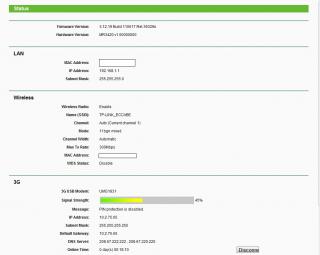
This post has been edited by digilife: Apr 2 2012, 12:35 AM |
|
|
Apr 2 2012, 08:12 AM
|
|
Elite
6,931 posts Joined: Apr 2011 From: Bolehland for sure ^_^
|
QUOTE(digilife @ Apr 2 2012, 12:33 AM) this is how my mr3420 looks mine quite the same too other than the modem is E353 and signal bar higher a bit, the rest is same, the wifi issue drop off after a while probably come from the auto channel, may be we need to select proper channel so our wifi wont crash with our neighbour,. any difference fr u guys?
|
|
|
Apr 2 2012, 08:30 AM
|
|
Senior Member
2,240 posts Joined: Mar 2007 From: Johor
|
i use wifi analyser on android to determine the best channel settings for me.
|
|
|
Apr 2 2012, 08:52 AM
|
|
Senior Member
8,025 posts Joined: Feb 2005 From: Planet Boleland
|
QUOTE(chuahcs79 @ Apr 2 2012, 08:12 AM) mine quite the same too other than the modem is E353 and signal bar higher a bit, the rest is same, the wifi issue drop off after a while probably come from the auto channel, may be we need to select proper channel so our wifi wont crash with our neighbour,. is Auto better?or a special Value better? btw, is your FW version the same? do u think it will support E372? meanwhile speed still strong as for now (on for more than 8 hrs)  This post has been edited by digilife: Apr 2 2012, 08:55 AM |
|
|
Apr 2 2012, 08:58 AM
|
|
Senior Member
4,582 posts Joined: Jan 2003 From: West johor
|
QUOTE(wkkm007 @ Apr 1 2012, 11:27 PM) conclusion: TP Link TL-MR3420/3220 have good OpenWrt firmware support.Aztech HW550 better; less wifi issue Tp Link TL-MR3420 better: more model modem detection 42mbps modem will this work on these 3G ready router? |
|
|
Apr 2 2012, 09:05 AM
|
|
Senior Member
8,025 posts Joined: Feb 2005 From: Planet Boleland
|
QUOTE(fat16 @ Apr 2 2012, 08:58 AM) TP Link TL-MR3420/3220 have good OpenWrt firmware support. what is OpenWrt for? |
|
|
Apr 2 2012, 10:35 AM
|
|
Staff
72,807 posts Joined: Sep 2005 From: KUL
|
I noticed that Channel 9 is not working that well for me. It is better than the earlier one but it still stops after a while of inactivation. Any other suggested channel?
This post has been edited by fruitie: Apr 2 2012, 10:36 AM |
|
|
Apr 2 2012, 10:44 AM
|
|
Senior Member
2,954 posts Joined: Apr 2008
|
QUOTE(fruitie @ Apr 2 2012, 10:35 AM) I noticed that Channel 9 is not working that well for me. It is better than the earlier one but it still stops after a while of inactivation. Any other suggested channel? Only happen on iPad? How about computer? |
|
|
Apr 2 2012, 10:58 AM
|
|
Staff
72,807 posts Joined: Sep 2005 From: KUL
|
QUOTE(KKW @ Apr 2 2012, 10:44 AM) Only happen on iPad? How about computer? Er, I don't turn on my WiFi on my laptop. Pure LAN only because WiFi is slower compared to LAN. Hehe. |
|
|
Apr 2 2012, 11:11 AM
|
|
Senior Member
2,954 posts Joined: Apr 2008
|
QUOTE(fruitie @ Apr 2 2012, 10:58 AM) Er, I don't turn on my WiFi on my laptop. Oh ok. It seem no different on my mac Pure LAN only because WiFi is slower compared to LAN. Hehe. Did you try to change your mtu? Did you use any extended cable to connect to modem? |
|
|
Apr 2 2012, 11:29 AM
|
|
Staff
72,807 posts Joined: Sep 2005 From: KUL
|
QUOTE(KKW @ Apr 2 2012, 11:11 AM) Oh ok. It seem no different on my mac Still the MTU I tested the other day, will try again. Did you try to change your mtu? Did you use any extended cable to connect to modem? Nope, no extended cable. Straight plug to my router. This post has been edited by fruitie: Apr 2 2012, 11:29 AM |
|
|
Apr 2 2012, 11:43 AM
|
|
Senior Member
8,025 posts Joined: Feb 2005 From: Planet Boleland
|
QUOTE(fruitie @ Apr 2 2012, 10:58 AM) Er, I don't turn on my WiFi on my laptop. Use LAN and wifi together will be much smoother Pure LAN only because WiFi is slower compared to LAN. Hehe. |
|
|
Apr 2 2012, 12:20 PM
|
|
Senior Member
2,954 posts Joined: Apr 2008
|
QUOTE(fruitie @ Apr 2 2012, 11:29 AM) Still the MTU I tested the other day, will try again. Try put as default MTU.. Nope, no extended cable. Straight plug to my router. |
|
|
Apr 2 2012, 01:54 PM
|
|
Staff
72,807 posts Joined: Sep 2005 From: KUL
|
QUOTE(digilife @ Apr 2 2012, 11:43 AM) Use LAN and wifi together will be much smoother Mine seems to give priority to WiFi and hence slower for me...QUOTE(KKW @ Apr 2 2012, 12:20 PM) Try put as default MTU.. I tried earlier, no big difference. OK la, will try at night again. |
|
|
Apr 2 2012, 08:21 PM
|
|
Junior Member
4 posts Joined: Jul 2007
|
helllo guys, how do i set Tp Link TL-MR3420 to run WDCMA ONLY ?
coz i wanted to get highspeed only at all the times. |
|
|
Apr 2 2012, 08:31 PM
|
|
Junior Member
384 posts Joined: Jan 2006 From: Penang
|
Apple products are known to have WiFi incompatibility with certain wireless routers. Only "certified" Apple routers will have less issues. I have the same issue using iPod Touch, iPhone or iPad with MR3420 on factory firmware. The issue is fixed after I started using OpenWRT firmware on MR3420, works on any channels. Must be some sort of algorithm differences among the 2 firmwares. Anyway, whatever works.
|
|
|
Apr 2 2012, 08:58 PM
|
|
Senior Member
3,963 posts Joined: Nov 2006
|
My MBP works very well with this router, never experience any drop WIFI issue.
Router on default setup and still running on factory firmware. |
|
|
Apr 2 2012, 10:43 PM
|
|
Senior Member
2,954 posts Joined: Apr 2008
|
QUOTE(piscesguy @ Apr 2 2012, 08:58 PM) My MBP works very well with this router, never experience any drop WIFI issue. Same on my mac Router on default setup and still running on factory firmware. Btw, I just check my router.. I was shock when I saw this  
|
|
|
Apr 2 2012, 11:54 PM
|
|
Senior Member
8,025 posts Joined: Feb 2005 From: Planet Boleland
|
QUOTE(KKW @ Apr 2 2012, 10:43 PM) Same on my mac u guys are lucky to have such nice signal as i believe you guys live very close to the tower/base stationBtw, I just check my router.. I was shock when I saw this
how is your speedtest? |
|
|
Apr 3 2012, 12:03 AM
|
|
Staff
72,807 posts Joined: Sep 2005 From: KUL
|
I think after some observations, my iPad is working fine. Will monitor for another day.
|
|
|
Apr 3 2012, 12:06 AM
|
|
Senior Member
8,025 posts Joined: Feb 2005 From: Planet Boleland
|
QUOTE(fruitie @ Apr 3 2012, 12:03 AM) I think after some observations, my iPad is working fine. Will monitor for another day. using OpenWRT firmware now?how is the streaming on LETV and PPS on Ipad? |
|
|
Apr 3 2012, 12:07 AM
|
|
Staff
72,807 posts Joined: Sep 2005 From: KUL
|
QUOTE(digilife @ Apr 3 2012, 12:06 AM) using OpenWRT firmware now? No, no time to check out OpenWRT yet.how is the streaming on LETV and PPS on Ipad? No problem ah. |
|
|
Apr 3 2012, 12:21 AM
|
|
Senior Member
2,954 posts Joined: Apr 2008
|
QUOTE(digilife @ Apr 2 2012, 11:54 PM) u guys are lucky to have such nice signal as i believe you guys live very close to the tower/base station Last time yes. Now no more cos they move away how is your speedtest? Here is the speedtest  QUOTE(fruitie @ Apr 3 2012, 12:03 AM) I think after some observations, my iPad is working fine. Will monitor for another day. What you did? Nth? |
|
|
Apr 3 2012, 12:37 AM
|
|
Senior Member
8,025 posts Joined: Feb 2005 From: Planet Boleland
|
QUOTE(KKW @ Apr 3 2012, 12:21 AM) Last time yes. Now no more cos they move away good speed there, RSSI = <60?Here is the speedtest What you did? Nth? |
|
|
Apr 3 2012, 01:06 AM
|
|
Staff
72,807 posts Joined: Sep 2005 From: KUL
|
QUOTE(KKW @ Apr 3 2012, 12:21 AM) What you did? Nth? Hehe. Got la. I didn't tell only. Changed MTU, then changed mode to b/g only. I Googled and I heard this is one of the solutions. |
|
|
Apr 3 2012, 01:21 AM
|
|
Elite
6,931 posts Joined: Apr 2011 From: Bolehland for sure ^_^
|
QUOTE(fruitie @ Apr 3 2012, 01:06 AM) Hehe. Got la. I didn't tell only. yea wireles B/G is much more stable than wireles N in certain way,.. Changed MTU, then changed mode to b/g only. I Googled and I heard this is one of the solutions. |
|
|
Apr 3 2012, 01:25 AM
|
|
Senior Member
8,025 posts Joined: Feb 2005 From: Planet Boleland
|
QUOTE(chuahcs79 @ Apr 3 2012, 01:21 AM) yea wireles B/G is much more stable than wireles N in certain way,.. i remembered u mentioned this b4, lousy wireless N |
|
|
Apr 3 2012, 01:42 AM
|
|
Elite
6,931 posts Joined: Apr 2011 From: Bolehland for sure ^_^
|
QUOTE(digilife @ Apr 3 2012, 01:25 AM) i remembered u mentioned this b4, lousy wireless N yea wireless N either 150Mbps or 300Mbps, so very tricky,.. wireless G more stable, but shorter distance,. |
|
|
Apr 3 2012, 06:12 AM
|
|
Senior Member
8,025 posts Joined: Feb 2005 From: Planet Boleland
|
Icon505M have the best Ping and UPload on MR3420
 
|
|
|
Apr 3 2012, 08:44 AM
|
|
Staff
72,807 posts Joined: Sep 2005 From: KUL
|
QUOTE(chuahcs79 @ Apr 3 2012, 01:21 AM) yea wireles B/G is much more stable than wireles N in certain way,.. Also silly me, I just noticed this part: Max Idle Time: 0 minutes (0 means remain active at all times)I didn't change the default value which is 15 minutes, now changed to 0, looks good. Always connected. |
|
|
Apr 3 2012, 09:38 AM
|
|
Senior Member
3,123 posts Joined: Sep 2008 From: OUG - Muhibbah LRT
|
QUOTE(digilife @ Apr 2 2012, 11:25 PM) i remembered u mentioned this b4, lousy wireless N Lol, but my x10 got b,g harder then my ipod Touch b,g,n to detect wifi hotsport |
|
|
Apr 3 2012, 11:41 AM
|
|
Elite
6,931 posts Joined: Apr 2011 From: Bolehland for sure ^_^
|
QUOTE(fruitie @ Apr 3 2012, 08:44 AM) Also silly me, I just noticed this part: Max Idle Time: 0 minutes (0 means remain active at all times) yea, that;s why after a while connection become no data,.. I didn't change the default value which is 15 minutes, now changed to 0, looks good. Always connected. |
|
|
Apr 3 2012, 01:41 PM
|
|
Staff
72,807 posts Joined: Sep 2005 From: KUL
|
QUOTE(chuahcs79 @ Apr 3 2012, 11:41 AM) yea, that;s why after a while connection become no data,.. I hope my connection issue can be solved. I suspected it is the idle time thingy.My connection stays active until this morning. |
|
|
Apr 3 2012, 08:16 PM
|
|
Elite
6,931 posts Joined: Apr 2011 From: Bolehland for sure ^_^
|
QUOTE(fruitie @ Apr 3 2012, 01:41 PM) I hope my connection issue can be solved. I suspected it is the idle time thingy. finger cross, and hope all will be done,.. apple product wifi a bit fussy for sure,.. My connection stays active until this morning. |
|
|
Apr 3 2012, 08:21 PM
|
|
Senior Member
8,025 posts Joined: Feb 2005 From: Planet Boleland
|
QUOTE(chuahcs79 @ Apr 3 2012, 08:16 PM) finger cross, and hope all will be done,.. apple product wifi a bit fussy for sure,.. Chuah, care to compare speed with your E353 now? peak hour rite? mine , raw ZTE MF691  |
|
|
Apr 4 2012, 12:12 AM
|
|
Senior Member
2,954 posts Joined: Apr 2008
|
QUOTE(fruitie @ Apr 3 2012, 08:44 AM) Also silly me, I just noticed this part: Max Idle Time: 0 minutes (0 means remain active at all times) Hopefully it solve your problem I didn't change the default value which is 15 minutes, now changed to 0, looks good. Always connected. QUOTE(chuahcs79 @ Apr 3 2012, 08:16 PM) finger cross, and hope all will be done,.. apple product wifi a bit fussy for sure,.. Luckily don't have any issue with my mac on this router..But now I'm using Cat6 cable so I can easily share my file from my pc to mac |
|
|
Apr 4 2012, 12:22 AM
|
|
Elite
6,931 posts Joined: Apr 2011 From: Bolehland for sure ^_^
|
QUOTE(KKW @ Apr 4 2012, 12:12 AM) Hopefully it solve your problem Lan cable can share file, not like wireless,.. fussy and slow,.. Luckily don't have any issue with my mac on this router.. But now I'm using Cat6 cable so I can easily share my file from my pc to mac |
|
|
Apr 4 2012, 12:52 AM
|
|
Senior Member
2,954 posts Joined: Apr 2008
|
QUOTE(chuahcs79 @ Apr 4 2012, 12:22 AM) Lan cable can share file, not like wireless,.. fussy and slow,.. Yup. On wireless the transfer rate is 2-3mbps While on lan transfer rate is 10-12 mbps |
|
|
Apr 4 2012, 01:08 AM
|
|
Staff
72,807 posts Joined: Sep 2005 From: KUL
|
OK, two updates here which I'm really delighted for:
1) Looks like my data stuck issue is solved. Thank God for me to identify the culprit 2) I noticed that I can connect to company's VPN very promptly, it used to take more than 2 minutes on my Aztech now only takes about 30 seconds? |
|
|
Apr 4 2012, 01:11 AM
|
|
Senior Member
8,025 posts Joined: Feb 2005 From: Planet Boleland
|
QUOTE(fruitie @ Apr 4 2012, 01:08 AM) OK, two updates here which I'm really delighted for: 1) wat was the main problem/culprit?1) Looks like my data stuck issue is solved. Thank God for me to identify the culprit 2) I noticed that I can connect to company's VPN very promptly, it used to take more than 2 minutes on my Aztech now only takes about 30 seconds? 2) you setup your Co's VPN into this Router and surf/DL with 50Mbps? |
|
|
Apr 4 2012, 01:15 AM
|
|
Staff
72,807 posts Joined: Sep 2005 From: KUL
|
QUOTE(digilife @ Apr 4 2012, 01:11 AM) 1) wat was the main problem/culprit? 1) The idle time thingy2) you setup your Co's VPN into this Router and surf/DL with 50Mbps? 2) No la. I connect to company's server using VPN to do work la, speed still retains Maxis' speed. |
|
|
Apr 4 2012, 01:18 AM
|
|
Elite
6,931 posts Joined: Apr 2011 From: Bolehland for sure ^_^
|
QUOTE(digilife @ Apr 4 2012, 01:11 AM) 1) wat was the main problem/culprit? LOL, if company VPN 50Mbps, then fruitie can campak maxis into Laut Dah, ha ha 2) you setup your Co's VPN into this Router and surf/DL with 50Mbps? Added on April 4, 2012, 1:20 am QUOTE(fruitie @ Apr 4 2012, 01:15 AM) 1) The idle time thingy wow , so no more regret on getting tl-mr3420 right ? see at the end still beat down the aztech, LOL 2) No la. I connect to company's server using VPN to do work la, speed still retains Maxis' speed.This post has been edited by chuahcs79: Apr 4 2012, 01:20 AM |
|
|
Apr 4 2012, 01:24 AM
|
|
Senior Member
8,025 posts Joined: Feb 2005 From: Planet Boleland
|
QUOTE(fruitie @ Apr 4 2012, 01:15 AM) 1) The idle time thingy So wat idle value u set?2) No la. I connect to company's server using VPN to do work la, speed still retains Maxis' speed.from where u access the idel value? i wan to check mine too |
|
|
Apr 4 2012, 01:47 AM
|
|
Staff
72,807 posts Joined: Sep 2005 From: KUL
|
QUOTE(chuahcs79 @ Apr 4 2012, 01:18 AM) LOL, if company VPN 50Mbps, then fruitie can campak maxis into Laut Dah, ha ha Yeah, then none of us will need to subscribe for high speed Internet and company doesn't even need to subsidize our broadband. Added on April 4, 2012, 1:20 am wow , so no more regret on getting tl-mr3420 right ? see at the end still beat down the aztech, LOL Err, I still need few days of observations before come to a conclusion. QUOTE(digilife @ Apr 4 2012, 01:24 AM) So wat idle value u set? 0 because it means remain active at all times.from where u access the idel value? i wan to check mine too By default it is 15 minutes. Go to http://192.168.1.1 page then navigate to Network and collapse the branch out to 3G. From there, you can see it under Connection mode. |
|
|
Apr 4 2012, 01:58 AM
|
|
Senior Member
8,025 posts Joined: Feb 2005 From: Planet Boleland
|
QUOTE(fruitie @ Apr 4 2012, 01:47 AM) Yeah, then none of us will need to subscribe for high speed Internet and company doesn't even need to subsidize our broadband. This is how mine look, no wonder i dun have the prob that u are facing, btw, it came as default, i din do any settings to it....... Err, I still need few days of observations before come to a conclusion. 0 because it means remain active at all times. By default it is 15 minutes. Go to http://192.168.1.1 page then navigate to Network and collapse the branch out to 3G. From there, you can see it under Connection mode. 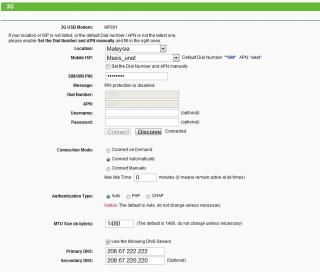
|
|
|
Apr 4 2012, 02:25 AM
|
|
Elite
6,931 posts Joined: Apr 2011 From: Bolehland for sure ^_^
|
QUOTE(fruitie @ Apr 4 2012, 01:47 AM) Yeah, then none of us will need to subscribe for high speed Internet and company doesn't even need to subsidize our broadband. 0 = good, otherwise after 15 min, wifi gone haywire,.. happen to mylaptop wifi too,. my laptop is hp,. Err, I still need few days of observations before come to a conclusion. 0 because it means remain active at all times. By default it is 15 minutes. Go to http://192.168.1.1 page then navigate to Network and collapse the branch out to 3G. From there, you can see it under Connection mode. |
|
|
Apr 4 2012, 08:16 AM
|
|
Staff
72,807 posts Joined: Sep 2005 From: KUL
|
OK, I take back my words. Looks like the problem still persists and now happens on my company's laptop also which is a DELL. The WiFi signal will lose somewhere. I really need to find out a solution.
Currently using Channel 9, any other thing that you guys can suggest? |
|
|
Apr 4 2012, 09:00 AM
|
|
Senior Member
1,411 posts Joined: Dec 2004 From: Batu Pahat
|
Flash to OpenWrt firmware. kaskus have good tutorial plus mod firmware.
|
|
|
Apr 4 2012, 09:16 AM
|
|
Senior Member
8,025 posts Joined: Feb 2005 From: Planet Boleland
|
QUOTE(fruitie @ Apr 4 2012, 08:16 AM) OK, I take back my words. Looks like the problem still persists and now happens on my company's laptop also which is a DELL. The WiFi signal will lose somewhere. I really need to find out a solution. could it be network problem?Currently using Channel 9, any other thing that you guys can suggest? i was using direct connection just now, one minute it was blazing highspeed of >4Mbps, the next min, although it shows connected , there is "no internet access" when checked on the "IPv4 Connectivity" status now i am using MF600 and although the speed is much slower, atleast i am still "connected" with internet connectivity  could it be network issue that is affecting your connection and can your laptop surf when there is packet loss via MR3420 wifi to your iPAD? btw, abt flashing to OpenWRT firmware, where is kaskus ? |
|
|
Apr 4 2012, 10:19 AM
|
|
Staff
72,807 posts Joined: Sep 2005 From: KUL
|
QUOTE(pcbase @ Apr 4 2012, 09:00 AM) Flash to OpenWrt firmware. kaskus have good tutorial plus mod firmware. I'm just afraid I can't use it with my E353.QUOTE(digilife @ Apr 4 2012, 09:16 AM) could it be network problem? Nope, it is not connection issue I presume. i was using direct connection just now, one minute it was blazing highspeed of >4Mbps, the next min, although it shows connected , there is "no internet access" when checked on the "IPv4 Connectivity" status now i am using MF600 and although the speed is much slower, atleast i am still "connected" with internet connectivity could it be network issue that is affecting your connection and can your laptop surf when there is packet loss via MR3420 wifi to your iPAD? btw, abt flashing to OpenWRT firmware, where is kaskus ? I don't know la, have to find out a solution which I think I can. Kaskus is an Indonesian forum but then earlier in few pages, someone did share the tutorial. |
|
|
Apr 4 2012, 10:33 AM
|
|
Senior Member
2,954 posts Joined: Apr 2008
|
QUOTE(fruitie @ Apr 4 2012, 08:16 AM) OK, I take back my words. Looks like the problem still persists and now happens on my company's laptop also which is a DELL. The WiFi signal will lose somewhere. I really need to find out a solution. Did you try restore your router?Currently using Channel 9, any other thing that you guys can suggest? btw, do you guys remember that I complain before about the router hang? I upgrade my e1762 firmware it solve the problem Can you access the router page when the problem happen? This post has been edited by KKW: Apr 4 2012, 10:35 AM |
|
|
Apr 4 2012, 10:37 AM
|
|
Staff
72,807 posts Joined: Sep 2005 From: KUL
|
QUOTE(KKW @ Apr 4 2012, 10:33 AM) Did you try restore your router? Yes, can access. btw, do you guys remember that I complain before about the router hang? I upgrade my e1762 firmware it solve the problem Can you access the router page when the problem happen? |
|
|
Apr 4 2012, 11:09 AM
|
|
Senior Member
2,954 posts Joined: Apr 2008
|
QUOTE(fruitie @ Apr 4 2012, 10:37 AM) Yes, can access. That's mean not hang problem.. Maybe try your luck on e353 modem This post has been edited by KKW: Apr 4 2012, 11:09 AM |
|
|
Apr 4 2012, 11:30 AM
|
|
Elite
6,931 posts Joined: Apr 2011 From: Bolehland for sure ^_^
|
QUOTE(digilife @ Apr 4 2012, 09:16 AM) could it be network problem? i myself always have this router wifi issue, connected but it wont last long before zero data traffic,.. happen to my laptop always,. been using Lan cable since then,. i was using direct connection just now, one minute it was blazing highspeed of >4Mbps, the next min, although it shows connected , there is "no internet access" when checked on the "IPv4 Connectivity" status now i am using MF600 and although the speed is much slower, atleast i am still "connected" with internet connectivity could it be network issue that is affecting your connection and can your laptop surf when there is packet loss via MR3420 wifi to your iPAD? btw, abt flashing to OpenWRT firmware, where is kaskus ? |
|
|
Apr 4 2012, 08:00 PM
|

Senior Member
1,185 posts Joined: Mar 2007
|
Anybody here got experience with NAS on OpenWRT on the TP-Link?
This post has been edited by totally_skint: Apr 6 2012, 01:16 AM |
|
|
Apr 10 2012, 05:40 PM
|

Senior Member
1,794 posts Joined: Jan 2003 From: int lo0/0
|
Hi, I just bought this router. Any idea where I can get the SIM/UIM PIN? I'm on Maxis Broadband with the 3G USB modem which is plug and play. So how do I find out about the SIM/UIM PIN?
Thanks |
|
|
Apr 10 2012, 06:58 PM
|
|
Senior Member
2,954 posts Joined: Apr 2008
|
QUOTE(Praetor @ Apr 10 2012, 05:40 PM) Hi, I just bought this router. Any idea where I can get the SIM/UIM PIN? I'm on Maxis Broadband with the 3G USB modem which is plug and play. So how do I find out about the SIM/UIM PIN? Did you set any pin before when you connect on pc?Thanks If no, just ignore that |
|
|
Apr 10 2012, 07:18 PM
|
|
Senior Member
8,025 posts Joined: Feb 2005 From: Planet Boleland
|
QUOTE(Praetor @ Apr 10 2012, 05:40 PM) Hi, I just bought this router. Any idea where I can get the SIM/UIM PIN? I'm on Maxis Broadband with the 3G USB modem which is plug and play. So how do I find out about the SIM/UIM PIN? use the sim on a phone to disable the simcard pin , by default it should be 0123 for maxis and 1234 for celcomThanks |
|
|
Apr 11 2012, 03:06 AM
|

All Stars
10,475 posts Joined: Jan 2003 From: Sarawak
|
QUOTE NOTE for this method, is it permanently disabling the autorun of all my flashdrive like usb pendrive?or it only disable the autorun for the ZTE usb modem?for ZTE USB MODEM, u need to disable the auto run first before plug into router, otherwise the router wont recognize your modem. For window xp : -> plug in your zte modem in pc/laptop -> wait for your pc/laptop to recognize your modem ( close the dialer if it pop up ) -> click start -> click run -> type in CMD ( comand prompt ) -> type in AT+ZCDRUN=8 (Disable cd /flashdrive autorun ) -> press enter -> done ( u will see a message showing that autorun is diable now ) -> unplug your modem from pc now -> plug it into TP Link 3G router -> router will auto recognize it now and start dialer your ZTE modem For window 7: ->plug your ZTE modem into your pc/laptop -> wait for pc/laptop to recognise it ( close the dialer if it pop up ) -> click start -> enter CMD in search column -> type in AT+ZCDRUN=8 (Disable cd /flashdrive autorun ) -> press enter -> done ( u will see a message showing u that autorun is disable ) -> unplug the modem from pc -> plug it in your TP Link 3G router -> router will auto recognize it now and start dialer your ZTE modem will my celcom dialer for the ZTE MF190 still work like normal after i disable the autorun? sometimes i need to bring the usb dongle to my workplace and use it on other notebook to online. |
|
|
Apr 11 2012, 07:13 AM
|
|
Junior Member
384 posts Joined: Jan 2006 From: Penang
|
QUOTE(Praetor @ Apr 10 2012, 05:40 PM) Hi, I just bought this router. Any idea where I can get the SIM/UIM PIN? I'm on Maxis Broadband with the 3G USB modem which is plug and play. So how do I find out about the SIM/UIM PIN? I have the TP-Link firmware that supports entering the PIN number via the web UI if you're interested. Manage to download it before TP-Link pulled it out from their servers. I'm not sure why they did that though. The only difference I noticed is that this version allows you to use a PIN-locked modem. So, use it at your own risks!! Thanks Version of the firmware: TL-MR3420_V1_110617 PM me to get the file. ----------------------------------------- I've just uploaded it to the following file server: http://www.2shared.com/file/b-1MclFW/TL-MR..._V1_110617.html Mods, kindly remove the link if it's not allowed. Thanks! This post has been edited by maxcheam: Apr 11 2012, 07:20 AM |
|
|
Apr 11 2012, 07:02 PM
|
|
Senior Member
2,954 posts Joined: Apr 2008
|
The firmware was only at malaysia TP-Link website..
If you access the global website, you can't see this firmware |
|
|
Apr 11 2012, 09:14 PM
|
|
Senior Member
1,794 posts Joined: Jan 2003 From: int lo0/0
|
QUOTE(KKW @ Apr 10 2012, 06:58 PM) Did you set any pin before when you connect on pc? If no, just ignore that QUOTE(digilife @ Apr 10 2012, 07:18 PM) use the sim on a phone to disable the simcard pin , by default it should be 0123 for maxis and 1234 for celcom QUOTE(maxcheam @ Apr 11 2012, 07:13 AM) I have the TP-Link firmware that supports entering the PIN number via the web UI if you're interested. Manage to download it before TP-Link pulled it out from their servers. I'm not sure why they did that though. The only difference I noticed is that this version allows you to use a PIN-locked modem. So, use it at your own risks!! Thanks guys, I just got this yesterday but I don't have the USB modem with me right now to test it out. I'm looking through the thread and someone posted their configuration which made me wonder where the heck do I get the SIM pin. Version of the firmware: TL-MR3420_V1_110617 PM me to get the file. ----------------------------------------- I've just uploaded it to the following file server: http://www.2shared.com/file/b-1MclFW/TL-MR..._V1_110617.html Mods, kindly remove the link if it's not allowed. Thanks! Anyway, I can't disable the SIM card pin with a phone and then put it back on the modem. That would require me to punch the SIM as I'm using an iPhone. I'll try it out this weekend. |
|
|
Apr 11 2012, 09:16 PM
|
|
Junior Member
384 posts Joined: Jan 2006 From: Penang
|
QUOTE(KKW @ Apr 11 2012, 07:02 PM) The firmware was only at malaysia TP-Link website.. thanks for pointing that out. I didn't realize. If you access the global website, you can't see this firmware |
|
|
Apr 11 2012, 09:23 PM
|
|
Senior Member
2,954 posts Joined: Apr 2008
|
QUOTE(Praetor @ Apr 11 2012, 09:14 PM) Thanks guys, I just got this yesterday but I don't have the USB modem with me right now to test it out. I'm looking through the thread and someone posted their configuration which made me wonder where the heck do I get the SIM pin. You can disable the sim card pin on mobile partner Anyway, I can't disable the SIM card pin with a phone and then put it back on the modem. That would require me to punch the SIM as I'm using an iPhone. I'll try it out this weekend. QUOTE(maxcheam @ Apr 11 2012, 09:16 PM) thanks for pointing that out. I didn't realize. No probs |
|
|
Apr 11 2012, 10:02 PM
|
|
Senior Member
3,123 posts Joined: Sep 2008 From: OUG - Muhibbah LRT
|
Portable 3G/3.75G Battery Powered Wireless N Router TL-MR3040
 http://www.tp-link.com/en/products/details...=TL-MR3040#spec This post has been edited by wkkm007: Apr 11 2012, 10:02 PM |
|
|
 Apr 12 2012, 09:41 AM Apr 12 2012, 09:41 AM
|
|
Newbie
3 posts Joined: Apr 2011
|
Two things here:
1) I recently bought TPlink M3420 to be used with my Hua Wei E173s-2, After a nightmare of connection problems for about a week, finally solved it with their June 2011 firmware update, from TP link Chile 2) reading your posts on using SE phones. Very interesting.. is it limited to the models you have tested or almost all the old phones can do this? And How to do the settings? Tq Ed |
|
|
Apr 12 2012, 11:16 AM
|
|
Senior Member
8,025 posts Joined: Feb 2005 From: Planet Boleland
|
Our fellow forumer is using his Huawei E367 (28.8Mbps modem) with this MR3420, has anyone use his Huawei E372 (DC-42Mbps modem) with this MR3420?
This post has been edited by digilife: Apr 12 2012, 11:17 AM |
|
|
Apr 12 2012, 09:29 PM
|
|
Senior Member
3,123 posts Joined: Sep 2008 From: OUG - Muhibbah LRT
|
QUOTE(lokzan @ Apr 12 2012, 07:41 AM) Two things here: 2.1 also can use 3rd party app but root require.1) I recently bought TPlink M3420 to be used with my Hua Wei E173s-2, After a nightmare of connection problems for about a week, finally solved it with their June 2011 firmware update, from TP link Chile 2) reading your posts on using SE phones. Very interesting.. is it limited to the models you have tested or almost all the old phones can do this? And How to do the settings? Tq Ed 2.2 above just go to setting, wireless n net., tethering and portable hotport, |
|
|
Apr 12 2012, 11:42 PM
|
|
Senior Member
8,025 posts Joined: Feb 2005 From: Planet Boleland
|
something that you guys really want to knoe is shown below
i wont explain anything, ITS SELF EXPLANATORY 
|
|
|
Apr 13 2012, 07:24 AM
|
|
Senior Member
1,411 posts Joined: Dec 2004 From: Batu Pahat
|
i tot u already using openwrt firmware ?
|
|
|
Apr 13 2012, 07:47 AM
|
|
Junior Member
384 posts Joined: Jan 2006 From: Penang
|
QUOTE(digilife @ Apr 12 2012, 11:42 PM) something that you guys really want to knoe is shown below Showing off your DC HSPA+ modem ya. i wont explain anything, ITS SELF EXPLANATORY
I like your SSID too. |
|
|
Apr 13 2012, 07:51 AM
|
|
Senior Member
8,025 posts Joined: Feb 2005 From: Planet Boleland
|
QUOTE(maxcheam @ Apr 13 2012, 07:47 AM) Showing off your DC HSPA+ modem ya. thanks bro, using this kind of SSID, ppl just dun have the heart to hack your wifiI like your SSID too. btw, by using E372, i am just harnessing the DC offered by maxis  Added on April 13, 2012, 7:54 am QUOTE(maxcheam @ Apr 13 2012, 07:47 AM) Showing off your DC HSPA+ modem ya. thanks bro, using this kind of SSID, ppl just dun have the heart to hack your wifiI like your SSID too. btw, by using E372, i am just harnessing the DC offered by maxis This post has been edited by digilife: Apr 13 2012, 07:54 AM |
|
|
Apr 13 2012, 08:37 PM
|
|
Senior Member
1,794 posts Joined: Jan 2003 From: int lo0/0
|
Ahhh, finally got it running. Setup was relatively easy. From zero to Internet in 15 minutes.
Speed is a bit low though albeit strong signal; about 65% to 75%. Using E1552 USB Modem. First run  Second run is slightly a bit better.  This post has been edited by Praetor: Apr 13 2012, 08:45 PM |
|
|
Apr 14 2012, 12:24 AM
|
|
Staff
72,807 posts Joined: Sep 2005 From: KUL
|
QUOTE(digilife @ Apr 12 2012, 11:42 PM) something that you guys really want to knoe is shown below Your MAC address is exposed. i wont explain anything, ITS SELF EXPLANATORY
|
|
|
Apr 14 2012, 12:28 AM
|
|
Senior Member
8,025 posts Joined: Feb 2005 From: Planet Boleland
|
QUOTE(fruitie @ Apr 14 2012, 12:24 AM) Your MAC address is exposed. any harm , if yes to wat extend? |
|
|
Apr 14 2012, 12:46 AM
|
|
Staff
72,807 posts Joined: Sep 2005 From: KUL
|
QUOTE(digilife @ Apr 14 2012, 12:28 AM) any harm , if yes to wat extend? I don't know but somehow it is your computer's identity.This post has been edited by fruitie: Apr 14 2012, 12:50 AM |
|
|
Apr 14 2012, 12:17 PM
|

Senior Member
1,200 posts Joined: Feb 2010 From: Kuala Lumpur
|
QUOTE(fruitie @ Apr 14 2012, 12:46 AM) I don't know but somehow it is your computer's identity. that mac is for the routernot computer's |
|
|
Apr 14 2012, 01:42 PM
|
|
Senior Member
8,025 posts Joined: Feb 2005 From: Planet Boleland
|
QUOTE(johnlth93 @ Apr 14 2012, 12:17 PM) that mac is for the router so its not "harmful" to me if exposed ?not computer's |
|
|
Apr 14 2012, 04:20 PM
|
|
Senior Member
3,123 posts Joined: Sep 2008 From: OUG - Muhibbah LRT
|
Lol
Added on April 14, 2012, 4:21 pmLike show contact no. on fb Added on April 14, 2012, 4:23 pmTp link can support 42mbps? This post has been edited by wkkm007: Apr 14 2012, 04:23 PM |
|
|
Apr 14 2012, 04:58 PM
|
|
Senior Member
8,025 posts Joined: Feb 2005 From: Planet Boleland
|
QUOTE(wkkm007 @ Apr 14 2012, 04:20 PM) Lol yes, on stock FW too, din even update the FW or to Open WRT yetAdded on April 14, 2012, 4:21 pmLike show contact no. on fb Added on April 14, 2012, 4:23 pmTp link can support 42mbps? |
|
|
Apr 14 2012, 08:42 PM
|
|
Newbie
4 posts Joined: Jun 2006
|
Bought 3420 for my ZTE MF190 yesterday, no need to disable auto run just setup in 192.168.1.1 only aftertat can use.
|
|
|
Apr 15 2012, 01:05 AM
|
|
Senior Member
1,200 posts Joined: Feb 2010 From: Kuala Lumpur
|
QUOTE(digilife @ Apr 14 2012, 01:42 PM) so its not "harmful" to me if exposed ? possibly not ~well ofcuz there will be possibility of harm to be done but in most circumstances, it's not harmful xD |
|
|
Apr 15 2012, 09:18 AM
|
|
Senior Member
8,025 posts Joined: Feb 2005 From: Planet Boleland
|
E372+MR3420, wifi only, no lan cable attached
 |
|
|
Apr 15 2012, 05:36 PM
|
|
Junior Member
6 posts Joined: Oct 2008
|
just bought a dlink dwm156 A6 usb modem for my tplink mr3420, but show unknow from the router. i checked all setting , all fill correctly n reboot but still unknown to the router.
how to make make usb modem support by my router , pls help. |
|
|
Apr 15 2012, 05:46 PM
|
|
Senior Member
8,025 posts Joined: Feb 2005 From: Planet Boleland
|
QUOTE(niksam @ Apr 15 2012, 05:36 PM) just bought a dlink dwm156 A6 usb modem for my tplink mr3420, but show unknow from the router. i checked all setting , all fill correctly n reboot but still unknown to the router. why dun u buy Huawei modem cause MR3420 support most Huawei modems including E372, (42mbps)how to make make usb modem support by my router , pls help. |
|
|
Apr 15 2012, 06:23 PM
|
|
Junior Member
6 posts Joined: Oct 2008
|
My mistake, recommended by the seller. Do u know how to make it support. I check compatibility list stated support
|
|
|
Apr 15 2012, 06:48 PM
|
|
Senior Member
8,025 posts Joined: Feb 2005 From: Planet Boleland
|
QUOTE(niksam @ Apr 15 2012, 06:23 PM) My mistake, recommended by the seller. Do u know how to make it support. I check compatibility list stated support If the documentations stated support, then i believe it will work, just that you need to be patience as sometimes it takes up to 5~10 mins to get it connected.1) does your PC shows that the MR3420 is connected or not ? if it does, meaning your MR3420 is in "proper order" 2) now comes to the modem part, is your simcard able to use or that there is no Broadband Plan activated. 3) do you have another modem to test? |
|
|
Apr 15 2012, 08:08 PM
|
|
Senior Member
1,794 posts Joined: Jan 2003 From: int lo0/0
|
Just out of curiosity, has anyone ever attempted to plugin a USB drive into the router? Will it share out the drive?
|
|
|
Apr 15 2012, 10:00 PM
|
|
Junior Member
6 posts Joined: Oct 2008
|
QUOTE(digilife @ Apr 15 2012, 06:48 PM) If the documentations stated support, then i believe it will work, just that you need to be patience as sometimes it takes up to 5~10 mins to get it connected. huawei e1550 n huawei e169 work properly only this dlink dwm156 cannot work. just found out in dlink website this dwm156 got version 6 n version 3. don know wat is the differences. anyway thanks for heip. 1) does your PC shows that the MR3420 is connected or not ? if it does, meaning your MR3420 is in "proper order" 2) now comes to the modem part, is your simcard able to use or that there is no Broadband Plan activated. 3) do you have another modem to test? if any more idea pls to let me know, thanks bro |
|
|
Apr 16 2012, 12:19 AM
|
|
Senior Member
8,025 posts Joined: Feb 2005 From: Planet Boleland
|
QUOTE(niksam @ Apr 15 2012, 10:00 PM) huawei e1550 n huawei e169 work properly only this dlink dwm156 cannot work. just found out in dlink website this dwm156 got version 6 n version 3. don know wat is the differences. anyway thanks for heip. how long and how much u bought the modem?if any more idea pls to let me know, thanks bro any link to that modem? |
|
|
Apr 16 2012, 05:30 PM
|
|
Junior Member
6 posts Joined: Oct 2008
|
QUOTE(digilife @ Apr 16 2012, 12:19 AM) how long and how much u bought the modem? bought it for rm120, who interested?any link to that modem? wat do u mean , any link to the modem. |
|
|
Apr 16 2012, 05:41 PM
|
|
Senior Member
8,025 posts Joined: Feb 2005 From: Planet Boleland
|
QUOTE(niksam @ Apr 16 2012, 05:30 PM) bought it for rm120, who interested? to read its specifications wat do u mean , any link to the modem. |
|
|
Apr 16 2012, 05:53 PM
|
|
Junior Member
6 posts Joined: Oct 2008
|
dlink website or google it lo
|
|
|
Apr 16 2012, 07:36 PM
|
|
Elite
6,931 posts Joined: Apr 2011 From: Bolehland for sure ^_^
|
Best modem to work with this TL-MR3420 = Huawei Brand,.
other brand like ZTE, Dlink, CSL, etc etc all normally have some issue here and there, mostly is the autorun need to turn off issue |
|
|
Apr 16 2012, 08:25 PM
|
|
Senior Member
8,025 posts Joined: Feb 2005 From: Planet Boleland
|
E372 connects very fast , so is Icon505
Mf691 and UMG, a tad slower. E220, lagi slow |
|
|
Apr 17 2012, 07:29 PM
|
|
Elite
6,931 posts Joined: Apr 2011 From: Bolehland for sure ^_^
|
QUOTE(digilife @ Apr 16 2012, 08:25 PM) E372 connects very fast , so is Icon505 E372 = out of budget,. Mf691 and UMG, a tad slower. E220, lagi slow |
|
|
Apr 18 2012, 08:53 AM
|
|
Staff
72,807 posts Joined: Sep 2005 From: KUL
|
My E353+TL MR 3420
 I'll try out E367 today after work. |
|
|
Apr 18 2012, 07:26 PM
|

Junior Member
31 posts Joined: Feb 2007
|
Dear all, may I know can TL-MR3420 support U mobile 7.2mb and 42mb usb modem ? Today I check with 1 of the staff from viewnet and he said TL-MR3420 does not support both U mobile 7.2mb and 42mb usb modem.... is that true ? TQ
|
|
|
Apr 18 2012, 07:32 PM
|
|
Senior Member
8,025 posts Joined: Feb 2005 From: Planet Boleland
|
QUOTE(se3333 @ Apr 18 2012, 07:26 PM) Dear all, may I know can TL-MR3420 support U mobile 7.2mb and 42mb usb modem ? Today I check with 1 of the staff from viewnet and he said TL-MR3420 does not support both U mobile 7.2mb and 42mb usb modem.... is that true ? TQ i can confirm that MR3420 support Umobile 7.2Mbps modem ( the ZTE MF190 ) for the 42Mbps, Huawei E372 is supported ( Umobile earlier Bundled 42Mbps modem ) but this latest ZTE MF680, i am not sure. i have more than 30modems in my stable of modems, u can listen to me on this dun ask me why i have so many modems, as i am a sial modem collector like ppl like to collect China Dolls and so on........... |
|
|
Apr 18 2012, 08:47 PM
|
|
Elite
6,931 posts Joined: Apr 2011 From: Bolehland for sure ^_^
|
QUOTE(digilife @ Apr 18 2012, 07:32 PM) i can confirm that MR3420 support Umobile 7.2Mbps modem ( the ZTE MF190 ) for the 42Mbps, Huawei E372 is supported ( Umobile earlier Bundled 42Mbps modem ) but this latest ZTE MF680, i am not sure. totally right i have more than 30modems in my stable of modems, u can listen to me on this dun ask me why i have so many modems, as i am a sial modem collector like ppl like to collect China Dolls and so on........... wow, E372 vs ZTE MF680 |
|
|
Apr 18 2012, 08:58 PM
|
|
Senior Member
8,025 posts Joined: Feb 2005 From: Planet Boleland
|
QUOTE(chuahcs79 @ Apr 18 2012, 08:47 PM) totally right E372 wins hands down, cause its an "open" modem compared to MF680 which is simlock, and E372 cost is much higher compared to MF680, and this explains why Umobile also ceased to bundle E372 with their signs up wow, E372 vs ZTE MF680 you guys just need to pay rm350 and signup a MB68 package, and if u stay for 5 mths , you get rebates of rm20X5=rm100, meaning the modem cost is rm350-rm100=rm250, whereas E372 cost rm450 from a authorised distro from TenTen Malaysia , see the difference and FYI, whoever wan to signup this rm350 modem bundled package from UM, can PM me as i have stocks of MF680 (simlocked to UM) |
|
|
Apr 18 2012, 09:31 PM
|
|
Elite
6,931 posts Joined: Apr 2011 From: Bolehland for sure ^_^
|
Sim locked is not that interesting as ZTE newer modem facing some unlock difficulty though
|
|
|
Apr 19 2012, 10:57 AM
|
|
Senior Member
3,076 posts Joined: Jan 2008
|
QUOTE(fruitie @ Apr 2 2012, 10:58 AM) Er, I don't turn on my WiFi on my laptop. I thought this router has a LAN port speed of 100Mbps and Wireless N speed of 300Mbps or worse 150Mbps? Pure LAN only because WiFi is slower compared to LAN. Hehe. |
|
|
Apr 19 2012, 11:01 AM
|
|
Staff
72,807 posts Joined: Sep 2005 From: KUL
|
QUOTE(cucubud @ Apr 19 2012, 10:57 AM) I thought this router has a LAN port speed of 100Mbps and Wireless N speed of 300Mbps or worse 150Mbps? I believe it is my network card's issue. |
|
|
Apr 19 2012, 11:30 AM
|
|
Senior Member
2,954 posts Joined: Apr 2008
|
Hmm.. I had tried cat5, cat5e and cat6 lan cable on this router to my mac.
In term of internet connection, it doesn't seem any different In term of sharing file from pc to pc, yes.. cat5e and cat6 has significant faster and max out the transferring rate which is 95mbps out of 100mbps which support on my pc.. |
|
|
Apr 19 2012, 05:49 PM
|
|
Junior Member
467 posts Joined: Dec 2009 From: ~!!! in BolehLand !!!~
|
|
|
|
Apr 19 2012, 08:06 PM
|
|
Senior Member
8,025 posts Joined: Feb 2005 From: Planet Boleland
|
peak hour traffic
mr3420+huawei e220  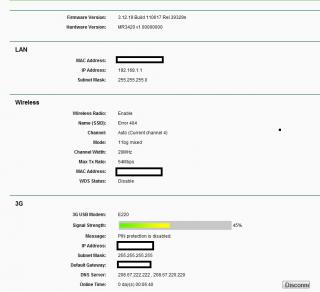
note; Solid Modem that cost rm1299.00 a few years ago, 2006 to be exact This post has been edited by digilife: Apr 19 2012, 08:09 PM |
|
|
Apr 20 2012, 01:56 AM
|
|
Elite
6,931 posts Joined: Apr 2011 From: Bolehland for sure ^_^
|
QUOTE(KKW @ Apr 19 2012, 11:30 AM) Hmm.. I had tried cat5, cat5e and cat6 lan cable on this router to my mac. after all cat 5e and cat 6 really making a different on Data transfer Rate In term of internet connection, it doesn't seem any different In term of sharing file from pc to pc, yes.. cat5e and cat6 has significant faster and max out the transferring rate which is 95mbps out of 100mbps which support on my pc.. |
|
|
Apr 22 2012, 11:59 AM
|
|
Junior Member
31 posts Joined: Feb 2007
|
QUOTE(digilife @ Apr 18 2012, 07:32 PM) i can confirm that MR3420 support Umobile 7.2Mbps modem ( the ZTE MF190 ) for the 42Mbps, Huawei E372 is supported ( Umobile earlier Bundled 42Mbps modem ) but this latest ZTE MF680, i am not sure. thanks for your reply bro i have more than 30modems in my stable of modems, u can listen to me on this dun ask me why i have so many modems, as i am a sial modem collector like ppl like to collect China Dolls and so on........... May I know is the any page i can find tutorial to set up this MR3420 with Umobile 7.2mbps 3G modem ? or any expert here can guide me for that ? Sorry i'm not familiar with networking stuff thanks in advanced !! Btw, is that ok if i can get average speed around 3.2 ~3.3mbps (speedtest.net) at my area using Umobile 7.2mbps 3G modem ? TQ This post has been edited by se3333: Apr 22 2012, 12:02 PM |
|
|
Apr 22 2012, 01:07 PM
|

Senior Member
1,693 posts Joined: Sep 2009
|
QUOTE(se3333 @ Apr 22 2012, 11:59 AM) thanks for your reply bro it's too ok already.....i get only 2mb +- on huawei e367... May I know is the any page i can find tutorial to set up this MR3420 with Umobile 7.2mbps 3G modem ? or any expert here can guide me for that ? Sorry i'm not familiar with networking stuff thanks in advanced !! Btw, is that ok if i can get average speed around 3.2 ~3.3mbps (speedtest.net) at my area using Umobile 7.2mbps 3G modem ? TQ u're so lucky... |
|
|
Apr 22 2012, 01:18 PM
|
|
Staff
72,807 posts Joined: Sep 2005 From: KUL
|
Just for the sake of suka-suka Speedtest on a lazy Sunday. Just came back from KLCC.
     TP Link MR 3420 + Huawei E353 Location: SEAPark PJ |
|
|
Apr 22 2012, 02:37 PM
|
|
Junior Member
31 posts Joined: Feb 2007
|
QUOTE(wanttobuylaptop @ Apr 22 2012, 01:07 PM) it's too ok already.....i get only 2mb +- on huawei e367... Maybe because of my area are @ Red color zone on Umobile map...? That day I ask my friend to bring his notebook and modem to test on my place to check the speed for me before i apply Umobile service.... actually is for my parents house..... Btw, is anyone can guide my how to set up MR3420 with Umobile 7.2mpbs modem ? thanks again:)u're so lucky... |
|
|
Apr 22 2012, 02:45 PM
|
|
Staff
72,807 posts Joined: Sep 2005 From: KUL
|
QUOTE(se3333 @ Apr 22 2012, 02:37 PM) Maybe because of my area are @ Red color zone on Umobile map...? That day I ask my friend to bring his notebook and modem to test on my place to check the speed for me before i apply Umobile service.... actually is for my parents house..... Btw, is anyone can guide my how to set up MR3420 with Umobile 7.2mpbs modem ? thanks again:) I'm not sure which modem U Mobile supplied to you but I assume it is a ZTE modem.So, please refer to the first post. It has all the info you need for ZTE modems. |
|
|
Apr 22 2012, 04:47 PM
|
|
Senior Member
8,025 posts Joined: Feb 2005 From: Planet Boleland
|
QUOTE(fruitie @ Apr 22 2012, 01:18 PM) Just for the sake of suka-suka Speedtest on a lazy Sunday. Just came back from KLCC. you make us jelly la......TP Link MR 3420 + Huawei E353 Location: SEAPark PJ btw, wat if on E367? |
|
|
Apr 22 2012, 05:59 PM
|
|
Elite
6,931 posts Joined: Apr 2011 From: Bolehland for sure ^_^
|
QUOTE(digilife @ Apr 22 2012, 04:47 PM) you make us jelly la...... may be E367 pancit kot ? btw, wat if on E367? |
|
|
Apr 22 2012, 06:56 PM
|
|
Staff
72,807 posts Joined: Sep 2005 From: KUL
|
QUOTE(digilife @ Apr 22 2012, 04:47 PM) you make us jelly la...... It's the same for me, not much difference in term of speed. btw, wat if on E367? |
|
|
Apr 22 2012, 10:43 PM
|
|
Junior Member
31 posts Joined: Feb 2007
|
QUOTE(fruitie @ Apr 22 2012, 02:45 PM) I'm not sure which modem U Mobile supplied to you but I assume it is a ZTE modem. thanks for your reply.... i never notice there is guide on 1st page So, please refer to the first post. It has all the info you need for ZTE modems. what i understand from reading 1st post is 1st i have to disable the auto run then i plug umobile modem in to MR3420 it will run automatic without further setting/configuration ? TQThis post has been edited by se3333: Apr 22 2012, 10:44 PM |
|
|
Apr 22 2012, 10:50 PM
|
|
Staff
72,807 posts Joined: Sep 2005 From: KUL
|
QUOTE(se3333 @ Apr 22 2012, 10:43 PM) thanks for your reply.... i never notice there is guide on 1st page I believe so. Else, the settings are very easy. People like me who have no networking knowledge also can get it done. what i understand from reading 1st post is 1st i have to disable the auto run then i plug umobile modem in to MR3420 it will run automatic without further setting/configuration ? TQ |
|
|
Apr 23 2012, 02:04 PM
|
|
Junior Member
121 posts Joined: Feb 2010
|
Hi guys, my current set up is u mobile zte 190 with this router but having problem of delaying send in & out email and file such as .pdf and .doc download with remark " file corrupted". I have no problem when using unifi but u mobile always give such problem. Anyone know what is the root cause ? Can YES DoGgle support this router ? Thanks for reply in advance.
|
|
|
Apr 23 2012, 05:04 PM
|
|
Junior Member
146 posts Joined: Aug 2010 From: Seremban
|
Tomorrow going to receive my MR3420 router. Do i need to do any setting on my E1762 Modem before using it to MR3420? This modem is a gift from Maxis. Whenever i plug in my laptop it will autorun and pop up.
Thanks for the help 
This post has been edited by hsunl: Apr 23 2012, 05:09 PM |
|
|
Apr 23 2012, 05:28 PM
|
|
Senior Member
8,025 posts Joined: Feb 2005 From: Planet Boleland
|
QUOTE(MPK @ Apr 23 2012, 02:04 PM) Hi guys, my current set up is u mobile zte 190 with this router but having problem of delaying send in & out email and file such as .pdf and .doc download with remark " file corrupted". I have no problem when using unifi but u mobile always give such problem. Anyone know what is the root cause ? Can YES DoGgle support this router ? Thanks for reply in advance. U cant compare Wireless to Cable internet YES GO dongle will not be supported cause YES needs you to keyin the ID and Passcode, and YES nature is an extension of WiFi ( called wimax) whereas 3G modem is 3G tech..........remember this infamous phrase " it looks like me and sounds like me, BUT its not me" |
|
|
Apr 23 2012, 05:31 PM
|
|
Senior Member
8,025 posts Joined: Feb 2005 From: Planet Boleland
|
QUOTE(hsunl @ Apr 23 2012, 05:04 PM) Tomorrow going to receive my MR3420 router. Do i need to do any setting on my E1762 Modem before using it to MR3420? This modem is a gift from Maxis. Whenever i plug in my laptop it will autorun and pop up. dun worry unnecessary, just plug it in and wait for abt 5~15mins, if by then you dun see any activity, ask the sifus here againThanks for the help
meanwhile, keyin this in your browser helps 192.168.1.1 , user id = admin , passcode = admin |
|
|
Apr 23 2012, 06:46 PM
|
|
Junior Member
121 posts Joined: Feb 2010
|
QUOTE(digilife @ Apr 23 2012, 05:28 PM) U cant compare Wireless to Cable internet U meant it is normal and possibility of the download file corrupted and no or delaying response when sending email in or out via u mobile broadband, is it? I used u mobile for office and unifi at home and it truly shown result different. thinking to change other teco if the problem still persist, Any recommendation ? Btw, it is weird there is no problem to surf net but when come to check and send email, always headache.... YES GO dongle will not be supported cause YES needs you to keyin the ID and Passcode, and YES nature is an extension of WiFi ( called wimax) whereas 3G modem is 3G tech..........remember this infamous phrase " it looks like me and sounds like me, BUT its not me" |
|
|
Apr 23 2012, 08:10 PM
|
|
Senior Member
8,025 posts Joined: Feb 2005 From: Planet Boleland
|
QUOTE(MPK @ Apr 23 2012, 06:46 PM) U meant it is normal and possibility of the download file corrupted and no or delaying response when sending email in or out via u mobile broadband, is it? I used u mobile for office and unifi at home and it truly shown result different. thinking to change other teco if the problem still persist, Any recommendation ? Btw, it is weird there is no problem to surf net but when come to check and send email, always headache.... wat mail client u use?any bug with them? |
|
|
Apr 24 2012, 07:22 AM
|
|
Junior Member
384 posts Joined: Jan 2006 From: Penang
|
QUOTE(digilife @ Apr 23 2012, 05:28 PM) U cant compare Wireless to Cable internet theoretically, YES GO dongle will work as long as the drivers and appropriate dialer are installed. There is already a Linux driver for it which comes with a GUI for you to connect, if I'm not mistaken, it's done by a fellow Malaysian. YES GO dongle will not be supported cause YES needs you to keyin the ID and Passcode, and YES nature is an extension of WiFi ( called wimax) whereas 3G modem is 3G tech..........remember this infamous phrase " it looks like me and sounds like me, BUT its not me" For this router's case, it will be supported with OpenWRT firmware in the near future as development works are in progress using gctwimax drivers that someone reverse-engineered from the Windows drivers. Fingers crossed and we will be able to turn this little wonder to a YES 4G router. On a side note, the router already have a support for WiMax devices based on Samsung CMC-730 chip using madwimax drivers. For more info, a quick search on Google will give you plenty results. |
|
|
Apr 24 2012, 08:18 AM
|
|
Senior Member
8,025 posts Joined: Feb 2005 From: Planet Boleland
|
QUOTE(maxcheam @ Apr 24 2012, 07:22 AM) theoretically, YES GO dongle will work as long as the drivers and appropriate dialer are installed. There is already a Linux driver for it which comes with a GUI for you to connect, if I'm not mistaken, it's done by a fellow Malaysian. ++ For this router's case, it will be supported with OpenWRT firmware in the near future as development works are in progress using gctwimax drivers that someone reverse-engineered from the Windows drivers. Fingers crossed and we will be able to turn this little wonder to a YES 4G router. On a side note, the router already have a support for WiMax devices based on Samsung CMC-730 chip using madwimax drivers. For more info, a quick search on Google will give you plenty results. news indeed, so YES Go will be able use this MR3420 soon ? Great |
|
|
Apr 24 2012, 08:26 AM
|
|
Junior Member
384 posts Joined: Jan 2006 From: Penang
|
QUOTE(digilife @ Apr 24 2012, 08:18 AM) ++ that's what I'm looking forward to as well. If it works well, I can even use it on MR3020 mobile router with OpenWRT. Any Linux gurus willing to help speed up the process? I'm so a lot of people will be grateful. news indeed, so YES Go will be able use this MR3420 soon ? Great |
|
|
Apr 24 2012, 08:32 AM
|
|
Junior Member
121 posts Joined: Feb 2010
|
QUOTE(maxcheam @ Apr 24 2012, 08:26 AM) that's what I'm looking forward to as well. If it works well, I can even use it on MR3020 mobile router with OpenWRT. Any Linux gurus willing to help speed up the process? I'm so a lot of people will be grateful. YES...please. it will be grateful if the sifus can proceed step by step |
|
|
Apr 24 2012, 08:33 AM
|
|
Senior Member
8,025 posts Joined: Feb 2005 From: Planet Boleland
|
meaning flashing mr3420 into openWRT will be the first step, thereafter look for the GUI dialer for YES will be the second step and we are ready to go..........
|
|
|
Apr 24 2012, 11:15 AM
|
|
Junior Member
121 posts Joined: Feb 2010
|
QUOTE(digilife @ Apr 23 2012, 08:10 PM) wat mail client u use? okay it is confirmed - bug issue between thunderbird and google IMAP. I have resolved this problem after some setting done. Thanks for the replies and good to know about this router able to support YES 4G in future. Appreciate sifus here can share the steps by steps setting on this...cheersany bug with them? |
|
|
Apr 24 2012, 11:25 AM
|
|
Junior Member
384 posts Joined: Jan 2006 From: Penang
|
QUOTE(digilife @ Apr 24 2012, 08:33 AM) meaning flashing mr3420 into openWRT will be the first step, thereafter look for the GUI dialer for YES will be the second step and we are ready to go.......... I'm afraid the second step is not possible for OpenWRT as the GUI dialer is meant for normal Linux distribution such as Ubuntu and such.You're right about first step on getting OpenWRT loaded. Next, we'll need to install gctwimax drivers and have a dialer installed. I'm a noob in Linux, so I don't know how to do that. What I'm planning to do is to wait for the development to complete on gctwimax and be included into OpenWRT packages just like for madwimax which already included. Not sure it will take how long, fingers crossed again... |
|
|
Apr 24 2012, 05:22 PM
|
|
Junior Member
31 posts Joined: Feb 2007
|
QUOTE(fruitie @ Apr 22 2012, 02:45 PM) I'm not sure which modem U Mobile supplied to you but I assume it is a ZTE modem. So, please refer to the first post. It has all the info you need for ZTE modems. QUOTE(sglalang @ Mar 23 2012, 10:24 AM) Hi all, Dear all, I just apply my new Umobile service (ZTE MF190) yesterday and buy MR3420 yesterday as well but i'm having problem setting my 3G modem @ Tp-link router..... router not recognize my modem.I try the step in page 1 try to disable auto run but window show me same msg as sglalang mention : 'AT+ZCDRUN=8' is not recognized as an internal or external command, operable program or batch file.i followed the steps mentions above to disable my ZTE Mf190 3G modem. but i wan unable to do so, below is the message after i press Enter in the command prompt; 'AT+ZCDRUN=8' is not recognized as an internal or external command, operable program or batch file. do you guys face this problem before? how to solve it? Thanks! Any idea to make it work ? TQ |
|
|
Apr 24 2012, 05:38 PM
|
|
Senior Member
8,025 posts Joined: Feb 2005 From: Planet Boleland
|
QUOTE(maxcheam @ Apr 24 2012, 11:25 AM) I'm afraid the second step is not possible for OpenWRT as the GUI dialer is meant for normal Linux distribution such as Ubuntu and such. bro, you have Zoom rite? You're right about first step on getting OpenWRT loaded. Next, we'll need to install gctwimax drivers and have a dialer installed. I'm a noob in Linux, so I don't know how to do that. What I'm planning to do is to wait for the development to complete on gctwimax and be included into OpenWRT packages just like for madwimax which already included. Not sure it will take how long, fingers crossed again... duno how long long have to wait for the MR3420+ Go, lets just use Zoom and save the sweat btw, you sold of your Huddle? |
|
|
Apr 24 2012, 07:36 PM
|
|
Junior Member
384 posts Joined: Jan 2006 From: Penang
|
QUOTE(digilife @ Apr 24 2012, 05:38 PM) bro, you have Zoom rite? Yup, I'm using Zoom now and I've sold my Huddle within 2 weeks after I posted the sale thread. So, I'm not rushing to have Yes GO dongle support in MR3420. I'm more looking forward to use it on MR3020 portable router. duno how long long have to wait for the MR3420+ Go, lets just use Zoom and save the sweat btw, you sold of your Huddle? |
|
|
Apr 24 2012, 07:56 PM
|
|
Senior Member
8,025 posts Joined: Feb 2005 From: Planet Boleland
|
QUOTE(maxcheam @ Apr 24 2012, 07:36 PM) Yup, I'm using Zoom now and I've sold my Huddle within 2 weeks after I posted the sale thread. So, I'm not rushing to have Yes GO dongle support in MR3420. I'm more looking forward to use it on MR3020 portable router. you should have kept the Huddle, its Very Good. i bought one recently and go round my area to test YES 4G, and to my amazement, its very good all over my area........ |
|
|
Apr 25 2012, 01:32 PM
|
|
Junior Member
146 posts Joined: Aug 2010 From: Seremban
|
QUOTE(hsunl @ Apr 23 2012, 05:04 PM) Tomorrow going to receive my MR3420 router. Do i need to do any setting on my E1762 Modem before using it to MR3420? This modem is a gift from Maxis. Whenever i plug in my laptop it will autorun and pop up. Thanks for the help
Can surf already. Heavy rain now. Signal strength only 54. Before this can get 74. O.K to get speed?  Lunch Hr now. OK. Juz test for few days n c what happen. Thanks to all sifus for this recom modem. Right now i am using Streamyx modem LAN IP = 192.68.1.1 and TP3420 LAN IP also 192.68.1.1. Any problems ? Both ON all the time. This post has been edited by hsunl: Apr 25 2012, 01:34 PM |
|
|
Apr 25 2012, 03:32 PM
|
|
Senior Member
8,025 posts Joined: Feb 2005 From: Planet Boleland
|
just change the passcode of the router and dun use "admin" for goodness sake
|
|
|
Apr 25 2012, 04:17 PM
|
|
Junior Member
146 posts Joined: Aug 2010 From: Seremban
|
QUOTE(digilife @ Apr 25 2012, 03:32 PM) just change the passcode of the router and dun use "admin" for goodness sake I dun know how to change the "admin" from 3420 but i managed to change its IP to 198.162.2.1OK? Just now try to use MDMA and wanna to c the negotiated QoS showed in MDMA but turn out failed. I tried steps below but getting error 680. Anyone out there can help me? 1) go to open network and sharing centre 2) set new connection or network 3) connect to internet 4) choose dial up 5) set the *99# dial number 6) connection name -> MDMA 7) click connect 8) click skip 9) done 10) disable Netbios at MDMA connection (under the advance setting) 11) run MDMA 12) click connect Error 680 This post has been edited by hsunl: Apr 25 2012, 05:21 PM |
|
|
Apr 25 2012, 10:31 PM
|
|
Junior Member
205 posts Joined: May 2009
|
My zte 190 modem, if I plug in 3420 after I disconnect from laptop, it works! But if I plug in 3420 before I plug in to my laptop, it cannot detect by the router... Anyone know why? I it mean every time I need to plug and plug out before I can use?
I read tat two user have some problem and the disable auto run actually appear as error message,anyway to solve this? |
|
|
Apr 26 2012, 11:28 AM
|
|
Junior Member
146 posts Joined: Aug 2010 From: Seremban
|
QUOTE(hsunl @ Apr 25 2012, 04:17 PM) I dun know how to change the "admin" from 3420 but i managed to change its IP to 198.162.2.1 Very weird. Using laptop thru TP 3420 ping is much lower than if using Ipad... OK? Just now try to use MDMA and wanna to c the negotiated QoS showed in MDMA but turn out failed. I tried steps below but getting error 680. Anyone out there can help me? 1) go to open network and sharing centre 2) set new connection or network 3) connect to internet 4) choose dial up 5) set the *99# dial number 6) connection name -> MDMA 7) click connect 8) click skip 9) done 10) disable Netbios at MDMA connection (under the advance setting) 11) run MDMA 12) click connect Error 680 . Ipad is around 150 ~ 280. But laptop ping is around 40~80. Check many times also the same. Just now try to change to b/g from b/g/n, speed is more stable and constant. Right now stick to this b/g mode. Channel wise let it to Auto mode since my Streamyx is fixed at Channel 11. Speed so far is ok now but night time very bad. Only 1 M and upload is worst 0.03M |
|
Topic ClosedOptions
|
| Change to: |  0.2241sec 0.2241sec
 0.80 0.80
 6 queries 6 queries
 GZIP Disabled GZIP Disabled
Time is now: 6th December 2025 - 05:51 PM |
 Quote
Quote


