Welcome Guest ( Log In | Register )

Bump Topic Topic Closed RSS Feed

Outline · [ Standard ] · Linear+

 Tp Link TL-MR3420 3G/3.75G router owner club V1

views
     
shinichi87
post Dec 18 2011, 06:59 PM

Getting Started
**
Junior Member
65 posts

Joined: Jul 2009
hello guys, i am also happy owner of this router.

been using it for around 1 year. 24/7 online with e173 on maxis 3g.

i prefer openwrt firmware, it seems more stable than the stock firmware.

anyone here uses openwrt too? care to share your experience
shinichi87
post Dec 18 2011, 07:28 PM

Getting Started
**
Junior Member
65 posts

Joined: Jul 2009
yep, been using openwrt firmware for at least 5 months and still using it right now


Added on December 18, 2011, 7:31 pmMy area: wangsa maju

user posted image

This post has been edited by shinichi87: Dec 18 2011, 07:31 PM
shinichi87
post Dec 19 2011, 08:33 PM

Getting Started
**
Junior Member
65 posts

Joined: Jul 2009
well, the easiest way to use openwrt firmware, is to use the one that has already been configured with a web GUI. in my opinion, if you afraid you might brick your router, i suggest to go with this http://eko.one.pl/?p=openwrt-gargoylepl

the only thing that makes your life a lil bit difficult is that, the firmware is not in english, but it is easily configured

i'll post some steps in the next post after getting some screenshots for you guys to view
shinichi87
post Dec 19 2011, 08:47 PM

Getting Started
**
Junior Member
65 posts

Joined: Jul 2009
1) download openwrt firmware from http://ecco.selfip.net/gargoyle-pl/ar71xx/...hfs-factory.bin

2) upgrade your tl-mr3420 firmware just as you normally do with the openwrt firmware you just downloaded

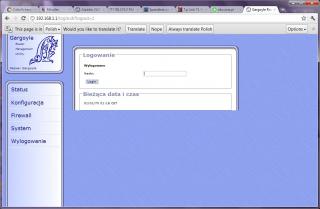
3) you will see your web interface like this

Attached Image

4) the default password for the web GUI is 'password' without the '. after you have enter the password, it will ask for new password you want to use for the web GUI.

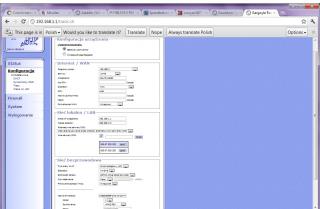
5) next configure your router setting similar like this, 3g UMTS and set your apn / username /password. also configure your wifi as needed, then you're done

Attached Image

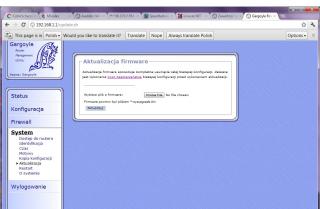
6) if you want to change to stock firmware, you can go to here
Attached Image
shinichi87
post Dec 19 2011, 09:01 PM

Getting Started
**
Junior Member
65 posts

Joined: Jul 2009
QUOTE(chuahcs79 @ Dec 19 2011, 08:57 PM)
so does this open wrt support se phone like stock firmware ? or it only support usb modem ?
*
well i dont have experience with that, never tried. but i think it should be able to detect the phone at least, if the stock firmware can. you can always revert to your previous firmware without any problem.
shinichi87
post Mar 12 2012, 06:22 PM

Getting Started
**
Junior Member
65 posts

Joined: Jul 2009
QUOTE(ks98 @ Mar 10 2012, 10:24 PM)
Anybody has luck to get a working bin file? I tried the sniffer tool several time but still couldn't get my bin file working for UMG1831. Looks like have to ask help from TP Link.
*
hi there, i'd like to recommend openwrt firmware for you or any other user using umg1831 with this router. it is considerably much more faster than the existing firmware.


Added on March 12, 2012, 6:24 pmthis is an excellent openwrt firmware that i have just discovered

Openwrt firmware

1) flash the router with this new firmware

2) to turn on the wifi after firmware update, wait until the 'sys' LED stop blinking and then press QSS button on the router. there will be 'openwrt' wifi

3) logon into http://192.168.1.1 .. the default username is 'root' and the default password is 'password'

4) go into network tab and you'll see two network interfaces. click 'edit' button for WAN interface and change the protocol to UMTS/GPRS/EV-DO then you'll be familiar with the setting. apn username password etc

5) customize your wireless setting security

done done..

This post has been edited by shinichi87: Mar 12 2012, 06:36 PM

shinichi87
post May 11 2012, 04:30 PM

Getting Started
**
Junior Member
65 posts

Joined: Jul 2009
QUOTE(digilife @ May 11 2012, 06:16 AM)
recently my MR3420 behave strangely, internet speed never exceed 3Mbps, mostly max out at 2Mbps

frustrated, done a FW upgrade

and after the upgrade, speed increased tremendously

but i only upgrade the FW and din do Factory Default and Reboot to use back my previous settings  thumbup.gif

[attachmentid=2835212]

user posted image
*
ehm i think you have switched your "quote" between latest firmware and previous firmware am i right?

the new one you can get from tp link singapore
shinichi87
post May 11 2012, 07:19 PM

Getting Started
**
Junior Member
65 posts

Joined: Jul 2009
QUOTE(digilife @ May 11 2012, 06:34 PM)
which quote are u referring to?  sweat.gif

i got it from the TP Link site, use MR3420, not MR3220 as a forumer mentioned not to use a FW on different Hardware........
*
i mean.. the one that you colored red in your picture. 110617 should be newer version of firmware.
shinichi87
post May 11 2012, 07:44 PM

Getting Started
**
Junior Member
65 posts

Joined: Jul 2009
oh. i thought you download from singapore site. because the latest one there is 110617. btw, i have tried the latest 110418 from tp link .com.. it is not as good as 110617 that im using right now. this one rarely disconnected from internet. stays connected quite long
shinichi87
post May 19 2012, 09:19 PM

Getting Started
**
Junior Member
65 posts

Joined: Jul 2009
QUOTE(raikko5 @ May 19 2012, 07:51 PM)
anyone can help me?
*
when you have the internet connection up and running.. try to restart your pc, see if the connection still good. then we can narrow down the problem to check whether it is from router or your pc firewall..

Topic ClosedOptions
 

Change to:
| Lo-Fi Version
0.0472sec    0.58    7 queries    GZIP Disabled
Time is now: 7th December 2025 - 11:43 AM