Outline ·
[ Standard ] ·
Linear+
Tp Link TL-MR3420 3G/3.75G router owner club V1
|
pal33x
|
 Nov 28 2011, 02:42 PM Nov 28 2011, 02:42 PM
|

|
hye... i try the command AT+ZCDRUN=8 in cmd but it tell me that AT+ZCDRUN=8 is not recognized as internal or external command, operable program or batch file so actually what is step by step way to disable the autorun? i try the method here https://wiki.archlinux.org/index.php/ZTE_MF626_/_MF636but cant find hyperterminal software |
|
|
|
|
|
pal33x
|
Nov 28 2011, 09:17 PM
|
|
|
alrite thnx for the answer.
but from ur guide it seem just open cmd and then type AT+ZCDRUN=8 but it tell me that AT+ZCDRUN=8 is not recognized as internal or external command operable program or batch file which mean it cannot open the software
so any1 can teach me step by step to disable it? cuz i scared it will void my umobile modem warranty and how to revert it back
|
|
|
|
|
|
pal33x
|
Nov 28 2011, 09:36 PM
|
|
|
already add some pic what did i do wrong here? thnx Attached thumbnail(s)
|
|
|
|
|
|
pal33x
|
Nov 28 2011, 10:21 PM
|
|
|
oic...thnx....will test tomorrow...wan tutup already .if succesful will recommend this router to my customer...btw im a umobile worker hee~ thnx ya kizwan and chuah  ) This post has been edited by pal33x: Nov 28 2011, 10:21 PM |
|
|
|
|
|
pal33x
|
Nov 30 2011, 10:15 PM
|
|
|
hye there i still unable to disable the autorun feature.
actually what is step by step procedure?
1.launch putty (i dl latest ver 0.61 beta)
2.set the command as the pic.
3.?
4.?
5.?
sorry i already tried but still cant.its not like i want to be spoonfeed
but still cant use my umobile with the router
|
|
|
|
|
|
pal33x
|
Nov 30 2011, 10:24 PM
|
|
|
QUOTE(chuahcs79 @ Nov 30 2011, 10:18 PM) u can try to use the window xp or win 7 method instead of putty,. and what is the method? i try the cmd thing but noting happen wor it said cant execute  |
|
|
|
|
|
pal33x
|
Dec 1 2011, 12:20 PM
|
|
|
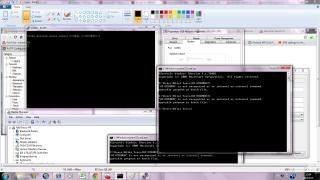
ok so the outcome should be like this? then can use? sorry im ask here cuz need to settle my customer problem with their modem Attached thumbnail(s)
|
|
|
|
|
|
pal33x
|
Dec 2 2011, 10:52 PM
|
|
|
thnx all it work perfectly ~  but my customer complain cannot connect with lan to get the internet 3g since the modem is not with me so i cannot check the setting la. so if cucuk usb modem then connect lan port shud be automatic get internet rite or need some sort of setting? This post has been edited by pal33x: Dec 2 2011, 10:53 PM |
|
|
|
|
|
pal33x
|
Dec 3 2011, 02:31 AM
|
|
|
QUOTE(kizwan @ Dec 3 2011, 12:27 AM) Whether connected via ethernet (wired) or wireless, client computer will get an IP address from router (DHCP). If the customer is using wired connection & unable to browse internet, most probably the computer didn't get an IP address or he set static IP address on the ethernet port on his computer. oic so if automatic can get internet its mean that my client pc is too old or he not set auto in network setting thnx  |
|
|
|
|





 Quote
Quote

 0.0191sec
 0.57
0.57
 7 queries
 GZIP Disabled