


Tp Link TL-MR3420 3G/3.75G router owner club V1
|
|
 Jan 16 2012, 08:13 AM Jan 16 2012, 08:13 AM
Return to original view | Post
#1
|
 
Senior Member
8,025 posts Joined: Feb 2005 From: Planet Boleland  
|
MF691 and UMG1831 is compatible with MR3420
|
|
|
|
|
|
Mar 27 2012, 12:45 AM
Return to original view | Post
#2
|
|
Senior Member
8,025 posts Joined: Feb 2005 From: Planet Boleland
|
why is it when i use this MR3420 and i key in 192.168.1.1 , i cant go into the menu/home page?
thanks |
|
|
Mar 27 2012, 01:13 AM
Return to original view | Post
#3
|
|
Senior Member
8,025 posts Joined: Feb 2005 From: Planet Boleland
|
QUOTE(kizwan @ Mar 27 2012, 01:03 AM) Did you remember to set the IP address on the computer you're using? The IP address must in the same subnet 192.168.1.X how to chk the subnet? last time i just key in 192.168.1.1, now cannot ady  |
|
|
Mar 31 2012, 03:19 AM
Return to original view | Post
#4
|
|
Senior Member
8,025 posts Joined: Feb 2005 From: Planet Boleland
|
maxis is faster now, maybe they deactivated those " renters " now.........
i noticed faster speed since Fri morning |
|
|
Mar 31 2012, 02:24 PM
Return to original view | Post
#5
|
|
Senior Member
8,025 posts Joined: Feb 2005 From: Planet Boleland
|
QUOTE(chuahcs79 @ Mar 31 2012, 06:23 AM) wow good news fruitie, see after all TL-MR3420 still better ^^ he he i too can get 4~7Mbps on my UMG but i am still not satisfy cause i knoe there is a Dual Channel/Carrier modem namely, E372 or MF680 out there and i wont be satisfy till i used them when Maxis broadcast in DC later....... Added on March 31, 2012, 6:24 am yea with E353 can easily get 6~8Mbps steady in my area now, am happy and satisfy already its like tat, we are spoilt (or rather i myself) , the faster it gets, the faster we wan to use them i ady using YES , but i am still not satisfy till i tried Maxis DC my YES now  |
|
|
Mar 31 2012, 02:52 PM
Return to original view | Post
#6
|
|
Senior Member
8,025 posts Joined: Feb 2005 From: Planet Boleland
|
QUOTE(fruitie @ Mar 31 2012, 02:35 PM) Thanks for the information. Shall keep this in my record. dun screwup the router again, like wat u done to your e1762 last time Mine is 3.12.8 Build 110418 Rel.43954n Looks like I'll need to update later. Besides updating the compatible modems list, what else does an updated firmware do?  then you will cry alone in the dark again  |
|
|
|
|
|
Mar 31 2012, 03:03 PM
Return to original view | Post
#7
|
|
Senior Member
8,025 posts Joined: Feb 2005 From: Planet Boleland
|
QUOTE(fruitie @ Mar 31 2012, 02:57 PM) I can't find the firmware... Care to help? ask Prof Chuah, he is using E353 + Mr3420 as he is damn GOOD in Networking Technical stuff, Yang Terbaek....Ignore the MTU, I got it already. Added on March 31, 2012, 2:58 pm If E353 is not compatible with olf dirmware, what can I do wor?  |
|
|
Apr 1 2012, 08:35 AM
Return to original view | Post
#8
|
|
Senior Member
8,025 posts Joined: Feb 2005 From: Planet Boleland
|
QUOTE(fruitie @ Apr 1 2012, 04:37 AM) I need serious help here. This didn't happen when I was using Aztech router. I noticed that my iPad will top receiving data from my router after a while and this caused frequent freeze on my video streaming. care to tell wat actually happened and wat u done to your router?I searched this topic that MYstombox had the same issue also. Does anyone mind to share the workaround? Else, this is going to bother me a lot and iPad has been playing a big role in my life. flashed it? set the MTU? the rule of the thumb, dun mess with the default if all is fine, i hope my prediction is not true , btw, do u still remember abt the initial minutes of your HW550? |
|
|
Apr 1 2012, 01:33 PM
Return to original view | Post
#9
|
|
Senior Member
8,025 posts Joined: Feb 2005 From: Planet Boleland
|
QUOTE(fruitie @ Apr 1 2012, 01:22 PM) Which one should I select? Wat problem is it? No la, this is a common problem for MR 3420. Nothing to do with flashing or not. I Googled and it is a common problem.  OK, how did you know it is channel 9? Tried one by one?  I dun hav any problem with my MR3420, just that sometimes my Desktop cannot connect via WiFI but can connect via LAN cable Only |
|
|
Apr 1 2012, 01:44 PM
Return to original view | Post
#10
|
|
Senior Member
8,025 posts Joined: Feb 2005 From: Planet Boleland
|
I din actually use my Mr3420 to wifi my Ipad, maybe i should try it and see how..........
btw, do a Hard Reset on the router and see if it helps. |
|
|
Apr 1 2012, 03:12 PM
Return to original view | Post
#11
|
|
Senior Member
8,025 posts Joined: Feb 2005 From: Planet Boleland
|
QUOTE(fruitie @ Apr 1 2012, 02:26 PM) Why this router so mafan one? Do still remembered when you first starting to use HW550, how was the situation?I don't recalling going through such hassle when I was with Aztech router. Another "like" for Aztech router.  Who you bug to help solve your problem? How many hours you spend till you finally can have your dinner? |
|
|
Apr 2 2012, 12:31 AM
Return to original view | Post
#12
|
|
Senior Member
8,025 posts Joined: Feb 2005 From: Planet Boleland
|
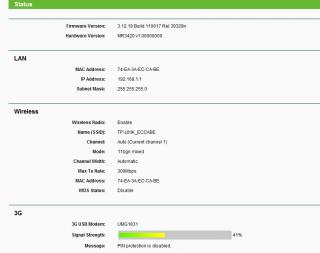
this is how my mr3420 looks
any difference fr u guys? |
|
|
Apr 2 2012, 12:33 AM
Return to original view | Post
#13
|
|
Senior Member
8,025 posts Joined: Feb 2005 From: Planet Boleland
|
this is how my mr3420 looks
any difference fr u guys? 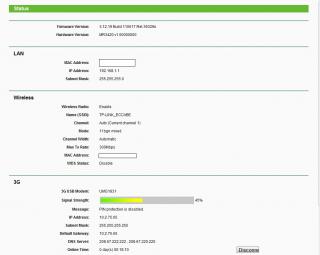
This post has been edited by digilife: Apr 2 2012, 12:35 AM |
|
|
|
|
|
Apr 2 2012, 08:52 AM
Return to original view | Post
#14
|
|
Senior Member
8,025 posts Joined: Feb 2005 From: Planet Boleland
|
QUOTE(chuahcs79 @ Apr 2 2012, 08:12 AM) mine quite the same too other than the modem is E353 and signal bar higher a bit, the rest is same, the wifi issue drop off after a while probably come from the auto channel, may be we need to select proper channel so our wifi wont crash with our neighbour,. is Auto better? or a special Value better? btw, is your FW version the same? do u think it will support E372? meanwhile speed still strong as for now (on for more than 8 hrs)  This post has been edited by digilife: Apr 2 2012, 08:55 AM |
|
|
Apr 2 2012, 09:05 AM
Return to original view | Post
#15
|
|
Senior Member
8,025 posts Joined: Feb 2005 From: Planet Boleland
|
QUOTE(fat16 @ Apr 2 2012, 08:58 AM) TP Link TL-MR3420/3220 have good OpenWrt firmware support. what is OpenWrt for? |
|
|
Apr 2 2012, 11:43 AM
Return to original view | Post
#16
|
|
Senior Member
8,025 posts Joined: Feb 2005 From: Planet Boleland
|
QUOTE(fruitie @ Apr 2 2012, 10:58 AM) Er, I don't turn on my WiFi on my laptop. Use LAN and wifi together will be much smoother Pure LAN only because WiFi is slower compared to LAN. Hehe. |
|
|
Apr 2 2012, 11:54 PM
Return to original view | Post
#17
|
|
Senior Member
8,025 posts Joined: Feb 2005 From: Planet Boleland
|
QUOTE(KKW @ Apr 2 2012, 10:43 PM) Same on my mac u guys are lucky to have such nice signal as i believe you guys live very close to the tower/base stationBtw, I just check my router.. I was shock when I saw this  [attachmentid=2769960] how is your speedtest? |
|
|
Apr 3 2012, 12:06 AM
Return to original view | Post
#18
|
|
Senior Member
8,025 posts Joined: Feb 2005 From: Planet Boleland
|
QUOTE(fruitie @ Apr 3 2012, 12:03 AM) I think after some observations, my iPad is working fine. Will monitor for another day. using OpenWRT firmware now?how is the streaming on LETV and PPS on Ipad? |
|
|
Apr 3 2012, 12:37 AM
Return to original view | Post
#19
|
|
Senior Member
8,025 posts Joined: Feb 2005 From: Planet Boleland
|
QUOTE(KKW @ Apr 3 2012, 12:21 AM) Last time yes. Now no more cos they move away good speed there, RSSI = <60?Here is the speedtest  What you did? Nth? |
|
|
Apr 3 2012, 01:25 AM
Return to original view | Post
#20
|
|
Senior Member
8,025 posts Joined: Feb 2005 From: Planet Boleland
|
QUOTE(chuahcs79 @ Apr 3 2012, 01:21 AM) yea wireles B/G is much more stable than wireles N in certain way,.. i remembered u mentioned this b4, lousy wireless N |
|
Topic ClosedOptions
|
| Change to: |  0.0479sec 0.0479sec
 0.53 0.53
 7 queries 7 queries
 GZIP Disabled GZIP Disabled
Time is now: 15th December 2025 - 12:40 PM |
 Quote
Quote