Outline ·
[ Standard ] ·
Linear+
Tp Link TL-MR3420 3G/3.75G router owner club V1
|
kizwan
|
 Oct 30 2011, 01:07 AM Oct 30 2011, 01:07 AM
|

|
Hi,
I just bought this router today. I'm using it with my Sony Ericsson K660i. At first I was skeptical because last time I tried the phone with other router (don't remember the brand), it doesn't work. I was going to buy 3G (HSPA) USB modem today but all shop I go didn't sell them. Thankfully I'm unable to buy one because when I connect my phone to TP-Link router & after simple configuration, it successfully make a connection.
However, there is a problem though. Download speed only 54 KB/s max. If I connect the phone directly to laptop, the download speed is around 2XX to 3XX KB/s. Do anyone know why the speed is so low?
|
|
|
|
|
|
kizwan
|
Oct 30 2011, 01:23 AM
|
|
|
I'm using windows 7. I did tweak MTU. What value for MTU & APN you use?
I did upgrade the router firmware to latest version but the download speed still low. I did checked firmware for my phone, there is no firmware update for it.
|
|
|
|
|
|
kizwan
|
Oct 30 2011, 02:25 AM
|
|
|
I noticed in the log it execute this command:- CODE pppd /dev/ttyACM1 115200 connect "chat -s -v -f /etc/ppp/conn-s Does yours also executed the same command? Especially the "115200". |
|
|
|
|
|
kizwan
|
Oct 30 2011, 02:33 AM
|
|
|
Weird, I got low speed.  Maybe incompatibility between the phone & router?
Added on October 30, 2011, 4:18 pmI figured out what's wrong. The phone didn't get enough current to support HSPA speed. I connected the phone to USB hub & connected the USB hub to TP-Link router. The USB hub have AC adapter plugged to it & this make the USB hub is self-powered. The download speed I got now is 1XX KB/s, still below 200KB/s but at least it faster now. I'll try to tweak the MTU later to get faster speed. This post has been edited by kizwan: Oct 30 2011, 04:18 PM |
|
|
|
|
|
kizwan
|
Nov 15 2011, 01:52 PM
|
|
|
QUOTE(layr @ Nov 14 2011, 05:58 AM) Can anyone explain what's the difference between IP reservation and IP & MAC binding? IP reservation & "IP & MAC Binding" are basically the same thing except the latter "bind" the IP address to MAC address. Meaning, for example IP address AA.BB.CC.DD is bind to MAC address 00-11-22-33-44-55. If there is another PC (which obviously have different MAC address) trying to use the IP address AA.BB.CC.DD, that PC will be blocked by router from communicating with other PC/device in the network. "IP reservation" didn't enforce this. If two PC/devices using the same IP address, one or both will failed to communicate due to IP address conflict. This post has been edited by kizwan: Nov 15 2011, 01:59 PM |
|
|
|
|
|
kizwan
|
Nov 28 2011, 03:33 PM
|
|
|
I found PDF file explaining how to properly disabled autorun on ZTE modem. Instead Hyperterminal, you can use Putty too.  USB_Modem_Config_Procedure.pdf
 ( 27.2k )
Number of downloads: 128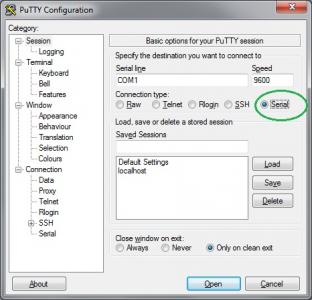
To know the correct COM# port, I believe you can check it in Device Manager, under "Ports (COM & LPT)". After you have put the correct settings in Putty, click Open to make the connection. In case you only see black terminal, press "Enter" one time.  This post has been edited by kizwan: Nov 28 2011, 03:37 PM
 |
|
|
|
|
|
kizwan
|
Nov 28 2011, 09:51 PM
|
|
|
QUOTE(pal33x @ Nov 28 2011, 09:36 PM) already add some pic what did i do wrong here? thnx You can't execute the command in CMD. You need to connect to the modem first. For this you can use Putty. After you have made the connection, then you can run the command to disabled autorun. |
|
|
|
|
|
kizwan
|
Dec 3 2011, 12:27 AM
|
|
|
Whether connected via ethernet (wired) or wireless, client computer will get an IP address from router (DHCP). If the customer is using wired connection & unable to browse internet, most probably the computer didn't get an IP address or he set static IP address on the ethernet port on his computer.
|
|
|
|
|
|
kizwan
|
Dec 18 2011, 08:21 PM
|
|
|
Hi,
How to install the openwrt firmware? Can you give instruction to install the firmware?
|
|
|
|
|
|
kizwan
|
Dec 18 2011, 10:37 PM
|
|
|
The instruction at openwrt website is a bit confusing. However, I managed to install the openwrt firmware on my router. The firmware I use doesn't have Web GUI. To be honest, I don't know it doesn't have Web GUI until it finish updating the firmware. So, I need to install Web GUI manually. The Web GUI sorted out but unfortunately, I can't figure out how to use it with 3G modem. EDIT: OK, there is one last configuration I need to do before I can use 3G modem with it. In summary:- - Reset router to factory settings.
- Install openwrt firmware. (http://wiki.openwrt.org/toh/tp-link/tl-mr3420)
- Telnet to router
CODE telnet 192.168.1.1
Set root password:-
CODE passwd root - Now you can connect to router using SSH (use Putty).
- Install Web GUI. (http://wiki.openwrt.org/doc/howto/luci.essentials)
- Configure 3G function. (http://wiki.openwrt.org/doc/recipes/3gdongle)
* I didn't configure 3G function yet. This post has been edited by kizwan: Dec 18 2011, 10:53 PM |
|
|
|
|
|
kizwan
|
Dec 19 2011, 01:50 AM
|
|
|
Good call!  |
|
|
|
|
|
kizwan
|
Dec 19 2011, 05:34 PM
|
|
|
I tried it last night. I want to see if I get faster speed with openwrt firmware. (Bringing you back to the past; do you remember that my SE phone when connected to the router, speed is slow? Because of this, I didn't use the router, I just plug my SE phone directly to my notebook.) Everything configured except I can't open any website. I can ping, nslookup & everything but I can't open any website. I checked & found out the firewall in the router blocked port 80 (http). Since it's very late when I try this, I didn't tried my best to solved the firewall problem. So, I flashed with original firmware before I go to sleep.
@shinichi87, can you help me solved the firewall issue? Thanks.
This post has been edited by kizwan: Dec 19 2011, 05:36 PM
|
|
|
|
|
|
kizwan
|
Dec 19 2011, 06:08 PM
|
|
|
You're using original SE USB data cable right?  This post has been edited by kizwan: Dec 19 2011, 06:16 PM This post has been edited by kizwan: Dec 19 2011, 06:16 PM |
|
|
|
|
|
kizwan
|
Dec 20 2011, 08:08 PM
|
|
|
QUOTE(chuahcs79 @ Dec 19 2011, 09:22 PM) Just tested with that open wrt,.. too bad it cannot support SE phone,.  and the status pages even show the signal in % and RSSI in -dBm too,. good firmware though,.. but it doesnt make any different in speed, still have to depends on what modem we use,. summary for people who using this router with SE phone, best is stay with stock firmware,..  In the configuration page, does 3G modem is detected as /dev/ttyACMX (X is 0 or 1 or so on)? |
|
|
|
|
|
kizwan
|
Dec 21 2011, 02:22 AM
|
|
|
Finally, I get correct 3G speed now with OpenWRT firmware. The pppd in original firmware is not compatible with my SE phone. That's why I got low speed. Now, the speed I get using this 3G router is similar with what I get when connected directly to notebook. I use OpenWRT firmware from Trunk & using manual installation method.   This post has been edited by kizwan: Dec 21 2011, 02:59 AM This post has been edited by kizwan: Dec 21 2011, 02:59 AM |
|
|
|
|
|
kizwan
|
Dec 21 2011, 02:58 AM
|
|
|
I use firmware " Web interface" (in " None" column), branch Trunk, under " *-factory.bin" table/release ( http://wiki.openwrt.org/toh/tp-link/tl-mr3420 ). Remember, this one doesn't have Web GUI & 3G function. So you need to install Web GUI & 3G function manually ( http://forum.lowyat.net/index.php?showtopi...post&p=47556174 ). I don't know whether Nokia phones are supported or not. If your phones, regardless any brands, works in linux, so I guess it should work with OpenWRT firmware. This post has been edited by kizwan: Dec 21 2011, 03:06 AM |
|
|
|
|
|
kizwan
|
Dec 21 2011, 03:07 AM
|
|
|
If your nokia can connect using ppp in linux, it should work with this router too using openwrt firmware.
|
|
|
|
|
|
kizwan
|
Jan 2 2012, 02:59 PM
|
|
|
Does com port number is correct? You did check it in Device Manager, right?
|
|
|
|
|
|
kizwan
|
Jan 2 2012, 09:36 PM
|
|
|
Putty make connection via COM port. So, COM port number must correct for successful connection. Did you check it in Device Manager for the COM port number?
|
|
|
|
|
|
kizwan
|
Feb 1 2012, 02:10 AM
|
|
|
Yes. I connected my phone (modem) to USB hub & the USB hub connected to router.
|
|
|
|
|





 Quote
Quote

 0.0474sec
 0.66
0.66
 7 queries
 GZIP Disabled