Welcome Guest ( Log In | Register )

Bump Topic Topic Closed RSS Feed
107 Pages « < 30 31 32 33 34 > » Bottom

Outline · [ Standard ] · Linear+

Unifi Official TM UniFi High Speed Broadbrand Thread V11, FREE Installation & 1-month subscription

views
     
cannavaro
post Jun 30 2011, 03:44 AM

CATTENACIO
*******
Senior Member
3,008 posts

Joined: Sep 2005
From: T.T.D.I, Bukit Damansara


QUOTE(antonio @ Jun 30 2011, 01:59 AM)
This might sound noobish and probably stupid, but I still wanna ask;

-Why do you guys decide to change the bundled with router (DIR-615)?? Because I really don't understand even after reading various version of this thread...I understand if the DIR-615 is dead and that you decide to get a new one as opposed to waiting for TM to send a replacement unit, but most replies I'd glance, there are some who swap their DIR-615 to TP-Link, Asus and even Mikrotik...

What are the benefits (technically) and what makes you wanna change the DIR-615? My guess is (and I know it is probably not accurate) that probably the wireless function may be a little bit weak..but isn't most reputable brands have similar if not same amount of power in terms of the transmitter to be in accordance with health and safety bla bla bla, set by FCC or whatnot...unlike those 2W China/Taiwan USB antenna or signal amplifiers (which is not accordance to most country law or regulation tongue.gif but I like them brows.gif )..

I have been using Unifi since its free testing days (back in mid 2010) at the office (the DIR-615 is just behind my chair and have no problems whatsoever) and 5 days of using it at home....both my office and home are 5Mbps subscription and neither have been showing signs of the DIR-615 unable to provide me with 500kbps (or sometimes even more)...

can someone elaborate or provide me with a link on the real reason WHY, some of the guys here swap the DIR-615 with other Wireless Routers?

Is it speed? is it distribution of speed? is it range? is it temperature problem? is it power problem? is it the lack of antenna change? or just simple because it looks ugly and the ASUS U56 just looks astonishing??  rolleyes.gif
*
meh you have not lurked in the unifi thread long enough.

let me try to walk you through some of the reasons


1. Wireless signal. The DIR615 is a mere 1.5dBi. The TL-WR841N/ND is 5dBi. Plus you can upgrade the antennas. The Asus N56U is also 5dBi (for 5GHz, 3.8dBi for 2.4GHz).
Reports of those who changed say - No more wireless drop outs, no more messing with the 20Mhz/40Mhz channel width to see which one is suitable for some devices.

2. The DIR615 can only handle x amount (sorry can't recall the figures) of connections at once. There were cases of the router locking up during heavy torrent sessions. There is also a minimal, brief lag with the IPTV when switching channels. Those who changed to the Mikrotik reported that this lag is gone.

3. Weak QOS engine.

4. No gigabit support. Not everyone needs this of course.

5. Shit support from TM (like you briefly said, 'as opposed to waiting for TM to send a replacement unit...').

And then there's the security issue that was discovered by rizvanrp during the earlier days... which prompted a lot of users to jump ship by either using the DIR615 as a stupid vlan bridge or replacing it completely. laugh.gif

BTW some batches of the DIR615 are shittier than the others, some issue with QC I reckon. At one time quite a few of these routers died just like that. I remember one user whose DIR615 had to be replaced a whopping 3 times. laugh.gif
luminarist
post Jun 30 2011, 06:46 AM

Getting Started
**
Junior Member
143 posts

Joined: Sep 2009
Idk about u guys but the default DIR615 works fine for me.. at least after 8 months of usage (only switch it off when i go outstation).. its still working flawlessly..

In terms of speed, i dun remember having snail speeds at all since day 1..

Happy customer here smile.gif
ruffstuff
post Jun 30 2011, 07:31 AM

Look at all my stars!!
*******
Senior Member
3,345 posts

Joined: Jan 2003
landasan teknologi having mikrotik promtion for RB250gs.

MOQ 6 will entitled for RM140 each.

http://mikrotik.landasan.com.my/
owc
post Jun 30 2011, 10:31 AM

Generous in Sharing Knowledge
******
Senior Member
1,240 posts

Joined: Aug 2008
From: Other World Computing

QUOTE(kenneth686 @ Jun 29 2011, 04:30 PM)
When you go there? my fren just purchased RT-N56U @ C-Zone Low Yat, and they willing for help to flash the firmware if you requested.

Maybe you try go go again!!!!  thumbup.gif
*
Maybe is you the one that send email for Miss Chock for the firmware.
When I go they, I wonder why she know is me that mention her name in LYN?
She said I told LYN her service no good. lols...
Anyway not me said Miss Chock ya.... hehe
Her service very good... tongue.gif
I wonder who told my LYN Identity to Miss Chock.
kenneth686
post Jun 30 2011, 10:49 AM

Getting Started
**
Junior Member
235 posts

Joined: Jan 2005


QUOTE(owc @ Jun 30 2011, 10:31 AM)
Maybe is you the one that send email for Miss Chock for the firmware.
When I go they, I wonder why she know is me that mention her name in LYN?
She said I told LYN her service no good. lols...
Anyway not me said Miss Chock ya.... hehe
Her service very good... tongue.gif
I wonder who told my LYN Identity to Miss Chock.
*
Haha Fren, no me la. I just know many of my friends always look for her. I think they provide good service loz!!!!! thumbup.gif
rafizi
post Jun 30 2011, 10:56 AM

New Member
*
Junior Member
39 posts

Joined: Oct 2006
Aiyah just because the ASUS N56 so pretty u guys spend all that money, need to flash firmware jugak. IMO the TP-Link W8960N is the best, no need to flash anything. Cheap too. Not everybody needs dual band, not all laptops/PC hv dual band wifi unless you wanna spend more $$$ upgrading. My tp-link opens about 1000+ torrent connections from my NAS 24/7 and doesnt break a sweat, wifi signal probably strong enough to reach the next taman hehe.
stanleychew
post Jun 30 2011, 11:06 AM

New Member
*
Junior Member
4 posts

Joined: Jun 2011
c-zone promoter kekeke
rizvanrp
post Jun 30 2011, 11:37 AM

Getting Started
Group Icon
Elite
195 posts

Joined: Sep 2006


QUOTE(klseet @ Jun 29 2011, 11:51 PM)
@Riz

As usual, nice & quick work to identify the security exploit  rclxms.gif
And glad that ASUS team is quick to response and patch it up !  biggrin.gif

Look forward for further detail review & test from you on this impressive RT-N56U !  flex.gif
*
I'm hoping to get it up by this weekend for the RT-N56U. ASUS team is fixing everything within 1-2 days. You found a good router for Unifi here tongue.gif
owc
post Jun 30 2011, 12:20 PM

Generous in Sharing Knowledge
******
Senior Member
1,240 posts

Joined: Aug 2008
From: Other World Computing

ASUS RT-N56U come out Unifi version, just buy and put your Unifi ID and Password already can use.
Very user friendly.
SimonsayZ
post Jun 30 2011, 02:27 PM

Newbie
*******
Senior Member
2,792 posts

Joined: Dec 2004
From: Neverland


Just a heads up for people who don't wanna touch your DIR615 but need to extend your wifi range, can try this:

DLink DAP-1360 Wireless N Access Point / Repeater

This one the antennas only 2dbi but atleast its upgradable.


For me because I stay in double storey house and my PS3/PC is upstairs and router is downstairs, the DIR615 reception is rubbish. So I bought this and use it as repeater mode (its got 7 configurations. AP. bridge or client mode via Ethernet cable).

So far so good. Easy to setup and now during heavy online gaming or download still manage to maintain 100% signal and no disconnects.

I know replacing the router is the best solution. But this might be suitable for those who's got big house. biggrin.gif


This post has been edited by SimonsayZ: Jun 30 2011, 02:29 PM
dimenxion
post Jun 30 2011, 02:29 PM

Getting Started
**
Junior Member
289 posts

Joined: Jan 2003
From: Shah Alam


wow man.. how much is that? TP-link that currently most of us use cost RM89.90. how much is yours?
SimonsayZ
post Jun 30 2011, 02:32 PM

Newbie
*******
Senior Member
2,792 posts

Joined: Dec 2004
From: Neverland


QUOTE(dimenxion @ Jun 30 2011, 02:29 PM)
wow man.. how much is that? TP-link that currently most of us use cost RM89.90. how much is yours?
*
I got it in lowyat for 139. sweat.gif I had no time to scout around so just buy lol.

mel5582
post Jun 30 2011, 03:30 PM

None
*****
Senior Member
777 posts

Joined: Jan 2003
From: Not definite


I just got TP-Link WRD841ND from Garage Sales for RM89 only. Firmware all flashed by seller. Just input username and password and everything works well haha. that DIR-615 is now gone! Hated it, couldn't stand it.. Always disconnect and cannot stream movies or do any remote connection. Now everything is.. (like Steve Jobs said) IT JUST WORKS!
ahhann
post Jun 30 2011, 04:47 PM

Lim Peh
****
Senior Member
545 posts

Joined: Mar 2006
From: The Weirdo River O_o


Just got VIP10

and the sad torrent is so slow ... and not stable.

I tried to do the port fowarding but ... i dun understand at all what the hell is this menu rclxub.gif :
user posted image

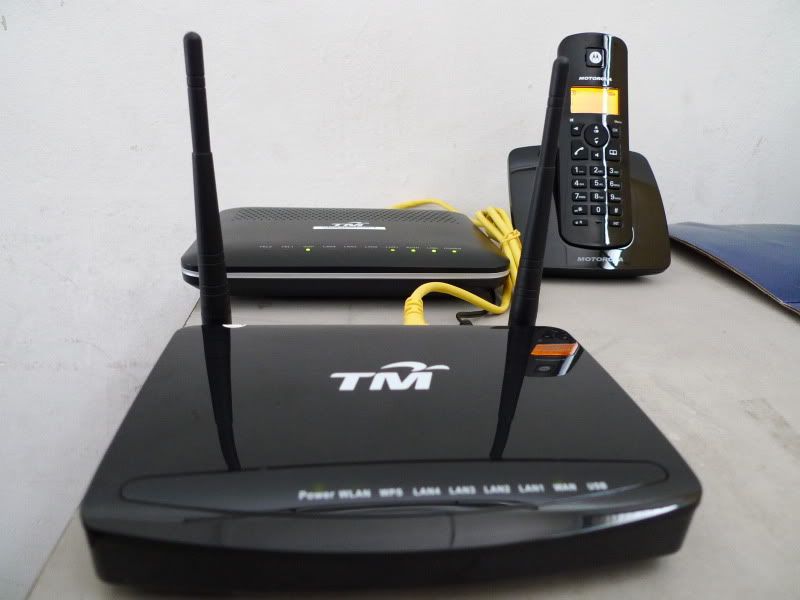
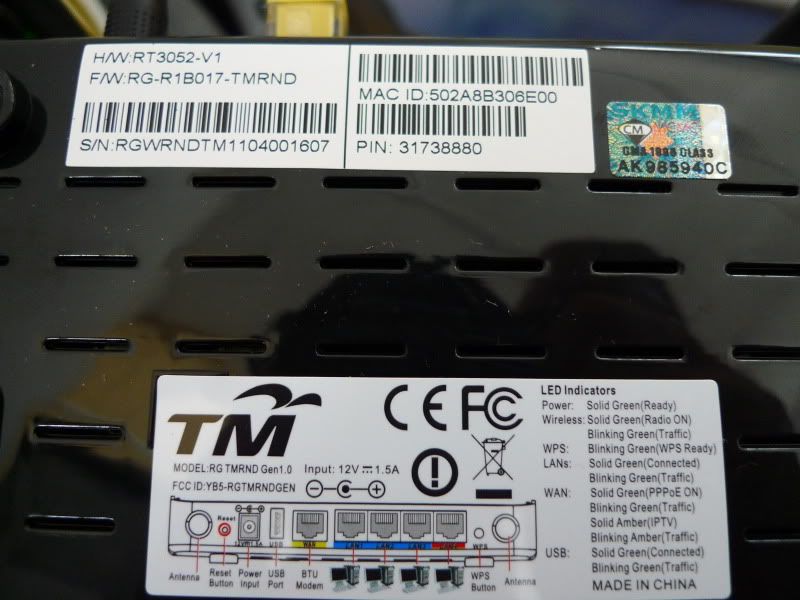
This is TM own router, yucks ~
Manufacturer TMRnD
Manufacturer OUI 502a8b
Model Name RG TMRND Gen1.0
Description TM Residential Gateway
Serial Number RGWRNDTM1104001607
Hardware Chipset RT3052-V1
Software Version RG-R1B017-TMRND
Modem Firmware Version 1.0.0
Current Date & Time 2011-06-30 00:47:34
Up Time 0Day 0h 47m 29s


Anybody having this same router as me? Can guide how to do the port forwarding?

This post has been edited by ahhann: Jun 30 2011, 04:48 PM
alexwsk
post Jun 30 2011, 04:52 PM

Look at all my stars!!
*******
Senior Member
4,092 posts

Joined: Jan 2003
From: USJ


QUOTE(ahhann @ Jun 30 2011, 04:47 PM)
Just got VIP10

and the sad torrent is so slow ... and not stable.

I tried to do the port fowarding but ... i dun understand at all what the hell is this menu rclxub.gif :
user posted image

This is TM own router, yucks ~
Manufacturer TMRnD
Manufacturer OUI 502a8b
Model Name RG TMRND Gen1.0
Description TM Residential Gateway
Serial Number RGWRNDTM1104001607
Hardware Chipset RT3052-V1
Software Version RG-R1B017-TMRND
Modem Firmware Version 1.0.0
Current Date & Time 2011-06-30 00:47:34
Up Time 0Day 0h 47m 29s
Anybody having this same router as me? Can guide how to do the port forwarding?
*
the RG brand just went from bad to worst
stanleychew
post Jun 30 2011, 04:53 PM

New Member
*
Junior Member
4 posts

Joined: Jun 2011
off-topic... sry.

can u guys recommend me some popular torrent sites? lost track with those sites after moving into a cave couple of years back.

thx


Added on June 30, 2011, 4:55 pmLOL @ TM "own" router.... can post some SS on how it looks like? i think ur the 1st using it

This post has been edited by stanleychew: Jun 30 2011, 04:57 PM
IwanAGP
post Jun 30 2011, 05:13 PM

Nothing is Possible!
*******
Senior Member
9,590 posts

Joined: Jan 2008
From: S'wak||KL||SG


QUOTE(antonio @ Jun 30 2011, 01:59 AM)
This might sound noobish and probably stupid, but I still wanna ask;

-Why do you guys decide to change the bundled with router (DIR-615)?? Because I really don't understand even after reading various version of this thread...I understand if the DIR-615 is dead and that you decide to get a new one as opposed to waiting for TM to send a replacement unit, but most replies I'd glance, there are some who swap their DIR-615 to TP-Link, Asus and even Mikrotik...

What are the benefits (technically) and what makes you wanna change the DIR-615? My guess is (and I know it is probably not accurate) that probably the wireless function may be a little bit weak..but isn't most reputable brands have similar if not same amount of power in terms of the transmitter to be in accordance with health and safety bla bla bla, set by FCC or whatnot...unlike those 2W China/Taiwan USB antenna or signal amplifiers (which is not accordance to most country law or regulation tongue.gif but I like them brows.gif )..

I have been using Unifi since its free testing days (back in mid 2010) at the office (the DIR-615 is just behind my chair and have no problems whatsoever) and 5 days of using it at home....both my office and home are 5Mbps subscription and neither have been showing signs of the DIR-615 unable to provide me with 500kbps (or sometimes even more)...

can someone elaborate or provide me with a link on the real reason WHY, some of the guys here swap the DIR-615 with other Wireless Routers?

Is it speed? is it distribution of speed? is it range? is it temperature problem? is it power problem? is it the lack of antenna change? or just simple because it looks ugly and the ASUS U56 just looks astonishing??  rolleyes.gif
*
For me... It's just the Wireless that matters... For my case, staying in condo, maybe due to tonnes of wifi surrounding, interference just happens and connection just drop with no reason... After connection drop, my SSID became "Invisible" then this this that that... Another thing is that signal strength fluctuates a lot. I usually use inside my room with the router right behind the wall, signal strength still fluctuates from FULL (5bars on win7) then drop to 4 and even worse, to 2. I don't understand why this happens as my old wireless G asus modem router at my hometown always give me full bar signal even though the router is placed downstair while i'm using upstair. Next, the router just love to hang... Staying with friends, 8 of them. The router just can't handle this amount of user well. Restart once in 2~3 days. Sometimes 1 day. However, when it's up and running, it can just do its job. Need to give it restart once in a while else web browsing is quite sluggish... Next next next, the QOS thingy... I don't know what's the qos in dir-615 for. Tick or untick it gives no difference. The most this router can do if the filter function. I can't stand ppl keep on using those p2p software(WITH NO LIMIT!!!!! Very sien lo!!!! Cannot tell them straight in their face too...) What I do is i filtered his connection using filter rules, blocking UDP sessions(dropping UDP packets sent to his laptop) brows.gif brows.gif But still very sien lo~~~ Look at the log, 40pages of log can easily be filled up by "Dropping UDP XXXXXXXXXXXXXX from XXX.XXX.XXX.XXX bla bla bla" within 2~3mins.

QUOTE(ahhann @ Jun 30 2011, 04:47 PM)
Just got VIP10

and the sad torrent is so slow ... and not stable.

I tried to do the port fowarding but ... i dun understand at all what the hell is this menu rclxub.gif :
user posted image

This is TM own router, yucks ~
Manufacturer TMRnD
Manufacturer OUI 502a8b
Model Name RG TMRND Gen1.0
Description TM Residential Gateway
Serial Number RGWRNDTM1104001607
Hardware Chipset RT3052-V1
Software Version RG-R1B017-TMRND
Modem Firmware Version 1.0.0
Current Date & Time 2011-06-30 00:47:34
Up Time 0Day 0h 47m 29s
Anybody having this same router as me? Can guide how to do the port forwarding?
*
drool.gif New router??? Interface looks totally different from mine drool.gif
soitsuagain
post Jun 30 2011, 05:19 PM

Let's do it together!
*******
Senior Member
3,801 posts

Joined: Mar 2007


Sorry for asking a stupid question but where is the FTB box usually located? If I am planning to pull it myself, I will only have to pull the RJ45 cable over the roof to my currently installed phone wall socket right? Thanks.
hye
post Jun 30 2011, 05:23 PM

White Tiger
Group Icon
Moderator
3,395 posts

Joined: Dec 2007
From: 서울, South Korea
Folks ... I just came across this router "PROLiNK WNR1008 3.75G Wireless-N Gigabit Router". (Perhaps not available in Malaysia yet)

I looked at the product manual and found VLAN settings. I'm curious whether this router would be another candidate for use with Unifi.
ahhann
post Jun 30 2011, 05:32 PM

Lim Peh
****
Senior Member
545 posts

Joined: Mar 2006
From: The Weirdo River O_o


This the evil thing i talking about:
user posted image
user posted image

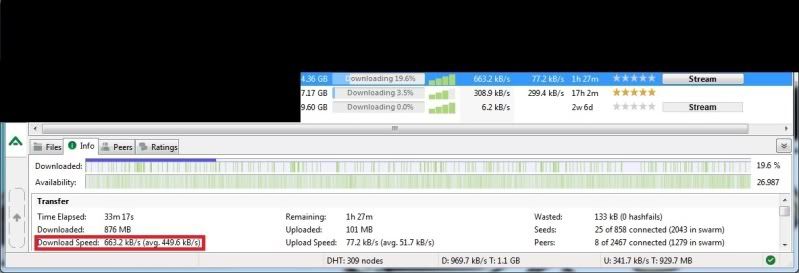
Now the the speed is *handsome* pula:
user posted image
havn't do port forwarding ...


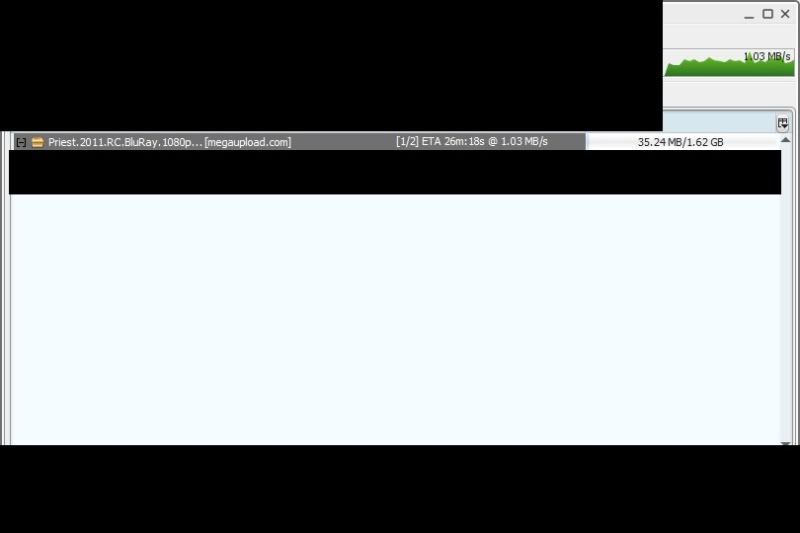
as for file sharing, just now 2pm:
user posted image
rclxms.gif

now 80kb rclxub.gif

This post has been edited by ahhann: Jun 30 2011, 05:34 PM

107 Pages « < 30 31 32 33 34 > » Top
Topic ClosedOptions
 

Change to:
| Lo-Fi Version
0.0456sec    0.51    7 queries    GZIP Disabled
Time is now: 1st December 2025 - 11:34 AM