Welcome Guest ( Log In | Register )

Bump Topic Topic Closed RSS Feed
125 Pages « < 53 54 55 56 57 > » Bottom

Outline · [ Standard ] · Linear+

 Samsung Galaxy S I9000 Official Thread V14, Galaxy S, live on a smart life

views
     
ckdenion
post Mar 10 2011, 12:39 AM

Financial Practitioner
*******
Senior Member
2,866 posts

Joined: Sep 2008
From: Wangsa Maju, KL


y i flash to darky 9.3 now but cant?
even i factory reset,wipe cache,wipe dalvik...wanna apply d 9.3 darky extreme edition...but all d command turns out failed to find recovery/log thingy at d CWM log...wad happen?
freakfingers12
post Mar 10 2011, 12:48 AM

Honor thy father
*******
Senior Member
2,283 posts

Joined: Apr 2007


QUOTE(gmhafiz @ Mar 10 2011, 12:28 AM)
Impressive! But the narrator didn't even smileĀ  blink.gif Looks way serious.
*
Haha so professional la konon. lol.. glad that we have quality apps like these.

Try this out too. Lol, got many quality apps lately.

https://market.android.com/details?id=com.dex.friday

This post has been edited by freakfingers12: Mar 10 2011, 12:49 AM
gajahwhite
post Mar 10 2011, 12:57 AM

Android Monster
******
Senior Member
1,852 posts

Joined: Jun 2010
From: Alor Setar, Kedah. Live: Kangar, Perlis.


nice apps Thrutu..
but if we want to use.. those function only able for those who use Thrutu also? if we call that person that didnt use Thrutu.. no use la? but really cool la that apps..
sunnyboy
post Mar 10 2011, 01:08 AM

Regular
******
Senior Member
1,446 posts

Joined: Jan 2003


i'm waiting for viber......so long havent released for android
lch78
post Mar 10 2011, 01:38 AM

b.e.y.o.n.d.r.e.a.l.m.s
*******
Senior Member
2,114 posts

Joined: Aug 2010
From: Edge Of D. World


QUOTE(freakfingers12 @ Mar 10 2011, 01:48 AM)
Haha so professional la konon. lol.. glad that we have quality apps like these.

Try this out too. Lol, got many quality apps lately.

https://market.android.com/details?id=com.dex.friday
*
I like this one....
zumapuma
post Mar 10 2011, 01:47 AM

Getting Started
**
Junior Member
110 posts

Joined: Oct 2009


i've just successfully flashed to Sweethoney 2.4 from Stock eclair DXJG4
but alot of apps that should be there are missing..
like the Phone, Contacts and Messaging app..its not in the apps home as well..
but everything else works like a charm!
any ideas on how i can get the apps one by one or should i reflash again

and oh yeah, i've updated to Sweethoney 2.4.1, thinking that updating would get those missing apps. but nope, doesnt help...
silentser
post Mar 10 2011, 04:12 AM

OH MAH ANDROID
*******
Senior Member
3,177 posts

Joined: Sep 2006
From: subway FTW


cant wait for a more stable gingerbread.... jst love the easy text selection, but the unstableness is killing me, phone call also can drop cause of phone hanging.
Bap3
post Mar 10 2011, 07:11 AM

Casual
***
Junior Member
422 posts

Joined: Jul 2010
QUOTE(zumapuma @ Mar 10 2011, 01:47 AM)
i've just successfully flashed to Sweethoney 2.4 from Stock eclair DXJG4
but alot of apps that should be there are missing..
like the Phone, Contacts and Messaging app..its not in the apps home as well..
but everything else works like a charm!
any ideas on how i can get the apps one by one or should i reflash again

and oh yeah, i've updated to Sweethoney 2.4.1, thinking that updating would get those missing apps. but nope, doesnt help...
*
it is there actually...but the icon have changed...check carefully by alphabetically...u will find just the icon is change for the item u highlighted.. nod.gif nod.gif
bestofel
post Mar 10 2011, 08:05 AM

On my way
****
Senior Member
528 posts

Joined: Mar 2008
From: Klang Valley


QUOTE(bestofel @ Mar 9 2011, 02:54 AM)
Last week, I just update to froyo using kies. Just 10 minutes than i got froyo without any data and app deleted.

But i feel lagging sometimes. Then try rooting using z4root and fix lagging. My false maybe, coz i choose temporary root, unroot after reboot. After reboot, my phone can't be start. Then i try install 3 combo buttons using adb. But the phone just like hanging without any progress after 2 minutes. The guide said, it just 3 seconds installation. So, i do pull out the battery and reboot the phone. Yeayy.. My phone bricked!

Then, i go to restore at customer service. They install froyo, but it not same like the update from samsung kies. No lagging problem like before.
*
From customer service, the update version I got is:
  • Firmware = 2.2
  • Baseband = 19000DXJPA
  • Kernel = 2.6.32.9 root@SE-S604 #1
  • Build number = FROYO.DXJPA

I found some errors about this version:
  • sometimes, the notifications bar at the top can't be sweep down. When reboot, its back to normal.
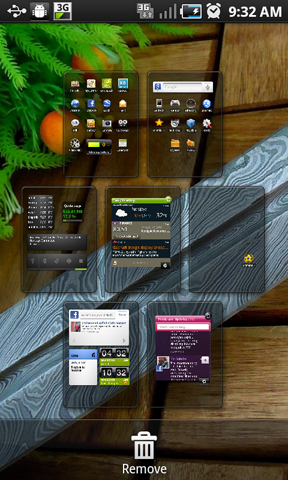
  • when edit home page (refer to screen below), I can't drag page to rearrange the page.

user posted image

Any suggestion?
Harddisk
post Mar 10 2011, 08:16 AM

Look at all my stars!!
*******
Senior Member
2,962 posts

Joined: Jan 2003

QUOTE(bestofel @ Mar 10 2011, 08:05 AM)
From customer service, the update version I got is:

  • Firmware = 2.2
  • Baseband = 19000DXJPA
  • Kernel = 2.6.32.9 root@SE-S604 #1
  • Build number = FROYO.DXJPA

I found some errors about this version:[list]
[*]sometimes, the notifications bar at the top can't be sweep down. When reboot, its back to normal.

Any suggestion?
*
This was quite common when DXJPA Froyo was released to us. Many of us kena this.

But over the time, with various of Speedmod versions applied. I no longer see this problem on my phone now.

Try Menu -> Notification.
dahool00
post Mar 10 2011, 08:28 AM

Getting Started
**
Junior Member
162 posts

Joined: Feb 2009
QUOTE(Fornaxlife @ Mar 9 2011, 05:48 PM)
i guess it's on par.. compared with my sis's iphone and sounds almost the same :/
*
Thanks all for replying my questions on speaker/loudspeaker.

Few more Qs:

1. how do turn off those OTA updates (not WIFI), as I do not want to be charge for data transfer.
I want to use it just as a phone - ie. SMS/calls, no need those weather updates...etc.
But If I turn on WIFI, it should check for updates like OS updates.

2. if there is a new OS update (eg: 2.3) detected over WIFI and it replaced current 2.2, will it wipe up all mt contacts, settings..etc?

3. SGS - now RM2400?, but SGS SL - RM1600 - huge diff.

Thanks!
freakfingers12
post Mar 10 2011, 08:41 AM

Honor thy father
*******
Senior Member
2,283 posts

Joined: Apr 2007


QUOTE(dahool00 @ Mar 10 2011, 08:28 AM)
Thanks all for replying my questions on speaker/loudspeaker.

Few more Qs:

1. how do turn off those OTA updates (not WIFI), as I do not want to be charge for data transfer.
I want to use it just as a phone - ie. SMS/calls, no need those weather updates...etc.
But If I turn on WIFI, it should check for updates like OS updates.

2. if there is a new OS update (eg: 2.3) detected over WIFI and it replaced current 2.2, will it wipe up all mt contacts, settings..etc?

3. SGS - now RM2400?, but SGS SL - RM1600 - huge diff.

Thanks!
*
1. If you mean it automatically updates when you have wifi and never updates when you're on 3G, then no. Unfortunately you can't, correct me if I am wrong, only samsung apps and MIUI rom can do that i think. But I use the app, DroidWall. You can block 3G from accessing the certain apps/widgets that have auto updates or syncs.

2. If you're updating from KIES, most of the time, nope it won't wipe. But KIES is unreliable, backup data first cause the last 2 times I updated from KIES, it didn't boot until I factory reset.

3. SAMOLED is more marketable I guess. But no la... the price dropped to 1.8k or below d right?

Guys, have you all tried this game Cordy? Android exclusive game I think and its freeeee~
https://market.android.com/details?id=com.silvertree.cordy

This post has been edited by freakfingers12: Mar 10 2011, 08:53 AM

mengsuan
post Mar 10 2011, 08:52 AM

9W2NNS
Group Icon
Staff
10,459 posts

Joined: Sep 2005
From: Puchong

QUOTE(dahool00 @ Mar 10 2011, 08:28 AM)
Thanks all for replying my questions on speaker/loudspeaker.

Few more Qs:

1. how do turn off those OTA updates (not WIFI), as I do not want to be charge for data transfer.
I want to use it just as a phone - ie. SMS/calls, no need those weather updates...etc.
But If I turn on WIFI, it should check for updates like OS updates.

2. if there is a new OS update (eg: 2.3) detected over WIFI and it replaced current 2.2, will it wipe up all mt contacts, settings..etc?

3. SGS - now RM2400?, but SGS SL - RM1600 - huge diff.

Thanks!
*
1. You could just totally not set any APN (or destroy any APN set for you). On Froyo, you can disable data connection. The apps and system will still attempt to connect to internet periodically but would fail. To obtain best experience with smartphones, a data plan is highly recommended. To me, the phone is boring (I don't play games), it's just the online contents and convenience that attracts me.

2. OS does not update over wifi for now. KIES would not wipe your personal data usually. The usual way of setting up an Android phone is to sync contacts and calender to Gmail account. Android phone also allows Microsoft Exchange server connection for corporate accounts. In any chance of contacts and calender being wiped, just setup those accounts and information will be fetched automatically, provided you have internet connection.

3. The difference between them aren't just the display. Both firmwares are not cross-flashable, hence I believe they are quite different hardware internally.
pcboy
post Mar 10 2011, 08:52 AM

1,2,3,4.... Hi-5
*****
Senior Member
800 posts

Joined: Dec 2006
From: No.22, Jalan-jalan Cari Makan, 46150 PJ


QUOTE(silentser @ Mar 9 2011, 08:12 PM)
cant wait for a more stable gingerbread.... jst love the easy text selection, but the unstableness is killing me, phone call also can drop cause of phone hanging.
*
same boat with you, that makes me revert back to 2.2.1 ... patiently waiting for stable GB
sengasdf
post Mar 10 2011, 09:15 AM

Casual
***
Junior Member
492 posts

Joined: Mar 2010


QUOTE(freakfingers12 @ Mar 10 2011, 12:48 AM)
Haha so professional la konon. lol.. glad that we have quality apps like these.

Try this out too. Lol, got many quality apps lately.

https://market.android.com/details?id=com.dex.friday
*
need invitation...
dahool00
post Mar 10 2011, 09:26 AM

Getting Started
**
Junior Member
162 posts

Joined: Feb 2009
QUOTE(mengsuan @ Mar 10 2011, 08:52 AM)
1. You could just totally not set any APN (or destroy any APN set for you). On Froyo, you can disable data connection. The apps and system will still attempt to connect to internet periodically but would fail. To obtain best experience with smartphones, a data plan is highly recommended. To me, the phone is boring (I don't play games), it's just the online contents and convenience that attracts me.

2. OS does not update over wifi for now. KIES would not wipe your personal data usually. The usual way of setting up an Android phone is to sync contacts and calender to Gmail account. Android phone also allows Microsoft Exchange server connection for corporate accounts. In any chance of contacts and calender being wiped, just setup those accounts and information will be fetched automatically, provided you have internet connection.

3. The difference between them aren't just the display. Both firmwares are not cross-flashable, hence I believe they are quite different hardware internally.
*
1. Sorry guys, too many jargon. Just need to know whether I can go into Mobile Setting and turn off any live update or Data Transfer as I don't intend to get any data plan. Please don't ask me why blush.gif
Can u pls show me the steps or screen shots to do this?

2. How do I then update SGS to 2.3 when available? Sync thru internet via cable?

Sorry guys...still learning.

Thx!


Added on March 10, 2011, 9:34 amTo use Samsung Kies, need to provide credit card details???

crazy!

This post has been edited by dahool00: Mar 10 2011, 09:34 AM
noobie1
post Mar 10 2011, 09:54 AM

Look at all my stars!!
*******
Senior Member
2,538 posts

Joined: Jul 2006


QUOTE(dahool00 @ Mar 10 2011, 09:26 AM)
1. Sorry guys, too many jargon. Just need to know whether I can go into Mobile Setting and turn off any live update or Data Transfer as I don't intend to get any data plan. Please don't ask me why  blush.gif
Can u pls show me the steps or screen shots to do this?

2. How do I then update SGS to 2.3 when available? Sync thru internet via cable?

Sorry guys...still learning.

Thx!


Added on March 10, 2011, 9:34 amTo use Samsung Kies, need to provide credit card details???

crazy!
*
have u try read the 1st post? i believe there are many info that u can find at there.. smile.gif
dahool00
post Mar 10 2011, 09:59 AM

Getting Started
**
Junior Member
162 posts

Joined: Feb 2009
QUOTE(noobie1 @ Mar 10 2011, 09:54 AM)
have u try read the 1st post? i believe there are many info that u can find at there.. smile.gif
*
can u help pin-point cos u guys are already in thread 14 and i didn't follow the series...thx
Bap3
post Mar 10 2011, 10:06 AM

Casual
***
Junior Member
422 posts

Joined: Jul 2010
QUOTE(dahool00 @ Mar 10 2011, 09:59 AM)
can u help pin-point cos u guys are already in thread 14 and i didn't follow the series...thx
*
i think what noobie1 said to look to 1st page of this thread not the 1st thread.. sweat.gif sweat.gif

This post has been edited by Bap3: Mar 10 2011, 10:06 AM
dahool00
post Mar 10 2011, 10:13 AM

Getting Started
**
Junior Member
162 posts

Joined: Feb 2009
QUOTE(Bap3 @ Mar 10 2011, 10:06 AM)
i think what noobie1 said to look to 1st page of this thread not the 1st thread..  sweat.gif  sweat.gif
*
pai-seh...ok, i check later, thx

125 Pages « < 53 54 55 56 57 > » Top
Topic ClosedOptions
 

Change to:
| Lo-Fi Version
0.0291sec    0.20    6 queries    GZIP Disabled
Time is now: 6th December 2025 - 04:44 AM