Welcome Guest ( Log In | Register )

Bump Topic Topic Closed RSS Feed

Outline · [ Standard ] · Linear+

 Samsung Galaxy S I9000 Official Thread V14, Galaxy S, live on a smart life

views
     
bestofel
post Mar 9 2011, 02:54 AM

On my way
****
Senior Member
528 posts

Joined: Mar 2008
From: Klang Valley


QUOTE(zumapuma @ Mar 9 2011, 12:15 AM)
thanx everyone!

im a little skeptical with KIES cuz before this, I had a Samsung Wave and once, i updated it and the phone was bricked..had to go to all the way to Sunway Pyramid Samsung Service Center which has terrible service IMO..

anyway, if i update, all my apps will be retained right? its not like a factory reset or anything right?

sorry peeps for being such a total noob XD
*
Last week, I just update to froyo using kies. Just 10 minutes than i got froyo without any data and app deleted.

But i feel lagging sometimes. Then try rooting using z4root and fix lagging. My false maybe, coz i choose temporary root, unroot after reboot. After reboot, my phone can't be start. Then i try install 3 combo buttons using adb. But the phone just like hanging without any progress after 2 minutes. The guide said, it just 3 seconds installation. So, i do pull out the battery and reboot the phone. Yeayy.. My phone bricked!

Then, i go to restore at customer service. They install froyo, but it not same like the update from samsung kies. No lagging problem like before.

This post has been edited by bestofel: Mar 9 2011, 02:56 AM
bestofel
post Mar 10 2011, 08:05 AM

On my way
****
Senior Member
528 posts

Joined: Mar 2008
From: Klang Valley


QUOTE(bestofel @ Mar 9 2011, 02:54 AM)
Last week, I just update to froyo using kies. Just 10 minutes than i got froyo without any data and app deleted.

But i feel lagging sometimes. Then try rooting using z4root and fix lagging. My false maybe, coz i choose temporary root, unroot after reboot. After reboot, my phone can't be start. Then i try install 3 combo buttons using adb. But the phone just like hanging without any progress after 2 minutes. The guide said, it just 3 seconds installation. So, i do pull out the battery and reboot the phone. Yeayy.. My phone bricked!

Then, i go to restore at customer service. They install froyo, but it not same like the update from samsung kies. No lagging problem like before.
*
From customer service, the update version I got is:
  • Firmware = 2.2
  • Baseband = 19000DXJPA
  • Kernel = 2.6.32.9 root@SE-S604 #1
  • Build number = FROYO.DXJPA

I found some errors about this version:
  • sometimes, the notifications bar at the top can't be sweep down. When reboot, its back to normal.
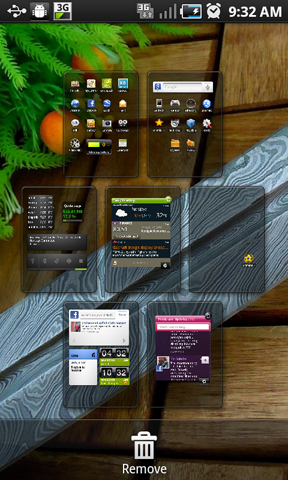
  • when edit home page (refer to screen below), I can't drag page to rearrange the page.

user posted image

Any suggestion?
bestofel
post Mar 10 2011, 04:41 PM

On my way
****
Senior Member
528 posts

Joined: Mar 2008
From: Klang Valley


QUOTE(michaelnct @ Mar 10 2011, 04:09 PM)
Sifus,
      Do I need to have data plan (3G/Edge,HSDPA, Wi-Fi etc) to make my SGS's GPS works? If I take out my sim card, will it still work? I just compare it with GPS device.
*
If you have GPS app like PAPAGO, then you can use it without data plan. The map already on your phone.

If you try navigate thru GPS app like Google Map, Google Earth, Navigation, Places, Layar etc which is get the map directly from google service, then you need the internet connection.

Last Tuesday evening, a guy come to Samsung Customer Service, Berjaya Plaza asking like you. Hope, he's not you. biggrin.gif

This post has been edited by bestofel: Mar 10 2011, 04:42 PM
bestofel
post Mar 10 2011, 04:53 PM

On my way
****
Senior Member
528 posts

Joined: Mar 2008
From: Klang Valley


QUOTE(Fornaxlife @ Mar 10 2011, 04:42 PM)
wow you're working for samsung? smile.gif
*
No lah.. I'm waiting my phone getting factory restore. wink.gif

QUOTE(buffallo_soldier @ Mar 10 2011, 03:54 PM)
Questions : how to tethering samsung galaxy s.???

i`m using Simply Galaxy ROM 2.4.

Tethering by USB or make your phone as an access point (AP)? If AP, follow Fornaxlife's guide. If using USB, try settings > wireless and network > Tethering.
bestofel
post Mar 11 2011, 04:26 PM

On my way
****
Senior Member
528 posts

Joined: Mar 2008
From: Klang Valley


QUOTE(Fornaxlife @ Mar 11 2011, 11:56 AM)
oo.. can just ignore it.. the only app i installed from samsung apps is asphalt lol
*
After flashing to Froyo at Samsung Customer Service, my Samsung App not listing asphalt. How can I get it, any suggestion?

And after flashing to froyo, Samsung Kies said;
QUOTE
This version of the device cannot be updated.

Current firmware version: PDA:JPA / PHONE:JPA/ CSC:JPA (KOR)


Why they not installing the updatable version?

My update version now is:
  • Firmware = 2.2
  • Baseband = 19000DXJPA
  • Kernel = 2.6.32.9 root@SE-S604 #1
  • Build number = FROYO.DXJPA

So, when I want update my version next time, I can't easily update using Samsung Kies la.. Last time, I've successed update to froyo using Samsung Kies before I bricked my phone.

With Samsung Kies update function, my installed app and data not deleted. That why I like to update using Samsung Kies. Plus, it easy, no need to download this, run this, push these buttons, etc..penat and pening! rclxub.gif Phobia after my phone bricked last time. Huuu...
bestofel
post Mar 12 2011, 02:52 AM

On my way
****
Senior Member
528 posts

Joined: Mar 2008
From: Klang Valley


From Samsung Galaxy S forum: www.samsunggalaxysforum.com

QUOTE(Samsung Galaxy S)
user posted image

We Have just Got a Confirmation from Samsung Mobile Romania Facebook page that the I9000 Galaxy S will be getting Gingerbread 2.3 Update (after a quick v2.2.1 update). The Samsung Galaxy S will first get a minor update to v2.2.1 by 20 March followed by the GingerBread 2.3.2 update by the 30 March (end of the month). The update should come not long after the Gingerbread update for Google own Nexus One.

This move will sure earn Samsung some brownie points the Samsung I9000 Galaxy S may be getting replaced soon, but its a best seller in the pockets of millions. For the record its getting a second major OS update.

user posted image

http://www.youmobile.org/blogs/entry/Galax...2-3-by-30-March
bestofel
post Mar 16 2011, 04:49 PM

On my way
****
Senior Member
528 posts

Joined: Mar 2008
From: Klang Valley


QUOTE(FormalCat @ Mar 16 2011, 04:44 PM)
shocking.gif root access failed! tried out super one click instead, restarted and it worked thumbup.gif now i'm going to flash my first custom rom. any particular ones a noob should use first?  tongue.gif
*
Mine same like you. Kernel 2.6.32.9 root@SE-S604 #1. Then try rooting with z4root. I choose permanent but can't. I try super one click also can't.

I want rooting to backup my data and apps before flashing.

Any suggestion?
bestofel
post Mar 16 2011, 05:21 PM

On my way
****
Senior Member
528 posts

Joined: Mar 2008
From: Klang Valley


I've trying appy sdcard:update.zip, also cannot, signature verification failed. Huhuu..

Before I use odin, how can I backup my data and app?
bestofel
post Mar 16 2011, 06:01 PM

On my way
****
Senior Member
528 posts

Joined: Mar 2008
From: Klang Valley


QUOTE(janov @ Mar 16 2011, 05:27 PM)
titanium (requires root) or mybackup (does not require root)
*
MyBackup trial 30days ok ya? Thanx..I'll try it..

QUOTE(gmhafiz @ Mar 16 2011, 05:32 PM)
are you from stock froyo? You can still use odin to flash speedmod kernel. Then go to recovery mode to switch on root. Then you can make /efs folder, apps and data backup.
*
Yeah.. Its Froyo DXJPA from Samsung Customer Service. Flashing kernel, the data and apps not deleted right?

TQ all.
bestofel
post Mar 17 2011, 08:00 AM

On my way
****
Senior Member
528 posts

Joined: Mar 2008
From: Klang Valley


QUOTE(gmhafiz @ Mar 16 2011, 05:32 PM)
are you from stock froyo? You can still use odin to flash speedmod kernel. Then go to recovery mode to switch on root. Then you can make /efs folder, apps and data backup.
*
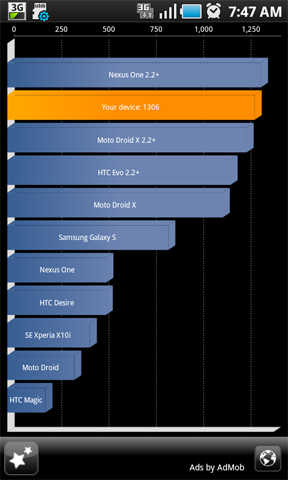
Installing speedmod successfully done!

My Speed now:

user posted image

Next.. I want backup all data with titanium backup and flash to Gingerbread. rclxms.gif Owh.. I've meeting at 9..continue after. Huu..
bestofel
post Mar 17 2011, 08:36 AM

On my way
****
Senior Member
528 posts

Joined: Mar 2008
From: Klang Valley


Owh..ya! I don't know.. Thanks..


bestofel
post Mar 17 2011, 08:42 AM

On my way
****
Senior Member
528 posts

Joined: Mar 2008
From: Klang Valley


How about Voodoo? Look at the screen captured, is it real?

user posted image

Source: http://hemorrdroids.net/froyo-with-new-speed-fix/
bestofel
post Mar 17 2011, 12:19 PM

On my way
****
Senior Member
528 posts

Joined: Mar 2008
From: Klang Valley


Yeah.. I bricked my sgs when following a guide from xda. It said after click start button, its just 3 seconds. But after 2 minutes, nothing happen. Then i pull out the battery. Then yeah..bricked already.
bestofel
post Mar 17 2011, 12:32 PM

On my way
****
Senior Member
528 posts

Joined: Mar 2008
From: Klang Valley


QUOTE(noobie1 @ Mar 17 2011, 12:21 PM)
which post u follow?
*
This one: http://forum.xda-developers.com/showthread.php?t=785201

Before that, i tried install z4root and oclf, but i choose root temporary. When the phone reboot, it can't start. Just loop at big S logo.
bestofel
post Mar 17 2011, 02:14 PM

On my way
****
Senior Member
528 posts

Joined: Mar 2008
From: Klang Valley


QUOTE(noobie1 @ Mar 17 2011, 12:38 PM)
weird, i rmb i also follow that thread..but i did success with first time..
did u make sure "Phone Bootloader Update" is ticked and re-partition is unticked?
or maybe because u did that temp root?
*
I just delete my nightmare from my memory. I can't remember it anymore. Hehe..
I think i just follow the guide carefully. But nothing happen after 2 minutes.

QUOTE(gmhafiz @ Mar 17 2011, 01:30 PM)
- were you from stock froyo?
- can you go to download mode now?
*
Yes..froyo from Samsung Kies update. After bricked, i sent my phone to customer service. Now, I have the 3 combo buttons.
bestofel
post Mar 17 2011, 02:28 PM

On my way
****
Senior Member
528 posts

Joined: Mar 2008
From: Klang Valley


QUOTE(lch78 @ Mar 17 2011, 02:17 PM)
Did they charge you for sending to customer service? If so, how much?
*
If no samsung warranty, they will charge RM100.

But, I just pay parking and train costs. Hehe..
bestofel
post Mar 18 2011, 08:04 AM

On my way
****
Senior Member
528 posts

Joined: Mar 2008
From: Klang Valley


Last night, with odin, I just flash to Android 2.2.1, Froyo.ZSJPG, then use speedmod 500hz kernel.

When I connect to Samsung Kies, it's blank at firmware information. Current firmware version also blank.

Why? So next time, is it no need to check update from Samsung Kies?

And then, on SGS Settings > About Phone, I found "Software update" menu. But when try check for update, it said "Connection failed".
bestofel
post Mar 18 2011, 08:51 AM

On my way
****
Senior Member
528 posts

Joined: Mar 2008
From: Klang Valley


QUOTE(Fornaxlife @ Mar 18 2011, 08:07 AM)
zsjpg is for hong kong region. you don't have to use kies at all @@.. odin will do

software update? don't touch that dude. if you wanna update firmware, use odin
*
Ceh...I downloaded from SamFirmware.com, they put it at Asia's table. I guest I can get any Asia language pack like Malaysia, Thailand, Indonesia, Hongkong. Ngee.. doh.gif

So, actually which one are friendly with Samsung Kies?
bestofel
post Mar 18 2011, 12:06 PM

On my way
****
Senior Member
528 posts

Joined: Mar 2008
From: Klang Valley


Who have trying Android 2.2.1 FROYO.ZSJPG with speedmod 500hz kernel? Have you facing hanging sometimes?

My SGS hanging somtimes.. this morning about 3X:
- browsing website
- selecting wi-fi networks from list
- can't remember what I do.
bestofel
post Mar 18 2011, 12:14 PM

On my way
****
Senior Member
528 posts

Joined: Mar 2008
From: Klang Valley


Yes...enabled all tweaks. Do you have enabled lag fix? I enabled it also.

2 Pages  1 2 >Top
Topic ClosedOptions
 

Change to:
| Lo-Fi Version
0.0967sec    0.48    7 queries    GZIP Disabled
Time is now: 4th December 2025 - 09:15 AM