Welcome Guest ( Log In | Register )

Bump Topic Topic Closed RSS Feed
115 Pages « < 81 82 83 84 85 > » Bottom

Outline · [ Standard ] · Linear+

Unifi Official TM UniFi High Speed Broadbrand Thread V9, save RM200 from 16 February - 31 March !

views
     
jAkUn
post Mar 26 2011, 11:35 PM

Casual
***
Junior Member
326 posts

Joined: Jan 2005
From: Damansara

Ok. Since I did see so many questions to ask about the pricing for extra cables/extra charges on top of standard installation, allow me explain and clarify about this.

Standard Installation:
-15 metres of internal fibre cables
-15 metres of RJ45/RJ15 (based on stocks)
-15 metres of casing raceway (based on stocks)


Extra charges:
-Any extra internal fibre cables (Fibre Wall Socket [FWS] ------> BTU (Broadband Termination Unit)
- 1 unit of fibre cables = 5 metres
- 1 unit = RM50

-Climbing roof (assuming Distribution Point [DP] is on POLE) that covers up any;
- Enters through ceiling
- Drilling
- Through windows
Will amount from RM50 up to RM150 (Negotiable) depends on heights/house type. Bungalow/Double Storey/Semi-D/ etc

-UG Block / Hacking (Negotiable and can get the quotation first) from RM100 up to RM300 depends on situation and condition

-External fibre cables (Distribution Point [DP] ---------------> Fibre Distribution Point [FDP] )
- UG
-calculated from main-hole until to FDP
-TM only subsidized first 30 metres
-Extra fibre cables depends on quotation of contractors (type of insulation and type of fibre cables)

- On pole
-TM only subsidized first 30 metres
-Extra fibre cables depends on quotation of contractors (type of insulation and type of fibre cables)


At the moment only this informations that I can remember after squeezing the information from both contractors and TM CS.

Neptern
post Mar 26 2011, 11:44 PM

On my way
****
Junior Member
518 posts

Joined: Aug 2005
That's why i say negotiate first and keep some cash in hand.
VerM
post Mar 27 2011, 12:16 AM

Getting Started
**
Junior Member
117 posts

Joined: Jan 2003
From: Place where number 1 is very famous


QUOTE(jAkUn @ Mar 26 2011, 11:35 PM)
Ok. Since I did see so many questions to ask about the pricing for extra cables/extra charges on top of standard installation, allow me explain and clarify about this.

Standard Installation:
-15 metres of internal fibre cables
-15 metres of RJ45/RJ15 (based on stocks)
-15 metres of casing raceway (based on stocks)
Extra charges:
-Any extra internal fibre cables (Fibre Wall Socket [FWS] ------> BTU (Broadband Termination Unit)
    - 1 unit of fibre cables = 5 metres
    - 1 unit = RM50

-Climbing roof (assuming Distribution Point [DP] is on POLE) that covers up any;
    - Enters through ceiling
    - Drilling
    - Through windows
    Will amount from RM50 up to RM150 (Negotiable) depends on heights/house type. Bungalow/Double Storey/Semi-D/ etc

-UG Block / Hacking (Negotiable and can get the quotation first) from RM100 up to RM300 depends on situation and condition

-External fibre cables (Distribution Point [DP] ---------------> Fibre Distribution Point [FDP] )
    - UG
        -calculated from main-hole until to FDP
        -TM only subsidized first 30 metres
        -Extra fibre cables depends on quotation of contractors (type of insulation and type of fibre cables)

    - On pole
        -TM only subsidized first 30 metres
        -Extra fibre cables depends on quotation of contractors (type of insulation and type of fibre cables)
At the moment only this informations that I can remember after squeezing the information from both contractors and TM CS.
*
i though drilling (simple and straightforward) is suppose to be part of the RM200 installation fee...
jAkUn
post Mar 27 2011, 12:22 AM

Casual
***
Junior Member
326 posts

Joined: Jan 2005
From: Damansara

QUOTE(VerM @ Mar 27 2011, 01:16 AM)
i though drilling (simple and straightforward) is suppose to be part of the RM200 installation fee...
*
climbing the roof also includes lay cables + drilling + workmanship and all until to FWS.

so in a normal installation w/o climbing, drilling will be free.
otosan
post Mar 27 2011, 01:00 AM

Getting Started
**
Junior Member
162 posts

Joined: Sep 2009
From: 127.0.0.1
anybody noticing ipTV anomaly today? all my premium chanel is opened... o.O

fashion, MUTV, [V] channel & etc all avail...
jAkUn
post Mar 27 2011, 01:09 AM

Casual
***
Junior Member
326 posts

Joined: Jan 2005
From: Damansara

QUOTE(otosan @ Mar 27 2011, 02:00 AM)
anybody noticing ipTV anomaly today? all my premium chanel is opened... o.O

fashion, MUTV, [V] channel & etc all avail...
*
*sigh. Go www.unifi.my . Already got announcement free viewing all premium channels from 24/3 until 30/4/2011.
hye
post Mar 27 2011, 01:15 AM

White Tiger
Group Icon
Moderator
3,397 posts

Joined: Dec 2007
From: 서울, South Korea
Guys ... anyone here knows whether the CLIR (on Unifi) can be turned on or off just like when using mobile phones ?
BlueHeng
post Mar 27 2011, 02:47 AM

Senior Member
******
Senior Member
1,604 posts

Joined: Dec 2006
From: Petaling Jaya


QUOTE(otosan @ Mar 27 2011, 01:00 AM)
anybody noticing ipTV anomaly today? all my premium chanel is opened... o.O

fashion, MUTV, [V] channel & etc all avail...
*
LOL it's not an anomaly. Exactly like what jAkUn said. =.=" Just enjoy the channels.
naz9802
post Mar 27 2011, 01:08 PM

New Member
*
Junior Member
31 posts

Joined: Aug 2010
QUOTE(hye @ Mar 27 2011, 01:15 AM)
Guys ... anyone here knows whether the CLIR (on Unifi) can be turned on or off just like when using mobile phones ?
*
It is possible but I think u need to call TM Unifi center to subscribe the CLIR feature.
OKLY
post Mar 27 2011, 01:28 PM

The Penguin Vader
Group Icon
Staff
12,090 posts

Joined: Dec 2004
From: Malaysia


QUOTE(hye @ Mar 27 2011, 01:15 AM)
Guys ... anyone here knows whether the CLIR (on Unifi) can be turned on or off just like when using mobile phones ?
*
That should be an add-on feature with a monthly fee for it.
aneip
post Mar 27 2011, 01:41 PM

Look at all my stars!!
*******
Senior Member
2,466 posts

Joined: Nov 2004


Anyone know how does speed capping work? by username or physical port? For eg, if 1 got 2 account 1 5mbps and another 1 20 mbps. Can the account interchangeable?
ultraman259
post Mar 27 2011, 02:11 PM

New Member
*
Junior Member
21 posts

Joined: Dec 2010
Can I upgrade from VIP5 to BIZ5? Does it require extra installation that need TM staff to come to my house? Cheers.
IwanAGP
post Mar 27 2011, 03:46 PM

Nothing is Possible!
*******
Senior Member
9,590 posts

Joined: Jan 2008
From: S'wak||KL||SG


QUOTE(ultraman259 @ Mar 27 2011, 02:11 PM)
Can I upgrade from VIP5 to BIZ5? Does it require extra installation that need TM staff to come to my house? Cheers.
*
Don't know about that but I think they will come and raid your IPTV set-top box. haha...
ultraman259
post Mar 27 2011, 03:56 PM

New Member
*
Junior Member
21 posts

Joined: Dec 2010
So the IPTV is just there so that we can watch HyppTV? So if I subscribed to BIZ5, I cannot watch HyppTV is it?
IwanAGP
post Mar 27 2011, 04:09 PM

Nothing is Possible!
*******
Senior Member
9,590 posts

Joined: Jan 2008
From: S'wak||KL||SG


QUOTE(ultraman259 @ Mar 27 2011, 03:56 PM)
So the IPTV is just there so that we can watch HyppTV? So if I subscribed to BIZ5, I cannot watch HyppTV is it?
*
IPTV is not part of BIZ5 package.
Vbs
post Mar 27 2011, 04:32 PM

Getting Started
**
Junior Member
234 posts

Joined: Dec 2006
Hi guys, I just have UniFi installed yesterday but have already encountered a problem. My dad and I use Dell Inspiron laptops that were bought back in 2008, and both of us could not connect to the internet as we can't detect the wifi signal. My netbook on the other hand, which we got last year, was able to connect through radio signal. If we were to use the LAN cable, we could connect (on the Dell lappies)

I did a thorough search and found out that my network adapter currently supports only up to 802.11g for radio mode, while the radio signal detected on my netbook shows 802.11n (UniFi router). I then updated my network driver and hardware, but to no avail.

I have an inkling that the cause is the radio mode incompatibility issue, but I've been trying to solve the problem for hours now.

Can anyone help?

This post has been edited by Vbs: Mar 27 2011, 04:33 PM
OKLY
post Mar 27 2011, 04:47 PM

The Penguin Vader
Group Icon
Staff
12,090 posts

Joined: Dec 2004
From: Malaysia


QUOTE(ultraman259 @ Mar 27 2011, 03:56 PM)
So the IPTV is just there so that we can watch HyppTV? So if I subscribed to BIZ5, I cannot watch HyppTV is it?
*
Yup since the triple play service is only for the residential packages aka VIP.


Added on March 27, 2011, 4:49 pm
QUOTE(Vbs @ Mar 27 2011, 04:32 PM)
Hi guys, I just have UniFi installed yesterday but have already encountered a problem. My dad and I use Dell Inspiron laptops that were bought back in 2008, and both of us could not connect to the internet as we can't detect the wifi signal. My netbook on the other hand, which we got last year, was able to connect through radio signal. If we were to use the LAN cable, we could connect (on the Dell lappies)

I did a thorough search and found out that my network adapter currently supports only up to 802.11g for radio mode, while the radio signal detected on my netbook shows 802.11n (UniFi router). I then updated my network driver and hardware, but to no avail.

I have an inkling that the cause is the radio mode incompatibility issue, but I've been trying to solve the problem for hours now.

Can anyone help?
*
You'll have to login to the router and see if the wireless radio is configured to mixed mode or only to 'N'. If it's in mixed mode, it should be backwards compatible to network cards that does not support wireless-N.

This post has been edited by yongkailoon: Mar 27 2011, 04:49 PM
IwanAGP
post Mar 27 2011, 04:51 PM

Nothing is Possible!
*******
Senior Member
9,590 posts

Joined: Jan 2008
From: S'wak||KL||SG


QUOTE(Vbs @ Mar 27 2011, 04:32 PM)
Hi guys, I just have UniFi installed yesterday but have already encountered a problem. My dad and I use Dell Inspiron laptops that were bought back in 2008, and both of us could not connect to the internet as we can't detect the wifi signal. My netbook on the other hand, which we got last year, was able to connect through radio signal. If we were to use the LAN cable, we could connect (on the Dell lappies)

I did a thorough search and found out that my network adapter currently supports only up to 802.11g for radio mode, while the radio signal detected on my netbook shows 802.11n (UniFi router). I then updated my network driver and hardware, but to no avail.

I have an inkling that the cause is the radio mode incompatibility issue, but I've been trying to solve the problem for hours now.

Can anyone help?
*
That is ur hardware limitation on your old laptops. I don't think 802.11n is supported by 2008 models. What you can do now, just get into the router config page,
type 192.168.0.1 in ur browser, id: operator, pass: h566UniFi->Advanced tab->Advanced wireless tab on the left->Change wireless mode to Mixed b/g/n->In addition, to ensure more stable connection, change the bandwidth to 20Mhz instead of 20Mhz/40Mhz auto.

If this doesn't solve your problem, in the wireless mode option, change it to 802.11 mixed (b/g) in which the wireless will be broadcast at G mode instead of N which is the speed of 54Mbps instead of 150/300Mbps on N mode. However, considering that the internet provided by unifi will only hit max 20Mbps on VIP20, it's sufficient to provide you full experience for you internet. If you want sharing from one laptop to another at N mode then you need to enable it. Since you said two of your laptops are 2008 models, it won't support N unless you get it an adapter or change its wireless card. You can't get connected to a N network by just updating the driver. It's hardware problem, not driver problem. Haha... Hope i helped you xD
VerM
post Mar 27 2011, 04:53 PM

Getting Started
**
Junior Member
117 posts

Joined: Jan 2003
From: Place where number 1 is very famous


QUOTE(Vbs @ Mar 27 2011, 04:32 PM)
Hi guys, I just have UniFi installed yesterday but have already encountered a problem. My dad and I use Dell Inspiron laptops that were bought back in 2008, and both of us could not connect to the internet as we can't detect the wifi signal. My netbook on the other hand, which we got last year, was able to connect through radio signal. If we were to use the LAN cable, we could connect (on the Dell lappies)

I did a thorough search and found out that my network adapter currently supports only up to 802.11g for radio mode, while the radio signal detected on my netbook shows 802.11n (UniFi router). I then updated my network driver and hardware, but to no avail.

I have an inkling that the cause is the radio mode incompatibility issue, but I've been trying to solve the problem for hours now.

Can anyone help?
*
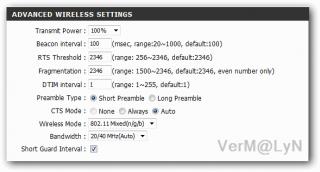
1. the default wifi setup for the router should support b/g/n... however if you still unable to detect then perhaps you should try set it to b/g only...

2. if your wifi network adapter only support b/g then upgrading the driver won't make your adapter n... its the chip on the hardware...not software..

3. my current asus laptop was bought in late 2007 and i'm able to detect and connect to the unifi wifi router...

4. the other reason probably due to WPA2 security... some older laptops can not perform the necessary 'handshake'.... so downgrade to WPA or WEP (less secure)

Attached Image
Attached Image


Added on March 27, 2011, 4:55 pm
QUOTE(IwanAGP @ Mar 27 2011, 04:51 PM)
That is ur hardware limitation on your old laptops. I don't think 802.11n is supported by 2008 models. What you can do now, just get into the router config  page,
type 192.168.0.1 in ur browser, id: operator, pass: h566UniFi->Advanced tab->Advanced wireless tab on the left->Change wireless mode to Mixed b/g/n->In addition, to ensure more stable connection, change the bandwidth to 20Mhz instead of 20Mhz/40Mhz auto.

If this doesn't solve your problem, in the wireless mode option, change it to 802.11 mixed (b/g) in which the wireless will be broadcast at G mode instead of N which is the speed of 54Mbps instead of 150/300Mbps on N mode. However, considering that the internet provided by unifi will only hit max 20Mbps on VIP20, it's sufficient to provide you full experience for you internet. If you want sharing from one laptop to another at N mode then you need to enable it. Since you said two of your laptops are 2008 models, it won't support N unless you get it an adapter or change its wireless card. You can't get connected to a N network by just updating the driver. It's hardware problem, not driver problem. Haha... Hope i helped you xD
*
My laptop bought in late 2007 and support n...

This post has been edited by VerM: Mar 27 2011, 04:55 PM
hackwire
post Mar 27 2011, 06:38 PM

Look at all my stars!!
*******
Senior Member
4,256 posts

Joined: Jan 2005
anyone face the same problem with mine? My Iptv able to go to the 100 and able to see all the little program in it's menu. When i press "OK" on those channel. The screen is Blank.

When press back to 100. All the programs were shown in those little mosaic boxes again. What happen? pls help guys.

115 Pages « < 81 82 83 84 85 > » Top
Topic ClosedOptions
 

Change to:
| Lo-Fi Version
0.0458sec    0.70    7 queries    GZIP Disabled
Time is now: 21st December 2025 - 12:57 PM