Welcome Guest ( Log In | Register )

Bump Topic Topic Closed RSS Feed
5 Pages  1 2 3 > » Bottom

Outline · [ Standard ] · Linear+

Unifi Official TM UniFi High Speed Broadbrand Thread V9, save RM200 from 16 February - 31 March !

views
     
VerM
post Mar 7 2011, 10:43 PM

Getting Started
**
Junior Member
117 posts

Joined: Jan 2003
From: Place where number 1 is very famous


Hello Unifiers,

I have just become one of you.....today... rclxms.gif

Initial impressions...hmmm... not lightning fast as one would think...browsing wise probably a little bit better than streamyx...(still not that fast considering using the 'fibre')...

Downloading is a significant jump but not overly overwhelmed by it considering Mbps versus MB/s...


Will plan to do sth with the setup... soon...
VerM
post Mar 8 2011, 07:22 PM

Getting Started
**
Junior Member
117 posts

Joined: Jan 2003
From: Place where number 1 is very famous


QUOTE(doremon @ Mar 8 2011, 10:01 AM)
You all to busy for wireless improvements while im busy to disconnect the wireless 101% LOL. Yesterday got a call from my neighbor he said he still able to access my unifi. Really give up on this matter. I simply shut the modem and router the whole night yesterday just because of that incident. Bummer. How the hell he can get/crack my wireless after I shut everything down. Really puzzle me here huhuhu
*
I sometimes do not use WPA/WPA2 key for my wifi... instead at all time my wifi setup will require MAC address in order to connect...

most of the time i use both WPA/WPA2 key + MAC Address ... it is troublesome a bit but at least provide double security..

and in case anyone here is wondering what the heck is MAC Address please follow the link...

how to read your MAC Address?

CODE
Run --> cmd --> ipconfig /all


Read the following

Wireless LAN adapter Wireless Network Connection:
Physical Address. . . . . . . . . : XX-XX-XX-XX-XX-XX


Copy the address xx-xx-xx-xx-xx-xx (or sometimes in xx:xx:xx:xx:xx:xx format) into your wireless access list...

you have to do the same for all devices connected to your wifi...

This post has been edited by VerM: Mar 8 2011, 07:32 PM
VerM
post Mar 8 2011, 11:32 PM

Getting Started
**
Junior Member
117 posts

Joined: Jan 2003
From: Place where number 1 is very famous


QUOTE(firestonez @ Mar 8 2011, 11:05 PM)
My connection this week really suck.. Wanna download file also always dc.
user posted image
user posted image
*
i learnt from my experience that speed test tool is not an accurate measurement for your broadband speed... biggrin.gif

it is just a tool to make u happy/unhappy with your current subscription...

the only true benchmarking is by downloading files from various sites...

Mbps (megabit per sec)/8 -> MB/s (megabyte per sec)

This post has been edited by VerM: Mar 8 2011, 11:36 PM
VerM
post Mar 10 2011, 10:51 PM

Getting Started
**
Junior Member
117 posts

Joined: Jan 2003
From: Place where number 1 is very famous


QUOTE(jianwei87 @ Mar 9 2011, 12:37 AM)
I'm subscribe UniFi 5MB package but I only get this speed. Why?
user posted image
*
Unifi albeit using fiber it is still on shared bandwidth not a lease line where you get what you pay...
Connectivity (or download speed if you may) is subjected to various factors since we aren't using premium backbone (that comes with SLA & SLG)

QUOTE(jehutyz @ Mar 9 2011, 09:42 AM)
I want to register for UniFi through online so can get free 1 month. My area is covered as my neighbor already have it. But using the online registration giving me problem. When I put the IC Num, it able to found my home line and streamyx account but I think due to profile as they simply put. Now it showed unable to detect and I can't proceed with it.

Is it I need to go TM just to correct my profile then try again. -.-"
*
If you ever have registered with Telekom (current or past), TM keep the user database for Unifi registeration purpose. So irrespective of your current landline address, you can register unifi anywhere as long as the place is covered by the service.


QUOTE(wdarke @ Mar 9 2011, 03:23 PM)
Happened to me too. Signal at the pole was about 18 ( not sure what measurement ), signal in the house was about 19. They said it's considered pretty good. Anything above 27 the BTU will not be able to connect. After connecting everything, the link light still blinks. Apparently, TM has not established the connection on their side. They promised that it would be up on that day itself, and I should only sign off once it's up. Took TM another 2 hours before the link is up.
*
The measurement is for testing the fiber to check whether it has any bent, break or any other related damages.

QUOTE(chinkw1 @ Mar 9 2011, 03:58 PM)
1. If during thunderstorm and lightning, do we need to off power to BTU, router and deck phone??
2. Will lightning fry them??
3. Do we need to unplug the fiber optic wire going into the BTU ??
When using streamyx last time, we used to unplug telephone line entering into modem.


Added on March 9, 2011, 3:59 pm1. If during thunderstorm and lightning, do we need to off power to BTU, router and deck phone??
2. Will lightning fry them??
3. Do we need to unplug the fiber optic wire going into the BTU ??
When using streamyx last time, we used to unplug telephone line entering into modem.
*
I would advice you not to frequently unplug/plug the fiber optic cable...

a) fiber optic cable is not like LAN cable, it can break or bent and this will affect the light pulse signal
b) the connector (SC) is quite fragile and exposure to dust will affect the light signal

QUOTE(armusen @ Mar 9 2011, 11:00 PM)
I think TM can clarify about the need to give up old telephone number when getting Unfii.

One of neighbours enquired with TM about subscribing to Unifi and was told that he cannot maintain the old telephone number and he will be given a new number. He told them that this was a deal breaker and he didn't want to subscribe to Unifi anymore if he had to change the number.

However, the next day someone from TM call back and told him that he can maintain current landline by:
1. Register for Unifi with new phone line
2. Cancel existing Streamyx but maintain old telephone line for one month
3. Then they can do the switch from 2nd month onwards....i.e, old telephone number will be ported into Unifi number.
4. From 2nd month onwards there won't be any rental charges for old telephone - only Unifi package charges.

I think TM needs to clarify this. Their own salespeople are unaware of this. Obviously all the resellers selling Unifi will not have any clue at all that there is a possibility of maintaining old telephone number! The cost is only one month rental for all telephone line.

(Sorry for the repost - thought it would be good to get a reply on the "official" Unifi topic).
*
I dont think we can use existing POTS (landline) number for Unifi... TM has allocated a range of number to be used with VOIP... that's why we'll get new number when we subscribe to unifi (as package)...

We can keep our existing line... no problem... we'll just end up with two home numbers only biggrin.gif

QUOTE(ahpaul82 @ Mar 10 2011, 02:15 PM)
Finally registered online successfully.

installation would be 03/04/2011...  sweat.gif
*
Welcome to the club Ah Paul (the car librarian) notworthy.gif

QUOTE(izkon @ Mar 10 2011, 08:42 PM)
at last unifi is available at my area finally...my house is using the green box for the ftth means all the wire lines are grounded and centralized in the house..so do the contractors need to pull any lines or drill any holes? TM say installation is free until 31 March..also how much is the extra hidden charges by the contractors?
*
No hidden charge unless the wiring exceed certain length...

QUOTE(IwanAGP @ Mar 10 2011, 10:28 PM)
Just a curious question... Can we "extend" fibre optic cable like what we can do on copper cable? Just curious. Haha
*
Fiber optic uses light pulse not electric signals...


Added on March 10, 2011, 10:56 pm
QUOTE(hackwire @ Mar 10 2011, 10:20 PM)
i think im going to buy my own pvc casing as it's not that expensive for protecting the outside rain and heat.

Is it true that bending of the fibre optic can cause breakage to the glass especially when comes to the wall corner? as i know optic is made of glass and a hammer knocking on it will cause a few hundred dollars.
*
Some reading may shed some light...

Fiber optic cable


Added on March 10, 2011, 10:59 pm
QUOTE(yeahh @ Mar 10 2011, 06:06 PM)
the waiver is THE DAY u register online right? doesn't matter when they make the installation
*
yup... as long as you register online within the promo period, you are entitled to all the perks regardless of when they will come to install...

This post has been edited by VerM: Mar 10 2011, 10:59 PM

VerM
post Mar 10 2011, 11:29 PM

Getting Started
**
Junior Member
117 posts

Joined: Jan 2003
From: Place where number 1 is very famous


QUOTE(IwanAGP @ Mar 10 2011, 11:25 PM)
I know fiber optics uses light pulse. That's why I ask. I think it can be done with certain device. lol

Youtube-ed and found this!

*
Well you if have money then you can just buy the the splicer... or if you hv friends doing fiber optic installation, borrow from them...

but splicing requires knowledge...

or alternative buy the fiber patch cord (SC type).... but i think the supplied one is long enough...


Added on March 10, 2011, 11:33 pm
QUOTE(ahpaul82 @ Mar 10 2011, 11:26 PM)
same schedule time as you biggrin.gif
laugh.gif
meet you here pula ~  rclxms.gif

still need to wait 3weeks+ to get install...  yawn.gif
*
yeah... it does takes about 3 weeks for installation appointment (not enough contractor to do it, TM is having issues with this)....
but on the bright side, it requires no activation... so if the installation goes well, you can use it almost immediately...

*patience is virtue*...

This post has been edited by VerM: Mar 10 2011, 11:34 PM
VerM
post Mar 11 2011, 12:02 AM

Getting Started
**
Junior Member
117 posts

Joined: Jan 2003
From: Place where number 1 is very famous


QUOTE(IwanAGP @ Mar 10 2011, 11:48 PM)
Basically i asked and searched that just to fulfill my curiousity. I'm staying in condo. Need not to deal with FTB and those cables. haha
*
well... i hope you are *satisfied*... biggrin.gif

condo need no FTB? My contractor recently complained that condo/apartment installation is a lot harder than landed and requires more time for wiring..
VerM
post Mar 11 2011, 01:09 AM

Getting Started
**
Junior Member
117 posts

Joined: Jan 2003
From: Place where number 1 is very famous


QUOTE(otosan @ Mar 11 2011, 01:07 AM)
anybody facing speed slowdown tonight?
*
its a bit slow tonite...
VerM
post Mar 11 2011, 09:36 AM

Getting Started
**
Junior Member
117 posts

Joined: Jan 2003
From: Place where number 1 is very famous


QUOTE(IwanAGP @ Mar 11 2011, 12:45 AM)
vmad.gif  vmad.gif  vmad.gif  vmad.gif  vmad.gif
Don't show ur 7ms ping to me!!!!

Speedtest to US is still bad... But practically I tried downloading a game client from US based server. Even though unconsistent but it at least hit 300kB/s on my VIP5 and peak to 550kB/s. Haha
*
QUOTE(Neptern @ Mar 11 2011, 12:54 AM)
Nah ping to local server really tells you nothing.I prefer lower ping for overseas though.I thought we should be getting even lower ping for local server.

Speed wise is still ok.I do hope local connection dont get cap.
*
How bout this local server ping? brows.gif

Attached Image
VerM
post Mar 11 2011, 03:47 PM

Getting Started
**
Junior Member
117 posts

Joined: Jan 2003
From: Place where number 1 is very famous


QUOTE(HoNeYdEwBoY @ Mar 11 2011, 03:14 PM)
err, just one question my friend say we can output movie from desktop, got such thing?
*
Refer unifi cookbook --> Unifi Cookbook
VerM
post Mar 12 2011, 11:49 AM

Getting Started
**
Junior Member
117 posts

Joined: Jan 2003
From: Place where number 1 is very famous


QUOTE(hackwire @ Mar 12 2011, 10:56 AM)
When will be the best time to terminate streamyx account? the sales lady Tina, told me that it's best to terminate on the 2nd month... WoW! Am i going to pay Streamyx RM 140 @ RM 280 for wastage?

Please advise is this necessary as my Unifi setup is on the 19th? and does the pro-rate begin from the 19th or 20th-30th of the month end?

thanks.
*
i terminated my streamyx 1 month before i even register for unifi... (i can survive without internet at home)...

actually there is a bit of confusion i notice regarding unifi registeration for many people...

a) Unifi and streamyx is not related and not dependent on each other. In other words if our area is unifi serviceable then we can have both unifi and streamyx or we can terminate the streamyx. Termination is not necessarily after unifi installation. It can be anytime... perhaps the reason many received suggestion to terminate streamyx after unifi installation is because in case the unifi installation have problem we still have internet at home with streamyx

b) As part of the package (VIP), we are entitled to have 1 (one) VOIP number. We can not use existing landline number for unifi registration. It runs on two separate system. However, we may choose to keep the old number and end up with two numbers. Both have two separate billing. Again, termination of the existing number/line can be done anytime either before, during or after unifi installation...

c) Current promotion period ends 31 March. As long we register during the period we are entitled to whatever discount they give irrespective of installation date.

d) Advanced user may refer to http://unifi.athena.my as the site have detail information about improving our unifi experience..

as for the unifi billing, i received mine yesterday... and pro-rate begin from the date i started using the service (the installalation date) + stamp duty + 6% tax.


hope this helps!

This post has been edited by VerM: Mar 12 2011, 12:21 PM
VerM
post Mar 12 2011, 12:18 PM

Getting Started
**
Junior Member
117 posts

Joined: Jan 2003
From: Place where number 1 is very famous


QUOTE(bearbear @ Mar 12 2011, 09:55 AM)
guys

any link for existing streamyx user?

i tried new subscription but their record shows i have streamyx, doesn't allow me to submit the application.
*
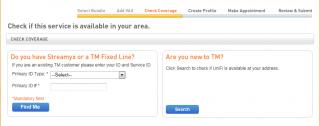
Did you arrive at this screen?

Attached Image

Existing TM user (or in my case previous TM user) should use the option on the left..

This post has been edited by VerM: Mar 12 2011, 12:19 PM
VerM
post Mar 12 2011, 03:21 PM

Getting Started
**
Junior Member
117 posts

Joined: Jan 2003
From: Place where number 1 is very famous


Sometime ago, this thread have 1 network specialist (way before i even think of registering unifi)..

He posted this https://forum.lowyat.net/index.php?showtopi...post&p=33261734

in which i think a really good explanation for those who are concern with their speedtest.net results after using unifi...


VerM
post Mar 13 2011, 01:00 AM

Getting Started
**
Junior Member
117 posts

Joined: Jan 2003
From: Place where number 1 is very famous


QUOTE(hazairi @ Mar 12 2011, 10:56 PM)
if there's a maintenance or something like that, u guys can apply for compensation right?
*
Not with TM...(or any other local telcos...)

QUOTE(dimenxion @ Mar 12 2011, 11:01 PM)
if due to their own fault, most probably yes. but you need to know what is your SLA first. as a home user the SLA is pretty much lower compare to corporate, also depends on service u are using.

but if it's caused by natural disaster, then NO.
*
Both consumer & corporate customer dont have SLA (or SLG) for broadband services (streamyx & unifi)...

If the internet is slow due their fault then we can't do anything about it other than complain to the hotline...


VerM
post Mar 14 2011, 07:45 AM

Getting Started
**
Junior Member
117 posts

Joined: Jan 2003
From: Place where number 1 is very famous


QUOTE(dimenxion @ Mar 13 2011, 09:53 AM)
yeah.. i know about the SLA. but most here dont. so we should educate them  biggrin.gif
*
Carry on my friend... biggrin.gif


Added on March 14, 2011, 7:49 am
QUOTE(stasio @ Mar 14 2011, 01:22 AM)
Dudey,
I just check my speed:

user posted image
*
High speed with high ping... hmmm....


Does anyone here notice traffic from unifi uses streamyx gateway [219.93.218.177]? I was under impression we suppose to have different gateway...

This post has been edited by VerM: Mar 14 2011, 07:49 AM
VerM
post Mar 14 2011, 09:19 AM

Getting Started
**
Junior Member
117 posts

Joined: Jan 2003
From: Place where number 1 is very famous


QUOTE(hackwire @ Mar 14 2011, 08:25 AM)
ey guys, just want to find out how things work between a customer vs contractor vs Telekom about the Wifi Coverage Area.

If i install my system upstairs and i get the wifi upstairs with good signal bar displayed and not downstairs, will this void the contract with Telekom or we can ask the contractor to ensure that the coverage is equally covered in all areas in the house.

Can Telekom replace the modem if the customers cannot get a satisfactorily result from this installation.

What happen ? I know many are tempted to have speed broadband and accepted the terms very fast after the installation even when the promises of wifi coverage is below par.

Is there a method to test out the wifi coverage by the contractors to check first before they leave? who knows maybe they could do something to improve it in the configuration which they can?
*
my installation is also upstairs (no tv upstairs, trying to do point2point ap downstairs)... in my case i have no trouble getting connected anywhere in my house; downstairs, kitchen, outside....

the supplied wifi router is already preconfigured for optimum wifi coverage... there is not much the contractor can do...

to have wifi equally covered in all areas in the house depends on various factors (including faulty router)...

TM has no responsibility to make sure every where in the house get connected, they already mentioned here

QUOTE
3.The wired connection (RJ45 cable) from your desktop PC/laptop to the RG/BG* will ensure that you get OPTIMUM high speed Internet access connectivity.
4.As an additional benefit for your convenience, the RG/BG also comes with wireless (WiFi) ability, however, if you want to maximise this ability, please observe the following :
a. position your RG/BG in a central position and minimise any obstacles around it – better still, place your PC/laptop closer to the RG/BG.
b. reduce the number of users who are accessing the Internet at any one time.
c. check your PC configurations so that they are configured correctly.
d. update your firmware or network adapter driver.
e. upgrade 802.11b/g devices to 802.11n models.
f. switch off any other wireless electrical/electronic devices to minimise wireless interference.
g. move your RG/BG off the floor and away from walls & metal objects.
h. switch off your PC and RG/BG for 30-60 seconds and restart if required.


*RG – Residential Gateway, BG – Business Gateway
Please note once again, the wired connection (RJ 45) cable that is connected
from your desktop PC or laptop to the RG/BG still offers the best Internet bandwidth access
connectivity speed.
If you read closely, wifi coverage is an additional benefit... meaning, TM only ensure that you get the unifi connectivity properly (speed, iptv and phone) but not what you intend to do with it...

This post has been edited by VerM: Mar 14 2011, 09:22 AM
VerM
post Mar 14 2011, 10:28 AM

Getting Started
**
Junior Member
117 posts

Joined: Jan 2003
From: Place where number 1 is very famous


QUOTE(+Newbie+ @ Mar 14 2011, 10:17 AM)
To be fair, TM's technicians will put the equipment where you want to put it and their main concern is to ensure that it gets to where you want it placed and is working properly.

So before they come, you really should put in some thought about where you want the equipment placed. Anything more than that is none of their concern. If the distance is too far, you will be charged as well.
*
Well said! nod.gif
VerM
post Mar 14 2011, 10:49 AM

Getting Started
**
Junior Member
117 posts

Joined: Jan 2003
From: Place where number 1 is very famous


QUOTE(yoda @ Mar 14 2011, 10:34 AM)
i would take those with a grain of salts. try direct download with accelerator or torrent instead. if you can't get 80% i.e 16Mbps, i would email them (unifi@tm.net.my)  if i were u (i never called them because they are charging me to report my problem,...duuhhhh).
*
nod.gif , getting 80% (2MB) should be enough i think considering various factors (including we aren't leased line in the first place)...

since downloading speed is not always constant (throughout 4GB files as an example), one should be able to see speed ranging from a mere 500KB to 2.45MB...(direct download with jdownloader, not sure about torrent)


VerM
post Mar 14 2011, 11:29 AM

Getting Started
**
Junior Member
117 posts

Joined: Jan 2003
From: Place where number 1 is very famous


QUOTE(gotdamsg @ Mar 14 2011, 11:07 AM)
Just tested my downloads, speed constantly at 1560kB/s..
*
Hmm... thats about 12.48Mbps... try a different time of the day and different download location (microsoft download is a good one) until at one point you reach 2MB or more...

If you reached that speed, then your unifi is up to speed (assuming yours is VIP20)... after that anything speed below that is probably attributed to other factors...(earth quake, load factor, congestion, server location, etc..etc..)... so best not to worry much about your speedtest.net results..
in fact getting 1.5MB constantly should be enough...

Perhaps this post give better explanation https://forum.lowyat.net/index.php?showtopi...post&p=33261734

This post has been edited by VerM: Mar 14 2011, 11:37 AM
VerM
post Mar 14 2011, 12:11 PM

Getting Started
**
Junior Member
117 posts

Joined: Jan 2003
From: Place where number 1 is very famous


QUOTE(ahpaul82 @ Mar 14 2011, 12:09 PM)
Wow,
so surprise to get Unifi staff to called me just now,

he informed me they have extra installation team to come over my place @ this coming Thursday afternoon session...
(Registered online @ 10/03/2011, and actual installation date is 03/04/2011)
rclxms.gif

i haven't confirm with him yet and ask him call me back after lunch hour, (Working lah)
hopefully he keep his promise lah biggrin.gif

what thing i need to prepare?

4/5gang power strip right?
*
Wow... good for you ahpaul... better straightaway confirm... nod.gif
VerM
post Mar 14 2011, 01:09 PM

Getting Started
**
Junior Member
117 posts

Joined: Jan 2003
From: Place where number 1 is very famous


QUOTE(ahpaul82 @ Mar 14 2011, 12:20 PM)
what extension cable?
i'm staying in Condo, they will used back existing telephone line...
that day got training till 3.30pm leh...  cry.gif
that's why can't confirm straight,
have to ask my mom schedule want her stay at home...
*
extension cable for powering all the devices laaa ahpaul... you got many wall socket power point meh?

QUOTE(gotdamsg @ Mar 14 2011, 01:02 PM)
Just tried downloading from microsoft.com and the speed ranging from 2MB to 1700kbps..
*
that should be good.. smile.gif

This post has been edited by VerM: Mar 14 2011, 01:11 PM

5 Pages  1 2 3 > » Top
Topic ClosedOptions
 

Change to:
| Lo-Fi Version
0.0560sec    0.40    8 queries    GZIP Disabled
Time is now: 6th December 2025 - 12:09 AM