Welcome Guest ( Log In | Register )

Outline · [ Standard ] · Linear+

P1 Updated 25/10! P1 Wimax guideline / Troubleshoot, New tips to improve your P1

views
     
TSyong888
post Mar 9 2009, 09:56 PM, updated 16y ago

New Member
*
Junior Member
30 posts

Joined: Mar 2009
First I must tell I'm not expert, but I can provide few useful step for you to fine tuning....
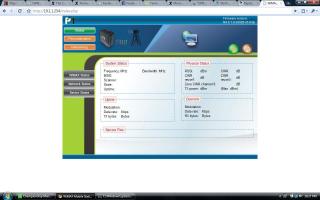
1.) Login the P1 modem interface, goto http://10.1.1.254
username: admin
password: admin123


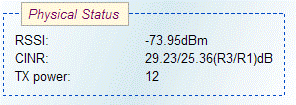
2.) Best Spot for wimax signal: once login adjust your P1 modem to find best spot (normally near window or outside window) and point to "Wimax Base station" direction (which you can see from modem interface the "RSSI" will keep changing, the lower "RSSI" the better signal it is, keep trying until you get lowerest RSSI)

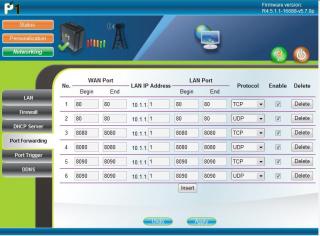
3.) BT user: must do port forwarding (refer to the picture below)

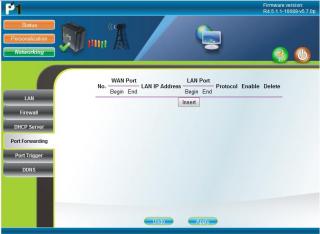
4.) DMZ Zone: Put your own IP (online gaming, FTP,.... others) under DMZ zone but once your IP under DMZ zone, you don't have protection meaning you're expose yourself without firewall, do it with extra caution (refer to below picture)

5.) Online Gaming: If you know your online game port number just simply do port forwarding so that you don't need put yourself in DMZ zone, it'll help latency problem

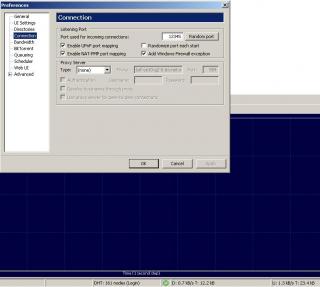
6.) Goto uTorrent preference use port: 12345 (example, u can use any port u like, refer to below picture on how to use certain port)

7.) Use Router to share with others: if you use router to share bandwidth you'll need goto router setting interface (normally is http://192.168.1.1 username/password: admin / admin) change your "Internet connection type" to DHCP or automatic or whatever router will assign IP to your PC because all the authentication will do within that P1 modem itself. (refer to picture below)

Hope can help you all....

P/S: forgot to tell you guys, raining do affect the signal, try don't put any electronic device (Wifi router, TV, microwave....) near this p1 modem

Tips: Always check your account usage, for example 1200 Package with 20GB (upload+download) whether exceed the quota, once it exceed P1 will start to cap your speed, btw you still able to get full speed during mid-night.

thumbup.gif thumbup.gif thumbup.gif

Guys, something P1 will give when your birthday coming ~~

Updated !!!!!!!!!!!!!!!!


A quick tips maybe can help you improve your speed which is pointing direction to the nearest base station.

Scenario 1:
Each CPE modem will search for frequency 2375000, 2380000, 2385000. If it happen your area have 3 base station nearby and your CPE pointing is in the middle of 2 base station.

Result: it'll cause frequent disconnect and reconnect, because it'll always search for best connectivity (Technology limitation)

Work around: Call / Email their Customer support ask them to plot out the base station by the map then you'll know which direction you should point to.


Scenario 2: Bandwidth limitation on base station is xxMbps, each base station connect to internet backbone have the limitation, let's say it's 10Mbps and 1 Wiggy max capacity already 10Mbps can suck all the bandwidth. If you find out the base station you connected have very good (green light) signal but very slow internet speed. This could be the reason

Work around: Try point to another base station even the connection is weaker(orange, red light) you could get better internet speed & bandwidth

How to know you're connect to different base station ??
Simple, just check the frequency you're connected at 1st then change direction or position. Check again, if it happen connect to different frequency it's different base station.

This post has been edited by yong888: Oct 25 2009, 09:55 PM


Attached thumbnail(s)
Attached Image Attached Image Attached Image Attached Image Attached Image Attached Image Attached Image
FROGEYE
post Mar 9 2009, 10:44 PM

New Member
*
Junior Member
23 posts

Joined: Sep 2006
hi yong
I'm finding a sweep spot for my P1 modem as well (got the login from u d!) but I would wanna clarify one thing; When you said "the lower RSSI, the better". Now, my RSSI signal is -60.30 (negative 60.30) and at some spot it was -45.10 (negative 45.10). As its a negative integer, in this context which one is 'lower'? Tx much
TSyong888
post Mar 9 2009, 10:47 PM

New Member
*
Junior Member
30 posts

Joined: Mar 2009
QUOTE(FROGEYE @ Mar 9 2009, 10:44 PM)
hi yong
I'm finding a sweep spot for my P1 modem as well (got the login from u d!) but I would wanna clarify one thing; When you said "the lower RSSI, the better". Now, my RSSI signal is -60.30 (negative 60.30) and at some spot it was -45.10 (negative 45.10).  As its a negative integer, in this context which one is 'lower'? Tx much
*
-45.10 is lower
FROGEYE
post Mar 9 2009, 11:03 PM

New Member
*
Junior Member
23 posts

Joined: Sep 2006
ok, got it. Tx!
TSyong888
post Mar 9 2009, 11:09 PM

New Member
*
Junior Member
30 posts

Joined: Mar 2009
As now P1 Wimax technology is not mature enough yet, each P1 Base station only can support up to 1km and others wimax ISP can go up to 5 ~ 10km like korea .... also MIMO is not yet implement yet.

Hopefully we can see some improvement after they implement MIMO notworthy.gif notworthy.gif
Also can improve on their Reseller, customer support.... Please put some technical people ~~
owc
post Mar 9 2009, 11:18 PM

Generous in Sharing Knowledge
******
Senior Member
1,240 posts

Joined: Aug 2008
From: Other World Computing

Nothing helps if you do have ID and password, what dif?

This post has been edited by owc: Mar 14 2009, 09:36 AM
FROGEYE
post Mar 9 2009, 11:44 PM

New Member
*
Junior Member
23 posts

Joined: Sep 2006
QUOTE(yong888 @ Mar 9 2009, 11:09 PM)
As now P1 Wimax technology is not mature enough yet, each P1 Base station only can support up to 1km and others wimax ISP can go up to 5 ~ 10km like korea .... also MIMO is not yet implement yet.

Hopefully we can see some improvement after they implement MIMO  notworthy.gif  notworthy.gif
Also can improve on their Reseller, customer support.... Please put some technical people ~~
*
hi yong,
I noticed this glitch a few times and do share with us if you're experiencing the same. I have a few bckground d/l Tab and simultaneously I hv a Firefox Tab wth the modem user interface open to monitor the RSSI, etc, etc. Now, whenever I close this particular modem user interface Tab, the entire connection freeze. No incoming/outgoing packets. Modem status still looks healthy thought. I've tried this a few times to validate the glitch. Comments?

TSyong888
post Mar 9 2009, 11:51 PM

New Member
*
Junior Member
30 posts

Joined: Mar 2009
I don't have this experience before, but I do same situation when I disable routing feature on the P1 modem, my pc will get public IP but connection seems got problem.

note: it shouldn't have any problem when you close the modem user interface. Try to do some testing keep pinging certain domain name / IP example: ping google.com -t and close the Tab , see whether got problem or not
hwchan
post Mar 10 2009, 07:19 AM

New Member
*
Junior Member
5 posts

Joined: Apr 2008
Seems like i got problem to do port forwarding and not too sure where the problem occur. Im using Belkin router F5D7230-4

I follow your guide on the p1 modem and set all the ports that i required to open, and enter the LAN IP as 10.1.1.1 but i dont know how to set my router to assign WAN IP automatically. I click to use dynamic setting, and it asked me to enter the host name, i tried p1.com.my but it get me error of invalid host ><

i check with the port and it not open at all
p4n6
post Mar 10 2009, 08:29 AM

Look at all my stars!!
*******
Senior Member
5,968 posts

Joined: Jan 2003
From: KL, Malaysia
QUOTE(yong888 @ Mar 9 2009, 11:09 PM)
As now P1 Wimax technology is not mature enough yet, each P1 Base station only can support up to 1km and others wimax ISP can go up to 5 ~ 10km like korea .... also MIMO is not yet implement yet.

Hopefully we can see some improvement after they implement MIMO  notworthy.gif  notworthy.gif
Also can improve on their Reseller, customer support.... Please put some technical people ~~
*
Thanks. Already PM you wink.gif

Are you P1 staff?
IIIaZer
post Mar 10 2009, 10:20 AM

Casual
***
Junior Member
347 posts

Joined: Jan 2003
From: Sunway


already PM you as well. Thanks
nitezshiro
post Mar 10 2009, 01:50 PM

Getting Started
**
Junior Member
94 posts

Joined: Sep 2005


Can this guide solve frequent disconnection as well?

I have returned my modem to them already. They told me that my area is not in coverage so that is why I have such disconnection..
ubsacc2004
post Mar 10 2009, 02:00 PM

No life without MUsic
******
Senior Member
1,860 posts

Joined: Sep 2006
From: KL


huh ? no coverage ? so weird ah. not tested the signal before subscribe ? now i waiting for yong888 to fine tune my signal.
FROGEYE
post Mar 10 2009, 02:10 PM

New Member
*
Junior Member
23 posts

Joined: Sep 2006
i have sporadic disconnection too. You'll notice ya d/l bar move very fast BUT then it just stopped there momentarily, and resumes. Weird
meiL
post Mar 10 2009, 04:40 PM

New Member
*
Newbie
2 posts

Joined: Nov 2008


PM sent biggrin.gif . P1 slows down these few days sad.gif
TSyong888
post Mar 10 2009, 04:44 PM

New Member
*
Junior Member
30 posts

Joined: Mar 2009
QUOTE(hwchan @ Mar 10 2009, 07:19 AM)
Seems like i got problem to do port forwarding and not too sure where the problem occur. Im using Belkin router F5D7230-4

I follow your guide on the p1 modem and set all the ports that i required to open, and enter the LAN IP as 10.1.1.1 but i dont know how to set my router to assign WAN IP automatically. I click to use dynamic setting, and it asked me to enter the host name, i tried p1.com.my but it get me error of invalid host ><

i check with the port and it not open at all
*
the hostname should be your PC name


Added on March 10, 2009, 4:44 pm
QUOTE(FROGEYE @ Mar 10 2009, 02:10 PM)
i have sporadic disconnection too. You'll notice ya d/l bar move very fast BUT then it just stopped there momentarily, and resumes. Weird
*
this's due to wireless signal not stable.... technology not mature enough yet rclxub.gif

This post has been edited by yong888: Mar 10 2009, 04:44 PM
hwchan
post Mar 10 2009, 06:08 PM

New Member
*
Junior Member
5 posts

Joined: Apr 2008
well i still cant get it right, guess i ask for guide here

Im using wifi router Belkin F5D7230-4 and connected with 2 PC through cable

Currently my LAN IP is set to DHCP mode, so my LAN IP is 192.168.2.2. When i do port forwarding, i enter all the port number and it will assign 192.168.2.2 for the port while under Wimax setting, it falls under 10.1.1.1 so is this the problem? Anyway i can do this fine?
ubsacc2004
post Mar 10 2009, 06:08 PM

No life without MUsic
******
Senior Member
1,860 posts

Joined: Sep 2006
From: KL


my RSSI is -39.81. but port forwarding i just insert 12345 hehe. tks.
TSyong888
post Mar 10 2009, 06:11 PM

New Member
*
Junior Member
30 posts

Joined: Mar 2009
QUOTE(hwchan @ Mar 10 2009, 06:08 PM)
well i still cant get it right, guess i ask for guide here

Im using wifi router Belkin F5D7230-4 and connected with 2 PC through cable

Currently my LAN IP is set to DHCP mode, so my LAN IP is 192.168.2.2. When i do port forwarding, i enter all the port number and it will assign 192.168.2.2 for the port while under Wimax setting, it falls under 10.1.1.1 so is this the problem? Anyway i can do this fine?
*
I think you'll need to 2 port forwarding,
1.) Port forward from wimax modem to router (IP : 10.1.1.1) because P1 modem itself is router
2.) port forward from Router to your PC (192.168.2.2)


Added on March 10, 2009, 7:50 pm
QUOTE(ubsacc2004 @ Mar 10 2009, 06:08 PM)
my RSSI is -39.81. but port forwarding i just insert 12345 hehe. tks.
*
Wow ~ -39.81 consider very very signal rclxms.gif rclxms.gif rclxms.gif


Added on March 10, 2009, 7:51 pmguys.... username and password posted, enjoy ~

This post has been edited by yong888: Mar 10 2009, 07:51 PM
ubsacc2004
post Mar 10 2009, 08:19 PM

No life without MUsic
******
Senior Member
1,860 posts

Joined: Sep 2006
From: KL


hehe i stay at bdr baru sentul 10 floors.
deacan
post Mar 10 2009, 08:27 PM

Getting Started
**
Junior Member
56 posts

Joined: Sep 2004


QUOTE(yong888 @ Mar 9 2009, 09:56 PM)
First I must tell I'm not expert, but I can provide few useful step for you to fine tuning....
1.) Login the P1 modem interface, goto http://10.1.1.254
    username: p1admin
    password: 769973

2.) Best Spot for wimax signal: once login adjust your P1 modem to find best spot (normally near window or outside window) and point to "Wimax Base station" direction (which you can see from modem interface the "RSSI" will keep changing, the lower "RSSI" the better signal it is, keep trying until you get lowerest RSSI)

3.) BT user: must do port forwarding (refer to the picture below)

4.) DMZ Zone: Put your own IP (online gaming, FTP,.... others) under DMZ zone but once your IP under DMZ zone, you don't have protection meaning you're expose yourself without firewall, do it with extra caution (refer to below picture)

5.) Online Gaming: If you know your online game port number just simply do port forwarding so that you don't need put yourself in DMZ zone, it'll help latency problem

6.) Goto uTorrent preference use port: 12345 (example, u can use any port u like, refer to below picture on how to use certain port)

7.) Use Router to share with others: if you use router to share bandwidth you'll need goto router setting interface (normally is http://192.168.1.1 username/password: admin / admin) change your "Internet connection type" to DHCP or automatic or whatever router will assign IP to your PC because all the authentication will do within that P1 modem itself. (refer to picture below)

Hope can help you all....

P/S: forgot to tell you guys, raining do affect the signal, try don't put any electronic device (Wifi router, TV, microwave....) near this p1 modem
thumbup.gif  thumbup.gif  thumbup.gif
*
Thx very much bro. Got your email too today.
Coconut
post Mar 10 2009, 09:07 PM

Regular
******
Senior Member
1,268 posts

Joined: Jan 2003


i am noob in port forwarding, anyone using DI524 router can share how to set the port forwarding?

meiL
post Mar 10 2009, 09:56 PM

New Member
*
Newbie
2 posts

Joined: Nov 2008


Got ur email biggrin.gif . Thx for the username/password . utorrent shows the green icon now smile.gif
littleman
post Mar 10 2009, 10:04 PM

Enthusiast
*****
Senior Member
834 posts

Joined: Sep 2006
mine is still showing red icon even after I portforward. sad.gif
saddient
post Mar 11 2009, 12:00 AM

yes or no
****
Senior Member
686 posts

Joined: Jun 2007
From: dine in the hell


is that -45.75 is a good RSSI? how come my dl speed still so slow ...

user posted image
Mortario
post Mar 11 2009, 10:08 AM

New Member
*
Junior Member
8 posts

Joined: Jan 2003
What is a good RSSI rating and DNR(sp?) Anyone?
p4n6
post Mar 11 2009, 01:43 PM

Look at all my stars!!
*******
Senior Member
5,968 posts

Joined: Jan 2003
From: KL, Malaysia
QUOTE(yong888 @ Mar 9 2009, 11:09 PM)
As now P1 Wimax technology is not mature enough yet, each P1 Base station only can support up to 1km and others wimax ISP can go up to 5 ~ 10km like korea .... also MIMO is not yet implement yet.

Hopefully we can see some improvement after they implement MIMO   notworthy.gif  notworthy.gif
Also can improve on their Reseller, customer support.... Please put some technical people ~~
*
Any proof that Korea basestation can reach 10km? As far as I can see, the distance is more on the RF limitation but not the technology & equipment limitation.

This post has been edited by p4n6: Mar 11 2009, 01:45 PM
saddient
post Mar 11 2009, 08:58 PM

yes or no
****
Senior Member
686 posts

Joined: Jun 2007
From: dine in the hell


QUOTE(Mortario @ Mar 11 2009, 11:08 AM)
What is a good RSSI rating and DNR(sp?) Anyone?
*
as i know the lower RSSI u got there.. the stronger signal
lulu418
post Mar 11 2009, 08:59 PM

New Member
*
Junior Member
7 posts

Joined: Dec 2007
I already Open the port but my BT still yellowl light~~~~~~~~ rclxub.gif rclxub.gif
saddient
post Mar 11 2009, 09:00 PM

yes or no
****
Senior Member
686 posts

Joined: Jun 2007
From: dine in the hell


QUOTE(lulu418 @ Mar 11 2009, 09:59 PM)
I already Open the port but my BT still yellowl light~~~~~~~~ rclxub.gif  rclxub.gif
*
better than me ...still red colour... hows the speed? what's your result at speedtest.net d?
TSyong888
post Mar 11 2009, 09:38 PM

New Member
*
Junior Member
30 posts

Joined: Mar 2009
Please make some noise to careline@p1.com.my about BT, seems like lately they block BT ....
mad.gif mad.gif mad.gif mad.gif mad.gif mad.gif mad.gif
owc
post Mar 11 2009, 09:41 PM

Generous in Sharing Knowledge
******
Senior Member
1,240 posts

Joined: Aug 2008
From: Other World Computing

hmm.gif I feel like been scam by P1 Wimax, what I saw is not what i get ! doh.gif
saddient
post Mar 11 2009, 09:50 PM

yes or no
****
Senior Member
686 posts

Joined: Jun 2007
From: dine in the hell


QUOTE(yong888 @ Mar 11 2009, 10:38 PM)
Please make some noise to careline@p1.com.my about BT, seems like lately they block BT ....
mad.gif  mad.gif  mad.gif  mad.gif  mad.gif  mad.gif  mad.gif
*
already lodged a complaint few times by emailing them but no feedback from them


Added on March 11, 2009, 9:51 pm
QUOTE(owc @ Mar 11 2009, 10:41 PM)
hmm.gif  I feel like been scam by P1 Wimax, what I saw is not what i get !  doh.gif

*
wow ur speedtest result so nice

This post has been edited by saddient: Mar 11 2009, 09:51 PM
hwchan
post Mar 11 2009, 10:11 PM

New Member
*
Junior Member
5 posts

Joined: Apr 2008
i already uninstalled my zone alarm firewall but still cant get the any port open though i already allow port forward either in the modem itself and my router. I wonder what is wrong now...
p4n6
post Mar 11 2009, 10:40 PM

Look at all my stars!!
*******
Senior Member
5,968 posts

Joined: Jan 2003
From: KL, Malaysia
QUOTE(saddient @ Mar 11 2009, 08:58 PM)
as i know the lower RSSI u got there.. the stronger signal
*
RSSI and CINR, the higher the better.

But you need to understand the concept of negative number.


Added on March 11, 2009, 10:46 pm
QUOTE(yong888 @ Mar 11 2009, 09:38 PM)
Please make some noise to careline@p1.com.my about BT, seems like lately they block BT ....
mad.gif  mad.gif  mad.gif  mad.gif  mad.gif  mad.gif  mad.gif
*
It's the normal reaction for every ISP, when every users treat their best effort line as a leased line, ISP will retaliate to throttle p2p traffic.

It's the same cycle we all encountered before during StreamyX reign.

It's inevitable. No ISP will provide us ALL YOU CAN EAT BUFFET with RM100.

This post has been edited by p4n6: Mar 11 2009, 10:46 PM
TSyong888
post Mar 11 2009, 11:12 PM

New Member
*
Junior Member
30 posts

Joined: Mar 2009
QUOTE(p4n6 @ Mar 11 2009, 10:40 PM)
RSSI and CINR, the higher the better.

But you need to understand the concept of negative number.


Added on March 11, 2009, 10:46 pm
It's the normal reaction for every ISP, when every users treat their best effort line as a leased line, ISP will retaliate to throttle p2p traffic.

It's the same cycle we all encountered before during StreamyX reign.

It's inevitable. No ISP will provide us ALL YOU CAN EAT BUFFET with RM100.
*
The greater negative number you get is only mean your CPE (P1 modem) connection to base station is good, doesn't mean the base station to internet is good....

Another point is since P1 set the quota for every package they shouldn't cap the speed until you reach the limit, I think it's time for mcmc http://aduan.skmm.gov.my/


Added on March 11, 2009, 11:38 pm
QUOTE(hwchan @ Mar 11 2009, 10:11 PM)
i already uninstalled my zone alarm firewall but still cant get the any port open though i already allow port forward either in the modem itself and my router. I wonder what is wrong now...
*
Maybe it's nothing wrong with all the setting and fine tuning, the problem come from the wimax base station....
WiMAX should be able to handle up to 70 megabits per second, once it hit the capacity, I think nothing much we can do .... meaning if more than 70 users login to the same base station, you're going to share the bandwidth with others...


This post has been edited by yong888: Mar 11 2009, 11:38 PM
whisperblade
post Mar 11 2009, 11:39 PM

New Member
*
Newbie
0 posts

Joined: Dec 2008
First, zillion thanks for yong888 for sharing is caring.

Mine as below:-

Physical StatusRSSI: -68.78 CINR: 24.94dB
TX power: 10.64
UplinkModulation: qam16-ctc-1/2
Data rate: 6Kb/s
TX bytes: 2601436
DownlinkModulation: qam16-ctc-1/2
Data rate: 210Kb/s
RX bytes: 74995886

I think we should also see the data rate and not just RSSI value.
How much are you guys getting for downlink data rate?

owc
post Mar 12 2009, 01:01 AM

Generous in Sharing Knowledge
******
Senior Member
1,240 posts

Joined: Aug 2008
From: Other World Computing

P1 Careline they admit they now block p2p and lower the download speed until further notice, for more infomation please call their respective phone number 1300 800 888
yuhahai
post Mar 12 2009, 10:37 AM

New Member
*
Junior Member
8 posts

Joined: Sep 2008


1st for all I must thank you yong sharing the valuable info


Added on March 12, 2009, 10:39 am1st for all I must thank you yong sharing the valuable info but now I counter the problem not be able to get back into the router page even I type the username and password can somebody help me with that?

This post has been edited by yuhahai: Mar 12 2009, 10:39 AM
UFO
post Mar 12 2009, 06:51 PM

Getting Started
**
Junior Member
50 posts

Joined: Jan 2003
From: G-Block @ DeadMan WonderLand


QUOTE(yuhahai @ Mar 12 2009, 10:37 AM)
1st for all I must thank you yong sharing the valuable info


Added on March 12, 2009, 10:39 am1st for all I must thank you yong sharing the valuable info  but now I counter the problem not be able to get back into the router page even I type the username and password can somebody help me with that?
*
Unfortunately we can't use the exposed username and password anymore since the P1 team had already revoked them I guess... even my previous saved username and password of my own setting they also manage to overwrite it... So, I guess we are stucked with no more user access again... too bad cry.gif
Acrisius
post Mar 12 2009, 09:32 PM

New Member
*
Junior Member
9 posts

Joined: Jun 2007
From: A place which took me A thousand square feet.


If the modem upgraded into new firmware. I think it's the time for P1 to release their username and password to customer, as they promised the new firmware will giving out the username and password to configure some setting for users
ImAn
post Mar 12 2009, 09:55 PM

Getting Started
**
Junior Member
64 posts

Joined: Jan 2003
i can't login using the username and the password in this post. can somebody help me.

This post has been edited by ImAn: Mar 12 2009, 09:55 PM
owc
post Mar 12 2009, 10:05 PM

Generous in Sharing Knowledge
******
Senior Member
1,240 posts

Joined: Aug 2008
From: Other World Computing

You all know what? P1 have hired spy to monitor this forum, so anything you say and what you write they already take notes.
But then some stupid service issue no idea why they don't want fix their service to more better.
Best effort is not what we need.
What we need is 100% effort and no mistake.
What we see is mean what we must get, or else is counted scaming.
Reason is not solotion, what we know is the fact.
p4n6
post Mar 14 2009, 12:31 AM

Look at all my stars!!
*******
Senior Member
5,968 posts

Joined: Jan 2003
From: KL, Malaysia
QUOTE(Acrisius @ Mar 12 2009, 09:32 PM)
If the modem upgraded into new firmware. I think it's the time for P1 to release their username and password to customer, as they promised the new firmware will giving out the username and password to configure some setting for users
*
Yup, been waiting for that ... but not sure those that already changed their username/password previously will be able to get the upgrade.


Added on March 14, 2009, 12:45 am
QUOTE(yong888 @ Mar 11 2009, 11:12 PM)
The greater negative number you get is only mean your CPE (P1 modem) connection to base station is good, doesn't mean the base station to internet is good....

Another point is since P1 set the quota for every package they shouldn't cap the speed until you reach the limit, I think it's time for mcmc http://aduan.skmm.gov.my/


Added on March 11, 2009, 11:38 pm

Maybe it's nothing wrong with all the setting and fine tuning, the problem come from the wimax base station....
WiMAX should be able to handle up to 70 megabits per second, once it hit the capacity, I think nothing much we can do .... meaning if more than 70 users login to the same base station, you're going to share the bandwidth with others...
*
I've done some researches on wireless technology prior to subscribing to it.
I can say that to calculate the maximum bandwidth of wireless technology is way more complicated than in wired technology.
So I can say that your assumption on the 70Mbps is way too overated of the technology capability.


Added on March 14, 2009, 12:48 am
QUOTE(owc @ Mar 12 2009, 01:01 AM)
P1 Careline they admit they now block p2p and lower the download speed until further notice, for more infomation please call their respective phone number 1300 800 888
*
BLOCK & LOWER DOWN THE DOWNLOAD SPEED ... this is two contradicting statement ... how can you block but reduce the speed??? Already block then it's zero lah! But somehow people can still download ... then it's not block lah! P1 Careline says wrongly or you interpret it differently?

Block or Reduce Speed???

It's different.


This post has been edited by p4n6: Mar 14 2009, 12:48 AM
owc
post Mar 14 2009, 08:41 AM

Generous in Sharing Knowledge
******
Senior Member
1,240 posts

Joined: Aug 2008
From: Other World Computing

QUOTE(p4n6 @ Mar 14 2009, 08:50 AM)
BLOCK & LOWER DOWN THE DOWNLOAD SPEED ... this is two contradicting statement ... how can you block but reduce the speed??? Already block then it's zero lah! But somehow people can still download ... then it's not block lah! P1 Careline says wrongly or you interpret it differently?

Block or Reduce Speed???

It's different.
*
Does it matter? anyway speed 100kbit and bt can't even 1kbit speed move.
Are you 1 of the P1 careline?
I had slow speed for many month, green signal, monthly usage less then 5gb.
You are P1 careline? why keep protect P1 careline?
P1 careline sux, report everyday still no improve.
Everyday I call P1 careline still need to talk same thing.
You know what? call to P1 careline is a waste of $.
You know every month I spend how many hour talk to that P1 careline.
Are you Alan in P1 careline>?
Or you want me to report your service in MCMC?
I have prove the service less then 10%
That enough me to report to MCMC.

This post has been edited by owc: Mar 14 2009, 09:00 AM
p4n6
post Mar 14 2009, 11:27 AM

Look at all my stars!!
*******
Senior Member
5,968 posts

Joined: Jan 2003
From: KL, Malaysia
QUOTE(owc @ Mar 14 2009, 08:41 AM)
Does it matter? anyway speed 100kbit and bt can't even 1kbit speed move.
Are you 1 of the P1 careline?
I had slow speed for many month, green signal, monthly usage less then 5gb.
You are P1 careline? why keep protect P1 careline?
P1 careline sux, report everyday still no improve.
Everyday I call P1 careline still need to talk same thing.
You know what? call to P1 careline is a waste of $.
You know every month I spend how many hour talk to that P1 careline.
Are you Alan in P1 careline>?
Or you want me to report your service in MCMC?
I have prove the service less then 10%
That enough me to report to MCMC.
*
Mr. OWC, I'm providing a fair statement here.

You have suck service, I have good service, you complain about it on this forum, I recommend it on this forum, you have the right to give your view, I have the right to give my opinion.
How is that protecting P1 Careline?

Just that you are in misery that doesn't mean everyone else need to stand by your point.

I will challenge you if your point is not valid and i will support you if it's right.

And to answer you question, no I'm not P1 Careline and I'm not your bf, Alan, just that my userid starts with a P that doesn't make me affiliated to P1, duh! Stop being a schizo and control yourself...

I'm a subscriber of their service, if their service sucks, I will screw them myself.

I think you should report this matter to MCMC if you have the proof and you really think it will help, I don't see why not?

This post has been edited by p4n6: Mar 14 2009, 11:29 AM
Nels
post Mar 14 2009, 01:41 PM

Tech Enthusiast
*****
Senior Member
811 posts

Joined: May 2006


Let's chill out. I bet owc is suffering so much about his broadband speed.

Well, back from my last post in here until now i have not be able to connect to my wimax broadband. The modem keep on blinking and blinking. I did reset and the result is the same.

Already a week i can say.

I just too busy to call p1 wimax careline lol.
owc
post Mar 14 2009, 08:28 PM

Generous in Sharing Knowledge
******
Senior Member
1,240 posts

Joined: Aug 2008
From: Other World Computing

QUOTE(Nels @ Mar 14 2009, 01:41 PM)
Let's chill out. I bet owc is suffering so much about his broadband speed.

Well, back from my last post in here until now i have not be able to connect to my wimax broadband. The modem keep on blinking and blinking. I did reset and the result is the same.

Already a week i can say.

I just too busy to call p1 wimax careline lol.
*
Damm right, one month I waste dozen and dozen hour to call P1WiMAX careline.
Does it help? No nothing improve, if they fix the problem, three day after the problem happen again.
Have to rereport again, everytime call P1WiMAX careline have to talk same issue, some more i till lazy call already.
On top of that, everytime from now on, when i report to P1WiMAX careline i would tell them the old problem again.
I will tell them please refer to my prevoise many report, and it all are same issus, never fix.
Everytime respond time very slow.
The Network Team one of the technican called Mr.Alan, he only available on office hour and monday to friday.
All the P1WiMAX careline will report to him, but anyway you need wait one or more week only they will reply you.
P1WiMAX careline no use at all, they just help you issue report.
The Network Technical Team always unavailable.
Somemore, P1WiMAX careline many staff come from Streamyx and TMNET.
Wonder their service so good and so much welcome among us.
yama
post Mar 14 2009, 09:59 PM

Getting Started
**
Junior Member
79 posts

Joined: Jan 2003


QUOTE(Nels @ Mar 14 2009, 01:41 PM)
Let's chill out. I bet owc is suffering so much about his broadband speed.

Well, back from my last post in here until now i have not be able to connect to my wimax broadband. The modem keep on blinking and blinking. I did reset and the result is the same.

Already a week i can say.

I just too busy to call p1 wimax careline lol.
*
Wow, you case is even worst. I think you are not even in the coverage, did you check on P1 website?

If cannot use, why don't just terminate it, you should have all the bullets to shoot them if they flash your contract with them.

No point to wait, just terminate and subscribe again when their service improves.
deacan
post Mar 15 2009, 12:01 AM

Getting Started
**
Junior Member
56 posts

Joined: Sep 2004


It seems like P1 Wimax is on to us... the username and password does not work anymore
owc
post Mar 15 2009, 12:55 AM

Generous in Sharing Knowledge
******
Senior Member
1,240 posts

Joined: Aug 2008
From: Other World Computing

QUOTE(deacan @ Mar 15 2009, 12:01 AM)
It seems like P1 Wimax is on to us... the username and password does not work anymore
*
ID and password is their P&C, not like streamyx, streamyx no scare let you know the ID and Password.
If you own the ID and password you can hack all P1WiMAX user.
No idea how they spred out their P&C, if our PC get hack how? shu them in court?
Goneraz
post Mar 15 2009, 02:02 AM

Casual
***
Junior Member
432 posts

Joined: Oct 2006


QUOTE(owc @ Mar 14 2009, 08:28 PM)
Damm right, one month I waste dozen and dozen hour to call P1WiMAX careline.
Does it help? No nothing improve, if they fix the problem, three day after the problem happen again.
Have to rereport again, everytime call P1WiMAX careline have to talk same issue, some more i till lazy call already.
On top of that, everytime from now on, when i report to P1WiMAX careline i would tell them the old problem again.
I will tell them please refer to my prevoise many report, and it all are same issus, never fix.
Everytime respond time very slow.
The Network Team one of the technican called Mr.Alan, he only available on office hour and monday to friday.
All the P1WiMAX careline will report to him, but anyway you need wait one or more week only they will reply you.
P1WiMAX careline no use at all, they just help you issue report.
The Network Technical Team always unavailable.
Somemore, P1WiMAX careline many staff come from Streamyx and TMNET.
Wonder their service so good and so much welcome among us.
*

Hey bro i feel u too... i have the same exact problem. I wont even bother to argue with p4n6, he has been an acid fan of p1 even before he got the service and i agree with him,everyone is entitled to have his own opinion. I am happy that he is enjoying his p1.
Nels
post Mar 15 2009, 12:01 PM

Tech Enthusiast
*****
Senior Member
811 posts

Joined: May 2006


QUOTE(yama @ Mar 14 2009, 09:59 PM)
Wow, you case is even worst. I think you are not even in the coverage, did you check on P1 website?

If cannot use, why don't just terminate it, you should have all the bullets to shoot them if they flash your contract with them.

No point to wait, just terminate and subscribe again when their service improves.
*
Nah, i am one of the 6 month trial user. I will call the careline tonight since i have some time. :}
p4n6
post Mar 15 2009, 01:08 PM

Look at all my stars!!
*******
Senior Member
5,968 posts

Joined: Jan 2003
From: KL, Malaysia
QUOTE(Goneraz @ Mar 15 2009, 02:02 AM)
Hey bro i feel u too... i have the same exact problem. I wont even bother to argue with p4n6, he has been an acid fan of p1 even before he got the service and i agree with him,everyone is entitled to have his own opinion. I am happy that he is enjoying his p1.
*
I'm fan to the technology not necessary to P1 alone ... somehow AMAX never make it to my home only tongue.gif
AMAX has lower number of subscribers, so I believe their service SLA will be higher at this point of time.
P1 has a head start in term of gaining subscribers as well as chance for them to improve their network.

Previously I have told everyone the danger of becoming a guneia pig and not too early to judge the network performance as for all new network, shit happens when subscribers increased tongue.gif

I have been monitoring P1 report card since the beginning, from their track record, you can see a wave when subs comment the service is good, then for a few months, the service performance will degrade, then you will see alot of people complaining on LYN, then the service will improve back, ... and then it will come back down. If you ask me, they are still adapting and stabilizing ... they will improve, it's just time.

I'm using now because to me, stability is the major concern not exactly the upto 1.2Mbps/500kbps advertised speed.
I can see the stability improves from before that's why i start to put my hand in now. Based on my daily usage, a stable average of 300kbps DL/ 100kbps UL is more than sufficient, no point to me to be kiasu and demand for the max cause i know they are offering best effort service. I read my T&C and understands it well.


owc
post Mar 15 2009, 01:15 PM

Generous in Sharing Knowledge
******
Senior Member
1,240 posts

Joined: Aug 2008
From: Other World Computing

QUOTE(p4n6 @ Mar 15 2009, 01:08 PM)
I'm fan to the technology not necessary to P1 alone ... somehow AMAX never make it to my home only tongue.gif
AMAX has lower number of subscribers, so I believe their service SLA will be higher at this point of time.
P1 has a head start in term of gaining subscribers as well as chance for them to improve their network.

Previously I have told everyone the danger of becoming a guneia pig and not too early to judge the network performance as for all new network, shit happens when subscribers increased tongue.gif

I have been monitoring P1 report card since the beginning, from their track record, you can see a wave when subs comment the service is good, then for a few months, the service performance will degrade, then you will see alot of people complaining on LYN, then the service will improve back, ... and then it will come back down. If you ask me, they are still adapting and stabilizing ... they will improve, it's just time.

I'm using now because to me, stability is the major concern not exactly the upto 1.2Mbps/500kbps advertised speed.
I can see the stability improves from before that's why i start to put my hand in now. Based on my daily usage, a stable average of 300kbps DL/ 100kbps UL is more than sufficient, no point to me to be kiasu and demand for the max cause i know they are offering best effort service. I read my T&C and understands it well.
*
Does it matter? I don’t think so, P1 they know the problem already everyday and every minute thousand of people call complain same problem and same area. They just get ignore, p4n6 I agree with you your speed very stratified by you. I understand when I join P1 WiMAX user the 1st 3 month bravo fast, time after time it like sux. I last time also stand on P1 side as same as you, I feel prove that I have P1 and high speed then you all don’t own. I understand p4n6 you same as me last time very prove that have P1. Is the same theory, if you have new car did you love your new car? Will you defense your new car? Will you polish your new car? After few months your car dirty and you no care already and the engine started got problem year after year. What you going to do? Still prove that you have P1? Still polish your p1? Still love your p1? Still defense your P1?

Dam, I do understand how your felling, I walk past your journey before, sour, sweet, bitter, spicy, all I have been true. p4n6 you still have long journey with P1WiMAX, anyway the answer need self explore, people said you wouldn’t believe, same as me last time, I believe my own and even don’t believe in god, I believe in money, are you so?

I don’t want to argue with you, no point those entire things I have know and been true, and you are new in P1. Just enjoy P1 and stay tune p4n6.

For your information, I have been experiance of those kind of speed before:
user posted imageuser posted image
justsome1
post Mar 16 2009, 03:44 AM

New Member
*
Junior Member
19 posts

Joined: Nov 2005
From: Subang Jaya


wah. so nice. RSSI readings so good.
my place in USJ 11 only got -75.xx. *sobs*
will try putting the modem upstairs front facing window tomorrow.
so far, download seems good at 11xxkbps to 12xxkbps but Upload slow ler...about 200-300 kbps only. need to seed!!!
colin83
post Mar 16 2009, 10:25 AM

Getting Started
**
Junior Member
130 posts

Joined: Feb 2007


QUOTE(deacan @ Mar 10 2009, 08:27 PM)
Thx very much bro. Got your email too today.
*
p1admin usename and password 769973 cant be used anymore ?
any other backdoor login name and password for this ?

i just wan login and check the RSSI ..
Acrisius
post Mar 16 2009, 11:32 AM

New Member
*
Junior Member
9 posts

Joined: Jun 2007
From: A place which took me A thousand square feet.


Nope colin83, they already upgraded into backup firmware to avoid user abuse the modem setting. So just stay tuned on the new firmware to provide username and password for customer.
antonio
post Mar 16 2009, 02:30 PM

AMD Phenom II & Intel i7 Overclocker
Group Icon
VIP
4,032 posts

Joined: Jan 2003
From: MSR Headquaters
ahh...thats is why I cant connect to the modem configuration page...

Dun forget to share everybody once the new pass is out...

This post has been edited by antonio: Mar 16 2009, 02:34 PM
cameltoe
post Mar 16 2009, 05:03 PM

Getting Started
**
Junior Member
293 posts

Joined: Jan 2009
From: 10101010111


Refer to this thread to find out more about the small box modem used by P1.

http://forum.lowyat.net/topic/966343
p4n6
post Mar 17 2009, 12:46 AM

Look at all my stars!!
*******
Senior Member
5,968 posts

Joined: Jan 2003
From: KL, Malaysia
QUOTE(cameltoe @ Mar 16 2009, 05:03 PM)
Refer to this thread to find out more about the small box modem used by P1.

http://forum.lowyat.net/topic/966343
*
How will it helps to perform troubleshooting and accessing to the page?

Don't go out topic ler ...
Hamilton
post Mar 17 2009, 07:17 PM

Getting Started
**
Junior Member
158 posts

Joined: Jun 2007
i cant even login with the userid and pw that u provide..any other IDs?
Acrisius
post Mar 17 2009, 08:47 PM

New Member
*
Junior Member
9 posts

Joined: Jun 2007
From: A place which took me A thousand square feet.


Hamilton, try to look back the previous post, and you will know the reason why you couldn't access on the modem, and it was updated new firmware. I think everything has been changed.
owc
post Mar 19 2009, 02:22 PM

Generous in Sharing Knowledge
******
Senior Member
1,240 posts

Joined: Aug 2008
From: Other World Computing

QUOTE(Acrisius @ Mar 17 2009, 08:47 PM)
Hamilton, try to look back the previous post, and you will know the reason why you couldn't access on the modem, and it was updated new firmware. I think everything has been changed.
*
Upgrade or no upgrade the firmware is the same. The problem is they are over selling bandwith.
Use non geniune Basestation Equipment.


user posted image

DR. AL ALI - HAT MAS
Chairman of Green Packet Networks

Dr. Ali Al-Mashat is the presiding Chairman of Green Packet Networks with extensive knowledge of the telecommunications and satellite industries.

Prior to joining Green Packet Networks, Dr. Ali was the founding CEO of the Arab Satellite Communications Organisation (ARABSAT), the Middle East's largest satellite operator. He also worked as a representative for the United Nations International Children's Fund, (UNICEF) in both Iraq and France.

In 2005, Dr. Ali was appointed Advisor to the International Space University (ISU) and was elected as a board member of the ISU and Arab Think Forum. Among his previous positions are Director General (D.G.) of Technical Affairs in the Arab Ministry of Planning, President of the Iraqi Foundation of Technical Institutes and the D.G. of the Iraqi Space Research Centre.

Dr. Ali holds a Bachelor of Science from Cairo University and a MSc and PhD in Electronics & Communications from the University of Manchester, Institute of Science and Technology.

frey88
post Mar 19 2009, 10:55 PM

Getting Started
**
Junior Member
65 posts

Joined: Sep 2006
From: Another Side of the Galaxy


Who can provide us the latest modem username and password?
lan85evo
post Mar 22 2009, 06:03 PM

New Member
*
Junior Member
19 posts

Joined: Mar 2009
From: Cyberjaya


can we downgrade/upgrade the firmware for p1 modem without username n password
jus askin coz we can do it for linksys modem n router
TSyong888
post Mar 22 2009, 11:32 PM

New Member
*
Junior Member
30 posts

Joined: Mar 2009
P1 win chile wimax license....
http://www.bnamericas.com/news/telecommuni...oadband_project

p4n6
post Mar 22 2009, 11:37 PM

Look at all my stars!!
*******
Senior Member
5,968 posts

Joined: Jan 2003
From: KL, Malaysia
QUOTE(lan85evo @ Mar 22 2009, 06:03 PM)
can we downgrade/upgrade the firmware for p1 modem without username n password
jus askin coz we can do it for linksys modem n router
*
You sure you want to do that? As WiMAX is a pretty new tech now, the firmware compatibility could be the key for better stability of our connection.
qsp1985
post Mar 23 2009, 12:57 AM

New Member
*
Junior Member
9 posts

Joined: Jun 2005


I have tried to portforward for torrent download.... i am using Azureus. But my speed still wont go even up to 10kb... my downlink data rate is 500kbps. BTW i am connecting the P1 modem to a wireless router(aztech WL830RT4). i have also port fwd on the router.... when ask for the ip add i put the 1 i found in the dhcp client list is that right?
lan85evo
post Mar 23 2009, 08:04 PM

New Member
*
Junior Member
19 posts

Joined: Mar 2009
From: Cyberjaya


QUOTE(p4n6 @ Mar 22 2009, 11:37 PM)
You sure you want to do that? As WiMAX is a pretty new tech now, the firmware compatibility could be the key for better stability of our connection.
*
ok i agree that they do give us latest firmware but do they have to block the acces to modem page.
just checkin la if any1 know more about the modem, coz right now speed for p2p is extremly slow
but surfing speed is good.i want to know if we can port forward in the modem itself.
p4n6
post Mar 23 2009, 10:47 PM

Look at all my stars!!
*******
Senior Member
5,968 posts

Joined: Jan 2003
From: KL, Malaysia
QUOTE(lan85evo @ Mar 23 2009, 08:04 PM)
ok i agree that they do give us latest firmware but do they have to block the acces to modem page.
just checkin la if any1 know more about the modem, coz right now speed for p2p is extremly slow
but surfing speed is good.i want to know if we can port forward in the modem itself.
*
I believe they are releasing the modem access page soon according to P1 staff on LYN previously.

All ISP also will throttle P2P, despite port forwarding, I think it won't help ...

At first people use StreamyX, then StreamyX starts to throttle p2p, then people move to Maxis 3G and Celcom 3G, then Maxis/Celcom throttle p2p, then people move to P1, and now P1 throttle p2p .. so on and so forth, p2p users are like stray dogs.

This post has been edited by p4n6: Mar 23 2009, 10:49 PM
James_yka
post Mar 24 2009, 04:56 AM

kNight
******
Senior Member
1,372 posts

Joined: Jan 2003


Thats why when i they say they will not throttle, i know its just a hoax...

There is no way that any networking system can handle p2p... too much connection with too much bandwidth...
Possible but would they invest more for the lil fraction of p2p user...
p4n6
post Mar 24 2009, 08:24 AM

Look at all my stars!!
*******
Senior Member
5,968 posts

Joined: Jan 2003
From: KL, Malaysia
QUOTE(James_yka @ Mar 24 2009, 04:56 AM)
Thats why when i they say they will not throttle, i know its just a hoax...

There is no way that any networking system can handle p2p... too much connection with too much bandwidth...
Possible but would they invest more for the lil fraction of p2p user...
*
Even if they invest more to buy a bigger pipe, I too will not think they will allow p2p. Bandwidth is money ... they are charging us RM88, I don't think they will let us enjoy the big pipe, instead they will sell to more people.

That's why I said P2P users are stray dogs, they are the unwanted subscribers as no ISP will prefer them to be in the network. And no ISP will pay more to ensure P2P users to be happier ... no such thing.

This post has been edited by p4n6: Mar 24 2009, 08:26 AM
Laayhood
post Mar 26 2009, 10:46 PM

New Member
*
Newbie
3 posts

Joined: Feb 2009
From: Setapak, KL


helo..im sorry can i have p1 primary dns server and secondary dns server..i'd lost it thx!
ubsacc2004
post Mar 26 2009, 11:02 PM

No life without MUsic
******
Senior Member
1,860 posts

Joined: Sep 2006
From: KL


hm ned to set dns server ?

msaupi21
post Mar 27 2009, 03:44 PM

New Member
*
Newbie
0 posts

Joined: Mar 2009
p1 have changed modem password during recent firmware update..huhu..
does anybody know what the new password is..?

jasonhor
post Mar 27 2009, 04:20 PM

Getting Started
**
Junior Member
210 posts

Joined: Jan 2009


username: admin
password: admin123
msaupi21
post Mar 27 2009, 07:00 PM

New Member
*
Newbie
0 posts

Joined: Mar 2009
thanks jasonhor...

SUSAzlan96
post Mar 27 2009, 07:30 PM

Casual
***
Junior Member
310 posts

Joined: Nov 2008
From: Ampang, selangor


user posted image
msaupi21
post Mar 27 2009, 07:57 PM

New Member
*
Newbie
0 posts

Joined: Mar 2009
its different interface from the previous firmware...

nonoldo
post Mar 27 2009, 08:06 PM

New Member
*
Junior Member
6 posts

Joined: Nov 2008
From: KL


I see, now the limit is 40GB instead of 20GB for 1.2Mbps user? If true, that'll be nicee. rclxms.gif
SUSAzlan96
post Mar 27 2009, 08:15 PM

Casual
***
Junior Member
310 posts

Joined: Nov 2008
From: Ampang, selangor


QUOTE(nonoldo @ Mar 27 2009, 08:06 PM)
I see, now the limit is 40GB instead of 20GB for 1.2Mbps user? If true, that'll be nicee.  rclxms.gif
*
No lah, still 20GB

http://www.p1.com.my/wimax/packages_ref.aspx
TSyong888
post Mar 29 2009, 06:17 PM

New Member
*
Junior Member
30 posts

Joined: Mar 2009
Guys and girls, New username and password release ~~

Username: admin
Password: admin123

yama
post Mar 29 2009, 06:20 PM

Getting Started
**
Junior Member
79 posts

Joined: Jan 2003


QUOTE(yong888 @ Mar 29 2009, 06:17 PM)
Guys and girls, New username and password release ~~

Username: admin
Password: admin123

*
Thanks. The CINR/RSSI reading will be very helpful.
whisperblade
post Mar 29 2009, 07:57 PM

New Member
*
Newbie
0 posts

Joined: Dec 2008
too bad they 'removed' the download rate (Kbps) from the WiMAX Status page.

what's the best CINR/RSSI reading you guys get so far?

mine hovering from 33dB / -66dBM

rajulkabir
post Mar 29 2009, 09:59 PM

Regular
Group Icon
Elite
1,428 posts

Joined: Oct 2004


QUOTE(whisperblade @ Mar 29 2009, 07:57 PM)
too bad they 'removed' the download rate (Kbps) from the WiMAX Status page.

what's the best CINR/RSSI reading you guys get so far?

mine hovering from 33dB / -66dBM
*
RSSI: -55.58 dBm --- CINR: 17.47 dB

And it's a good connection in terms of ping/speed.
Andrew Lim
post Mar 30 2009, 08:50 AM

Just keep on keeping on
*******
Senior Member
2,844 posts

Joined: Nov 2007


I can't login using Firefox 3. I get a session timeout page no matter how many times I try. I also tried to clear my cache, cookies, and authenticated data, but still experiencing the session timeout.

Works fine for me on IE7 though.

Anybody else experiencing this problem?
SUSAzlan96
post Mar 30 2009, 10:04 AM

Casual
***
Junior Member
310 posts

Joined: Nov 2008
From: Ampang, selangor


QUOTE(Andrew Lim @ Mar 30 2009, 08:50 AM)
I can't login using Firefox 3. I get a session timeout page no matter how many times I try. I also tried to clear my cache, cookies, and authenticated data, but still experiencing the session timeout.

Works fine for me on IE7 though.

Anybody else experiencing this problem?
*
NOT ME!!

BTW, the username and password can be easily changed after we logged in
photopro
post Mar 30 2009, 11:40 AM

New Member
*
Newbie
0 posts

Joined: Oct 2007
From: Kepong - Islands


QUOTE(Azlan96 @ Mar 30 2009, 10:04 AM)
NOT ME!!

BTW, the username and password can be easily changed after we logged in
*
why i can't logged in? is it because you've changed the username & password azlan?
SUSAzlan96
post Mar 30 2009, 11:53 AM

Casual
***
Junior Member
310 posts

Joined: Nov 2008
From: Ampang, selangor


QUOTE(photopro @ Mar 30 2009, 11:40 AM)
why i can't logged in? is it because you've changed the username & password azlan?
*
YOu cant log in? I still can.. using

Username:admin

Pass: admin123

I did not change the password
Andrew Lim
post Mar 30 2009, 01:22 PM

Just keep on keeping on
*******
Senior Member
2,844 posts

Joined: Nov 2007


Azlan96, what is your Firefox version?
SUSAzlan96
post Mar 30 2009, 02:28 PM

Casual
***
Junior Member
310 posts

Joined: Nov 2008
From: Ampang, selangor


QUOTE(Andrew Lim @ Mar 30 2009, 01:22 PM)
Azlan96, what is your Firefox version?
*
Mozilla Firefox 3.1 Beta 3
Ashes
post Mar 30 2009, 09:53 PM

New Member
*
Junior Member
20 posts

Joined: Sep 2005


tried the username admin and password admin123. i can't log in. so whats the problem? browser?


Added on March 30, 2009, 10:00 pmtried the old username and password and it works. i guess the modem i got use older firmware.

This post has been edited by Ashes: Mar 30 2009, 10:00 PM
p4n6
post Mar 30 2009, 11:04 PM

Look at all my stars!!
*******
Senior Member
5,968 posts

Joined: Jan 2003
From: KL, Malaysia
QUOTE(photopro @ Mar 30 2009, 11:40 AM)
why i can't logged in? is it because you've changed the username & password azlan?
*
QUOTE(Ashes @ Mar 30 2009, 09:53 PM)
tried the username admin and password admin123. i can't log in. so whats the problem? browser?


Added on March 30, 2009, 10:00 pmtried the old username and password and it works. i guess the modem i got use older firmware.
*
Wow ... the firmware upgrade already so long ... you two still using old firmware ... you never turn on your modem?

This post has been edited by p4n6: Mar 30 2009, 11:05 PM
Ashes
post Mar 30 2009, 11:09 PM

New Member
*
Junior Member
20 posts

Joined: Sep 2005


QUOTE(p4n6 @ Mar 30 2009, 11:04 PM)
Wow ... the firmware upgrade already so long ... you two still using old firmware ... you never turn on your modem?
*
i just got my modem today new user here.
LEVIATHAN
post Mar 30 2009, 11:12 PM

Master Chief Carl M. Brashear
*******
Senior Member
2,281 posts

Joined: Oct 2006
From: Littleroot Town


Pardon the stupidity. Kindly assist me filling numbers in the blanks below:

user posted image
user posted image

I'm trying to setup a proper port forwarding for an online game. The ports to be opened are 6672, 28900 UDP and 8001, 27900 TCP. The gaming rig's IP is 192.168.1.5.

I seriously don't understand the upper part.
kazasho
post Mar 30 2009, 11:41 PM

カザショ!
******
Senior Member
1,964 posts

Joined: Jun 2006
From: San Andreas


QUOTE(Ashes @ Mar 30 2009, 11:09 PM)
i just got my modem today new user here.
*
no wonder. acc activated yet? coz for me last time, havent activated yet, thus it use old firmware, after my acc activate, use new firmware automatically.

QUOTE(LEVIATHAN @ Mar 30 2009, 11:12 PM)
Pardon the stupidity. Kindly assist me filling numbers in the blanks below:

user posted image
user posted image

I'm trying to setup a proper port forwarding for an online game. The ports to be opened are 6672, 28900 UDP and 8001, 27900 TCP. The gaming rig's IP is 192.168.1.5.

I seriously don't understand the upper part.
*
I want portfoward for bt. and nat2. can get ar?
photopro
post Mar 31 2009, 01:44 AM

New Member
*
Newbie
0 posts

Joined: Oct 2007
From: Kepong - Islands


QUOTE(p4n6 @ Mar 30 2009, 11:04 PM)
Wow ... the firmware upgrade already so long ... you two still using old firmware ... you never turn on your modem?
*
i normally let my modem turn on even when i'm not using it. ok, sorry for being lame but is this the address that i'm suppose to go http://10.1.1.254/ ? with username - admin / password - admin123 ? already tried using both firefox & ie but i can't logged in. now, the speed is acceptable enough for me.(i'm using maxis slowwww connection for almost a year now..so, this is fast enough rclxub.gif ) kind if any of you direct me of what to do.. thanks icon_rolleyes.gif

user posted image
cress
post Mar 31 2009, 03:19 AM

New Member
*
Junior Member
32 posts

Joined: Aug 2005
Anyone here know how to specifically perform a port forward with P1 Wimax for PS3? Tried the tutorials online and am still getting NAT3 instead of a NAT2. Anyhelp is much appreciated.....
James_yka
post Mar 31 2009, 08:11 AM

kNight
******
Senior Member
1,372 posts

Joined: Jan 2003


QUOTE(photopro @ Mar 31 2009, 01:44 AM)
i normally let my modem turn on even when i'm not using it. ok, sorry for being lame but is this the address that i'm suppose to go http://10.1.1.254/ ? with username - admin / password - admin123 ? already tried using both firefox & ie but i can't logged in. now, the speed is acceptable enough for me.(i'm using maxis slowwww connection for almost a year now..so, this is fast enough  rclxub.gif ) kind if any of you direct me of what to do.. thanks  icon_rolleyes.gif

user posted image
*
If yours is the old firmware... try username : adminp1 password : 769973
LEVIATHAN
post Mar 31 2009, 12:03 PM

Master Chief Carl M. Brashear
*******
Senior Member
2,281 posts

Joined: Oct 2006
From: Littleroot Town


In P1 modem
user posted image

In router
user posted image

Result
user posted image

Downloading torrent at plateau speed of 38 KBps = 304 kbps (I exceeded the bandwidth limit weeks ago). The speed should be 1200 kbps tomorrow (new month of April).

Hope this delivery give you ideas on how to toggle the numbers in your modem and router. Your numbers should be the same provided you use a router to connect you with the modem.

Use PFPortChecker by portforward.com to determine if you port forward correctly or not.
outofsoul
post Apr 2 2009, 01:59 AM

New Member
*
Junior Member
9 posts

Joined: Dec 2008


Luck for u all. I'm staying at bukit oug condo 12flr. Initial test during trial period same spots i got very good and excellent connection. Now, horrible sometime no connection at all specially between 11pm onwards to 4am
( i work at night and at home).
Called their csr. Pointless. Now already over trial period, I read their termination process in their site, if terminate before 12 months i need to pay RM999 plus termination fees thats 1k mad.gif shocking.gif mega_shok.gif


iglue
post Apr 2 2009, 04:47 AM

Getting Started
**
Junior Member
154 posts

Joined: Nov 2004


i can't login to my modem. anyone else facing this problem?
Andrew Lim
post Apr 2 2009, 04:47 AM

Just keep on keeping on
*******
Senior Member
2,844 posts

Joined: Nov 2007


QUOTE(iglue @ Apr 2 2009, 04:47 AM)
i can't login to my modem. anyone else facing this problem?
*
I can't login properly using Firefox 3.0.6 on Windows Vista. I always get redirected to a session timeout page.

But I can login using IE7.

This post has been edited by Andrew Lim: Apr 2 2009, 04:55 AM
iglue
post Apr 2 2009, 04:50 AM

Getting Started
**
Junior Member
154 posts

Joined: Nov 2004


im using safari on a mac. downloading firefox to see if i can


Added on April 2, 2009, 5:18 amgot in through firefox but torrents still slow sad.gif

This post has been edited by iglue: Apr 2 2009, 05:18 AM
cress
post Apr 2 2009, 05:48 AM

New Member
*
Junior Member
32 posts

Joined: Aug 2005
I've setup the modem + router similarly to LEVIATHAN's screenprint and tested it with Open Port Checker from portforward.com and it states that my ports are not opened. Firewall was disabled both in Windows and also in the Antivirus suite. Any ideas what went wrong?
iglue
post Apr 2 2009, 06:14 AM

Getting Started
**
Junior Member
154 posts

Joined: Nov 2004


follow the steps carefully and including the steps in portforward.com according to your router model. i just did and just got "port open" after a couple of hours trying heh
LEVIATHAN
post Apr 2 2009, 09:58 AM

Master Chief Carl M. Brashear
*******
Senior Member
2,281 posts

Joined: Oct 2006
From: Littleroot Town


When you test the ports, double check the protocol. UDP or TCP. Example, if you open port 9100/UDP, only 9100/UDP is open.

user posted image

user posted image

user posted image
iglue
post Apr 2 2009, 10:22 AM

Getting Started
**
Junior Member
154 posts

Joined: Nov 2004


my router can set it to both smile.gif
lan85evo
post Apr 3 2009, 05:47 PM

New Member
*
Junior Member
19 posts

Joined: Mar 2009
From: Cyberjaya


just register yesterday/cannot use both username and password
adminp1 and admin doesnt work....
any sugestion
falconhour
post Apr 5 2009, 08:25 PM

New Member
*
Junior Member
13 posts

Joined: Apr 2009
QUOTE(LEVIATHAN @ Apr 2 2009, 09:58 AM)
When you test the ports, double check the protocol. UDP or TCP. Example, if you open port 9100/UDP, only 9100/UDP is open.

user posted image

user posted image

user posted image
*
Leviathan, great info mate thanks.

have anyone tried port triggering instead of port forwarding in their W1MAX modem? correct me if i am wrong but i read somewhere in the Internet that port triggering advantage is you dont have to specificy a machine IP address to do port forwarding. i have couple of network machines at home and dont want to "fixed" them IP addresses based on their MAC.

another thing to note, i havent been successfully port forward an Xbox 360 out despite of allowing the necessary ports to be fwd out. And I tried direct LAN connection to the modem still got Stricted.

any help would be apprecitated. Thanks!

secretman
post Apr 10 2009, 11:06 AM

Getting Started
**
Junior Member
59 posts

Joined: Jan 2003


after i log in the p1 admin interface and did the port forwarding. do i need to do any settings to my router (d-link 624+) to make it works or port open status?
LEVIATHAN
post Apr 10 2009, 11:37 AM

Master Chief Carl M. Brashear
*******
Senior Member
2,281 posts

Joined: Oct 2006
From: Littleroot Town


Yes. There are settings and numbers to be adjusted to properly setup port forwarding.
secretman
post Apr 12 2009, 06:51 AM

Getting Started
**
Junior Member
59 posts

Joined: Jan 2003


hi, LEVIATHAN what should i do? or can someone kindly advise?

This post has been edited by secretman: Apr 12 2009, 06:53 AM
p4n6
post Apr 12 2009, 10:07 AM

Look at all my stars!!
*******
Senior Member
5,968 posts

Joined: Jan 2003
From: KL, Malaysia
QUOTE(lan85evo @ Apr 3 2009, 05:47 PM)
just register yesterday/cannot use both username and password
adminp1 and admin doesnt work....
any sugestion
*
I think it's

username: admin
password: admin123


Added on April 12, 2009, 10:08 am
QUOTE(LEVIATHAN @ Apr 2 2009, 09:58 AM)
When you test the ports, double check the protocol. UDP or TCP. Example, if you open port 9100/UDP, only 9100/UDP is open.

user posted image

user posted image

user posted image
*
notworthy.gif You are the god in port forwarding.

This post has been edited by p4n6: Apr 12 2009, 10:08 AM
Andrew Lim
post Apr 12 2009, 11:11 PM

Just keep on keeping on
*******
Senior Member
2,844 posts

Joined: Nov 2007


Hey guys, I want to check what everybody else's firmware version currently is.

Mine is R4.5.1.1-16688-v5.7.0p
syahpian
post Apr 13 2009, 12:04 AM

Enthusiast
*****
Junior Member
813 posts

Joined: Jul 2008
From: Kota Kinabalu <-> Kuala Lumpur


QUOTE(Andrew Lim @ Apr 12 2009, 11:11 PM)
Hey guys, I want to check what everybody else's firmware version currently is.

Mine is R4.5.1.1-16688-v5.7.0p
*
same here
LEVIATHAN
post Apr 13 2009, 01:34 AM

Master Chief Carl M. Brashear
*******
Senior Member
2,281 posts

Joined: Oct 2006
From: Littleroot Town


Mine R4.5.1.1-16688-v5.7.0p.
syahpian
post Apr 13 2009, 05:14 PM

Enthusiast
*****
Junior Member
813 posts

Joined: Jul 2008
From: Kota Kinabalu <-> Kuala Lumpur


anyone know how to change ds300 firmware to a custom firmware like tomato firmware or similar?
LEVIATHAN
post Apr 13 2009, 05:38 PM

Master Chief Carl M. Brashear
*******
Senior Member
2,281 posts

Joined: Oct 2006
From: Littleroot Town


Is that possible? Is it OK to do that, according to the signed contract?
syahpian
post Apr 13 2009, 05:52 PM

Enthusiast
*****
Junior Member
813 posts

Joined: Jul 2008
From: Kota Kinabalu <-> Kuala Lumpur


QUOTE(LEVIATHAN @ Apr 13 2009, 05:38 PM)
Is that possible? Is it OK to do that, according to the signed contract?
*
maybe it will void the warranty.. shakehead.gif shakehead.gif but i just curious... because router we can change to customize firmware right.. brows.gif brows.gif maybe ds300 can oso.. but the hard thing to do is.. rclxub.gif rclxub.gif to find the right firmware. tongue.gif tongue.gif

This post has been edited by syahpian: Apr 13 2009, 05:55 PM
antonio
post Apr 15 2009, 03:55 AM

AMD Phenom II & Intel i7 Overclocker
Group Icon
VIP
4,032 posts

Joined: Jan 2003
From: MSR Headquaters
QUOTE
RSSI: -75.04dBm CINR: 21.40dB
TX power: 26.44
I got the above after logging in the Modem admin page...Whats the best value for;

-RSSI
-CINR
-TX Power

rajulkabir
post Apr 15 2009, 04:10 AM

Regular
Group Icon
Elite
1,428 posts

Joined: Oct 2004


QUOTE(antonio @ Apr 15 2009, 03:55 AM)
I got the above after logging in the Modem admin page...Whats the best value for;

-RSSI
-CINR
-TX Power
*
RSSI you want a stronger signal, which is a higher number (e.g., -50 is better than -100).

CINR you want a higher ratio, which is a higher number (e.g., 40 is better than 20).

TX power adapts to conditions, but a lower number is probably better since it indicates your modem doesn't feel it has to work so hard.

This post has been edited by rajulkabir: Apr 15 2009, 04:13 AM
antonio
post Apr 15 2009, 04:20 AM

AMD Phenom II & Intel i7 Overclocker
Group Icon
VIP
4,032 posts

Joined: Jan 2003
From: MSR Headquaters
QUOTE(rajulkabir @ Apr 15 2009, 04:10 AM)
RSSI you want a stronger signal, which is a higher number (e.g., -50 is better than -100).

CINR you want a higher ratio, which is a higher number (e.g., 40 is better than 20).

TX power adapts to conditions, but a lower number is probably better since it indicates your modem doesn't feel it has to work so hard.
*
Got it...thanks! rclxm9.gif icon_rolleyes.gif
altie
post Apr 15 2009, 02:30 PM

Runaway Fridge™
Group Icon
VIP
673 posts

Joined: Jan 2006
From: The Kitchenette™ Status: In Wub ♥™


Thanks for the great guide.

Sticky for you.

user posted image
antonio
post Apr 16 2009, 11:22 AM

AMD Phenom II & Intel i7 Overclocker
Group Icon
VIP
4,032 posts

Joined: Jan 2003
From: MSR Headquaters
Whats the RSSI number you guys are having?


Mine is hovering around 68-71 if I place the DS-300 correctly...
nonoldo
post Apr 18 2009, 02:34 PM

New Member
*
Junior Member
6 posts

Joined: Nov 2008
From: KL


Average I can get -58 for RSSI
SUSAzlan96
post Apr 18 2009, 04:57 PM

Casual
***
Junior Member
310 posts

Joined: Nov 2008
From: Ampang, selangor


RSSI - 58
CA5273
post Apr 19 2009, 03:53 AM

Getting Started
**
Junior Member
73 posts

Joined: Jan 2006


mine...
Attached Image
aftersteps
post Apr 23 2009, 01:59 AM

Getting Started
**
Junior Member
75 posts

Joined: Sep 2006


damn suck keep dc when playing game
alcali
post Apr 24 2009, 12:46 AM

On my way
****
Senior Member
565 posts

Joined: Jan 2005
From: KL


mine...still in trial period

RSSI: -45.74 dBm CINR: 18.16 dB
TX power: 1.70
okano3
post Apr 24 2009, 12:40 PM

New Member
*
Newbie
2 posts

Joined: Jun 2007
Hi all,

When I access 10.1.1.254 I can see the login page which I can see RSSI, etc.

Then I check my external IP from whatismyip.com and it shows 120.141.XXX.XXX
If I go to my browser (internally) and access http://120.141.XXX.XXX I can see my router login page

I ask my friend outside using Maxis 3g and try to access http://120.141.XXX.XXX (on his browser) to see whether he can see my P1 router login page.
But he could not. It seems that got some blocking.

Anyone knows how I can access my router login page EXTERNALLY?


lj0000
post Apr 24 2009, 12:55 PM

Look at all my stars!!
*******
Senior Member
2,200 posts

Joined: Jan 2003
my modem dead last night.
after seeing there is no activity, i power off and on back. now the LAN port rosak liao.

the lan port cannot assign ip address (dhcp not working)
if i use a fix address 10.1.1.x the lan port will light up, after few minutes ,dead and reset. cannot ping 10.1.1.254.

checked its not cable problem, not notebook problem.

any help besides going for the helpdesk?
TSyong888
post Apr 26 2009, 04:41 PM

New Member
*
Junior Member
30 posts

Joined: Mar 2009
Try to print screen of your local area connection status "General" and "Status"
lj0000
post Apr 27 2009, 12:04 AM

Look at all my stars!!
*******
Senior Member
2,200 posts

Joined: Jan 2003
went to padock... confirmed its a dead modem. probably i pulled the power while its updating ota.
smallvill3
post Apr 27 2009, 11:44 PM

On my way
****
Senior Member
657 posts

Joined: Jul 2008
From: Bikini Bottom

I don't know what exactly use for port forwarding on BT because i can get 150kps download speed without port forward.


This post has been edited by smallvill3: Apr 28 2009, 12:15 AM
ehsandy
post May 1 2009, 11:27 PM

New Member
*
Junior Member
18 posts

Joined: Jan 2003
Guys,
I cannot seem to get connected to LimeWire or any P2P server for MP3 download.
Anyone got a solution for this?
p4n6
post May 4 2009, 08:06 AM

Look at all my stars!!
*******
Senior Member
5,968 posts

Joined: Jan 2003
From: KL, Malaysia
QUOTE(syahpian @ Apr 13 2009, 05:52 PM)
maybe it will void the warranty..  shakehead.gif  shakehead.gif  but i just curious... because router we can change to customize firmware right..  brows.gif  brows.gif  maybe ds300 can oso.. but the hard thing to do is..  rclxub.gif  rclxub.gif  to find the right firmware.  tongue.gif  tongue.gif
*
But if you change the firmware causing your P1 modem to malfunction/ cannot connect, you need to pay for the rest of your contract period without a modem to use or pay RM999 to get another one though. IMHO.


Added on May 4, 2009, 8:07 am
QUOTE(aftersteps @ Apr 23 2009, 01:59 AM)
damn suck keep dc when playing game
*
Your game DC or your WiMAX connection DC? Just curious.

This post has been edited by p4n6: May 4 2009, 08:07 AM
owc
post May 4 2009, 03:36 PM

Generous in Sharing Knowledge
******
Senior Member
1,240 posts

Joined: Aug 2008
From: Other World Computing

QUOTE(p4n6 @ May 4 2009, 08:06 AM)
Your game DC or your WiMAX connection DC? Just curious.
*
The internet connection not stable with high latency will cause your game client dc, game client must every second sync with game server, if it doesn't it's will disconnected. Some will feel very lag and can't control such moving, fighting and so on.

This post has been edited by owc: May 4 2009, 03:42 PM
mysubang
post May 5 2009, 04:08 PM

New Member
*
Newbie
4 posts

Joined: Apr 2008


I getting high frequency DC at USJ21. I only use for surfing web and email. Any body in USJ21 having the same problem?

Called and email the problem to P1 but no body respond....

Worst then TM and Maxis......
p4n6
post May 6 2009, 12:19 AM

Look at all my stars!!
*******
Senior Member
5,968 posts

Joined: Jan 2003
From: KL, Malaysia
QUOTE(owc @ May 4 2009, 03:36 PM)
The internet connection not stable with high latency will cause your game client dc, game client  must every second sync with game server, if it doesn't it's will disconnected. Some will feel very lag and can't control such moving, fighting and so on.
*
I used to play online games too, I know game server could be congested too sometimes. Something to ponder.
ken.lee1
post May 9 2009, 12:22 PM

Casual
***
Junior Member
316 posts

Joined: Nov 2008
QUOTE(smallvill3 @ Apr 27 2009, 11:44 PM)
I don't know what exactly use for port forwarding on BT because i can get 150kps download speed without port forward.
*
which torrent software you use ? and which window you use (vista?) ?
tisumuka
post May 10 2009, 07:56 AM

Getting Started
**
Junior Member
70 posts

Joined: Oct 2008
From: Selayang / Country Homes


anybody have problem with signal?yesterday i got this problem. 1 day signal blinking is red.really2 bad.
Shopboy
post May 14 2009, 10:54 AM

On my way
****
Senior Member
609 posts

Joined: Dec 2006


Hi guys, I'm a new user to P1, this is my second days using it and it was horrible, then I discovered this thread and hope someone can help me before I cancel my subscription.

My question
1) whats port forwarding? why we need to do that?
2) what is port number? why is it important and how to obtain the number?
3) DMZ is firewall? I'm using zone alarm, so if I disable it my zone alarm will still protect my PC right?

Anyone know the answer please reply and you'll have my gratitude, I'm very frustrated with the connection now.
lin00b
post May 14 2009, 01:29 PM

nobody
*******
Senior Member
3,592 posts

Joined: Oct 2005
correct me if i am wrong

1. portforwarding is used so that outside computers can access your computer. most common use is for p2p and hosting games. does not affect net speed
2. port number is the port used in portforwarding. decided by whatever software you need to forward. eg. warcraft 3 you'll need to forward 6112/6113 if you want to host games
3. dmz is part of the network that is not protected by firewall. generally you dont put any computer there.

conclusion, if you are having slow browsing speed, none of these options will matter. if you are having good browsing speed but bad p2p speed, you need to do some portfowarding.
Shopboy
post May 15 2009, 12:17 AM

On my way
****
Senior Member
609 posts

Joined: Dec 2006


sweat.gif
QUOTE(lin00b @ May 14 2009, 01:29 PM)
correct me if i am wrong

1. portforwarding is used so that outside computers can access your computer. most common use is for p2p and hosting games. does not affect net speed
2. port number is the port used in portforwarding. decided by whatever software you need to forward. eg. warcraft 3 you'll need to forward 6112/6113 if you want to host games
3. dmz is part of the network that is not protected by firewall. generally you dont put any computer there.

conclusion, if you are having slow browsing speed, none of these options will matter. if you are having good browsing speed but bad p2p speed, you need to do some portfowarding.
*
Thanks for the promptly reply thumbup.gif thumbup.gif , guess there is nothing I can do about the terrible connection will proceed to cancel end of this week then sweat.gif sweat.gif sweat.gif
ec_goh
post May 15 2009, 03:42 PM

Casual
***
Junior Member
418 posts

Joined: Jan 2003
From: Kay'L
Hi guys, I have a problem with the WiMAX + Router.

Previously, I'm able to share the internet to multiple computers.

--> CPE Access Control
Tick > Allow Web to access Wan.

For the new firmware upgrade, I'm not able to tweak that function anymore.

Is there any other way to so that I can tweak this ?

Thank you.
tartputat
post May 16 2009, 08:35 AM

Casual
***
Junior Member
395 posts

Joined: May 2008
From: bangsar, kl


i manage to do the port forwarding...
getting better speed for my bittorent..
tq so much for the guide from everybody...

starapril85
post May 16 2009, 06:13 PM

New Member
*
Newbie
0 posts

Joined: May 2009
Hihi.. guy,
I using p1 and i able to set my BT to green light.. (pi wimax sign green)
But my download speed "siao siao de"..
sometime fast, some time slow... mostly of the time just below 15kb/s..
any idea what happen here?
thank you
Andrew Lim
post May 16 2009, 11:11 PM

Just keep on keeping on
*******
Senior Member
2,844 posts

Joined: Nov 2007


My port forwarding settings don't seem to be working anymore.
Anybody else experiencing this? hmm.gif
tartputat
post May 21 2009, 01:59 PM

Casual
***
Junior Member
395 posts

Joined: May 2008
From: bangsar, kl


QUOTE(Andrew Lim @ May 16 2009, 11:11 PM)
My port forwarding settings don't seem to be working anymore.
Anybody else experiencing this?  hmm.gif
*
yesterday i also face the same thing..
but i try to do the same step of port forwarding again..
and the result is good..
i still got green light of my bittorent..
maybe u can try again...
just my feedback.. tongue.gif
patrickl33
post May 21 2009, 08:32 PM

New Member
*
Junior Member
15 posts

Joined: Feb 2009


i try to do port forwarding to tcp 25 80 110 443 but when i try PFPortChecker . 80 is not open. Any idea why? the rest of the ports are fine though
LEVIATHAN
post May 21 2009, 09:02 PM

Master Chief Carl M. Brashear
*******
Senior Member
2,281 posts

Joined: Oct 2006
From: Littleroot Town


Double check the proto on PFPortChecker and the port forwarding setting page. Check UDP on UDP.
patrickl33
post May 21 2009, 09:12 PM

New Member
*
Junior Member
15 posts

Joined: Feb 2009


QUOTE(LEVIATHAN @ May 21 2009, 09:02 PM)
Double check the proto on PFPortChecker and the port forwarding setting page. Check UDP on UDP.
*
yeah i already check it

Attached Image

Attached Image


Added on May 22, 2009, 10:23 amanyone can help? sad.gif

This post has been edited by patrickl33: May 22 2009, 10:23 AM
samfa
post May 23 2009, 03:59 AM

New Member
*
Newbie
8 posts

Joined: Mar 2009
Hello, can anyone of you kindly teach me how to port forward for the p2p download step by step? I never do it before and I'm really frustrated of my slow download speed for BT. Thank you very much!!!
smallvill3
post May 25 2009, 04:15 PM

On my way
****
Senior Member
657 posts

Joined: Jul 2008
From: Bikini Bottom

QUOTE(ken.lee1 @ May 9 2009, 12:22 PM)
which torrent software you use ? and which window you use (vista?) ?
*
utorrent (all default setting) and xp.
Well, p2p speed depends on seed and peer i think smile.gif
steveyan
post May 27 2009, 11:59 AM

New Member
*
Junior Member
7 posts

Joined: Apr 2009
I been using P1 for couple of month already, and all this while been playing all different online game and no problem for it. Last 2 day when i wanna play Nostale Global Online where i have no problem playing it for 1 month, but it just cannot get the game patch.

So is this might be my P1 setting? (I never set anything to the Modem before)

Hope someone can point me to the light.

Thanks in advance biggrin.gif

This post has been edited by steveyan: May 27 2009, 04:00 PM
bluebirdck2
post May 29 2009, 09:56 AM

Getting Started
**
Junior Member
76 posts

Joined: Apr 2009
What is the Outgoing mail (SMTP) for wimax? i set at smtp.wimax.com but it cant work.
lj0000
post Jun 1 2009, 09:32 AM

Look at all my stars!!
*******
Senior Member
2,200 posts

Joined: Jan 2003
what happend to my speed???
user posted image


Added on June 1, 2009, 10:30 amfixed my problem.... found out its not p1 fault... my router kong liao.

smtp. i dont think p1 got smtp service. pls use a gmail or hotmail account.

This post has been edited by lj0000: Jun 1 2009, 10:30 AM
winrainbow
post Jun 2 2009, 04:16 PM

New Member
*
Junior Member
16 posts

Joined: Jul 2006
i've signed-up P1 Wimax for the third day and get really screwed up with the download speed.

the purpose of signing up P1 and terminating Maxis BB was mainly on the downloading purpose....

however, my thunder and bit comet can hardly move in P1. The 1st 3 minutes when i boot my comp, the downloading speed can boost up till 100k and after 3 mins, the downloading will completely stop or move 1-3k.

i'm using dv-230 modem at the moment, which is the lastest modem from P1. May i know how to do port forwarding for this version of modem which is a bit different from the 1st thread here.....

advance thx for everyone who are willing to help~~~
LEVIATHAN
post Jun 2 2009, 05:04 PM

Master Chief Carl M. Brashear
*******
Senior Member
2,281 posts

Joined: Oct 2006
From: Littleroot Town


http://www.portforward.com/ :-)
Hamilton
post Jun 3 2009, 05:30 AM

Getting Started
**
Junior Member
158 posts

Joined: Jun 2007
hi, how do I check which port my game is using?
LEVIATHAN
post Jun 3 2009, 07:22 AM

Master Chief Carl M. Brashear
*******
Senior Member
2,281 posts

Joined: Oct 2006
From: Littleroot Town


Either read the manual that comes with the game, or bing for it.
LoneGuy
post Jun 4 2009, 06:22 AM

New Member
*
Junior Member
41 posts

Joined: Mar 2009
From: Jalan Klang Lama


Hey guys i really need help on this. I did all the basic stuff and did port forwarding for torrent only.

Take a look.

user posted image

My settings on UTorrent seem fine too...

user posted image

And this is the results....

user posted image

Im cant seem to find the problem. I've read that it could be my firewall blocking it. But my firewall settings are not a fuss so far. Take a look. Not much connection I've set here.

user posted image


Could it be that i should add more connections to my firewall settings or wat? Btw my modem obtains ip address and DNS servers automatically.

Your Help Is Appreciated. notworthy.gif (SORRY FOR THE SMALL PICTURE RESOLUTION) NEW TO IMAGESHACK tongue.gif

This post has been edited by LoneGuy: Jun 4 2009, 06:30 AM
LEVIATHAN
post Jun 4 2009, 06:46 AM

Master Chief Carl M. Brashear
*******
Senior Member
2,281 posts

Joined: Oct 2006
From: Littleroot Town


1. Is your network something like this

PC > Router > P1 Modem

2. In the 1st picture, what's your basis putting 120.141.109.165 in Server IP?
LoneGuy
post Jun 4 2009, 06:55 AM

New Member
*
Junior Member
41 posts

Joined: Mar 2009
From: Jalan Klang Lama


Erm nope i do not use a router. I straight connect my modem from my pc and power cable thats all. About the ip address thing, im not suppose to do that? What must i do?
fatalkeyv
post Jun 5 2009, 12:24 PM

Getting Started
**
Junior Member
58 posts

Joined: Dec 2007
From: Island with 2 very long bridges
anyone tried port forwarding to get nat 2 on ps3??

just wan to know coz i cant do it till afternoon =P
peinsama
post Jun 5 2009, 02:16 PM

Au fait
*****
Senior Member
725 posts

Joined: Apr 2008
From: Kuala Lumpur


QUOTE(LoneGuy @ Jun 4 2009, 06:55 AM)
Erm nope i do not use a router. I straight connect my modem from my pc and power cable thats all. About the ip address thing, im not suppose to do that? What must i do?
*
Same problem here. Can't torrent at all.
Hamilton
post Jun 6 2009, 02:53 AM

Getting Started
**
Junior Member
158 posts

Joined: Jun 2007
From the 1st post, the LAN port and WAN port is same?

By default the DMZ is not ticked, do we need to enable it in order to port forward?
LEVIATHAN
post Jun 6 2009, 07:25 AM

Master Chief Carl M. Brashear
*******
Senior Member
2,281 posts

Joined: Oct 2006
From: Littleroot Town


Afaik,
PC > P1 modem = no port forwarding.
PC > router > P1 modem = yes port forwarding.


This is my example of port forwarding :-)

Take a snail mail analogy for example. You buy something from me, say http://forum.lowyat.net/topic/1023739/ XD

1. We decided to post it (say that Mario game) to you, and you gave me you address.
2. Then after packed it nicely, I sent it and a postman helped me with it.
3. The helpful postman arrived at your house, and put it inside your mailbox.
4. You sister checked, and found your package. Decidedly she pass you the package :-)
5. Great success :-)

So I effortlessly sent you the Mario without knowing your exact location (well you are upstairs, behind the locked door watching some petty porn XD). Same case with torrent. Seeder don't know your exact IP as your are behind a router. Seeder only know your modem IP (your home address). Then your sister (the router - who know exactly where you are) helpfully passed it to you.

» Click to show Spoiler - click again to hide... «


LAN IP Address is my router IP, assigned by P1 modem.

» Click to show Spoiler - click again to hide... «


Entries in Src Address are empty because I want to allow ANY address to forwarded to me through those specific ports. For example, torrent. I allow any peer/seeder to connect with me on port 6881 only.

From 1st pic, WAN port is my peer/seeder port, LAN port is my router port, and from 2nd pic, Int Port is my PC port.

So WAN Address is (not exactly) needed in snail mail (and torrent - thus I let it empty), and bla bla bla...

Do correct me for any misguided statement :-)
camron
post Jun 10 2009, 03:36 PM

不能说的秘密
******
Senior Member
1,346 posts

Joined: Sep 2005
From: anywhere u like


recently i'd found that my p1 network getting slower and slower..
I'd tried to direct plug in the modem into the pc..
the speed is slow... but i'd tried plug into the Router even slower..

the signal bar at 2nd bar.. which is Yellow/Orange color..

owc
post Jun 13 2009, 12:37 PM

Generous in Sharing Knowledge
******
Senior Member
1,240 posts

Joined: Aug 2008
From: Other World Computing

QUOTE(camron @ Jun 10 2009, 03:36 PM)
recently i'd found that my p1 network getting slower and slower..
I'd tried to direct plug in the modem into the pc..
the speed is slow... but i'd tried plug into the Router even slower..

the signal bar at 2nd bar.. which is Yellow/Orange color..
*
Iayo full bar also like hell leh!
vincentlaw
post Jun 14 2009, 02:27 AM

Regular
******
Senior Member
1,507 posts

Joined: May 2007


sry im not sure is this the right place to post this or not.

im new user of p1wimax and i notice that the speed at night (about after 11am) slow like mad compared to other time... its been 3 days (started to use p1wimax 3days ago).Its not for the whole midnight but for afew hours and normal back then happen again... this problem goes the same for both 400kbps/Rm49 package (my friend) and 1.2mbps/RM99 (mine) package. My location is Petaling Jaya Section 16

1. high latency
2. slow response (alot of packet lost)
3. unstable download speed (less than 500kbps for 1.2mbps package)
4. turtlelite upload speed (less than 100kbps for 500kbps upload)

below image is for 1.2mbps package and connection to US
user posted image

user posted image

Anyone experience this?

This post has been edited by vincentlaw: Jun 14 2009, 02:35 AM
owc
post Jun 14 2009, 06:42 AM

Generous in Sharing Knowledge
******
Senior Member
1,240 posts

Joined: Aug 2008
From: Other World Computing

QUOTE(vincentlaw @ Jun 14 2009, 02:27 AM)
sry im not sure is this the right place to post this or not.

im new user of p1wimax and i notice that the speed at night (about after 11am) slow like mad compared to other time... its been 3 days (started to use p1wimax 3days ago).Its not for the whole midnight but for afew hours and normal back then happen again... this problem goes the same for both 400kbps/Rm49 package (my friend) and 1.2mbps/RM99 (mine) package. My location is Petaling Jaya Section 16

1. high latency
2. slow response (alot of packet lost)
3. unstable download speed (less than 500kbps for 1.2mbps package)
4. turtlelite upload speed (less than 100kbps for 500kbps upload)

below image is for 1.2mbps package and connection to US
user posted image

user posted image

Anyone experience this?
*
If you live in PJ better subscribe for DIGI Brodband, my friend use there get 6mbps dow and 1mbps up ++ at PJ
Seem DIGI at PJ only and less people use due to exensive.
Less user, faster.
You are very good luck due to you stay at PJ, but not me!
vincentlaw
post Jun 14 2009, 02:14 PM

Regular
******
Senior Member
1,507 posts

Joined: May 2007


QUOTE(owc @ Jun 14 2009, 06:42 AM)
If you live in PJ better subscribe for DIGI Brodband, my friend use there get 6mbps dow and 1mbps up ++ at PJ
Seem DIGI at PJ only and less people use due to exensive.
Less user, faster.
You are very good luck due to you stay at PJ, but not me!
*
im quite heavy internet user so DIGI low Fair share limit will be a real limit to me.... i guess i can finish it within few days....

This post has been edited by vincentlaw: Jun 14 2009, 10:50 PM
william_lim
post Jun 16 2009, 01:06 AM

New Member
*
Newbie
1 posts

Joined: Jun 2009
From: Kuala Lumpur


I'm just subscribe for 1.2mbps/RM99 - home plus package. My location is wangsa maju.
below image is speedtest result
user posted image
Attached Image
For my personal view, internet speed very dependency with the area and how many subscriber at that area. biggrin.gif


This post has been edited by william_lim: Jun 16 2009, 01:13 AM
aceh
post Jun 17 2009, 02:21 PM

New Member
*
Junior Member
26 posts

Joined: May 2009
QUOTE(LEVIATHAN @ Jun 6 2009, 07:25 AM)
Afaik,
PC > P1 modem = no port forwarding.
PC > router > P1 modem = yes port forwarding.
mine PC>p1 modem, from ur posting is that mean NOTHING can be done to open up port?

cry.gif i wanna do some torrent-ing
Defcon
post Jun 17 2009, 10:20 PM

New Member
*
Junior Member
47 posts

Joined: Oct 2005
QUOTE(vincentlaw @ Jun 14 2009, 02:27 AM)
sry im not sure is this the right place to post this or not.

im new user of p1wimax and i notice that the speed at night (about after 11am) slow like mad compared to other time... its been 3 days (started to use p1wimax 3days ago).Its not for the whole midnight but for afew hours and normal back then happen again... this problem goes the same for both 400kbps/Rm49 package (my friend) and 1.2mbps/RM99 (mine) package. My location is Petaling Jaya Section 16

1. high latency
2. slow response (alot of packet lost)
3. unstable download speed (less than 500kbps for 1.2mbps package)
4. turtlelite upload speed (less than 100kbps for 500kbps upload)

below image is for 1.2mbps package and connection to US
user posted image

user posted image

Anyone experience this?
*
My house from base station/that P1 antenna radio just +/-700m and everyday when i got to my office i can see that damn thing on the roof. I stay at Taipan USJ. Last day i call P1 call center asking status of my previous unsolved issue. Almost 2 month ago i lodged a complaint, but sound like P1 doesn't seriously handle my chase. So i ask what is my report number? Because i plan make a report to MCMC. That call center refuse to give it, said that's a procedure cant give a report number. So today i make a report http://aduan.skmm.gov.my/ without my report number, just give my account number. All the rest, just wish i can get something feedback there.

Erm.


QUOTE(owc @ Jun 14 2009, 06:42 AM)
If you live in PJ better subscribe for DIGI Brodband, my friend use there get 6mbps dow and 1mbps up ++ at PJ
Seem DIGI at PJ only and less people use due to exensive.
Less user, faster.
You are very good luck due to you stay at PJ, but not me!
*
No more luck at all
HeHeHunter
post Jun 17 2009, 10:37 PM

On my way
****
Senior Member
664 posts

Joined: Dec 2006
QUOTE(Defcon @ Jun 17 2009, 10:20 PM)
My house from base station/that P1 antenna radio just +/-700m and everyday when i got to my office i can see that damn thing on the roof. I stay at Taipan USJ. Last day i call P1 call center asking status of my previous unsolved issue. Almost 2 month ago i lodged a complaint, but sound like P1 doesn't seriously handle my chase. So i ask what is my report number? Because i plan make a report to MCMC. That call center refuse to give it, said that's a procedure cant give a report number. So today i make a report http://aduan.skmm.gov.my/ without my report number, just give my account number. All the rest, just wish i can get something feedback there.

Erm.
No more luck at all
*
You're supposed to be given a report number so that you can check on the status. Or did I just screw up with that where only screamyx will give report number?
Defcon
post Jun 18 2009, 12:08 AM

New Member
*
Junior Member
47 posts

Joined: Oct 2005
QUOTE(HeHeHunter @ Jun 17 2009, 10:37 PM)
You're supposed to be given a report number so that you can check on the status. Or did I just screw up with that where only screamyx will give report number?
*
That call center refuse to give it. I already requested via phone call begging for that number. Erm, have anyone?
HeHeHunter
post Jun 18 2009, 11:04 AM

On my way
****
Senior Member
664 posts

Joined: Dec 2006
QUOTE(aceh @ Jun 17 2009, 02:21 PM)
mine PC>p1 modem, from ur posting is that mean NOTHING can be done to open up port?

cry.gif i wanna do some torrent-ing
*
There's a support help here.

http://www.p1.com.my/support/support_techelp.aspx
aceh
post Jun 19 2009, 02:37 PM

New Member
*
Junior Member
26 posts

Joined: May 2009
QUOTE(HeHeHunter @ Jun 18 2009, 11:04 AM)
aiyyaaaa, i still cannot open my port.

for LAN IP add,i have to insert the last 3 digits? icon_question.gif

how to determine port no? i can't use 12345 as my port because Port 12345 does not appear to be open.


Added on June 19, 2009, 8:25 pmI give up...surrender, no more port forwarding...

i followed step by step
http://www.p1.com.my/support/support_techelp.aspx,

and after reboot, i can't access to web. got page load error with the green light on. it took me about 10 minutes, finally everything back to normal.

am sweating like helll, takut okk...

This post has been edited by aceh: Jun 19 2009, 08:25 PM
lambertlai
post Jun 24 2009, 12:44 AM

Casual
***
Junior Member
470 posts

Joined: Nov 2005


Hallo, may i know my setting is correct or not?
I setting up my cctv dvr system view from internet..

This post has been edited by lambertlai: Jun 24 2009, 12:45 AM


Attached thumbnail(s)
Attached Image Attached Image
pizza0502
post Jun 25 2009, 10:47 AM

Getting Started
**
Junior Member
213 posts

Joined: Mar 2007
hi, i want to ask is...after we done those configuration the p1wimax speed will faster right?
but if the speed faster means we will reach our fair usage limit faster too right?
is there any way or trick to reset the fair usage limit?
stasio
post Jun 25 2009, 11:23 AM

10k Club
********
All Stars
18,503 posts

Joined: Oct 2007
From: P.Jaya
QUOTE(pizza0502 @ Jun 25 2009, 10:47 AM)
hi, i want to ask is...after we done those configuration the p1wimax speed will faster right?
but if the speed faster means we will reach our fair usage limit faster too right?
is there any way or trick to reset the fair usage limit?
*
This is only for download(limit) biggrin.gif
It's nothing with speed.

This post has been edited by stasio: Jun 25 2009, 11:24 AM
genryou
post Jun 26 2009, 11:48 AM

Getting Started
**
Junior Member
56 posts

Joined: Feb 2007


Problem

-I,m planning to pay my WIMAX bill using CimbClicks, when I try to add P1 WIMAX to my bill, they ask for "Customer Account"

so, this customer account refer to P1 WIMAX account or my Bill Account? which one should I put?

Thanks in advance.

Lowyat_P1W1MAX
post Jun 26 2009, 04:40 PM

New Member
*
Junior Member
12 posts

Joined: Dec 2008
QUOTE(genryou @ Jun 26 2009, 11:48 AM)
Problem

-I,m planning to pay my WIMAX bill using CimbClicks, when I try to add P1 WIMAX to my bill, they ask for "Customer Account"

so, this customer account refer to P1 WIMAX account or my Bill Account? which one should I put?

Thanks in advance.
*
Hi genryou,

It would be your Wimax Account.

Regards,
Packet One Team
srawrats
post Jun 27 2009, 11:36 AM

New Member
*
Junior Member
11 posts

Joined: Apr 2006


my speed at putra perdana and aman putra puchong.

what's your excuse p1?

u want much more details? pm me.


Attached thumbnail(s)
Attached Image
HeHeHunter
post Jun 28 2009, 07:47 PM

On my way
****
Senior Member
664 posts

Joined: Dec 2006
QUOTE(srawrats @ Jun 27 2009, 11:36 AM)
my speed at putra perdana and aman putra puchong.

what's your excuse p1?

u want much more details? pm me.
*
You torrenting is it?
fizziscool
post Jun 30 2009, 12:34 PM

Getting Started
**
Junior Member
56 posts

Joined: May 2009
hye i dont really know where to post this, but i guess i start here.

i currently using p1 and i using it for my ps3 and its work fine but i cant play winning eleven 2009 on9 but when i try using stremxy it work. other game i play on9 with p1 work fine but only winning eleven 2009.

please could anyone help...

thanks.
nonoldo
post Jun 30 2009, 01:16 PM

New Member
*
Junior Member
6 posts

Joined: Nov 2008
From: KL


QUOTE(fizziscool @ Jun 30 2009, 12:34 PM)
hye i dont really know where to post this, but i guess i start here.

i currently using p1 and i using it for my ps3 and its work fine but i cant play winning eleven 2009 on9 but when i try using stremxy it work. other game i play on9 with p1 work fine but only winning eleven 2009.

please could anyone help...

thanks.
*
pls do port forward. refer page 1. for port number u can check at ps3 thread or ps3 manual. smile.gif
fizziscool
post Jul 1 2009, 12:04 AM

Getting Started
**
Junior Member
56 posts

Joined: May 2009
how can i find my ps3 ip?
lankutu
post Jul 1 2009, 11:36 AM

On my way
****
Senior Member
603 posts

Joined: Apr 2006


QUOTE(fizziscool @ Jul 1 2009, 12:04 AM)
how can i find my ps3 ip?
*
go to setting then find network setting...

fizziscool
post Jul 2 2009, 02:09 AM

Getting Started
**
Junior Member
56 posts

Joined: May 2009
QUOTE(nonoldo @ Jun 30 2009, 01:16 PM)
pls do port forward. refer page 1. for port number u can check at ps3 thread or ps3 manual.  smile.gif
*
i try it but still cant play we2009. anyone try playing we2009 online using p1wimax?
nonoldo
post Jul 2 2009, 06:52 AM

New Member
*
Junior Member
6 posts

Joined: Nov 2008
From: KL


QUOTE(fizziscool @ Jul 2 2009, 02:09 AM)
i try it but still cant play we2009. anyone try playing we2009 online using p1wimax?
*
Can, but soo lag until i dont want to play we09 online anymore. rclxub.gif
fizziscool
post Jul 2 2009, 11:27 AM

Getting Started
**
Junior Member
56 posts

Joined: May 2009
QUOTE(nonoldo @ Jul 2 2009, 06:52 AM)
Can, but soo lag until i dont want to play we09 online anymore.  rclxub.gif
*
could me please teach me the step by step to how u set the p1 wimax dmz setting? icon_question.gif

couse i did check my ps3 ip, and i put it on the p1 dmz setting and still i cant play.

and can u please show me also how to do the manual network setting on ps3 cause when i go to ip setting what number should i put there and do i have to put the number for the rest of the list there.

thanks.

sory im not so bright on this tongue.gif
loldog
post Jul 16 2009, 09:58 AM

Getting Started
**
Junior Member
61 posts

Joined: Mar 2009
From: kuala lumpur


hey bro is there any way to open the nat type using p1 modem when playing xbox 360 or ps3?
lankutu
post Jul 27 2009, 02:52 PM

On my way
****
Senior Member
603 posts

Joined: Apr 2006


QUOTE(loldog @ Jul 16 2009, 09:58 AM)
hey bro is there any way to open the nat type using p1 modem when playing xbox 360 or ps3?
*
nope...with P1 you always get NAT3...trying to configure last time..but failed..always get NAT3..
end up with terminate P1 and subscribe streamyx..
thangasilan
post Jul 28 2009, 10:23 AM

New Member
*
Newbie
0 posts

Joined: Jul 2009
anyone know about new package from p1 no charges for RM100 registration & RM60 activation? pls update me, i'm thinking of signing p1.
qkchuah
post Aug 5 2009, 10:00 AM

Getting Started
**
Junior Member
107 posts

Joined: Sep 2007
Hi Packet One Team,
I have complain to your customer service on slow speed from June till now. But customer service mention network upgrading and test after 3/8/09.On 3/8/09,the speed is still the same.Attach are the speed test.What is your comment and solution?[attachmentid=1119716][attachmentid=1119716][attachmentid=1119717][attachmentid=1119718][attachmentid=1119719][attachmentid=1119720][attachmentid=1119721][attachmentid=1119722]

mad.gif mad.gif mad.gif mad.gif mad.gif mad.gif mad.gif mad.gif

This post has been edited by qkchuah: Aug 5 2009, 10:01 AM
asuran_zara
post Aug 5 2009, 04:17 PM

New Member
*
Junior Member
42 posts

Joined: Jan 2003
how do u guys usually pay the bills...i'm newbie of P1...just got the ds 300 yesterday...activated yesterday also...i have cimbclicks.com....but how to pay i have no idea...anyone who pay with the same method? can explain from step one....? thanx...
druck7
post Aug 7 2009, 10:22 AM

New Member
*
Junior Member
10 posts

Joined: Aug 2009
anyone experienced p1 is begin to be unstabil this day..

i'm using the office package in larkin jb area.. last two weeks my connection is very good.. always in green mode but between in this two weeks its slow like hell.. and the green light also always change to orange/yellow.. eventhough i'm not moving the ds300 a bit.. its still change n change and the speed also if b4 this i can get 2.0mbp for the test speed but now my speed is 1.2- or below.. suppose to be my current speed is 2.4mbp.. haiyyaahhh very2 bad..
theraving
post Aug 12 2009, 10:11 PM

New Member
*
Junior Member
20 posts

Joined: Aug 2009
P1 is really slow lately..can someone from P1 respond to this matter..i need to work at home and with the slow speed i cant finish my work.. sweat.gif


Added on August 12, 2009, 10:58 pm
QUOTE(asuran_zara @ Aug 5 2009, 04:17 PM)
how do u guys usually pay the bills...i'm newbie of P1...just got the ds 300 yesterday...activated yesterday also...i have cimbclicks.com....but how to pay i have no idea...anyone who pay with the same method? can explain from step one....? thanx...
*
hey, u can actually pay using online banking or credit card..if u are using cimbclicks follow the steps below

click > transfer fund > Payment from (ur acc) > Payment to (Payee list : select P1.com Sdn Bhd) > Customer acc no (ur P1 acc num)

> Customer invoice no ( the bill num)

hope this help..
smile.gif

This post has been edited by theraving: Aug 12 2009, 10:58 PM
stimix
post Aug 14 2009, 08:39 AM

Dunno
Group Icon
Moderator
3,542 posts

Joined: Jan 2003
From: Puchong, Selangor


Is P{1 downed in Puchong area? Connection cut-off since midnite Y'day..Called them but no one. & the website too can't access at all?
Mr_47
post Aug 16 2009, 01:01 AM

***NOT MODERATOR *** Post : +10,000,000,00 Warn: 100%
*******
Senior Member
4,337 posts

Joined: Jan 2003
From: Bora-bora u jelly? Special: Age of multi-monitor


Physical Status
RSSI: -64.63dBm
CINR: 29.34/28.12(R3/R1)dB
TX power: 7dBm

gud or not?

any better?

location : pandan indah LRT station
wan_lo
post Aug 17 2009, 03:09 PM

Getting Started
**
Junior Member
179 posts

Joined: Jan 2007
From: klang
from 5 stars.... i only give 1/2 star only..
to all customers p1 , what should we do to make p1 hear our voice ??


r4ydc24
post Aug 17 2009, 10:13 PM

Level of Noobness
******
Senior Member
1,067 posts

Joined: Nov 2004
From: Puncak Jalil


guys, izzit juz me, or everyone here can't upload any photos to flickr using w1max connection?

(sorry, not sure where to post this kinda question~)
Icehart
post Aug 17 2009, 10:51 PM

72.55.191.6
********
All Stars
14,899 posts

Joined: Apr 2005
From: Kuala Lumpur & Selangor


QUOTE(stimix @ Aug 14 2009, 08:39 AM)
Is P{1 downed in Puchong area? Connection cut-off since midnite Y'day..Called them but no one. & the website too can't access at all?
*
Yes, it seems so but everything seems to be working now.

QUOTE(Mr_47 @ Aug 16 2009, 01:01 AM)
Physical Status
RSSI:  -64.63dBm
CINR:  29.34/28.12(R3/R1)dB
TX power: 7dBm

gud or not?

any better?

location : pandan indah LRT station
*
Quite good based on comparison to what I am getting. I have almost the same RSSI and CINR but higher Tx power compared to yours. I can surf faster and smoother than Streamyx. smile.gif

haXker
post Aug 20 2009, 10:13 AM

New Member
*
Junior Member
15 posts

Joined: Dec 2005


hello P1 rep,

y does your network very slow lately ha?? always no connection after 1-2am till 7am even the LED shows green signal.
im staying at Desa Latania Sksn 36 s.alam. last month very ok. what's wrong? pls advise or help me trouble shoot. cry.gif
mizer
post Aug 24 2009, 10:37 PM

Casual
***
Junior Member
375 posts

Joined: Oct 2008
what settings should be done so that i can use network switch to connect my ps3 and pc ?
thanks =)

*here's a couple of screen shot.
wonder why is mine diff than the TS's 1 ?

Attached Image
Attached Image

This post has been edited by mizer: Aug 24 2009, 10:43 PM
lj0000
post Aug 24 2009, 11:10 PM

Look at all my stars!!
*******
Senior Member
2,200 posts

Joined: Jan 2003
anybody use italkbuddy here? its the cheap calling method that uses italk credit.

my trouble:
can log in, can dial, i cannot hear the other party. the other party can hear me.

already opened all ports, even dmz it. tried direct connect, tried wifi.

tested with streamyx without any trouble.
jolipoli81
post Sep 4 2009, 12:39 AM

Look at all my blinks
******
Senior Member
1,256 posts

Joined: Mar 2007


I use to hate P1 so much, cursing it everyday!!
until i read this post and relocate my p1 modem, now it is working like a charm!
torrent could reach as high as 130+kB/s

best result, yet


Attached thumbnail(s)
Attached Image
darude87
post Sep 5 2009, 11:33 PM

hhhoooiii!!!
******
Senior Member
1,412 posts

Joined: Jun 2005


do we need to do port forward in order for torrent to work? yest i left my torrent overnight and it doesn't move at all, i'm using DS300
kaka_89
post Sep 15 2009, 10:05 PM

Casual
***
Junior Member
470 posts

Joined: Jan 2009
From: JB @ PJ

my p1 wimax becomes slower and slower la... cry.gif cry.gif ..

is the download and upload limit it the factor that affect the connection speed..??

what happens if i exceeded the limit..??...anything happens to the speed or not... hmm.gif hmm.gif ...

user posted image
erisx
post Sep 16 2009, 10:25 AM

New Member
*
Newbie
3 posts

Joined: Nov 2006
i can't access to internet since last 2 days..anyone facing same problem with me?..even my signal is green but i can't surf the net. so frustrating..

can anyone explained about it..i dun think i hav issue with my payment since i paid it every month..
Monkey King
post Sep 16 2009, 06:52 PM

Autoparts Trader
******
Senior Member
1,093 posts

Joined: Jan 2003
From: SETAPAK, KL


QUOTE(erisx @ Sep 16 2009, 10:25 AM)
i can't access to internet since last 2 days..anyone facing same problem with me?..even my signal is green but i can't surf the net. so frustrating..

can anyone explained about it..i dun think i hav issue with my payment since i paid it every month..
*
its the P1 service interruption around setapak Area, 24 hours since 15/9 12PM till 16th/9 12PM
johnkor
post Sep 22 2009, 05:36 PM

Level 2 Mainboard Repair Specialist
*******
Senior Member
4,237 posts

Joined: Sep 2006


sri petaling area damn bad and very congested , i am getting a 384kps slow like hell !
C-Note
post Sep 23 2009, 01:11 AM

starry starry night
*******
Senior Member
3,037 posts

Joined: Dec 2007
From: 6-feet under


Wtf. And i thought the chinese were better
CHUNGSIN
post Sep 23 2009, 07:52 PM

New Member
*
Newbie
0 posts

Joined: Sep 2009
HI, I JUST SIGNED UP P1 3 DAYS AGO, CAN SOMEONE HELP TO SETUP THE P1 MODEM WITH MY BELKIN ROUNTER?

THANK YOU, IF SOMEONE WHO CAN HELP. URGENT!!!!


red277
post Sep 25 2009, 04:07 AM

Getting Started
**
Junior Member
75 posts

Joined: Dec 2006
From: Kay El
f*** lar just apply p1 before raya lag like hell dl speed from mu,rapid,sendspace and so on onli gettin 20++kbps. i tot p1 supose to be fast damm it
trade_mark
post Sep 27 2009, 02:51 AM

New Member
*
Junior Member
27 posts

Joined: Nov 2006


QUOTE(yong888 @ Mar 10 2009, 06:11 PM)
I think you'll need to 2 port forwarding,
1.) Port forward from wimax modem to router (IP : 10.1.1.1) because P1 modem itself is router
2.) port forward from Router to your PC (192.168.2.2)


Added on March 10, 2009, 7:50 pm

Wow ~ -39.81 consider very very signal  rclxms.gif  rclxms.gif  rclxms.gif


Added on March 10, 2009, 7:51 pmguys.... username and password posted, enjoy ~
*
Dear yong888, may i know how to portforward from wimax to router then port forward router to pc? i have tried portofrward.com however uTorrent still say that port is not open. cry.gif

Any guide will be very much appreciate. smile.gif
yoshi86
post Sep 28 2009, 02:32 AM

Getting Started
**
Junior Member
178 posts

Joined: Apr 2008
feel very disappointed with P1, i having 1Mbps office package, i stay wangsa maju here, when i do speed test, my speed is always just 300-500kbps. Once in a blue moon, it will hit 800++kbps. so i decide call to P1 contact center to make complaint. After call them, my speed is at 800-1200kbps for few days. After that it drop back to 300-500kbps again. Every time i need to call and complaint than will get a higher speed for few days. Is it i need to keep on complaint on every few days in order for me to get a higher speed wif my P1 ??
chanzealord
post Oct 2 2009, 04:37 PM

New Member
*
Newbie
3 posts

Joined: Aug 2009


i think dis wiil help u guys
http://www.portforward.com/cports.htm
servex
post Oct 3 2009, 04:01 AM

New Member
*
Newbie
0 posts

Joined: Oct 2009
i have 2 unpaid p1 w1max modem and 1 paid modem.. How can i used the 2 unpaid p1 w1max modem??? anybody can help me?? tongue.gif

This post has been edited by servex: Oct 3 2009, 04:05 AM
bongeric
post Oct 16 2009, 01:11 AM

New Member
*
Junior Member
27 posts

Joined: May 2009


Hello, tis few days my p1 modem keep booting on its own or in other words, it keeps disconnected which is very irritating,is this normal or is it my modem problem can you pm me any solution pls. TQ. Btw for your information, my connection speed is still ok just like before, only the disconnection that's annoy me.
genecor
post Oct 16 2009, 10:56 PM

New Member
*
Junior Member
41 posts

Joined: Oct 2009
From: Johor Bahru... aka Down South


Mod, could you please delete this.. posted in wrong thread by mistake..

Thanks!

This post has been edited by genecor: Oct 16 2009, 11:59 PM
derravile
post Oct 18 2009, 01:53 AM

Choking on my aspirations
******
Senior Member
1,958 posts

Joined: Mar 2006


any1 noe how to improve p1 spd??

my area is incrediblely slow...

sri kembangan area near mines resort
cnh
post Oct 19 2009, 05:27 PM

New Member
*
Junior Member
12 posts

Joined: Apr 2009


I have a DV-230 and I would like do port-forwarding.

I read some post they have setup like modem -> router -> PCs,

my question is that do I need a router for me to do port-forwarding? is the DV-230 is a modem? or a router?

I have sent many requests thru their website but non reply.

Btw, I hope the P1 Marketing team have follow this thread as well, you see, most of the time the technical team might not bother all the technical or customer problem, and they always say the technology is like that one and cant do anything, until they notice the "like that one and cant do anything" un-acceptable by customer then start thinking some stupid answer. (who knows in their support report to the management and saying all solve without "problem")

maybe we should complaints to their sales/marketing team as well and hopefully the marketing team will give some noise or pressure to the technical team.

I really hope the P1 get stronger and stronger and would not let streamyx be the only dominant. either P1 or streamyx win will not benefit to the consumer.

This post has been edited by cnh: Oct 19 2009, 05:28 PM
gid
post Oct 20 2009, 05:41 PM

Getting Started
**
Junior Member
123 posts

Joined: Jan 2006


can anyone help me !!!

I am trying to get my email (tm.net.my) via outlook.
I am just started using P1 now.
I am only able to get my mail but not able to send out any mail..

any special setting?
efarhan
post Oct 22 2009, 08:55 AM

Getting Started
**
Junior Member
229 posts

Joined: Jul 2005


QUOTE(derravile @ Oct 18 2009, 01:53 AM)
any1 noe how to improve p1 spd??

my area is incrediblely slow...

sri kembangan area near mines resort
*
they say all dv-230 and dv-300 is affected from the recent firmware upgrade..once all the firmware upgraded...a lot of issues..i guess P1 screwed up their firmware and created more trouble by opening the pandora's box..i guess it will take them a couple of months..mayb if not ...years to fix this issue...

Sources from BLOOMBERG....just kiddin'....from a CS at P1...
conan86
post Oct 25 2009, 12:50 PM

Casual
***
Junior Member
396 posts

Joined: Sep 2007
From: T@M4n DeSa


OMG .. no wonder la super slow .. i was thinkin did i cap my usage ed lol ..
damn cant do anything online now ..too slow to load page .. they shud refund us 1 whole month instead of the 1 day free they gave us
TSyong888
post Oct 25 2009, 09:42 PM

New Member
*
Junior Member
30 posts

Joined: Mar 2009
QUOTE(cnh @ Oct 19 2009, 05:27 PM)
I have a DV-230 and I would like do port-forwarding.

I read some post they have setup like modem -> router -> PCs,

my question is that do I need a router for me to do port-forwarding? is the DV-230 is a modem? or a router?

I have sent many requests thru their website but non reply.

Btw, I hope the P1 Marketing team have follow this thread as well, you see, most of the time the technical team might not bother all the technical or customer problem, and they always say the technology is like that one and cant do anything, until they notice the "like that one and cant do anything" un-acceptable by customer then start thinking some stupid answer. (who knows in their support report to the management and saying all solve without "problem")

maybe we should complaints to their sales/marketing team as well and hopefully the marketing team will give some noise or pressure to the technical team.

I really hope the P1 get stronger and stronger and would not let streamyx be the only dominant. either P1 or streamyx win will not benefit to the consumer.
*
hi CNS,

For DV-230 actually it's a CPE (modem) + WIFI, so you don't need connect to router anymore, you can enable the WIFI feature for your laptop.
I figure out nothing much different on their new modem when doing port-forwarding on DV-230, so just don't need to bother.
The speed all depend on their base-station vs your CPE (modem) pointing direction.

DeltaPanthera
post Oct 27 2009, 10:45 PM

Getting Started
**
Junior Member
101 posts

Joined: Jun 2008
QUOTE(yong888 @ Oct 25 2009, 09:42 PM)
hi CNS,

For DV-230 actually it's a CPE (modem) + WIFI, so you don't need connect to router anymore, you can enable the WIFI feature for your laptop.
I figure out nothing much different on their new modem when doing port-forwarding on DV-230, so just don't need to bother.
The speed all depend on their base-station vs your CPE (modem) pointing direction.
*
I noticed that the Wifi signal transmitted from the DV-230 is rather weak, it only shows 1 signal bar when the modem is 2 rooms away. Some of us would rather use a conventional wireless router.
cnh
post Oct 28 2009, 01:22 AM

New Member
*
Junior Member
12 posts

Joined: Apr 2009


thanks all for the explanation and suggestion.

the port forwarding working fine without the extra router, just wonder why some earlier post mention that.


Added on October 29, 2009, 7:25 pmread this:

http://www.crunchgear.com/2009/10/28/inter...tion-and-price/

P1 charge me RM159 for 1.2Mbps become the most expensive service provider in the world... #@#$%

user posted image

This post has been edited by cnh: Oct 29 2009, 07:25 PM
monalisax
post Nov 4 2009, 02:56 AM

New Member
*
Newbie
3 posts

Joined: Sep 2009
imo...
P1 is still a child...actually the advertisement we saw at tv and the plan/speed they promise is meant for future years...lol.. who knows.. maybe for 3 to 10 years later...maybe longer

Then y they advertise it rite now?
It is a shortcut to grow fast...earn big now.. so they can hit their target faster.
fizziscool
post Nov 5 2009, 10:07 AM

Getting Started
**
Junior Member
56 posts

Joined: May 2009
hi im using p1wimax and playing online game with my ps3 with it and it work fine. but yesterday i just bought PES2010,which is awesome, but i cant play online,the game say my port setting is the problem. so anyone using p1 that can help me thanks
taitianhin
post Nov 5 2009, 01:51 PM

Look at my STARS, it never burn out
******
Senior Member
1,521 posts

Joined: Apr 2005
From: too far to see


p1 Wimax juz have lots of problem at my area... RSSI is like 69-80
encikapeq
post Nov 5 2009, 03:20 PM

Getting Started
**
Junior Member
71 posts

Joined: May 2005
P1 SCUK...!!!!
why..??almost 3 month my area have low signal...
i call cs..they said will send technician...but till today...no....
so yesterday i goes to jln tmpler and yelling to them...
again they said will send technician...
scuk respond....can't do anything...bcoz of 1 year contrat....
L7Awesome
post Nov 5 2009, 04:49 PM

Casual
***
Junior Member
418 posts

Joined: Jan 2007
Hi anyone using P1 in Puchong Utama area? How is the service and performance of P1 over at that side?
archery
post Nov 7 2009, 02:24 PM

Getting Started
**
Junior Member
116 posts

Joined: Apr 2009


lately i never got green led, always orange..what happen?????
come on la. increase da service beter
linkokkeen
post Nov 7 2009, 10:15 PM

Getting Started
**
Junior Member
278 posts

Joined: Apr 2005


pro here, im using xunlei download so wat number i keyin at the port forwarding start and end there? thanks.
kakram
post Nov 8 2009, 02:07 PM

New Member
*
Newbie
3 posts

Joined: Aug 2007
QUOTE(nonoldo @ Jul 2 2009, 06:52 AM)
Can, but soo lag until i dont want to play we09 online anymore.  rclxub.gif
*
Bro,
please help us on this issue...seems that i already port forward..but result the same...failed to play...
valquisser
post Nov 10 2009, 12:39 AM

New Member
*
Junior Member
31 posts

Joined: May 2005


i've prob...my RSSI status is -76.57dBm but download rate still around 20-50kbps

when i'm using maxis bband i can reach 100kbps ++

any suggestion how to improve download rate...
torreseemee
post Nov 11 2009, 03:50 AM

New Member
*
Junior Member
19 posts

Joined: Nov 2008
p1 always suck
newnews01
post Nov 14 2009, 08:34 PM

Getting Started
**
Junior Member
51 posts

Joined: Jun 2008
It depends on the number of users in tat area. I hope my area will maintain the number of users, so my speed always 80-134KBps tongue.gif tongue.gif tongue.gif the lesser P1 users in your area, the better performannce u will get...

This post has been edited by newnews01: Nov 14 2009, 10:09 PM
cute_pokemon
post Nov 17 2009, 01:49 PM

Getting Started
**
Junior Member
108 posts

Joined: Jul 2005
I am connecting the DVR to the P1 modem DV230 and its Firmware v1.3.7-g1.2.6-p1.

If the DVR is direct connect to the modem LAN port, it is successfully connected after the port forwarding thing is done. But, if the modem is connect to a switch / hub, then, the DVR connects to one of the LAN ports at the switch, the connection to DVR is unsuccessful. But internet sharing among the PCs is ok by connecting to the switch.

What when wrong? Thanks.
mr. cool guy
post Nov 18 2009, 06:01 PM

New Member
*
Newbie
0 posts

Joined: Oct 2009


is there anybody who using p1 wimax who can reach utorrent download speed 200kbps and above,,????? im only 100kbps++...
qwertyuioped
post Nov 20 2009, 11:42 PM

Enthusiast
*****
Senior Member
942 posts

Joined: Mar 2008
From: Bollinger Bands
Hey I just got my Wimax today,and i get the Dv230 modem.
The question is how to prevent other people using my line over wi-fi?
And how to port-forward for BtComet.The picture at the 1st post a little bit diffrent than mine.
Thanks.Im so noob abt this network stuff

This post has been edited by qwertyuioped: Nov 20 2009, 11:45 PM
En_Chor
post Nov 21 2009, 02:54 PM

New Member
*
Junior Member
42 posts

Joined: Oct 2008
DV-230 modem. My status for RSSI: -45.06dBm, Signal full bar.

Now I'm getting downloads from uTorrent less than 50kbps! Last time able to reach 150kbps+ and getting HIGH latency while playing online games. What's the problem here?

This post has been edited by En_Chor: Nov 21 2009, 03:37 PM
Muhammad Syukri
post Nov 23 2009, 11:44 PM

Enthusiast
*****
Senior Member
821 posts

Joined: Mar 2009
i dont understand this,i check my billing information & it shows RM -59.85 it means,i dont have to pay anything for this month??
Stpd P1
post Nov 27 2009, 11:37 AM

New Member
*
Newbie
0 posts

Joined: Nov 2009
Hi, I'm very frustrated with P1 after 2 weeks of trial. I'm not the one subscribing to P1, apparently it is my young brother that didn't read on the terms and condition before signing for the contract.

Please advise on the following problems i have with P1.

We had signed a contract with P1, and got very frustrated and regret after that. out of the 30 days in a month, we can only successfully connected to the internet for 2 days.

the line fails to connect when it rain, when the modem is not facing the window, when it is about to rain or after rain. Eventually i got very stress and frustrated on this.

I wanted to cut off the line but they claimed that we had signed the contract.

one of my friend also got the similar problem, he told me that P1 ask them to report to them which are the days that it can't be connected, and report to them, hence they'll minus the charges and bill accordingly.

but continuous doing this for 2 years can be very time consuming, and create stress to the user. Do they expect me to stay in front of the computer to monitor when can it be use and when it cant?

what if there is time that i need to access to the net urgently, are they going to pay me for sourcing an alternative?

kindly advice. should i report to the consumer right association and is there any other way to cancel the line.

I'm staying in Sri Damansara area

Thank you
owikh84
post Nov 28 2009, 06:56 PM

i7 Clan
Group Icon
Elite
8,711 posts

Joined: Nov 2007
From: Butterworth, PG / Machang, Kelantan


QUOTE(Stpd P1 @ Nov 27 2009, 11:37 AM)
Hi, I'm very frustrated with P1 after 2 weeks of trial. I'm not the one subscribing to P1, apparently it is my young brother that didn't read on the terms and condition before signing for the contract.

Please advise on the following problems i have with P1.

We had signed a contract with P1, and got very frustrated and regret after that. out of the 30 days in a month, we can only successfully connected to the internet for 2 days.

the line fails to connect when it rain, when the modem is not facing the window, when it is about to rain or after rain. Eventually i got very stress and frustrated on this.

I wanted to cut off the line but they claimed that we had signed the contract.

one of my friend also got the similar problem, he told me that P1 ask them to report to them which are the days that it can't be connected, and report to them, hence they'll minus the charges and bill accordingly.

but continuous doing this for 2 years can be very time consuming, and create stress to the user. Do they expect me to stay in front of the computer to monitor when can it be use and when it cant?

what if there is time that i need to access to the net urgently, are they going to pay me for sourcing an alternative?

kindly advice. should i report to the consumer right association and is there any other way to cancel the line.

I'm staying in Sri Damansara area

Thank you
*
Same situation here in Butterworth, Penang.
I couldn't get online since 19 Nov where the said maintenance took place on 19-20 Nov.
Damn now waiting for their technician to come over to visit my house next week, let see how they can fix it but I will definitely belasah them teruk when coming to my house lepas geram vmad.gif vmad.gif mad.gif
zhen^wei
post Nov 30 2009, 08:25 PM

Look at all my stars!!
*******
Senior Member
4,057 posts

Joined: Jan 2003
From: Pandan Indah


well. i did call to P1 hotline for past 3 months. i call average 5 times per month. they promise to send the technician to come, but there is nothing from them.

how come they no provide good services but keep asking ppl suscribe the package.
ArSe-SeNG
post Nov 30 2009, 10:02 PM

Getting Started
**
Junior Member
101 posts

Joined: Oct 2009


Erm guys, I have never seen the p1 user interface as you guys had mentioned on page 1. Anyone can help me out? Been having problems portforwarding. sad.gif
h_n_s
post Dec 1 2009, 12:39 PM

Getting Started
**
Junior Member
294 posts

Joined: May 2009
From: perlis


walllaa..
thx yong..
smile.gif
GuyRicchi
post Dec 1 2009, 09:31 PM

New Member
*
Junior Member
16 posts

Joined: Apr 2009
From: Penang, Malaysia


I think I'm the other victims of the Potong Campaign.

I Potong Streamyx 2 months before to subscribe to Wimax. Well at first the speed is good and I'm very satisfied on the services provide. Just recently not long ago, I started to get a bad connections and the whole thing is unuseable during raining days. Well knowing that it's a wireless services and it'll suffer drop in frequency during raining day - Well I kept quiet and still looking at the good side of Wimax, until yesterday where i fully utilised my 20 gigs of the Fair Usage Policy and got my speed throttle all the way down to 100kbs/s. i was waiting anxiously for 1st of December to come to get back my speed and to my horror, I'm still getting the lame speed all days and i had no choice but to give a call to the Customer Service to ask for the reason for the long throttle. Called and a customer service came to answer my call.

She informed me that the FUP of 20 gigs last from 14th to the 14th of the next month. I accept the explanation and then ask politely on is there any ways that I can get back my speed. She started to answer me in a rather rude manner telling me that there will be no ways that I can do so and the only ways that I can do is to wait till 14th of December to get back my speed. Nothing I could do so i hang up. Then I browse the website for any explanation on the FUP and found this

""WHAT WILL HAPPEN IF MY USAGE EXCEEDS THE FAIR USAGE THRESHOLD THAT MONTH?
• If your data usage per month exceeds the Fair Usage Threshold, P1 reserves the right to manage and reduce speed up to 400 Kbps for download speed and 150 Kbps for upload speed (1.2 Mbps subscription or higher) and 100 Kbps download speed and 50 Kbps upload speed (below 1.2 Mbps subscription package). All connection speeds will return as per original subscription packages on the 1st of every month.""

I was thinking what the h*ll is wrong with the customer service who inform me that it'll be on the 14th of every month and then make another call to P1. This time the different Customer Service picked up the phone and after telling him what is wrong, he put me on hold nearly 8 minutes (Yes, I counted) he told me that P1 had just renew their policy and that they will only reset the FUP after 14th. I kept on stressing to him that my previous month of FUP started on the 1st of November and it's very unfair to give me a 20Gig of FUP for the period of 6 Weeks (14th of the month will be 2 weeks for now = so total 6 weeks). And guess what he told me, Sorry Mr XXX, there is nothing that I can do to help you. I mean WTF!!!!!!! I pay on time every month for the lil 20Gig and they wan me to use it for 1 and a half month and they could not do shit on it when it's not even my fault!!!!!

Please do something on it and please solve this problems with an acceptable answer.


My account number is 101712693


massKiller
post Dec 1 2009, 10:18 PM

New Member
*
Junior Member
43 posts

Joined: Jul 2007
From: JB


Crap!

Does anyone in jb town having slow connections problem.
joellim
post Dec 2 2009, 12:01 PM

Getting Started
**
Junior Member
188 posts

Joined: Nov 2007
From: Bukit Jambul, Penang (Hometown: Georgetown)


owikh84 and zhen wei, i'm also in the same predicament as you guys...the first month the connection was acceptable, as fast as my previous streamyx line, but from october onwards, the connection started to become irregular. sometimes slow, sometimes no connection at all. can't even load this lowyat website (which is a local malaysian server and is normally the fastest to load). I called them up and complain that i havent been able to connect, they gave me all sorts of excuses, raining, move my wireless modem to other location, restart modem, use LAN cable instead of wifi. finally i got sick of this and they said they did some servicing in my area on the 19-20 nov. so i waited for that date, it came and gone but my connection still can't connect! finally i said either they give me reimbursement or i will not pay next month's bill. the customer service agent said he'll give me one month service charge waiver. i told them whatever servicing they did on the 19-20 nov made things WORSE. i told them to check with their servicemen cos they definely screwed things up!

First, they I potong my streamyx, then they potong my neck(overcharge for lousy service), now they potong my internet! please don't fall for this potong scam. if only penangfon was at my office. mad.gif

This post has been edited by joellim: Dec 2 2009, 12:26 PM
efarhan
post Dec 6 2009, 12:43 PM

Getting Started
**
Junior Member
229 posts

Joined: Jul 2005


QUOTE(joellim @ Dec 2 2009, 12:01 PM)
owikh84 and zhen wei, i'm also in the same predicament as you guys...the first month the connection was acceptable, as fast as my previous streamyx line, but from october onwards, the connection started to become irregular. sometimes slow, sometimes no connection at all. can't even load this lowyat website (which is a local malaysian server and is normally the fastest to load). I called them up and complain that i havent been able to connect, they gave me all sorts of excuses, raining, move my wireless modem to other location, restart modem, use LAN cable instead of wifi. finally i got sick of this and they said they did some servicing in my area on the 19-20 nov. so i waited for that date, it came and gone but my connection still can't connect! finally i said either they give me reimbursement or i will not pay next month's bill. the customer service agent said he'll give me one month service charge waiver. i told them whatever servicing they did on the 19-20 nov made things WORSE. i told them to check with their servicemen cos they definely screwed things up!

First, they I potong my streamyx, then they potong my neck(overcharge for lousy service), now they potong my internet! please don't fall for this potong scam. if only penangfon was at my office. mad.gif
*
yo yo yo...welcome to the club...my case is similar as you..i went to MCMC..and now they are giving me waiver until my case is solved..so far 3 months waiver already...they promised till january can fix..but if still persist...ill be requesting an extension to my waiver...wakkakaka.. tongue.gif laugh.gif


Added on December 6, 2009, 12:47 pm
QUOTE(En_Chor @ Nov 21 2009, 02:54 PM)
DV-230 modem. My status for RSSI: -45.06dBm, Signal full bar.

Now I'm getting downloads from uTorrent less than 50kbps! Last time able to reach 150kbps+ and getting HIGH latency while playing online games. What's the problem here?
*
wah..u can actually download torrent at 150kpbs ? and even after the trial period u still can manage to get that speed ? my case i cant reach 10kb man..gila wey..

This post has been edited by efarhan: Dec 6 2009, 12:47 PM
kailoonthedog
post Dec 7 2009, 12:07 PM

I have no super cow power~~~
*******
Senior Member
2,470 posts

Joined: Nov 2007
I'm going to write in to sue p1 wimax,since they're just giving me a speed slower than 56 kbps after i exceed the fair usage
newnews01
post Dec 9 2009, 01:32 PM

Getting Started
**
Junior Member
51 posts

Joined: Jun 2008

Muar is in good coverage. The performance of P1 here is much better than streamyx.
gbrlta
post Dec 11 2009, 05:35 PM

New Member
*
Junior Member
25 posts

Joined: Sep 2008


QUOTE(kailoonthedog @ Dec 7 2009, 12:07 PM)
I'm going to write in to sue p1 wimax,since they're just giving me a speed slower than 56 kbps after i exceed the fair usage
*
Same here, contact them told me that line in my area congested??? who o9 24hour a day????? whre ur location?
silentser
post Dec 16 2009, 01:27 PM

OH MAH ANDROID
*******
Senior Member
3,177 posts

Joined: Sep 2006
From: subway FTW


taken from: http://forum.lowyat.net/index.php?showtopi...&#entry30605549 (baliwesti)

hope can update the 1st page


some tips to those suffering low speeds (maybe due to base station congestion, etc).

1. Do not put your modem in front of a window with tint. seems to have an aversion to tinted windows, this modem.
2. Make a list of all the base stations in your area. take the modem on a field trip on different parts of your house, then login to the modem http://10.1.1.254 (admin/admin123) to take down the BS ID/Base station Id. Also take note of the location of the modem if you get a different BS ID.
You can also use the coverage checking map to see which direction you may have to face the modem to.
3. Disable any QoS service in your router (my previous router, DIR-300 screwed my wimax connection when i turn on the QoS)
4. Do not limit your possible wimax modem location to "just facing out of a window", sometime facing a wall there can be signal also (like in my case facing the inside of the condo at times)
5. Once you have the list in #2, do some observation per base station.
a. do a ping www.yahoo.com -t test, if it is normal you should be getting 200-400ms reply and only 1 "Request time out" every
once in a while
b. do a speedtest
6. Position is key. The modem signal can change if you even move it 1 degree or even just centimeters from where it is, or even just adding some height to the modem (like putting it on top of a book, etc)


Hope this helps, this is what i normally do when i get low speed with P1.


and btw, these are the base stations that I know that are suxx:

00:00:12:A0:01:63 - used to be good, but right now when i connect high ping
00:00:12:A0:05:72 - said to be under maintenance, also used to be good too, at the moment off peak is ok- come 9pm here comes the lag.

these base stations are ok.
00:00:12:A0:00:52 - currently using this one, getting green signal too but modem is at the balcony (where our clothes are being hung to dry)
00:00:12:A0:00:41 - sometimes able to connect to this one, also good.


kyser39099
post Dec 17 2009, 08:40 PM

Enthusiast
*****
Senior Member
783 posts

Joined: Nov 2004
From: subang


a little teaser.. hehe

Attached Image

notice the difference?

btw can someone find the password for the modem other than user 'admin'?

found out that theres higher level than 'admin'.. i think it shouldn't be exposed here.. to those 'hackers' u are welcomed to PM me for the details..

tongue.gif

This post has been edited by kyser39099: Dec 17 2009, 08:41 PM
silentser
post Dec 19 2009, 12:21 AM

OH MAH ANDROID
*******
Senior Member
3,177 posts

Joined: Sep 2006
From: subway FTW


QUOTE(kyser39099 @ Dec 17 2009, 08:40 PM)
a little teaser.. hehe

Attached Image

notice the difference?

btw can someone find the password for the modem other than user 'admin'?

found out that theres higher level than 'admin'.. i think it shouldn't be exposed here.. to those 'hackers' u are welcomed to PM me for the details..

tongue.gif
*
hahah you use tiang letrik ka as modem??
kyser39099
post Dec 19 2009, 06:40 PM

Enthusiast
*****
Senior Member
783 posts

Joined: Nov 2004
From: subang


hahaha.. thats the outdoor modem.. not commercialized..
isone
post Dec 20 2009, 01:49 PM

Getting Started
**
Junior Member
104 posts

Joined: Apr 2009
From: Kuala Lumpur


Hi guys. If u got any congestion issue or u got speed slower than promised, we deserve to return back and terminate our contract as what I did with my parent Wiggy yesterday..
take advantage of congestion issue to terminate ur contract. cool2.gif
xilerain
post Dec 26 2009, 09:39 PM

New Member
*
Junior Member
20 posts

Joined: Dec 2009
QUOTE(silentser @ Dec 19 2009, 12:21 AM)
hahah you use tiang letrik ka as modem??
*
ahaks outdoor CPE
leiu90
post Dec 26 2009, 11:43 PM

New Member
*
Junior Member
8 posts

Joined: Dec 2009
From: somewhere on earth :P

QUOTE(kyser39099 @ Dec 17 2009, 08:40 PM)
a little teaser.. hehe

Attached Image

notice the difference?

btw can someone find the password for the modem other than user 'admin'?

found out that theres higher level than 'admin'.. i think it shouldn't be exposed here.. to those 'hackers' u are welcomed to PM me for the details..

tongue.gif
*
aaar?!
what the....
haha
is really different
maybe is "special" modem
silentser
post Dec 26 2009, 11:49 PM

OH MAH ANDROID
*******
Senior Member
3,177 posts

Joined: Sep 2006
From: subway FTW


QUOTE(leiu90 @ Dec 26 2009, 11:43 PM)
aaar?!
what the....
haha
is really different
maybe is "special" modem
*
haha that is the beyond broadband la. its for company. they use special modem
static
post Dec 28 2009, 08:58 PM

Enthusiast
*****
Senior Member
782 posts

Joined: Nov 2004
From: Down under


I'm having prob with my connection for a week now, no connection at all. Below is my status, help anyone?

System Status
Frequency: 2375000
Bandwidth: 10000
BSID: 00:00:12:a0:01:62
Dev State: Connecting
Mac State: Network entry
Uptime: 0

signal strength is at STRONG BTW...
loisjeans
post Dec 29 2009, 12:30 AM

Getting Started
**
Junior Member
127 posts

Joined: Aug 2009
I always get a very unstable connection since the first day of subscription.
I want to cancel it asap but don't know how much is the penalty
his77ham
post Jan 5 2010, 09:19 AM

New Member
*
Newbie
1 posts

Joined: Dec 2007


damm .my connection still slow ..already email p1 wimax so many time..no responce..makan gaji buta...

technician come..then replace modem with wireless one...

still no good..still damm slow

damm p1 wimax..makan duit saja

matyrze
post Jan 5 2010, 02:37 PM

Historical tears
****
Senior Member
678 posts

Joined: Dec 2007
From: Shah Alam


Edited. posted on the proper thread smile.gif

This post has been edited by matyrze: Jan 5 2010, 02:39 PM
leiu90
post Jan 5 2010, 02:53 PM

New Member
*
Junior Member
8 posts

Joined: Dec 2009
From: somewhere on earth :P

now not like before anymore...
before even u reached ur threshold,u still get full speed @ night...
but now
N-O-T anymore
this is sad
xen5
post Jan 5 2010, 11:45 PM

New Member
*
Newbie
1 posts

Joined: Dec 2009
From: Kota Damansara


did P1 support LINUX?
xilerain
post Jan 15 2010, 12:18 PM

New Member
*
Junior Member
20 posts

Joined: Dec 2009
QUOTE(static @ Dec 28 2009, 08:58 PM)
I'm having prob with my connection for a week now, no connection at all. Below is my status, help anyone?

System Status
Frequency:  2375000
Bandwidth: 10000
BSID: 00:00:12:a0:01:62
Dev State: Connecting
Mac State: Network entry
Uptime: 0

signal strength is at STRONG BTW...
*
go to wimax status > phsyical status > RSSI, CINR & txpower

Good reading for the signal shud be

RSSI = BELOW -80 (-70, -60)
CINR = above 15
Txpower = above 8, if 0, n/a, -2, -3 = no line at all

all the above shud relate with each other... if rssi = -90 but cinr is 18, it will still be yellow

Solution???? = reposition until u get the value tongue.gif

happy trying thumbup.gif


Added on January 15, 2010, 12:19 pm
QUOTE(xen5 @ Jan 5 2010, 11:45 PM)
did P1 support LINUX?
*
sorry bro..... nope

This post has been edited by xilerain: Jan 15 2010, 12:19 PM
jdynasty
post Jan 18 2010, 06:28 PM

New Member
*
Newbie
0 posts

Joined: Aug 2008
dont let me heard of WIMAX, IT IS JUST SUCK!!!!!!!! I subscribe since last year July or later than that i cant remember, but it is totally rubbish!!! i use it at one of my branch, which located at Kepong Metro Area, damm it......untill now, still cannot use, call thousand time no body come to solve the problem, and just keep asking me to set this set that...idiot.....really suck experience.......they try to waived the fees few times d, but no improve at all........OMG....how dare they ask ppl to POTONG and their service is just like a shit?>????? totally cannot understand...and dissapointed..!!!! friends around me also complaint like held.................it is just my nightmare of uisng this stupid wimax .......potong your head lah...potong.........
hlyshgrsyd
post Jan 20 2010, 11:51 AM

Getting Started
**
Junior Member
186 posts

Joined: Aug 2006
From: Oslo, Norway


u need to do this >>>

user posted image


Polytechnic
post Jan 20 2010, 11:57 PM

Getting Started
**
Junior Member
143 posts

Joined: Jan 2009


Still doesnt work ... my NAT is still strict in modern warfare 2 and i guess it will be NAT 3 in playstation 3...

HOW TO CHANGE OMG ... i would pay 100$$$$ if someone help me change this succesffully omg omg
leyley
post Jan 21 2010, 09:53 AM

Look at all my stars!!
*******
Senior Member
2,096 posts

Joined: May 2008
The modem that connect on the window ... doh.gif Wonder if raining heavily how to use laugh.gif
elvin828
post Jan 21 2010, 04:03 PM

New Member
*
Newbie
3 posts

Joined: Feb 2006
QUOTE(Polytechnic @ Jan 20 2010, 11:57 PM)
Still doesnt work ... my NAT is still strict in modern warfare 2 and i guess it will be NAT 3 in playstation 3...

HOW TO CHANGE OMG ... i would pay 100$$$$ if someone help me change this succesffully omg omg
*
change to streamyx directly~~
cause last year i report this to p1 , ask them to open nat for my p1 modem
till now nothing change~~!!!!after that i try do port forward but the problem still same
i cant play any online game at all
mw2 i wait almost 30min still cant get a room to join =.=
but lucky my contract end so i potong my p1 then use back streamyx
now i can join any room in mw2 within 1min~~

hellzspellz
post Jan 23 2010, 03:14 PM

New Member
*
Junior Member
4 posts

Joined: Dec 2009


P1??
Is it good??
Naoko Kensaku
post Jan 26 2010, 03:20 PM

New Member
*
Junior Member
25 posts

Joined: Sep 2006


QUOTE(xen5 @ Jan 5 2010, 11:45 PM)
did P1 support LINUX?
*
Support in what sense? It's plug and play with my Ubuntu at home.
rayns
post Jan 30 2010, 10:19 AM

New Member
*
Junior Member
10 posts

Joined: Dec 2008
hi bro,,,ady port forwarding but why when i test connection to ps3 still be NAT type 3
adipop
post Feb 8 2010, 02:32 AM

New Member
*
Junior Member
39 posts

Joined: Jul 2009


You all know what? P1 have hired spy to monitor this forum, so anything you say and what you write they already take notes.
But then some stupid service issue no idea why they don't want fix their service to more better.
Best effort is not what we need.
What we need is 100% effort and no mistake.
What we see is mean what we must get, or else is counted scaming.
Reason is not solotion, what we know is the fact.
PrinceCaspien
post Feb 8 2010, 08:29 PM

Unique
******
Senior Member
1,717 posts

Joined: May 2008


P1 really SUCKS BIG TIME, rain come line also no more same, at least slight rain astro got line but P1 got rain only no line.......digi broadband big rain also got line........P1 sucks big big time....

Was at Zubaidah Mamak in Bayu Perdana Klang to use their Free Broadband but cannot use cause no line(raining).......they are on 1.2MB P1 package.....

This post has been edited by PrinceCaspien: Feb 8 2010, 08:30 PM
antonio
post Feb 10 2010, 02:29 AM

AMD Phenom II & Intel i7 Overclocker
Group Icon
VIP
4,032 posts

Joined: Jan 2003
From: MSR Headquaters
QUOTE(kyser39099 @ Dec 17 2009, 08:40 PM)
a little teaser.. hehe

Attached Image

notice the difference?

btw can someone find the password for the modem other than user 'admin'?

found out that theres higher level than 'admin'.. i think it shouldn't be exposed here.. to those 'hackers' u are welcomed to PM me for the details..

tongue.gif
*
i think I came across a couple of times this 'secret section' when i login to the modem...During that time, the modem was like froze/hang and I saw, menus and stuff that wasn't able to be seen before in my browser...when i refresh, then only it return to the normal screen showing signal strength and what not...

icon_rolleyes.gif

p/s: expose jerk...where can tangkap u for things like this...not even company secret or sensitive materials what rclxm9.gif

Attached Image

This post has been edited by antonio: Feb 10 2010, 09:15 AM
antonio
post Feb 10 2010, 09:13 AM

AMD Phenom II & Intel i7 Overclocker
Group Icon
VIP
4,032 posts

Joined: Jan 2003
From: MSR Headquaters
*double post doh.gif

This post has been edited by antonio: Feb 10 2010, 09:16 AM
david101
post Feb 11 2010, 03:36 PM

Getting Started
**
Junior Member
61 posts

Joined: Jan 2003
I just set up P1 today. Speed seems good.

Having problems with port forwarding however. Everytime I try and 'apply' the new setting, an error box will pop out saying that 'the value is out of range'. The port I am forwarding is 58580. What is up with that?

Is there also any way to check how many PCs/laptops are connecting to my modem? I am using the modem with wifi DV-230.
SylbilasSys
post Feb 19 2010, 12:53 PM

New Member
*
Newbie
4 posts

Joined: May 2007
QUOTE(Polytechnic @ Jan 20 2010, 11:57 PM)
Still doesnt work ... my NAT is still strict in modern warfare 2 and i guess it will be NAT 3 in playstation 3...

HOW TO CHANGE OMG ... i would pay 100$$$$ if someone help me change this succesffully omg omg
*
Hi.. i also using P1 for my online games(ps3) but only faced problem with speed from 11pm to 2am everday..
Are u using wireless or wired connect to ps3? don't ever use PS3 wireless because is not good recommendation.
the best configuration is

i) use wired
ii) login to p1 router and make sure
configuration as below:-
RSS1 is between -45 to - 55
CINR above 15
TX below 15 (best 6)
iii) use direct connection - from p1modem to ps3
iv) on PS3 when configure network choose wired -> custom and enter IP manually. Go to end and test.
Next login again to p1 modem and set DMZ= PS3 IP... that's all
v) if u have any difficulties email to logeswary.s@packet-1.com. she really helpful


This post has been edited by SylbilasSys: Feb 19 2010, 12:56 PM
v1ctorong
post Feb 20 2010, 12:02 PM

Casual
***
Junior Member
364 posts

Joined: Jan 2003
From: Klang -> Shah Alam ->Klang


QUOTE(silentser @ Dec 26 2009, 11:49 PM)
haha that is the beyond broadband la. its for company. they use special modem
*
Hey this is outdoor modem, they change mine too...previously having problem with the weak signal using the normal black modem.
And the normal modem showing green LED, even the RSSI ~ -75 and CINR ~ 11, which their engineer claim its very weak when come to my house and check before replace with outdoor modem.

QUOTE(static @ Dec 28 2009, 08:58 PM)
I'm having prob with my connection for a week now, no connection at all. Below is my status, help anyone?

System Status
Frequency:  2375000
Bandwidth: 10000
BSID: 00:00:12:a0:01:62
Dev State: Connecting
Mac State: Network entry
Uptime: 0

signal strength is at STRONG BTW...
*
Do not trust the LED status of the modem, post your CINR and RSSI here, so we see how can we help...

QUOTE(his77ham @ Jan 5 2010, 09:19 AM)
damm .my connection still slow ..already email p1 wimax so many time..no responce..makan gaji buta...

technician  come..then replace modem with wireless one...

still no good..still damm slow

damm p1 wimax..makan duit saja
*
It same like my last problem before they resolved. check this out http://forum.lowyat.net/topic/1237785/+880
I belief you need to get the right person to speak to.


Added on February 20, 2010, 12:05 pm
QUOTE(PrinceCaspien @ Feb 8 2010, 08:29 PM)
P1 really SUCKS BIG TIME, rain come line also no more same, at least slight rain astro got line but P1 got rain only no line.......digi broadband big rain also got line........P1 sucks big big time....

Was at Zubaidah Mamak in Bayu Perdana Klang to use their Free Broadband but cannot use cause no line(raining).......they are on 1.2MB P1 package.....
*
Proof to me i am wrong.

http://forum.lowyat.net/topic/1237785/+860

Speedtest and screen captured during heavy rain (its really heavy enough, the river in front of my house almost overflow). I am staying in Sentosa.


Added on February 20, 2010, 12:26 pm
QUOTE(adipop @ Feb 8 2010, 02:32 AM)
You all know what? P1 have hired spy to monitor this forum, so anything you say and what you write they already take notes.
But then some stupid service issue no idea why they don't want fix their service to more better.
Best effort is not what we need.
What we need is 100% effort and no mistake.
What we see is mean what we must get, or else is counted scaming.
Reason is not solotion, what we know is the fact.
*
cheh, then TM also got hired spy to talk bad about P1 lo?? if your above statement is true.....kekeke

This post has been edited by v1ctorong: Feb 20 2010, 12:26 PM
lynch
post Feb 22 2010, 08:21 AM

Casual
***
Junior Member
304 posts

Joined: Oct 2004
From: Rainbow Land


what is the latest firmware for the DS-300 modem with wifi?
static
post Feb 25 2010, 10:22 PM

Enthusiast
*****
Senior Member
782 posts

Joined: Nov 2004
From: Down under


My modem is blinking with green light....

RSSI: -53.02dBm
CINR: 15.73/15.34(R3/R1)dB
TX power: 0dBm

Just happened today. Sigh.


Added on February 25, 2010, 11:04 pmOkay, finally found a spot that would connect to the third tower (red signal)...

RSSI: -71.57dBm
CINR: 5.86/5.70(R3/R1)dB
TX power: 10dBm

The other two nearest tower, is either amber or green, wouldnt connect. WTF??? It just blinks on amber/green and that's it. And on green, it would connect and disconnect rapidly within 10 seconds. Any ideas?

This post has been edited by static: Feb 25 2010, 11:04 PM
v1ctorong
post Feb 26 2010, 05:58 PM

Casual
***
Junior Member
364 posts

Joined: Jan 2003
From: Klang -> Shah Alam ->Klang


QUOTE(static @ Feb 25 2010, 10:22 PM)
My modem is blinking with green light....

RSSI:    -53.02dBm
CINR:  15.73/15.34(R3/R1)dB
TX power: 0dBm

Just happened today. Sigh.


Added on February 25, 2010, 11:04 pmOkay, finally found a spot that would connect to the third tower (red signal)...

RSSI:    -71.57dBm
CINR:  5.86/5.70(R3/R1)dB
TX power: 10dBm

The other two nearest tower, is either amber or green, wouldnt connect. WTF??? It just blinks on amber/green and that's it. And on green, it would connect and disconnect rapidly within 10 seconds. Any ideas?
*
Too many users conencted to that green signal tower?
nlik
post Mar 4 2010, 11:55 PM

Enthusiast
*****
Senior Member
876 posts

Joined: May 2006
From: Klang, Bukit Jalil


Hi, I'm now on the 7 days trial. I'm deciding if I should continue wif P1 wimax cause the upload speed is abit suspect. I need to submit assignments through email thus the uploading capability is important. Currently, both hotmail and yahoo mail will always timeout if the file is more than 3mb size. I wonder if there is a way to improve the upload speeds? Now trying out the lite package.

Speedtest just taken about an hour ago at bukit jalil, and turned off all messengers/AV/autoupdates.

Thanks nod.gif

This post has been edited by nlik: Mar 4 2010, 11:58 PM


Attached thumbnail(s)
Attached Image Attached Image

Attached image(s)
Attached Image
Polytechnic
post Mar 4 2010, 11:57 PM

Getting Started
**
Junior Member
143 posts

Joined: Jan 2009


I got a problem...

I forwarded the ports for the PS3 or the games i want in the PC

I always get NAT 3 or a Strict Type

I was told that P1 is a noob ISP and they blocked almost 90% international and 40% of asia ports .
decypher
post Mar 8 2010, 11:08 AM

低头族
*****
Senior Member
864 posts

Joined: Apr 2006
From: Earth


Guys, I'm having trouble with my P1 WiFi Modem.

I believe the WiFi dongle doesn't work, because all of my laptops (3) are not able to detect the wireless network. Wired connection still works.

How should I proceed with my problem? Been calling the helpdesk but cannot get through.
one1002
post Mar 17 2010, 01:38 AM

On my way
****
Senior Member
617 posts

Joined: Jun 2009


hi..i'm a bit confuse here..my current RSSI is -69 to -71 (green signal strength)..but the speedtest was way better than RSSI -60 to -62(orange signal strength)..as yong888 said at the first page, -45.10 should be lower than -60.30..with him saying "the lower RSSI, the better", i wonder which RSSI value is higher or lower?looking at my speedtest, -71 seems to be lowest if compared to -60 cause of the higher download speed and slightly higher upload speed..


Attached Image

Attached Image

user posted image


Added on March 17, 2010, 2:58 pmuser posted image

look at that..crazy upload speed and ping...sigh..

This post has been edited by one1002: Mar 17 2010, 02:58 PM
pokeat
post Mar 25 2010, 09:56 AM

Casual
***
Junior Member
438 posts

Joined: Oct 2008
From: Goblintown


Hmmmmmmmmm
mits27
post Apr 1 2010, 08:59 AM

Getting Started
**
Junior Member
62 posts

Joined: Jan 2010
One question for P1, why when the speed is slow, P1 customer care suggest us to use the fixed DNS that I listed below, so this fixed DNS will help on the speed ???

I thought fixed DNS is only apply if you have DSL???


This is the DNS P1 suggested:
Ip Address: 10.1.1.2
Subnet Mask: 255.255.255.0
Gateway: 10.1.1.254

Preferred DNS: 122.255.96.148
Alternate DNS: 122.255.96.149

This post has been edited by mits27: Apr 1 2010, 09:01 AM
conan86
post Apr 14 2010, 01:56 PM

Casual
***
Junior Member
396 posts

Joined: Sep 2007
From: T@M4n DeSa


dude i got that same DNS .. n was even thinkin bout the same thing ..
says my upload/download too slow
ive updated it n ya its faster now .. but after 2 weeks than back too normal slowness ..
Polytechnic
post Apr 25 2010, 01:03 PM

Getting Started
**
Junior Member
143 posts

Joined: Jan 2009


p1 wimax suck... i had been having slow connection speed below 300kbps download rate -.- for 1 month
Mr_47
post May 7 2010, 09:35 PM

***NOT MODERATOR *** Post : +10,000,000,00 Warn: 100%
*******
Senior Member
4,337 posts

Joined: Jan 2003
From: Bora-bora u jelly? Special: Age of multi-monitor


QUOTE(Polytechnic @ Apr 25 2010, 01:03 PM)
p1 wimax suck... i had been having slow connection speed below 300kbps download rate -.- for 1 month
*
me lagi la 3 month since the last service maintenance at pandan indah
Acher13
post May 13 2010, 11:35 PM

Getting Started
**
Junior Member
182 posts

Joined: Apr 2007
Guys, I have a question.

While I'm using the wifi. how do I check if there's anyone else is connected to my P1? and if there is, can I kick them?
oh, I dont use router... just that uh, black modem thing.


also, why upload speed is less than 200kb?

This post has been edited by Acher13: May 13 2010, 11:36 PM
Muhammad Syukri
post May 14 2010, 04:02 PM

Enthusiast
*****
Senior Member
821 posts

Joined: Mar 2009
Help~~~I wanted to do port forwarding to play Splinter Cell online but i dont know how.

I tried just now but phailed...here's the instruction.

QUOTE
If you have a router in your home network, please make sure that you have
the latest firmware installed for that device. Your router manufacturer
should be able to help you complete this update.
- In addition, the following ports will need to be open in your router or
any firewall software you may be running:
9103, 9100, 10196 (UDP outbound/inbound)
80, 3081, 3105 (TCP outbound)
22350 - 22380 (TCP inbound)
If you are unsure of how ports work, the best course of action may be to
contact your router manufacturer, system administrator or ISP for more
information.

En_Chor
post May 17 2010, 11:44 PM

New Member
*
Junior Member
42 posts

Joined: Oct 2008
How to do port forwarding to modern warfare 2?
reeve86
post May 23 2010, 04:25 PM

Getting Started
**
Junior Member
178 posts

Joined: Jan 2009
and i also wanted to do port forwarding to download, how?
jenny kambing
post May 24 2010, 08:13 PM

New Member
*
Newbie
0 posts

Joined: May 2010
QUOTE(reeve86 @ May 23 2010, 04:25 PM)
and i also wanted to do port forwarding to download, how?
*
im also how to do port forwarding for xbox 360 my NAT Is some kind of moderate ..
im using p1 wimax!! plzzzzzzzz
Muhammad Syukri
post May 25 2010, 09:33 PM

Enthusiast
*****
Senior Member
821 posts

Joined: Mar 2009
damn someone pls ask at p1 rep there how to portforwarding.

anyway u guise use what modem??

Im using DV230 but i heard this modem cant be portforward althought have the option at configuration..
En_Chor
post May 25 2010, 11:28 PM

New Member
*
Junior Member
42 posts

Joined: Oct 2008
QUOTE(Polytechnic @ Jan 20 2010, 11:57 PM)
Still doesnt work ... my NAT is still strict in modern warfare 2 and i guess it will be NAT 3 in playstation 3...

HOW TO CHANGE OMG ... i would pay 100$$$$ if someone help me change this succesffully omg omg
*
Networking > UPNP > tick both


reeve86
post May 26 2010, 06:16 PM

Getting Started
**
Junior Member
178 posts

Joined: Jan 2009
my p1 modem dont have UPNP setting....
TSyong888
post May 26 2010, 08:53 PM

New Member
*
Junior Member
30 posts

Joined: Mar 2009
I think if P1 ask you all change DNS IP most likely due to their DNS server query by too many people until lagging -- meaning to say that server not strong enough (guessing only). By the way, I figure out sometime P1 DNS server can't even resolve domain name to IP address, then I use US public DNS instead. You might try that as well:
Service provider: vnsc-pri.sys.gtei.net
Public Name server IP address:

* 4.2.2.1
* 4.2.2.2
* 4.2.2.3
* 4.2.2.4
* 4.2.2.5
* 4.2.2.6

SUSkhalpowers
post May 28 2010, 08:17 PM

Regular
******
Senior Member
1,966 posts

Joined: Dec 2009
after reset my usage last nite until now my connection is very ggod.. rclxms.gif rclxms.gif
can reach 250 kbs when download form megaupload thru jdownloader..
i use the warner dns server..and my location in subang bestari.
i use 1mb package.
[attachmentid=1598749]
[attachmentid=1598750]
axlkey
post May 31 2010, 09:20 AM

Getting Started
**
Junior Member
150 posts

Joined: May 2006


hi..anyone here knows about the time range of the data usage in our FUP.. i mean from when to when does it calculated..is it fr 1st to 31st of month or according to bill.. t.q
machogiler
post Jun 2 2010, 05:35 AM

New Member
*
Junior Member
47 posts

Joined: Dec 2005
some of u will now appreciate streamyx huh?
ralyon
post Jun 5 2010, 11:13 PM

Getting Started
**
Junior Member
234 posts

Joined: Jan 2005


QUOTE(axlkey @ May 31 2010, 09:20 AM)
hi..anyone here knows about the time range of the data usage in our FUP.. i mean from when to when does it calculated..is it fr 1st to 31st of month or according to bill.. t.q
*
For me, the usage reset on the billing day. You can login to P1 website to check the remaining usage.
XxAC3xX
post Jun 11 2010, 03:36 PM

Casual
***
Junior Member
380 posts

Joined: Feb 2008
From: KL


Hello guys, let's say I subscribe the Home Lite package. The original download speed is 400kbps, once I exceed the fair usage of 5gb, how low the speed will be? or the speed cap is depends on the users around my area, which means if theres no other user around, ill get my full speed?? icon_question.gif icon_question.gif

This post has been edited by XxAC3xX: Jun 11 2010, 03:37 PM
lj0000
post Jun 13 2010, 05:11 PM

Look at all my stars!!
*******
Senior Member
2,200 posts

Joined: Jan 2003
QUOTE(XxAC3xX @ Jun 11 2010, 03:36 PM)
Hello guys, let's say I subscribe the Home Lite package. The original download speed is 400kbps, once I exceed the fair usage of 5gb, how low the speed will be? or the speed cap is depends on the users around my area, which means if theres no other user around, ill get my full speed??  icon_question.gif  icon_question.gif
*
probably they will half ur speed. depend on situation, they may give u full speed in the midnight.
Lowyat_P1W1MAX
post Jun 23 2010, 10:31 AM

New Member
*
Junior Member
12 posts

Joined: Dec 2008
Dear all P1 Wimax Subsribers,

Thanks for your support to P1 wimax.

Should u have any technical/other enquries about P1 Wimax kindly visit our official thread http://forum.lowyat.net/topic/1237785/+1480. Sorry for any inconvenience caused. We will more than happy to assist you. nod.gif

Regards,
P1 Wimax_Reps
aizax007
post Aug 8 2010, 11:50 PM

Getting Started
**
Junior Member
119 posts

Joined: Jul 2010


my W1ggy always got prob.. WHy??
shirley_andy
post Sep 2 2010, 10:33 PM

VR Hardware Solution Provider
*******
Senior Member
2,631 posts

Joined: Jun 2009
Hi anyone here knows how to port forward, mind to teach?
Using DS300 modem, I wanna port forward to a local game server, I have the server's IP no. but dunno what to do with it..
wongpeter
post Sep 3 2010, 12:43 AM

Enthusiast
*****
Senior Member
973 posts

Joined: Jun 2008
QUOTE(shirley_andy @ Sep 2 2010, 10:33 PM)
Hi anyone here knows how to port forward, mind to teach?
Using DS300 modem, I wanna port forward to a local game server, I have the server's IP no. but dunno what to do with it..
*
go here: http://portforward.com/
search for your modem model and follow the instructions.
shirley_andy
post Sep 3 2010, 12:14 PM

VR Hardware Solution Provider
*******
Senior Member
2,631 posts

Joined: Jun 2009
QUOTE(wongpeter @ Sep 3 2010, 12:43 AM)
go here: http://portforward.com/
search for your modem model and follow the instructions.
*
i dunno how to use that, it require me to enter the port number.. I only have the server's IP no.
shirley_andy
post Sep 3 2010, 12:31 PM

VR Hardware Solution Provider
*******
Senior Member
2,631 posts

Joined: Jun 2009
is this correct?

user posted image
Legendary Big Boss
post Sep 4 2010, 10:29 PM

Getting Started
**
Junior Member
56 posts

Joined: Jun 2009
i also wanted to know how to portforward last time and till now i dont know how to using that menu.

Mine is DV230 modem.
CheaTeRz
post Sep 6 2010, 03:44 AM

They can't beat me so they call me Cheater. oh silly
******
Senior Member
1,400 posts

Joined: Nov 2007
From: Seksyen 24, Shah Alam


is there anyone here can help with p1 gateway wa-320 issue?
i got problem with its disconnection issues, the router keep on dc and reconnect with its own for no reason = =.
im using static ip and still have this problem, is there any tips that could help with this problem?

pm would be helps.
thx very much smile.gif
DDragon
post Sep 14 2010, 05:08 AM

New Member
*
Junior Member
7 posts

Joined: Oct 2007
From: Siel


I'm getting inconsistent connection since yesterday. Same thing when I called their technician, they ask me to observe 24 hours b4 they forward to 2nd lvl technician. This happen to me many many times and they keep on saying the same thing. after 3-5days, the connection is back to normal and I will received an email, case closed.

The question is, did they really look into user's problem? Or our problem can't be solve? Is P1 going to close shop? Or they don't really care of our complaints?
static
post Sep 25 2010, 03:10 PM

Enthusiast
*****
Senior Member
782 posts

Joined: Nov 2004
From: Down under


I realised if i connect to p1 thru wifi, the connection is HORRIBLE. It works smoothly if i hook it up with LAN, any ideas?
kokifung
post Oct 3 2010, 01:46 AM

KnOw NoThInG...
*******
Senior Member
2,682 posts

Joined: Jul 2005
From: bukit jelutong, shah alam


how to cancel this p1??
really slow network at my current housing area.. previously super smooth..
now? worst then dial up..
DDragon
post Oct 3 2010, 05:36 PM

New Member
*
Junior Member
7 posts

Joined: Oct 2007
From: Siel


Dont waste time on P1. I complained from 13th Sep till today, the line still bad, especially peak hours. Call many times to their technical dept, they will appologize and apply waiver for you.

Want to see their email?

---------------------------------------------------------------------------------------------------------------------------------------------------------------------------------------

Thank you for contacting P1 W1MAX support.

Our technicians are presently working on correcting the problem with the high utilization in your area. In the meantime, we have applied a waiver of 2 weeks' subscription fees to your account to compensate for the slow connection that you have been receiving. Please continue monitoring your connection for about 2 weeks. If the problem persists, please contact us via email or our careline (1-300-800-888).


If you require further assistance, please do not hesitate to respond to this email or call our Technical Careline at 1300-800-888. We will be more than happy to assist you. Please provide your account number and/or Case Log ID to the agent so that your case could be sorted out quickly.

Thank you for choosing P1.


Regards,

Chew

Customer Care Consultant
P1 Careline

P1 Careline Tel: 1300-800-888
Business Hours: Monday - Sunday, 8am - 11pm

---------------------------------------------------------------------------------------------------------------------------------------------------------------------------------------

Just bring back the router to their HQ and terminate the contract. You dont have to pay any penalty due to their stupid services.


yashin
post Oct 5 2010, 08:45 PM

Getting Started
**
Junior Member
152 posts

Joined: Oct 2010
Sorry if this seems a stupid question.
Can i access blocked sites using openDNS on p1 Wimax?
I signed up and tried and can access blocked sites but can't play video (ahem)....any way around this?


Added on October 12, 2010, 11:24 am
QUOTE(yashin @ Oct 5 2010, 08:45 PM)
Sorry if this seems a stupid question.
Can i access blocked sites using openDNS on p1 Wimax?
I signed up and tried and can access blocked sites but can't play video (ahem)....any way around this?
*
anyone? Some suggest have to use VPN?

This post has been edited by yashin: Oct 12 2010, 11:24 AM
mizer
post Oct 26 2010, 12:50 AM

Casual
***
Junior Member
375 posts

Joined: Oct 2008
What modem should I use for P1 ?
Cant configure my old modem with P1 sad.gif

Thanks.
streetkid
post Nov 19 2010, 12:40 AM

Getting Started
**
Junior Member
116 posts

Joined: Sep 2008
From: PJ & Shah Alam, Kuala Lumpur, Selangor, Malaysia


Hi,

i cant even log in into my P1 Modem Interface

http://10.1.1.254
username: admin
password: admin123

Mind explaining why?

tq
p4n6
post Nov 20 2010, 10:42 PM

Look at all my stars!!
*******
Senior Member
5,968 posts

Joined: Jan 2003
From: KL, Malaysia
QUOTE(shirley_andy @ Sep 3 2010, 12:31 PM)
is this correct?

user posted image
*
You should enter the private IP of your client such as 10.1.1.1 etc depending on the interface you want to port forward to.


Added on November 20, 2010, 10:50 pmFrom experience and some friends help, note that in the modem page, there are 3 signal indicators:

1. RSSI
2. CINR
3. Transmit Power

The CINR will tell you whether your DL throughtput performance, the HIGHER the better.

The Transmit Power will tell you your UL throughpur performance, the LOWER the better (maximum for modem is 27, maximum for dongle is 23).

The LED light on the modem will only tell you the signal quality based on the CINR but that's not the full story.

It's recommended to login to the modem page to check and adjust the modem location so that it can acquire a low transmit power as well for better UPLINK throughput.

At least that's what I do. Hope it helps.

This post has been edited by p4n6: Nov 20 2010, 10:50 PM
kcs985
post Nov 30 2010, 06:01 PM

New Member
*
Newbie
0 posts

Joined: Dec 2006
How to improve Online Gaming performance ?
i currently playing Taiwan world of warcraft , high lantency ,always dc .
even i use vpn oso no help , aihhhhh.


ddr3
post Dec 7 2010, 11:47 AM

HEDGIE :3
******
Senior Member
1,459 posts

Joined: Oct 2009
From: BOLEHLAND


wanna ask all the sifus here, if i am going to subscribe for P1 4G wiggy which has 10Gb quota permonth, and the speed is 1.5mbps, so what will the speed be if after 10GB usage? Half (750mbps)? o worse? Thanks


Added on December 7, 2010, 11:53 amanother question will be can i download from HOTFILE?


This post has been edited by ddr3: Dec 7 2010, 11:53 AM
CopyX
post Dec 7 2010, 04:05 PM

Casual
***
Junior Member
317 posts

Joined: May 2006
From: City Of Angels


hi there.. im using p1 ds300..

i cant seem to log in the P1 web interface. cry.gif

already have entered the admin/admin123 but it says login fail.

all my settings are default.. yawn.gif im afraid some broadband stealers already change it.. vmad.gif

so if i use the pin to RESET my modem to default factory setting, can it reset the password too??

and if i reset, can i still use the internet with my current accnt or do i have to go to w1max to make it work again?? rclxub.gif


please help! icon_question.gif
Klemann C
post Dec 7 2010, 08:37 PM

Casual
***
Junior Member
481 posts

Joined: Feb 2008
From: from da land of dori dori


QUOTE(CopyX @ Dec 7 2010, 04:05 PM)
hi there.. im using p1 ds300..

i cant seem to log in the P1 web interface. cry.gif

already have entered the admin/admin123 but it says login fail.

all my settings are default.. yawn.gif  im afraid some broadband stealers already change it.. vmad.gif

so if i use the pin to RESET my modem to default factory setting, can it reset the password too??

and if i reset, can i still use the internet with my current accnt or do i have to go to w1max to make it work again?? rclxub.gif
please help! icon_question.gif
*
that tiny hole pin is just for restore factory default setting for ur modem.....
juz do it, its not affecting ur account.....yes, usually it will work after reset.
but if problem still persist,mostly ur modem firmware corrupted.
Then u shud go to nearest P1 centre to perform warranty modem....

CopyX
post Dec 7 2010, 10:32 PM

Casual
***
Junior Member
317 posts

Joined: May 2006
From: City Of Angels


QUOTE(Klemann C @ Dec 7 2010, 08:37 PM)
that tiny hole pin is just for restore factory default setting for ur modem.....
juz do it, its not affecting ur account.....yes, usually it will work after reset.
but if problem still persist,mostly ur modem firmware corrupted.
Then u shud go to nearest P1 centre to perform warranty modem....
*
omg dude! drool.gif

thanks!! i did it!! rclxm9.gif

i change evrything lool!! icon_rolleyes.gif

and made me a new WEP key..

and i found this website that can generate your custom WEP hex password.

http://www.andrewscompanies.com/tools/wep.asp (Hex WEP Generator)


thanks again bro!! thumbup.gif
qwen234
post Dec 8 2010, 12:27 AM

Casual
***
Junior Member
365 posts

Joined: Dec 2007


guys, im having frequent disconnections
and it seems that i m having difficulty connecting my pc to the modem
im using the dx-230
any ideas?
thx
ddr3
post Dec 8 2010, 08:24 AM

HEDGIE :3
******
Senior Member
1,459 posts

Joined: Oct 2009
From: BOLEHLAND


anyone from SP, Serdang (UPM) n Johor Bahru (Near larkin) area, mind if i know ur review about the connection?

Download rate (Using IDM o other ddl software)= ? kb/s
Disconnect frequency = ? times per day
If exceed the quota, what wil the speed be? (half of the subscribed 1)
How is ur connection after three months usage?

I need all this info because i have seen many bad feedback form the customers and i am in a dilemma 2 subscribe.
adx
post Dec 13 2010, 06:10 AM

New Member
*
Junior Member
48 posts

Joined: Oct 2006
Got this new DX-230 modem, anyone know how to set it to bridge mode? There's no options to change dns server either. Tried ssh into the modem, there is an option to enter Privileged Mode but none of the password I tried able to pass through. Can those be done in command line or I seriously dont know what am I doing?? I've existing network with dns, dhcp and all, just need this modem to be bridge. sweat.gif
munzamir
post Dec 16 2010, 05:39 PM

Getting Started
**
Junior Member
76 posts

Joined: May 2010


QUOTE(streetkid @ Nov 19 2010, 12:40 AM)
Hi,

i cant even log in into my P1 Modem Interface

http://10.1.1.254
username: admin
password: admin123

Mind explaining why?

tq
*
hi guys.. i just found this thread..
wanna check with you, does the login and pass still valid..
wanna try configuring my connect so i can get NAT Type: Open for my PS3
onnplay
post Dec 20 2010, 04:19 PM

New Member
*
Newbie
0 posts

Joined: Feb 2009
Any idea how to port forwarding for port 80 on modem DV230?

All other port number is working only this single port 80 keep showing control panel.
Channel84
post Dec 23 2010, 12:51 AM

Getting Started
**
Junior Member
245 posts

Joined: Jan 2005


want to ask sifu here
if i dmz my ip, does it mean i no need portforward adi?
or i need to portforward and dmz at the same time?
Fluxs
post Dec 23 2010, 07:06 PM

Getting Started
**
Junior Member
264 posts

Joined: Jan 2003
How do i change my P1 WIFI password?
I'm using DX-230 modem
nawie
post Dec 27 2010, 12:35 PM

New Member
*
Junior Member
33 posts

Joined: Jan 2005
From: KL


P1 wifi pass?
SUS~min~
post Dec 29 2010, 07:44 PM

   SUN AND SUMMER!!
******
Senior Member
1,045 posts

Joined: Jan 2010
From: land beyond heaven and hell!!


i got serious shit prob with wimax. havent paid bill for 3 month and just call from wimax just now. the prob is i have move from kl to pahang. also i got no transport to wimax center. any other way to terminate? wimax suck btw
ir1z
post Jan 22 2011, 07:36 PM

The God of Death
******
Senior Member
1,629 posts

Joined: Dec 2007
From: Heaven and Hell


anyone care to explain how on earth do i port forward for the DX-230 modem so i can open this ports

What ports should I open for multiplayer if I'm having EA connection issues?

- 18390 TCP Outgoing
- 18395 TCP Outgoing
- 18395 UDP Outgoing
- 13505 TCP Outgoing
- 80 TCP Outgoing

Thank you
LightningFist
post Jan 23 2011, 02:41 AM

Minion of the Damned
Group Icon
VIP
3,965 posts

Joined: Apr 2009
I got the DX-230 over 12 hours ago with 4.8 Mbps.

I only got the stable Internet (LEDs indicating signal strength) a few minutes ago. I tried connecting it to my desktop via LAN and a laptop via Wifi. Both could not access the internet even when it was stable, and connections were established.

After a few minutes of trying, suddenly it DCed, and not it's back to the single LED (green) blinking - like it's been all day.

Argh!
kliprift
post Jan 28 2011, 01:52 AM

Getting Started
**
Junior Member
135 posts

Joined: Sep 2008
From: Klang

The administrator login that i got.


http://10.1.1.254
username: p1ost
password: p1access09


takkicom
post Jan 29 2011, 07:01 PM

Casual
***
Junior Member
422 posts

Joined: Sep 2008
QUOTE(kliprift @ Jan 28 2011, 01:52 AM)
The administrator login that i got.
http://10.1.1.254
username: p1ost
password: p1access09
*
hell ya thanks, i able to unblock b****es restriction
w1maxfreak
post Feb 3 2011, 05:21 PM

New Member
*
Newbie
0 posts

Joined: Feb 2011
hi can someone please pm me how to access this modem via telnet. i need admin access so i can check the configuration. it's part of my project. also, i need to tweak some settings. i have intermittent connection. thanks!
pdotellwhy
post Feb 10 2011, 10:50 PM

New Member
*
Junior Member
22 posts

Joined: Jan 2011


help2..how to reset my p1 modem password huh..???
ikky9mili
post Feb 25 2011, 10:47 PM

New Member
*
Junior Member
4 posts

Joined: Nov 2004


can we komplen to tribunal pengguna? maybe gather up all unsatisfied users and sign a petition, take them to court and maybe all of us can get our rm100 x 24 month contract, rm 2400 +/- back...

then can buy something nice maa..
grannie
post Mar 19 2011, 03:32 PM

New Member
*
Junior Member
8 posts

Joined: Dec 2007
From: K.L.


now i pay RM120++ a month , still have 1 more years contract binding .
when i started using it , 800 kbps . nowadays , sometimes get 100 - 500 kbps . it can get to 700 ++ , yeah , in midnight !

what the hell ?! i paid RM120 a month and all i've got is half speed that i should have ? nonono , sorry for my poor english . all i meant is , RM 100 = 1 mbps . and all i got is RM120 = 300 kbps .

i complaint a few times , i got berserk once . i ask why things have changed , i can't get the speed that i used to . and he said :"because your spot have more user using their service ... it happens "

FUXK , you have more customer , then i had to sacrifice ???
aaahhhh ahhhhhhhhhhhhh !!!!!

oh , i guest my damn room can't get good signal ~ so i ask for the new modem , hope that i can get signal easily , since my house doesn't have many window . but they said can't do . becoz that's against terms of our ontract ... i'll need to terminate my P1 and pay rm 3++ penalty , and sign up the new package , then i'll get my new modem .

motherfxxkers ................... i want a new modem , you said against your rules . you guys promise me that i can get full speed all the times leh ??? who gonna pay me back my money ??? ok , you want my money ?! i give you that penalty lah ~~~~ ahhhhhhhh ~~~ (berserk again...)

This post has been edited by grannie: Mar 19 2011, 03:51 PM
inimachi
post Mar 22 2011, 01:03 AM

Getting Started
**
Junior Member
56 posts

Joined: Jan 2003
From: where ha ?

QUOTE(kliprift @ Jan 28 2011, 01:52 AM)
The administrator login that i got.
http://10.1.1.254
username: p1ost
password: p1access09
*
anyone with successfull attemp with above admin username n password?


Added on March 22, 2011, 1:04 am
QUOTE(grannie @ Mar 19 2011, 03:32 PM)
oh , i guest my damn room can't get good signal ~ so i ask for the new modem , hope that i can get signal easily , since my house doesn't have many window . but they said can't do . becoz that's against terms of our ontract  ... i'll need to terminate my P1 and pay rm 3++ penalty , and sign up the new package , then i'll get my new modem .

motherfxxkers ................... i want a new modem , you said against your rules . you guys promise me that i can get full speed all the times leh ??? who gonna pay me back my money ??? ok , you want my money ?! i give you that penalty lah ~~~~ ahhhhhhhh ~~~ (berserk again...)
*
new policy noted that penalty of RM150 will charges if acc terminated withtin bonding contract frametime...

This post has been edited by inimachi: Mar 22 2011, 01:04 AM
MightyPirates
post Apr 2 2011, 12:49 AM

New Member
*
Junior Member
16 posts

Joined: Mar 2011
a question.

my sister didnt pay p1 for about 8 months.. last time pay at august 2010.

she didnt inform bcause she thought they will auto-cut the line and the bills if havent pay as previously p1 will cut off if u delay payment for more than 1 months.. she's been using her friend streamyx.. her friend left the house.. now she wants to continue but the bills is about rm900++
btw in august the contract already ended.

why is this happening? shudnt they just cut off the bills and the internet if its not in use or unpaid for 1months?
Faiz Shafie
post Apr 22 2011, 01:42 AM

New Member
*
Newbie
4 posts

Joined: Feb 2010


i hear the p1max is the best broadband? It isn't?
jenwww
post Apr 23 2011, 04:26 PM

Enthusiast
*****
Senior Member
734 posts

Joined: Apr 2009
From: Infront My PC
QUOTE(MightyPirates @ Apr 2 2011, 12:49 AM)
a question.

my sister didnt pay p1 for about 8 months.. last time pay at august 2010.

she didnt inform bcause she thought they will auto-cut the line and the bills if havent pay as previously p1 will cut off if u delay payment for more than 1 months.. she's been using her friend streamyx..  her friend left the house.. now she wants to continue but the bills is about rm900++
btw in august the contract already ended.

why is this happening? shudnt they just cut off the bills and the internet if its not in use or unpaid for 1months?
*
no they will keep send you bill even after they cut ur internet . for 50 years 100 years they still will send you . i call then ask this before . and 6 month no pay u will get blacklisted too


Added on April 23, 2011, 4:28 pm
QUOTE(Faiz Shafie @ Apr 22 2011, 01:42 AM)
i hear the p1max is the best broadband? It isn't?
*
no broadband claim to be best broadband . is up to you . you think is good then good

This post has been edited by jenwww: Apr 23 2011, 04:28 PM
lolz1120
post Apr 29 2011, 03:38 PM

On my way
****
Senior Member
633 posts

Joined: Jul 2008
From: Somewhere in between heaven and hell


hi sifus, is there any more tweaks to be done other than moving the modem around? so far i can only get a rssi value of -60++
The signal shown on the modem is weak. I'm using the DX230 (RM99, 20GB)

note: i'm staying on the 21st floor, i know it's hard to get decent signal, but just wanna try everything possible to improve my speed. Thanks!!
toh2020
post Apr 30 2011, 12:06 PM

Casual
***
Junior Member
493 posts

Joined: Apr 2011
QUOTE(lolz1120 @ Apr 29 2011, 03:38 PM)
hi sifus, is there any more tweaks to be done other than moving the modem around? so far i can only get a rssi value of -60++
The signal shown on the modem is weak. I'm using the DX230 (RM99, 20GB)

note: i'm staying on the 21st floor, i know it's hard to get decent signal, but just wanna try everything possible to improve my speed. Thanks!!
*
nothing much can do, call P1 support, ask them to lock your modem to nearest transmission tower at best strength,
lolz1120
post May 1 2011, 12:47 PM

On my way
****
Senior Member
633 posts

Joined: Jul 2008
From: Somewhere in between heaven and hell


QUOTE(toh2020 @ Apr 30 2011, 12:06 PM)
nothing much can do, call P1 support, ask them to lock your modem to nearest transmission tower at best strength,
*
u mean base station? i think i already did upon subscription.
pacer
post May 1 2011, 11:57 PM

On my way
****
Senior Member
618 posts

Joined: Aug 2005
hi all,

just got my P1 today and i am quite disappointed. this is what speed i am getting and i had signed up for the 4.8mbps plan.
the promoter said that bukit tinggi in klang had good connection speed and this is what i get mad.gif


looks like going to give it a few days and then get my refund sad.gif

This post has been edited by pacer: May 1 2011, 11:58 PM


Attached image(s)
Attached Image
lolz1120
post May 2 2011, 03:30 PM

On my way
****
Senior Member
633 posts

Joined: Jul 2008
From: Somewhere in between heaven and hell


QUOTE(pacer @ May 1 2011, 11:57 PM)
hi all,

just got my P1 today and i am quite disappointed. this is what speed i am getting and i had signed up for the 4.8mbps plan.
the promoter said that bukit tinggi in klang had good connection speed and this is what i get mad.gif
looks like going to give it a few days and then get my refund sad.gif
*
try moving the modem around and point to the correct direction. it changes alot even if u move it by 1cm (i spent literally whole day on this) once u get it, never touch it or move it again.good luck
antonio
post May 6 2011, 01:11 PM

AMD Phenom II & Intel i7 Overclocker
Group Icon
VIP
4,032 posts

Joined: Jan 2003
From: MSR Headquaters


One of my video regarding P1 CPE Web interface and what is going on when we on the device wink.gif

This is regarding the antenna...well sort of blush.gif


the explanation is here... https://forum.lowyat.net/index.php?showtopi...post&p=41910310 wink.gif

This post has been edited by antonio: May 6 2011, 01:23 PM
jenwww
post May 7 2011, 11:03 AM

Enthusiast
*****
Senior Member
734 posts

Joined: Apr 2009
From: Infront My PC
» Click to show Spoiler - click again to hide... «


wow nice video . biggrin.gif so what can be mod to get better connection?
chuahcs79
post May 16 2011, 10:46 PM

Look at all my stars!!
Group Icon
Elite
6,931 posts

Joined: Apr 2011
From: Bolehland for sure ^_^


new p1 modem u cannot mod anything to get better signal, is nothing we can do other than moving it around your house and find the PERFECT spot and leave it there,..


pizza0502
post May 18 2011, 04:36 PM

Getting Started
**
Junior Member
213 posts

Joined: Mar 2007
Hi,
I've reach 1 years by using p1wimax, now i wan to cancel/terminate it, where and how can i do it?
McDBigMaC
post May 18 2011, 10:53 PM

Casual
***
Junior Member
479 posts

Joined: Jun 2010
I have no idea how to connect to a desktop using Wimax.
Davidtcf
post May 18 2011, 11:26 PM

To the moon!!
*******
Senior Member
3,520 posts

Joined: Jan 2003


wth P1 why can't play any FB games? (since 2 hours ago) you went and block all apps.facebook.com routes?

This post has been edited by Davidtcf: May 18 2011, 11:26 PM
chocobo7779
post May 18 2011, 11:56 PM

Power is nothing without control
********
All Stars
14,673 posts

Joined: Sep 2010
Wierd. Why Twitter and Ebay just doesn't load? I have to use proxy to go there. hmm.gif
lkh1001
post Jun 1 2011, 05:16 PM

New Member
*
Junior Member
13 posts

Joined: May 2011
From: KL


the new modem doesn't require any sort of positioning to face towers anymore is that right?
jenwww
post Jun 1 2011, 06:07 PM

Enthusiast
*****
Senior Member
734 posts

Joined: Apr 2009
From: Infront My PC
QUOTE(lkh1001 @ Jun 1 2011, 05:16 PM)
the new modem doesn't require any sort of positioning to face towers anymore is that right?
*
nop . they just have better antenna gain for better signal .
chuahcs79
post Jun 1 2011, 06:15 PM

Look at all my stars!!
Group Icon
Elite
6,931 posts

Joined: Apr 2011
From: Bolehland for sure ^_^


QUOTE(lkh1001 @ Jun 1 2011, 05:16 PM)
the new modem doesn't require any sort of positioning to face towers anymore is that right?
*
but u still need to find the best spot for it, even though the antenna is better gain on signal,..
lkh1001
post Jun 1 2011, 09:33 PM

New Member
*
Junior Member
13 posts

Joined: May 2011
From: KL


QUOTE(chuahcs79 @ Jun 1 2011, 06:15 PM)
but u still need to find the best spot for it, even though the antenna is better gain on signal,..
*
Oh yea, that makes sense.
jenwww
post Jun 1 2011, 09:56 PM

Enthusiast
*****
Senior Member
734 posts

Joined: Apr 2009
From: Infront My PC
QUOTE(lkh1001 @ Jun 1 2011, 09:33 PM)
Oh yea, that makes sense.
*
has better antenna gain so u dont have to move your modem whole day and still cant get good signal . for what i know it improve the rssi only nothing special.
lkh1001
post Jun 2 2011, 11:10 AM

New Member
*
Junior Member
13 posts

Joined: May 2011
From: KL


shouldn't that help in allowing you to get better signal and thus speed/stability?
jenwww
post Jun 2 2011, 11:50 AM

Enthusiast
*****
Senior Member
734 posts

Joined: Apr 2009
From: Infront My PC
QUOTE(lkh1001 @ Jun 2 2011, 11:10 AM)
shouldn't that help in allowing you to get better signal and thus speed/stability?
*
speed depend on time and area cuase if u getting low signal u still can get max speed . for stability well abit better .
lkh1001
post Jun 2 2011, 02:54 PM

New Member
*
Junior Member
13 posts

Joined: May 2011
From: KL


QUOTE(jenwww @ Jun 2 2011, 11:50 AM)
speed depend on time and area cuase if u getting low signal u still can get max speed . for stability well abit better .
*
yea u mean the peak and off peak time rite?
plus wouldn't it b great if there was such a way as to know when alot of ppl are on whichever area?
so that we can know and not just b bothered with slow speeds without knowing y
jenwww
post Jun 2 2011, 07:13 PM

Enthusiast
*****
Senior Member
734 posts

Joined: Apr 2009
From: Infront My PC
QUOTE(lkh1001 @ Jun 2 2011, 02:54 PM)
yea u mean the peak and off peak time rite?
plus wouldn't it b great if there was such a way as to know when alot of ppl are on whichever area?
so that we can know and not just b bothered with slow speeds without knowing y
*
lol u can call p1 ask . i call many times and they told me the amount of user . not sure they got lie or not .
ahrapture
post Jul 11 2011, 01:13 AM

Casual
***
Junior Member
383 posts

Joined: Jan 2009
Hi guys

I am on my 4th day since subscription. Sign up for RM99 @20GB, 1.2Mbps line.

Signal was consistently at the 'strong' level for these 4 days. Im getting the 1.2Mbps speed as promise. Heard alot of negative stuffs bout P1 and wonder should i terminate it within 7 days? Need sifus help here.

Btw, im at sentul area, 10th floor condo.

Attached my printscreen just minutes ago.


Attached thumbnail(s)
Attached Image
mcbaren1011
post Jul 12 2011, 01:02 PM

Casual
***
Junior Member
329 posts

Joined: Jul 2011
sometimes my P1 connection abit sot sot dei...but overall quite good la. Dunno wanna upgrade to the ONE plan or not.
aromatic54
post Aug 5 2011, 12:58 PM

New Member
*
Junior Member
39 posts

Joined: Aug 2011
P1 so far how? good ah?
dreamee
post Aug 6 2011, 12:57 PM

New Member
*
Junior Member
24 posts

Joined: Oct 2006


QUOTE(aromatic54 @ Aug 5 2011, 12:58 PM)
P1 so far how? good ah?
*
I am just subscribed the P1 One plan 129 which have a big modem and small wiggy modem.
I staying at Menjalara 12 flr, using big modem is quite stable.

But really frustrated with the small wiggy modem vmad.gif :
1. Go to 1 of the shop in SS2 (got p1 coverage), but the line really bad, the facebook webpage just keep loading and loading...
2. Go to 1 of the office building in Metro Prima (got p1 coverage), but the line really bad, the facebook webpage just keep loading and loading...
3. Go to Starhill Gallery (got p1 coverage), but the internet can't connect at all.

All those 3 places have no problem if i am using Maxis broadband.
jenwww
post Aug 7 2011, 11:39 AM

Enthusiast
*****
Senior Member
734 posts

Joined: Apr 2009
From: Infront My PC
QUOTE(dreamee @ Aug 6 2011, 12:57 PM)
I am just subscribed the P1 One plan 129 which have a big modem and small wiggy modem.
I staying at Menjalara 12 flr, using big modem is quite stable.

But really frustrated with the small wiggy modem  vmad.gif :
1. Go to 1 of the shop in SS2 (got p1 coverage), but the line really bad, the facebook webpage just keep loading and loading...
2. Go to 1 of the office building in Metro Prima (got p1 coverage), but the line really bad, the facebook webpage just keep loading and loading...
3. Go to Starhill Gallery (got p1 coverage), but the internet can't connect at all.

All those 3 places have no problem if i am using Maxis broadband.
*
pj area alot of user . so we cant do anything
KoYuKii
post Aug 7 2011, 01:38 PM

Regular
******
Senior Member
1,979 posts

Joined: Jan 2003
From: Coconut Tree. That's what my mum said
if p1 exceeds quota will bar my connection? or juz cap? coz i call the operator said exceed quota so kena barred.
jenwww
post Aug 7 2011, 10:04 PM

Enthusiast
*****
Senior Member
734 posts

Joined: Apr 2009
From: Infront My PC
QUOTE(KoYuKii @ Aug 7 2011, 01:38 PM)
if p1 exceeds quota will bar my connection? or juz cap? coz i call the operator said exceed quota so kena barred.
*
i think can say as half capped half barred la . cause midnight i can surf with slow speed . then during peak hour or weekend when many people use then u hardly get internet ... oh wait ~ even havent finish quota also hard to get connection for some people LOL .
chuahcs79
post Aug 7 2011, 10:13 PM

Look at all my stars!!
Group Icon
Elite
6,931 posts

Joined: Apr 2011
From: Bolehland for sure ^_^


QUOTE(jenwww @ Aug 7 2011, 10:04 PM)
i think can say as half capped half barred la . cause midnight i can surf with slow speed . then during peak hour or weekend  when many people use then u hardly get internet ... oh wait ~ even havent finish quota also hard to get connection for some people LOL .
*
LOOOL rclxms.gif rclxms.gif
aromatic54
post Aug 8 2011, 11:43 AM

New Member
*
Junior Member
39 posts

Joined: Aug 2011
hmmm....is it? maybe the one plan home modem is good? but the wiggy not very effective ah?
krazee_k
post Aug 8 2011, 10:43 PM

Getting Started
**
Junior Member
255 posts

Joined: Jan 2003
From: the Justified Ancients of MuMu


hi guys, anyone around here managed to get the P1 wiggy running on mac OS X Lion? it just freezes for me, wasn't a prob when running snow leopard.
mcbaren1011
post Aug 9 2011, 03:15 PM

Casual
***
Junior Member
329 posts

Joined: Jul 2011
hmmm...i am was having slow speeds on my P1 line yesterday. At night it was better....
spotlifter
post Aug 9 2011, 10:53 PM

New Member
*
Newbie
4 posts

Joined: Jul 2008
From: Ipoh


Jan 1 11:41:13 mt71x9 daemon.info [WMXD]: WiMAX MAC Re-Init Reason Code = 526, Reason = signal, ranging code retries exhausted"

I suspect my area broadcast station antenna is COOKED!!
Any ideas? Don't ask me about the modem. I already went to service centre and exchanged. Even though my previous modem WAS fine.

jenwww
post Aug 10 2011, 01:16 AM

Enthusiast
*****
Senior Member
734 posts

Joined: Apr 2009
From: Infront My PC
QUOTE(spotlifter @ Aug 9 2011, 10:53 PM)
Jan  1 11:41:13 mt71x9 daemon.info [WMXD]: WiMAX MAC Re-Init Reason Code = 526, Reason = signal, ranging code retries exhausted"

I suspect  my area broadcast station antenna is COOKED!!
Any ideas? Don't ask me about the modem. I already went to service centre and exchanged. Even though my previous modem WAS fine.
*
looks like it out of slot . 1 base station can hold up to 80-90 user only those p1 customer service people told me
mcbaren1011
post Aug 10 2011, 04:37 PM

Casual
***
Junior Member
329 posts

Joined: Jul 2011
QUOTE(aromatic54 @ Aug 5 2011, 12:58 PM)
P1 so far how? good ah?
*
So far i got no problem with P1 lor. speed quite good. improve before. last time before memang abit sux the speeds, but improving la. still got some downtime but not so bad now.
garywind
post Aug 11 2011, 06:47 AM

Getting Started
**
Junior Member
132 posts

Joined: Aug 2007
last time i remember i could get my base station location from this website
http://www.p1.com.my/wimax/coverage_ref.aspx by providing my BSID, anyone have idea, how to get it?
mcbaren1011
post Aug 16 2011, 11:07 AM

Casual
***
Junior Member
329 posts

Joined: Jul 2011
im not sure. normally i just called P1 customer care. They have upgraded the customer service facilities.
chany
post Sep 9 2011, 02:37 PM

New Member
*
Newbie
3 posts

Joined: Dec 2009


QUOTE(krazee_k @ Aug 8 2011, 10:43 PM)
hi guys, anyone around here managed to get the P1 wiggy running on mac OS X Lion? it just freezes for me, wasn't a prob when running snow leopard.
*
P1 doesn't support Lion. I kena also... sleep.gif"

They didnt train their reseller well, they only know "Oh, P1 support Mac!", but don't really understand the basic of OS version.
P1 support up to snow leopard only.
advani
post Sep 10 2011, 06:13 PM

New Member
*
Newbie
2 posts

Joined: Dec 2008
For the last 3 weeks, I am experiencing this problem where all my downloads stop abruptly half way! I have tried Firefox, IE, Opera and even Chrome and it's the same. Any idea why this happening?
jenwww
post Sep 10 2011, 09:17 PM

Enthusiast
*****
Senior Member
734 posts

Joined: Apr 2009
From: Infront My PC
QUOTE(advani @ Sep 10 2011, 06:13 PM)
For the last 3 weeks, I am experiencing this problem where all my downloads stop abruptly half way! I have tried Firefox, IE, Opera and even Chrome and it's the same. Any idea why this happening?
*
i had this problem before . but p1 unable to fix it and unable to gv me a reason why this will happened . until now my problem gone . possibly answer for this problem is .
1.your area basestation overheat or congested(but they says my area aren't that much user )
2. start to damage(they even says they checked and the basestation arent damage)
3 . maybe there are other base station interfere with your signal . (p1 even lock my modem to single base station and this cant be fix too )


This post has been edited by jenwww: Sep 10 2011, 09:18 PM
advani
post Sep 10 2011, 11:19 PM

New Member
*
Newbie
2 posts

Joined: Dec 2008

Thanks jenwww.

I called them up several times too and just as you mentioned, none of them can explain to me why this happens. Yet they say absolutely no problem with their stations!

This does not happen to small sized files...anything above 100mb stops abruptly and the message at the download bar at Chrome says 'download interupted'.
jenwww
post Sep 11 2011, 12:42 AM

Enthusiast
*****
Senior Member
734 posts

Joined: Apr 2009
From: Infront My PC
QUOTE(advani @ Sep 10 2011, 11:19 PM)
Thanks jenwww.

I called them up several times too and just as you mentioned, none of them can explain to me why this happens. Yet they say absolutely no problem with their stations!

This does not happen to small sized files...anything above 100mb stops abruptly and the message at the download bar at Chrome says 'download interupted'.
*
100mb file? lucky you . last time i cant even play 5 minute youtube video . . 5 minute video also keep stuck . download 5-10mb files also fail
jackch101
post Sep 13 2011, 04:08 PM

New Member
*
Junior Member
26 posts

Joined: Sep 2011


How is P1's service now? I am giving up on TM...their service is not very good. Am interested in P1 or YES.
mcbaren1011
post Sep 14 2011, 11:05 AM

Casual
***
Junior Member
329 posts

Joined: Jul 2011
P1 and YES are wireless broadbands. It depends on your usage and your online habits. Do you surf a lot? Do you go online and youtube, download, play games alot? All these factors play an important part of your decision making for a good broadband plan.

If you are not a heavy user. just the normal surfing, facebook...etc. YES would be okay as there is no quota and you use it like electricty.

P1 has the biggest quota of all wireless bb (30GB). You pay a set amount every month for the broadband service.
jackch101
post Sep 19 2011, 05:18 PM

New Member
*
Junior Member
26 posts

Joined: Sep 2011


i see. i am torn between P1 and YES. i have heard alot of good reviews about P1 lately.
mcbaren1011
post Sep 22 2011, 05:08 PM

Casual
***
Junior Member
329 posts

Joined: Jul 2011
Get P1. I have had no problems with P1. Fast, smooth and pretty stable. Its been a lot faster lately though. Must've upgraded the network or something.
mehahn
post Sep 24 2011, 07:00 PM

New Member
*
Newbie
1 posts

Joined: Mar 2006
I am wondering if its anyway to edit the DNS setting in the modem configuration admin page. I tried but couldn't find any. I am using DX230 modem. Thanks!

This post has been edited by mehahn: Sep 24 2011, 07:01 PM
jenwww
post Sep 24 2011, 10:04 PM

Enthusiast
*****
Senior Member
734 posts

Joined: Apr 2009
From: Infront My PC
QUOTE(mehahn @ Sep 24 2011, 07:00 PM)
I am wondering if its anyway to edit the DNS setting in the modem configuration admin page. I tried but couldn't find any. I am using DX230 modem. Thanks!
*
just set it on ur computer is the same thing . btw p1 modem lack of many features
mehahn
post Sep 24 2011, 10:11 PM

New Member
*
Newbie
1 posts

Joined: Mar 2006
Setting on my pc/devices would not work. Still cant bypass the blocked fi;esharing sites.
jenwww
post Sep 24 2011, 11:08 PM

Enthusiast
*****
Senior Member
734 posts

Joined: Apr 2009
From: Infront My PC
QUOTE(mehahn @ Sep 24 2011, 10:11 PM)
Setting on my pc/devices would not work. Still cant bypass the blocked fi;esharing sites.
*
that weird . so far only 1 or 2 people say not working .
v1ctorong
post Sep 25 2011, 02:29 PM

Casual
***
Junior Member
364 posts

Joined: Jan 2003
From: Klang -> Shah Alam ->Klang


guys, i found that P1 MTU = 1400, so set our pc MTU size to 1360 for best performance
ogony75
post Sep 26 2011, 12:24 AM

Getting Started
**
Junior Member
74 posts

Joined: Jul 2009
QUOTE(v1ctorong @ Sep 25 2011, 02:29 PM)
guys, i found that P1 MTU = 1400, so set our pc MTU size to 1360 for best performance
*
where can i set that?

rhoyo
post Sep 30 2011, 08:20 AM

-
*******
Senior Member
2,800 posts

Joined: Mar 2005
From: -

guys is there a way to make the p1 wimax goes to NAT 1 ..
SteamieHP
post Oct 2 2011, 09:31 PM

Getting Started
**
Junior Member
113 posts

Joined: Aug 2011
From: Johor Bahru, Johor


I just got p1 wimax 1 week ago. web browsing is fine, but when it comes to online gaming , it always lag and connection interrupted!

can sum1 explain to me why? soemthing to do with the modem? . and please dun tell me to go get streamyx/unify as i have been using friend's p1 wimax and been playing with it with no lag at all.
jenwww
post Oct 3 2011, 02:13 AM

Enthusiast
*****
Senior Member
734 posts

Joined: Apr 2009
From: Infront My PC
QUOTE(SteamieHP @ Oct 2 2011, 09:31 PM)
I just got p1 wimax 1 week ago. web browsing is fine, but when it comes to online gaming , it always lag and connection interrupted!

can sum1 explain to me why? soemthing to do with the modem? . and please dun tell me to go get streamyx/unify as i have been using friend's p1 wimax and been playing with it with no lag at all.
*
is sunday . what you expect? . try again on non peak hour .
SteamieHP
post Oct 3 2011, 07:42 PM

Getting Started
**
Junior Member
113 posts

Joined: Aug 2011
From: Johor Bahru, Johor


QUOTE(jenwww @ Oct 3 2011, 02:13 AM)
is sunday . what you expect? . try again on non peak hour .
*
u sure? i tried most of the time and the result still the same.
jenwww
post Oct 3 2011, 09:17 PM

Enthusiast
*****
Senior Member
734 posts

Joined: Apr 2009
From: Infront My PC
QUOTE(SteamieHP @ Oct 3 2011, 07:42 PM)
u sure? i tried most of the time and the result still the same.
*
try ping test . and ya i have to say wireless broadband are not for gaming
SteamieHP
post Oct 4 2011, 03:12 AM

Getting Started
**
Junior Member
113 posts

Joined: Aug 2011
From: Johor Bahru, Johor


QUOTE(jenwww @ Oct 3 2011, 09:17 PM)
try ping test . and ya i have to say wireless broadband are not for gaming
*
but. . . my friend's p1 can play with no connnection interrupted in every 15 seconds. the modem is old version compared to mine (4G). Did i miss something? .
jenwww
post Oct 4 2011, 10:19 PM

Enthusiast
*****
Senior Member
734 posts

Joined: Apr 2009
From: Infront My PC
QUOTE(SteamieHP @ Oct 4 2011, 03:12 AM)
but. . . my friend's p1 can play with no connnection interrupted in every 15 seconds. the modem is old version compared to mine (4G). Did i miss something? .
*
well it could be hardware problem . not everything are made equally . take it to p1 hq and have them check the modem for you
avlin09
post Oct 7 2011, 12:24 AM

New Member
*
Newbie
4 posts

Joined: Oct 2011
hi guys, im new (and quite a noob when it comes to computer stuff) here. i've been using wimax for close to 3 yrs now. and i noticed recently that download speed doesnt go above 70kbps (when it used to be 150 average) and i can't access some of the blocked sites. i have changed my DNS to the google one.. but i still cant access some of the blocked sites. can anyone help me?
ElaineChewMeow
post Oct 13 2011, 04:37 PM

You forget what you have when you complaining what you don't
*****
Senior Member
760 posts

Joined: Mar 2011


QUOTE(jenwww @ Oct 3 2011, 10:17 PM)
try ping test . and ya i have to say wireless broadband are not for gaming
*
was sounds like i need to connect using the cable to get improvement? hmm.gif
jenwww
post Oct 14 2011, 04:14 PM

Enthusiast
*****
Senior Member
734 posts

Joined: Apr 2009
From: Infront My PC
QUOTE(ElaineChewMeow @ Oct 13 2011, 04:37 PM)
was sounds like i need to connect using the cable to get improvement?  hmm.gif
*
oh ya . wifi connection sometimes will had interfere by nearby wifi connection too .
spritzmeistah
post Oct 20 2011, 04:07 PM

Getting Started
**
Junior Member
90 posts

Joined: Sep 2011
QUOTE(avlin09 @ Oct 7 2011, 12:24 AM)
hi guys, im new (and quite a noob when it comes to computer stuff) here. i've been using wimax for close to 3 yrs now. and i noticed recently that download speed doesnt go above 70kbps (when it used to be 150 average) and i can't access some of the blocked sites. i have changed my DNS to the google one.. but i still cant access some of the blocked sites. can anyone help me?
*
could be congestion problems? your area must've had more subscribers hence the line is more congested, making your speeds slow. Heard that they are doing upgrades and adding towers around the country tho.
avlin09
post Oct 26 2011, 01:25 AM

New Member
*
Newbie
4 posts

Joined: Oct 2011
QUOTE(spritzmeistah @ Oct 20 2011, 04:07 PM)
could be congestion problems? your area must've had more subscribers hence the line is more congested, making your speeds slow. Heard that they are doing upgrades and adding towers around the country tho.
*
yeah that could explain the slower speed, but i still dont get why i cant access some the blocked sites though. hmm.gif

This post has been edited by avlin09: Oct 26 2011, 01:28 AM
spritzmeistah
post Oct 27 2011, 11:47 AM

Getting Started
**
Junior Member
90 posts

Joined: Sep 2011
hmm...im not so sure on that issue tho. Try going on facebook and go to P1cares. you can list out your problem and they normally will get back to you asap.
man_hakim87
post Oct 30 2011, 07:37 PM

Getting Started
**
Junior Member
276 posts

Joined: Aug 2008
From: Port Klang, Kuala Lumpur


Anyone here stays at keramat or wangsa maju area? Been having lagging or incomplete download lately.
Davidtcf
post Nov 3 2011, 11:44 AM

To the moon!!
*******
Senior Member
3,520 posts

Joined: Jan 2003


Yong, is it possible for us to tie our modem to a single base station? As in we do this configuration ourselves?

As I know my area has 2-3 base stations, and this has been a problem for my Black modem last time. Recently contract finish and I was offered the white modem with discounts bla bla...

problem is now if I play online games like HoN, LoL all facing major lag spikes... and I somehow sense the previous problem have return!! *tho web browsing is ok and ping is ok.

Please help!! Else I would need to call P1 helpdesk make all the noise all over again !!! Last time technician fix it by remoting into my modem and adjusting it so that it only receives signal from 1 base station instead of checking all 3. Makes it much better lor.

Sigh.

This post has been edited by Davidtcf: Nov 3 2011, 11:45 AM
mcbaren1011
post Nov 8 2011, 02:25 PM

Casual
***
Junior Member
329 posts

Joined: Jul 2011
better go to facebook and post on P1cares wall...they should be able to help you really quick.
jenwww
post Nov 13 2011, 02:03 AM

Enthusiast
*****
Senior Member
734 posts

Joined: Apr 2009
From: Infront My PC
where can i terminate p1 other than HQ? that day i ask on twitter they ask me search Service & Technical Support on their outlet . so i search the nearest is pearl point at jalan klang lama . or the 2nd nearest is lowyat plaza . just want to make sure i can do it at these place . like alot people said they point them to hq to do the termination .
BobThe Builder
post Nov 15 2011, 04:15 AM

New Member
*
Junior Member
38 posts

Joined: Apr 2011


Hi guys. Newbie to P1 here.

I noticed that when I download a big file (say 1GB), it normally slows down after about 30% downloading. When I reboot from the 10.1.1.254 page, the speed picks up again.

Is this normal?
shrek003
post Nov 21 2011, 12:09 AM

New Member
*
Newbie
3 posts

Joined: Dec 2008
any one know how to change the dns setting in the dx230 modem?
spotlifter
post Nov 30 2011, 07:24 PM

New Member
*
Newbie
4 posts

Joined: Jul 2008
From: Ipoh


I wish P1 to stop playing around my area. So that I can surf internet peacefully. I am off internet for 4 days already.
Today I got back from work and saw my modem was connected to my previous BSID.
Lasted for 15mins and get disconnected. Checked/Login, modem is trying to connect NEW BSID.

Here's my story. I have 2 BSID station in my area. And that was 00:00:12:b0:01:81 and 83(as shown pic below).
user posted image
user posted image

Now there's 3 new BSID station in my area. So the previous 2 BSID is gone to me.
user posted image
user posted image
user posted image

P1 didn't informed me any info/notice at my area or may have purposely hid this BSID from me.
Right now, my modem is currently trying to connect to this 3 new BSID automatically without informing me again.
Whenever I saw this error "WiMAX MAC Re-Init Reason Code = 205, Reason = abort: Rx RNG-RSP with abort status",
I know the modem connection has changed. I don't know what kind of P1 experimenting around my area.
But I've been out of connection for 4 days now.
I've been also complaining my connections for more than 3 months.
1) Issues connecting to BSID 00:00:12:b0:01:81 has been going on and on.
2) But connecting to BSID 00:00:12:b0:01:83 gives no problem, only slow/weak speed(like dialup). Not an option

This kind of problem is like a deja vu for me in streamyx. That's why I switched to P1.
Now the karma is haunting back to me. Dear god! please try to end my misery.
I wanna go die young, rather than tortured by ISP.

Shadow Kun
post Dec 6 2011, 10:46 AM

TOASTY!
****
Senior Member
621 posts

Joined: Sep 2008
From: Middle of Nowhere
QUOTE(spotlifter @ Nov 30 2011, 07:24 PM)
I wish P1 to stop playing around my area. So that I can surf internet peacefully. I am off internet for 4 days already.
Today I got back from work and saw my modem was connected to my previous BSID.
Lasted for 15mins and get disconnected. Checked/Login, modem is trying to connect NEW BSID.

Here's my story. I have 2 BSID station in my area. And that was 00:00:12:b0:01:81 and 83(as shown pic below).
user posted image
user posted image

Now there's 3 new BSID station in my area. So the previous 2 BSID is gone to me.
user posted image
user posted image
user posted image

P1 didn't informed me any info/notice at my area or may have purposely hid this BSID from me.
Right now, my modem is currently trying to connect to this 3 new BSID automatically without informing me again.
Whenever I saw this error "WiMAX MAC Re-Init Reason Code = 205, Reason = abort: Rx RNG-RSP with abort status",
I know the modem connection has changed. I don't know what kind of P1 experimenting around my area.
But I've been out of connection for 4 days now.
I've been also complaining my connections for more than 3 months.
1) Issues connecting to BSID 00:00:12:b0:01:81 has been going on and on.
2) But connecting to BSID 00:00:12:b0:01:83 gives no problem, only slow/weak speed(like dialup). Not an option

This kind of problem is like a deja vu for me in streamyx. That's why I switched to P1.
Now the karma is haunting back to me. Dear god! please try to end my misery.
I wanna go die young, rather than tortured by ISP.
*
i got a problem similar to yours. asked the P1 Cares and he told me to poke the reset button behind the modem. what does it do really?


naminakata87
post Dec 24 2011, 02:29 PM

Enthusiast
*****
Senior Member
706 posts

Joined: Dec 2009
From: Rainbow City JB


cry.gif how to update modem to the latest firmware?i dont get any kfc voucher cry.gif
kroviken
post Apr 4 2012, 07:38 PM

New Member
*
Junior Member
30 posts

Joined: Oct 2007
From: Puchong-Shah Alam


How to know our account setup? I mean username&password...i want to use 2 different modem on same account..dont want to use wiggy or any...is it possible???
raymondevil
post Apr 4 2012, 08:43 PM

New Member
*
Junior Member
8 posts

Joined: May 2009
yesterday i signed up for p1 wimax and today i got the modem delivered to my office. i'm pretty impressed with the speedy delivery. however i'm not really impressed with the speed though. at this moment of writing, i did a bandwidth test with p1 speedtest and i'm not getting a fraction of the subscribed speed package. last time i use unifi with 5mbit connection, at least i get roughly 4mbit of download but this, it's just a quarter from it... sad! cry.gif Attached Image
coklatua
post May 17 2012, 03:01 PM

Enthusiast
*****
Senior Member
887 posts

Joined: Dec 2010


Hi, I want to ask a question.
Can I change my account name to another person?
I want to sell my unlimited package to someone else.
vh_20
post May 25 2012, 11:06 AM

Getting Started
**
Junior Member
290 posts

Joined: Jan 2003


P1 speed in my area is great for surfing, streaming and such BUT the big problem is online gaming. im getting 1k latency on average whilst on different broadband my latency only 500ms maximum. anything can be done to improve this?
KAHAK
post Jun 16 2012, 05:01 PM

Getting Started
**
Junior Member
181 posts

Joined: Mar 2010
No Capped Say no 2 Capped Keep using google D.N.S 8.8.8.8.....
more2teayap
post Jun 17 2012, 09:02 AM

(づ。◕‿‿◕。)づ
*******
Senior Member
2,746 posts

Joined: Jun 2006
From: LYN Database


QUOTE(KAHAK @ Jun 16 2012, 05:01 PM)
No Capped Say no 2 Capped Keep using google D.N.S 8.8.8.8.....
*
Err What do you mean?
KAHAK
post Jun 17 2012, 10:59 AM

Getting Started
**
Junior Member
181 posts

Joined: Mar 2010
i lies that time la just use google. D.N.S then they will be less lag....if u want steady fast use VPN like BOLEH VPN my borhterhood know....


Added on July 16, 2012, 7:48 amjust hack their capped la if u tak hati...

This post has been edited by KAHAK: Jul 16 2012, 07:48 AM
ffnbnj
post Jul 30 2012, 04:06 PM

Getting Started
**
Junior Member
113 posts

Joined: Dec 2008
hi, considering p1 ToGo 69, what is p1 generally like?
i don't play online games and quota is not a problem to me

naminakata87
post Aug 12 2012, 12:38 AM

Enthusiast
*****
Senior Member
706 posts

Joined: Dec 2009
From: Rainbow City JB


can some 1 pm me how to let the modem only get signal from 1 tower only,my place got 2 tower nearby,1 ok 1 ko,sometime the modem always disconected itself.
munky
post Sep 4 2012, 07:45 PM

Regular
******
Senior Member
1,971 posts

Joined: Oct 2004


Guys, how to change/reset the WAN ip address?
arimii
post Sep 4 2012, 07:50 PM

___________
*****
Senior Member
817 posts

Joined: Jul 2011
why my modem keeps dc ?
wonglily57
post Sep 12 2012, 06:21 PM

New Member
*
Newbie
0 posts

Joined: Sep 2012


Hi yong, can email me the username/password and other info stuff too ?

I will pm u my email. thanks.
calvin_kenni
post Dec 16 2012, 08:41 PM

Enthusiast
*****
Senior Member
780 posts

Joined: Aug 2009
From: Melehser


Alright.. Recently bought a new laptop with Windows 8 64 bit.
I am a happy user of ONEPLAN in Melaka.
The coverage here has no issue at all, but the problem comes when i tried to connect my UH235 wiggy to my Windows 8 laptop.

Yea the installation of the P14G connection manager was smooth sailing.
HOWEVER, after the modem was connected to the internet (as shown in the P14G software as well as the blinking blue led on the UH235), my laptop started showing BSOD.

BSOD msg = DRIVER_IRQL_NOT_LESS_OR_EQUAL (mt7118u_x64.sys)

After much looking up on google, it turns out that mt7118u_x64.sys in fact is the driver for UH235, and UH235 MODEM IS NOT COMPATIBLE WITH WINDOWS 8. doh.gif

i've tried using the newer version (UH235 Connection Manager ver 3.3.12.11) of the connection manager provided by P1 website
» Click to show Spoiler - click again to hide... «


sad case, emailed to p1 support but still no reply..

I know win 8 is pretty new, but P1 is simply too slow getting things to sort out..

Perhaps i'll walk in to their service centre and ask for another modem that provides the wifi options instead of these buggy usb modem.. shakehead.gif
xLiger
post Dec 29 2012, 11:40 PM

New Member
*
Newbie
0 posts

Joined: Jan 2011
I'm having problem when I playing Dragon Nest SEA
I always get disconnected during 9pm until 1am, EVERYDAY
Why will this problem occur?

Can solved? I can surf smoothly during this period, just this that get affected
dlkk
post Jan 2 2013, 01:01 PM

Getting Started
**
Junior Member
66 posts

Joined: Oct 2006


why do i get slow speed on my iOS devices like iphone and ipad thru wifi, but android devices i tried like samsung galaxy s2 have normal speeds like my computer. is there any settings i need to do with the modem ? Help guys! i tested the speeds using speedtest.net
reoz
post Jan 4 2013, 01:09 AM

Getting Started
**
Junior Member
213 posts

Joined: Apr 2011
If I terminate my p1 during the cooling period, am I entitle for a refund RM100 upfront?

My p1 already terminated during cooling period (in fact they extended my cop to 14days). Guess what? I still receiving an email saying that I have overdue amount yet to be paid.

Totally speechless...
wankj
post Feb 26 2013, 02:00 PM

Getting Started
**
Junior Member
53 posts

Joined: Jan 2008
From: Kota Tinggi Desa Cemerlang Tampoi Johor Bahru


Reoz,did u go to counter to terminte ur account?
adamw
post Feb 27 2013, 02:17 PM

Back to serve justice to those PKHKC corrupted Ex-ministers!
*******
Senior Member
3,351 posts

Joined: Dec 2006


QUOTE(reoz @ Jan 4 2013, 01:09 AM)
If I terminate my p1 during the cooling period, am I entitle for a refund RM100 upfront?

My p1 already terminated during cooling period (in fact they extended my cop to 14days). Guess what? I still receiving an email saying that I have overdue amount yet to be paid.

Totally speechless...
*
I guess their customer service is understaff & overpay lead by morons! With the ex-TMNUT guy as CEO most probably brought along the TMNUT bureacracy. In fact I got better service from Unifi, at least they will call you up before they simply closed your case.

Note: Mine is Fiber for biz & not Wimax

Below is my email to them!

Hi,

FYI info your P1 customer service sucks! Without contacting the customer to confirm if every issue has been settle, you simply closed my case. My phone line is still suspended! Please get your ass up and do a "PROPER JOB" for once at least.

Regards,
Adam


On Wed, Feb 27, 2013 at 10:18 AM, <careline@p1.com.my> wrote:
Dear Mr xxx ,

Please be informed your case 1302B19490x has been attended and/or closed.

Should you have any enquiries, please email us at careline@p1.com.my. For speedier transaction on your account status enquiries and to make payment, please log in now to your self care account at www.p1.com.my.
Thank you for your continuous support.

Your sincerely,

P1 Careline


This post has been edited by adamw: Feb 27 2013, 02:20 PM
SUSMNet
post Mar 17 2013, 04:48 PM

10k Club
********
All Stars
11,954 posts

Joined: May 2007


Speed also slow

Subscribe 2Mbps speed get 0.15Mbps speed... Quota still have 10GB left

user posted image

user posted image

user posted image
cyberloner
post Mar 21 2013, 08:47 PM

Regular
******
Senior Member
1,560 posts

Joined: May 2005
From: Penang


do u guys success port forward? tested to port forward but the port still closed...
miramar
post Mar 23 2013, 04:00 PM

Getting Started
**
Junior Member
193 posts

Joined: Jan 2003
From: Kuala Lumpur


QUOTE(cyberloner @ Mar 21 2013, 08:47 PM)
do u guys success port forward? tested to port forward but the port still closed...
*
No luck here either. I tried forwarding ports 21, 22, 23 for FTP, SSH and Telnet to my PC. Nothing happens.

Also tried putting my PC into the DMZ without any port forwarding also still nothing.

I can however ping the P1 IP.

Weird isn't it?
cyberloner
post Mar 24 2013, 02:11 AM

Regular
******
Senior Member
1,560 posts

Joined: May 2005
From: Penang


the firmware is failure... none this happen to other routers...
eric8188
post Mar 26 2013, 10:46 AM

Getting Started
**
Junior Member
73 posts

Joined: Aug 2006


Thanks for the tips, my signal is always at the strong level, but i feel the overall speed is very slow regardless of the signal strength, any suggestion to overcome this?

SOmetimes it is just like turtle speed...suffering...
SUSErgoProxi
post Aug 25 2013, 02:55 PM

Aren't I just good enough to eat?
*******
Senior Member
2,702 posts

Joined: Aug 2011
From: UNKNOWN
need info A.S.A.P,
from the rants above, I'd concluded that P1 is quite crappy but is it still worthy?

If yes,
does p1 got unlimited quota with uncapped speed?
prepaid/postpaid plans details plz.
Zaryl
post Aug 27 2013, 10:31 AM

Hardcore Casual Gamer
******
Senior Member
1,709 posts

Joined: Jan 2003
From: Kedah Khap Khoun Khap (4K)


I used P1 forHome, rm99 @ 2mbps/20gb quota package in changlun, kedah.

My experience so far:

Web surfing: quite fast
Ps3 online gaming: lag like shit
Torrent: surprisingly quite fast
Youtube: above average speed

After subscribed & used for 3 days, my quota finished already due to torrenting 3 720p movies lol. whistling.gif doh.gif

My wimax strength is excellent, almost full bar, but during peak hours, the speed dropped to turtle speed doh.gif

Speed achieved normally below 1mbps during the day, but after midnite around 2am, the speed recorded was 1.88mbps

This post has been edited by Zaryl: Aug 27 2013, 10:32 AM
royalben
post Sep 17 2013, 03:06 PM

Getting Started
**
Junior Member
175 posts

Joined: Sep 2006
From: Shah Alam


Here are the few things I have discover about my P1.
I am using the old modem DV-230 which you have to face the modem to the base station to get good strength connection.
This also allows me to choose the base station I want to connect to by turning the modem's facing direction.

In my area there are 3 base station:
- 00:00:12:a0:10:32 - Fair download speed
- 00:00:12:a0:10:31 - Good download speed
- 00:00:12:a0:10:33 - Slow download speed

It doesn't really matter what the signal strength is, at least you should have orange bar, then face your modem to the base station with good speed and you will get good speed.
Chances are that good speed base station has less users.

Another things is that the direction changes at times (I have no idea why), and I have to turn the modem to find that particular base station again.
Its a pain sometimes, but once I got the 00:00:12:a0:10:31 base station it will get good speed.

wearwolf
post Sep 18 2013, 10:26 PM

New Member
*
Newbie
45 posts

Joined: May 2013
QUOTE(royalben @ Sep 17 2013, 03:06 PM)
Here are the few things I have discover about my P1.
I am using the old modem DV-230 which you have to face the modem to the base station to get good strength connection.
This also allows me to choose the base station I want to connect to by turning the modem's facing direction.

In my area there are 3 base station:
- 00:00:12:a0:10:32 - Fair download speed
- 00:00:12:a0:10:31 - Good download speed
- 00:00:12:a0:10:33 - Slow download speed

It doesn't really matter what the signal strength is, at least you should have orange bar, then face your modem to the base station with good speed and you will get good speed.
Chances are that good speed base station has less users.

Another things is that the direction changes at times (I have no idea why), and I have to turn the modem to find that particular base station again.
Its a pain sometimes, but once I got the 00:00:12:a0:10:31 base station it will get good speed.
*
1) Just wanna confirm; the base station info you're referring to is the BSID rite?

2) Would you happen to know what's the telnet/admin ID for accessing the DNS settings or not? smile.gif
freewarechan
post Sep 25 2013, 06:37 PM

New Member
*
Junior Member
26 posts

Joined: Jun 2011
From: Selangor


[quote=adamw,Feb 27 2013, 02:17 PM]
I guess their customer service is understaff & overpay lead by morons! With the ex-TMNUT guy as CEO most probably brought along the TMNUT bureacracy. In fact I got better service from Unifi, at least they will call you up before they simply closed your case.

Note: Mine is Fiber for biz & not Wimax

Below is my email to them!

Hi,

FYI info your P1 customer service sucks! Without contacting the customer to confirm if every issue has been settle, you simply closed my case. My phone line is still suspended! Please get your ass up and do a "PROPER JOB" for once at least.

Regards,
Adam
On Wed, Feb 27, 2013 at 10:18 AM, <careline@p1.com.my> wrote:
Dear Mr xxx ,

Please be informed your case 1302B19490x has been attended and/or closed.

Should you have any enquiries, please email us at careline@p1.com.my. For speedier transaction on your account status enquiries and to make payment, please log in now to your self care account at www.p1.com.my.
Thank you for your continuous support.

Your sincerely,

P1 Careline

*

[/quote

Thanks for the tips.
Contemplating of writing them a nasty letter as well.I'm a user for 10 months now on a unlimited quota.My area of coverage has been excellet but then all of sudden the signal went way below to low.Reported matter thru other means as built in phone cant be used anymore due to low signal.Was adviced by call centre agents to point my modem to everyplace to get the best signal but problem still remain.Finally was told to change modem.Changed but problem still remain the same.Finally they admited that the base station had some problem.
I did ask earlier whether there was problem with the base station but they were very adamant there was nothing wrong.Was made to run around like a fool.In the end I have lost a week of my productivity.Wanted to terminate but not allowed as its on a year contract.Do you think I have a case here?can anyone advice me.,,,,, vmad.gif

P/S as I type my problem still not resolved.To be frank we r at the mercys of this jokers


kcphoon
post Oct 12 2013, 05:01 PM

Getting Started
**
Junior Member
60 posts

Joined: Mar 2012
Stupid P1 i terminate P1 after 24 month plan, after 2 year plus said i due bill rm999.01.Said want to put me in ctoss n black list.

After i sent complaint at seftcare P1 reduce to rm200.

P.S. I still got termination form copy,and my payment is autopay.
jackpro41
post Nov 28 2013, 09:48 PM

<5 star yellow WORM>
*****
Senior Member
846 posts

Joined: Apr 2008


im using the p1 wimax (the package RM99 unlimited quota.), the black colour modem...

i know there is 3 colour, red, orange and green.
i place it near my window and able to get a green signal all time.

but recently i face such problem twice that all a sudden it turns into red colour and don't have connection at all for 1 day ++.

after that, it resume the connection a day later.
i wondering anybody experiencing dis problem?
nbht24
post Nov 30 2013, 01:24 AM

New Member
*
Newbie
2 posts

Joined: Nov 2013
Can I request a firmware of p1
czlee88
post Dec 16 2013, 05:43 PM

Getting Started
**
Junior Member
100 posts

Joined: Jan 2008


I got excellent wimax signal but turtle slow speed. Any idea?


Attached thumbnail(s)
Attached Image
SUSmeistsh_musical
post Dec 17 2013, 04:39 PM

Ahbeng
******
Senior Member
1,111 posts

Joined: Nov 2011
From: at Malaysia


QUOTE(jackpro41 @ Nov 28 2013, 10:48 PM)
im using the p1 wimax (the package RM99 unlimited quota.), the black colour modem...

i know there is 3 colour, red, orange and green.
i place it near my window and able to get a green signal all time.

but recently i face such problem twice that all a sudden it turns into red colour and don't have connection at all for 1 day ++.

after that, it resume the connection a day later.
i wondering anybody experiencing dis problem?
*
black color are low modem
use whtite color

i register 2 year ago and they give me black color yes alot problem and sometime orange color
after half month they contact us and ask us change to white modem and add some money with more gb
no problem for me now


SUSmeistsh_musical
post Dec 17 2013, 04:40 PM

Ahbeng
******
Senior Member
1,111 posts

Joined: Nov 2011
From: at Malaysia


QUOTE(czlee88 @ Dec 16 2013, 06:43 PM)
I got excellent wimax signal but turtle slow speed. Any idea?
*
after reach 70% usage it start getting slow
after 100% usage more slow
that all
p1 user here
not signal problem

sometime environment also can make the speed slow
mine p1 slow during heavy rain and heavy storm

This post has been edited by meistsh_musical: Dec 17 2013, 04:41 PM
lionheart23
post Dec 18 2013, 10:51 AM

Getting Started
**
Junior Member
103 posts

Joined: Oct 2006


p1 is terrible, i wonder why still alot of folks using it...............
czlee88
post Dec 18 2013, 02:48 PM

Getting Started
**
Junior Member
100 posts

Joined: Jan 2008


QUOTE(meistsh_musical @ Dec 17 2013, 04:40 PM)
after reach 70% usage it start getting slow
after 100% usage more slow
that all
p1 user here
not signal problem

sometime environment also can make the speed slow
mine p1 slow during heavy rain and heavy storm
*
mine was unlimited plan, so wont affect no matter how much I use.
SUSmeistsh_musical
post Dec 18 2013, 06:42 PM

Ahbeng
******
Senior Member
1,111 posts

Joined: Nov 2011
From: at Malaysia


QUOTE(czlee88 @ Dec 18 2013, 03:48 PM)
mine was unlimited plan, so wont affect no matter how much I use.
*
yes i plan to register this week
u using black or white modem?
hack87
post Dec 18 2013, 07:29 PM

Getting Started
**
Junior Member
116 posts

Joined: Jul 2008
QUOTE(meistsh_musical @ Dec 18 2013, 06:42 PM)
yes i plan to register this week
u using black or white modem?
*
before you do, please check this out...

Facebook Group
SUSmeistsh_musical
post Dec 18 2013, 07:35 PM

Ahbeng
******
Senior Member
1,111 posts

Joined: Nov 2011
From: at Malaysia


QUOTE(hack87 @ Dec 18 2013, 08:29 PM)
before you do, please check this out...

Facebook Group
*
i am p1 user from 2010 and use 2 year have no problem
mine 1 is old package
and 1 thing is, went we want terminate P1 please contact the person who incharge register our p1.
and do survey area 1st before register
want terminate? make sure ask about the detail how much own them or not.
dun listen newbie reseller everything say yes yes.
the important is i want fast broadband only

so i see no problem

czlee88
post Dec 19 2013, 10:23 AM

Getting Started
**
Junior Member
100 posts

Joined: Jan 2008


QUOTE(meistsh_musical @ Dec 18 2013, 06:42 PM)
yes i plan to register this week
u using black or white modem?
*
white colour
the wifi signal are extremely weak
SUSmeistsh_musical
post Dec 19 2013, 05:15 PM

Ahbeng
******
Senior Member
1,111 posts

Joined: Nov 2011
From: at Malaysia


QUOTE(czlee88 @ Dec 19 2013, 11:23 AM)
white colour
the wifi signal are extremely weak
*
hmm.gif see your area with the p1 atenna
my currently air putih kuantan strong
sultan sulaiman kuala terengganu normal 4 bar
i hear selayang KL got new atenna, not yet try
rclxms.gif
black 1 signal more weak use before
czlee88
post Jan 2 2014, 12:28 PM

Getting Started
**
Junior Member
100 posts

Joined: Jan 2008


QUOTE(meistsh_musical @ Dec 19 2013, 05:15 PM)
hmm.gif  see your area with the p1 atenna
my currently air putih kuantan strong
sultan sulaiman kuala terengganu normal 4 bar
i hear selayang KL got new atenna, not yet try
rclxms.gif
black 1 signal more weak use before
*
i manage to get full signal but the speed are still slow~
*haiz*
SUSmeistsh_musical
post Jan 2 2014, 12:31 PM

Ahbeng
******
Senior Member
1,111 posts

Joined: Nov 2011
From: at Malaysia


QUOTE(czlee88 @ Jan 2 2014, 01:28 PM)
i manage to get full signal but the speed are still slow~
*haiz*
*
i use white color download speed brows.gif
even torrent brows.gif
stream brows.gif

sometime if got windy or cloudy speed will reduce
seongmeng
post Jan 22 2014, 10:58 PM

On my way
****
Senior Member
570 posts

Joined: Jul 2005
our P1 is giving us private ip? i unable to view my cctv outside , anyone can help??
vasu2010
post Feb 6 2014, 02:12 PM

New Member
*
Newbie
1 posts

Joined: Feb 2014


Friends. Need urgent help. I'm having problem with P1 for the past 20 days. 20 days no internet connection at all. Everytime i call them they say base station problem. but for 20 days??? i'm clueless here. i have been using p1 for nearly 3 years. but for the past 3 months facing major problems. Numerous complaints via email & phone, yet still no solution. really very irritating.

what can i do? can i complaint somewhere? NCCC or tribunal? wish i can complain to newspapers.

pls help.

doh.gif vmad.gif rclxub.gif
trowapeter
post Feb 9 2014, 12:32 PM

Getting Started
**
Junior Member
238 posts

Joined: Sep 2010


Preparing to switch to YES 4G but do they allow u to register for another telco without terminating the current one?

P1 seriously pissed me off ,and I mean 'seriously'.


1st year of using P1 ,the services are good .The line didnt have problem even at peak hours .

2nd year of using ,the nightmare begins.And by nightmare ,its crazy to think that I can even hold out for so long even after my contract ended 4 months ago.

During the start of 2nd year after signing P1 and with another 12 months + to the end of contract ,I wasnt expecting anything bad from them.

Just after March ,their services starting to have problems.

1st ,I got my speed reduced to the point that browsing google.com ( yes just to reach tat search page ) was so slow .

2nd, During 'certain' hours of the day ,there will be at least 3 if not 5 disconnection that usually last for 1 hour (sometimes more).And the 'DC' would start at around xx.48 ( E.g 5.48 pm ) which later lasted for one hour till (7.xxpm) until its resumed .

Even off peak time like 4am / 5am in the morning would get affected .

3rd,This is probably the funniest if not surprised reason why I should just exercise my right as consumer and switch to a better telco.

There was a time when there's totally no internet connection for 3 days (luckily those 3 days were my working days),and the funny thing is they sent a SMS informing about base station maintenance/ etc etc after 1 month .When I receive the msg ,I was like (har?! Seriously,now only u inform me ? ).

Even when I wrote this post ,the 2nd reason is still doing its job .Dc-ing just when I was searching on ways to terminate the service.

Use ur right as consumer,change to a better telco fast.
blueblood619
post Feb 28 2014, 08:54 PM

Getting Started
**
Junior Member
111 posts

Joined: Sep 2012
How is the P1 signal for sunway monash area?
wilson1stop
post Mar 2 2014, 01:57 PM

Look at all my stars!!
*******
Senior Member
2,779 posts

Joined: Feb 2008


Any CURRENT users in JB city now?
How's P1 speed and connections recently?
Thank for feedbacks!
RootOfJesse
post Mar 3 2014, 02:09 AM

Getting Started
**
Junior Member
241 posts

Joined: May 2007


Sigh....guys...seriously....this is killing me....don't be a fool....


wtf...the dl speed is http://www.speedtest.net/my-result/3342792810.

guys...srsly...

This post has been edited by RootOfJesse: Mar 3 2014, 02:10 AM
SUSMNet
post Mar 5 2014, 11:15 PM

10k Club
********
All Stars
11,954 posts

Joined: May 2007


u using what package?
herrkolisch
post Apr 3 2014, 02:58 AM

Getting Started
**
Junior Member
216 posts

Joined: Dec 2007
Okay so I've been getting this the past few days (sometimes okay then not the whole day...), it's been working okay since last year until then...

anything I can do about this? Area is Nilai, Negri Sembilan

This post has been edited by herrkolisch: Apr 3 2014, 02:58 AM


Attached thumbnail(s)
Attached Image
fihir
post Apr 3 2014, 12:16 PM

New Member
*
Junior Member
38 posts

Joined: Nov 2008
Now P1 is part of TM, hopefully P1 after-sales services getting better plus their speed and connections...
wearwolf
post Jun 2 2014, 01:29 PM

New Member
*
Newbie
45 posts

Joined: May 2013
*** KNOCK *** KNOCK *** P1 WEBMASTER WAKE UP!! ***

Wanted to post to the P1 Webmaster; but their support site doesnt support contacting the webmaster. Wat a pity.... here's something to make you laugh and have a great monday!!Attached Image
bband
post Jun 8 2014, 09:56 PM

New Member
*
Junior Member
7 posts

Joined: May 2014


Guys do you know how to check the TCP Sessions and UDP Sessions of the P1 Zoom router? It's important for me but I don't see the option in the router configuration page.
sbanboy
post Nov 2 2014, 12:39 AM

Getting Started
**
Junior Member
60 posts

Joined: Jul 2006
How is the P1 coverage and connection in Seremban .. especially around Jalan Tok Ungku and Rasah Jaya?

Any ideas? I have been using the 2mb streamyx which keeps disconnecting .. thinking of changing over to P1.
iddbbi
post Oct 2 2015, 12:19 PM

Casual
***
Junior Member
323 posts

Joined: Jun 2009


I have issue when browsing Facebook, slow, but other websites are okay. rclxub.gif
akuoka
post Oct 6 2015, 03:27 AM

New Member
*
Newbie
2 posts

Joined: Sep 2015
QUOTE(sbanboy @ Nov 2 2014, 12:39 AM)
How is the P1 coverage and connection in Seremban .. especially around Jalan Tok Ungku and Rasah Jaya?

Any ideas? I have been using the 2mb streamyx which keeps disconnecting .. thinking of changing over to P1.
*
my p1 seems to be okay, i have been suing p1 for 6 month
izz70
post Nov 14 2015, 09:51 PM

Getting Started
**
Junior Member
226 posts

Joined: Sep 2007
QUOTE(akuoka @ Oct 6 2015, 03:27 AM)
my p1 seems to be okay, i have been suing p1 for 6 month
*
suing or using?
fantagero
post Nov 19 2015, 11:03 PM

[ToFish4RepliesLikeYours]
*******
Senior Member
2,723 posts

Joined: Jan 2006
From: Pekopon Planet ~~~


hey guys.. i know p1 sucks but just wondering if any of u guys manage to use the uh235 wiggy modem with windows 10??

when i plugged in my modem, no response from the software installed sad.gif

latest software installed from their website..

This post has been edited by fantagero: Nov 19 2015, 11:04 PM
mztang52
post Dec 31 2015, 03:46 PM

Before you quit, TRY
*******
Senior Member
2,807 posts

Joined: Jun 2015


QUOTE(seongmeng @ Jan 22 2014, 11:58 PM)
our P1 is giving us private ip? i unable to view my cctv outside , anyone can help??
*
I can view my cctv via P1. If you dont know how to port forward using P1's modem you can do what I did.I used P2P cloud based dvr. And it works fine.


Change to:
| Lo-Fi Version
0.2807sec    0.48    6 queries    GZIP Disabled
Time is now: 4th December 2025 - 05:39 PM