Welcome Guest ( Log In | Register )

Outline · [ Standard ] · Linear+

P1 Updated 25/10! P1 Wimax guideline / Troubleshoot, New tips to improve your P1

views
     
TSyong888
post Mar 9 2009, 09:56 PM, updated 16y ago

New Member
*
Junior Member
30 posts

Joined: Mar 2009
First I must tell I'm not expert, but I can provide few useful step for you to fine tuning....
1.) Login the P1 modem interface, goto http://10.1.1.254
username: admin
password: admin123


2.) Best Spot for wimax signal: once login adjust your P1 modem to find best spot (normally near window or outside window) and point to "Wimax Base station" direction (which you can see from modem interface the "RSSI" will keep changing, the lower "RSSI" the better signal it is, keep trying until you get lowerest RSSI)

3.) BT user: must do port forwarding (refer to the picture below)

4.) DMZ Zone: Put your own IP (online gaming, FTP,.... others) under DMZ zone but once your IP under DMZ zone, you don't have protection meaning you're expose yourself without firewall, do it with extra caution (refer to below picture)

5.) Online Gaming: If you know your online game port number just simply do port forwarding so that you don't need put yourself in DMZ zone, it'll help latency problem

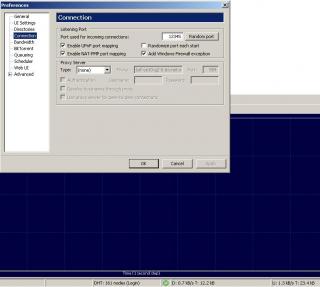
6.) Goto uTorrent preference use port: 12345 (example, u can use any port u like, refer to below picture on how to use certain port)

7.) Use Router to share with others: if you use router to share bandwidth you'll need goto router setting interface (normally is http://192.168.1.1 username/password: admin / admin) change your "Internet connection type" to DHCP or automatic or whatever router will assign IP to your PC because all the authentication will do within that P1 modem itself. (refer to picture below)

Hope can help you all....

P/S: forgot to tell you guys, raining do affect the signal, try don't put any electronic device (Wifi router, TV, microwave....) near this p1 modem

Tips: Always check your account usage, for example 1200 Package with 20GB (upload+download) whether exceed the quota, once it exceed P1 will start to cap your speed, btw you still able to get full speed during mid-night.

thumbup.gif thumbup.gif thumbup.gif

Guys, something P1 will give when your birthday coming ~~

Updated !!!!!!!!!!!!!!!!


A quick tips maybe can help you improve your speed which is pointing direction to the nearest base station.

Scenario 1:
Each CPE modem will search for frequency 2375000, 2380000, 2385000. If it happen your area have 3 base station nearby and your CPE pointing is in the middle of 2 base station.

Result: it'll cause frequent disconnect and reconnect, because it'll always search for best connectivity (Technology limitation)

Work around: Call / Email their Customer support ask them to plot out the base station by the map then you'll know which direction you should point to.


Scenario 2: Bandwidth limitation on base station is xxMbps, each base station connect to internet backbone have the limitation, let's say it's 10Mbps and 1 Wiggy max capacity already 10Mbps can suck all the bandwidth. If you find out the base station you connected have very good (green light) signal but very slow internet speed. This could be the reason

Work around: Try point to another base station even the connection is weaker(orange, red light) you could get better internet speed & bandwidth

How to know you're connect to different base station ??
Simple, just check the frequency you're connected at 1st then change direction or position. Check again, if it happen connect to different frequency it's different base station.

This post has been edited by yong888: Oct 25 2009, 09:55 PM


Attached thumbnail(s)
Attached Image Attached Image Attached Image Attached Image Attached Image Attached Image Attached Image
TSyong888
post Mar 9 2009, 10:47 PM

New Member
*
Junior Member
30 posts

Joined: Mar 2009
QUOTE(FROGEYE @ Mar 9 2009, 10:44 PM)
hi yong
I'm finding a sweep spot for my P1 modem as well (got the login from u d!) but I would wanna clarify one thing; When you said "the lower RSSI, the better". Now, my RSSI signal is -60.30 (negative 60.30) and at some spot it was -45.10 (negative 45.10).  As its a negative integer, in this context which one is 'lower'? Tx much
*
-45.10 is lower
TSyong888
post Mar 9 2009, 11:09 PM

New Member
*
Junior Member
30 posts

Joined: Mar 2009
As now P1 Wimax technology is not mature enough yet, each P1 Base station only can support up to 1km and others wimax ISP can go up to 5 ~ 10km like korea .... also MIMO is not yet implement yet.

Hopefully we can see some improvement after they implement MIMO notworthy.gif notworthy.gif
Also can improve on their Reseller, customer support.... Please put some technical people ~~
TSyong888
post Mar 9 2009, 11:51 PM

New Member
*
Junior Member
30 posts

Joined: Mar 2009
I don't have this experience before, but I do same situation when I disable routing feature on the P1 modem, my pc will get public IP but connection seems got problem.

note: it shouldn't have any problem when you close the modem user interface. Try to do some testing keep pinging certain domain name / IP example: ping google.com -t and close the Tab , see whether got problem or not
TSyong888
post Mar 10 2009, 04:44 PM

New Member
*
Junior Member
30 posts

Joined: Mar 2009
QUOTE(hwchan @ Mar 10 2009, 07:19 AM)
Seems like i got problem to do port forwarding and not too sure where the problem occur. Im using Belkin router F5D7230-4

I follow your guide on the p1 modem and set all the ports that i required to open, and enter the LAN IP as 10.1.1.1 but i dont know how to set my router to assign WAN IP automatically. I click to use dynamic setting, and it asked me to enter the host name, i tried p1.com.my but it get me error of invalid host ><

i check with the port and it not open at all
*
the hostname should be your PC name


Added on March 10, 2009, 4:44 pm
QUOTE(FROGEYE @ Mar 10 2009, 02:10 PM)
i have sporadic disconnection too. You'll notice ya d/l bar move very fast BUT then it just stopped there momentarily, and resumes. Weird
*
this's due to wireless signal not stable.... technology not mature enough yet rclxub.gif

This post has been edited by yong888: Mar 10 2009, 04:44 PM
TSyong888
post Mar 10 2009, 06:11 PM

New Member
*
Junior Member
30 posts

Joined: Mar 2009
QUOTE(hwchan @ Mar 10 2009, 06:08 PM)
well i still cant get it right, guess i ask for guide here

Im using wifi router Belkin F5D7230-4 and connected with 2 PC through cable

Currently my LAN IP is set to DHCP mode, so my LAN IP is 192.168.2.2. When i do port forwarding, i enter all the port number and it will assign 192.168.2.2 for the port while under Wimax setting, it falls under 10.1.1.1 so is this the problem? Anyway i can do this fine?
*
I think you'll need to 2 port forwarding,
1.) Port forward from wimax modem to router (IP : 10.1.1.1) because P1 modem itself is router
2.) port forward from Router to your PC (192.168.2.2)


Added on March 10, 2009, 7:50 pm
QUOTE(ubsacc2004 @ Mar 10 2009, 06:08 PM)
my RSSI is -39.81. but port forwarding i just insert 12345 hehe. tks.
*
Wow ~ -39.81 consider very very signal rclxms.gif rclxms.gif rclxms.gif


Added on March 10, 2009, 7:51 pmguys.... username and password posted, enjoy ~

This post has been edited by yong888: Mar 10 2009, 07:51 PM
TSyong888
post Mar 11 2009, 09:38 PM

New Member
*
Junior Member
30 posts

Joined: Mar 2009
Please make some noise to careline@p1.com.my about BT, seems like lately they block BT ....
mad.gif mad.gif mad.gif mad.gif mad.gif mad.gif mad.gif
TSyong888
post Mar 11 2009, 11:12 PM

New Member
*
Junior Member
30 posts

Joined: Mar 2009
QUOTE(p4n6 @ Mar 11 2009, 10:40 PM)
RSSI and CINR, the higher the better.

But you need to understand the concept of negative number.


Added on March 11, 2009, 10:46 pm
It's the normal reaction for every ISP, when every users treat their best effort line as a leased line, ISP will retaliate to throttle p2p traffic.

It's the same cycle we all encountered before during StreamyX reign.

It's inevitable. No ISP will provide us ALL YOU CAN EAT BUFFET with RM100.
*
The greater negative number you get is only mean your CPE (P1 modem) connection to base station is good, doesn't mean the base station to internet is good....

Another point is since P1 set the quota for every package they shouldn't cap the speed until you reach the limit, I think it's time for mcmc http://aduan.skmm.gov.my/


Added on March 11, 2009, 11:38 pm
QUOTE(hwchan @ Mar 11 2009, 10:11 PM)
i already uninstalled my zone alarm firewall but still cant get the any port open though i already allow port forward either in the modem itself and my router. I wonder what is wrong now...
*
Maybe it's nothing wrong with all the setting and fine tuning, the problem come from the wimax base station....
WiMAX should be able to handle up to 70 megabits per second, once it hit the capacity, I think nothing much we can do .... meaning if more than 70 users login to the same base station, you're going to share the bandwidth with others...


This post has been edited by yong888: Mar 11 2009, 11:38 PM
TSyong888
post Mar 22 2009, 11:32 PM

New Member
*
Junior Member
30 posts

Joined: Mar 2009
P1 win chile wimax license....
http://www.bnamericas.com/news/telecommuni...oadband_project

TSyong888
post Mar 29 2009, 06:17 PM

New Member
*
Junior Member
30 posts

Joined: Mar 2009
Guys and girls, New username and password release ~~

Username: admin
Password: admin123

TSyong888
post Apr 26 2009, 04:41 PM

New Member
*
Junior Member
30 posts

Joined: Mar 2009
Try to print screen of your local area connection status "General" and "Status"
TSyong888
post Oct 25 2009, 09:42 PM

New Member
*
Junior Member
30 posts

Joined: Mar 2009
QUOTE(cnh @ Oct 19 2009, 05:27 PM)
I have a DV-230 and I would like do port-forwarding.

I read some post they have setup like modem -> router -> PCs,

my question is that do I need a router for me to do port-forwarding? is the DV-230 is a modem? or a router?

I have sent many requests thru their website but non reply.

Btw, I hope the P1 Marketing team have follow this thread as well, you see, most of the time the technical team might not bother all the technical or customer problem, and they always say the technology is like that one and cant do anything, until they notice the "like that one and cant do anything" un-acceptable by customer then start thinking some stupid answer. (who knows in their support report to the management and saying all solve without "problem")

maybe we should complaints to their sales/marketing team as well and hopefully the marketing team will give some noise or pressure to the technical team.

I really hope the P1 get stronger and stronger and would not let streamyx be the only dominant. either P1 or streamyx win will not benefit to the consumer.
*
hi CNS,

For DV-230 actually it's a CPE (modem) + WIFI, so you don't need connect to router anymore, you can enable the WIFI feature for your laptop.
I figure out nothing much different on their new modem when doing port-forwarding on DV-230, so just don't need to bother.
The speed all depend on their base-station vs your CPE (modem) pointing direction.

TSyong888
post May 26 2010, 08:53 PM

New Member
*
Junior Member
30 posts

Joined: Mar 2009
I think if P1 ask you all change DNS IP most likely due to their DNS server query by too many people until lagging -- meaning to say that server not strong enough (guessing only). By the way, I figure out sometime P1 DNS server can't even resolve domain name to IP address, then I use US public DNS instead. You might try that as well:
Service provider: vnsc-pri.sys.gtei.net
Public Name server IP address:

* 4.2.2.1
* 4.2.2.2
* 4.2.2.3
* 4.2.2.4
* 4.2.2.5
* 4.2.2.6


Change to:
| Lo-Fi Version
0.0191sec    0.95    7 queries    GZIP Disabled
Time is now: 1st December 2025 - 05:09 PM